
CMTECK USB Computer Microphone G009
4.5Editor score
Omnidirectional condenser mic
Active noise cancelling chip
Mute button with LED
Finding the right audio equipment does not have to break the bank. Affordable desk microphones have improved significantly, offering clear sound for calls, gaming, and content creation without high costs.
We evaluated ten top-rated budget microphones based on sound quality, build durability, ease of use, and included features like noise cancellation and mute buttons to find the best options for your needs.
Each pick highlights specific strengths and ideal use cases so you can decide quickly. Remember that product availability and pricing can shift, so check current listings before finalizing your purchase decision today.
4.5Editor score

4.4Editor score

4.4Editor score
As an Amazon Associate we earn from qualifying purchases.
Here is a side-by-side comparison of all ten affordable desktop microphones included in this guide, detailing their core specifications and key differentiators to help you make an informed choice.



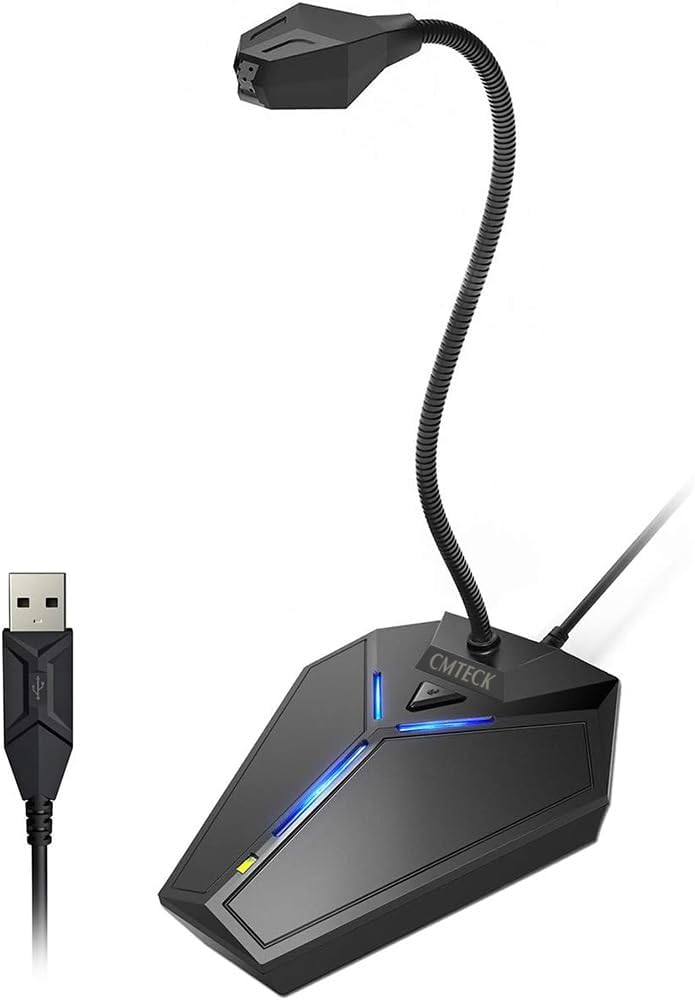

The CMTECK USB Computer Microphone G009 stands out as an exceptional budget-friendly choice for anyone needing reliable voice capture without spending much. It boasts a high rating from users who appreciate its crystal clear audio quality and straightforward setup process.
We may earn a commission when you buy through this link, at no additional cost to you.
Key strengths include its active noise-cancelling technology powered by a CCS2.0 SMART CHIP which effectively blocks background noise so your voice remains the focus. The built-in pop filter prevents plosives from overloading the mic ensuring only your voice is heard clearly.
Trade-offs include limited OS compatibility as it does not work with Linux or Android devices. The compact base is stable but might feel light compared to heavier models. These are acceptable for the price point and intended casual use cases.
This microphone is ideal for students, remote workers, or casual streamers who need a quick plug-and-play solution. If you prioritize ease of use and clear voice pickup over professional studio features this CMTECK model delivers excellent value.
The CCS2.0 SMART CHIP actively filters out ambient sounds like keyboard clicks or fan noise which significantly improves call clarity in noisy environments.
LED lights provide instant visual feedback on mic status with green indicating connected and red showing mute mode preventing accidental audio transmission.
We may earn a commission when you buy through this link, at no additional cost to you.
The Amazon Basics Condenser Microphone offers a more premium experience within the budget category thanks to its larger diaphragm and superior build quality. Users report low distortion and clear sound pickup ideal for streaming or music recording tasks.
We may earn a commission when you buy through this link, at no additional cost to you.
Its cardioid pickup pattern effectively isolates background noise ensuring clean audio for broadcasting. The built-in shock absorber and silicone boot reduce vibrations while the one-tap mute function syncs with your laptop for convenience.
Some users may find the cable length restrictive or lack physical gain controls compared to more advanced models. However these limitations are minor given the overall performance and ease of integration with existing desktop setups.
This mic suits creators who want better audio fidelity than basic USB mics without investing in expensive interfaces. If you need a reliable stand-alone mic for podcasts or voiceovers this Amazon Basics option is a solid upgrade.
The large 14mm diaphragm captures richer sound details and lowers noise floor which results in professional-grade audio for home studio recording.
Standard 5/8 inch thread allows detachment for installation on boom arms or tripods offering flexibility for various recording configurations.
We may earn a commission when you buy through this link, at no additional cost to you.
The ZealSound Podcast Microphone delivers studio-quality audio at an accessible price making it our top choice for serious content creators. With a 40Hz to 18kHz frequency response it reproduces rich lows and clear highs for natural vocals.
We may earn a commission when you buy through this link, at no additional cost to you.
Its Intelligent Noise Reduction Mode reduces keyboard clicks and fan hum while physical knobs allow precise control over gain and echo. Real-time monitoring via a 3.5mm jack ensures you hear exactly what is being recorded without delay.
While pricier than basic gooseneck models the included accessories like Lightning adapters and a foam windscreen justify the cost. The larger footprint requires more desk space but the stability and features are worth the trade-off for podcasters.
This microphone is perfect for podcasters, streamers, or voice-over artists who need professional sound without a mixer. If you value hands-on control and mobile flexibility the ZealSound K66 stands out as the best all-around budget option.
Hold the mute button to engage a special mode that filters ambient noise without altering your voice tone which is vital for clean recordings.
Dedicated knobs for mic volume and echo adjust let you tailor sound instantly without relying on software settings or external interfaces.
We may earn a commission when you buy through this link, at no additional cost to you.
This USB Microphone offers a versatile 360-degree adjustable gooseneck design allowing you to position it exactly where needed for optimal sound capture. It is highly rated for its plug-and-play ease and reliable performance across gaming and dictation tasks.
We may earn a commission when you buy through this link, at no additional cost to you.
The omnidirectional high sensitivity picks up sound from all directions ensuring clear capture even if you move slightly. Intelligent noise canceling technology reduces background echoes and fans maintaining voice clarity during calls or meetings.
It lacks an included pop filter which might lead to plosive noises if you speak too close. The cable is shorter than some competitors but sufficient for most desk setups. These minor drawbacks do not hinder its core functionality.
Ideal for users who need a flexible mic that stays put during active sessions. The heavy-duty stand ensures stability while the simple controls make it accessible for beginners or casual users seeking dependable audio.
The fully adjustable gooseneck lets you rotate the mic head to any angle ensuring it captures your voice perfectly from any seating position.
Premium metal pipe and ABS stand construction provide long-lasting durability resisting wear from frequent adjustments or accidental bumps.
We may earn a commission when you buy through this link, at no additional cost to you.
This computer microphone features exceptional 360-degree omni-directional audio pickup within an optimal 6-12 inch range. It receives high marks for crystal-clear sound and natural tone without requiring specialized software or sound cards for operation.
We may earn a commission when you buy through this link, at no additional cost to you.
Windproof fluffy caps reduce noise from spray and wind while the touch-sensitive mute button offers instant audio control. The ABS shockproof base with non-slip silicone ensures stability even during passionate live streams or gaming moments.
The touch-sensitive mute might accidentally trigger if tapped lightly and it connects exclusively via USB limiting versatility. However the long six-foot cable allows flexible placement and the compact design saves valuable desk space effectively.
Best for streamers and gamers who need quick mute access and portable setup. The wind protection and stable base make it a reliable choice for active recording environments where movement and noise are common.
Included windproof fluffy caps physically block air turbulence which minimizes plosive sounds and wind noise during recording sessions.
The sensitive touch mute allows one-click audio muting preventing accidental speech transmission during sensitive conversations or breaks.
We may earn a commission when you buy through this link, at no additional cost to you.
Designed specifically for small to medium meetings this TONOR microphone captures subtle sounds from 360 degrees with a 11.5 ft pickup range. It allows participants to hear each other clearly without raising voices during conferences or seminars.
We may earn a commission when you buy through this link, at no additional cost to you.
The omnidirectional pattern ensures all voices around the table are picked up equally. Nylon shielded wiring eliminates signal interference while the anti-slip mat keeps the unit stable on desktops during active discussions.
It performs best in group settings rather than individual voice recording as the wide pickup might include more background noise. The basic design lacks advanced filters but delivers reliable performance for business applications.
Perfect for office professionals conducting Zoom calls or remote training sessions. If you need a mic that handles group conversation well without needing positioning adjustments the G11 model is a practical tool.
The wide pickup range and omnidirectional pattern allow all meeting participants to speak naturally without needing to lean into a specific direction.
Nylon shielded wires prevent electronic noise which ensures clear transmission even in environments with many wireless devices.
We may earn a commission when you buy through this link, at no additional cost to you.
This desktop microphone features studio-quality sound with intelligent noise reduction filtering keyboard clicks and fan humming effectively. The 360-degree metal gooseneck offers flexible positioning to suit different speaker comfort and recording angles.
We may earn a commission when you buy through this link, at no additional cost to you.
Ambient lighting effects like customizable breathing lights add a sleek tech aesthetic to your setup while the weighted ABS base ensures stability. High-grade metal build resists displacement even during enthusiastic live streaming or gaming sessions.
The gooseneck might lose tension over time if bent excessively and the LED lights consume power though they can be turned off. These are minor trade-offs given the robust build and sound quality delivered.
Ideal for streamers who value both performance and aesthetics. The metal construction and noise filtering make it a solid choice for long-term use in home office or gaming setups requiring reliable audio.
Customizable breathing lights provide visual flair to your gaming setup and can be toggled off if a minimalist look is preferred.
Intelligent noise reduction targets common office sounds like fan noise or clicks ensuring your voice remains the primary audio track.
We may earn a commission when you buy through this link, at no additional cost to you.
The LIANGSTAR microphone uses a CCS3.0 smart chip to effectively reduce background noise and capture your voice 360 degrees. It features a built-in sound card for instant plug-and-play setup without installing drivers on Windows or Mac systems.
We may earn a commission when you buy through this link, at no additional cost to you.
Its unique one-button mute design meets convenience needs while the flexible positioning lets you rotate the condenser mic to any angle. The omnidirectional condenser ensures your voice remains real smooth and loud during calls.
Build materials are standard ABS and metal which are durable but not premium. It lacks advanced filters or physical controls beyond mute but covers essential needs for recording streaming and chatting effectively.
Great for users seeking a simple reliable mic with good customer support. The built-in sound card eliminates configuration headaches making it a strong candidate for non-technical users needing quick audio setup.
The internal sound card handles audio processing automatically allowing immediate use without external drivers or software configuration.
The one-button mute provides quick access to silence audio instantly protecting privacy during unexpected interruptions or breaks.
We may earn a commission when you buy through this link, at no additional cost to you.
This CMTECK model emphasizes clear audio and ease of use with a high-performance smart chip that suppresses background noise. The flexible gooseneck design allows you to position the mic exactly where needed for home office or gaming setups.
We may earn a commission when you buy through this link, at no additional cost to you.
A unique blue LED light adds visual style and can be turned on or off with a switch. The built-in indicator LED lights show working status clearly helping avoid accidental recording silence.
Managing the six-foot cable can be tricky depending on your desk layout and the aesthetic LED light may not suit minimalists. These issues are minor compared to the reliable voice capture and mute functionality provided.
Best for users who want studio-quality sound without complex setup. The smart chip ensures voice comes through crisp making it suitable for Zoom meetings and voice dictation tasks efficiently.
The switchable blue LED light lets you customize your desk appearance while still maintaining clear status indicators for mic activity.
Smart chip technology actively filters out background noise ensuring your voice remains the primary audio source during calls.
We may earn a commission when you buy through this link, at no additional cost to you.
The KLIM Talk embeds a patented audio filter to record only your voice ensuring perfect clarity for teammates. It works well with speech recognition software and offers compatibility across Windows Mac and Linux systems.
We may earn a commission when you buy through this link, at no additional cost to you.
Design excellence is highlighted by aerodynamic curves and a flexible neck complementing any desktop. The lightweight yet stable construction provides durability and it comes backed by a five-year assurance warranty for peace of mind.
The aesthetic might be polarizing for those preferring traditional microphone shapes but functionality remains top-tier. Technical specs are less detailed than competitors but real-world usage confirms reliable performance across many platforms.
Ideal for professionals needing robust reliability and extensive warranty coverage. If you want a mic that supports speech recognition and multi-platform use with long-term support this KLIM model is a smart investment.
The patented filter technology isolates your voice which reduces background noise and ensures colleagues hear you clearly.
Five-year assurance coverage demonstrates confidence in product quality and provides significant protection for long-term users.
We may earn a commission when you buy through this link, at no additional cost to you.
Choosing the right affordable microphone depends on matching its features to your specific usage needs and workspace constraints.
Pickup patterns determine how the mic captures sound from different directions. Cardioid microphones focus on sound from the front ideal for solo streaming or podcasting while omnidirectional mics capture 360-degree sound better for conference calls or group meetings.
Choose cardioid for single speaker isolation and omnidirectional for group conversation scenarios.
Active noise cancellation uses smart chips to filter out background noise like keyboard clicks or fan hum. Passive filtering uses physical pop filters to reduce plosives. Both improve voice clarity but active systems provide broader suppression of environmental noise.
Prioritize microphones with active noise cancellation if you work in noisy environments.
Plug and play USB mics require no driver installation and work immediately upon connection. This reduces setup complexity and ensures compatibility across different operating systems like Windows and Mac.
Always verify plug-and-play support to avoid driver troubleshooting during setup.
A physical mute button allows instant silence during calls preventing accidental audio transmission. Some models feature LED indicators to visually confirm mute status which adds an extra layer of security for privacy.
Look for a dedicated mute button with clear indicators for reliable control.
USB cables typically range from 4 to 6 feet. Longer cables provide more flexibility in mic placement without restricting movement. Ensure the connector matches your device and consider extension cables if needed.
Verify cable length matches your desk layout to avoid clutter or reach issues.
Microphones should have stable bases to prevent tipping. Metal goosenecks and shockproof bases add durability. Weighted bases keep the unit fixed during active use which is essential for streaming or gaming.
Choose models with sturdy bases and metal components for long-term reliability.
Some microphones offer real-time monitoring jacks or echo controls for advanced users. Others include aesthetic lighting effects that appeal to streamers. Assess which extras enhance your workflow versus those that add unnecessary complexity.
Focus on features that directly improve your audio quality or workflow efficiency.
Ensure the microphone supports your operating system including Windows versions Mac OS or Linux. Some mics have specific incompatibilities with gaming consoles or mobile devices so always check the specs.
Confirm compatibility with your primary devices before purchase to avoid returns.
Connect the USB microphone directly to an available USB port on your computer and allow the system to detect it automatically. You may need to select the microphone as your default input device in system sound settings.
Position the microphone 6 to 12 inches away from your mouth to capture clear audio without distortion. Adjust the gooseneck to point the mic toward your face while ensuring it does not obstruct your view or keyboard access.
Clean the mic regularly with a soft dry cloth and avoid exposing it to moisture. Store it in a safe place when not in use to protect the stand and prevent accidental falls.
A good affordable desk mic should deliver clear voice capture with effective noise reduction. It must be easy to set up with plug-and-play USB connectivity and feature a stable base to prevent accidental movement.
Most USB microphones listed here are compatible with both Mac and Windows operating systems. Always check the product specs to confirm OS support especially for older versions like Windows 7.
Yes many budget mics include active noise cancellation chips that reduce background noise. Passive filters also help reduce plosive sounds but active systems provide broader environmental noise reduction.
A physical mute button is highly valuable for instant audio control during meetings or streams. It prevents accidental speech transmission and enhances privacy without needing software navigation.
Most USB microphones come with a cable length ranging from 4 to 6 feet. This standard length provides sufficient reach for desk setups but you may need extensions for larger spaces.
Position the mic 6 to 12 inches from your mouth and angle it directly toward your face. Adjust the stand height so it does not block your view while maintaining consistent audio pickup.
Yes many of these models are compatible with gaming setups on PC and consoles. They support voice chat applications like Discord and provide clear audio for team communication.
Most USB desk mics work immediately without extra software drivers. Some advanced features like volume controls may require drivers but basic recording and calling functions are ready upon connection.
The CMTECK USB Computer Microphone G009 Amazon Basics Condenser Microphone and ZealSound Podcast Microphone lead this roundup offering different strengths for various user needs.
Prioritize features like noise cancellation and build quality if you stream frequently or work in noisy environments to ensure consistent audio clarity.
Prices and availability may change so verify current listings before purchasing to secure the best value for your specific setup and requirements.