
HP Chromebook 14
4.3Editor score
14-inch HD display
Up to 14 hours battery
Lightweight portable design
Finding a reliable device that handles daily tasks without breaking the bank is essential for students and professionals alike. You need something portable with enough power for browsing and streaming while keeping costs low for your budget.
We evaluated ten affordable models based on processor speed, display quality, and battery endurance. Each option balances cost with functionality to ensure you get a machine that lasts through school or work days comfortably.
Every pick below highlights key strengths and weaknesses so you can choose wisely. Prices fluctuate often so check current listings before buying. This guide covers everything from Chromebooks to Windows laptops for versatile use.
4.3Editor score

4.8Editor score
4.2Editor score
As an Amazon Associate we earn from qualifying purchases.
This side-by-side comparison helps you quickly identify which model fits your specific needs by highlighting core specifications and features across all ten affordable laptops reviewed.


The HP Chromebook 14 stands out as a top budget pick with a solid 4.3 star rating from users who value efficiency and portability above all else for daily computing needs.
We may earn a commission when you buy through this link, at no additional cost to you.
Its quad-core Intel Celeron N4120 processor handles web browsing and streaming smoothly while the 4GB RAM ensures multitasking remains responsive even with multiple tabs open simultaneously.
Trade-offs include only 64GB storage and a standard HD display but these are acceptable for students or casual users who rely on cloud storage and don't need heavy graphical power.
Buy this if you need a reliable machine for school or light work that lasts all day on a single charge without costing a fortune in your current budget.
Enjoy up to 14 hours of battery life which covers a full school day or work shift without needing a charger nearby.
Chrome OS keeps your system updated automatically and includes built-in virus protection for safer computing on the go.
We may earn a commission when you buy through this link, at no additional cost to you.
With an impressive 4.8 star rating this Amzboy model offers a larger screen and faster charging than many competitors making it a favorite for users seeking value in Windows laptops.
We may earn a commission when you buy through this link, at no additional cost to you.
The 15.6-inch FHD display provides clear visuals for media consumption while the fanless design ensures quiet operation perfect for libraries or shared workspaces.
While the processor is entry level the 128GB storage and expandable slot allow you to add space easily without replacing the unit which suits growing storage needs.
Choose this if you want a full Windows experience on a tight budget with a bigger screen and reliable performance for everyday documents and browsing tasks.
The 1920×1080 resolution delivers sharper text and images than HD screens helping reduce eye strain during long sessions.
Use a compact 45W Type-C adapter that charges your laptop and phone with one cord simplifying travel and daily carry.
We may earn a commission when you buy through this link, at no additional cost to you.
This 2026 HP model brings premium features like Copilot AI and Wi-Fi 6 to the budget class ensuring you get cutting-edge connectivity and productivity tools without a premium price tag.
We may earn a commission when you buy through this link, at no additional cost to you.
The Intel N150 processor provides snappy performance for office tasks while the SSD ensures fast boot times and application launches that keep you moving quickly through your day.
You pay slightly more for the newer specs and design but the addition of Microsoft 365 and AI assistance makes it worth the extra cost for professionals or students.
Invest in this laptop if you want a modern machine with future-proof features that look professional and handle everything from video calls to complex spreadsheets efficiently.
Built-in Copilot helps with summaries and research tasks saving you time on routine work and improving overall efficiency.
Enjoy faster wireless speeds and better reliability even in crowded networks which is ideal for remote work or online classes.
We may earn a commission when you buy through this link, at no additional cost to you.
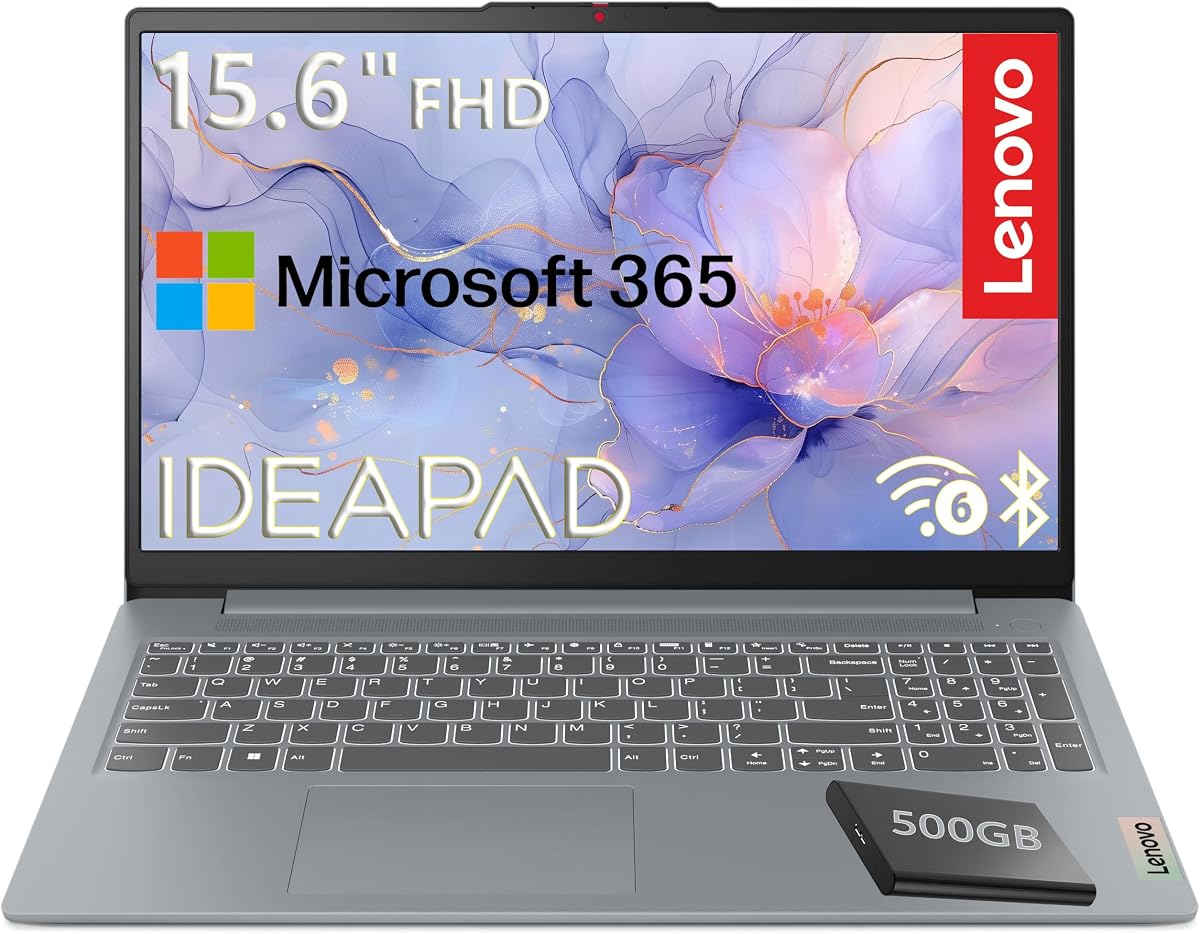
Lenovo delivers a rugged 2026 laptop with military-grade certification and a large external hard drive making it ideal for users who need reliability and extra storage space.
We may earn a commission when you buy through this link, at no additional cost to you.
The N100 processor handles daily tasks easily while the FHD display offers clear visuals for media and work without straining your eyes during long periods of use.
Having an external drive means you have plenty of room for files but it adds a tiny bit of bulk compared to laptops with all internal storage solutions.
Pick this one if you need a tough machine for travel or school that comes with ample storage options and solid performance for regular computing tasks.
Built to withstand drops and bumps this laptop survives rough handling better than standard consumer models in its price range.
The 1920×1080 display ensures crisp text and vibrant colors for streaming videos or editing documents with ease.
We may earn a commission when you buy through this link, at no additional cost to you.
This 2026 Chromebook upgrade brings 8GB RAM and a newer N100 processor offering noticeably better multitasking than older models while keeping the simplicity of Chrome OS intact.
We may earn a commission when you buy through this link, at no additional cost to you.
The 128GB UFS storage is faster than standard eMMC which means quicker app loads and smoother system performance even with multiple tabs open at once.
While the screen remains HD the extra RAM makes this a stronger candidate for students who need to run several apps simultaneously without slowing down.
Choose this if you want a Chromebook that lasts longer than older ones and provides more headroom for multitasking while staying affordable and easy to manage.
With 8GB of RAM you can keep more applications open without slowdowns which improves workflow efficiency significantly.
Universal Flash Storage delivers faster data access speeds leading to quicker boot times and snappier overall responsiveness.
We may earn a commission when you buy through this link, at no additional cost to you.
The Lenovo S330 is one of the most affordable options available and it handles basic tasks well making it perfect for users who primarily need web access and email.
We may earn a commission when you buy through this link, at no additional cost to you.
Its lightweight build and ten hour battery life make it easy to carry around campus or home without worrying about finding a power outlet frequently.
The limited storage might feel tight but since it uses cloud services you can store photos and documents online to avoid running out of space quickly.
Buy this if you need the cheapest reliable Chromebook possible for basic tasks and don't require large internal storage or high-end performance features.
Weighing just 3.3 lbs this laptop is easy to slip into any backpack for commuting or travel without added weight.
Free Google Drive space helps you keep files accessible across devices without needing to manage local storage constantly.
We may earn a commission when you buy through this link, at no additional cost to you.
This HP Essential model brings Office 365 directly into the package saving you subscription costs while the N150 processor ensures quick responses for your daily workflow.
We may earn a commission when you buy through this link, at no additional cost to you.
Features like the dedicated Copilot key and noise reduction audio show HP is focusing on productivity tools that make remote work and learning more efficient and comfortable.
The 4GB RAM is a limitation but the fast UFS storage helps compensate by keeping system apps responsive for standard browsing and document editing tasks.
Select this if you need full Windows productivity with Office apps included and want a machine designed for clear calls and efficient typing without high costs.
Includes a one year subscription to Microsoft 365 which covers Word Excel and PowerPoint so you are ready to work immediately.
Dual speakers and noise reduction microphones ensure you sound clear on calls which is essential for virtual meetings.
We may earn a commission when you buy through this link, at no additional cost to you.
Lenovo equips this Chromebook with an 8-core processor and FHD touchscreen which elevates the experience to premium feel while keeping the simplicity of the Chrome environment.
We may earn a commission when you buy through this link, at no additional cost to you.
The touch interface adds versatility for navigation and drawing while the modern processor ensures apps load quickly and multitasking remains smooth even on a budget.
Storage is a bit low at 64GB but using cloud services keeps things manageable and the high-resolution display is a standout feature in this price range.
Opt for this if you value a tactile screen and modern performance specs and want a sleek device that looks stylish and performs well for students.
The 14-inch Full HD touchscreen lets you interact with content directly making it great for students and visual learners.
Eight processing cores ensure smooth handling of multiple apps and tabs without lag or slowdowns during daily use.
We may earn a commission when you buy through this link, at no additional cost to you.
This slim HP model combines DDR5 RAM with an efficient processor to offer speed and portability that suits mobile users who need to work from various locations daily.
We may earn a commission when you buy through this link, at no additional cost to you.
The eleven hour battery life supports long days away from a plug while the dedicated Copilot key gives you quick access to AI tools for summaries and help.
It balances price with modern internals like SSD and DDR5 which means you get snappy performance without paying for features you might not use heavily.
Pick this if you prioritize portability and need a machine that lasts through travel or commutes while still offering modern connectivity and quick app speeds.
DDR5 RAM provides faster data transfer rates than older memory types improving overall system responsiveness for your tasks.
Weighing just 3.24 lbs this laptop is easy to carry all day making it ideal for students who move between classes.
We may earn a commission when you buy through this link, at no additional cost to you.
This unique offering stands out with 12GB of RAM which is rare in budget laptops allowing heavy multitasking and faster speeds compared to standard 4GB or 8GB models.
We may earn a commission when you buy through this link, at no additional cost to you.
The IPS screen provides better viewing angles and color accuracy than TN panels making it a good choice for media consumption and design tasks on a budget.
While the processor is older the extra RAM helps offset this by keeping apps responsive and reducing the need to close tabs constantly while working.
Choose this if you prioritize RAM capacity above all else and need a versatile machine with lots of ports for connecting peripherals without buying extra hubs.
With 12GB of memory you can run heavy applications and multiple windows simultaneously without significant performance drops.
Multiple USB ports including Type-C and HDMI let you connect monitors drives and accessories easily without extra adapters.
We may earn a commission when you buy through this link, at no additional cost to you.
Selecting the right affordable laptop involves weighing performance needs against budget constraints to ensure you get a device that meets your daily requirements.
Choosing between Windows and Chrome OS depends heavily on your needs as Chrome OS offers simpler security and faster boot times while Windows provides broader software compatibility.
Prioritize Chrome OS if you mainly use web apps and Google Docs but pick Windows if you need specific desktop applications or gaming capabilities.
Look for entry level CPUs like Intel Celeron or N-series which handle basic tasks well without the cost of high end chips.
Ensure the processor has at least 4 cores to manage modern browsers and multiple tabs efficiently without slowing down.
RAM determines how many programs you can run simultaneously so aim for at least 4GB but 8GB or more is safer for longevity.
More RAM helps the system run smoothly when switching between apps so try to find a model with upgradable memory if possible.
Solid State Drives are essential for fast boot times and quick application launches compared to traditional hard drives.
Aim for at least 128GB of storage to fit your operating system and essential files comfortably without running out of space quickly.
Full HD screens offer clearer text and images which reduces eye strain during long sessions compared to standard HD options.
Prioritize IPS panels for better viewing angles and color accuracy especially if you consume a lot of media or content.
For everyday use aim for a laptop with at least 8 hours of battery to last through a work or school day without charging.
Check reviews to verify real world battery performance as manufacturer claims can sometimes differ from actual usage times.
Weight matters significantly if you carry your laptop daily so models under 3.5 lbs are ideal for commuting or travel.
Thinner designs are also more likely to fit in standard backpacks so measure your bag before purchasing a larger machine.
Modern laptops should include USB-C ports for faster data transfer and charging convenience along with standard USB-A ports.
Wi-Fi 6 support ensures better speeds and reliability in crowded networks which is crucial for remote work or online learning.
Set up your new laptop by creating a secure user account and enabling automatic updates to keep your system protected against vulnerabilities and bugs.
Manage your storage by using cloud services for large files and deleting temporary caches regularly to maintain optimal performance and prevent slowdowns.
Protect your hardware by using a padded sleeve when transporting and avoiding extreme temperatures to extend the life of your battery and internal components.
Yes a cheap laptop is perfectly suitable for everyday tasks like browsing streaming and document editing. Modern budget models offer enough speed and battery life for students and casual users without compromising reliability. Just ensure you pick a model with enough RAM and storage for your specific needs.
Budget laptops typically last between three and five years depending on usage and care. With proper maintenance like keeping them cool and updating software they can handle daily tasks well into that range. Heavy use might shorten lifespan slightly but for light use they often exceed expectations.
Chromebooks are simpler and more secure making them ideal for web-based tasks while Windows laptops offer broader software support. Choose Chromebook if you live in a browser but pick Windows if you need specific desktop apps. Both work well for everyday use depending on your workflow.
Many modern budget laptops have soldered RAM so upgrading might not be possible before purchase. Check the product specs carefully to see if slots are available or if the memory is fixed. If unsure aim for a model with 8GB RAM out of the box to future proof your investment.
Cheap laptops are excellent for students as they cover note taking research and writing needs efficiently. They are often lighter and have better battery life which helps during long study sessions or classes. Look for ones with a good keyboard and screen for comfort and productivity.
Most budget laptops support basic 4K streaming but may struggle with editing or playback of raw files. Integrated graphics can handle watching videos but for editing you might need more powerful hardware. For casual viewing and streaming 4K support is generally sufficient on modern models.
Solid State Drives are the best choice for budget laptops as they make the system much faster than traditional hard drives. Aim for at least 128GB of SSD space to balance cost and performance. If storage is tight consider using external drives or cloud services to expand capacity.
Extend battery life by lowering screen brightness disabling unused Bluetooth connections and closing background apps when not in use. Using power saver modes helps manage energy consumption effectively. Also ensure you update your drivers as optimizations can improve overall power efficiency.
We found that top picks like the HP Chromebook and Amzboy 15.6 offer the best balance of price and performance for daily tasks.
Prioritize battery life and storage capacity when shopping to ensure your device keeps up with your schedule without constant recharging or space limits.
Remember to check current prices before buying since deals change often and finding the lowest price ensures you get the best value possible today.