
Spacrea Dual Monitor Stand Riser
4.6Editor score
Adjustable length 27.6 to 40.6 inches
Integrated drawer and pen holders
One-piece steel plate construction
Finding the right dual monitor stand riser for desk can transform your workspace into a more productive and comfortable environment. A good riser elevates your screens to eye level, reducing neck strain and freeing up valuable desk space for other essentials.
We evaluated ten top-rated models based on build quality, storage features, adjustability, and ergonomic design. Our comparison considers real user feedback and manufacturer specifications to ensure you get a reliable stand that fits your specific setup needs.
Each pick highlights unique strengths like built-in drawers, wireless charging, or adjustable angles. Prices and availability change frequently, so check the latest details before purchasing to ensure you get the best deal for your office or home setup.
4.6Editor score

4.6Editor score
4.5Editor score
As an Amazon Associate we earn from qualifying purchases.
Here is a side-by-side comparison of all ten dual monitor stand riser options we reviewed. Each entry highlights key specifications to help you quickly identify which model best matches your desk size and storage requirements.


The TAVR Monitor Stand Riser stands out as a top choice for users needing flexibility and storage. With a strong 4.6 rating, it offers an adjustable length ranging from 30.7 to 43.3 inches to fit various desk configurations. Its ergonomic design lifts screens to eye level, promoting better posture during long work sessions.
We may earn a commission when you buy through this link, at no additional cost to you.
Key strengths include three spacious storage compartments underneath the rack, perfect for organizing keyboards, mice, and office supplies. The adjustable angle of the end pieces allows you to customize the layout for curved or angled monitors. Assembly takes only two minutes with numbered parts and a detailed manual.
While the wood finish might show scratches over time, the stability and load capacity of up to 44 pounds make up for it. The price point remains accessible compared to premium models with electronics. It balances functionality and cost effectively for most home and office setups.
Buy this if you need a versatile stand that accommodates different monitor sizes and requires significant under-shelf storage. It is ideal for professionals who value organization and ergonomics without spending a fortune on high-tech features.
Elevating your monitors to eye level reduces neck and back strain, helping you maintain a healthy sitting posture throughout the day without discomfort.
The adjustable length and angle pieces let you tailor the stand to your desk curve, while three open compartments keep essential items within easy reach.
We may earn a commission when you buy through this link, at no additional cost to you.
The Spacrea Dual Monitor Stand Riser offers exceptional value for budget-conscious shoppers seeking reliable performance. Rated 4.6 by users, it features a one-piece steel plate construction that ensures stability without complex assembly. The adjustable length fits desks from 27.6 to 40.6 inches comfortably.
We may earn a commission when you buy through this link, at no additional cost to you.
Its integrated design includes a functional drawer and pen holders, keeping stationery and small tools organized and within reach. Anti-slip pads protect your desk from scratches and prevent the stand from sliding during typing or gaming. Setup takes just one minute since it comes pre-assembled.
The only trade-off is the limited aesthetic variety compared to wooden models, and the steel surface might feel colder in some environments. However, the durability and low cost make it a practical choice for students or entry-level home offices.
Choose this if you need a sturdy, no-fuss riser that maximizes workspace organization without breaking the bank. It is perfect for those who prioritize function and stability over premium materials or advanced features.
The one-piece stamping of steel plates provides a stable structure with strong load-bearing capacity that prevents deformation even after long-term daily use.
Integrated drawer and pen holders allow you to store common tools like scissors and pens easily, reducing desktop clutter and improving workflow efficiency.
We may earn a commission when you buy through this link, at no additional cost to you.
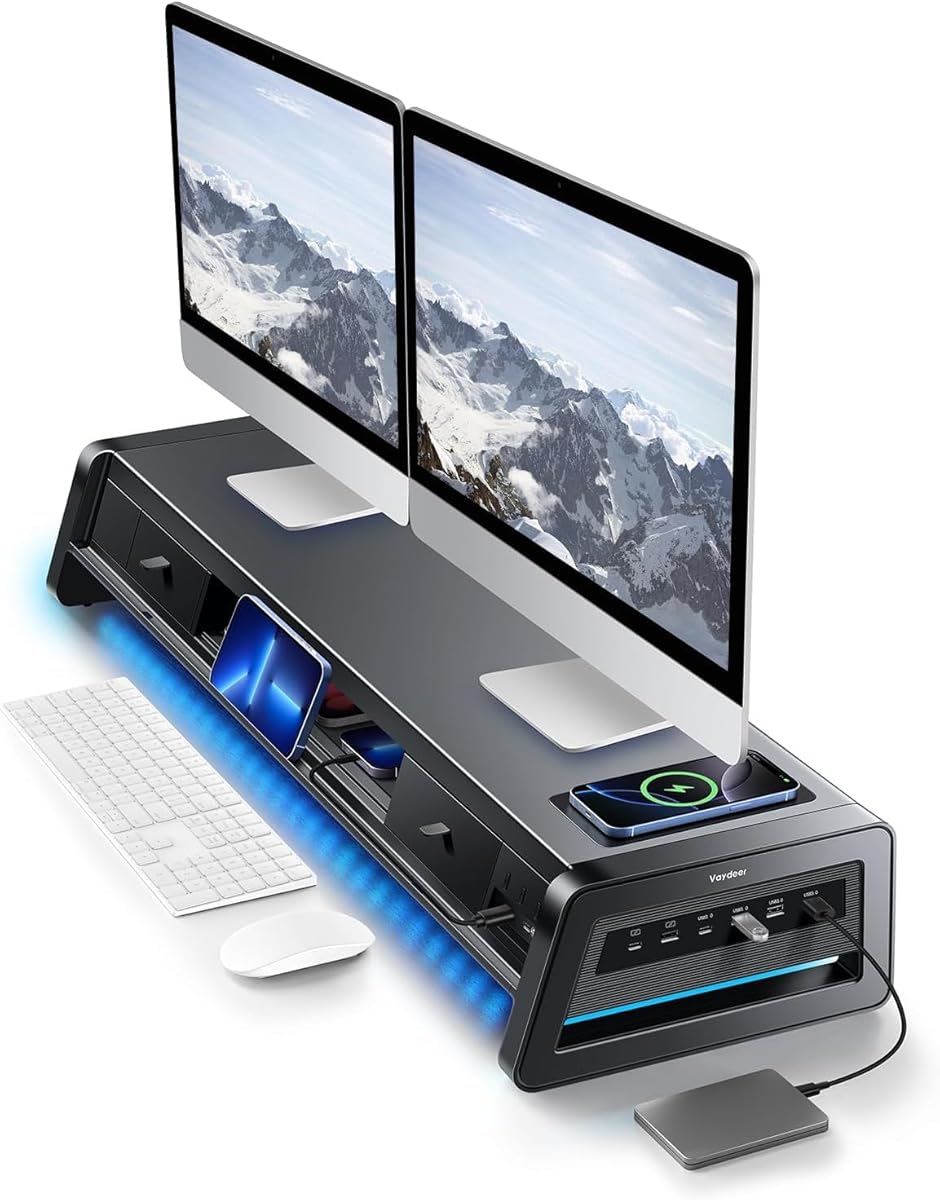
The Vaydeer All-in-One Dual Monitor Stand brings premium features to your desk with its 13-in-1 functionality. It includes 8 USB ports, a 15W wireless charging pad, and a built-in LED light strip to enhance both utility and ambiance. Users appreciate its durable metal construction that supports up to 50kg safely.
We may earn a commission when you buy through this link, at no additional cost to you.
Key features include two pull-out drawers for tidy storage of essentials and a wireless charging pad that keeps smartphones powered without extra cables. The LED strip provides soft illumination, reducing eye strain during late-night work. Its dimensions of 1000mm by 283mm fit most large desks well.
While the price is higher than basic models, the integration of charging ports and lighting justifies the cost for tech-heavy setups. Some users may find cable management slightly tricky due to the number of ports, but the organizational benefits are significant.
Opt for this if you want a comprehensive workspace solution that combines ergonomics with modern tech convenience. It suits professionals who need multiple devices charged and organized while maintaining a clean and efficient desk environment.
The 8 USB ports and 15W wireless charging pad keep all your devices powered and connected within reach, boosting productivity by eliminating cable clutter.
The built-in soft LED light strip gently illuminates your workspace, reducing eye strain and creating a more inviting office environment for better focus.
We may earn a commission when you buy through this link, at no additional cost to you.
The Gianotter Dual Monitor Stand Riser is ideal for those who want immediate usability without any setup hassle. Rated 4.5, it arrives ready to use with a magnetic drawer and two pen holders to organize accessories. The design is crafted from high-strength metal materials ensuring exceptional support performance.
We may earn a commission when you buy through this link, at no additional cost to you.
Its magnetic pen holders keep writing tools secure, while the drawer stores supplies to keep the workspace clear. The patented design reflects attention to detail and ratio. Raising monitors to eye level helps reduce neck strain and improve posture during work hours.
Since it has no assembly, it saves time but offers fixed dimensions which might not suit all desk sizes. The metal construction is sturdy but could scratch if not handled carefully. Overall it balances convenience with functional storage well.
Buy this if you prioritize speed and simplicity over adjustable features. It suits users who need a reliable riser quickly and value integrated storage for maintaining a tidy and productive workspace environment.
This monitor riser allows you to skip the hassle of assembly, letting you transform your cluttered desktop into an organized workspace instantly.
The stand features two magnetic pen holders and a drawer, allowing you to easily organize desk accessories while keeping the workspace clear and tidy.
We may earn a commission when you buy through this link, at no additional cost to you.
The Simple Trending Dual Monitor Stand Riser with Mouse Pad is designed for heavy-duty use and thermal management. It holds up to 100 pounds thanks to its thick metal frame and steel legs. The mesh platform ensures airflow around devices, preventing overheating during extended gaming or work sessions.
We may earn a commission when you buy through this link, at no additional cost to you.
A large 32-inch mouse pad is included, covering ample surface for smooth gliding and cleaning. The 7-inch height elevates screens to eye level, reducing neck and shoulder strain. Non-slip suction cups lock the stand firmly in place, preventing wobble during intense typing.
The suction cups may require a smooth desk surface to function effectively, and the mouse pad might need replacement after heavy use. However, the build quality and cooling benefits make it a reliable choice for power users and gamers.
Select this if you need maximum stability and airflow for heavy equipment like dual monitors and gaming consoles. It is perfect for setups where heat management and surface space are priorities alongside ergonomic benefits.
The metal mesh platform with ventilation holes increases airflow around your devices, keeping computers cool during extended use without performance throttling.
With a thick metal frame and steel support legs, this stand holds up to 100 pounds, supporting dual monitors and printers without bending or wobbling.
We may earn a commission when you buy through this link, at no additional cost to you.
The Simple Trending 38-inch Computer Monitor Stand offers a classic wooden design with substantial surface space. It measures 38 by 10.25 inches, easily holding a gaming keyboard and console side by side. Made from 0.5-inch thick high-quality wood boards, it provides reliable support without bending over time.
We may earn a commission when you buy through this link, at no additional cost to you.
Non-slip suction cups ensure the stand stays firmly in place on any desk surface. Setup is quick with clear step-by-step guides and an installation video included. The sturdy construction supports monitors, laptops, and printers securely while fitting most modern desk aesthetics.
Wood surfaces may show marks if not cleaned periodically, but the durability remains strong. The fixed dimensions might limit placement flexibility compared to adjustable models. However, the aesthetic appeal and strength make it a solid option for office environments.
Choose this if you prefer a natural look and need a wide surface for large peripherals. It is ideal for users seeking reliable stability and simple assembly without sacrificing style or desk space.
With a top surface measuring 38 by 10.25 inches, it is spacious enough for large gaming keyboards and consoles side by side without crowding.
Made from thick high-quality wood boards, this stand provides strong and reliable support for monitors and printers without bending or shaking over time.
We may earn a commission when you buy through this link, at no additional cost to you.
The BONTEC Dual Monitor Stand Riser stands out for its flexibility with adjustable length and swivel side shelves. Rated 4.6, it fits desks from 31.5 to 42.5 inches, making it suitable for corner or curved layouts. The design includes three open compartments for organizing office supplies and gaming devices.
We may earn a commission when you buy through this link, at no additional cost to you.
Features include a built-in smartphone holder slot and cable management opening, keeping wires and devices neat. The white wooden design blends naturally with modern home office accessories. Assembly takes about two minutes with included screws, ensuring a stable base.
The white finish may attract dirt or show marks over time, but the functional benefits outweigh this minor issue. It is a versatile choice for users who need to adapt their setup frequently without compromising on storage or ergonomics.
Opt for this if you need a flexible solution for unique desk shapes or multiple device storage. It suits home office workers who value customization and organization to maintain a clean and efficient workspace.
The adjustable length and swivel side shelves support straight, angled, or corner layouts, making it a flexible monitor stand for various home office setups.
Built with a phone stand slot and cable management opening, this stand helps keep your phone, devices, and wires neatly arranged for daily efficiency.
We may earn a commission when you buy through this link, at no additional cost to you.
The YAOHUOO Dual Monitor Stand Riser is built for large setups with its 38.6 by 10.2 by 5-inch dimensions. It supports up to 100 pounds thanks to extremely sturdy heavy-duty steel footing legs. Users report stability during use with non-slip pads protecting the desk from scratches.
We may earn a commission when you buy through this link, at no additional cost to you.
This stand serves multiple purposes including as a printer stand, laptop stand, or TV riser. The wooden desktop organizer shelf provides extra space to store keyboards or accessories under the monitor. Instructions and tools are included for a ten-minute assembly process.
While assembly takes longer than pre-built options, the solid build ensures it will not collapse or shake. The wooden surface may require occasional care to maintain its appearance. Overall it offers robust support for heavy or multiple device setups.
Select this if you need a wide stable platform for large monitors and printers. It is ideal for users who prioritize weight capacity and multi-purpose functionality over quick setup speed.
Extremely sturdy and stable with heavy-duty steel footing, the max weight capacity can reach up to 100 pounds without collapsing or shaking during use.
The stand provides a nice workspace usable as a monitor stand, printer stand, laptop stand, or TV riser for versatile desk organization needs.
We may earn a commission when you buy through this link, at no additional cost to you.
The Fenge Dual Monitor Stand Riser offers modern aesthetics with its 42.5-inch wide design and frosted acrylic drawers. Made from high-quality thickened MDF panels, the surface is waterproof and resists scratches and fingerprints. It accommodates up to 99 pounds with added central support beams for stability.
We may earn a commission when you buy through this link, at no additional cost to you.
The two-tier desktop organizer keeps workspace tidy with semi-transparent drawers for office supplies. A back panel prevents drawers from sliding out, while a cable management opening helps organize wires. Setup takes about fifteen minutes with pre-drilled holes and included tools.
The acrylic drawers are stylish but might scratch more easily than solid plastic or wood. The assembly time is longer than some competitors but results in a sturdy and functional piece. It fits well with contemporary desk setups.
Buy this if you want a stylish storage solution that combines wide monitor support with secure drawer compartments. It suits users who prioritize a clean look and organized desktop environment.
The surface is waterproof and prevents marks such as scratches and fingerprints, ensuring the stand maintains its aesthetic over time with minimal effort.
The design includes a back panel behind the acrylic drawer to prevent the drawer from easily sliding out and falling, ensuring safer storage of items.
We may earn a commission when you buy through this link, at no additional cost to you.
The Simple Trending Dual Monitor Stand with Drawer balances compact design with efficient storage. Rated 4.5, it features a hidden drawer and two pen holders to keep writing tools and supplies accessible yet out of sight. The sturdy metal frame supports two monitors without wobbling or bending.
We may earn a commission when you buy through this link, at no additional cost to you.
At 4.75 inches tall, it elevates screens to a comfortable eye level, reducing neck strain and eye fatigue during long workdays. The 42-inch width provides ample space for side-by-side monitors. Tools and clear instructions are included for a tool-free assembly process.
The drawer glide might need a break-in period to move smoothly, and the height is lower than some other risers. However, the metal frame ensures reliability under daily heavy use. It remains a solid choice for organized desks.
Choose this if you need a reliable stand with discreet storage to maintain a clutter-free workspace. It is ideal for users who value stability and ergonomic support in a compact design.
The smooth-gliding drawer stores pens, sticky notes, and small supplies out of sight, while side holders keep writing tools within reach for a tidy desk.
Premium metal construction ensures stability under daily heavy use, holding monitors securely without shaking or bending for reliable long-term support.
We may earn a commission when you buy through this link, at no additional cost to you.
Choosing the right dual monitor stand riser involves considering several key factors to ensure it meets your ergonomic and organizational needs.
The primary purpose of a monitor riser is to elevate your screens to eye level to reduce neck strain. Look for models that offer a height between 4 and 7 inches which typically provides the best ergonomic alignment. Some stands allow angle adjustments which can further improve your posture during extended work sessions.
Ensure the stand raises your monitors so you can view them without tilting your head down for long periods. This small adjustment can significantly improve comfort and productivity over the course of a workday.
Check the weight capacity to ensure the stand can safely support your specific monitors. Metal and wood models typically offer higher load limits compared to plastic ones. Heavy-duty steel legs or thick boards are signs of a sturdy build that will not deform over time.
Prioritize stands with proven stability if you plan to place heavy monitors or other devices like printers underneath. A durable material ensures the stand remains safe and functional throughout years of daily use.
Measuring your desk space is crucial before purchasing to find a stand that fits comfortably. Some risers offer adjustable lengths to accommodate different desk widths or monitor layouts. Swivel or corner options are useful if you have an unusual desk shape or multiple monitors at angles.
Consider the length and depth of the stand to ensure it does not obstruct your keyboard or mouse movement. A flexible design allows you to customize your setup as your needs change.
Many dual monitor stands include storage features such as drawers, pen holders, or open compartments. These help keep office supplies within reach while reducing surface clutter. Models with drawers are excellent for concealing small items that might otherwise look messy.
Evaluate what you need to store underneath the stand such as keyboards, cables, or notebooks. Choosing a model with built-in organization tools can streamline your workflow and keep your desk tidy.
Some risers come pre-assembled or require minimal assembly for quick setup. Others might need tools and instructions which can take up to fifteen minutes. Pre-drilled holes and numbered parts make the process smoother and less confusing.
If you prefer convenience, opt for models advertised as tool-free or quick assembly. Simple setups save time and reduce frustration when setting up your new workspace.
The visual design of the stand should complement your existing office decor. Available finishes include black, white, wood tones, or metal textures to match different styles. Some models feature modern elements like LED strips or frosted acrylic drawers.
Choose a color and material that blends well with your desk and monitors for a cohesive look. A stylish riser can enhance the overall appearance of your workspace while providing function.
Premium models may offer USB ports, wireless charging pads, or built-in lighting strips. These features add convenience by reducing cable clutter and keeping devices powered. Look for stands with multiple USB ports if you have several peripherals to connect.
Consider whether these tech extras justify the higher cost for your specific needs. While useful, they are not essential for basic monitoring and organization tasks.
Prices vary widely from affordable budget options to premium multi-functional stands. Determine your budget and prioritize features that matter most to your workflow. Basic models provide solid support while premium ones offer added connectivity and storage.
Compare the features offered against the price to ensure you are getting good value. Investing a bit more in quality often pays off in durability and comfort over time.
Place the stand on a flat stable surface and ensure all legs are evenly touching the desk to prevent wobbling. Tighten any assembly screws securely using the provided tools to guarantee safety.
Clean the surface regularly with a soft damp cloth to remove dust and prevent buildup. Avoid using harsh chemicals that might damage wood finishes or metal coatings over time.
Check the stability periodically by gently pressing on the corners and adjusting if necessary. Ensure cables and accessories stored underneath do not put uneven weight on the stand or obstruct airflow.
Most dual monitor stand risers accommodate standard monitor sizes ranging from 22 to 32 inches. Check the width and depth limits listed in the product specs to confirm your screens fit comfortably. Adjustability options can also help adapt the stand to different monitor shapes or angles.
Weight capacities vary by model but generally range from 44 to 100 pounds for dual monitor setups. Heavier metal or wood constructions offer higher limits suitable for large screens. Always verify the specific capacity before placing multiple devices on the stand.
Some stands are designed for tool-free assembly while others include necessary screws and basic tools. Pre-drilled holes and instruction manuals typically make assembly straightforward. Check product details to know if additional tools are required before starting.
Yes many risers work with laptops, printers, consoles, or televisions depending on the size. Ensure the weight and dimensions of your device are within the stand's supported limits. This versatility allows you to organize multiple types of electronics on your desk.
Most models can be cleaned with a simple damp cloth to remove dust and smudges. Wood and metal surfaces generally resist stains but should not be exposed to excess water. Regular maintenance keeps the stand looking new and functioning well.
By elevating monitors to eye level, these stands help reduce neck and back strain during long work sessions. Proper height alignment promotes a healthier sitting posture and minimizes fatigue. Improved ergonomics can lead to better focus and productivity throughout the day.
Our top picks include the TAVR Monitor Stand Riser for overall versatility, the Spacrea model for budget value, and the Vaydeer All-in-One stand for advanced tech integration. Each offers unique strengths tailored to different needs and preferences.
Prioritize features like ergonomic height, weight capacity, and storage options based on your specific workspace. Balancing cost with durability ensures you get a reliable stand that supports your daily tasks effectively.
Prices and availability change regularly so check the latest details before making your final purchase decision. This guide provides a solid foundation to find a dual monitor stand riser that transforms your desk into a more productive environment.