
QUI Presentation Clicker with Volume Control
4.3Editor score
Budget friendly price point
Long wireless range
Built-in volume control
This guide compares the top laser pointer for presentations to help you choose the best wireless clicker for PowerPoint and keynote slides in October 2026.
Choosing the right laser pointer for presentations can make a significant difference in how effectively you communicate your message. A reliable wireless clicker allows you to move freely while highlighting key points on your slides without being tethered to your laptop or podium.
We have analyzed ten top-rated wireless presenter remotes based on their laser visibility, range, battery life, and ease of use. Our comparison covers options for teachers, business professionals, and keynote speakers who need dependable tools for engaging audiences in various environments.
Each selection below highlights unique features and performance aspects to help you find the perfect match for your specific needs. Please note that product availability and pricing may change over time, so verifying current details before purchase is always recommended.
4.3Editor score

4.6Editor score

4.6Editor score
The following table provides a side-by-side comparison of all ten selected laser pointers for presentations to help you evaluate their core specifications at a glance.


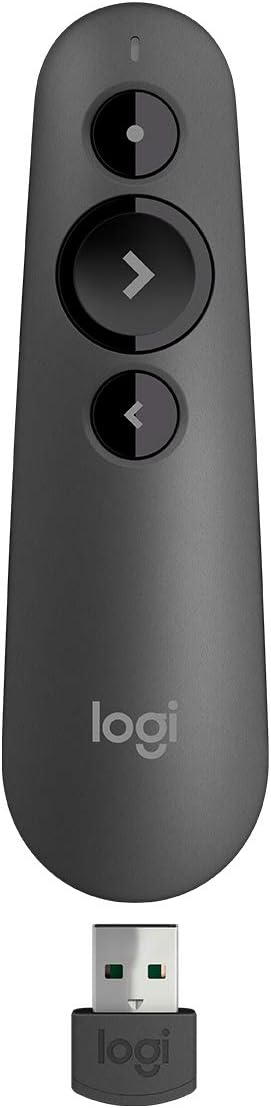


This wireless presenter stands out as the top choice for educators and professionals who need a reliable tool that delivers visibility and ease of use. With a strong rating from thousands of users, it combines modern features like USB-C charging with practical design elements that make daily presentations smoother.
We may earn a commission when you buy through this link, at no additional cost to you.
The 532nm green light is significantly brighter than traditional red lasers, ensuring your pointer remains visible even on bright screens or in well-lit lecture halls. The device also offers comprehensive control over slides, including dedicated buttons for hyperlinks and volume, allowing you to manage your presentation without interrupting your flow.
While the green laser offers superior visibility, it comes at a slightly higher cost compared to basic red models. Additionally, the battery life is excellent but requires planning for occasional charging sessions rather than simply swapping batteries when the power runs low.
If you prioritize visibility and modern convenience, this clicker is the ideal choice for classroom teaching, corporate meetings, or any setting where you need to engage a large audience effectively. The ergonomic design and magnetic receiver storage ensure you never lose critical components during important events.
The green laser provides a crisp dot that cuts through ambient light better than red lasers, making it perfect for large rooms.
A single USB-C charge lasts for weeks of daily use, eliminating the need to constantly hunt for replacement batteries.
We may earn a commission when you buy through this link, at no additional cost to you.
The Logitech R400 is a staple in the world of presentation clickers, known for its simplicity and dependability. It offers a straightforward solution for users who want to advance slides and point to key elements without needing advanced features or complex setup procedures.
We may earn a commission when you buy through this link, at no additional cost to you.
Its red laser is bright enough for most standard presentation environments, and the 2.4GHz wireless technology ensures a stable connection within a fifty-foot range. The intuitive touch keys allow for easy control, and the receiver conveniently docks inside the clicker when not in use.
However, the range is somewhat limited compared to newer models, which might be restrictive in very large auditoriums. Additionally, the feature set is basic, lacking advanced controls like volume adjustment or screen toggles that some users might prefer for dynamic presentations.
For those who value a no-fuss experience and reliable performance from a well-known manufacturer, the R400 remains a solid option. It is particularly suitable for small to medium-sized meetings where basic slide control is all that is needed.
Logitech is a trusted name in peripherals, ensuring that this clicker will perform consistently over time.
Its small size makes it easy to carry in a pocket or bag for on-the-go presentations.
We may earn a commission when you buy through this link, at no additional cost to you.
This presentation clicker offers a compelling mix of features at an accessible price point, making it a strong contender for budget-conscious buyers. It includes essential controls like volume adjustment and hyperlink navigation, which are often reserved for more expensive models.
We may earn a commission when you buy through this link, at no additional cost to you.
The 100-foot wireless range allows you to move freely around a room without worrying about losing connection. The bright red pointer is effective for most backgrounds, and the rubberized buttons provide a comfortable feel during extended use.
On the downside, the battery is not included in the package, so you will need to purchase AAA batteries separately. The build quality is functional but may not feel as premium as higher-end options, though it serves the purpose well for occasional presentations.
If you need a versatile tool that handles various functions without breaking the bank, this clicker is an excellent choice. It is well-suited for teachers and business professionals who need more than just simple forward and backward controls.
Features like hyperlink and volume control allow for more interactive and dynamic presentation experiences.
With 100 feet of range, you can engage with your audience from anywhere in a standard conference room.
We may earn a commission when you buy through this link, at no additional cost to you.
The Logitech R800 is designed for professionals who need advanced tools to manage their presentations effectively. It features a built-in LCD timer that keeps you on track without needing to look at a clock or screen, ensuring you stay within time limits.
We may earn a commission when you buy through this link, at no additional cost to you.
The vibration alerts are a standout feature for silent environments, allowing you to receive timing cues without disrupting the flow of your talk. The green laser is bright and clear, making it easy to highlight details on any screen type.
While the device offers premium features, it comes at a higher price than basic models. It also relies on AAA batteries rather than rechargeable options, which might be a consideration for eco-conscious users or those who prefer less waste.
For keynote speakers and presenters who value time management and professional features, the R800 is a top-tier choice. Its combination of visibility, range, and unique timing tools makes it a reliable investment for serious presenters.
The LCD timer and vibration alerts help you stay on schedule without distractions during critical moments.
The green laser ensures your pointer is visible even on complex visual displays or in bright lighting.
We may earn a commission when you buy through this link, at no additional cost to you.
The Logitech R500s distinguishes itself with the flexibility of both USB and Bluetooth connectivity, making it a versatile choice for modern laptops that may lack traditional USB ports. This adaptability ensures you can connect to almost any device without additional adapters.
We may earn a commission when you buy through this link, at no additional cost to you.
Battery life is exceptional, lasting up to twelve months on a single AAA battery. The smart battery management system disables the laser when low to extend usage, giving you peace of mind during critical presentations.
To unlock the full potential of customization, you will need to install the Logitech Presentation App. While this adds flexibility for button mapping and monitoring, it requires initial setup and may be unnecessary for users who prefer simple operation.
If you frequently switch between different devices and need a long-lasting, flexible tool, the R500s is an excellent investment. It is particularly useful for tech-savvy users who value connectivity options and battery longevity.
Choose between USB or Bluetooth to match your current device setup without worrying about missing ports.
Advanced features extend battery life significantly, ensuring you are rarely caught without power during a session.
We may earn a commission when you buy through this link, at no additional cost to you.
This clicker offers incredible value for its price, providing a long wireless range and essential controls that are often found in more expensive models. It is an ideal choice for those who need a reliable tool without investing too much money upfront.
We may earn a commission when you buy through this link, at no additional cost to you.
The 328-foot range allows you to move freely across large halls, making it suitable for auditoriums or outdoor events. The included carrying clip ensures you can attach it to a notebook or pocket, keeping it secure and accessible at all times.
However, the build quality is basic, and the battery is not included in the package. While it performs well for its price point, it may not offer the same durability or ergonomics as higher-priced alternatives.
For budget-conscious users or casual presenters who need a straightforward tool, this clicker is a smart buy. It delivers the core functionality required for effective presentations without unnecessary frills.
Get essential presentation controls and long range at a fraction of the cost of premium models.
The built-in clip keeps the device secure on your person, preventing loss during travel.
We may earn a commission when you buy through this link, at no additional cost to you.
The Norwii N95 stands out for its ability to be customized to fit your specific workflow. The reprogrammable buttons allow you to tailor the clicker to your preferences, making it highly adaptable for different presentation styles.
We may earn a commission when you buy through this link, at no additional cost to you.
With a massive wireless range of up to 328 feet, you can roam large spaces without worrying about signal loss. The green laser is bright and clear, and the USB-C rechargeable battery ensures you always have power ready when you need it.
To fully utilize the customization features, you need to download the Norwii Presenter app. Additionally, the charging cable is not included in the box, which might be an inconvenience if you do not have a compatible USB-C cable on hand.
If you need a highly customizable and portable device for large-scale presentations, this clicker is a strong option. Its combination of flexibility and power makes it a great choice for dynamic speakers.
Remap buttons to suit your unique presentation style, making the device work exactly how you want it to.
Rechargeable battery reduces waste and ensures you are always ready to present without buying new batteries.
We may earn a commission when you buy through this link, at no additional cost to you.
This presenter solves a common problem by including a receiver that works with both USB-A and USB-C ports. This versatility ensures compatibility with virtually any computer, whether it is an older desktop or a modern ultrabook.
We may earn a commission when you buy through this link, at no additional cost to you.
The design is compact and ergonomic, fitting comfortably in your hand for extended use. It is lightweight and portable, making it easy to toss into a bag for impromptu presentations on the go.
The wireless range is limited to about forty-nine feet, which may be restrictive in larger rooms. Additionally, the feature set is relatively basic, focusing primarily on slide control without advanced customization options.
For users who value universal connectivity and simplicity, this clicker is a practical choice. It is ideal for those who frequently switch between different devices and need a reliable, plug-and-play solution.
The dual USB receiver ensures you can connect to any device without searching for adapters or dongles.
The ergonomic shape reduces hand strain, allowing for smooth operation even during long sessions.
We may earn a commission when you buy through this link, at no additional cost to you.
This clicker combines versatility with performance, offering dual USB connectivity and a generous wireless range for various presentation environments. It includes volume controls and screen toggles, providing a robust set of tools for dynamic speakers.
We may earn a commission when you buy through this link, at no additional cost to you.
The ergonomic body with a soft-touch coating ensures a comfortable grip, while the magnetic storage for the receiver prevents loss. The low power consumption design extends battery life, meaning fewer battery changes over time.
It requires two AAA batteries to operate, which is a slight drawback compared to rechargeable models. While the build quality is adequate, it may not feel as premium as high-end options, but it performs reliably for its price.
For professionals who need a balance of features and compatibility, this clicker is a solid investment. It is particularly useful for those who frequently use Mac and PC devices interchangeably.
Whether you use an older PC or a new Mac, the dual USB receiver ensures you are always ready to present.
Smart power management extends battery life, keeping you operational for longer periods between changes.
We may earn a commission when you buy through this link, at no additional cost to you.
This clicker is designed for portability and ease of use, making it an excellent choice for travelers and mobile professionals. Its compact design ensures it fits easily into any pocket, while the ergonomic shape provides a comfortable grip.
We may earn a commission when you buy through this link, at no additional cost to you.
The red laser pointer is visible and effective for most presentation scenarios. The simple operation requires no drivers or software, allowing you to plug it in and start presenting immediately without any setup hassle.
Because of its small size, it may feel a bit difficult to handle for users with larger hands. Additionally, the feature set is basic, focusing on core slide control without advanced customization or volume options.
If you prioritize portability and simplicity, this clicker is a great option. It is ideal for on-the-go users who need a reliable tool that does not add bulk to their bag.
The compact size makes it perfect for business travelers who need a reliable tool that does not take up space.
No software or drivers are required, ensuring you can start presenting instantly in any environment.
We may earn a commission when you buy through this link, at no additional cost to you.
Selecting the right laser pointer for presentations involves considering several key factors to ensure the device meets your specific needs and environment.
Green lasers are generally more visible than red lasers, especially in well-lit rooms or on certain types of screens. If you present in diverse environments, a green laser might offer better visibility for your audience.
Consider the lighting conditions where you usually present to decide between red or green options for optimal visibility.
The range determines how far you can move from your computer while retaining control. Standard ranges vary from fifty feet to over three hundred feet depending on the model.
Choose a range that suits your typical venue size to ensure you have the freedom to move without connectivity issues.
Some devices use replaceable AAA batteries, while others feature built-in rechargeable batteries via USB-C. Rechargeable models reduce waste and cost over time but require charging.
Decide whether convenience or long-term cost savings is more important to you when selecting battery types.
Modern clickers may offer Bluetooth, USB-A, or USB-C connections. Ensure the device is compatible with your current computer or tablet ports.
Universal compatibility ensures you can use the clicker across different devices without needing adapters.
Advanced models include buttons for volume control, screen toggling, and hyperlink navigation. Basic models focus on simple slide advance and backward functions.
Select a layout that includes the specific controls you need for your presentation style.
The device should feel comfortable in your hand during extended use. A lightweight and compact design is beneficial for travel.
Test the grip and size if possible to ensure it suits your hand comfortably for prolonged sessions.
Trusted brands often provide better reliability and customer support. Look for models with good user ratings and warranty options.
A strong reputation ensures you get a durable product that performs consistently over time.
Some models allow for button remapping via software apps. This feature is useful for those who want a tailored control experience.
Consider if you need advanced customization or prefer a plug-and-play experience without software dependencies.
To start using your clicker, simply insert the USB receiver into your computer's port or connect via Bluetooth if supported. Most devices are plug-and-play, requiring no additional drivers or software installation.
During your presentation, use the forward and backward buttons to navigate slides. Hold the laser button to highlight specific elements on the screen, releasing it when you are done to save battery life.
Store the receiver safely inside the clicker when not in use to prevent loss. Charge or replace batteries as needed to ensure the device is ready for your next presentation.
A green laser is generally brighter and more visible in well-lit environments than a red laser. This makes it a preferred choice for large rooms or outdoor presentations where ambient light might wash out a red dot.
Most wireless presenters are plug-and-play and do not require software installation. However, some advanced models may offer customization features that need specific software for button mapping.
First, check the battery level or charge the device. Ensure the USB receiver is properly connected and try pairing it again. If issues persist, consult the user manual for troubleshooting steps.
Yes, most wireless presenters are compatible with Mac computers via USB or Bluetooth. However, check product specifications to ensure full functionality with macOS and presentation software.
Some models come with a built-in USB-C or micro-USB port for direct charging. If the cable is not included, you will need a compatible USB cable to charge the device via a port.
Yes, many modern models feature Bluetooth connectivity which eliminates the need for a USB receiver. This is particularly useful for tablets and modern laptops that lack traditional USB ports.
Turn off the laser when not in use and avoid holding buttons unnecessarily. Use rechargeable batteries or choose a rechargeable model to reduce waste and ensure consistent power availability.
Most wireless clickers offer a range between fifty and one hundred feet. High-end models can extend up to three hundred feet, providing ample freedom for large auditoriums or outdoor events.
Choosing the right laser pointer for presentations depends on your specific needs and the environments in which you present. The options listed here offer a range of features from basic control to advanced customization.
Prioritize visibility, connectivity, and battery life to ensure your tool supports your message effectively. A well-chosen clicker can make your presentation smoother and more engaging for your audience.
Remember to check current prices and availability before purchasing to get the best deal. With the right device, you can focus on delivering your content with confidence and professionalism.