
Cable Matters 2-Pack 6-Pin to 8-Pin PCIe GPU Power Adapter Cable
4.7Editor score
6-pin to 8-pin conversion
Secure locking latch design
Convenient two-pack included
This guide compares the top GPU power adapters for modern graphics cards, focusing on compatibility, safety, cable management, and power delivery standards to
Choosing the right GPU power adapter is critical for system stability and performance. Modern graphics cards often require specific connectors that standard power supplies may not support directly. An appropriate adapter ensures safe power delivery without risking hardware damage or thermal issues.
We evaluated ten leading GPU power adapters based on build quality, connector types, and user feedback. Our analysis covers legacy PCIe connectors and the newer 12VHPWR standards. Each product was selected for its ability to bridge compatibility gaps between older PSUs and newer GPUs efficiently.
Each pick highlights key features, pros, and cons to help you make an informed decision. Prices and availability can fluctuate frequently on online marketplaces. Always verify your power supply capabilities before purchasing any adapter to ensure your system remains safe and reliable.
4.7Editor score

4.7Editor score

4.2Editor score
The following table provides a side-by-side comparison of all ten selected GPU power adapters. It highlights key specifications like connector types, power ratings, and cable lengths to help you quickly identify the best match for your specific hardware configuration.


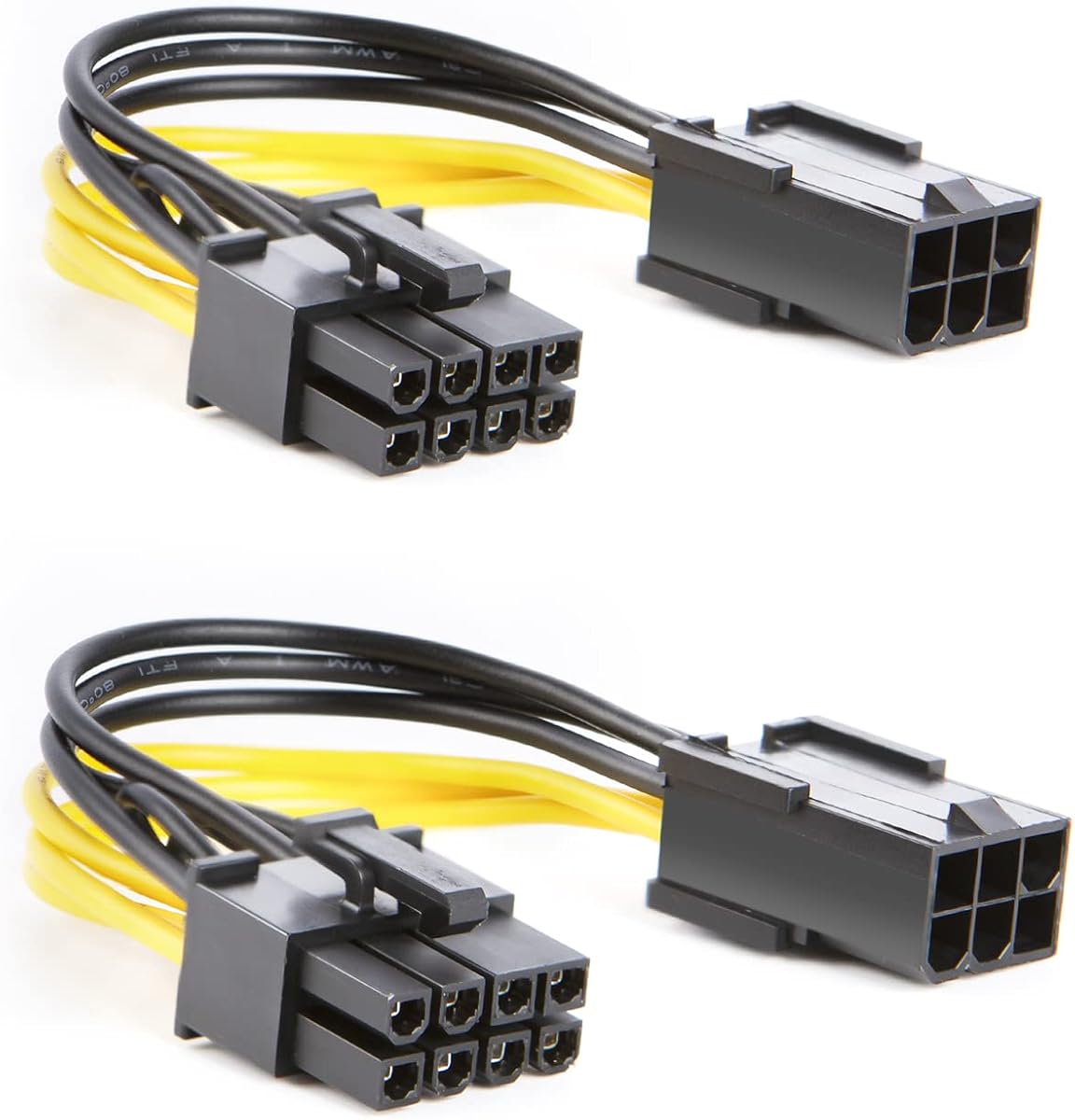


The Cable Matters 2-Pack offers a simple solution for users needing to convert 6-pin outputs to 8-pin inputs. With a solid 4.7 rating, it delivers reliable connectivity without breaking the bank. Its locking latch ensures the connection stays secure during operation.
We may earn a commission when you buy through this link, at no additional cost to you.
This adapter is ideal for budget builds where the power supply has 6-pin connectors but the GPU requires 8-pin. The two-pack allows you to keep one as a spare or use it on another system. It supports up to 36 watts safely through pure copper conductors.
While effective, the short four-inch length can be tricky in tight cases. Users must ensure their power supply provides enough wattage before connecting. It does not increase power capacity but bridges connector differences effectively for mid-range cards.
If you need a cost-effective way to upgrade your GPU without changing your power supply, this adapter is a strong choice. It provides the necessary connectivity safely and efficiently. Just verify your system requirements before installation to avoid issues.
The locking latch prevents accidental disconnection which is vital for system stability under load.
Getting two adapters in one package provides great value and convenience for multiple builds.
We may earn a commission when you buy through this link, at no additional cost to you.
This adapter is designed specifically for next-generation GPUs like the RTX 4070 Super. The 90-degree angle reduces stress on the port which often causes overheating with stiff factory cables. It boasts a 4.7 rating for its ability to improve cable management significantly.
We may earn a commission when you buy through this link, at no additional cost to you.
Made with 16AWG tinned copper wire, it supports up to 400 watts peak power output. The 13-inch length provides ample room for routing in smaller cases without bending the cable too sharply. This helps maintain stable voltage transmission and avoids potential connection failures.
The cost is higher than older adapters but the added safety features justify the price. It is not compatible with older 12pin cards so check your GPU model carefully. The included cable combs help keep the build looking neat and organized as well.
For builders upgrading to RTX 40 series cards, this extension is a highly recommended upgrade. It addresses common issues with the original cables effectively. Prioritizing this can prevent hardware damage and ensure smooth long-term operation.
The angled design prevents excessive bending that leads to connector overheating and potential failure.
The flexible sleeve and longer length allow for cleaner builds even in compact PC cases.
We may earn a commission when you buy through this link, at no additional cost to you.
The NZXT adapter offers a premium solution for users with compatible power supplies. It delivers up to 600 watts which covers almost all consumer graphics cards safely. While its rating is lower than others, the build quality is trusted by many NZXT users.
We may earn a commission when you buy through this link, at no additional cost to you.
This cable replaces the bulky adapters often included with GPUs for a cleaner look. It works with existing ATX 2.X PSUs so you do not need to upgrade the whole power supply. The connectors are designed to fit securely without adding unnecessary bulk inside the case.
Some users note that the rating is lower than competitors but it remains sufficient for high-end cards. Ensure you are using an NZXT PSU for best results as per the compatibility guidelines. The compact nature helps maintain airflow and reduces clutter inside your build.
If you own an NZXT power supply and want a reliable adapter for your RTX 40 series card this is a solid pick. It balances performance with aesthetics effectively. Just verify your power supply model before purchasing to ensure full compatibility.
Rated for 600 watts it handles high power GPUs without needing multiple adapters.
Designed specifically for NZXT PSUs to ensure optimal performance and safety.
We may earn a commission when you buy through this link, at no additional cost to you.
Fasgear provides a robust extension cable for high-end GPUs needing PCIe 5.1 support. It supports up to 600 watts which is excellent for cards like the RTX 4090 or 4080. The tinned copper wire helps prevent oxidation over time ensuring long-term reliability.
We may earn a commission when you buy through this link, at no additional cost to you.
This adapter requires two 8-pin ports on your power supply to function properly. Connecting fewer ports could damage your system so check your PSU capacity first. The 30cm length is a good balance for routing in standard cases without excessive slack.
Users appreciate the included cable combs which keep the build looking tidy. While it does not work with 12pin connectors like the RTX 3090, it covers most modern high-end cards. The stable transmission helps avoid power fluctuations during heavy loads.
For builders with ATX 3.0 PSUs wanting to upgrade to top tier GPUs this adapter is a great choice. It provides the necessary power handling and safety features. Just ensure your PSU has enough connectors to support it safely.
Supports up to 600 watts making it ideal for high-demand graphics cards.
Tinned copper prevents oxidation and maintains stable connections over time.
We may earn a commission when you buy through this link, at no additional cost to you.
This conversion cable is designed for PSUs that already have a native 12VHPWR output. It allows those PSUs to power GPUs with standard 8-pin connectors without needing the original bulky adapter. It works with models like the Corsair SF1000L or Seasonic FOCUS series.
We may earn a commission when you buy through this link, at no additional cost to you.
At 6.8 inches it is compact enough to fit in smaller builds without clutter. It supports up to 600 watts ensuring stable transmission for most high-performance cards. This makes it a versatile option for users who have invested in ATX 3.0 power supplies recently.
It is not a modular cable so you must use it with compatible PSU output cables. If your PSU does not have a 12VHPWR port this will not work for you. The 16AWG copper wire ensures durability and safety during operation.
Ideal for users upgrading to ATX 3.0 PSUs who still have older GPUs. It bridges the gap between new power standards and older hardware. Always confirm your PSU model before purchasing to ensure it supports this converter.
Designed to work seamlessly with PSUs featuring native 12VHPWR output cables.
Short length is perfect for small form factor builds where space is limited.
We may earn a commission when you buy through this link, at no additional cost to you.
This cable is tailored for RTX 4070 and similar series GPUs requiring 16-pin connectors. It uses 16AWG tinned copper wire to ensure stable voltage and high current output up to 450 watts. The flexible sleeve prevents the kinking that often causes connection issues.
We may earn a commission when you buy through this link, at no additional cost to you.
The 13-inch length offers a decent amount of slack for routing cables neatly in most cases. The included cable combs help secure the cable for a clean and organized look inside your build. This design prioritizes both safety and aesthetics in one package.
It prevents the overheating issues seen with stiff factory cables by allowing better bending radius. However it is not suitable for 12pin GPUs so verify your card model before buying. The alloy copper terminals provide reliable contact and reduce resistance effectively.
Perfect for builders who want a reliable extension for their mid-range RTX 40 series card. It balances flexibility and durability well. Make sure your GPU matches the connector type to avoid compatibility problems during installation.
Designed to prevent bending-induced overheating common with rigid power cables.
Includes accessories to organize cables for a professional looking PC build.
We may earn a commission when you buy through this link, at no additional cost to you.
CableCreation offers a straightforward solution for converting 6-pin to 8-pin connectors. The two-pack ensures you have a spare or can use both in different systems. It supports up to 36 watts safely through pure copper conductors rated for durability.
We may earn a commission when you buy through this link, at no additional cost to you.
Its RoHS certification means it meets environmental safety standards which is a plus for eco-conscious buyers. The four-inch length is compact but can be restrictive in large cases. It works well with many popular brands like Gigabyte and Sapphire.
While affordable, ensure your power supply provides enough wattage before connecting. It is not designed for high-end cards that require more than 36 watts. The adapter eliminates the need for a new PSU for simple compatibility upgrades effectively.
Ideal for users with older power supplies needing to connect a new mid-range GPU. It provides a cost-effective path to system upgrades. Always double-check your PSU capacity to avoid overloading it during operation.
RoHS certified ensuring the product meets strict environmental safety standards.
Uses 18AWG pure copper for reliable performance and conductivity.
We may earn a commission when you buy through this link, at no additional cost to you.
This adapter from Corsair is designed to reduce cable stress with a 180-degree bend. It helps keep cables away from the case panel for a cleaner and safer build. The material withstands temperatures up to 105 degrees C which is excellent for reliability.
We may earn a commission when you buy through this link, at no additional cost to you.
It targets users with RTX 40 series cards needing better routing options. The right-angle adapter prevents the cable from pressing against the side panel which can damage connectors. This design choice prioritizes long-term component safety over just connectivity.
The rating is lower than other adapters suggesting some users may have had mixed experiences. It is not a standard extension but a bridge for specific use cases. Verify your specific GPU model to ensure it fits correctly before purchase.
If you struggle with stiff cables or heat issues on your RTX 40 card this bridge is a great fix. It solves specific routing problems effectively. Prioritize this if your current cable causes thermal concerns or physical stress on your GPU.
Handles high temperatures ensuring reliability even under heavy thermal loads.
Prevents cable contact with case panels to maintain aesthetics and safety.
We may earn a commission when you buy through this link, at no additional cost to you.
EVGA PowerLink offers adjustable spacing for various PCI-E connections which aids cable routing. Integrated solid state capacitors provide power filtering for stable performance. It is designed to dramatically improve cable management inside your PC case effectively.
We may earn a commission when you buy through this link, at no additional cost to you.
This adapter supports many older GPU models like the RTX 2080 Ti and GTX 1080 Ti. Its flexible design helps avoid awkward bends that strain connectors over time. Installation is straightforward requiring minimal effort to set up correctly.
While great for older cards it does not support the newest 12VHPWR GPUs. The power filtering adds a layer of protection for your hardware. However the market has moved toward newer standards so check compatibility carefully.
Best for owners of older EVGA cards looking to upgrade cable management without changing hardware. It provides a clean solution for legacy builds. Verify your GPU model matches the supported list before purchasing.
Integrated capacitors filter noise for stable power delivery to your GPU.
Adjustable spacing reduces strain and improves aesthetics inside the case.
We may earn a commission when you buy through this link, at no additional cost to you.
This adapter features a Type B layout for broader chassis compatibility. It converts a 16-pin modular output to three 8-pin connectors safely. The aluminum alloy construction ensures durability during high-performance operation without overheating.
We may earn a commission when you buy through this link, at no additional cost to you.
Rated for 600 watts it supports high-end GPUs requiring multiple power inputs. The 90-degree connector improves airflow and reduces strain on the motherboard port. This helps prevent wear and tear over long-term use effectively.
Users must verify if they need Type A or Type B as the pin layouts differ. The perfect rating suggests high user satisfaction with its reliability and design. It is designed for flexible mounting orientations to suit different build preferences.
Excellent for users with modular ATX 3.0 power supplies needing to connect high-end GPUs. The build quality and power capacity are top notch. Confirm the pin layout matches your needs before finalizing your purchase decision.
Aluminum alloy construction maintains stability during high power operations.
Designed to support various mounting orientations for better cable routing.
We may earn a commission when you buy through this link, at no additional cost to you.
Selecting the correct adapter depends on your GPU model and power supply capabilities. This guide breaks down the essential factors to ensure compatibility and safety.
First identify the connector on your GPU and your PSU. Newer cards use 12VHPWR (16-pin) while older ones use 6-pin or 8-pin PCIe. Ensure the adapter matches both ends to avoid mismatched connections.
Always check your specific model requirements before buying.
Check the wattage rating of the adapter to match your GPU needs. High-end GPUs like RTX 4090 require 600W capable adapters while mid-range cards might need less. Using an under-rated adapter can lead to system instability.
Verify your power supply can provide sufficient wattage before purchasing.
Cable length is crucial for your case size. Smaller cases need shorter cables to avoid strain while larger cases need longer ones for clean routing. Measure your distance from PSU to GPU before selecting.
Ensure the length is sufficient for your build without stretching.
Look for adapters using high-quality wire like 16AWG tinned copper. Thicker wires handle higher currents and resist heating better. This protects your GPU from voltage drops and potential damage over time.
Prioritize copper conductors over cheaper alternatives.
Secure connectors with locking latches prevent accidental disconnection. Overheating protection and strain relief on the connector are vital for longevity. Avoid flexible cables that bend excessively at the connector head.
Prioritize safety features to protect your hardware.
Some adapters convert old PSU to new GPU (6-pin to 8-pin) while others bridge new PSU to old GPU (12VHPWR to 8-pin). Know which direction you need to avoid buying the wrong conversion type.
Match the adapter direction to your hardware direction.
Durable materials like aluminum alloy or nylon braided sleeves protect internal wires. Flexible sleeves prevent kinking which can damage internal conductors. Quality materials ensure the adapter lasts longer under heat.
Choose durable materials for long term use.
Check user feedback for real-world performance data. High ratings indicate reliability but low ratings often flag overheating issues. Look for comments on cable stiffness and connector fit.
Read recent reviews to validate product quality.
Before installing, power off your PC and unplug it from the wall. Remove the side panel to access the GPU and PSU area. Identify the correct ports on both devices to ensure a match.
Connect the adapter to the PSU first ensuring the connector clicks into place. Then connect the other end to the GPU power port. Do not force connectors if they do not fit naturally.
Once connected, manage the cables using ties or combs to keep them away from fans. Check that the cable is not bent too sharply at the connector which can cause heat issues.
Yes if you choose one that matches your power supply and GPU requirements. Always check wattage ratings and ensure the PSU can handle the load. Using an adapter that cannot handle the wattage is dangerous and can damage hardware.
If your PSU lacks the correct connector you may need an adapter. But if your PSU does not have enough wattage you must upgrade. Adapters change connectors but do not increase power capacity.
It is a newer standard used on RTX 40 series GPUs allowing higher power delivery. It uses a 16-pin connector that can replace multiple 8-pin cables. You need a specific adapter if your PSU is older than ATX 3.0.
Adapters can get hot if they are handling too much current or bent too sharply. Ensure it is rated for your GPU wattage. Avoid sharp bends at the connector which can cause overheating.
Yes but you must use the right type. If your PSU has native 12VHPWR you may not need an adapter for a new card. If you have an older GPU you need a 12VHPWR to 8-pin adapter.
Look for 16AWG copper wire which is standard for high power adapters. Thinner wires like 18AWG might overheat under high loads. Higher quality wires ensure safe voltage transmission.
We reviewed ten top options covering both legacy and new standards. From budget-friendly 6-pin converters to robust 12VHPWR extensions these picks offer solutions for many scenarios. The best choice depends on your specific hardware setup.
Prioritize safety and wattage capacity over price when selecting an adapter. Ensure your PSU can handle the load and the connector fits securely. Proper selection prevents overheating and hardware failure effectively.
Always check current prices and availability before purchasing. Adapters vary in stock based on GPU demand. Verify your hardware compatibility on the product page to ensure a perfect fit for your build.