
MINISFORUM MS-S1 MAX Mini AI Workstation PC
4.5Editor score
AMD Ryzen AI Max+ 395 APU
128GB LPDDR5x Unified Memory
Dual M.2 PCIe 4.0 Expansion
Explore our expert guide comparing the top 10 dual GPU AI setups for local LLM inference and training across workstations and desktops.
Choosing the right dual GPU AI setup is essential for developers and researchers who need powerful local inference capabilities without relying on cloud services. These systems combine multiple high-performance graphics cards to accelerate large language model processing, rendering, and complex computational tasks efficiently within a single chassis.
We evaluated ten distinct products ranging from compact mini workstations to enterprise-grade server racks. Our analysis focuses on VRAM capacity, memory bandwidth, power efficiency, and software compatibility with frameworks like PyTorch and vLLM to ensure each system meets rigorous professional standards for AI workloads.
Each pick highlights specific strengths such as budget-friendly configurations, maximum VRAM for huge models, or specialized cooling for sustained loads. Please note that pricing fluctuates based on market demand and availability so always verify current costs before making your final purchasing decision.
4.5Editor score

5.0Editor score

5.0Editor score
The following table provides a side-by-side comparison of all ten products evaluated in this guide. It highlights critical specifications such as processor type, GPU configuration, memory capacity, and storage options to help you quickly identify the system that matches your specific AI workload requirements.


The WEELIAO MAXSUN Arc Pro B60 Turbo Workstation Graphics Card stands out as the top recommendation for building a dual GPU AI setup focused on local language model deployment. With a combined 48GB of GDDR6 memory across its dual GPU design, it allows users to run 70B-class quantized models entirely on a single card. This eliminates the need for expensive multi-card motherboards or reliance on cloud services for inference tasks.
We may earn a commission when you buy through this link, at no additional cost to you.
Each GPU operates at 2400 MHz with 20 Xe cores, delivering a total of 394 TOPS of compute power. This architecture is purpose-built for high-concurrency inference and complex AI workloads. The system recognizes each chip separately, allowing for flexible task assignment which is crucial for developers managing multiple workflows simultaneously. Furthermore, the PCIe 5.0 x8 interface ensures high bandwidth without requiring enterprise-grade motherboards.
While this card offers exceptional value, it does require a motherboard that supports x16 lane bifurcation to achieve full bandwidth. Additionally, users should ensure their cooling setup aligns with the server airflow environment suggested for the turbo blower fan. These trade-offs are acceptable given the significant cost savings compared to traditional dual GPU server builds.
This product is ideal for researchers and developers who need to run large models locally without the overhead of enterprise server costs. The broad support for open-source models and standard ISV applications makes it a versatile addition to any AI workstation. We highly recommend this card for those prioritizing memory capacity and inference speed on a budget.
The massive 48GB VRAM allows for running large models like DeepSeek-R1:70B locally. This feature is essential for privacy-conscious users who cannot send data to cloud APIs.
The triple-thermal design with a large vapor chamber ensures stable temperatures. This is critical for maintaining consistent performance during long inference sessions without thermal throttling.
We may earn a commission when you buy through this link, at no additional cost to you.
The APC MES2X Dual GPU AI Workstation is engineered for professionals who require maximum raw power and VRAM capacity. It features two NVIDIA RTX PRO 6000 Blackwell GPUs, each equipped with 96GB of memory. This configuration ensures that even the most demanding large language models can be loaded entirely into video memory without needing system RAM offloading.
We may earn a commission when you buy through this link, at no additional cost to you.
Powered by the AMD Ryzen 9-9950X processor, this workstation handles data pre-processing efficiently. The system comes preloaded with Windows 11 Pro and the latest drivers, reducing setup time. The custom cable management and stress testing ensure reliability, which is vital for enterprise environments where downtime is not an option.
The main trade-off is the high price point, which may not be suitable for individual hobbyists. Additionally, the liquid cooling system requires specific case compatibility and maintenance considerations. However, for organizations needing a plug-and-play high-performance solution, these factors are justified by the system's stability and speed.
We recommend this workstation for businesses deploying AI agents or running heavy training tasks locally. The combination of high-end CPU and dual professional GPUs creates a balanced ecosystem for complex scientific computing and generative AI development.
The RTX PRO 6000 Blackwell GPUs provide enterprise-grade stability. Their driver support is optimized for professional applications beyond just gaming or standard inference.
The 8TB NVMe SSD configured in RAID offers incredibly fast data throughput. This is crucial for feeding data to the GPU during training loops to prevent bottlenecks.
We may earn a commission when you buy through this link, at no additional cost to you.
The APC ES620 brings powerful consumer hardware into a professional workstation form factor. By utilizing dual GeForce RTX 5090 GPUs, this system offers exceptional performance for AI tasks at a slightly lower cost than enterprise alternatives. The 256GB DDR5 memory ensures that large datasets can be managed efficiently during training or inference.
We may earn a commission when you buy through this link, at no additional cost to you.
The Ryzen 9-9950X processor provides the necessary compute headroom to handle background tasks without impacting GPU performance. The inclusion of a 360mm liquid cooler maintains optimal temperatures even under heavy load. This setup is ideal for users who want the power of high-end consumer cards with the reliability of a professional build.
One consideration is that consumer GPUs do not always support ECC memory, which can be important for scientific integrity. However, for most AI development tasks, this limitation is negligible. The high power consumption also necessitates a dedicated circuit in the workspace.
We suggest this setup for developers and researchers who prioritize community support and compatibility with a wide range of software libraries. The pre-assembled nature saves time and ensures that cooling and power delivery are handled correctly from day one.
GeForce GPUs often have wider community support for open-source frameworks. This makes debugging and finding tutorials easier for independent developers.
Liquid cooling is essential when running dual high-performance GPUs in close proximity. The 360mm unit ensures that heat is dissipated efficiently.
We may earn a commission when you buy through this link, at no additional cost to you.
The NVIDIA DGX Spark 2 Pack offers a unique approach to dual GPU AI setups by delivering supercomputer performance in a compact desktop form. Each unit uses the GB10 Grace Blackwell chip, providing up to 128GB of unified memory. This architecture allows for seamless data sharing between CPU and GPU which is crucial for large model processing.
We may earn a commission when you buy through this link, at no additional cost to you.
The system is designed specifically to run and build AI locally. With the full NVIDIA AI software stack integrated, developers can prototype and deploy models without worrying about environment mismatches. The ability to run models up to 200 billion parameters locally makes it a powerful tool for research and development.
The main limitation is that this system is proprietary to the NVIDIA ecosystem. Users must ensure their workflows align with NVIDIA software standards. Additionally, the compact size limits physical expansion options for adding more storage or peripherals.
We recommend this for teams looking to accelerate innovation with secure local resources. The ability to experiment with large models without cloud costs makes it a valuable investment for organizations focused on rapid prototyping and validation.
Unified memory removes bottlenecks between CPU and GPU data transfer. This significantly speeds up complex AI tasks that require frequent data movement.
Running fine-tuning locally allows for faster iteration cycles. This is essential for developers who need to test multiple model variations quickly.
We may earn a commission when you buy through this link, at no additional cost to you.
This ASUS server configuration is built for organizations that need enterprise-grade reliability and scalability. It supports up to eight NVIDIA RTX PRO 6000 GPUs, allowing for massive parallel processing capabilities. The dual EPYC 9965 processors provide immense multi-threaded performance that complements the GPU compute power.
We may earn a commission when you buy through this link, at no additional cost to you.
The 24-channel DDR5 ECC RDIMM memory ensures data integrity during long training runs. The chassis supports hot-swap drives which means maintenance can be performed without shutting down the entire system. This level of redundancy is critical for mission-critical AI applications in finance or healthcare.
The complexity of this system makes it less suitable for single users. It requires a proper rack setup and significant power provisioning. However, for data centers, the ability to scale GPU count and storage rapidly justifies the infrastructure requirements.
We suggest this server for large enterprises deploying generative AI at scale. The robust management tools and security features ensure that the system remains stable and protected against unauthorized access.
Hot-swap components allow for easy replacement during operation. This minimizes downtime and ensures continuous availability of the AI service.
The support for high-bandwidth NICs ensures fast data transfer. This is essential when multiple clients access the model simultaneously.
We may earn a commission when you buy through this link, at no additional cost to you.
The Cloud Ninjas Iron Bull AI Workstation is optimized for specialized tasks like surveying and mapping. While it supports standard AI workloads, its configuration is tuned to handle the heavy data processing required by PIX4Dsurvey. This makes it an excellent choice for industries relying on geospatial data and 3D modeling.
We may earn a commission when you buy through this link, at no additional cost to you.
Equipped with a Threadripper processor, this system excels at multi-threaded tasks. The 128GB of ECC RAM ensures that data processing remains accurate during long operations. The power supply is rated at 1600W to guarantee stable power delivery to high-performance components.
The customization for a specific industry means general AI users might not extract full value from the specialized drivers. However, for users in that niche, the integration is seamless. The high power requirement is necessary for the thermal headroom provided to the CPU.
We recommend this for professionals in surveying and GIS who need a reliable workstation for their daily tools. The balance of CPU power and GPU capability supports both local inference and heavy rendering tasks effectively.
Optimizing a workstation for specific software like PIX4Dsurvey ensures maximum efficiency. This reduces setup time and potential compatibility issues.
ECC memory corrects data errors automatically. This is vital for large datasets where corruption could lead to incorrect analysis results.
We may earn a commission when you buy through this link, at no additional cost to you.
This workstation combines the power of an AMD EPYC 9965 processor with substantial GPU capabilities. It supports three RTX PRO 6000 GPUs offering up to 288GB of VRAM. This configuration is ideal for large-scale deep learning tasks and complex 3D simulations that demand both compute and memory resources.
We may earn a commission when you buy through this link, at no additional cost to you.
The 768GB RAM pool allows for handling massive datasets without swapping to disk. This eliminates bottlenecks in the data science pipeline. The system is pre-installed with Windows 11 Pro for Workstations and comes with a comprehensive warranty.
The power supply requires a robust 240V setup to function at maximum capability. Additionally, the chassis size may not fit in standard office spaces. However, for enterprise research teams these are minor trade-offs for the performance gains.
We suggest this for organizations requiring high throughput for training large models. The combination of CPU cores and GPU VRAM creates a balanced environment for both training and inference operations.
The massive RAM capacity ensures large datasets are processed quickly. This speeds up the training loop and reduces the time to insights.
Adding a third GPU increases model capacity further. This is beneficial for running multiple models simultaneously without resource contention.
We may earn a commission when you buy through this link, at no additional cost to you.
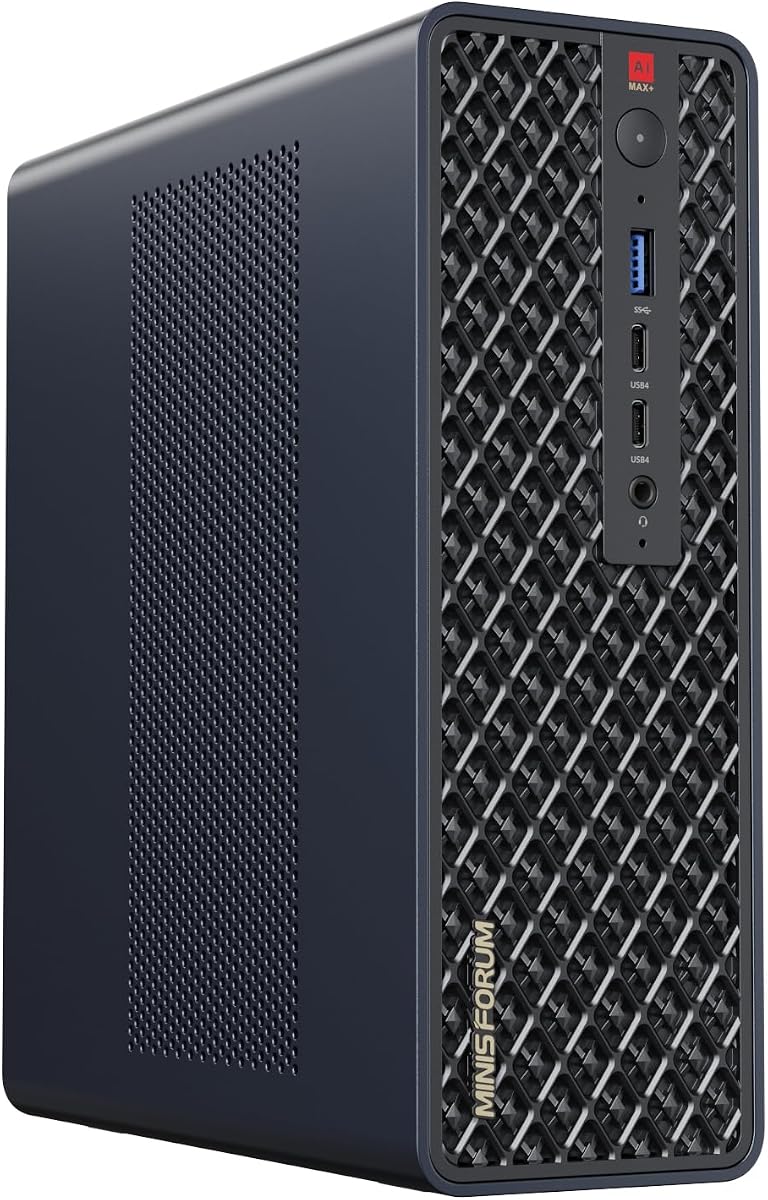
The MINISFORUM MS-S1 MAX offers an affordable entry point into local AI workloads. By utilizing 128GB of unified memory, it allows for running large models without the cost of dedicated VRAM hardware. This makes it a powerful choice for those needing local inference without the footprint of a full tower.
We may earn a commission when you buy through this link, at no additional cost to you.
The APU integrates a powerful CPU and GPU on a single chip. The system supports clustering with two units to run even larger models. This flexibility allows users to scale up by adding more units rather than replacing existing hardware.
The shared memory architecture means that peak performance might be slightly lower than discrete GPU solutions. Additionally, the thermal design relies on the internal cooling system which requires good airflow. These trade-offs are acceptable for the price and portability provided.
We recommend this mini PC for developers who need a space-saving solution for local testing. The ability to cluster units adds future-proofing that is rare in compact systems.
Unified memory simplifies the data path between CPU and GPU. This reduces latency and improves performance for many AI inference tasks.
Supporting dual-unit cluster configurations expands total memory pool. This allows for running models that would otherwise exceed single-device limits.
We may earn a commission when you buy through this link, at no additional cost to you.
This NVIDIA RTX PRO 6000 Max-Q GPU provides a powerful component for building a custom dual GPU setup. With 96GB of next-gen GDDR7 ECC memory it eliminates VRAM bottlenecks for heavy models. The Max-Q design ensures efficiency and thermal management suitable for desktop environments.
We may earn a commission when you buy through this link, at no additional cost to you.
Designed for multi-GPU scaling this card fits into standard desktops easily. The power consumption is capped at 300 watts making it easier to integrate into existing power supplies. This feature makes it ideal for research labs needing multiple GPU units without massive power upgrades.
Users must provide the chassis and motherboard to complete the setup. This adds complexity compared to buying a pre-built workstation. However, the flexibility to mix and match components allows for custom configurations tailored to specific needs.
We suggest this GPU for teams building custom AI clusters where size and efficiency are priorities. The ECC memory ensures reliability which is critical for long running training tasks.
The dual-slot design allows fitting two units in standard cases. This enables high VRAM capacity without needing a server rack.
Lower power consumption reduces electricity costs. This makes the system more cost-effective over the long term for 24/7 operations.
We may earn a commission when you buy through this link, at no additional cost to you.
The MINISFORUM MS-S1 Max is a versatile mini workstation for AI tasks. Its 128GB of RAM allows for running local language models effectively. The compact design makes it suitable for home offices or small studios where space is limited.
We may earn a commission when you buy through this link, at no additional cost to you.
The APU provides strong integrated graphics and NPU capabilities. The system supports up to five video outputs which is useful for monitoring multiple model outputs simultaneously. The inclusion of 10G LAN ports ensures fast network throughput for large data transfers.
Lack of a discrete GPU slot limits raw parallel compute power compared to tower systems. However, the unified memory architecture compensates for many inference tasks. Users needing heavy training should consider this more for prototyping than production.
We recommend this for developers needing a small form factor for local experimentation. The robust connectivity and memory capacity make it a capable tool for on-the-go AI development.
Multiple video outputs allow for expansive monitoring setups. This is helpful for tracking multiple AI streams simultaneously without clutter.
The cooling system is designed to be ultra-quiet. This ensures the system does not disrupt work environments during extended operation.
We may earn a commission when you buy through this link, at no additional cost to you.
Selecting the right dual GPU AI setup requires balancing raw compute power with memory capacity and thermal management. The following factors will help you identify a system that meets your specific workload needs.
VRAM capacity is the most critical factor for running large language models locally. Look for systems with at least 48GB of total VRAM if you plan to run quantized models above 70B parameters. Bandwidth determines how fast data moves between GPU and memory so higher bandwidth reduces bottlenecks.
Prioritize systems with ample memory bandwidth to ensure smooth inference without relying on system RAM.
The CPU must be powerful enough to handle data preprocessing and task scheduling. A high core count like Ryzen 9 or EPYC ensures that data loading keeps up with GPU processing. System RAM should ideally match or exceed VRAM for flexibility.
Choose a processor that offers sufficient threads to avoid slowing down the GPU during heavy tasks.
Dual GPU setups consume significant power so a robust PSU is essential for stability. Look for supplies rated for the combined wattage of both GPUs plus overhead. Thermal design including liquid cooling or high airflow fans prevents throttling during long sessions.
Ensure your workstation has enough cooling capacity to maintain stable temperatures under sustained loads.
Fast storage is vital for loading large datasets into memory quickly. NVMe SSDs with Gen5 support offer the best throughput for modern AI workloads. Capacity should be sufficient to store your training datasets and model weights.
Select storage with high read speeds to minimize the time spent waiting for data to load.
Compatibility with frameworks like PyTorch and TensorFlow is non-negotiable. Enterprise GPUs often have better driver stability for professional tools while consumer GPUs offer broader community support. Ensure the system supports your required OS version.
Check that the system supports the software libraries you rely on for your AI development.
Consider whether you need to add more GPUs or storage in the future. Desktop towers offer more expansion slots compared to mini PCs or racks. Rackmount systems are efficient but require specific infrastructure like raised floors.
Choose a form factor that allows for future upgrades if your workload grows over time.
While initial price is important consider the long-term costs including electricity and maintenance. Enterprise solutions may cost more upfront but offer better reliability and support. DIY builds can be cheaper but require technical knowledge to maintain.
Calculate the total cost of ownership to find the most cost-effective solution for your needs.
High-speed networking is important if you plan to access the system remotely or transfer large data. Look for 10GbE or faster ports to avoid bottlenecks in distributed setups. USB and Thunderbolt ports also matter for connecting peripherals.
Ensure your system has the necessary network speed to support your data transfer needs.
Always install the latest drivers provided by your GPU manufacturer before beginning any work. Outdated drivers can lead to compatibility issues with newer models and frameworks that may reduce efficiency. Regularly update your system software to maintain security and stability during operation.
Monitor temperatures and power usage during your first few hours of heavy usage to ensure stability. Thermal throttling can reduce performance if the cooling system is overwhelmed by the workload. Adjust fan speeds or improve airflow if you notice excessive heat buildup during tasks.
Perform regular backups of your models and data to protect against hardware failure. Even with ECC memory system components can fail and you need a way to recover your work quickly. Maintain a log of any errors encountered to help with troubleshooting if issues arise.
Yes consumer GPUs can be used for serious training especially if budget is a constraint. However professional GPUs offer better stability and driver support for enterprise workloads. Ensure your software stack supports the specific card you choose for best results.
For quantized models up to 70B parameters 48GB is generally sufficient. Larger models may require system RAM offloading which can slow performance significantly. Consider higher VRAM options if you plan to work with massive datasets or unquantized models.
You need a motherboard that supports GPU bifurcation to ensure full bandwidth. Standard boards may limit performance if lanes are not split correctly for multiple GPUs. Check the manual to confirm x8 + x8 lane distribution for dual configurations.
Use power management settings in your OS to limit maximum GPU power when not needed. This reduces heat and electricity costs without impacting performance during active workloads. Monitor your system power draw to avoid overloading your supply.
Most systems support major frameworks like PyTorch TensorFlow and vLLM. Check the manufacturer documentation for specific ISV support to ensure compatibility. Open-source models usually work out of the box with standard drivers.
Clean dust from filters and fans every three to six months depending on environment. Accumulated dust can block airflow and cause overheating. Use compressed air to clear vents without damaging components inside the chassis.
The WEELIAO MAXSUN Arc Pro B60 stands out as the top choice for those needing efficient local inference. The APC MES2X and ES620 offer higher performance options for professional environments. Consider your specific needs when selecting between budget and premium configurations.
Prioritize VRAM capacity and cooling when comparing systems to ensure longevity and performance. A balanced system with strong CPU support will provide better overall throughput. Match the hardware to your specific workflows to maximize return on investment.
Prices for these products can change quickly based on market demand. Check current listings to ensure you are getting the best deal available. Verify compatibility with your existing infrastructure before making your final purchase decision.