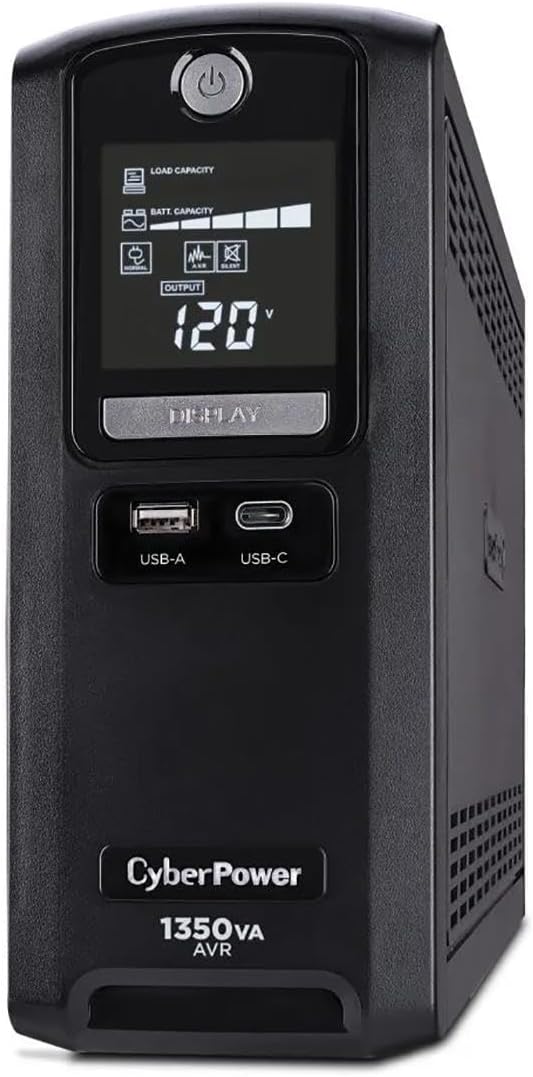
CyberPower CST135UC 1350VA/810W Simulated Sinewave LCD Battery Backup UPS System, Black
4.9Editor score
1350VA/810W Simulated Sinewave
10 Outlets with 5 Backup Protected
USB Charge Ports Included
This guide compares the top battery backup for small office setups, evaluating power capacity, surge protection, and runtime to ensure your critical workstation
Power outages can disrupt your small office workflow and cause costly data loss. A reliable battery backup ensures your computers and network devices stay online during interruptions, giving you time to save work or shut down safely.
We evaluated ten top-rated UPS models based on output capacity, outlet configuration, and protection features. Our analysis covers sine wave versus simulated waveforms, runtime performance under load, and included software for managing power events effectively.
Each selection highlights key strengths and ideal use cases for different office needs. While we provide detailed specifications and ratings, please note that prices and availability may change over time, so verify current details before purchasing.
4.9Editor score

4.5Editor score

4.5Editor score
This side-by-side comparison evaluates all ten selected battery backup units based on their power output, outlet types, protection features, and warranty terms to help you find the right fit for your office environment.


This CyberPower unit leads our list with its high-capacity PFC Sinewave output, making it ideal for small offices running active PFC power supplies. With a strong 4.5 rating, it delivers reliable protection and extensive connectivity options for your critical workstations and network gear.
We may earn a commission when you buy through this link, at no additional cost to you.
The 1500VA/1000W capacity ensures your devices stay powered through brief outages, while the 12 outlets provide ample space for computers, monitors, and routers. The color LCD panel offers real-time status updates, helping you monitor load and battery health easily.
While it costs more than basic models, the true sine wave protection prevents potential damage to sensitive electronics that simulated waveforms might cause. The connected equipment guarantee adds significant peace of mind for protecting valuable business assets from power-related failures.
If your office prioritizes equipment safety and performance, this UPS is a top recommendation. It balances power capacity with advanced protection features, ensuring your small office remains productive even when the grid fails unexpectedly during important work sessions.
The PFC Sinewave output ensures compatibility with modern power supplies that require a clean sine wave, reducing the risk of overheating or damage during battery operation.
The multifunction color LCD panel displays critical power metrics, allowing you to respond quickly to potential issues before they cause downtime or data loss.
We may earn a commission when you buy through this link, at no additional cost to you.
The CP1500AVRLCD3 offers a robust 1500VA capacity with Automatic Voltage Regulation to handle minor power fluctuations without draining the battery. Its 4.5 rating reflects solid performance for general office equipment and networking devices in typical environments.
We may earn a commission when you buy through this link, at no additional cost to you.
With 12 outlets and USB charging ports, it accommodates a wide range of devices, ensuring you can keep workstations and peripherals running during short interruptions. The color LCD panel provides clear visibility into power conditions and battery status at a glance.
While the simulated sine wave output is less precise than true sine wave, it remains suitable for most standard office computers and routers. The AVR feature helps extend battery life by correcting voltage issues before switching to backup power unnecessarily.
This model is a strong choice for small offices needing broad connectivity and voltage stability. It provides reliable backup power for everyday tasks, though users with high-end hardware should verify compatibility with simulated waveforms before purchasing.
AVR technology adjusts input voltage within a safe range without using battery power, preserving runtime for actual outages while protecting against brownouts and overvoltage conditions.
Twelve outlets and USB ports ensure you can power essential office hardware and charge mobile devices simultaneously, maintaining functionality even during extended power loss events.
We may earn a commission when you buy through this link, at no additional cost to you.
This Ecologic UPS is designed to reduce power consumption by automatically turning off power to peripherals when the main device is off. Its 4.4 rating indicates reliable performance for smaller setups focused on energy efficiency and cost savings.
We may earn a commission when you buy through this link, at no additional cost to you.
The 850VA capacity supports basic workstations and networking gear, while the 12 outlets offer flexibility for various office needs. The ECO feature helps lower energy costs by cutting power to non-essential devices like printers or monitors when not in use.
While not as powerful as higher VA models, it remains effective for light office use and devices that do not require heavy loads. The LCD panel keeps you informed about battery health, ensuring you can maintain readiness for unexpected outages.
Ideal for eco-conscious offices, this unit balances functionality with energy savings. It provides dependable backup power for essential equipment, making it a practical choice for environments prioritizing sustainability without sacrificing basic reliability.
ECO controlled outlets detect when connected devices are off or in sleep mode, automatically cutting power to peripherals to reduce waste and lower energy bills.
The multifunction LCD panel provides immediate access to detailed battery and power conditions, helping you manage your backup resources effectively and avoid surprises during an outage.
We may earn a commission when you buy through this link, at no additional cost to you.
The ST900U Standby UPS offers a slim profile ideal for crowded office desks, delivering reliable 900VA power for basic workstations and broadband routers. Its 4.5 rating highlights its effectiveness in safeguarding home office setups against common power issues.
We may earn a commission when you buy through this link, at no additional cost to you.
With 12 outlets including widely spaced ones, it accommodates larger plugs without blocking neighboring sockets. The GreenPower design reduces energy consumption, ensuring the unit itself does not add significantly to your office power usage.
While it lacks advanced voltage regulation, it provides essential surge protection and battery backup for critical equipment. The straightforward design makes it easy to use for anyone needing dependable protection without complex setup requirements.
Perfect for small offices with limited desk space, this UPS delivers essential protection efficiently. It supports essential devices like computers and routers, ensuring your workflow continues smoothly even when the main power supply fails unexpectedly.
The slim profile allows the UPS to fit neatly under desks or in tight spaces, minimizing its footprint while still providing sufficient outlets for essential office equipment.
GreenPower high efficiency design reduces overall power consumption, ensuring the backup unit itself operates efficiently and does not contribute excessively to energy costs.
We may earn a commission when you buy through this link, at no additional cost to you.
This unit offers exceptional value with its 1350VA capacity and extensive connectivity options, earning a high 4.9 rating from users. It provides reliable protection for small offices needing both power backup and data line security without a premium price tag.
We may earn a commission when you buy through this link, at no additional cost to you.
The 10 outlets and dual USB ports support a variety of devices, while network and coax protection safeguard against surges traveling through phone or cable lines. The Energy Star certification ensures efficient operation, keeping long-term costs low.
Although it uses a simulated sine wave, it works well for standard office equipment and routers. The extended runtime allows ample time to save work and shut down safely, making it a practical choice for remote workers and small teams.
For budget-conscious buyers, this model delivers robust features and performance. It balances capacity, connectivity, and protection effectively, ensuring your office remains functional during interruptions while keeping initial investment costs reasonable and manageable.
Network and coaxial protection guards against surges traveling through communication lines, protecting modems and routers from damage that standard power protection might miss.
With a 4.9 rating, users appreciate its reliability and feature set, confirming it delivers consistent performance and value for everyday office backup needs.
We may earn a commission when you buy through this link, at no additional cost to you.
The AVRG900LCD combines Automatic Voltage Regulation with data line protection to offer comprehensive safeguards for office setups. Its 4.6 rating reflects strong performance in maintaining stable power conditions during fluctuating grid situations.
We may earn a commission when you buy through this link, at no additional cost to you.
With 12 outlets, it supports multiple devices without needing additional power strips. The AVR function corrects minor voltage issues without using battery power, which extends runtime during actual outages and keeps connected equipment safe from electrical damage.
While it uses simulated sine wave, it remains suitable for most standard office computers and networking gear. The intelligent LCD provides clear status updates, ensuring you stay informed about power quality and battery health at all times.
This UPS is ideal for offices experiencing frequent voltage fluctuations. It offers essential protection features and ample connectivity, making it a solid choice for maintaining operational continuity in environments with unstable power inputs.
AVR adjusts input voltage automatically, protecting connected devices from brownouts or overvoltage while conserving battery life for genuine outages.
Integrated data line protection prevents surges from traveling through telephone lines, adding an extra layer of defense for networking and communication equipment.
We may earn a commission when you buy through this link, at no additional cost to you.
The BC450 is designed for minimal office setups, offering reliable protection for routers and small PCs. Its 4.2 rating indicates solid performance for basic devices where space is limited and advanced features are not necessary.
We may earn a commission when you buy through this link, at no additional cost to you.
With 8 outlets and wall mounting tabs, it fits neatly in tight spots without consuming valuable desk space. The slim profile keeps your workspace organized, and the silent operation ensures it does not add noise to your office environment.
While its output is lower than larger models, it provides enough power for essential networking gear and small peripherals. Easy battery replacement extends the unit's lifespan, offering a cost-effective solution for small offices on a tight budget.
Ideal for small spaces or minimal needs, this UPS provides essential backup and surge protection. It ensures your critical devices stay online briefly during outages, giving you time to save data or restart systems smoothly when power returns.
Bottom mounting tabs allow for secure wall installation, freeing up desk space while keeping the unit accessible and ready for use during emergencies.
Internal batteries are easily replaceable, ensuring the UPS remains effective over time without needing to buy a completely new unit when the battery ages.
We may earn a commission when you buy through this link, at no additional cost to you.
The BC350R offers essential protection for very basic setups like routers or small PCs. Its 4.5 rating suggests reliable performance for light tasks where high capacity is not required, making it suitable for minimal office configurations.
We may earn a commission when you buy through this link, at no additional cost to you.
With 6 outlets and wall mounting compatibility, it fits easily into tight spaces. The straightforward design ensures quick setup and minimal maintenance, allowing you to focus on work rather than troubleshooting power issues during outages.
Its lower output limits it to low-wattage devices, but it delivers solid surge protection and battery backup for those essential needs. The easy battery replacement feature ensures long-term usability without significant additional costs or complex maintenance procedures.
Best for minimal setups, this unit provides critical protection for essential networking gear. It keeps your connection alive during short outages, allowing you to save progress or maintain communication lines while power issues are resolved quickly.
Simple design ensures easy setup and operation, focusing on core protection needs without unnecessary features that complicate use or add cost.
Mounting slots allow for flexible placement options, helping you maximize available desk space by attaching the unit directly to a wall or shelf.
We may earn a commission when you buy through this link, at no additional cost to you.
The APC BE600M1 is designed to keep computers and routers running during outages, offering solid 600VA protection for essential devices. Its 4.5 rating reflects reliability for basic office needs, ensuring connectivity remains intact during interruptions.
We may earn a commission when you buy through this link, at no additional cost to you.
With 5 battery-backed outlets and 2 surge-only outlets, it supports core equipment efficiently. The built-in USB port keeps phones charged, ensuring you stay connected even when power fails, which is vital for communication during emergencies.
Easy battery replacement extends the unit's life, offering a cost-effective way to maintain protection. The well-spaced outlets accommodate bulky adapters, reducing frustration when connecting multiple devices to your backup system effectively and reliably.
A strong choice for home offices and small setups, this unit ensures your critical systems stay online. It provides just enough power to maintain work continuity during short outages, helping you avoid data loss and maintain productivity.
The built-in USB charging port keeps mobile devices powered during outages, ensuring you stay connected via phone or tablet even if wall power fails completely.
Designed for easy battery swaps, this model allows you to refresh the unit quickly without replacing the entire system, saving money and extending product life significantly.
We may earn a commission when you buy through this link, at no additional cost to you.
The ST425 is a basic standby UPS for small setups like routers or small PCs. Its 4.4 rating confirms reliable protection for minimal loads, making it suitable for small offices prioritizing essential backup without advanced features.
We may earn a commission when you buy through this link, at no additional cost to you.
With 8 outlets and transformer spacing, it accommodates various plug sizes efficiently. The slim profile saves desk space, ensuring the unit remains unobtrusive while providing necessary power support for your essential office gear and networking hardware.
While its capacity is limited, it offers sufficient backup for essential devices during short outages. The connected equipment guarantee adds value, ensuring protection for your hardware against power surges even with this entry-level model.
Best for small budgets and minimal setups, this unit delivers core backup functionality. It ensures your network stays active and devices remain safe during brief interruptions, providing peace of mind for basic office operations.
The slim design minimizes desk clutter, allowing the UPS to fit easily into tight spaces while still providing essential backup power for your most critical office devices.
The LED status light provides instant visual feedback on power conditions, helping you confirm that your devices are protected and the system is functioning properly at all times.
We may earn a commission when you buy through this link, at no additional cost to you.
Selecting the right battery backup involves evaluating power capacity, outlet configuration, and protection features. This guide breaks down the key factors to consider when choosing a UPS for your small office environment.
Power capacity, measured in VA and watts, determines how many devices you can connect and how long they will run during an outage. For small offices, look for at least 600VA to cover a computer and router, but consider higher capacities like 1500VA if you have multiple workstations or servers.
Always match your total load requirements to the UPS wattage rating to ensure reliable operation without overloading the system.
UPS units typically output either simulated sine wave or pure sine wave. Pure sine wave is recommended for devices with active PFC power supplies, such as high-end computers and servers, to prevent overheating or damage. Simulated sine wave works for most standard office equipment.
Choose pure sine wave if your office uses sensitive electronics or modern power supplies to ensure long-term safety and reliability.
Count the number of outlets needed for your computers, monitors, printers, and network gear. Many UPS models offer a mix of battery-backed and surge-only outlets, allowing you to connect non-critical peripherals to surge protection only to save battery life.
Ensure the UPS has enough outlets to avoid needing extra power strips, which can complicate cable management and increase clutter.
Automatic Voltage Regulation (AVR) corrects minor voltage fluctuations without using battery power, preserving runtime for actual outages. This feature is essential in areas with unstable power grids to prevent frequent battery drains and extend the unit's life.
If your office experiences frequent brownouts or surges, prioritize a model with robust AVR capabilities to maintain consistent power quality.
Runtime varies based on the load connected. Higher loads drain batteries faster, so consider how much time you need to save work or shut down safely. Look for units that offer extended runtimes at your expected operating load.
Batteries typically last 3 to 5 years and are replaceable, so choose a model with accessible batteries for easy maintenance and longevity.
Beyond battery backup, surge protection is vital to guard against sudden power spikes. Some units also include data line protection for phone, coax, or network cables, preventing damage from surges traveling through communication lines.
For offices with modems or routers, data line protection adds critical security against power-related damage to essential networking equipment.
Many modern UPS models come with management software allowing you to monitor battery health and perform automated shutdowns of connected devices during prolonged outages. Look for USB or network connectivity to enable these features.
Software monitoring helps prevent data loss by safely shutting down systems before the battery runs out, ensuring critical files are preserved during unexpected power failures.
A strong warranty, typically three years, covers the battery and unit. Some models include a connected equipment guarantee to protect your devices against damage from power surges if the UPS fails.
Prioritize units with comprehensive warranties and accessible technical support to ensure peace of mind and quick resolution of any potential issues with your power backup.
Proper placement and installation are crucial for safety and efficiency. Place the UPS on a flat, stable surface away from heat sources, moisture, and direct sunlight. Ensure ventilation grills remain clear to prevent overheating during operation.
Regular maintenance includes checking the LCD or LED indicators for battery health status. If the unit signals a low battery or fault, replace the internal battery promptly to maintain protection. Avoid leaving the UPS disconnected from a power source for extended periods.
Test the unit periodically by unplugging the power cord to simulate an outage. This confirms the battery activates correctly and devices stay powered. Keep the software updated for monitoring features and ensure cables remain secure and uncluttered.
For a small office with one or two computers and a router, a 600VA to 1000VA UPS is generally sufficient. If you have more devices or higher power equipment like servers, consider models with 1500VA capacity to ensure extended runtime and safe shutdown capabilities.
Yes, most battery backup units include surge protection for connected devices. This helps shield computers and networking gear from voltage spikes that can cause hardware damage, even when there is no actual power outage occurring.
A typical UPS battery lasts between three to five years depending on usage and environmental conditions. Factors like temperature and frequent discharge cycles can affect longevity. Replacing the battery restores full backup capability without needing to buy a new unit.
Yes, you can connect multiple monitors to a UPS provided the total load does not exceed its wattage rating. Keep track of your device power requirements to ensure the UPS has enough capacity to handle all connected equipment during an outage.
Battery backups are designed to provide power during short outages, allowing time to save data and shut down safely. Most units offer enough runtime for these essential tasks, depending on the load connected and the battery capacity available.
If the battery fails or degrades, the UPS will no longer provide backup power during outages, though it may still offer surge protection. Replacing the battery restores functionality and ensures your devices remain protected during future power interruptions.
Specialized software is optional but recommended for automated shutdowns and monitoring. It helps prevent data loss by shutting down connected systems before the battery runs out. Some units offer free software, making it easy to set up without extra costs.
We highlighted ten reliable battery backup options suitable for small offices, ranging from compact entry-level units to high-capacity models. Each product offers unique strengths, whether you prioritize power capacity, energy efficiency, or budget-friendly pricing.
When selecting a unit, focus on matching the capacity and features to your specific office needs. Consider waveform technology, outlet configuration, and additional protections like AVR or data line security to ensure comprehensive coverage.
Prices and availability may change, so verify current pricing and details before purchasing. Investing in the right battery backup safeguards your workflow, protects valuable equipment, and ensures your small office stays online when it matters most.