
SABRENT 74 in 1 3.5 Inch Internal Flash Media Card Reader
4.0Editor score
Supports 74 card types
Includes USB 2.0 port
Internal power connector
This guide compares the top internal media card readers for desktop PCs to help you choose the right model for high-speed data transfer and compatibility.
Choosing the right internal media card reader can significantly enhance your desktop workflow by providing direct access to various memory card formats. These devices integrate seamlessly into your computer case offering convenience and speed for photographers and content creators who need fast data transfer.
We have evaluated ten leading internal card readers based on compatibility speed and build quality. Each product was assessed for its ability to handle multiple card types simultaneously and its ease of installation into standard drive bays.
This guide showcases detailed reviews and specifications for each model to help you make an informed decision. Please note that pricing and availability are subject to change so verify current details before purchasing your next device.
4.0Editor score

4.5Editor score

5.0Editor score
The following table provides a side-by-side comparison of all ten internal media card readers featured in this guide. Review key specifications and features to determine which model best suits your specific desktop setup and workflow needs.


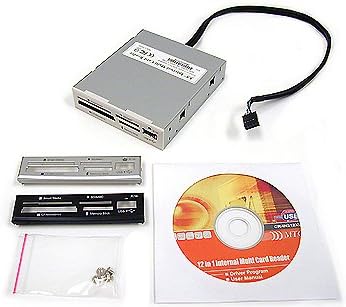
This StarTech internal card reader stands out as a top choice for professionals needing reliable and fast data access. With a 4.5 star rating it offers robust performance for videography and photography workflows.
We may earn a commission when you buy through this link, at no additional cost to you.
It supports a wide variety of flash card formats including CompactFlash SD and MemoryStick. The ability to access four different card slots simultaneously allows for efficient file transfers between media cards.
The setup is straightforward with OS independence supporting Windows macOS and Linux. While the price is higher the included cables and lifetime assistance make it a valuable investment for IT professionals.
If you need a durable solution for a desktop computer this model is highly recommended. It ensures secure internal power and efficient data handling for professional content creation tasks.
Accessing four different card slots simultaneously allows for efficient file transfers between media cards without needing to swap them manually.
Designed for IT professionals this TAA compliant reader offers lifetime assistance ensuring long-term reliability and support for business environments.
We may earn a commission when you buy through this link, at no additional cost to you.
The SABRENT reader is an excellent budget option for users needing access to a vast array of memory card formats. Its 4.0 star rating reflects solid reliability for everyday data transfer tasks.
We may earn a commission when you buy through this link, at no additional cost to you.
It supports 74 different types of memory cards including M2 XD and SD variants. The internal power connector ensures sufficient power for external USB devices connected via its built-in port.
While it uses USB 2.0 which limits speed compared to newer standards the versatility is unmatched at this price point. Most cards work directly but some may require adapters for proper fit.
For casual users or those on a tight budget this card reader offers exceptional value. It simplifies access to legacy media formats without breaking the bank.
Supports 74 different types of memory cards including M2 XD and SD variants making it versatile for various media needs.
The built-in USB 2.0 port allows you to connect external USB devices with sufficient power thanks to the internal connector.
We may earn a commission when you buy through this link, at no additional cost to you.
The Vantec Link internal card reader receives a perfect 5.0 star rating for its robust performance and extensive compatibility. It is ideal for users working with high capacity SD and MemoryStick media.
We may earn a commission when you buy through this link, at no additional cost to you.
It supports SD cards up to 2TB and offers quad data access for Memory Stick PRO-HG cards enhancing transmission rates. The Multi-LUN feature allows handling multiple card types efficiently within one device.
Installation requires a 20 pin header but the performance benefits justify the effort for professional setups. The reliable connectivity ensures stable data transfer for large media files.
For professionals requiring top-tier performance and reliability this model is a premium choice. It excels in handling high capacity and legacy MemoryStick formats effectively.
Supports SD cards up to 2TB allowing users to work with modern high capacity storage without compatibility issues.
Quad data access for Memory Stick PRO-HG cards significantly enhances transmission rates for compatible Sony media.
We may earn a commission when you buy through this link, at no additional cost to you.
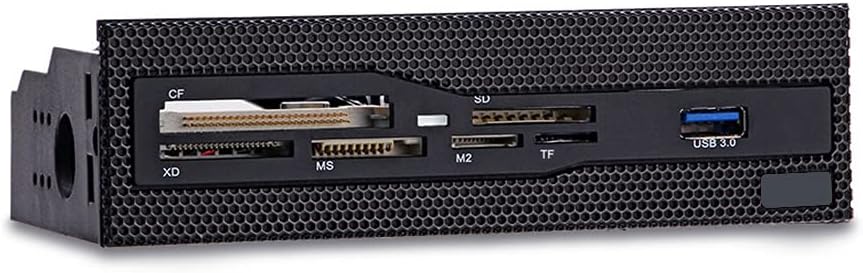
This 5.25 inch internal card reader integrates well with cases featuring a front mesh panel. Its 4.3 star rating highlights its reliable performance for users with compatible desktop chassis.
We may earn a commission when you buy through this link, at no additional cost to you.
It includes a high-speed USB 3.0 interface and six card slots for quick access to CF XD MS and TF formats. The copper-plated slots ensure stability during data transmission.
The grid panel design allows for easy and neat installation in standard 5.25 drive bays. While it lacks audio jacks the focus on card functionality is effective for many PC builders.
For those seeking a front-panel solution with high-speed data transfer this reader is a solid option. It balances ease of access with durable construction for daily use.
The high-speed front USB 3.0 interface enables efficient and easy data transmission for modern media files.
Copper-plated card slots ensure stability during transmission reducing errors and maintaining consistent read performance.
We may earn a commission when you buy through this link, at no additional cost to you.
This 5.25-inch media dashboard combines a USB 3.0 hub eSATA and a multi-format card reader for comprehensive front access. Its 3.8 star rating suggests mixed but generally functional experiences.
We may earn a commission when you buy through this link, at no additional cost to you.
It features dedicated front-panel audio jacks eliminating the need to reach behind the chassis. The eSATA support accelerates file transfers for creative professionals working with large media files.
Installation includes all necessary cables for USB and audio connectors making setup convenient for ATX cases. The durable ABS plastic construction withstands regular use while maintaining a sleek appearance.
Ideal for PC builders needing a full front panel solution this dashboard simplifies access to cards and ports. It addresses common connectivity needs in one integrated unit.
Combines USB 3.0 hub eSATA and a multi-format card reader offering versatile connectivity in one panel.
Dedicated front-panel audio jacks for speakers and microphone eliminate the need to reach behind your chassis.
We may earn a commission when you buy through this link, at no additional cost to you.
The TCC-QL5E dashboard offers a multifunctional front panel for PCs needing expanded connectivity options. It combines audio USB and card reading capabilities in a 5.25-inch format.
We may earn a commission when you buy through this link, at no additional cost to you.
It features a USB 3.0 port with transfer speeds up to 5Gbps and an eSATA port for high-speed external storage. The five-in-one card reader supports SD MMC CF MS TF and M2 formats.
Cabling includes multiple connectors for USB SATA and audio which may require careful management during installation. The LED indicators help track power and hard disk read/write status efficiently.
For users needing a versatile front panel with high data speeds this dashboard provides comprehensive access. It integrates well with various OS systems including Linux and older Windows versions.
USB 3.0 port transfer speed up to 5Gbps and eSATA port ensure efficient work efficiency for large files.
Audio port for front speakers and microphone solves the inconvenience of the plug behind your chassis.
We may earn a commission when you buy through this link, at no additional cost to you.
This Sony internal card reader is a reliable choice for users familiar with Sony's reputation for quality. With a 4.0 star rating it supports 17 memory card formats for versatile access.
We may earn a commission when you buy through this link, at no additional cost to you.
It includes black and ivory colored faceplates to match different case aesthetics. The included Drive Letter Recognition Software simplifies setup for Windows XP and Vista systems.
While the OS support is focused on older systems it remains useful for legacy setups or specific configurations. The build quality ensures steady performance for basic media card reading.
For those seeking a trusted brand name and straightforward installation this model is a solid option. It provides essential functionality for common card formats effectively.
Internal 17-in-1 Memory Card Reader supports a wide range of formats for various devices and uses.
Black and Ivory Colored Faceplates allow users to match the reader to their PC case aesthetics.
We may earn a commission when you buy through this link, at no additional cost to you.
This All-In-One internal card reader boasts a perfect 5.0 star rating indicating high customer satisfaction. It is designed for 2.5-inch internal slots offering a compact solution for desktop cases.
We may earn a commission when you buy through this link, at no additional cost to you.
It comes with black silver and white bezels allowing users to choose the best color match. The reliable high quality construction ensures steady performance for flash card reading.
While specific slot details are not fully detailed the general utility supports common flash card formats. It is a straightforward choice for users needing a simple internal reader.
For compact builds or smaller desktop setups this reader provides a clean and functional interface. Its high rating suggests it delivers on reliability and ease of use.
MTG ALL-IN-ONE 2.5in INTERNAL FLASH CARD READER fits perfectly into smaller drive bays for neat installs.
Retail with Black Silver and White Bezzels allows users to select the color that matches their setup.
We may earn a commission when you buy through this link, at no additional cost to you.
The Akasa internal card reader provides a convenient front-of-PC access point for various memory cards. With a 4.2 star rating it balances ease of use with reliable performance.
We may earn a commission when you buy through this link, at no additional cost to you.
It features six ports for media cards and includes an additional USB port for connectivity. Two LEDs indicate power card status and data transfer providing visual feedback.
Designed for a 3.5-inch bay it includes two front fascia panels for style flexibility. This setup is ideal for users wanting quick access without opening the case.
For general desktop users needing a straightforward front reader this model offers practicality. The extra USB port adds value for connecting other peripheral devices quickly.
This 6-port media card reader allows reading of all popular memory cards in one convenient place.
Two LEDs indicate power on card in and data transfer providing clear visual status updates.
We may earn a commission when you buy through this link, at no additional cost to you.
This MTG internal card reader supports 22 different card formats making it a versatile option for legacy media. While no rating is provided the design emphasizes durability with a metal case.
We may earn a commission when you buy through this link, at no additional cost to you.
It offers hot swappable and Plug Play capability for easy installation and use. Four slots can be used simultaneously for data exchange improving workflow efficiency.
The metal case fits a 3.5-inch drive bay ensuring a secure and stable fit. It includes beige black and silver color bezels for customization options.
For users needing support for a wide range of formats this reader covers many bases. The metal construction and multiple bezel options add to its practical utility.
Metal case fits to 3.5inch drive bay installation providing a sturdy and reliable housing for internal use.
Four slots can be used at the same time for data exchange allowing faster workflow between cards.
We may earn a commission when you buy through this link, at no additional cost to you.
Selecting the right internal media card reader involves considering several key factors to ensure compatibility and performance with your specific system.
Check whether your desktop case has 3.5-inch or 5.25-inch drive bays before purchasing. Most internal readers are designed for 3.5-inch slots but some models require larger 5.25-inch openings for installation.
Verify your case's available drive bay sizes to avoid purchasing a unit that will not fit.
Ensure the reader supports the specific memory card types you use such as SD CompactFlash or MemoryStick. Many models support multiple formats but some may require adapters for newer or niche cards.
Look for readers listing support for your required formats to ensure seamless data transfer.
USB 3.0 readers provide faster data transfer speeds compared to USB 2.0 models which is crucial for large media files. Check whether the unit requires a 20-pin header for internal connection.
Choose USB 3.0 models for high-speed performance and verify motherboard header availability.
Internal readers typically draw power from the motherboard or internal connectors which can be more reliable than external bus-powered devices. Ensure your power supply and motherboard headers match the reader's needs.
Confirm power connector compatibility to avoid connection issues or insufficient power.
Most modern readers support Windows macOS and Linux but older models may have limited driver support for newer systems. Check the product specifications for operating system compatibility lists.
Ensure the reader is compatible with your current OS to avoid driver installation issues.
Metal or high-quality plastic casings provide better protection against physical stress and heat compared to cheaper materials. Look for units with sturdy construction and reliable connectors.
Prioritize durable builds to extend the lifespan of your internal card reader.
Some models include extra USB ports audio jacks or LED indicators for status tracking. These features add convenience but may increase the price and installation complexity.
Decide if extra features like USB ports or audio jacks are necessary for your workflow.
Manufacturer warranty length and support availability can impact long-term satisfaction. IT-focused models often come with longer warranties and professional assistance options.
Check warranty terms to ensure adequate protection and support for your purchase.
Before installation power down your computer and unplug it from the outlet to ensure safety. Open the case and locate an appropriate empty drive bay matching the reader's size requirements.
Connect the data cables to the motherboard headers and secure the reader with screws. Ensure all connections are tight and secure before closing the case to prevent future disconnection issues.
Insert memory cards gently into the correct slots to avoid damaging connectors. Regularly clean dust from the card slots with compressed air to maintain optimal performance.
Most modern internal card readers are plug-and-play and work without additional drivers on Windows macOS and Linux. However older or specialized models may require specific drivers available from the manufacturer.
Internal card readers are designed to connect directly to a desktop computer's motherboard and power supply. They cannot be used with laptops or external systems without specialized adapter kits.
USB 3.0 provides significantly faster data transfer speeds up to 5Gbps compared to 480Mbps on USB 2.0. This makes USB 3.0 preferable for transferring large media files quickly and efficiently.
Yes most internal card readers support hot-swapping allowing you to insert or remove cards without restarting the computer. Always ensure the system is ready for new card detection before removal.
Check your case's specifications or open the side panel to measure the drive bay dimensions. Standard sizes are typically 3.5 inches for internal readers or 5.25 inches for larger panels.
Many modern readers support high capacity SDXC cards up to 2TB but check individual product specifications. Older models may be limited to SDHC cards with lower maximum capacity.
We reviewed ten top internal media card readers ranging from budget-friendly options to premium professional models. Each offers unique features tailored to different desktop needs and connectivity requirements.
Prioritize compatibility with your drive bay size and memory card formats before focusing on speed and extra features. High-speed USB 3.0 readers are ideal for professional content creators.
Always check current pricing and availability before purchasing to ensure you get the best value. Verify all connection requirements match your motherboard and case setup for seamless installation.