
WWZMDiB CH341A EEPROM BIOS Programmer
4.1Editor score
Supports 24 25 series chips
Includes SOIC8 SOP8 test clip
No welding required for connection
This guide compares the top bios flash tools available in October 2026 including programmers clips and bootable utilities to help technicians choose the right
Selecting the right bios flash tool is essential for technicians and enthusiasts who need to update firmware or recover systems. These devices range from hardware programmers that interface directly with chips to bootable utilities that restore operating systems when standard methods fail.
We evaluated ten distinct products based on compatibility speed and ease of use to create this comprehensive list. Our analysis covers hardware programmers for EEPROM and SPI chips as well as recovery drives designed for Windows and Linux environments to ensure broad utility.
Each pick highlights specific strengths such as voltage support or clip quality to help you match the tool to your needs. Prices and availability change frequently so please verify current details on the product pages before making a final purchase decision today.
4.1Editor score
4.4Editor score

4.3Editor score
The following table provides a side-by-side comparison of all ten selected bios flash tools and recovery utilities. Each entry lists key specifications to help you quickly identify which device meets your specific technical requirements for flashing or system repair.





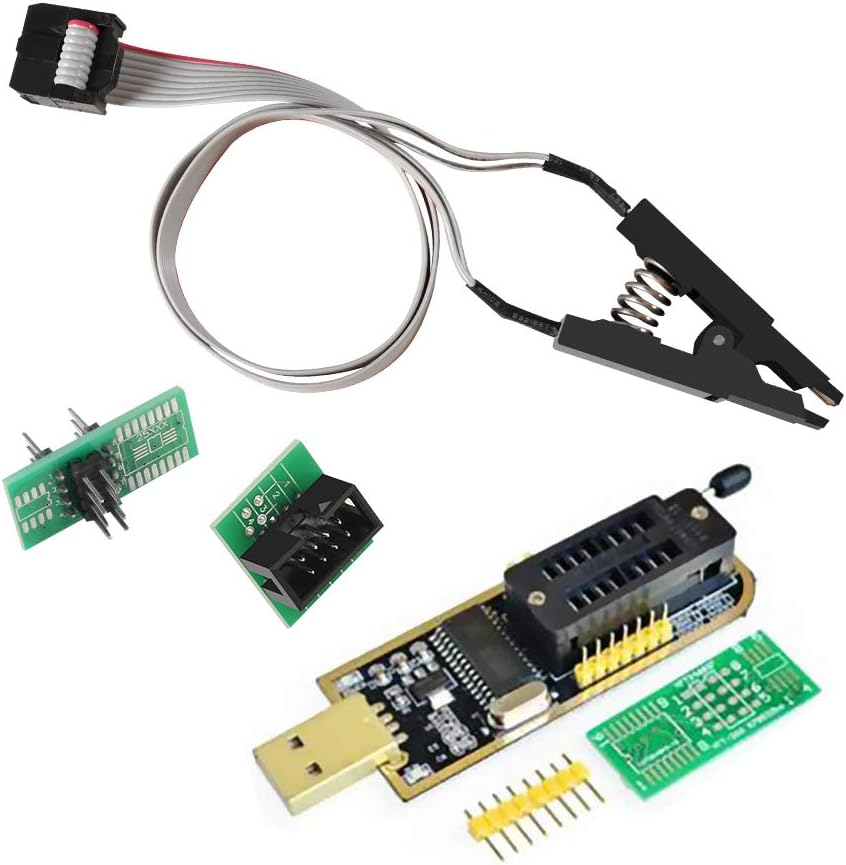
The WWZMDiB CH341A EEPROM BIOS Programmer is a solid entry-level hardware solution for anyone needing to flash or backup BIOS chips. It comes with a complete set including the programmer and a test clip so you can start working right away without extra purchases.
We may earn a commission when you buy through this link, at no additional cost to you.
Its main strength lies in its compatibility with most 24 and 25 series chips which are common in motherboards and routers. The included clip allows for in-circuit programming which saves time compared to desoldering components every time you need a quick firmware update.
While it works well for basic tasks the software support is not as polished as more expensive kits and it only supports specific voltage ranges. You must confirm the chip voltage before connecting to avoid damage which adds a small step to your workflow.
This tool is ideal for hobbyists or technicians who need a reliable cheap option for standard EEPROM and SPI flash operations. It provides the core functionality needed for most recovery tasks without breaking the bank on advanced features.
The package includes the programmer clip and conversion plates so you have everything needed to begin flashing immediately.
The test clip allows you to program chips while they are still on the motherboard reducing disassembly time significantly.
We may earn a commission when you buy through this link, at no additional cost to you.
The ACEIRMC SOIC8 SOP8 Flash Chip Test Clip offers a highly rated solution for technicians who prioritize efficiency during firmware updates. It pairs perfectly with the CH341A programmer to enable seamless in-circuit programming without removing chips from the board.
We may earn a commission when you buy through this link, at no additional cost to you.
Its standout feature is the dual clip setup which allows for easier handling and better stability when attaching to small ICs. The clip is designed to work with standard 24CXX and 25CXX chips ensuring broad utility across many laptop and desktop motherboard repairs.
Some users may find that peripheral circuits on certain boards interfere with the clip connection requiring chip removal for successful flashing. This is a known limitation of in-circuit tools but the overall speed gain usually outweighs this inconvenience for most standard cases.
We recommend this kit for professionals who need a dependable way to flash BIOS chips regularly on common hardware. It balances cost and performance effectively making it a top choice for repair shops and advanced DIY users alike.
The double clip design ensures a firm grip on the IC reducing connection errors during the flashing process.
Supports most 24 and 25 series chips found in modern electronics for versatile application across devices.
We may earn a commission when you buy through this link, at no additional cost to you.
This Password Reset Bootable USB provides a straightforward way to unlock forgotten user accounts on Windows and Linux machines. It supports both Legacy BIOS and UEFI boot modes which makes it versatile for older systems as well as modern ones.
We may earn a commission when you buy through this link, at no additional cost to you.
The tool is designed for simplicity allowing you to reset passwords without reinstalling the operating system or losing personal files. The user-friendly interface guides you through each step so you do not need deep technical knowledge to restore access quickly.
While it excels at password recovery it is more specialized than general-purpose repair tools. Some users report mixed results depending on the specific Windows version or encryption settings so checking compatibility before use is always a good practice.
This drive is best suited for IT admins or home users who need a quick fix for locked out systems without data loss. Its broad compatibility and offline nature make it a valuable addition to any technician emergency toolkit.
The tool runs entirely from the USB drive so no internet connection is required to restore system access.
Supports nearly all laptops and desktops from Windows 2000 to 11 plus most Linux distributions for broad utility.
We may earn a commission when you buy through this link, at no additional cost to you.
This Bootable USB Drive for Windows 11 is specifically designed to install or repair Windows systems without requiring a Trusted Platform Module. It is ideal for users with older hardware that does not meet the standard Windows 11 system requirements.
We may earn a commission when you buy through this link, at no additional cost to you.
The drive supports both UEFI and Legacy boot modes ensuring it can be used on a wide range of machines including those with older BIOS chips. It simplifies the setup process by providing a ready-to-use installer that boots directly from the USB port.
It is important to note that this tool only handles the Windows operating system and does not diagnose hardware failures like bad RAM. If your computer will not power on or enter BIOS this drive will not resolve the issue so verify functionality first.
For anyone trying to upgrade to Windows 11 on unsupported hardware this drive offers a clear path forward. It is a practical solution for system builders or home users who need a flexible installer without extra configuration.
Removes the TPM requirement so users can install Windows 11 on hardware that would otherwise be blocked.
Compatible with both UEFI and Legacy BIOS modes allowing use on older and newer computers seamlessly.
We may earn a commission when you buy through this link, at no additional cost to you.
The ACEIRMC SOIC8 SOP8 Test Clip Kit builds on the standard CH341A by adding a 1.8V adapter and a conversion module for broader chip support. It is designed for users who need to flash more specialized chips like 1.8V SPI Flash Memory.
We may earn a commission when you buy through this link, at no additional cost to you.
The erasing speed for this kit is significantly faster than older ATMEGA8 based programmers which saves valuable time during bulk operations. The included adapter allows for safe operation on delicate chips that would otherwise be damaged by higher voltage levels.
While it offers more power than the basic version the setup is slightly more involved and you need to select the correct adapter for each chip type. This is a minor trade-off given the increased versatility and ability to work with low voltage components.
This kit is perfect for repair technicians who encounter a variety of devices from TVs to laptops that use different flash standards. The extra adapter and module ensure you are ready for almost any EEPROM or SPI flash task.
The 1.8V adapter allows safe programming of low voltage chips that standard programmers cannot handle.
Erasing and programming are up to three times faster than older models for efficient workflow.
We may earn a commission when you buy through this link, at no additional cost to you.
The EZP2023 USB Programmer is marketed as the fastest BIOS chip programmer on the market with impressive read and write times for common chips like EN25T80. It offers a premium experience for professionals who need speed and reliability in high-volume repair environments.
We may earn a commission when you buy through this link, at no additional cost to you.
One of its key features is automatic chip model identification which reduces the chance of human error during selection. It also detects whether a chip is properly placed and selects the supply voltage automatically streamlining the workflow for complex tasks.
Although it covers most 25 series chips automatically some EEPROM series still require manual selection which adds a small manual step. However the included set of adapters ensures you can connect to a wide variety of package types without buying extra tools.
This device is the top choice for professionals who demand maximum performance and minimal downtime during repairs. The combination of speed automation and broad adapter support justifies the higher cost for serious users.
Reads chips in seconds and writes in under ten seconds which is significantly faster than standard tools.
Automatically identifies chip models and supply voltage to prevent configuration errors.
We may earn a commission when you buy through this link, at no additional cost to you.
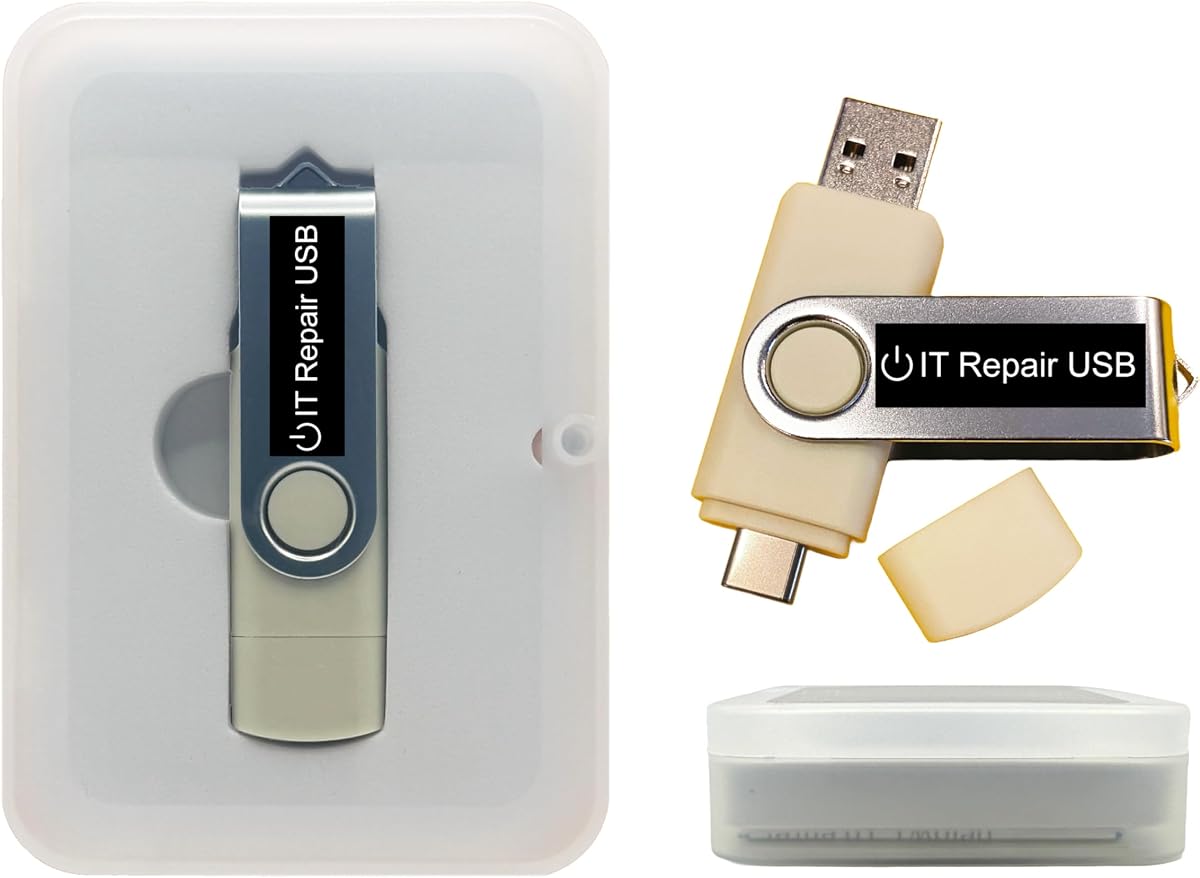
This Windows PC Repair Bootable USB Recovery Toolkit is designed as a comprehensive all-in-one solution for system rescue and recovery tasks. It includes tools for diagnostics malware removal and file recovery making it a versatile choice for technicians.
We may earn a commission when you buy through this link, at no additional cost to you.
You can run the toolkit directly from the USB drive as a Live OS which allows you to diagnose issues without modifying the installed operating system. The interface is user-friendly and guides you through fixing startup problems or recovering lost files.
While it offers a wide range of tools the rating is lower than simpler password reset drives which may indicate occasional software quirks. The ability to customize the USB with your own bootable ISOs adds flexibility for tailored repair needs.
This drive is suitable for IT professionals who need a single tool to handle multiple types of system failures. Its offline nature and file recovery options make it a valuable asset for business environments.
The toolkit runs from USB without needing an internet connection so you can work in any environment.
You can add or replace ISOs to customize the toolkit for specific system needs.
We may earn a commission when you buy through this link, at no additional cost to you.
The SOP16 IC Test Clip is specifically designed for 16 pin chips which are common in certain BIOS and flash memory applications. It supports both wide and narrow body chips ensuring you can work with a variety of physical package sizes.
We may earn a commission when you buy through this link, at no additional cost to you.
Its connection is built to be stable with a hardened clip and gold plated pins that ensure reliable contact during programming. The 40cm connection line gives you enough slack to manage the clip comfortably while working on cramped motherboards.
Keep in mind that in-circuit programming depends on the specific board and programmer used so some boards may still require chip removal. This is a standard limitation for test clips but the build quality helps maximize successful connections when possible.
This clip is an excellent addition for technicians who frequently encounter 16 pin flash chips that standard 8 pin clips cannot handle. It improves efficiency for those specific tasks by allowing in-circuit updates without soldering.
Supports 150 to 300 MIL bodies so you can use it on many different chip sizes.
Gold plated pins and a hardened clip ensure long lasting performance during repeated use.
We may earn a commission when you buy through this link, at no additional cost to you.
This Bootable USB for Windows 11 and 10 stands out because it works with Secure Boot enabled so you do not need to change BIOS settings. It ensures you get the latest official Windows images directly from Microsoft which maintains system security.
We may earn a commission when you buy through this link, at no additional cost to you.
The tool is designed for 64-bit systems with UEFI BIOS which covers most PCs from 2013 and newer. It simplifies the recovery process by handling the download and installation of genuine Windows copies so you avoid outdated or pirated ISOs.
Because it does not support Legacy BIOS it is strictly for modern hardware so check your system architecture before purchasing. The US-based support team also provides real-time assistance which is helpful if you encounter issues during setup.
This drive is the best choice for users with modern machines who want a secure and straightforward reinstall process. The Secure Boot compatibility saves time and reduces complexity for standard recovery tasks on recent devices.
Unlike many recovery tools this works with Secure Boot enabled so you skip BIOS configuration steps.
Downloads the latest official Windows copies directly from Microsoft to ensure security and compatibility.
We may earn a commission when you buy through this link, at no additional cost to you.
This Kali Linux Bootable USB provides a professional-grade platform for ethical hackers and cybersecurity researchers who need immediate access to security tools. It includes over 600 pre-installed tools for penetration testing and vulnerability assessment right out of the box.
We may earn a commission when you buy through this link, at no additional cost to you.
The drive supports both amd64 and arm64 builds so you can run it on Intel AMD or ARM-based PCs. It allows you to run Kali directly from the USB without installing it or use the customizable features to tailor the environment to your needs.
While it is powerful it is a specialized tool meant for security audits rather than general system repair. It requires some technical knowledge to use effectively but provides a trusted environment for serious security professionals.
This USB is ideal for security teams and researchers who need a portable secure workstation for audits. The ability to run without modifying the host system keeps the testing environment clean and isolated.
Carry a full security toolkit in your pocket to run audits without modifying the host system.
Supports both amd64 and arm64 so you can use it on a wide range of devices.
We may earn a commission when you buy through this link, at no additional cost to you.
Choosing the right bios flash tool depends on your specific hardware and the types of chips you need to program. Consider the factors below to ensure you select a device that meets your technical requirements.
The most critical factor is whether the tool supports the specific chip series you work with such as 24 25 or 93 series. Check the product description for listed chip sets to ensure it covers your common devices.
Always verify that the tool supports the exact model numbers you encounter to avoid buying a device that cannot read or write your targets.
Modern chips often operate at different voltages like 1.8V or 3.3V so the programmer must support these levels to prevent damage. Some kits include adapters to switch voltages which is essential for low-voltage components.
Ensure the tool supports multiple voltage ranges to safely program both older and newer chips without burning them.
A high-quality test clip ensures a stable connection during programming which reduces errors and failed writes. Look for hardened clips with gold plated pins that fit tightly on the chip pins.
Invest in clips that offer reliable contact because poor connections often lead to corrupted firmware writes.
Read and write speed impacts your workflow especially if you perform many updates daily. Tools with faster processors can save significant time over slower models.
Choose a programmer with high-speed capabilities if you need to process large amounts of data quickly.
The accompanying software should be user-friendly and support the operating system you use such as Windows or Linux. Good software helps identify chips and manage firmware files easily.
Check for software updates and community support to ensure the tool remains functional over time.
If you use bootable USB recovery tools ensure they support both Legacy BIOS and UEFI modes. Many modern systems require UEFI so a tool that lacks this support will be useless on new hardware.
Always check the boot mode requirements to match your system's BIOS configuration.
Some USB drives allow you to add or replace bootable ISOs which increases flexibility for different repair scenarios. This feature lets you build a custom toolkit tailored to your specific needs.
Look for customizable options if you want to adapt the tool to a wider range of recovery tasks.
Tools from established brands often come with better documentation and customer support which can be vital when troubleshooting issues. Check user reviews to gauge reliability and satisfaction with the product.
Prefer products with positive feedback from other technicians to ensure a smoother experience.
Always check the voltage requirements of the chip before connecting it to the programmer to prevent accidental damage. Most chips require 3.3V or 5V but newer ones may need 1.8V so use the correct adapter.
For in-circuit programming ensure no peripheral components interfere with the connection by checking the board layout before clipping on the tool. If errors occur try removing the chip to program it separately.
Store your tools in a dry static-free environment and keep clips clean to maintain reliable connections over time. Regularly update the software drivers to ensure compatibility with your operating system.
Not every tool works on all computers because compatibility depends on the chip series and BIOS mode. You should verify that the tool supports your specific hardware configuration before purchasing.
Some kits include multiple adapters but others may require you to purchase additional ones for non-standard chips. Check what is included in the package to see if you have what you need.
Peripheral circuits on the board may interfere with the clip connection so you may need to desolder the chip to program it. This is a common limitation of in-circuit tools.
Yes software support is essential because it handles the communication between the USB and the chip. Ensure the software runs on your operating system and supports your chip models.
You must identify the chip model and check its datasheet for the required voltage. Using the wrong voltage can permanently damage the component.
No bootable USB tools are for operating system recovery while programmers flash hardware chips directly. They serve different purposes but both help in system repair.
Most tools require a specific driver to communicate with the USB port. Install the drivers provided by the manufacturer before connecting the device.
If the computer does not power on at all a hardware programmer may not help until the system has some power. These tools usually require the board to be partially active.
The ten tools reviewed here cover a wide range of needs from affordable hobbyist kits to professional grade programmers. Select the option that best matches your budget and the types of chips you handle regularly.
Prioritize compatibility and voltage support to ensure you can work safely across different devices without risking damage. A tool that adapts to various scenarios will save you time and money in the long run.
Remember to check current availability and pricing before finalizing your purchase since these details can change quickly. Use the links provided to get the most up-to-date information from trusted retailers.