
FANTECH Maxfit61
4.6Editor score
60 percent compact layout
Hot swappable switch support
RGB backlight modes included
Discover the top 5 pin hot swappable keyboard models for 2026. This guide compares features, build quality, and customization options to help you choose.
Finding the right 5 pin hot swappable keyboard can transform your typing and gaming experience. These boards allow you to change switches easily without soldering, offering incredible flexibility for enthusiasts and professionals alike.
We evaluated ten top-rated models based on build quality, switch compatibility, and user feedback. Each product was selected for its ability to deliver reliable performance and customization options across different budgets and use cases.
Every pick highlights specific strengths like wireless connectivity, RGB lighting, or compact layouts. Keep in mind that prices and availability may change over time, so verify current details before making your final purchase decision.
4.6Editor score

4.4Editor score

4.5Editor score
The following table provides a side-by-side comparison of all ten selected keyboards, highlighting key specifications and unique features to help you quickly identify the best fit for your needs.



The Redragon K617 offers a compact 60 percent layout ideal for gamers needing desk space. It holds a strong rating due to its reliable hot-swap capability and vibrant RGB lighting.
We may earn a commission when you buy through this link, at no additional cost to you.
Its upgraded socket accepts both 3-pin and 5-pin switches, allowing extensive customization without soldering. The stock switches are smooth and quiet, suitable for shared environments.
While the software is functional, it lacks some advanced scripting found in higher-end models. The lack of wireless connectivity might be a limitation for users needing flexibility.
This board is perfect for budget-conscious gamers wanting a clean setup with room for mouse movement. It delivers reliable performance without breaking the bank.
Removing the numpad frees up desk space for wider mouse sweeps and better aim.
Hot-swappable sockets let you change switches quickly to match your typing preference.
We may earn a commission when you buy through this link, at no additional cost to you.
The TECWARE Phantom+ Elite TKL stands out for its versatile connectivity and premium build. It earns Editor's Choice for balancing wireless freedom with robust customization options.
We may earn a commission when you buy through this link, at no additional cost to you.
Its triple mode connectivity allows switching between Bluetooth, 2.4GHz, and wired modes instantly. The PBT keycaps and multi-layer foam create a satisfying thocky sound profile.
Battery life is excellent, lasting up to 250 hours on a single charge. However, the added features come with a higher price point compared to basic wired models.
Ideal for professionals and gamers who need flexibility across devices. The wireless performance ensures you stay connected without compromising on mechanical feel.
Switch between three connection modes seamlessly for multi-device productivity and gaming.
Sound dampening foam and V3 stabilizers deliver a deep, satisfying typing experience.
We may earn a commission when you buy through this link, at no additional cost to you.
This specialized keypad offers a unique approach to customization with programmable macro functions. It is designed for users needing quick access to specific commands or shortcuts.
We may earn a commission when you buy through this link, at no additional cost to you.
Each button can be set independently, allowing for complex workflows without interfering with the main keyboard. The USB interface ensures reliable connectivity without needing drivers.
The software setup might require some technical adjustment on different operating systems. It is best used as a secondary input device rather than a primary typing tool.
Great for gamers needing specific quick macros or streamers requiring hotkeys. Its compact size fits easily on any desk setup alongside a main keyboard.
Program each key independently to trigger specific actions or complex command sequences.
HID standard ensures it works immediately without installing extra drivers on most systems.
We may earn a commission when you buy through this link, at no additional cost to you.
The Keychron V6 8K delivers top-tier performance with an 8000Hz polling rate and open-source firmware. It is the premium choice for professionals demanding speed and total control.
We may earn a commission when you buy through this link, at no additional cost to you.
Features like the programmable knob and OSA PBT keycaps enhance daily usability. The hot-swappable sockets support a wide range of switches for tailored typing feel.
While the cost is higher, the build quality and feature set justify the investment. It works seamlessly across macOS, Windows, and Linux without compromising functionality.
Best for power users and enthusiasts who value performance and customization. The robust construction ensures reliability over years of heavy typing sessions.
QMK firmware allows deep customization of keys, macros, and system shortcuts.
ASA PBT keycaps resist shine and provide a durable, high-quality typing surface.
We may earn a commission when you buy through this link, at no additional cost to you.
The Keychron C1 TKL simplifies typing with a reliable hot-swappable TKL layout. It achieves a high rating for its compatibility with Mac and Windows systems.
We may earn a commission when you buy through this link, at no additional cost to you.
Pre-installed Gateron switches offer a tactile feel that balances responsiveness and quietness. The white backlight provides clear visibility without the distraction of complex lighting.
Although it lacks RGB, the focus on functionality makes it a solid choice for work. The inclined frame and adjustable feet ensure comfortable use over long sessions.
Recommended for professionals who want a straightforward, high-quality keyboard. Its robust build ensures it withstands daily use in office environments.
Includes extra keycaps to support seamless switching between macOS and Windows.
Adjustable feet and inclined frame help maintain a natural wrist posture.
We may earn a commission when you buy through this link, at no additional cost to you.
The RK61 offers a portable 60 percent layout with QMK/VIA programmability. It is a strong contender for gamers needing space-saving design without sacrificing customization.
We may earn a commission when you buy through this link, at no additional cost to you.
Pre-lubed red switches ensure smooth keystrokes right out of the box. The RGB effects and dedicated software allow for personalized setups to match your style.
While the layout requires adapting to missing function keys, the portability is a major advantage. VIA support allows for online profile saving across devices.
Ideal for students and mobile gamers who need a versatile board. Its build quality supports rigorous gaming sessions without compromising performance.
Compact design saves desk space and is easy to transport to different locations.
Online VIA compatibility lets you save configurations easily across multiple machines.
We may earn a commission when you buy through this link, at no additional cost to you.
This listing focuses on versatile hot-swap switches rather than a full keyboard unit. It is designed for enthusiasts looking to upgrade existing mechanical setups.
We may earn a commission when you buy through this link, at no additional cost to you.
Constructed from PA66 and POM materials, these switches offer consistent performance and durability. They are lubricated for quieter operation, suitable for quiet environments.
Since it is just a component, compatibility depends on your existing board's socket type. It is a great add-on for customizing typing feel without buying a new board.
Best for DIYers wanting to refine their current mechanical keyboard setup. These switches provide a reliable way to enhance audio and tactile feedback.
Meticulous lubrication reduces noise for peaceful typing in shared spaces.
PA66 and POM ensure longevity and consistent performance over extended use.
We may earn a commission when you buy through this link, at no additional cost to you.
The X82 integrates a dedicated volume knob into a compact 60 percent layout. This feature enhances media control, making it a practical choice for daily users.
We may earn a commission when you buy through this link, at no additional cost to you.
Its RGB lighting features over 20 modes, allowing for dynamic visual effects. The hot-swap PCB supports various switches to refine the typing experience.
While the build is decent, it lacks the depth of firmware found in higher-end boards. The metal knob adds a premium touch at a budget-friendly price point.
Perfect for casual gamers and streamers needing quick audio adjustments. It balances functionality and cost effectively for everyday desk setups.
Integrated metal knob provides quick access to volume and media playback.
Over 20 RGB modes allow you to customize the look of your desk.
We may earn a commission when you buy through this link, at no additional cost to you.
The FANTECH Maxfit61 is a top value pick for budget-conscious buyers. It features a standard 60 percent layout with hot-swappable capabilities for endless tweaking.
We may earn a commission when you buy through this link, at no additional cost to you.
Pre-lubed stabilizers provide smooth keystrokes for larger keys like Enter and Shift. The RGB backlight offers adjustable brightness and flow modes for visual flair.
While the stock blue switches are clicky, the hot-swap feature lets you change them easily. Build quality is solid for the price, ensuring decent longevity.
Ideal for beginners starting their mechanical keyboard journey. It delivers essential features without the high cost of premium brands.
One of the most affordable options with full mechanical features and hot-swap support.
Hot-swap sockets allow you to upgrade switches as your preferences change.
We may earn a commission when you buy through this link, at no additional cost to you.
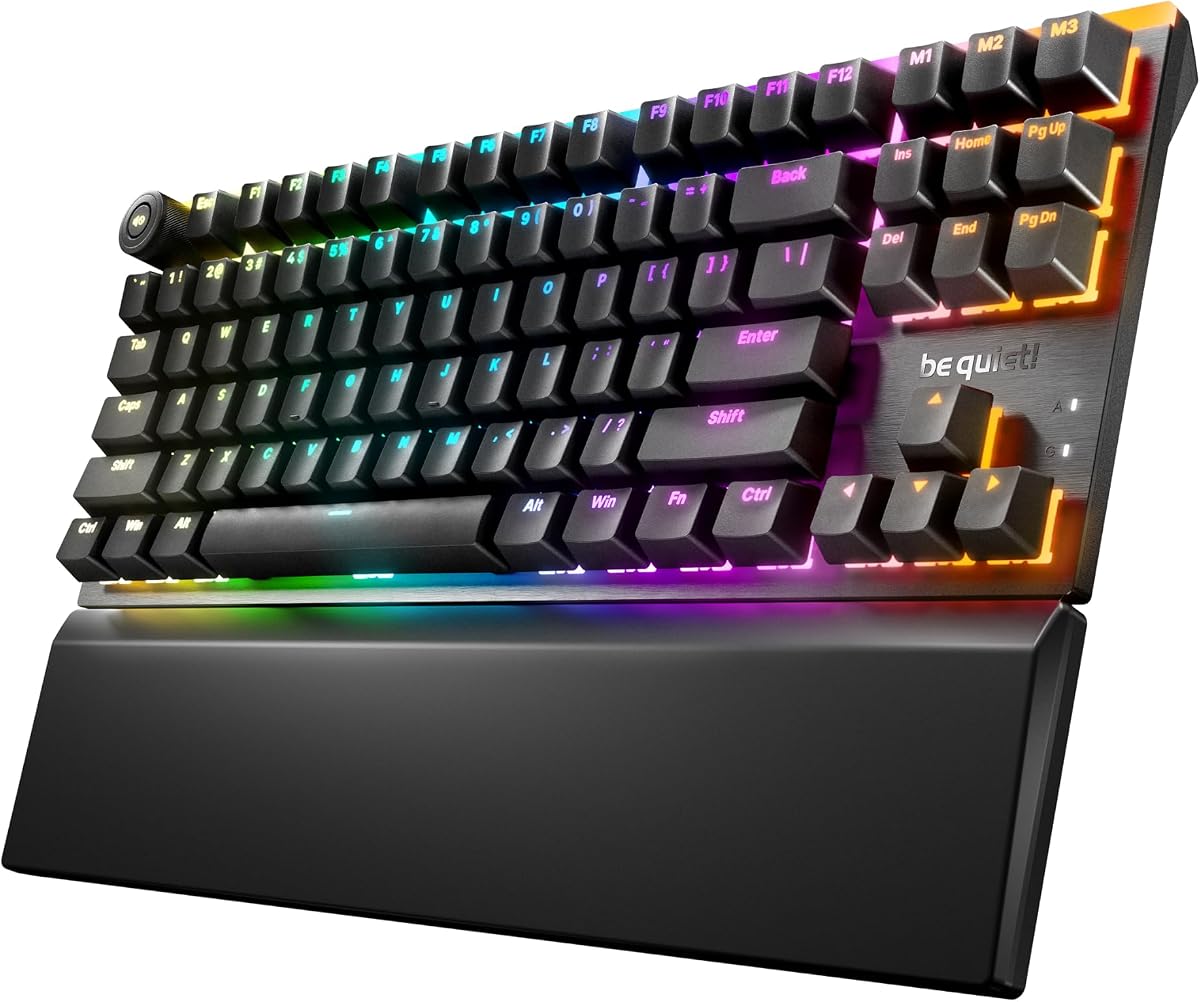
The be quiet! Light Mount TKL focuses on silent performance with specialized dampening. It is built for users needing a quiet keyboard for office or night gaming.
We may earn a commission when you buy through this link, at no additional cost to you.
Three layers of noise-reduction minimize typing noise while maintaining a premium feel. The hot-swap 5-pin sockets allow for easy switch customization.
While the cost is high, the unique design ensures minimal disturbance to others. The brushed aluminum top plate adds durability and a sleek aesthetic.
Best for environments where noise reduction is a priority. It combines gaming features with professional-grade sound isolation.
Three layers of foam dampen sound for peaceful typing in shared spaces.
Brushed aluminum plate and PBT keycaps offer a durable, high-end look.
We may earn a commission when you buy through this link, at no additional cost to you.
Choosing the right 5 pin hot swappable keyboard involves understanding several key factors that impact performance and longevity. This section outlines what to consider before making a purchase.
Ensure the keyboard explicitly supports 5-pin switches if you plan to use them. While many boards accept 3-pin switches, 5-pin offers more stability for heavy use.
Look for universal compatibility with major brands like Cherry, Gateron, or Kailh.
Decide between full-size, TKL, or compact 60% layouts based on your desk space. Compact boards save room but sacrifice number pads and navigation clusters.
Choose a layout that matches your typical workflow and peripheral needs.
Determine if you need wired or wireless connectivity for your setup. Wireless boards offer freedom but require battery management and may have higher latency.
Wired connections ensure zero delay and constant power for competitive gaming.
Check for durable materials like aluminum frames or reinforced plastics that prevent flex. High-quality stabilizers reduce rattle and improve the feel of larger keys.
Invest in a board with good construction to ensure it lasts through daily use.
Verify that the keyboard comes with software for remapping keys and macros. Open-source options like QMK or VIA offer deeper customization than proprietary tools.
Ensure the software supports your operating system to avoid compatibility issues.
Consider whether you need RGB, single-color, or no backlighting. RGB adds aesthetics but consumes more power if using wireless features.
Check for per-key customization if you want to highlight specific keys for functionality.
Set a budget that balances features with cost. Entry-level boards are affordable but may lack premium build quality or software depth.
Higher-priced models often offer better durability and advanced features like hot-swap sockets.
If noise is a concern, look for keyboards with internal foam or sound-dampening designs. This helps create a quieter experience for shared environments.
Switch type also impacts sound; linear switches are generally quieter than clicky ones.
Proper care ensures your keyboard maintains its performance over time. Keep the surface clean by dusting regularly with a soft brush or compressed air.
When swapping switches, always power off the device and use the provided puller to remove old switches gently. Avoid forcing pins to prevent damage to the PCB sockets.
Store the keyboard in a dry environment away from direct sunlight or excessive heat. If using wireless models, charge the battery regularly to prolong its lifespan.
3-pin switches have two pins for electrical connection and one stem pin for stability. 5-pin switches add two extra plastic pins for better physical stability, reducing wobble during heavy use. Most hot-swap boards support both types.
No, hot-swap keyboards are designed specifically to avoid soldering. You can simply pull out the old switch and plug in a new one. This makes customization accessible even for beginners without technical skills.
Many models like the Keychron C1 are explicitly designed for Mac compatibility. Always check the product specs for layout compatibility to ensure function keys and modifiers work correctly on macOS.
Battery life varies by model, with some lasting up to 250 hours on a single charge. Wireless usage typically drains faster than wired usage. Check specific product details for estimated battery life.
Yes, many 5 pin hot swappable keyboards are optimized for gaming with fast response times and anti-ghosting features. Look for high polling rates and low-latency connections for competitive play.
Regular maintenance involves cleaning dust from under keycaps and checking switch stability. If keys feel scratchy, lubricating the switches can improve the experience. Avoid using water directly on the PCB.
Yes, most standard mechanical keyboards accept standard MX-style keycaps. Ensure the height and style match your preference. Special layouts may require specific keycap sets for full coverage.
Most models offer dedicated software or support open-source solutions like QMK or VIA. These tools allow you to remap keys, create macros, and adjust lighting settings to fit your workflow.
The top picks highlight diverse options ranging from budget-friendly compact boards to high-performance wireless models. Each has unique strengths tailored to different user needs and environments.
Prioritize features that align with your daily use, whether that is sound dampening, software support, or switch compatibility. Your workflow dictates which keyboard will serve you best.
Always verify current pricing and availability before purchasing as these factors may change. Taking the time to choose wisely ensures you enjoy a reliable typing experience for years.