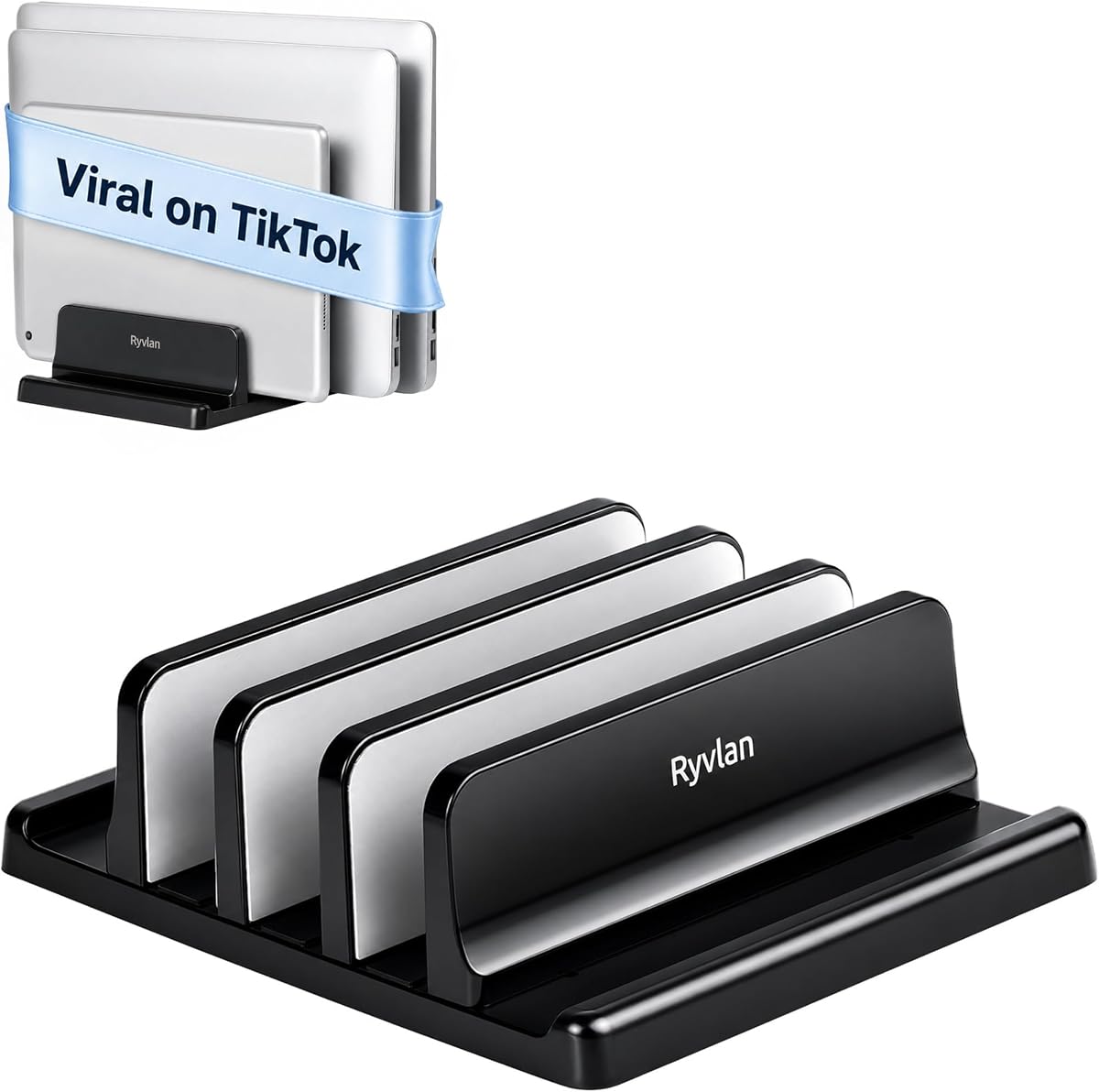
Ryvlan Vertical Laptop Stand
4.6Editor score
Holds up to three laptops plus tablets
Adjustable width slots from 0.47 to 1.2 inches
Impact resistant ABS with silicone padding
Managing multiple devices on a single desk can quickly lead to clutter and inefficiency. A dedicated laptop rack for multiple laptops helps organize your workspace while keeping devices secure and accessible. Choosing the right model depends on your specific needs for capacity, material, and port access.
We evaluated ten highly rated options based on build quality, stability, and compatibility with various devices. Each product was reviewed for its ability to hold laptops, tablets, and phones without wobbling. Our list includes vertical stands, charging stations, and floor racks to suit different environments.
Each pick highlights key features like adjustable slots, cooling airflow, and cable management systems. Prices and availability can change frequently so always verify current details before purchasing. This guide aims to simplify your decision by focusing on the most important aspects of multi-device storage solutions.
4.6Editor score

4.2Editor score

4.5Editor score
As an Amazon Associate we earn from qualifying purchases.
This side-by-side comparison highlights the key specifications and features of each top-rated laptop rack. Use this table to quickly identify which model offers the best capacity, material quality, and charging options for your specific workspace needs.




The Ryvlan Vertical Laptop Stand is a highly rated option for those seeking an affordable multi-device solution. With a 4.6 rating, it delivers solid performance for organizing laptops and tablets on a single desk footprint. Its three-slot design clears workspace while keeping devices accessible.
We may earn a commission when you buy through this link, at no additional cost to you.
Key strengths include the adjustable width mechanism which allows slots to expand from 0.47 inches to 1.2 inches. This flexibility accommodates thin ultrabooks and thicker gaming machines equally well. The silicone padding on all six walls protects devices from scratches and prevents sliding during use.
Honest trade-offs involve the ABS plastic construction which while impact-resistant lacks the premium feel of aluminum. Users must also use a small wrench to adjust slot widths which takes about a minute. These minor inconveniences are acceptable given the budget-friendly price and functional design.
This stand is ideal for home offices, dorm rooms, or shared workstations where flat surface space is limited. It works perfectly for users who need a simple, effective vertical organizer without spending much. We recommend it for anyone prioritizing cost efficiency and basic organization needs.
The compact footprint of roughly 7.3 inches by 5.9 inches ensures it fits easily on crowded desks without consuming valuable workspace.
Fits a wide range of brands including MacBook, Surface, Dell, HP, and Chromebook alongside tablets and phones in the front slots.
We may earn a commission when you buy through this link, at no additional cost to you.
The Elestoria 10-Slot Vertical Stand stands out as the Editor's Choice for users needing maximum device capacity. With a 4.2 rating, it offers an industry-leading ten-slot design that securely holds laptops, MacBooks, and tablets. Its premium aluminum construction ensures longevity and a professional aesthetic.
We may earn a commission when you buy through this link, at no additional cost to you.
Key strengths include the wide adjustment range from 0.24 inches to 5.83 inches which fits devices with cases or sleeves. The open-side design allows unobstructed access to charging ports and cables without removing devices. Passive thermal convection provides 360-degree airflow solving heat dissipation issues effectively.
Honest trade-offs involve the higher cost and larger size compared to compact desktop organizers. The footprint of 10.74 inches by 6.3 inches requires more desk space but remains comparable to a large tablet. These factors are acceptable for offices or studios needing a high-density tech ecosystem dock.
This stand is best suited for professional workspaces, gaming rooms, or living areas where organization is paramount. We recommend it for power users managing ten or more devices who value durability and airflow. It combines high-density storage with a minimalist modern aesthetic perfectly.
Simply turn base screws clockwise to stabilize dividers for a customized firm grip without needing external tools.
Soft silicone protective pads and polished edges safeguard devices from surface scratches and provide a secure grip.
We may earn a commission when you buy through this link, at no additional cost to you.
The 10-Device Laptop Charging Station earns the Best Premium badge for its comprehensive power and storage integration. With a 4.5 rating, it is designed for classrooms, offices, and shared device environments needing organized charging. It holds up to ten devices securely in vertical slots.
We may earn a commission when you buy through this link, at no additional cost to you.
Key strengths include the built-in AC outlets and USB ports eliminating the need for external power strips. The integrated cable management system organizes cords to reduce clutter on desks and counters. Surge protection ensures safe everyday charging for expensive electronic devices in public spaces.
Honest trade-offs include the weight and the need for a nearby power outlet to function effectively. It is bulkier than simple stands which limits portability but maximizes utility. These factors are acceptable for fixed installations where device charging is a primary requirement.
This station is ideal for schools, libraries, and large home workspaces managing many laptops. We recommend it for administrators or IT staff needing a reliable charge and store rack. It maximizes storage while minimizing countertop usage efficiently.
Six AC outlets and four USB ports support laptops, phones, and wireless accessories without extra adapters.
Integrated cable routing helps organize charging cords and simplifies multi-device charging management.
We may earn a commission when you buy through this link, at no additional cost to you.
The Elestoria 5-Slot Vertical Stand is a robust aluminum organizer with a 4.6 rating. It docks up to four laptops and one mobile device securely on a single vertical stand. The heavy-duty construction and patent pending design ensure lasting durability.
We may earn a commission when you buy through this link, at no additional cost to you.
Key strengths include the adjustable width range from 12mm to 38mm fitting most laptops and MacBooks easily. Sliding brackets adjust separately for each slot providing greater flexibility than standard holders. The closed design with soft silicone padding protects devices from scratches effectively.
Honest trade-offs involve the silver finish which may show fingerprints over time and the small screws for adjustment. These are minor concerns given the premium construction quality. The design is best for users who prioritize a sturdy and professional look.
This stand is ideal for professionals using clamshell mode with external monitors. It keeps your tech ecosystem organized on a single desktop. We recommend it for those seeking a multifunctional aluminum organizer.
Premium vertical design provides better cooling and 360-degree airflow to prevent overheating.
Solid aluminum alloy base ensures upright holding without tipping for safe storage.
We may earn a commission when you buy through this link, at no additional cost to you.
The Unittype Bamboo Multi Device Organizer brings natural elegance to any workspace. With a 4.1 rating, it stores daily tech essentials like smartphones and laptops beautifully. Its removable 6-slot design accommodates various device sizes seamlessly.
We may earn a commission when you buy through this link, at no additional cost to you.
Key strengths include the sturdy natural bamboo which complements any desktop aesthetic. Non-slip rubber feet protect surfaces and prevent sliding. Beyond electronics it doubles as a mail organizer for a tidy workspace.
Honest trade-offs involve the fixed slot width which may limit flexibility for larger cases. Bamboo may show wear if not cleaned occasionally but remains robust. These are acceptable for those prioritizing aesthetics and dual-purpose utility.
This organizer is ideal for home offices or solo spaces needing style and organization. We recommend it for users seeking a compact solution that enhances visual appeal.
Natural wood color complements any desktop enhancing visual appeal.
Besides devices it works as a wood mail organizer for folders and letters.
We may earn a commission when you buy through this link, at no additional cost to you.
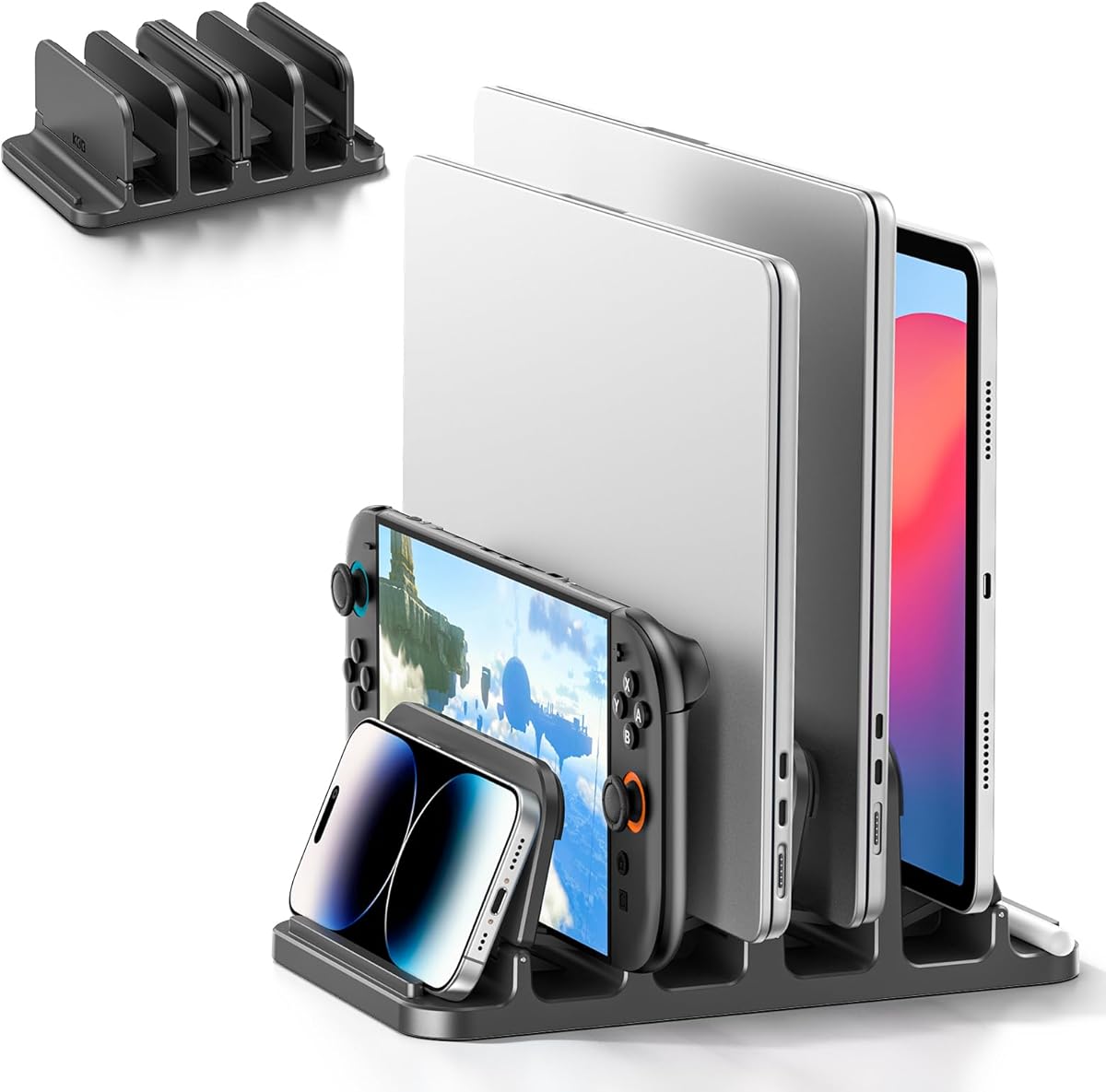
The KDD 4-Slot Vertical Stand offers unique gravity locking technology. With a 4.6 rating, it organizes up to six devices including laptops and game consoles securely. The 6-in-1 design makes it an efficient multi-device organizer.
We may earn a commission when you buy through this link, at no additional cost to you.
Key strengths include the gravity mechanism that locks devices without extra clamps. Silicone anti-slip pads ensure stability and prevent sliding. The vertical layout maximizes desktop space efficiently.
Honest trade-offs involve the sensitivity of the locking mechanism which may require precise placement. Thick cases might not fit due to tight slots. These are acceptable for those prioritizing unique locking security.
This stand is ideal for home offices needing user-friendly device handling. We recommend it for users seeking a reliable and user-friendly desktop solution.
Gravity mechanism automatically locks device in position without additional clamps.
Fits thicknesses from 0 to 1.1 inches for nearly all devices.
We may earn a commission when you buy through this link, at no additional cost to you.
The 5 Slot Aluminum Stand features a premium space gray finish. With a 4.6 rating, it holds five devices like MacBooks and iPads while maximizing desk space. The brushed aluminum texture matches Apple laptops aesthetically.
We may earn a commission when you buy through this link, at no additional cost to you.
Key strengths include the CNC-machined anodized aluminum which ensures quality and airflow. You can easily adjust slot width using the included hex key. Non-slip silicone pads protect devices and keep the stand in place.
Honest trade-offs involve the price and the need for a tool to adjust. These are minor for users seeking a professional look and build quality. The design is ideal for those with Apple-centric setups.
This stand is ideal for professionals and teachers needing a tidy desk. We recommend it for those seeking a quality gift for anyone needing organization.
Brushed aluminum alloy matches Apple MacBook Pro texture and quality.
Adjust width smoothly with included hex key to match device widths.
We may earn a commission when you buy through this link, at no additional cost to you.
The POCHAR 8-Device Universal Charging Station simplifies device management. With a 4.6 rating, it is ideal for classrooms and offices. It charges up to eight devices at once using integrated power.
We may earn a commission when you buy through this link, at no additional cost to you.
Key strengths include wide-angle slots compatible with laptops and Chromebooks. No assembly is required so you can use it immediately. The power strip includes surge protection for safe daily use.
Honest trade-offs involve the screen size limit of 14 inches which may exclude larger laptops. Slots are fixed which reduces flexibility. These are acceptable for standard classroom environments.
This station is ideal for schools and training rooms. We recommend it for businesses needing a durable store and charge rack.
Unbox and use immediately without any complex setup required.
Designed for laptops and Chromebooks up to 14 inches.
We may earn a commission when you buy through this link, at no additional cost to you.
The 10 Device Laptop Storage Rack earns a perfect 5.0 rating. It is a floor standing rack with ten slots for simultaneous charging. Its steel build guarantees long-lasting durability.
We may earn a commission when you buy through this link, at no additional cost to you.
Key strengths include wheels for easy movement and locking. Removable partitions allow customization of storage space. The bottom shelf provides extra storage for printers.
Honest trade-offs involve assembly time and floor space usage. These are acceptable for large environments needing mobility. The design is best for schools or offices.
This rack is ideal for high-density charging needs. We recommend it for facilities needing a moveable storage solution.
Equipped with wheels and handles for easy movement between spaces.
Ten slots meet high-density charging needs for laptops and tablets.
We may earn a commission when you buy through this link, at no additional cost to you.
The MobileVision Bamboo Multi Device Organizer is a compact solution. With a 4.7 rating, it stores up to five devices neatly. Its bamboo construction provides a stable platform.
We may earn a commission when you buy through this link, at no additional cost to you.
Key strengths include integrated rubber feet that protect surfaces. The ten-inch length saves space while offering efficient storage. It promotes a tidy environment for all devices.
Honest trade-offs involve fixed slots which may not fit thick cases. It lacks adjustable widths for customization. These are acceptable for small spaces needing style.
This organizer is ideal for conference rooms and classrooms. We recommend it for settings needing tidy and organized device management.
Four integrated rubber feet prevent sliding and protect surfaces.
Efficient storage without taking up excessive desktop space.
We may earn a commission when you buy through this link, at no additional cost to you.
Choosing the right laptop rack requires understanding your specific storage needs and workspace constraints. This guide outlines the most critical factors to consider before purchasing a multi-device solution.
Determine how many laptops, tablets, and phones you need to store at once. Some racks hold three devices while others accommodate ten or more. Matching capacity to your needs prevents clutter and overcrowding.
Always choose a rack with at least one extra slot for future devices.
Look for racks with adjustable dividers to fit laptops of varying thickness. Fixed slots may not accommodate gaming laptops or devices with protective cases. Adjustable mechanisms allow for a custom fit and secure grip.
Check if the adjustment requires tools or is tool-free for convenience.
Materials like aluminum and bamboo offer durability and aesthetic appeal compared to plastic. Aluminum provides better heat dissipation for laptops. Bamboo adds a natural look to modern workspaces.
Prioritize heavy-duty materials if you plan to move the rack frequently.
Integrated cable routing or built-in charging ports reduce clutter on your desk. Racks with open designs allow easier access to charging ports. Proper management prevents tangling and ensures safe charging.
Consider racks with surge protection if you will be charging devices overnight.
Check if the rack has a weighted base or rubber feet to prevent sliding. Some floor-standing models include wheels for mobility across rooms. Stability is crucial to prevent devices from tipping over.
Ensure the base is wide enough to support the tallest device securely.
Vertical designs allow passive thermal convection which helps cool laptops naturally. Racks with open sides maximize airflow to prevent overheating during storage. Good cooling extends device lifespan and performance.
Avoid closed cabinets that trap heat inside the storage area.
Measure your available desk or floor space before purchasing. Compact models fit on small desks while floor racks need room. Ensure the footprint does not block other essential workspace tools.
Choose vertical storage to maximize square footage on your desk surface.
Select finishes like grey, silver, or black that match your office decor. Bamboo or wood options suit home offices seeking natural styles. A professional look enhances the overall workspace environment.
Ensure the design complements your existing tech ecosystem visually.
Install your rack on a flat stable surface to ensure maximum stability and prevent tipping. If it has adjustable dividers, set the width according to the thickness of your devices before placing them inside.
When placing laptops, insert them gently into the slots and ensure the silicone pads are gripping the devices securely. For charging racks, route cables through the management channels to avoid clutter on the desk surface.
Clean the rack regularly with a damp cloth to remove dust and debris from slots and surfaces. For metal racks, avoid abrasive cleaners to maintain the finish. For bamboo, ensure it dries completely to prevent warping.
The Ryvlan Vertical Laptop Stand is a great choice under 100 dollars. It offers three slots for laptops and two for tablets at an affordable price. It is perfect for home offices needing basic organization without spending much.
Yes, most vertical stands are designed purely for storage without charging capabilities. You can plug in chargers externally through open sides. Only charging stations have integrated power ports built into the unit itself.
Many racks accommodate gaming laptops up to 17.3 inches with adjustable slots. Look for models specifying wide adjustment ranges for thickness. Always check the width settings to ensure your heavy device fits securely.
Use a soft damp cloth to wipe down the bamboo surface regularly. Avoid soaking the wood to prevent warping or damage. Dry it thoroughly after cleaning to maintain its natural finish and stability.
Charging racks with surge protection are safer for overnight use than standard strips. Ensure the power strip is rated for continuous operation. Always unplug if you notice any unusual heat or smells during use.
Not all racks have adjustable slots; some are fixed. Check product specifications for adjustable width features. If you have mixed device sizes, prioritize racks with tool-free or adjustable dividers.
A vertical stand organizes devices without power while a station includes outlets for charging. Stations manage cables and power but cost more. Choose based on whether you need charging integration or just storage.
Most floor-standing racks are designed to fit through standard doorways but check dimensions. Some may need assembly after moving. Always measure your entry points before purchasing to avoid delivery issues.
We reviewed ten excellent laptop racks for multiple laptops ranging from budget-friendly stands to premium charging stations. The Ryvlan Vertical Laptop Stand offers great value for basic needs while the Elestoria 10-Slot Stand leads in capacity. The 10-Device Laptop Charging Station is ideal for integrated power.
Prioritize capacity and material quality when making your choice to ensure long-term durability. Consider how many devices you need to store daily and whether you require charging integration. Adjustable slots provide flexibility for mixed device types.
Remember that prices and availability can change so always check current listings before purchasing. Verify the dimensions match your workspace to ensure a perfect fit. With the right rack, you can maintain a tidy and efficient workspace.