
OMTech K40+ 45W Desktop CO2 Laser Engraver
4.4Editor score
45W Laser Performance
12 x 8 Inch Workspace
LightBurn Compatible
Discover the top CO2 laser cutters for professionals and hobbyists. We compare power, speed, safety, and software to help you choose the right model.
CO2 laser cutters have revolutionized the way makers and businesses create intricate designs from wood, acrylic, and leather. Choosing the right machine requires understanding power output, workspace size, and safety features to ensure efficient production. This guide explores the leading models available in November 2026 to help you make an informed decision.
We evaluated ten top-rated CO2 laser cutters based on real-world performance, user feedback, and technical specifications. Our comparison considers cutting speed, material compatibility, software support, and build quality. Whether you need a compact desktop unit or an industrial-grade system, this list covers the best options for every budget and application.
Each product selection highlights key strengths, potential trade-offs, and ideal use cases for different users. Prices and availability can change frequently, so please verify current details before purchasing. We aim to provide clear, honest insights to streamline your search for the perfect laser cutting solution for your workshop needs.
4.4Editor score

4.5Editor score

4.0Editor score
The following table provides a side-by-side comparison of all ten CO2 laser cutters featured in this guide. It highlights key specifications such as laser power, working area, and software compatibility to help you quickly identify the model that best fits your specific cutting needs.



The xTool P3 80W is a flagship CO2 laser cutter designed for serious production and professional engraving tasks. It earns an impressive rating for its ability to cut through thick materials with industrial speed while maintaining precise alignment. The intelligent automation system sets it apart from standard models by handling setup and positioning automatically.
We may earn a commission when you buy through this link, at no additional cost to you.
This machine features a revolutionary automated creation system that integrates LiDAR ranging and dual HD cameras for perfect autofocus and positioning. The largest desktop area of 36 by 18 inches allows for large format projects without needing to cut and join pieces. Smart nesting technology ensures nearly 99 percent material utilization, which saves money over time.
While the performance is outstanding, the higher price point requires a significant budget commitment. Additionally, many powerful accessories like the conveyor feeder and rotary are sold separately. These trade-offs are acceptable for businesses that need reliability and speed to justify the investment in advanced automation features.
This laser cutter is ideal for small businesses and workshops that need industrial-grade output in a desktop-friendly package. If you value efficiency and safety features that reduce manual labor, the xTool P3 is the top recommendation. It transforms the laser cutting workflow into a streamlined, automated production process.
The ACS system uses LiDAR and cameras to automate setup, ensuring perfect focus and positioning every time without manual intervention.
Class 1 safety design and AI smart nesting protect users and minimize material waste, making it suitable for long production runs.
We may earn a commission when you buy through this link, at no additional cost to you.
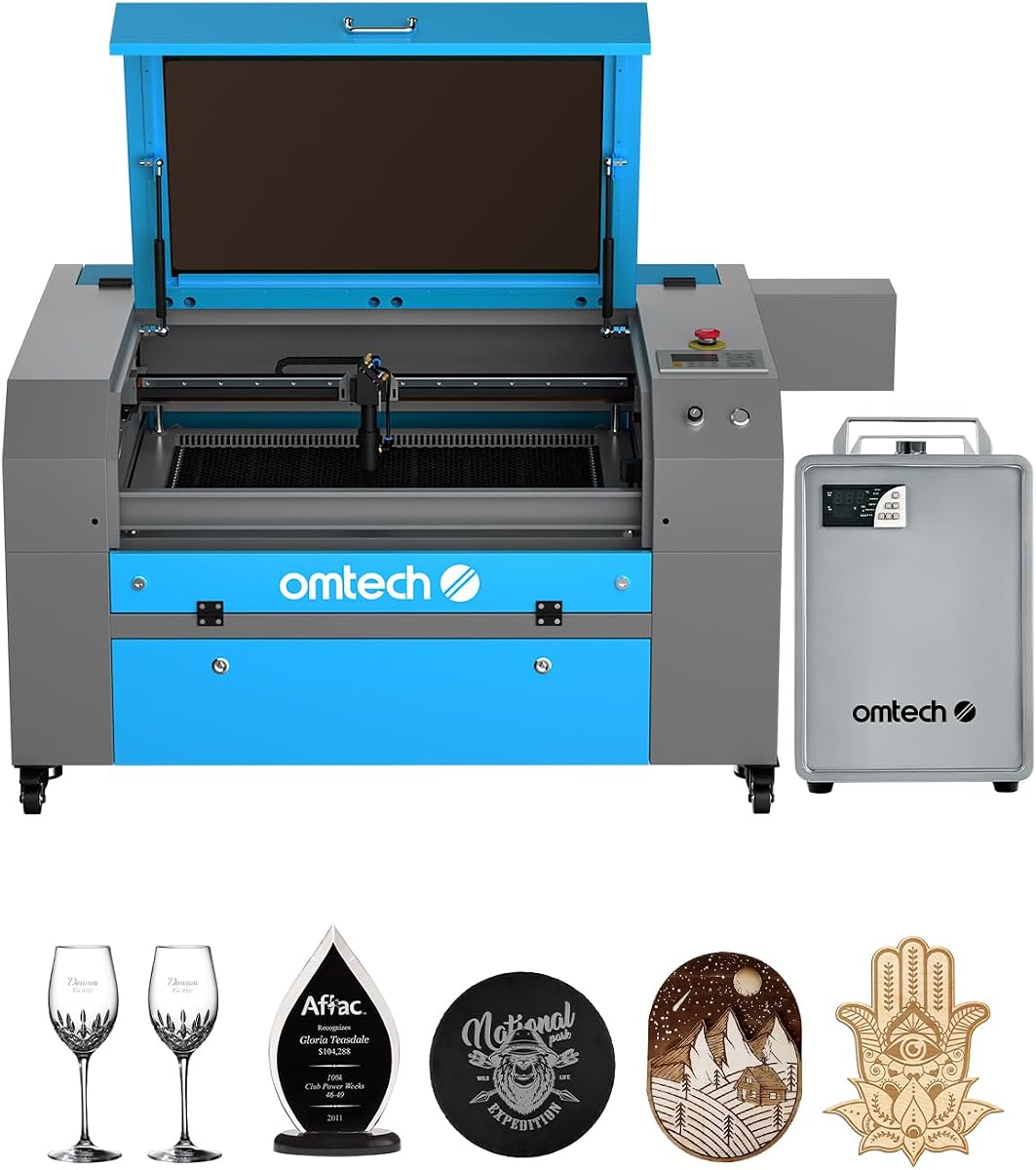
The OMTech K40+ 45W offers an excellent entry point for hobbyists and small businesses looking for a reliable CO2 laser cutter. With its upgraded power and supportive global team, it delivers professional results for personal projects. It is highly rated for its balance of cost and functionality.
We may earn a commission when you buy through this link, at no additional cost to you.
This model provides powerful 45W performance that cuts acrylic and wood with ease, boosting speed by up to two times compared to older versions. The flexible work area supports irregular materials, and the integrated air assist system reduces debris and fire risk during operation. It fully supports popular software like LightBurn for seamless design control.
While the compact 12 by 8 inch workspace limits large projects, it is perfect for desktop use in smaller shops. Manual focus adjustments can take extra time but are manageable for most users. These limitations are minor given the affordable price and robust feature set for beginners.
This laser cutter is perfect for DIY enthusiasts and small startups that need a cost-effective solution for cutting and engraving. If you are looking for a machine that supports your growth without a huge upfront cost, the K40+ is the best choice. It proves that quality laser cutting does not have to break the bank.
The 45W laser power provides enough strength for detailed engraving and cutting thin materials efficiently.
Compatibility with LightBurn and safety features like emergency stop ensure a safe and intuitive user experience.
We may earn a commission when you buy through this link, at no additional cost to you.
The OMTech Pro 130W is a professional-grade CO2 laser cutter designed for industrial applications and high-volume production. It features a massive workspace and powerful tube to handle thick materials effortlessly. This model stands out for its advanced motion control and connectivity features.
We may earn a commission when you buy through this link, at no additional cost to you.
This machine delivers rapid engraving speeds with upgraded ball-bearing guide rails and X and Y-axis servo motors. The built-in CW-5200 water chiller maintains stable temperatures, ensuring consistent performance during long engraving sessions. The futuristic design includes a widened tempered glass window and tri-color status lights for enhanced safety and visibility.
While the performance is top-tier, the large physical size requires a dedicated space and significant investment. However, the ability to handle large items with pass-through doors justifies the footprint for industrial users. These trade-offs are acceptable for businesses that need speed and large format capabilities.
This laser cutter is ideal for professional workshops and factories that need to process large batches of materials efficiently. If you require high speed and massive workspace without compromising on precision, this model is the premium choice. It offers the performance necessary for competitive industrial manufacturing environments.
The 130W tube and servo motors allow for rapid processing of thick materials and intricate designs.
Built-in chiller and WiFi connectivity ensure stable operation and remote control flexibility for the user.
We may earn a commission when you buy through this link, at no additional cost to you.
The VEVOR 100W CO2 laser engraver brings speed and precision to medium-sized shops with its generous workspace. It is highly rated for its ability to cut materials in one pass and maintain smooth cuts. The intuitive controls make it accessible for users transitioning from smaller devices.
We may earn a commission when you buy through this link, at no additional cost to you.
This model features a spacious 24 by 35 inch working area with pass-through doors that accommodate long projects easily. The intelligent laser head creates smooth incisions without burr, and the digital control panel supports major software like LightBurn and CorelDRAW. The air assist system clears smoke to ensure clean results.
While the machine performs well, initial setup may require patience to align the laser and air system correctly. Ensuring proper ventilation is also critical for safe operation in enclosed spaces. These trade-offs are manageable for users who prioritize speed and material flexibility in their workflow.
This laser cutter is suitable for makers and small businesses that need to process varied materials quickly and efficiently. If you value a large bed size and easy software integration, the VEVOR 100W is a strong contender. It balances performance with usability for a wide range of creative projects.
The 24 by 35 inch bed and high speed allow for efficient processing of large and small projects alike.
Digital panel and digital pass-through doors simplify operation and expand material handling possibilities.
We may earn a commission when you buy through this link, at no additional cost to you.
The OMTech Maker 90W provides a reliable commercial laser cutter experience with essential cooling included in the bundle. It is designed to handle deep engraving on various nonmetallic materials with ease. The machine balances power with a user-friendly workspace for medium production needs.
We may earn a commission when you buy through this link, at no additional cost to you.
This machine features a honeycomb and aluminum blade bed setup that supports a 20 by 28 inch work area for diverse projects. The bundled water chiller maintains effective cooling for extended sessions, and the built-in air assist protects the lenses from smoke and dust. The widened viewing window ensures lasting safe use with flame retardant material.
While the tube life is long, the lack of autofocus means users must adjust the bed manually for focus. This adds a step to setup but is a minor inconvenience for experienced users. These trade-offs are acceptable given the value provided by the included chiller and solid power output.
This laser cutter is recommended for small businesses that need consistent engraving performance without extra accessories. If you want a balanced machine that handles large items and offers good depth, the Maker 90W fits well. It delivers professional results for wood and acrylic with standard workflow support.
The bundled water chiller and flame retardant window ensure safe extended operation without overheating.
Pass-through doors and air assist allow for smooth engraving of various nonmetallic materials.
We may earn a commission when you buy through this link, at no additional cost to you.
The OMTech Maker 60W brings commercial reliability to smaller workspaces with its autofocus and bundled software. It earns a high rating for ease of use and consistent results on nonmetallic materials. This model simplifies the setup process for new users with auto adjustments.
We may earn a commission when you buy through this link, at no additional cost to you.
This machine features a 20 by 28 inch work area with four-way pass-through doors to fit large and longer items easily. The preinstalled autofocus finds the right focal distance automatically, saving time on setup. The built-in air assist ensures clean cuts by removing smoke and dust to protect lenses and mirrors.
While the 60W power is sufficient for many tasks, it may not be as fast as higher wattage units for thick materials. However, the convenience of autofocus and included software makes it a valuable tool for efficiency. These trade-offs are acceptable for users prioritizing ease of use over raw speed.
This laser cutter is perfect for small shops that need reliable engraving without complex manual setup steps. If you value consistent results and time-saving features, the Maker 60W is a great choice. It combines commercial power with user-friendly automation for a smooth workflow.
Autofocus and preinstalled software allow for immediate engagement with projects without tedious setup.
Flame retardant windows and air assist ensure a safe and clean environment for regular engraving.
We may earn a commission when you buy through this link, at no additional cost to you.
The OMTech K40+ 45W delivers a compact and efficient laser cutting solution for personal and commercial use. It is highly rated for its global support team and flexible design for various materials. This model proves that desktop units can deliver professional-grade results.
We may earn a commission when you buy through this link, at no additional cost to you.
This model features a powerful 45W laser that cuts through acrylic and wood with ease and supports fast engraving speeds. The honeycomb bed and optional rotary axis allow for engraving on cylindrical objects as well. The integrated air assist auto-adjusts airflow to reduce debris and fire risk.
While the workspace is small at 12 by 8 inches, it is ideal for detailed projects. Manual focus adjustments can take extra time but are manageable for most users. These trade-offs are minor given the robust support and flexible compatibility with different design software.
This laser cutter is ideal for hobbyists and small startups that need a reliable desktop machine. If you want a device with strong support and flexible material handling, this K40+ is an excellent pick. It balances cost and performance for everyday engraving needs.
Global support ensures assistance is always available, while the rotary axis expands creative possibilities.
Fast engraving speeds and air assist ensure quick completion of projects with clean edges.
We may earn a commission when you buy through this link, at no additional cost to you.
The OMTech Pronto 100W offers unmatched efficiency with its powerful tube and advanced autofocus technology. It is highly rated for transforming creative visions into reality quickly. This model supports makers and businesses looking to expand capabilities.
We may earn a commission when you buy through this link, at no additional cost to you.
This machine delivers 1000 mm/s speeds with a powerful pump to ensure precise and clean cuts. The honeycomb and aluminum blade beds feature a 40 by 24 inch work area to fit large projects. Safety features include water protection and emergency stop buttons for peace of mind.
While the price is higher, the speed and precision justify the investment for professional work. The large footprint requires dedicated workshop space, which may limit smaller setups. These trade-offs are acceptable for users prioritizing output quality and workflow efficiency.
This laser cutter is suitable for makers and small businesses that need speed and precision. If you want a machine that balances power with ease of use, the Pronto 100W is a strong option. It supports efficient production with reliable features.
The 100W tube and autofocus technology ensure rapid and accurate results for complex designs.
Comprehensive safety features and superior airflow maintain high quality and safe operations.
We may earn a commission when you buy through this link, at no additional cost to you.
The OMTech Pronto 130W provides massive workspace and power for artistic and industrial visions. It is highly rated for its tube lifespan and autofocus features. This model helps users impress with deep engraving capabilities.
We may earn a commission when you buy through this link, at no additional cost to you.
This machine features a 51 by 35 inch work area with two-way pass-through doors for large items. The autofocus technology finds the right focal distance automatically, ensuring consistent results. The tube delivers 130W power for up to 12000 hours of usage.
While the size is large, it accommodates substantial projects easily. The higher price reflects the premium tube life and power, which justifies for frequent use. These trade-offs are acceptable for users prioritizing capability and longevity.
This laser cutter is recommended for businesses and creatives needing high power and space. If you want a machine that supports ambitious designs, the Pronto 130W is a top pick. It delivers professional quality for varied materials.
The 130W tube and 51 by 35 inch bed handle large and deep engraving tasks efficiently.
Autofocus and safety features ensure reliable operation for professional output.
We may earn a commission when you buy through this link, at no additional cost to you.
The OMTech K40+ 45W offers an accessible entry point for new users to laser cutting. It is valued for its safe operation and flexible material compatibility. This model makes high-quality engraving available for personal projects.
We may earn a commission when you buy through this link, at no additional cost to you.
This machine features a compact desktop design that fits easily on standard worktables. The 45W laser cuts through wood and acrylic with ease, and safety features like door protection protect users. The integrated air assist ensures clean cuts and reduces debris.
While the workspace is small, it is sufficient for many DIY projects. Basic features may require manual adjustments, which is common for entry-level units. These trade-offs are acceptable for users prioritizing simplicity and budget.
This laser cutter is ideal for beginners and home hobbyists. If you want a simple machine for occasional engraving, the K40+ is a practical choice. It provides reliable performance without complexity.
Compact design and safety features make it easy to use safely in home environments.
Flexible material compatibility ensures you can engrave various surfaces with ease.
We may earn a commission when you buy through this link, at no additional cost to you.
Selecting the right CO2 laser cutter involves balancing technical capabilities with your specific workspace and project requirements.
Laser power determines the thickness and speed at which you can cut materials. Higher wattage like 90W to 130W allows for thicker cuts and faster production, while lower wattage like 45W suits thin materials and light engraving. The tube type also affects longevity and consistency of output.
Choose higher power for industrial needs and lower power for hobbyist budgets.
The working area defines the maximum size of material you can process without multiple setups. Large beds like 36 x 18 inches are essential for full sheet production, while smaller 12 x 8 inch beds save space. Consider pass-through doors if you need to handle long items.
Ensure the bed size accommodates your typical project dimensions comfortably.
Software compatibility is crucial for design workflow integration. Most machines support LightBurn and CorelDRAW, but some may require specific drivers or proprietary software. Touchscreens and WiFi connectivity add convenience for file management and remote control.
Verify software support matches your existing design stack before purchasing.
Safety is paramount with high-powered lasers. Enclosed Class 1 machines offer the highest protection with lid interlocks and sensors, while open units require careful supervision and external ventilation. Look for flame retardant materials and emergency stop buttons.
Prioritize safety features that meet your local regulations and usage environment.
Motion systems impact precision and speed. Servo motors offer higher precision and speed than stepper motors, which are more cost-effective. Guide rails quality also affects the smoothness of cuts and long-term maintenance needs.
Select motion systems based on the level of detail required for your work.
Air assist systems blow smoke and debris away from the cutting path to prevent burning and lens fouling. High airflow is necessary for clean edges and faster speeds. Integrated exhaust fans ensure fumes are properly removed from the workspace.
Check for auto-adjusting airflow and sufficient CFM for your cutting tasks.
Maintenance involves cleaning lenses, mirrors, and rails regularly. Look for manufacturers offering warranty, spare parts availability, and technical support. Global support teams are a strong asset for troubleshooting hardware issues quickly.
Ensure support availability is strong to minimize downtime during production.
Consider not just the initial price but also ongoing costs like power consumption, tube replacement, and accessories. A higher initial investment may save money over time through efficiency and durability. Accessories like rotary attachments and conveyors add to the total cost.
Balance the upfront cost against the expected lifespan and utility of the machine.
Start by preparing your material with clean surfaces and secure alignment. Load files using supported software and adjust settings based on material thickness and desired finish. Always test a small area to verify focus and power settings before full runs.
Regular maintenance is essential for performance. Clean the lens and mirrors with appropriate tools weekly to remove dust and residue. Lubricate guide rails and check belts for tension to ensure smooth movement and precise cuts.
Store your machine in a dry, temperature-controlled environment to prevent tube damage. Use the exhaust system effectively to manage fumes and fire risk. Monitor air assist pressure regularly to maintain consistent cut quality and lens protection.
CO2 laser cutters work best on non-metallic materials like wood, acrylic, leather, and glass. They can cut acrylic and wood cleanly, while engraving works on stone and cardboard. Metals cannot be cut with standard CO2 tubes without specific coatings.
A typical CO2 laser tube lasts between 8,000 and 12,000 hours of operation depending on usage and cooling. Proper water cooling and avoiding continuous maximum power extend the lifespan. Replacing tubes is standard maintenance for high-volume users.
Most cutters require design software like LightBurn or LaserGRBL to control movement and power. Some machines offer proprietary control software but support imports. Ensure compatibility with your preferred design tools before purchasing.
Engraving removes surface material to create designs without cutting through the full thickness. Cutting uses higher power or slower speeds to penetrate the entire material for shapes. Settings differ significantly for each operation on the same machine.
Water chillers are essential for larger power tubes above 60W to prevent overheating during extended use. Smaller units may rely on air cooling but chillers improve consistency and tube life. Invest in a chiller for serious production work.
To prevent burning, use high airflow assistance and optimal speed settings for the acrylic thickness. Proper focus ensures the laser energy is concentrated. Using specific software settings helps achieve clean edges without charring.
Choosing the right CO2 laser cutter depends on your specific production needs and budget. The xTool P3 offers the best automation for efficiency while the OMTech K40+ provides an affordable entry point for hobbyists.
Prioritize safety features and software compatibility to ensure a smooth workflow and safe operation. Consider the total cost of ownership including maintenance and accessories when making your final decision.
Always check current prices and availability as offerings may change. Contact us for more tips on maximizing your laser cutter's potential and performance.