HP ProDesk 600 G4 Mini
4.2Editor score
Compact space saving design
Solid state drive storage
Windows 11 Pro included
Finding the right desktop computer for kids involves balancing power, ease of use, and reliability. Parents need systems that handle homework, creative projects, and light gaming without breaking the bank or causing frustration.
We analyzed ten top-rated desktops focusing on processor speed, memory capacity, storage options, and display quality. Our comparison includes all-in-one units and traditional towers with monitors to suit different home setups.
Each pick highlights specific strengths like upgraded RAM, fast SSD storage, or vibrant displays. Note that prices and availability fluctuate frequently, so verify current details before making your final purchase decision.
4.2Editor score

4.5Editor score

4.3Editor score
As an Amazon Associate we earn from qualifying purchases.
The following table provides a quick side-by-side look at the technical specifications and key features of each desktop computer evaluated in this comprehensive guide.


The Dell Optiplex 9020 stands out as a reliable refurbished option for families seeking a complete desktop bundle. It comes with a 20 inch monitor and essential peripherals making it ready to use right out of the box for basic computing tasks.
We may earn a commission when you buy through this link, at no additional cost to you.
Powered by an Intel Quad-Core i5 processor this system handles everyday applications like web browsing, word processing, and video streaming smoothly. The inclusion of Windows 11 Pro ensures modern security features and a familiar interface for students and parents alike.
While the 8GB of DDR3 RAM is adequate for multitasking it may show its age with heavy modern workloads. The 500GB HDD offers decent space for files but slower load times compared to solid state drives found in newer models.
This computer is best suited for budget conscious buyers who need a dependable machine for school projects and general internet use. It provides a complete solution with minimal setup required for home or small office environments.
Getting a monitor included simplifies setup and reduces additional costs for families setting up a new workspace.
Certified renewed units undergo testing to ensure functionality while offering significant savings over brand new equipment.
We may earn a commission when you buy through this link, at no additional cost to you.
The HP 21.5 All-in-One Desktop offers a clean modern aesthetic that fits well in study areas or bedrooms. Its integrated design eliminates tower clutter while delivering the performance needed for daily homework and media consumption.
We may earn a commission when you buy through this link, at no additional cost to you.
Featuring a Full HD LED screen this model provides sharp visuals for reading documents and watching videos. The anti-glare coating reduces eye strain during long study sessions which is a thoughtful touch for student users.
Performance is handled by the Intel N100 processor which balances efficiency with capability for light multitasking. Storage is managed through a combination of internal drives and an included SD card offering flexible options for file management.
This all-in-one is ideal for households wanting a tidy setup without sacrificing essential functionality. It suits students who need a dedicated computer for web research and writing assignments without complex hardware configurations.
Including a keyboard and mouse means users can start working immediately without buying extra accessories.
The high resolution screen ensures text and images appear crisp for comfortable long term use.
We may earn a commission when you buy through this link, at no additional cost to you.
The HP Elite Desktop Computer stands out with its generous 16GB of RAM making it robust for multitasking students. This amount of memory allows multiple browser tabs and applications to run simultaneously without slowing down the system.
We may earn a commission when you buy through this link, at no additional cost to you.
It includes a new 22 inch Full HD monitor with an IPS panel ensuring wide viewing angles and accurate colors. The RGB keyboard and mouse add a personalized touch that might appeal to younger users wanting a unique setup.
Storage is provided by a 1TB HDD which offers ample space for games movies and school files. While hard drives are slower than SSDs this capacity is beneficial for users needing to store large media libraries locally.
This refurbished model is a strong choice for families needing extra memory for heavier workloads. It balances performance with storage needs effectively while including essential connectivity options for a complete computing experience.
Sixteen gigabytes of RAM ensures smooth operation even with demanding multitasking scenarios common in modern education.
The IPS monitor delivers consistent colors and angles suitable for collaborative viewing or creative tasks.
We may earn a commission when you buy through this link, at no additional cost to you.
The Dell OptiPlex Desktop offers exceptional storage value with a huge 2TB hard drive included. This capacity is perfect for families with extensive media collections or students working on large video projects that require local space.
We may earn a commission when you buy through this link, at no additional cost to you.
Like its sibling model it features 16GB of RAM ensuring that system performance remains fluid during multitasking. The 22 inch LED monitor provides a generous workspace for editing documents or managing multiple windows at once.
While the processor is from an older generation the ample RAM compensates by allowing efficient task management. The RGB accessories included add a bit of flair that can make the workspace feel more inviting for younger users.
This system is best for those who prioritize storage capacity over raw speed. It serves well as a family media center or a home office hub where file management is more critical than rapid processing.
Two terabytes of space allows users to keep vast libraries of files without worrying about filling up the drive.
High RAM capacity keeps the system responsive even when running background applications alongside active programs.
We may earn a commission when you buy through this link, at no additional cost to you.
This HP desktop delivers balanced performance with a 500GB SSD that ensures fast boot times and quick application access. The 16GB RAM supports smooth multitasking making it suitable for students who need to switch between apps frequently.
We may earn a commission when you buy through this link, at no additional cost to you.
It comes equipped with a 24 inch monitor which provides a comfortable viewing area for school work and entertainment. Additional accessories like a webcam and RGB speakers make this a ready for video calls and media consumption.
Connectivity is enhanced with WiFi 6 and Bluetooth allowing for reliable wireless connections and peripheral support. This modern networking ensures that streaming and downloads happen efficiently without needing constant cable connections for every device.
This bundle is an excellent choice for users needing speed and connectivity in a single package. It simplifies the setup process by including essential peripherals while offering the reliability of a solid state storage drive.
Solid state storage eliminates long wait times for startups ensuring students can get to work quickly every morning.
Latest wireless standards keep the computer connected to high speed networks and modern devices with ease.
We may earn a commission when you buy through this link, at no additional cost to you.
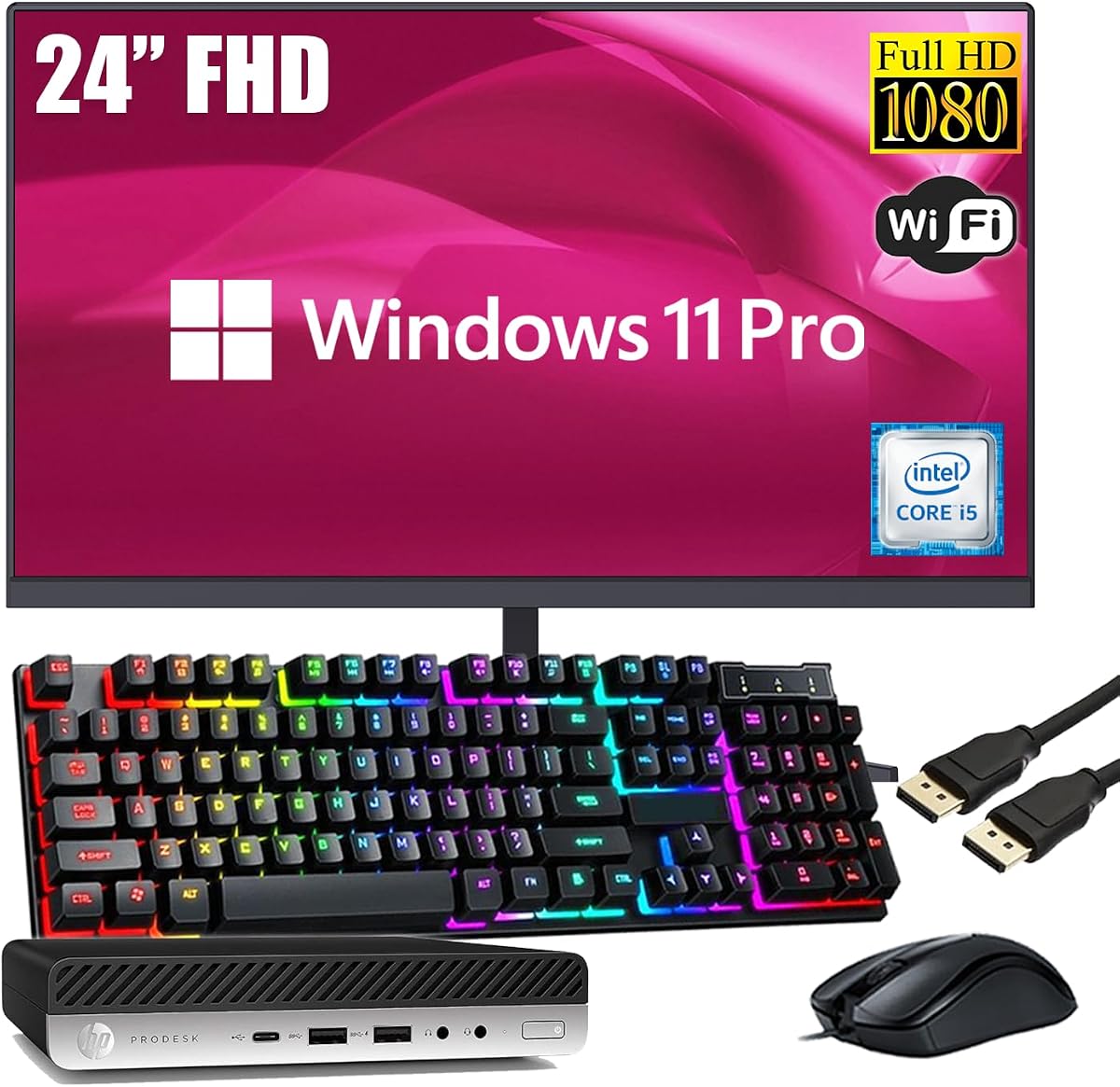
The HP ProDesk 600 G4 Mini saves valuable desk space with its compact tower design while still delivering solid performance. It includes a 24 inch monitor and keyboard mouse making it a complete bundle for immediate use.
We may earn a commission when you buy through this link, at no additional cost to you.
Powered by an Intel Core i5-8500T processor it handles daily tasks like web browsing and document editing efficiently. The 256GB SSD ensures that the system starts up quickly and applications launch without noticeable delays.
This unit features a USB-C port which adds modern connectivity options for peripherals like monitors or external drives. It also supports Windows 11 Pro offering advanced management tools and security features suitable for business or home use.
Ideal for small spaces this desktop proves that performance does not require a large footprint. It suits users who want a tidy setup with enough power for schoolwork and general computing needs without clutter.
The mini tower footprint leaves more room on the desk for books or writing materials for better ergonomics.
Solid state storage ensures that every session begins quickly keeping students focused on tasks right away.
We may earn a commission when you buy through this link, at no additional cost to you.
The Lenovo 24 FHD All-in-One focuses on a clutter-free workspace with wireless peripherals included in the box. This design reduces cable mess making it easier to keep the desk organized for study sessions.
We may earn a commission when you buy through this link, at no additional cost to you.
It features a 24 inch Full HD IPS screen that provides accurate colors and wide viewing angles. The anti-glare coating ensures that users can work comfortably under various lighting conditions without screen reflections interfering with visibility.
With 16GB of RAM and a PCIe SSD this system offers smooth multitasking and fast storage access. The inclusion of WiFi 6 and Bluetooth 5.2 ensures modern connectivity for smart devices and high-speed internet connections.
This all-in-one is perfect for users who want a clean setup with strong performance. It balances modern features with essential power making it suitable for both educational tasks and light professional work.
Using wireless input devices removes trip hazards and simplifies the desktop environment for a safer experience.
The IPS panel ensures consistent colors and brightness across the screen for better media viewing.
We may earn a commission when you buy through this link, at no additional cost to you.
The Lenovo 23.8 i3-N305 boasts a stunning three-sided borderless display that creates an immersive viewing experience. This design minimizes bezels allowing content to pop and making reading text or watching videos more engaging.
We may earn a commission when you buy through this link, at no additional cost to you.
Performance is driven by an Octa-core processor and 16GB of RAM ensuring that the system handles modern tasks efficiently. The 512GB PCIe SSD provides substantial storage for files and media while maintaining high speed boot times.
Built-in ports like HDMI-out allow for easy connection to external screens if additional workspace is needed. The slim aesthetic fits well into any room design adding a professional look to home or office environments.
This all-in-one is a great choice for users valuing visual quality and modern specs. It delivers a premium feel with strong performance suitable for content creation and detailed work without needing extra hardware.
The borderless design focuses attention on the content reducing visual distractions during study or media consumption.
A half terabyte of storage ensures plenty of room for large files without constant maintenance or cleanup.
We may earn a commission when you buy through this link, at no additional cost to you.
This Dell Desktop Package offers a practical solution for basic computing needs at a very accessible price point. It includes a 19 inch monitor and essential accessories ensuring that users have everything needed to get started quickly.
We may earn a commission when you buy through this link, at no additional cost to you.
The Intel Quad Core i5 processor provides reliable performance for web browsing and document editing. While the 19 inch screen is smaller than modern standards it remains functional for standard desktop tasks and text work.
Storage is handled by a 500GB HDD which is sufficient for typical school files and photos. The inclusion of a DVD drive adds utility for legacy media reading that some older software or discs might require.
This system is a solid entry-level option for households prioritizing budget over advanced features. It delivers essential computing capabilities with modern OS support making it a viable choice for lighter daily usage.
This package provides an affordable entry into desktop computing without sacrificing essential functionality or OS updates.
The included optical drive adds versatility for reading physical media that modern all-in-one systems often omit.
We may earn a commission when you buy through this link, at no additional cost to you.
The Lenovo IdeaCentre All-in-One combines modern efficiency with practical storage in a compact all-in-one form. It features a large 512GB SSD which offers significant space for apps and files while ensuring fast system responsiveness.
We may earn a commission when you buy through this link, at no additional cost to you.
Powered by the Intel N100 processor it handles daily tasks with ease suitable for students and home office users. The 23.8 inch IPS display provides clear visuals and comfortable angles for extended use sessions without strain.
Ports include USB-C and HDMI-out allowing for flexible connections to external devices or monitors. This flexibility ensures that the computer can adapt to growing needs without requiring immediate hardware replacements.
This desktop is an excellent choice for those wanting a reliable modern system without excessive costs. It balances storage and speed effectively making it a strong contender for general family computing needs.
Over half a terabyte of space ensures that users can keep many apps and files without constant management.
Multiple port options ensure that peripheral devices can be connected easily without needing adapters.
We may earn a commission when you buy through this link, at no additional cost to you.
Selecting the right desktop for children requires evaluating several key factors to ensure the system meets their educational and entertainment needs effectively.
The processor is the brain of the computer and determines how fast it can complete tasks. For kids doing homework and browsing the web an Intel N100 or Core i5 processor provides a balance of speed and energy efficiency that handles multitasking well.
Prioritize models with at least quad-core processors to ensure smooth operation during online classes and video streaming.
RAM allows the computer to run multiple applications at once. Eight gigabytes is a good baseline for basic tasks but sixteen gigabytes will provide a smoother experience if your child uses many tabs or apps simultaneously.
Look for systems with 8GB or 16GB of RAM to prevent slowdowns during intensive study sessions.
Solid state drives offer faster boot times and file access compared to traditional hard drives. While hard drives provide larger capacity at lower costs SSDs ensure the system feels responsive and modern.
Choose a system with an SSD whenever possible for better overall performance and longevity.
Since children spend time reading and watching videos the monitor quality matters greatly. Look for Full HD resolution and anti-glare coatings to reduce eye strain and ensure clear text.
A screen size between 21 and 24 inches offers a comfortable workspace without overwhelming smaller desks.
Modern computers need to connect to printers headphones and external displays easily. Ensure the desktop has enough USB ports and wireless options like WiFi 6 for reliable internet access.
Check for ports like USB-C or HDMI-out if you plan to expand the setup later.
All-in-one desktops combine the computer and monitor into one unit saving space and simplifying setup. Traditional towers allow for easier upgrades but require more desk space and cable management.
All-in-ones are often better for kids due to their tidy design and fewer cables to trip over.
Windows 11 offers modern security features and parental controls that help keep kids safe online. Ensure the system comes pre-installed or can be upgraded to a supported OS version.
A current operating system ensures compatibility with school software and security patches.
Refurbished units come with warranties that protect against defects. Check the length of coverage and availability of technical support to ensure peace of mind after purchase.
A minimum 90-day warranty is standard and provides a safety net for used or renewed systems.
Proper placement is essential to prevent overheating and ensure longevity. Place the desktop on a stable flat surface away from direct sunlight or heat sources to maintain optimal operating temperatures.
Keep the keyboard and mouse clean by wiping them down regularly with a dry cloth. Avoid eating or drinking near the setup to prevent crumbs or spills from damaging sensitive components.
Schedule regular restarts to clear temporary files and keep the system running smoothly. Encourage your child to log out properly instead of shutting down abruptly to prevent software issues.
Yes all-in-one desktops are often better for kids because they combine the monitor and computer into a single unit. This reduces cable clutter and saves desk space which is ideal for bedrooms or home offices. They also tend to look more modern and tidy.
Eight gigabytes of RAM is usually sufficient for basic schoolwork like writing essays and browsing the web. However if your child does multitasking or light video editing sixteen gigabytes will provide a smoother experience without slowdowns.
SSDs are solid state drives that store data electronically making them faster and more durable than traditional hard drives. HDDs use spinning disks which are slower but offer larger capacity. SSDs are preferred for modern performance.
Refurbished computers can be highly reliable if they come from reputable sellers with warranties. They undergo testing to ensure functionality making them a cost-effective way to get quality hardware for kids without paying premium prices.
Most of the models listed in this guide come pre-installed with Windows 11 Home or Pro. This ensures compatibility with modern software and provides current security features essential for safe internet usage by children.
Traditional tower desktops usually allow for RAM and storage upgrades while all-in-one units often have non-upgradeable components. Check the specific specifications of the model before buying if future upgrades are a priority for your needs.
This guide highlights ten diverse options ranging from budget refurbished units to premium all-in-one systems. Each pick offers a balance of performance storage and display quality to suit different household requirements.
Parents should prioritize features like RAM capacity and storage type to ensure the computer lasts through years of schoolwork. Choosing an all-in-one can also simplify setup and keep study areas organized.
Always check current prices and availability as these can change frequently. Investing in a system with good warranty support ensures peace of mind and long-term usability for your child.