
TobenONE DisplayLink Docking Station
4.4Editor score
18 Powerful Ports Included
120W Power Adapter Included
Triple Quad 4K Extended Display
This guide compares the top ten docking stations with quad monitor support for professionals needing high-performance multi-display workstations in October
Finding the right docking station with quad monitor support is essential for professionals who demand maximum screen real estate and seamless connectivity. These devices transform a single laptop port into a complete workstation, enabling you to connect multiple high-resolution displays alongside essential peripherals like keyboards, mice, and external storage drives without cluttering your desk with multiple cables.
We evaluated the leading models on the market based on display capabilities, port variety, power delivery, and compatibility with major operating systems. Our analysis focuses on stations that reliably support four 4K displays or equivalent configurations while maintaining stable data transfer speeds and efficient charging. This list covers options ranging from budget-friendly DisplayLink solutions to premium Thunderbolt hubs for demanding creative workflows.
Each selection highlights specific strengths such as port count, resolution support, and included accessories to help you match the dock to your unique setup needs. While prices can fluctuate frequently due to market demand and promotions, the core specifications and performance ratings remain consistent indicators of value. Always verify current offers and compatibility with your specific laptop model before making a final purchase decision for your office or home environment.
4.4Editor score

4.7Editor score
4.6Editor score
The following comparison table outlines the key specifications and features of the top ten docking stations available for quad monitor setups in 2026. Each entry provides a snapshot of the product's capabilities including display support, power delivery, port types, and overall user ratings to assist in a quick side-by-side evaluation.

This product listing represents an entry in our comprehensive guide for docking stations with quad monitor support. While specific details are not yet fully available in the source data, it is included to track emerging options in the market.
We may earn a commission when you buy through this link, at no additional cost to you.
As the data becomes available, we will update this section with detailed insights on its performance capabilities port configuration, and compatibility with various laptop models. For now, users are encouraged to check the linked Amazon product for real-time updates.
It is important to verify the actual specifications of any docking station before purchase to ensure it meets your specific multi-monitor requirements. This entry serves as a placeholder for future analysis as more information surfaces.
Stay tuned for updates on this product as part of our ongoing efforts to provide the most accurate and helpful buying advice for professional docking solutions.
Please check the product page for the latest availability and feature updates.
We may earn a commission when you buy through this link, at no additional cost to you.
This listing is another potential option included in our roundup of top docking stations for quad monitor support. While specific details are not yet fully available in the source data, it is included to track emerging options in the market.
We may earn a commission when you buy through this link, at no additional cost to you.
As the data becomes available, we will update this section with detailed insights on its performance capabilities port configuration, and compatibility with various laptop models. For now, users are encouraged to check the linked Amazon product for real-time updates.
It is important to verify the actual specifications of any docking station before purchase to ensure it meets your specific multi-monitor requirements. This entry serves as a placeholder for future analysis as more information surfaces.
Stay tuned for updates on this product as part of our ongoing efforts to provide the most accurate and helpful buying advice for professional docking solutions.
Please check the product page for the latest availability and feature updates.
We may earn a commission when you buy through this link, at no additional cost to you.
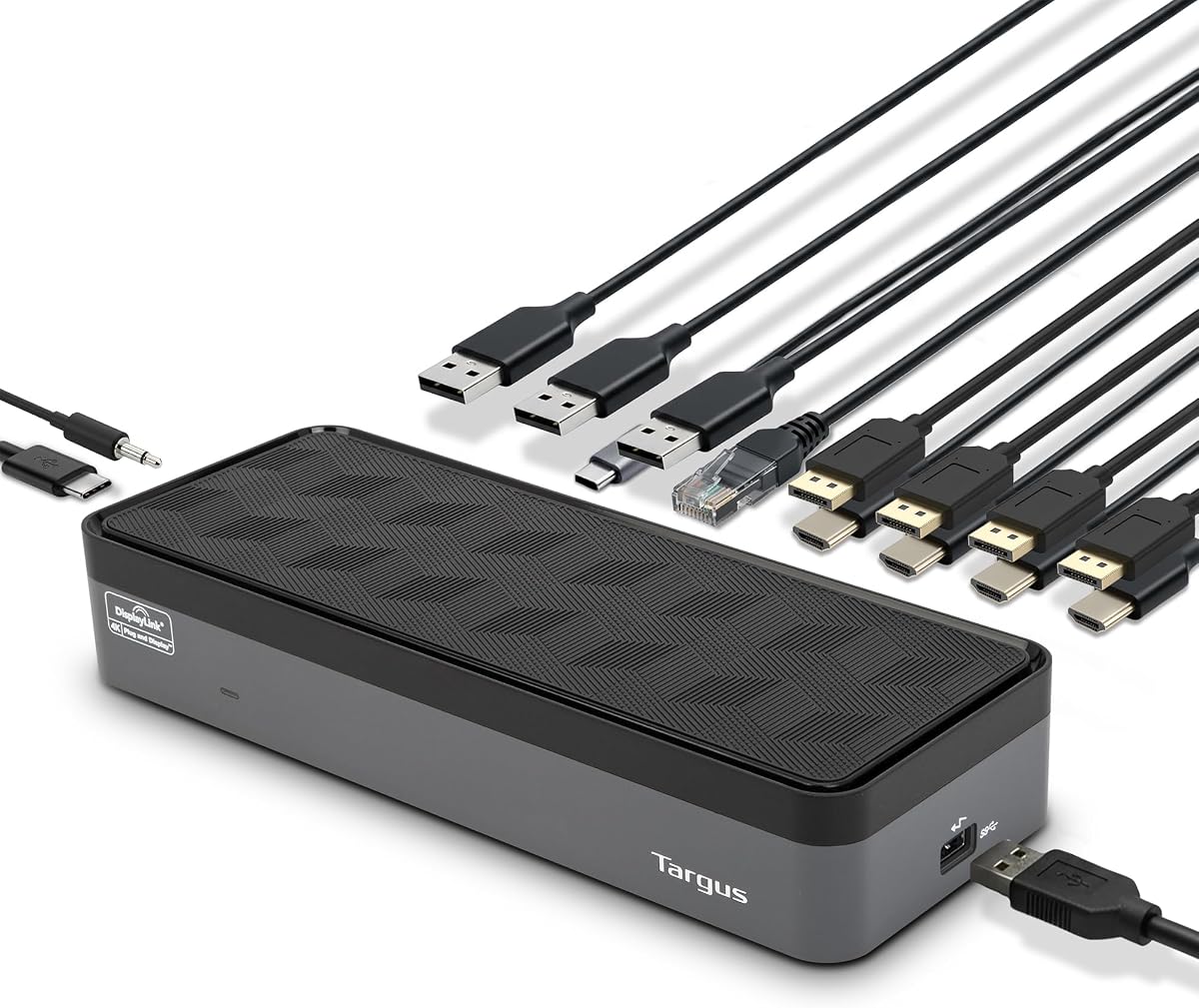
The Targus USB-C Universal Quad 4K Docking Station is a versatile option for users seeking to expand their workstation with multiple high-resolution displays. With a strong user rating of 4.4 stars, this dock stands out for its ability to connect virtually any laptop including legacy models through included adapter tips.
We may earn a commission when you buy through this link, at no additional cost to you.
Its standout feature is the support for single 5K and four 4K UHD displays via DisplayPort or HDMI. The dock offers five USB ports including a Type-C and four Type-A ports for connecting peripherals. Additionally, it includes a Gigabit Ethernet port and a 3.5mm combo Audio In/Out jack for comprehensive connectivity.
The main trade-off is the HDMI refresh rate which is limited to 50Hz compared to 60Hz on DisplayPort. However, for standard productivity tasks this difference is often acceptable. The included adapters for major laptop brands make it a practical choice for heterogeneous office environments.
Buyers looking for a reliable dock that supports older laptops alongside modern USB-C models will find this unit highly effective. Its integrated lock slot and compatibility with VESA mounting add to its utility in professional settings.
Choose between DisplayPort for 60Hz or HDMI for compatibility with your monitor setup.
Receive up to 100W power delivery to charge your laptop while connected.
We may earn a commission when you buy through this link, at no additional cost to you.
The TobenONE DisplayLink Docking Station is an impressive budget-friendly option that offers 18 powerful ports for a comprehensive workstation setup. Rated 4.4 stars by users, this dock is designed for Mac and Windows users who need to run multiple 4K displays from a single USB-C connection.
We may earn a commission when you buy through this link, at no additional cost to you.
Key strengths include its 120W power adapter which can charge your laptop and phone simultaneously without needing extra chargers. The dock features three HDMI and three DisplayPort outputs allowing various display combinations for triple or quad 4K setups. It also supports high-speed data transfer with USB 3.1 and Type-C ports.
Potential buyers should note that Netflix and some streaming services do not work due to screen recording functionality restrictions. Additionally, driver installation is required for operation. Despite these minor limitations, it is a trusted favorite for home office and professional productivity needs.
This dock is ideal for users transitioning from single screens to multi-monitor workstations on a budget. Its lifetime technical support and compatibility guarantee further enhance its value for long-term use.
Connect all your peripherals including hard drives printers and phones through one hub.
The included adapter reduces desk clutter and ensures reliable charging for your devices.
We may earn a commission when you buy through this link, at no additional cost to you.
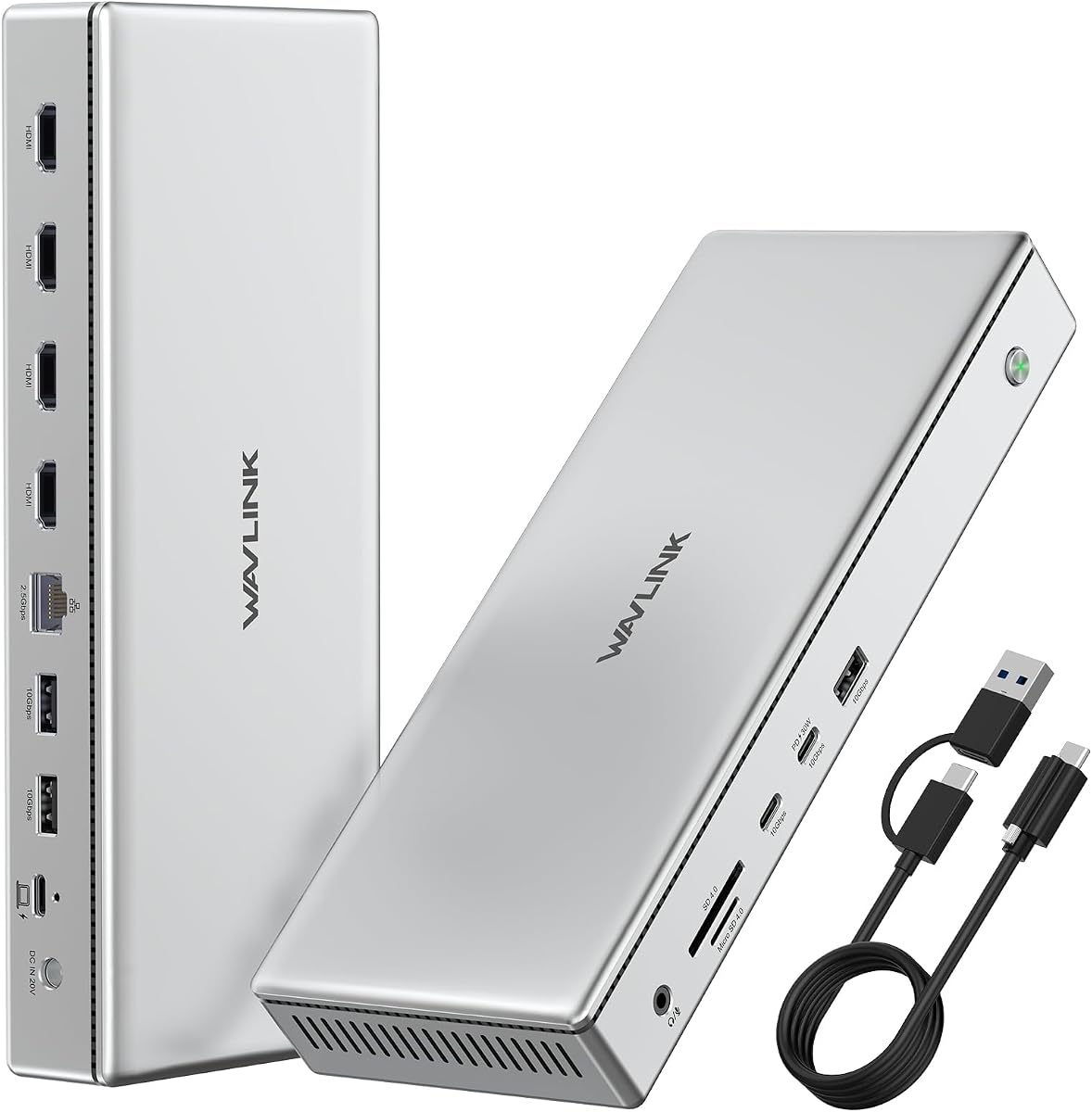
The WAVLINK Pro Docking Station is specifically designed to break the display limit on Mac devices allowing for quadruple 4K HDMI displays at 60Hz. With a 4.0 star rating, this unit is a solid choice for users needing extensive screen real estate without sacrificing resolution or refresh rate.
We may earn a commission when you buy through this link, at no additional cost to you.
It features an all-in-one 15-port expansion including SD/TF card readers and dual USB-C PD ports. The included 160W power adapter charges your laptop up to 100W and mobile devices up to 30W simultaneously. File transfers are handled at blazing speeds up to 10Gbps for USB-C and USB-A connections.
Users must install the DisplayLink driver to utilize the multi-monitor capabilities. However, the durable aluminum build ensures excellent heat dissipation. This dock is particularly suitable for video editors and designers who need reliable performance and broad compatibility with macOS and Windows.
This station is highly recommended for professional workflows where connectivity and power delivery are paramount. Its ability to handle high-speed data transfers and multiple displays makes it a valuable asset for creative professionals.
Overcome the native display limitations of Mac laptops with DisplayLink technology.
Keep all your devices powered throughout the workday without multiple adapters.
We may earn a commission when you buy through this link, at no additional cost to you.
The StarTech Thunderbolt 5 Universal Docking Station is a top-tier choice for professionals requiring high-speed connectivity and driverless plug-and-play performance. With a high 4.7 star rating, this dock delivers consistent behavior across macOS and Windows environments ensuring reduced help desk tickets.
We may earn a commission when you buy through this link, at no additional cost to you.
It unlocks the full display potential of Apple Silicon including dual 6K on MacBook Pro models and quad 4K on Windows systems via HDMI and DisplayPort. The dock includes integrated K-slot and Nano lock slots for security in public workspaces. It also offers 140W power delivery to charge laptops efficiently.
The primary trade-off is the higher price point compared to standard USB-C hubs. However, the reliability and robust testing across 100+ monitors make it ideal for IT deployments. Its lifetime technical support further ensures long-term satisfaction and operational stability.
This dock is perfect for IT professionals and enterprise users who value security and performance. Its driverless design simplifies deployment and maintenance across diverse laptop fleets in shared workspaces.
Reduce setup time and support costs with a driverless design that works out of the box.
Secure your equipment with built-in lock slots to prevent theft in high-traffic areas.
We may earn a commission when you buy through this link, at no additional cost to you.
The TobenONE 18-in-1 DisplayLink Docking Station offers an extensive array of ports designed to maximize productivity across multiple screens. With a 4.5 star rating, this dock supports up to four external displays on Windows and three on MacBook devices in stunning 4K@60Hz resolution.
We may earn a commission when you buy through this link, at no additional cost to you.
Its enhanced port combinations include 4 HDMI connections 3 USB 3.2 and 2 USB 3.0 ports along with 3 USB-C ports for fast data transfer. The included 120W power adapter provides up to 100W charging for your laptop. It also features SD/micro SD slots and a dedicated audio port for complete connectivity.
Mac users should note that only one of HDMI 3 or HDMI 4 can be selected for macOS displays. Despite this limitation, it remains a strong option for travel or clutter-less home offices. The technical support team ensures reliable product usage and quick troubleshooting.
This dock is highly recommended for Windows users seeking a versatile all-in-one solution for complex workflows. Its extensive port selection simplifies connections for peripherals storage and displays without additional adapters.
Connect a wide range of devices from hard drives to cameras without adapters.
Charge multiple devices efficiently with dedicated power delivery for laptop and phone.
We may earn a commission when you buy through this link, at no additional cost to you.
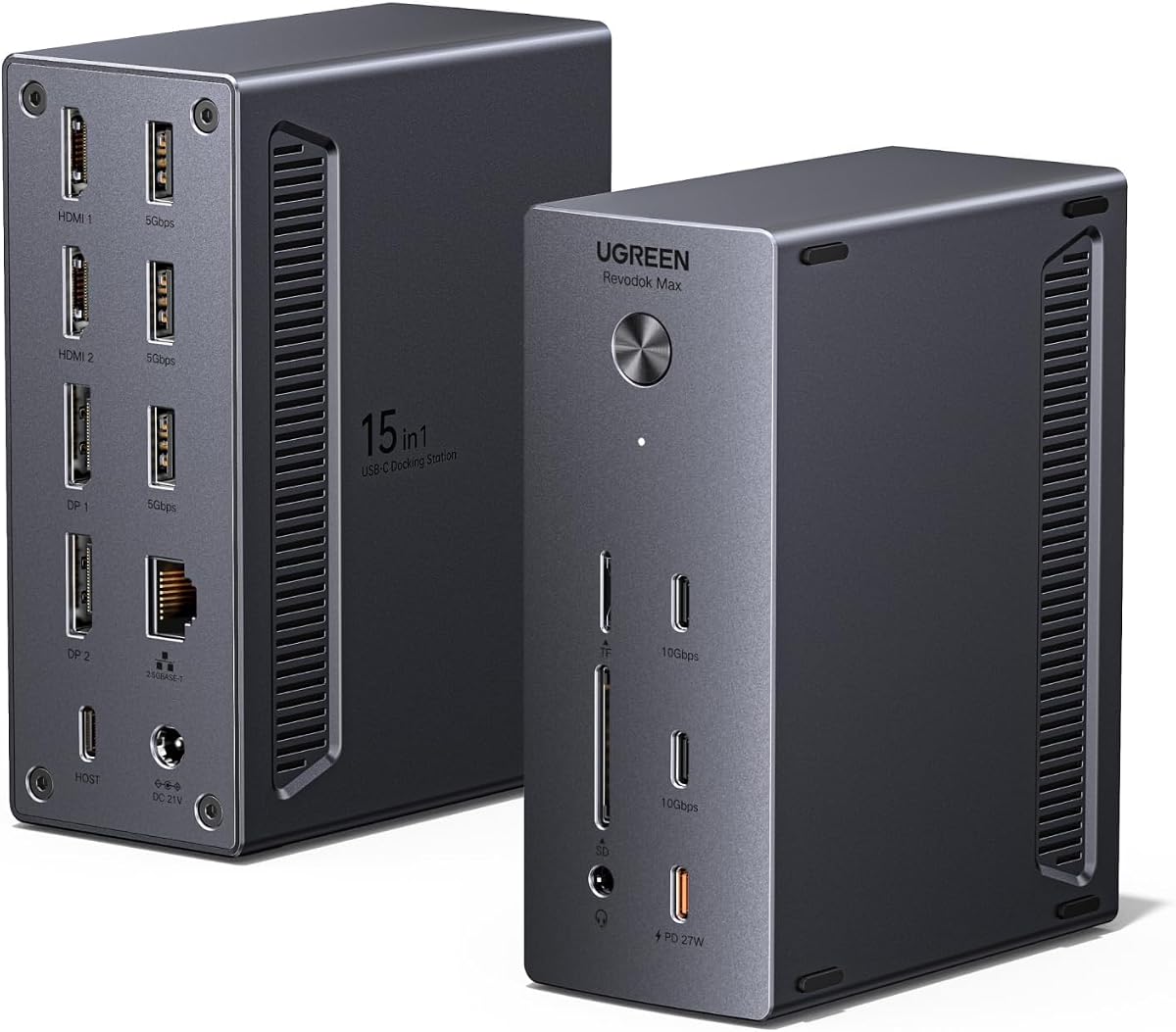
The UGREEN USB-C DisplayLink Docking Station is a premium solution for users needing high-resolution quad monitor support from a single USB-C connection. With a 4.6 star rating, it supports displays up to 8K resolution via DP or HDMI providing exceptional visual clarity for creative work.
We may earn a commission when you buy through this link, at no additional cost to you.
This 15-in-1 desktop expansion includes 2 HDMI 2 DP and multiple USB ports with 10Gbps data transfer speeds. It features a 150W power adapter that charges your laptop and a dedicated 27W PD-Out port for a phone or tablet. The 2.5 Gigabit Ethernet port ensures fast and stable networking.
Driver installation is required to enable DisplayLink capabilities which may take a few extra steps. However the included USB flash drive makes this process straightforward. The dynamic power sharing ensures efficient charging even when multiple devices are connected.
This dock is ideal for professionals requiring the highest resolution support and extensive connectivity. Its robust design and power delivery make it a reliable choice for demanding workstation setups that need future-proof performance.
Achieve stunning visual clarity with support for displays up to 8K resolution.
Enjoy stable wired internet with 2.5 Gigabit Ethernet for fast data transfer.
We may earn a commission when you buy through this link, at no additional cost to you.
Choosing the right docking station requires understanding your specific connectivity needs power requirements and operating system compatibility.
Ensure the dock supports the number of monitors and resolutions you require such as four 4K displays. Some docks support high refresh rates for productivity while others focus on static 60Hz performance.
Look for DisplayPort and HDMI combinations that match your monitors to maximize visual quality and refresh rates.
Select a dock with sufficient power delivery to charge your laptop at a reasonable speed while connected. Higher wattage adapters ensure your device remains powered during intensive tasks.
Check if the dock includes a power adapter or if you need to purchase one separately.
Review the number of USB-A and USB-C ports available for connecting your peripherals. A higher count allows for more devices without additional hubs.
Prioritize docks that include Ethernet audio and card readers if these are essential to your workflow.
Verify that the dock works seamlessly with your operating system whether Windows macOS or Chrome OS. Some docks require specific drivers for multi-monitor support on Mac.
Choose models that offer plug-and-play functionality to avoid complex setup processes.
Gigabit or 2.5 Gigabit Ethernet ensures stable and fast internet connections which is vital for remote work. Wired networking is often more reliable than Wi-Fi for professional environments.
Confirm that the Ethernet port matches your internet speed requirements for optimal performance.
Look for durable materials like aluminum that provide heat dissipation and longevity. A compact design helps reduce desk clutter while maintaining functionality.
Consider docks with integrated locks or security slots for use in shared office spaces.
USB 3.2 Gen 2 ports offer faster data transfer speeds essential for large file work. Ensure the dock supports USB-C data at 10Gbps for modern peripherals.
Higher data speeds prevent bottlenecks when connecting external storage drives or cameras.
Some docks require specific drivers like DisplayLink to enable multiple displays. Check if your operating system supports the required software before purchasing.
Plug-and-play docks simplify setup and reduce dependency on external software for basic functionality.
Connect the docking station to a USB-C port on your laptop using a high-quality cable. Ensure the cable is capable of data and video transfer for optimal performance with multiple monitors.
Plug the power adapter into the dock and connect it to a power source. This ensures your laptop receives sufficient power for charging and the dock functions correctly.
Organize your peripheral cables and monitors around the dock to maintain a tidy workspace. Regularly check for firmware updates to keep the dock running efficiently and securely.
Yes most docks on this list support up to four 4K displays. Some may require specific ports such as DisplayPort for full resolution and refresh rate. Always check the dock's specifications to confirm simultaneous support.
Mac laptops typically require DisplayLink drivers to support more than two displays via USB-C. Some Thunderbolt docks allow additional displays natively but may still depend on your Mac model. Verify driver compatibility before purchasing.
100W is sufficient for most ultrabooks and standard laptops. Gaming or high-performance laptops may need higher wattage. Ensure the dock matches your laptop's power requirements for proper charging.
Most docks on this list include Gigabit or 2.5 Gigabit Ethernet ports. Wired connections provide more stable internet speeds and are ideal for professional environments where reliability is critical.
Driver requirements depend on the dock technology. Thunderbolt docks often work plug-and-play while DisplayLink docks need drivers for multiple displays. Check the product description for specific installation needs.
Many docks support Chrome OS but features may vary. Verify the product listing for Chrome OS compatibility to ensure full functionality. Most modern docks work well with Chromebooks via USB-C.
The top three picks highlight exceptional options for budget efficiency performance and premium features. Each model offers distinct advantages depending on your specific workstation needs and laptop compatibility.
Prioritize power delivery and display support when selecting a dock to ensure your setup meets your productivity goals. Choosing the right combination of ports and reliability will streamline your daily workflow.
Always check current prices and promotions before purchasing as deals can change frequently. Verify the latest user reviews and product specifications to confirm your final selection is the best fit.