
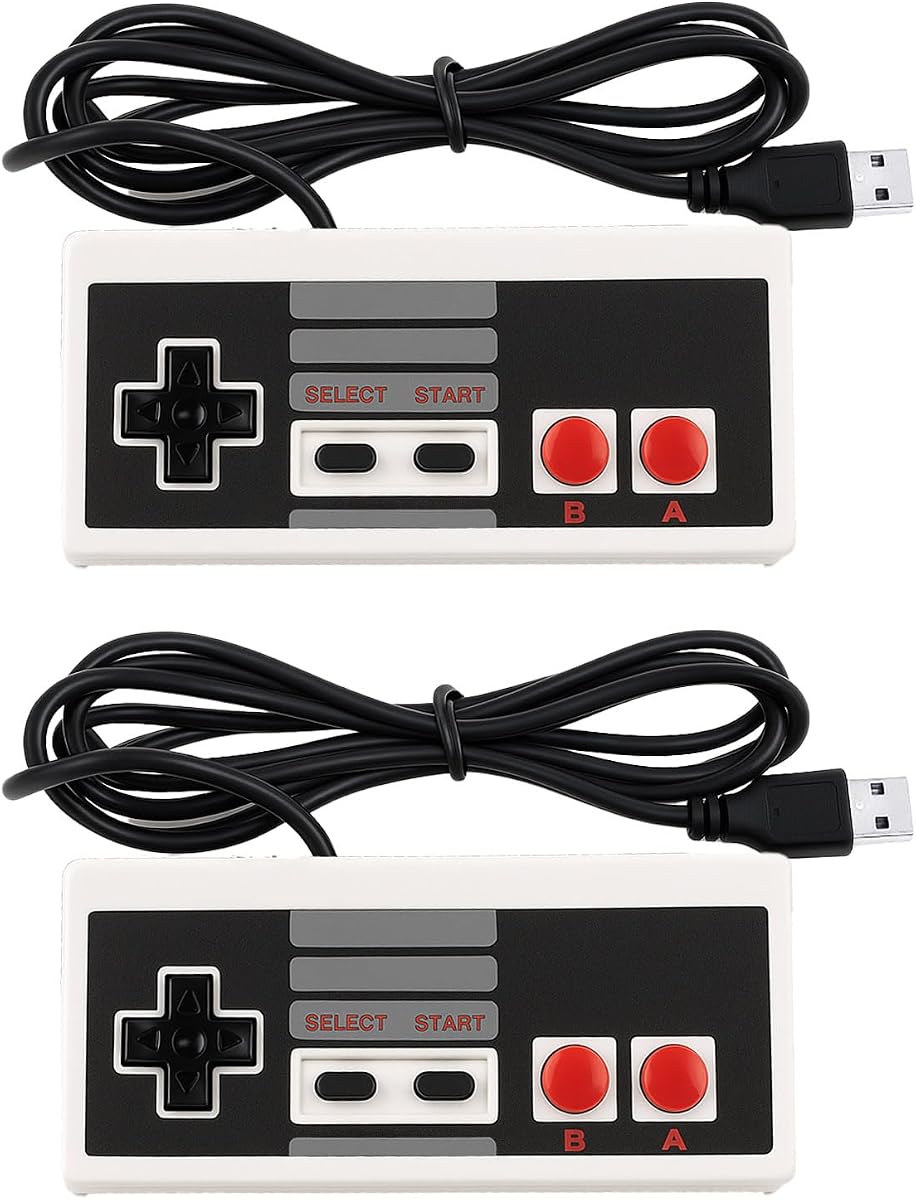
NGHTMRE for NES Classic Edition/Mini Controller for Replacement, with Extended 10ft Cable 2 Pack
3.7Editor score
10ft extended cable
Sensitive button response
Plug and play setup
Discover the top Classic Nes Controller Replacement options for retro gaming. We compare wired, wireless, and licensed options to help you choose the perfect
Finding the right Classic Nes Controller Replacement can transform your retro gaming experience significantly. Whether your original cables have frayed or you want more flexibility, the right controller ensures smooth gameplay without lag or connection issues.
We evaluated ten top options based on compatibility, build quality, and user feedback. Our analysis covers wired and wireless choices to help you find the best solution for your setup without unnecessary trial and error.
Each pick highlights key features, pros, and cons to guide your decision. Please note that prices fluctuate frequently so always check the latest offers before making your final purchase decision online.
3.7Editor score
3.8Editor score

4.8Editor score
This side-by-side comparison outlines the key specifications for each controller to help you visualize differences in connectivity, features, and intended use cases quickly.


This budget friendly pack offers a practical solution for gamers needing extra range. With a 10 foot cable it allows comfortable seating distances without signal loss issues.
We may earn a commission when you buy through this link, at no additional cost to you.
The buttons are designed to be sensitive for precision control which is crucial for retro gaming. The sturdy material ensures they hold up well over time during regular use.
While the build is functional it lacks the premium feel of licensed products. Some users note the buttons require slightly more pressure than official controllers.
Ideal for casual players or households needing multiple controllers this pack delivers value. It meets the needs of most users seeking reliable replacements at a low cost.
The 10 foot cable lets you sit further from the screen reducing eye strain during long sessions.
Two controllers are included so you can play with a friend right away without buying extra accessories.
We may earn a commission when you buy through this link, at no additional cost to you.
These wireless controllers offer freedom from cables making them great for PC gaming setups. The 2.4GHz technology ensures a stable connection up to ten meters away from your system.
We may earn a commission when you buy through this link, at no additional cost to you.
A built-in rechargeable battery lasts around 100 hours which means less frequent charging. You can customize buttons and use turbo functions for enhanced gameplay control easily.
The main limitation is incompatibility with the NES Classic console specifically. It targets PC Mac and Linux users so verify compatibility before purchasing for your specific device.
If you play retro games on a computer this option provides modern convenience. It suits users who want wireless play without investing in expensive branded adapters.
The rechargeable lithium ion battery supports about 100 hours of play on a single charge cycle.
You can configure keys and set rapid fire options through included software for personalized control layouts.
We may earn a commission when you buy through this link, at no additional cost to you.
This controller focuses on simplicity with a plug and play interface for PC and Mac. It uses a standard USB connection to ensure instant readiness without extra installation steps.
We may earn a commission when you buy through this link, at no additional cost to you.
The D-pad and buttons are designed for responsive control during long gaming sessions. Its construction aims for durability using premium materials to withstand regular handling over time.
While it works well on computers it lacks specific console adapters like the NES Classic. Users should confirm their operating system compatibility before purchasing to avoid return hassles.
For collectors or PC gamers this model offers a reliable retro feel. It is best suited for those prioritizing function over flashy aesthetics or brand licensing.
Simply plug into your PC or Mac and start playing right away since no drivers are required for operation.
The ergonomic layout ensures your hands stay comfortable even during extended periods of gameplay without strain.
We may earn a commission when you buy through this link, at no additional cost to you.
Highly rated by users this controller delivers exceptional build quality for retro game consoles. It features a 9 pin port design that works seamlessly with AV 620 and HD models.
We may earn a commission when you buy through this link, at no additional cost to you.
The continuous fire function gives you an edge in rapid fire games adding modern convenience to retro setups. Two controllers are included so you can enjoy multiplayer gaming right away.
While it is a great alternative it is not a first-party product so verify your console port compatibility first. It targets specific retro consoles rather than the Mini NES Edition.
For enthusiasts owning these specific retro models this pack offers premium performance. It is recommended for those who value durability and extra features over official branding.
The continuous fire function allows rapid shooting without holding buttons manually enhancing your gameplay experience significantly.
Designed specifically for AV 620 and HD 821 consoles this ensures a perfect fit without needing extra adapters.
We may earn a commission when you buy through this link, at no additional cost to you.
This controller supports a wide range of operating systems including Windows Linux and Raspberry Pi. It brings back nostalgic memories with smooth performance and an authentic classic NES feel.
We may earn a commission when you buy through this link, at no additional cost to you.
A 5.6 foot cable provides convenient distance while staying durable enough for daily use. Two controllers are included for multiplayer fun or sharing nostalgic moments with family.
It does not support Nintendo Switch or Wii systems so check your device compatibility before buying. The plug and play USB connection ensures immediate setup without extra software.
For PC and RetroPie users this is a reliable choice for retro gaming. It offers great value with its broad compatibility and straightforward design.
Compatible with Windows Mac and Raspberry Pi this controller fits into various gaming environments without issues.
Designed to replicate the classic NES controller layout it offers the nostalgic feel gamers expect from retro titles.
We may earn a commission when you buy through this link, at no additional cost to you.
This adapter allows you to use existing NES or SNES controllers on modern systems. It supports Wii U and Wii consoles without requiring any extra driver installation.
We may earn a commission when you buy through this link, at no additional cost to you.
The built-in turbo function adds enhanced gameplay capabilities to classic controllers. You can also exchange the D-pad and left stick for different configurations as needed.
It is not a standalone controller but an accessory to extend the life of your existing ones. This is great for users who want to keep their vintage hardware.
If you have old controllers this adapter is a practical way to reuse them. It bridges the gap between vintage hardware and modern consoles seamlessly.
Use your favorite vintage NES or SNES controllers on newer systems without needing to replace them.
The D-pad and left stick can be exchanged for different ergonomic setups based on your preference.
We may earn a commission when you buy through this link, at no additional cost to you.
This replacement housing transforms your Switch Joycon with a classic NES style design. It offers a soft touch feel that improves grip and comfort during long gameplay.
We may earn a commission when you buy through this link, at no additional cost to you.
The ergonomic D-pad enhances control for d-pad intensive games on the Switch. Installation requires moderate experience but includes a guide to help you proceed step by step.
Note that the electronics are not included so you must transfer parts from your existing Joycon. This is a modification project for those who enjoy customizing their hardware.
For Switch owners wanting a retro look this housing provides style and function. It is perfect for personalizing your device without buying a new console.
Add personality to your Switch with a unique NES style case that stands out from standard gray colors.
The ergonomic D-pad design improves function for games requiring frequent directional inputs on your Joycon.
We may earn a commission when you buy through this link, at no additional cost to you.
This bundle includes a controller power supply and extension cables for a complete setup. It aims to provide everything needed for comfortable gaming in one package.
We may earn a commission when you buy through this link, at no additional cost to you.
The 6 foot extension cables allow more seating freedom and the power supply ensures stable operation. Having a bundle simplifies the purchasing process for new users.
User ratings suggest mixed experiences so quality may vary. It is important to check recent feedback before purchasing to ensure current quality standards are met.
For those needing immediate setup options this bundle offers convenience. It is a one-stop option but verify recent reviews to manage expectations on quality.
Get a controller power supply and cables together to streamline your console setup without separate purchases.
The long cables let you sit back comfortably while playing on your console without cable length limits.
We may earn a commission when you buy through this link, at no additional cost to you.
As a licensed product this controller delivers superior quality materials that meet official standards. The textured silicone grip extends control for precision during intense gaming moments.
We may earn a commission when you buy through this link, at no additional cost to you.
RDS Industries is known as a top manufacturer nationwide which adds trust to this purchase. It is designed to provide comfort and better precision compared to standard plastic controllers.
It comes in a distinct red color which may appeal to those wanting a visual upgrade. The price is higher but the licensed quality often justifies the cost for collectors.
For fans seeking official quality this controller is a solid investment. It combines comfort with brand reliability for an enhanced gaming experience.
Being licensed by Nintendo ensures the controller meets strict quality and material standards for safety and durability.
Textured silicone material creates a comfortable grip that enhances precision and reduces hand fatigue.
We may earn a commission when you buy through this link, at no additional cost to you.
This controller mimics the SNES layout and works well for PC gaming via USB. It supports Windows Mac and Raspberry Pi making it versatile for retro emulation.
We may earn a commission when you buy through this link, at no additional cost to you.
The cross direction key uses a frosted concave design to prevent slipping during play. It works with most emulators though button mapping must be done manually inside the software.
It does not support the original SNES console but focuses on PC compatibility. Two controllers are included which offers great value for multiplayer retro gaming sessions.
If you use emulators on a computer this controller provides a familiar feel. It is a practical choice for those wanting classic controls on modern systems.
Works with popular emulators like VirtuaNES and OpenEmu for a seamless retro gaming experience on PC.
The frosted concave cross key provides an anti-sweat and anti-slip surface for better control during games.
We may earn a commission when you buy through this link, at no additional cost to you.
Choosing the right controller replacement requires considering compatibility, build quality, and your gaming setup needs.
Ensure the controller works with your specific console or PC. Some options target the NES Classic Mini while others work on PC or SNES systems. Always check the product description to confirm your setup is supported before buying.
Match the controller to your console to avoid connection issues or the need for extra adapters.
Wired controllers offer stable connections without battery concerns while wireless ones provide freedom from cables. Wireless options need charging and may have range limits so weigh your preference for convenience against potential lag or battery drain.
Choose wired for reliability or wireless for mobility based on your setup constraints.
Cable length impacts where you can sit during play. Longer cables like 10 feet let you sit further back for comfort but may tangle more easily. Shorter cables keep things tidy but limit seating options.
Pick a cable length that fits your room and seating distance preferences for comfort.
Look for durable materials that can withstand regular use. Sturdy construction ensures buttons and connectors hold up over time without breaking or loosening. Read reviews to gauge real-world longevity before committing to a purchase.
Prioritize sturdy materials to ensure the controller lasts through many gaming sessions.
Some controllers offer turbo buttons or extended D-pads for better gameplay. Features like these can enhance your gaming but may require setup or limit compatibility. Check if extra functions align with your games and needs.
Consider features like turbo or ergonomic D-pads if they match your gameplay style.
Price varies based on licensing and features. Licensed products may cost more but offer reliability while third-party options save money. Assess what features matter most to you to find the best balance of cost and quality.
Compare costs against features to get the best value for your budget.
Read feedback from other users to learn about real performance and issues. Reviews often highlight problems like button stiffness or connection drops that specs might not show. Use this insight to make an informed decision.
Rely on user feedback to identify common issues or strengths before buying.
Some packs include two controllers while others come single. Multi-packs offer value if you play with others but verify each controller works well. Check if extra accessories like cables are included or sold separately.
Check the box content to ensure you get all the controllers and accessories you need.
Connect the controller securely to your console or PC using the provided cable or adapter. Ensure ports are clean and dry for a stable connection without signal drops.
Test all buttons and D-pad movement immediately after setup to confirm everything works correctly. If a button feels stuck, gently clean around it with compressed air to remove debris.
Store your controller in a cool dry place when not in use to protect it from dust and moisture. Avoid letting the cable bend sharply to prevent internal wire damage over time.
Not all generic controllers work with the NES Classic Mini. Check the product description for explicit compatibility with the 2016 model with HDMI ports. Many third-party options require adapters or only work on PC.
Unresponsive buttons may be due to dirt or connection issues. Try cleaning the contacts with isopropyl alcohol or re-plugging the controller. If problems persist, the internal components may be defective.
Wireless options are safe but depend on battery life and connection stability. Ensure they charge fully and use reputable brands to avoid interference or lag. Some may require manual setup on PC systems.
Ideal cable length depends on your seating distance. A 6 to 10-foot cable offers good flexibility without tangling. Longer cables allow more room but can be cumbersome to manage.
You need a specific adapter like the MAYFLASH adapter to use SNES controllers on the NES Classic. Direct compatibility is not standard so check your adapter options before purchasing extra controllers.
Some replacement controllers include turbo features for rapid fire. Check the product details to confirm if turbo is built in. Setup might be needed via software or hardware buttons depending on the model.
Licensed controllers typically offer better build quality and guaranteed compatibility. Third-party options often save money but vary in reliability. Choose based on your budget and tolerance for potential issues.
Keep the cable free from sharp bends and knots to prevent internal wire breaks. Store it coiled loosely and avoid pinching it behind furniture. Periodic cleaning keeps connectors functioning well.
The NGHTMRE ZENANBiBi and happymaxplus options lead the list for budget versatility and quality respectively. Each serves different needs from casual PC gaming to specific retro console setups effectively.
Prioritize compatibility with your system to avoid returns or adapters. Check reviews for real-world feedback and consider cable length and build quality for long-term satisfaction.
Always verify current prices and offers before buying as deals change frequently. Select the controller that best matches your setup and gaming style for the most enjoyable experience.