
BNC to HDMI Converter
4.7Editor score
Supports 720P and 1080P output
Automatic NTSC and PAL detection
ABS material ensures impact protection
This guide compares the top 10 Coax to HDMI Converter models for 2026, analyzing compatibility, signal stability, and ease of setup for retro gaming and
Finding the right Coax to HDMI Converter can breathe new life into older TVs and security systems. These devices bridge the gap between legacy coaxial inputs and modern digital signals, ensuring compatibility across various setups.
We evaluated ten top-rated models based on signal stability, resolution support, and build quality. Each product was selected for its ability to handle specific conversion tasks, from gaming consoles to CCTV cameras.
Every pick highlights key features and potential limitations to help you choose wisely. Prices fluctuate often, so verify current offers before purchasing to ensure you get the best value for your needs.
4.7Editor score

5.0Editor score

4.4Editor score
The following table provides a side-by-side comparison of all ten products, highlighting key specifications and unique features to help you identify the best fit for your specific setup requirements.


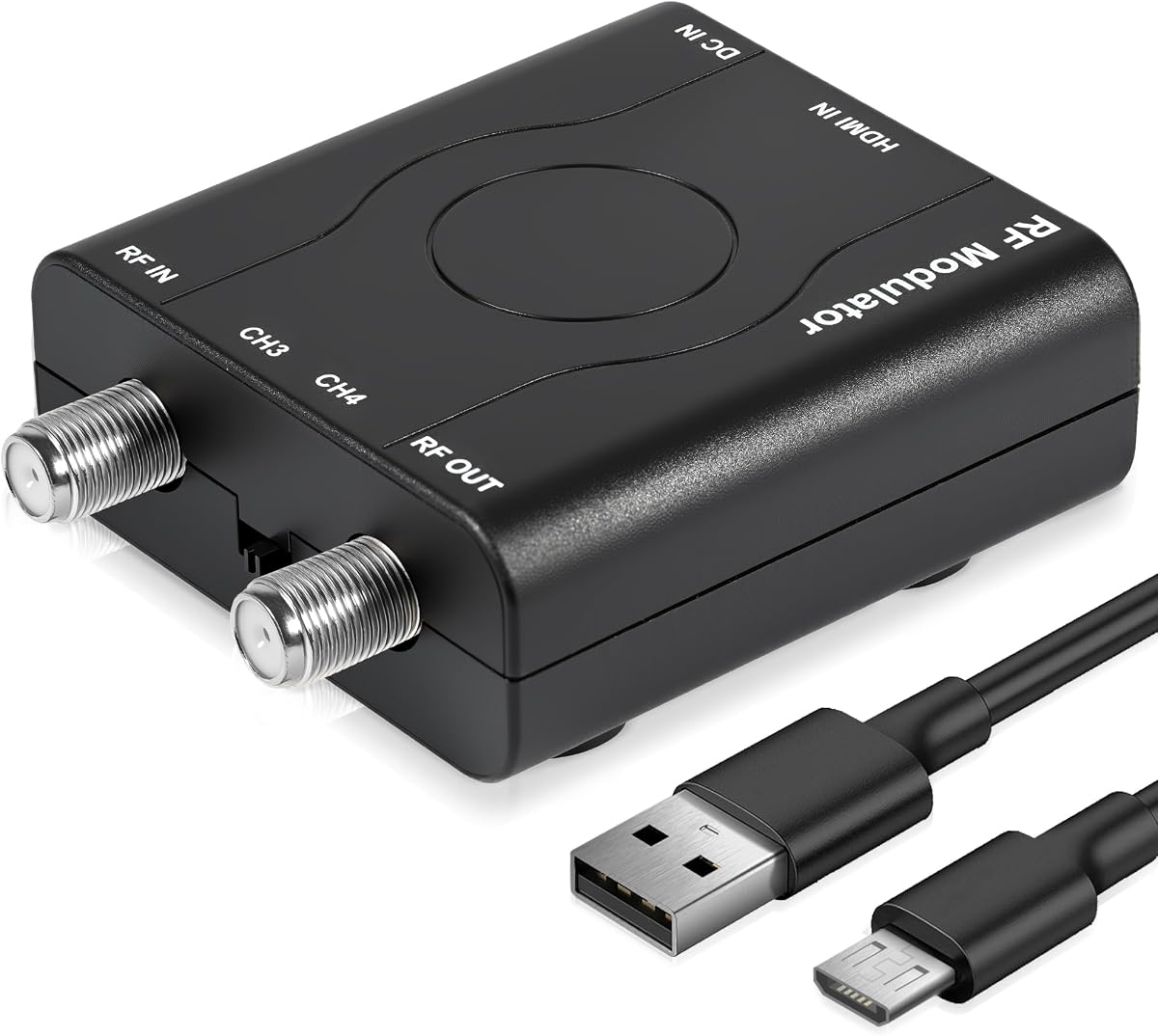


This HDMI to RF Modulator is designed to bridge modern devices with older TVs. It carries a 4.3 rating from users who appreciate its simplicity and included accessories. The unit supports standard resolutions and ensures stable transmission over coaxial cables.
We may earn a commission when you buy through this link, at no additional cost to you.
Its standout feature is the inclusion of a 1.2M HDMI cable, saving you from buying extras. The device converts HDMI signals to RF on Channel 3 or 4, making it ideal for connecting game consoles like PS5 or Switch to legacy displays without complex settings.
Users note that while it handles input resolution well, the output is limited to analog standards. This limitation is expected for this type of converter but means you won't get digital clarity on older screens. It is strictly one-way conversion.
If you own older TVs without HDMI ports and need to connect a modern console, this adapter is a reliable choice. It simplifies setup significantly with its ready-to-use design. Just ensure your TV can tune to NTSC RF signals for proper display.
The package comes with a 1.2M HDMI cable, allowing you to connect devices immediately after unboxing without extra purchases.
Built-in PLL control ensures consistent VHF frequency output, reducing signal loss when transmitting to older antenna inputs.
We may earn a commission when you buy through this link, at no additional cost to you.
This RF Demodulator allows users to connect vintage gaming consoles and VCRs to modern displays. It has a 3.4 rating, reflecting mixed experiences with signal consistency. The device converts analog coaxial signals to digital HDMI outputs for better viewing quality.
We may earn a commission when you buy through this link, at no additional cost to you.
Key strengths include compatibility with classic systems like Atari 2600 and NES. It also supports both NTSC and PAL formats, making it versatile for international setups. The included remote adds convenience for switching channels without physical access to the device.
However, some users report inconsistent picture quality depending on the source signal strength. This variability suggests it works best with strong coax inputs. It is not suitable for high-definition digital sources directly without external conversion.
If you need to preserve old video footage or play retro games on a new TV, this converter offers a viable path. Ensure your source signal is clean for the best results. It is a specialized tool rather than a universal adapter.
The device handles both NTSC and PAL formats, allowing it to work with a wide range of international video sources and tapes.
A remote control is included for easy channel switching and power management without needing to touch the unit physically.
We may earn a commission when you buy through this link, at no additional cost to you.
This BNC to HDMI Converter is a top choice for security system upgrades at an accessible price. With a 4.7 rating, it is praised for its reliability in converting analog camera feeds to digital signals. It supports standard security camera resolutions effectively.
We may earn a commission when you buy through this link, at no additional cost to you.
Its main benefit is the automatic detection of PAL or NTSC signals, which simplifies setup for mixed camera systems. The ABS material ensures it is impact-resistant, suitable for environments where durability matters. It supports outputs up to 1080P for clearer viewing.
Note that it uses BNC inputs, not standard RF coaxial connectors, so verify your camera ports first. It also does not include the power cable in some bundles, which is a minor inconvenience. However, performance remains consistent for daily surveillance.
If you are integrating analog cameras into a modern HDMI monitor, this adapter provides excellent value. It handles motion optimization and noise reduction well. Always confirm your camera output type matches the BNC interface before purchasing to avoid compatibility issues.
The unit automatically detects whether the input is PAL or NTSC, adjusting the output settings without manual intervention.
Constructed from ABS material, the converter is designed to withstand physical impacts and protect internal electronic components.
We may earn a commission when you buy through this link, at no additional cost to you.
This HDM61 Modulator is crafted for seamless integration with local cable systems. It holds a 4.3 rating for stable performance in home entertainment setups. The device converts HDMI inputs to RF outputs suitable for older TVs and coaxial distribution networks.
We may earn a commission when you buy through this link, at no additional cost to you.
Its high-quality craftsmanship ensures reliable operation over time. It supports HDCP 1.4 for content protection and works with diverse devices like laptops and DVD players. The 1080P PLL control maintains signal fidelity during conversion to analog formats.
While effective, it is strictly for HDMI to RF conversion. You cannot use it to feed coax signals into a modern HDMI port. This limitation is typical for modulators but restricts its use to specific output scenarios only.
For users needing to distribute HDMI content over coax in a home, this adapter is a solid choice. It avoids complex drivers and works straight out of the box. Check your local frequency standards to ensure channel compatibility.
Designed to work with standard local CATV systems, ensuring the RF output matches typical channel frequencies for easy tuning.
Accepts 1080P input signals to ensure that the source content is captured at high quality before conversion to analog.
We may earn a commission when you buy through this link, at no additional cost to you.
This RF Modulator stands out with a perfect 5.0 rating for reliability and ease of use. It is designed as a comprehensive HDMI to Coax Adapter. The device converts HDMI digital signals into RF outputs compatible with older TVs and distribution systems.
We may earn a commission when you buy through this link, at no additional cost to you.
It is excellent for distributing content to multiple TVs in a home or business. The kit includes everything needed for installation, such as HDMI cables and power adapters. User manuals provide clear step-by-step guidance for quick setup.
Customers appreciate its stable performance and broad device compatibility. It works well with streaming players and game consoles. However, it does not extract audio separately, relying on RF transmission for sound which may vary in quality.
If you need a dependable solution for legacy TV setups, this adapter is highly recommended. It simplifies connecting modern sources to older displays without hassle. Ensure your coax infrastructure supports the frequency output for optimal results.
The package includes HDMI cables, power adapters, and detailed instructions, ensuring you have everything to start using it immediately.
Compatible with a wide range of HDMI devices including streaming players, game consoles, and laptops for versatile use cases.
We may earn a commission when you buy through this link, at no additional cost to you.
This HDM61 Adapter is a compact solution for converting HDMI to RF. It carries a 5.0 rating for consistent performance and build quality. The device accepts HDMI input and outputs analog RF coax signals suitable for standard TVs.
We may earn a commission when you buy through this link, at no additional cost to you.
Its small size allows flexible placement in tight spaces between sources and TVs. The molded ABS shell protects internal components effectively during continuous operation. It supports standard NTSC-M signals with fixed frequencies for channel 3 and 4.
Users note that it works reliably for one-way conversion but cannot reverse the process. This means it is ideal for feeding modern devices to old TVs but not the reverse. The design prioritizes stability over advanced features.
If you need a simple, portable adapter for home use, this is a strong candidate. It handles HDMI 1.4 inputs well without driver requirements. Just ensure your TV supports the specific channel frequencies for uninterrupted viewing.
The small physical footprint makes it easy to hide behind consoles or TVs where space is limited for equipment.
Constructed with a molded ABS outer shell, the device resists physical damage and maintains performance over daily use.
We may earn a commission when you buy through this link, at no additional cost to you.
This Modulator prioritizes ease of use with a USB power cable included in the package. It holds a 4.5 rating for stable performance in converting HDMI to RF. The design ensures reliable operation without needing complex technical settings.
We may earn a commission when you buy through this link, at no additional cost to you.
It supports HDMI 1.4 and HDCP 1.4 for broad compatibility with modern devices. The ABS construction adds durability for long-term use. You can connect various sources like laptops and cameras easily for quick signal conversion.
While effective, it is limited to HDMI input only. It cannot accept RF signals as input. This constraint is typical for modulators but limits its versatility for bi-directional setups. However, for its intended purpose it works well.
For users seeking a straightforward adapter without extra accessories, this unit is a good choice. It includes necessary power connections for immediate setup. Ensure your TV input matches the RF frequency output for proper connection.
The package includes a USB power cable so you do not need to source a separate power adapter for operation.
Works with a wide range of devices including laptops, game consoles, and cameras thanks to HDMI 1.4 support.
We may earn a commission when you buy through this link, at no additional cost to you.
This Modulator offers dual outputs for both RCA and RF signals simultaneously. It has a 4.2 rating for versatility in connecting capture cards and TVs. The device helps users share content across different devices without signal loss.
We may earn a commission when you buy through this link, at no additional cost to you.
Its ability to connect to a capture card via RCA makes it useful for recording. The included channel switch prevents interference with other analog devices like VCRs. It supports various modern devices including consoles and streaming boxes.
However, managing two outputs might be complex for users needing a single connection. Some users report variable quality depending on the cable length and source. It is best suited for scenarios requiring both analog types at once.
If you need to send signals to a TV and a capture card, this adapter is unique. It simplifies multi-device setups with its dual functionality. Ensure your capture card supports RCA inputs to utilize this feature effectively.
It converts HDMI into both RCA CVBS and VHF RF signals, allowing simultaneous connections to TVs and recording devices.
A channel switch is included to avoid interference with other analog devices on the same coaxial system.
We may earn a commission when you buy through this link, at no additional cost to you.
This Eyoyo Converter is a premium solution for security camera systems. It has a 4.4 rating for clarity and reliability in surveillance setups. The device bridges the gap between analog cameras and modern HDMI monitors effectively.
We may earn a commission when you buy through this link, at no additional cost to you.
It supports a wide range of formats including TVI, CVI, and AHD. The metal housing helps dissipate heat for continuous 24/7 operation. A loop out feature allows you to send signals to a DVR while viewing on a monitor.
The unit outputs sharp 1080P video to ensure facial details are visible. Users appreciate that it works without drivers, simplifying maintenance. It is more expensive than basic models but delivers better stability for critical systems.
If you have older security cameras and need to upgrade your monitor, this adapter is ideal. It handles mixed formats automatically. Confirm your camera resolution supports up to 8MP to maximize its capabilities fully.
It works with TVI, CVI, AHD, and CVBS signals, allowing mixed systems to function without replacing all existing cameras.
The device includes a BNC loop out so you can view feeds on an HDMI screen while recording to a DVR simultaneously.
We may earn a commission when you buy through this link, at no additional cost to you.
This Modulator is designed for reliable operation within local CATV systems. It carries a perfect 5.0 rating for stable signal conversion and build quality. The device converts HDMI digital inputs to analog RF outputs effectively.
We may earn a commission when you buy through this link, at no additional cost to you.
Its professional-grade construction ensures long-term durability and consistent performance. It supports 1080P PLL control for high-quality transmission. Users can connect a range of devices including laptops and game consoles easily.
While it is strictly one-way, this fits most distribution needs. The unit requires external power but offers portability for flexible use. It is ideal for commercial setups requiring consistent channel distribution without signal degradation.
For users needing to integrate HDMI sources into existing coax networks, this adapter is excellent. It supports standard HDCP 1.4 for compliance. Ensure your local channel frequencies align with the device output for seamless operation.
Constructed with durable materials, this unit is built to withstand continuous daily use in demanding environments.
Designed to match local CATV specifications, ensuring the signal integrates smoothly with existing coax networks.
We may earn a commission when you buy through this link, at no additional cost to you.
Selecting the right converter depends on your source devices and display capabilities. Consider these factors to ensure compatibility and performance for your setup.
Verify whether you need HDMI to RF or RF to HDMI conversion. Some devices only support one direction, which is critical for your specific needs.
Choose a unit that matches your source port and display input to avoid connectivity issues.
Check the supported input and output resolutions. Most modern devices support 1080P, but older coax systems may limit output to lower analog standards.
Ensure the converter accepts your source resolution to prevent pixelation or signal loss.
Determine if you need support for NTSC or PAL formats. This is especially important if you are dealing with international video sources or older gaming consoles.
A device that auto-detects formats simplifies setup significantly for mixed systems.
Look for durable materials like ABS or metal housings. Security and commercial setups may require devices that can operate 24/7 without overheating.
A solid build ensures longevity and reliability during extended use periods.
Check if the package includes necessary cables like HDMI or power adapters. Missing accessories can add hidden costs to your total setup budget.
A complete kit saves time and ensures you can start using the device immediately.
Consider how the device is powered. Some require USB power while others need dedicated wall adapters. This affects portability and where you can place the unit.
Ensure you have access to the required power source near your display setup.
Prioritize devices with plug-and-play functionality. Drivers and complex software can complicate installation for non-technical users.
A simple setup process reduces frustration and speeds up deployment.
Review the manufacturer's support options. Good customer service can help resolve technical issues quickly if you encounter problems.
Responsive support ensures a smoother experience when setting up your converter.
Connect the power adapter to the converter first to ensure it is receiving electricity before attaching other cables. Once powered, plug your source device into the HDMI input port.
Attach the coaxial cable to the RF output port and connect the other end to your TV antenna input. Tune your TV to Channel 3 or 4 to view the signal.
Keep the converter in a well-ventilated area to prevent overheating during long sessions. Avoid placing it in direct sunlight or enclosed cabinets without airflow to maintain performance.
HDMI to RF converters take digital HDMI signals and convert them into analog coaxial signals for older TVs. RF to HDMI converters do the opposite, turning coaxial signals into digital HDMI for modern displays.
Most modern converters are plug-and-play and do not require any drivers or software installation. Just connect the device and ensure your TV is set to the correct channel.
Yes, many of these converters are designed specifically for connecting modern consoles to older TVs with coax inputs. Ensure the console output resolution matches the converter input.
Blurry pictures often result from signal loss during analog conversion or using low-quality coaxial cables. Ensure all cables are tightly connected and in good condition.
Most RF modulators transmit audio along with video through the coaxial cable. However, some devices may require separate audio connections depending on their specific design.
You can use an RF splitter to connect multiple TVs to one converter, but signal quality may decrease depending on the number of TVs and cable length.
We found that the best choice depends on your specific setup needs. Whether you are upgrading a security system or connecting retro consoles, the right adapter makes all the difference.
Prioritize compatibility and resolution support to ensure your devices work together seamlessly. Durable build quality is also crucial for long-term reliability in any environment.
Remember to check current prices and availability before purchasing to ensure you get the best value. Verify compatibility with your specific TV and source devices to avoid unnecessary returns.