
Adesso Easy Touch 630Ub Wired Waterproof Keyboard
4.2Editor score
IP67 waterproof rating for spills
Large durable keys for readability
Plug-and-play USB connectivity
This guide compares the best Keyboard for Pos System options available in October 2026, evaluating durability, layout, and connectivity features for retail
Choosing the right input device is critical for smooth operations in any retail or service setting. A reliable Keyboard for Pos System ensures that transactions are processed quickly and accurately without frustrating downtime. Businesses need hardware that can withstand constant use while providing clear visibility for staff during busy shifts.
We have analyzed a wide range of models specifically designed or suitable for point of sale environments. Our evaluation focuses on build quality, interface compatibility, and user comfort during extended periods of typing. This list covers options from specialized industrial units to versatile general-purpose keyboards that can adapt to POS tasks.
Each product entry below highlights key specifications and real-world performance characteristics to help you make an informed decision. We aim to provide transparent details so you can match the hardware to your specific workflow needs. Please note that prices and availability are subject to change over time.
4.2Editor score

4.2Editor score
The following table provides a side-by-side comparison of all ten products featured in this guide. You can quickly assess key differences in layout, connectivity, and special features to determine which model fits your specific point of sale requirements best.


The Perixx PERIBOARD-513III stands out as a versatile option for businesses needing a compact yet functional input device. With a 4.2 rating, it offers a blend of traditional typing comfort and modern touchpad navigation. This model is particularly strong for environments where desk space is limited but full keyboard functionality is still required.
We may earn a commission when you buy through this link, at no additional cost to you.
Its integrated touchpad allows users to navigate menus and point-and-click tasks without needing a separate mouse, streamlining the checkout process. The quiet scissor switches provide a laptop-like feel that reduces noise in open retail spaces. The full-size layout includes a dedicated numeric keypad, which is essential for rapid price entry and inventory management.
While the touchpad is convenient, some users accustomed to traditional mice might find the precision slightly less sharp during extended use. Additionally, the lack of backlighting means it is less suitable for dimly lit back offices or late-night shifts. These trade-offs are acceptable given the space-saving design and cost-effectiveness.
We recommend this keyboard for small to medium retail setups looking to minimize clutter without sacrificing productivity. It is an excellent choice for businesses that want a reliable plug-and-play solution that handles both typing and navigation efficiently. Its durability and ease of setup make it a strong contender for daily operational tasks.
The all-in-one design combines keyboard and touchpad, freeing up valuable counter space for packaging and other retail essentials.
Scissor switches offer a low-profile and quiet typing experience that reduces fatigue during long shifts at the register.
We may earn a commission when you buy through this link, at no additional cost to you.
The Adesso Easy Touch 630Ub is an exceptional value for businesses operating in environments prone to spills or wet conditions. Rated at 4.2, this keyboard is built to handle industrial or workshop settings where standard keyboards would fail quickly. Its waterproof design ensures that accidental liquid exposure does not lead to costly hardware replacements.
We may earn a commission when you buy through this link, at no additional cost to you.
The large keys are designed with increased print size, making them highly readable from a distance or in brightly lit areas. This feature is particularly useful for staff who need to type quickly without leaning in to check the labels. The robust construction means it can withstand rough handling and daily cleaning routines without degrading.
A potential downside is the lack of advanced features like multimedia keys or backlighting, which might be expected in modern office setups. The basic black design is functional but does not offer the sleek look of premium models. However, for pure utility and durability in tough environments, these limitations are minor.
This keyboard is best suited for restaurants, cafes, or manufacturing floors where cleanliness and resilience are top priorities. It is an ideal budget choice for businesses that need to equip multiple stations without breaking the bank. The peace of mind provided by its waterproof rating makes it a smart investment for operational continuity.
Engineered to withstand rough treatment and exposure to various substances, ensuring long-term performance in demanding environments.
The waterproof build allows for easy cleaning, which is crucial in food service or high-spill industrial settings.
We may earn a commission when you buy through this link, at no additional cost to you.
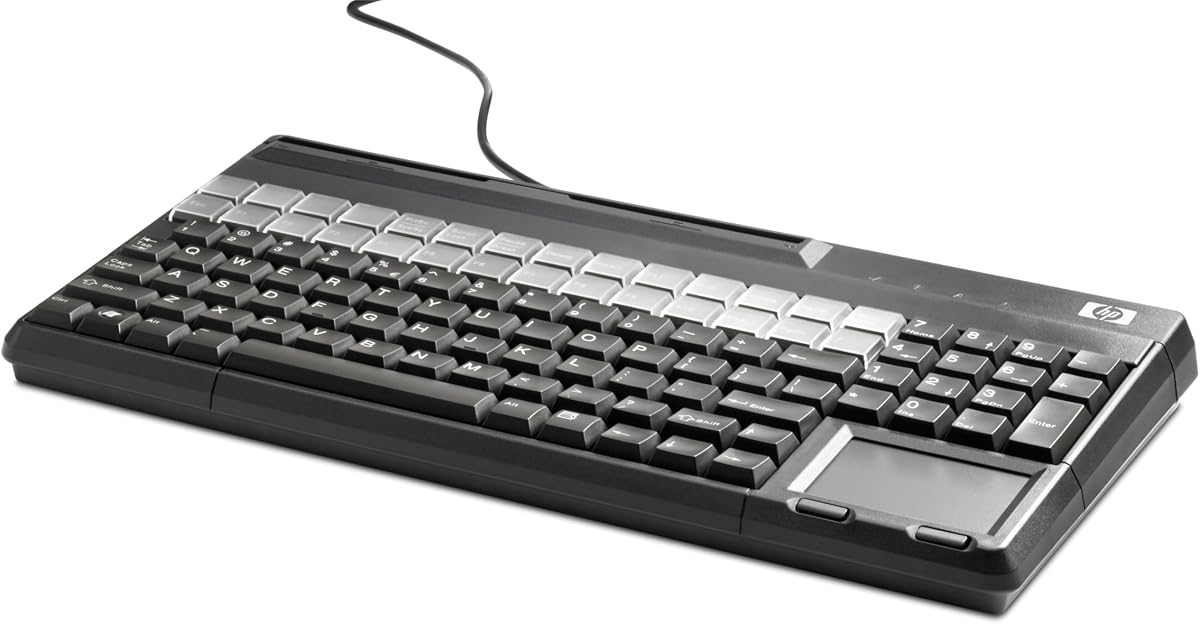
The HP POS Keyboard is designed specifically for point of sale systems where efficiency and specialized functionality are paramount. While user ratings are currently limited, its features suggest a high-quality solution for businesses needing integrated card processing capabilities. The inclusion of a magnetic stripe reader directly on the keyboard simplifies the checkout counter setup significantly.
We may earn a commission when you buy through this link, at no additional cost to you.
With 28 relegendable keys, businesses can customize key functions to match specific software requirements or workflow shortcuts. This level of customization helps streamline operations by reducing the need to reach for additional peripheral devices. The standard QWERTY layout ensures that staff can transition to this device without needing extensive retraining.
The main trade-off is the higher cost compared to generic keyboards, which might be a barrier for smaller businesses. Additionally, the lack of extensive user reviews makes it harder to predict long-term reliability compared to more widely adopted models. However, for specialized POS environments, the added functionality justifies the investment.
We recommend this keyboard for retail environments that process frequent card payments and want to minimize counter clutter. It is an excellent choice for businesses that need a dedicated hardware solution to integrate payment processing into the typing workflow. The durability and customizability make it a strong option for long-term commercial deployments.
The built-in magnetic stripe reader allows for seamless card swiping without requiring separate external hardware devices.
Relegendable keys can be tailored to specific application commands, speeding up data entry and transaction processing.
We may earn a commission when you buy through this link, at no additional cost to you.
The Cherry G86-62401 offers a reliable solution for businesses that need a compact yet full-function keyboard. With a solid 4.2 rating, it balances portability with essential features like an integrated touchpad. This model is particularly well-suited for smaller POS stations where space efficiency is a primary concern without sacrificing typing capability.
We may earn a commission when you buy through this link, at no additional cost to you.
The spill-resistant design provides peace of mind in busy environments where liquid spills are a risk. The touchpad allows for basic navigation tasks without requiring a separate mouse, which can help reduce clutter on the counter. The 106-key layout ensures that all standard functions and number pad keys are available for data entry tasks.
While the touchpad is functional, it may not offer the precision of a dedicated mouse for graphic-heavy applications. Additionally, the compact form factor means it lacks adjustable tilt legs or ergonomic features found in some larger models. These minor compromises are acceptable for users prioritizing desk space conservation.
This keyboard is a strong choice for retail or service environments looking for a durable and compact typing solution. It is ideal for businesses that value the reputation of the Cherry brand and need a reliable device for daily transaction processing. The ease of maintenance and space-saving design make it a practical addition to any setup.
The compact footprint allows for easier counter organization, leaving more room for customer interaction and product displays.
Cherry's reputation for durable input devices ensures that this keyboard can withstand continuous daily use in commercial settings.
We may earn a commission when you buy through this link, at no additional cost to you.
The Logitech K120 is a highly rated standard keyboard that offers excellent value for basic point of sale needs. With a 4.6 rating, it has proven itself as a reliable workhorse for businesses that prioritize simplicity and durability. Its high compatibility with Windows systems makes it a straightforward choice for many common POS software environments.
We may earn a commission when you buy through this link, at no additional cost to you.
The spill-resistant design helps protect the internal electronics from accidental liquid damage, which is crucial in retail settings. Setup is incredibly simple, requiring just a USB plug-in to function immediately without drivers or software. This ease of use reduces the IT workload when replacing or adding new stations to the network.
However, it lacks an integrated touchpad, meaning a separate mouse is necessary for navigation tasks. The design is also quite basic, lacking multimedia keys or backlighting for specialized workflows. For businesses that do not need advanced features, these limitations are not significant drawbacks but should be noted.
We recommend this keyboard for general retail or office environments that need a dependable and budget-friendly typing solution. It is a great choice for businesses that want to equip multiple workstations with a trusted brand without high costs. The combination of durability and ease of setup makes it a staple for many commercial installations.
IT teams appreciate the lack of required driver installation, allowing for quick setup and minimal maintenance across the network.
Its affordable price point and robust build make it ideal for businesses needing to replace units regularly without financial strain.
We may earn a commission when you buy through this link, at no additional cost to you.
The Cherry Lpos G86-71411 is a powerhouse designed for businesses that need a high level of input versatility. While user reviews are currently unavailable, the specifications indicate a device built for complex workflows. The large number of keys allows for extensive customization and rapid data entry capabilities that support advanced retail operations.
We may earn a commission when you buy through this link, at no additional cost to you.
The inclusion of a magnetic stripe reader eliminates the need for separate card swipers, centralizing payment functions. With 42 relegendable keys, users can program frequently used commands directly onto the keyboard for faster access. This level of integration can significantly speed up transaction times in busy retail or service environments.
A trade-off is the larger footprint, which requires ample desk space compared to compact or standard keyboards. Additionally, programming the relegendable keys may require a learning curve for staff accustomed to standard layouts. However, once configured, these features provide significant efficiency gains for trained employees.
This keyboard is best suited for large retail stores or specialized businesses where complex data entry and payment processing are routine. It is an ideal choice for operations that can benefit from reducing peripheral dependencies through integrated hardware functions. The comprehensive feature set makes it a robust solution for high-volume commercial use.
The ability to relegend keys allows businesses to tailor the hardware to their specific software environment and operational needs.
The built-in magnetic stripe reader streamlines the checkout process by combining typing and payment in a single device.
We may earn a commission when you buy through this link, at no additional cost to you.
The Cherry Electronics G86-71401EUADAA offers a professional touchpad keyboard with extensive programmability for specialized needs. However, the 2.4 rating suggests users may have experienced issues or mixed results with this specific model. Businesses considering this option should weigh its advanced features against potential reliability concerns.
We may earn a commission when you buy through this link, at no additional cost to you.
The key strength lies in its 127 programmable keys and 42 relegendable keys, which allow for deep customization. This can be highly beneficial for businesses with complex inventory management or custom POS software that requires custom shortcuts. The integrated touchpad also helps reduce counter clutter by removing the need for an external mouse.
On the downside, the lower user rating indicates that some customers may have faced quality control or functionality issues. The complexity of setting up programmable keys might also be daunting for staff who prefer simple plug-and-play devices. These factors suggest caution when adopting this model for critical operations.
We recommend this keyboard only for businesses with specific technical requirements that justify the programmability and customization. It is a potential choice for IT-managed environments where technical support can ensure proper setup and maintenance. For general retail use, a simpler and more positively rated model might be a safer investment.
The high number of programmable keys offers flexibility for users who need to execute complex commands quickly.
The touchpad integration supports a streamlined workflow by keeping input and navigation within a single device.
We may earn a commission when you buy through this link, at no additional cost to you.
The Cherry KC 1000 is a specialized security keyboard designed for environments that require strict card verification protocols. With a 4.6 rating, it is trusted by organizations needing high security for transactions. Its integrated smartcard reader ensures that chip cards can be processed directly, reducing reliance on external peripheral devices.
We may earn a commission when you buy through this link, at no additional cost to you.
This model meets several rigorous security standards, including FIPS 201 and EMV 2000 Level 1 approvals. This makes it an ideal choice for healthcare, government, or financial sectors where data protection is paramount. The secure PIN entry module adds an extra layer of protection for sensitive user authentication tasks.
A potential limitation is that its specialized nature means it may be overkill for standard retail transactions without card verification. The cost is also likely higher than standard consumer keyboards due to its security features. However, for businesses with strict compliance requirements, the value provided is substantial.
We recommend this keyboard for businesses operating in regulated industries that need robust secure entry and authentication capabilities. It is a perfect choice for hospitals or pharmacies where patient data security is a top priority. The reliability and compliance features make it a valuable asset for maintaining secure operational standards.
FIPS and EMV approvals ensure that the device meets high standards for secure data processing in regulated environments.
The dedicated smartcard terminal allows for secure PIN entry and chip card reading directly from the keyboard unit.
We may earn a commission when you buy through this link, at no additional cost to you.
The Cherry G80-1800 brings mechanical switch reliability to industrial and retail environments requiring heavy-duty input. With a 4.0 rating, it is valued for its endurance and robust construction. The MX Black switches ensure a linear and direct typing feel that can handle thousands of keystrokes daily without degradation.
We may earn a commission when you buy through this link, at no additional cost to you.
Its compact dimensions make it ideal for tight workstations where space is at a premium. The included PS/2 adapter adds versatility for legacy systems or Unix computers, broadening its compatibility. The gold crosspoint contacts further enhance reliability, ensuring consistent key registration even in dusty or harsh conditions.
The mechanical switches may produce more audible feedback than membrane keyboards, which could be disruptive in quiet retail spaces. Additionally, mechanical keyboards typically cost more than membrane alternatives, though the longevity often justifies the investment. These factors are manageable for users prioritizing longevity over silence.
We recommend this keyboard for industrial retail or warehouse settings where equipment must withstand constant and rough handling. It is a solid choice for businesses that value long-term durability and precise typing feedback. The versatility and mechanical strength make it a great tool for high-impact commercial environments.
With over 100 million actuations per key, this keyboard is built to outlast standard consumer-grade alternatives in demanding settings.
Support for both USB and PS/2 connections ensures compatibility with a wide range of legacy and modern hardware systems.
We may earn a commission when you buy through this link, at no additional cost to you.
The Logitech K270 provides the flexibility of wireless connectivity without sacrificing the reliability of a standard full-size layout. With a 4.3 rating, it is widely appreciated for its long battery life and ease of use. Businesses that want to reduce cable clutter on their POS counters will find this model particularly convenient.
We may earn a commission when you buy through this link, at no additional cost to you.
Its 24-month battery life means minimal maintenance for IT staff, as battery changes are rarely needed. The spill-proof design adds a layer of protection, though it should still be kept away from direct water exposure. The reliable 2.4GHz wireless connection ensures a stable link up to 33 feet, allowing for flexible placement.
A trade-off is the reliance on batteries, which means a dead battery could disrupt operations if not monitored. Additionally, wireless signals can sometimes suffer interference in environments with high radio frequency congestion. These issues are minor but worth considering when compared to wired alternatives.
We recommend this keyboard for POS setups where mobility and cable management are key priorities. It is a great choice for retail environments that want a clean look without compromising on typing comfort. The combination of wireless freedom and durability makes it a versatile option for many modern commercial settings.
The wireless connection reduces cable clutter on the counter, making it easier to clean and organize the workspace.
With battery life lasting up to two years, this keyboard reduces the operational burden of frequent maintenance tasks.
We may earn a commission when you buy through this link, at no additional cost to you.
Selecting the right keyboard for your point of sale system involves more than just picking a comfortable design. You must consider durability, connectivity, and specialized features that align with your operational needs to ensure long-term efficiency.
In retail environments, keyboards face constant use and frequent spills. Look for models with spill-resistant or waterproof designs, especially in food service or industrial settings. High-quality switches like mechanical ones can offer longer lifespans and more reliable performance over time.
Prioritize devices with robust construction that can withstand daily handling without developing issues.
Consider whether your workflow needs specialized functions such as magnetic stripe readers or programmable keys. Some businesses benefit from relegendable keys that can be customized to match specific software commands for faster transactions. A full-size layout with a numeric keypad is essential for high-volume data entry roles.
Evaluate your specific software needs to determine which layout features will offer the most operational value.
Ensure the keyboard is compatible with your operating system and POS software. Wired keyboards typically offer more stability, while wireless options reduce cable clutter. Check the connectivity options like USB or PS/2 to ensure they match your existing hardware ports.
Confirm that the interface type aligns with your system capabilities to avoid compatibility problems.
Staff members may spend hours typing throughout their shifts, so comfort is vital. Look for keyboards with ergonomic designs that reduce strain on wrists and fingers. Models with quiet keys can also reduce noise levels in retail environments, improving the overall atmosphere.
Invest in devices that prioritize user comfort to maintain high productivity and morale.
While upfront costs are important, consider the total cost of ownership over the device's life. A slightly more expensive durable model may save money by reducing replacement frequency. Balance the initial price with expected longevity to ensure you get the best value for your business.
Weigh the initial investment against the long-term savings from reduced maintenance and replacement costs.
If your business handles sensitive data or secure transactions, look for keyboards with security certifications like FIPS or EMV. Secure keyboards may include features like PIN pads or smartcard readers to enhance data protection. These standards ensure that your equipment meets industry requirements for security.
Choose hardware that meets necessary compliance standards to protect customer data effectively.
Plug-and-play devices simplify IT management by allowing quick deployment without complex driver installations. Easy-to-clean surfaces are crucial for maintaining hygiene in food service or high-spill environments. Look for options that support easy cleaning routines without damaging the electronics.
Opt for models that require minimal technical setup to save time and reduce support burdens.
When setting up your keyboard, ensure the surface is stable and flat to prevent typing errors. For wired models, connect the USB cable directly to a functional port and verify that all keys respond correctly before starting transactions.
Regular cleaning is essential to maintain functionality. Use a damp cloth for the surface and compressed air to remove dust from between the keys. Avoid spraying liquids directly onto the device to prevent internal damage.
If your keyboard has programmable features, take time to map them to your most frequently used commands. Regular updates to your POS software may require recalibration, so keep your drivers current to ensure optimal performance.
Mechanical keyboards are suitable for POS environments that require high durability and precise input. They can withstand heavy use and offer tactile feedback that many users prefer. However, they may be louder than membrane keyboards, so consider your environment noise levels.
To clean a spill-resistant keyboard, first unplug it and remove any loose debris. Wipe the surface with a slightly damp cloth and use compressed air to clean between keys. Ensure it is completely dry before plugging it back in to prevent short circuits.
A built-in magnetic stripe reader allows you to swipe cards directly on the keyboard, reducing desk clutter. It streamlines the checkout process by combining payment and data entry in one device. This feature is particularly useful for businesses with limited counter space.
Yes, wireless keyboards can be used for POS systems if they offer stable connectivity and compatibility with your software. Ensure you monitor battery levels to avoid interruptions during transactions. Wireless models are great for reducing cable clutter in clean environments.
Relegendable keys allow you to customize key labels to match specific functions in your POS software. This customization speeds up transactions by allowing staff to access commands quickly without memorizing complex combinations. It is ideal for businesses with specialized workflow requirements.
A numeric keypad is crucial for POS systems as it allows for rapid price and quantity entry. It improves accuracy and speed, which is essential during busy retail hours. Always ensure your keyboard includes a full numeric pad if you handle frequent data entry tasks.
Choosing the right Keyboard for Pos System depends heavily on your specific operational needs and environmental constraints. Whether you prioritize durability, specialized security features, or wireless flexibility, there is a model on this list to fit your requirements.
Consider your daily workflow and the challenges your staff face when selecting a keyboard. Investing in a reliable device will pay dividends in productivity and reduced downtime. Prioritize features that directly impact your transaction speed and staff comfort.
Remember that prices and availability can change, so verify the current specifications before purchasing. We hope this guide helps you make an informed decision that supports your business goals effectively. Thank you for considering these expert recommendations for your next hardware upgrade.