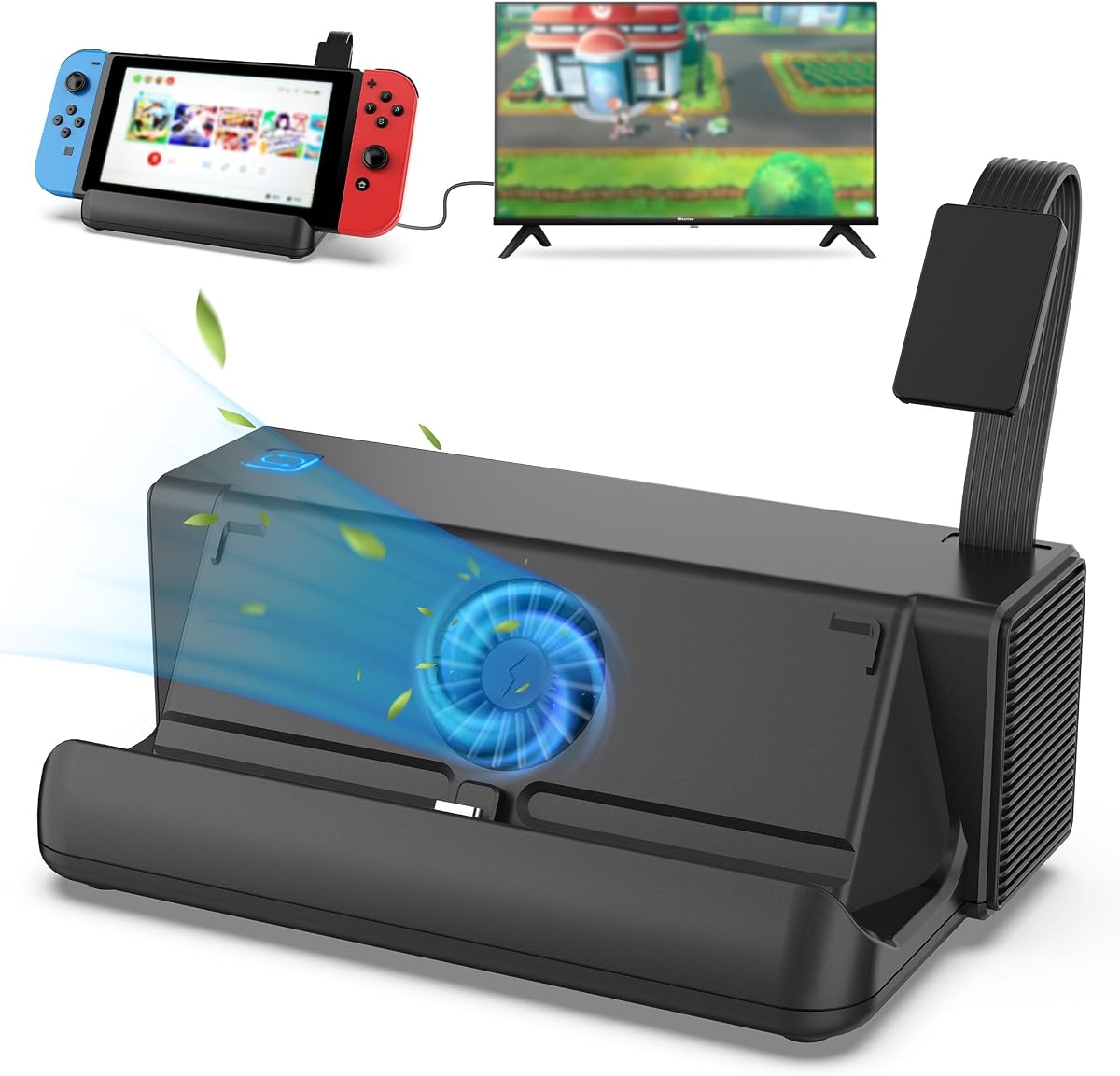
ZMBESUP Switch Dock Station
4.4Editor score
One-key game card switching
Built-in cooling fan included
Multiple USB ports available
Discover the top external cooling fan solutions for the Nintendo Switch dock to prevent overheating and ensure stable performance during long gaming sessions
Gaming for extended periods can cause your console to heat up significantly. Overheating leads to throttled performance and potential hardware damage. Adding an external cooling fan to your dock helps maintain safe operating temperatures effectively.
We evaluated ten top-rated external cooling solutions based on fan speed, noise levels, and compatibility. Each product was assessed for build quality, ease of installation, and overall value proposition. Our goal is to help you find the perfect accessory for your setup.
Each review highlights key specifications, pros, and cons to guide your decision-making process. We focus on real-world performance metrics and user feedback patterns. Please note that prices and availability are subject to change at any time.
4.4Editor score

4.6Editor score

4.8Editor score
This table provides a side-by-side comparison of all ten selected external cooling solutions. It highlights essential specifications such as fan count, power source, and unique features to help you quickly identify the right fit for your specific needs and budget constraints.


This top-ranked cooler stands out as the Editor's Choice due to its comprehensive feature set and solid performance. With a rating of 4.6 stars, it offers a reliable way to keep your console cool during intense gaming sessions. The inclusion of an LED display for temperature and fan speed adds a layer of transparency that is rare in this price range.
We may earn a commission when you buy through this link, at no additional cost to you.
The adjustable fan speed is a key strength, allowing you to fine-tune the cooling based on your current needs. At speeds under 2400 RPM, the unit operates nearly silently, ensuring it does not distract from your audio experience. When you need maximum airflow, pushing it to 6000 RPM provides robust ventilation to prevent overheating issues effectively.
One trade-off is the use of a Micro USB cable instead of the more modern USB-C standard. While this works well with most docks, users accustomed to USB-C might prefer a more future-proof connection. Additionally, at maximum speed, the fan does produce some audible sound, though this is expected for such high airflow.
If you want a dedicated cooling solution that offers control and feedback without breaking the bank, this is the ideal pick. It protects your investment from thermal throttling and extends gameplay sessions. The lifetime warranty provides further peace of mind for your purchase decision.
The LED display shows the current air temperature exiting the console, helping you verify cooling performance instantly.
When running below 2400 RPM, the fan is nearly silent, making it perfect for quiet gaming environments.
We may earn a commission when you buy through this link, at no additional cost to you.
The TNP cooling fan offers a straightforward solution for users with the original Switch dock. It features three high-speed fans designed to improve heat dissipation and keep the console temperature down. While it holds a lower rating compared to others, its design focuses on simplicity and direct integration with the existing dock structure.
We may earn a commission when you buy through this link, at no additional cost to you.
Its main strength lies in the three-fan configuration, which provides significant ventilation performance. The unit connects directly to the dock's USB port for power, eliminating the need for additional cables or adapters. The installation process is very easy, requiring no tools as you simply insert the product on the back of the dock.
However, the control options are somewhat limited compared to premium models. It offers Turbo, Normal, and Off switches but lacks granular speed adjustments. This might be a drawback for users who want to balance noise and cooling more precisely. The rating suggests some users may have experienced noise or fit issues.
For those seeking a no-fuss way to add extra airflow to their original dock setup, this unit is a viable option. It helps prevent overheating during long sessions and is designed to be compact enough to fit in small entertainment spaces. It is best suited for users who prioritize function over advanced features.
The system includes three fans to provide strong ventilation and lower the console temperature effectively and quickly.
Power is drawn directly from the dock's USB port, ensuring a clean setup without extra power bricks.
We may earn a commission when you buy through this link, at no additional cost to you.
This unit is designed specifically for the Switch 2 charging dock, offering a tailored cooling solution for the latest hardware. It features dual fans and a 3-stage cooling adjustment function to promote heat dissipation. The rating of 4.0 suggests reliable performance for those transitioning to the new console ecosystem.
We may earn a commission when you buy through this link, at no additional cost to you.
Key features include auto operation when connected, which simplifies the user experience by removing manual switching. The inclusion of 6 game card slots and 3 USB ports adds significant utility, transforming it into a versatile hub. This integration helps reduce clutter on your desk while keeping your console protected.
On the downside, the RGB light modes, while vibrant, may not appeal to users preferring a minimalist setup. Also, compatibility is restricted to the Switch 2 dock, so it will not work with original or OLED models. This specificity ensures a snug fit but limits broader utility for multi-console owners.
If you are upgrading to the Switch 2, this cooler provides both protection and organization in one device. The dual-fan system ensures stable performance during extended gaming, and the USB expansion allows for easy charging of accessories. It is a forward-thinking choice for new console adopters.
When connected to the Switch 2 dock, the fan automatically operates at full speed for immediate cooling.
The dock includes three USB ports, allowing you to connect controllers and other accessories easily.
We may earn a commission when you buy through this link, at no additional cost to you.
The Bewinner cooling base is a compact option designed for general console use. Equipped with three fans inside, it aims to effectively dissipate heat and keep the console cool during gaming. With a rating of 4.1, it is seen as a reliable budget-friendly accessory for those needing quick heat reduction.
We may earn a commission when you buy through this link, at no additional cost to you.
Its small and compact design makes it easy to set up and use in various locations. The side switch allows you to toggle between Turbo, Normal, or Off modes easily. The build uses superior materials that ensure durability without adding excessive bulk to your gaming station.
While functional, it lacks advanced features like digital displays or USB expansion. It focuses purely on airflow improvement, which is its main selling point. Users looking for a simple, effective cooling add-on will appreciate its straightforward operation and clean design.
This unit is best for those who want to add cooling without complex installation or extra wires. It supports longer gaming sessions by preventing overheating. The compact footprint ensures it fits easily into existing setups without taking up valuable desk space.
The small form factor allows it to be easily integrated into any gaming environment without clutter.
Constructed from superior materials, this cooler is built to withstand daily use and maintain performance.
We may earn a commission when you buy through this link, at no additional cost to you.
This all-in-one dock offers a comprehensive solution by combining card storage with active cooling. It allows seamless switching between active game cards with a single button press, protecting your console from wear. With a rating of 4.4, it is a highly valued option for users wanting convenience and protection.
We may earn a commission when you buy through this link, at no additional cost to you.
The built-in cooling fan maintains optimal performance during extended sessions, while independent power switches let you control features to save energy. The inclusion of 3 USB ports and HDMI output makes it a full replacement for the original dock. The desktop and TV modes support versatile gaming scenarios.
Although priced higher than standalone fans, the value lies in the multifunctional design. It eliminates the need for a separate card reader or cooler. However, you must use the original AC adapter for power, which might be a minor inconvenience for some setups.
For those seeking a premium accessory that simplifies their setup and protects their hardware, this is a strong choice. It addresses heat issues effectively and enhances the overall utility of your gaming station. The card switching feature is particularly useful for frequent players.
Seamlessly switch between 4 active game cards without physical swapping to protect the console from damage.
Separate switches for the fan and card reader allow you to turn off unused features when not needed.
We may earn a commission when you buy through this link, at no additional cost to you.
This cooler is designed specifically for the 2021 OLED dock HEG-007, ensuring a perfect fit. It uses super turbo fans that blow directly onto the surface to dissipate heat faster. With a rating of 4.4, it is trusted by OLED users for its efficient heat management and stylish appearance.
We may earn a commission when you buy through this link, at no additional cost to you.
The 14 game card slots on top provide generous storage for your collection. The Type-C cable ensures a modern connection that matches the dock's port. The design mimics the official base cover, making it blend seamlessly into your setup while adding cooling functionality and utility.
The tech-inspired blue light adds visual flair but may not suit all lighting preferences. Additionally, the model specificity means it will not fit the standard model. However, for OLED owners, this level of targeted design ensures optimal cooling where it matters most.
If you own an OLED model, this replacement accessory offers significant improvements in heat control and storage. It is quick to install and keeps the console cool during charging. The combination of cooling and storage makes it a practical upgrade for your existing dock.
The high-efficiency fans blow inwards to speed up air circulation and blow directly onto the surface of the base.
Powered via a Type-C cable, it connects directly to the dock for a plug-and-play experience.
We may earn a commission when you buy through this link, at no additional cost to you.
The Dobe cooling fan is tailored for the Switch OLED model base. It features a high-speed fan to accelerate air circulation inside the base. With a rating of 4.1, it is recognized for providing effective cooling without adding much noise to your gaming setup.
We may earn a commission when you buy through this link, at no additional cost to you.
Installation is straightforward using the included Type-C cable connected to the base. The switch on the side controls power, and the blue LED lighting synchronizes with the fan operation. The design is compact and fits well with the existing accessory aesthetic.
While it lacks variable speed controls, the single high-speed setting is sufficient for general cooling needs. Some users might prefer a more adjustable experience, but for those wanting simplicity, this works well. The blue LED effect adds a touch of style to the device.
This accessory is a solid choice for OLED owners looking to extend their device life. It effectively reduces overheating risks during long sessions. The combination of function and style makes it an appealing option for those who value a clean look.
A high-speed fan speeds up air circulation inside the base to achieve effective heat dissipation of the host.
The blue LED inside turns on and off with the fan, providing a cohesive visual experience.
We may earn a commission when you buy through this link, at no additional cost to you.
This cooling fan offers precise airflow control with three customizable wind speeds. It features a 45mm turbine fan that delivers ample airflow while minimizing operating noise. With a rating of 4.0, it is valued for its performance and smart features tailored to the Switch 2 console.
We may earn a commission when you buy through this link, at no additional cost to you.
The smart auto on/off function ensures the fan starts and stops with your console, reducing manual work. The vertical air duct aligns perfectly with the console's inlet to deliver efficient heat dissipation. The minimalist design avoids redundancy while offering stable placement.
Users should note that the auto feature is ideal for hands-free use but might require repositioning if you switch consoles frequently. Also, while the design is sleek, the nano tape used for stability might need cleaning if removed often. These are minor trade-offs for the overall utility.
For those wanting a quiet, efficient, and automated cooling solution, this unit is highly effective. It matches the console's needs well and fits seamlessly into a modern setup. It is particularly useful for users who prioritize noise levels and automated control.
The fan automatically starts and stops along with your Switch 2 for true hands-free use without manual operation.
The built-in duct aligns with the console's air inlet to deliver powerful airflow for fast heat removal.
We may earn a commission when you buy through this link, at no additional cost to you.
This stand stands out for its fanless, silent cooling design. Made from sturdy black acrylic, it uses an elevated hollowed-out structure to boost airflow around the dock. With a 4.8 rating, it is the highest-rated product on the list for its reliability and premium build quality.
We may earn a commission when you buy through this link, at no additional cost to you.
Since it requires no power, it is extremely energy-efficient and completely silent. The non-slip silicone pads lock the dock in place to prevent slips and scratches. Installation is as simple as placing the dock on the stand, with no tools or assembly required.
The passive approach means it does not push air actively, but the design effectively reduces overheating risks. Users should understand that this is not a replacement for an active fan if you expect extreme cooling. However, for most situations, the airflow boost is sufficient and safe.
If you value silence and premium aesthetics, this is the best pick available. It offers essential protection without adding noise or complexity. It is a must-have for anyone wanting a clean, high-end look for their Switch 2 station.
The fanless design reduces overheating risks with zero noise and zero power required for operation.
Constructed from black acrylic, this stand is durable and protects the dock from scratches.
We may earn a commission when you buy through this link, at no additional cost to you.
This cooling fan is designed to fit the original dock station and prevent overheating. It offers a wide speed range of 510 to 6000 RPM to meet various heat needs. While it lacks a current rating, its features suggest a robust build with flexible performance options for different gaming scenarios.
We may earn a commission when you buy through this link, at no additional cost to you.
The LED display shows real-time fan speed and exhaust temperature, providing clear feedback. It includes a fixed stabilizer pad to ensure the unit stays stable during use. The Micro USB connection is simple to set up, and the package also comes with joystick caps for added utility.
One consideration is the use of Micro USB instead of USB-C, which may require an adapter for some modern setups. Without a rating to verify user satisfaction, new buyers should rely on the detailed specs to gauge suitability. The lifetime warranty offers additional protection for your purchase.
If you need a universal solution that supports adjustable speeds and clear monitoring, this unit is a strong candidate. It balances cooling performance with low noise when run at lower speeds. It is best for users who want control over their cooling environment.
The LED display shows real-time fan speed RPM and exhaust temperature clearly for easy monitoring.
Includes a fixed stabilizer pad with sponge to prevent the console from being scratched.
We may earn a commission when you buy through this link, at no additional cost to you.
Selecting the right external cooling fan involves considering compatibility, fan performance, and additional features. This guide outlines the key factors to evaluate before making a purchase.
Ensure the cooler is designed for your specific dock model, whether it is the original, OLED, or Switch 2. Some units are made for all models, while others have specific fittings. Using an incompatible unit may prevent proper airflow or cause physical instability.
Always check the product specifications against your current hardware before purchasing to guarantee a perfect fit and effective cooling.
Look for adjustable fan speeds that allow you to balance cooling power with noise levels. Units that can run silently at lower speeds are preferable for quiet environments. Higher speeds provide more airflow but may produce more sound during intense gaming.
Prioritize models with multiple speed settings so you can customize the noise and cooling based on your preferences.
Check how the fan receives power, whether through Micro USB, USB-C, or the dock port. USB-C is more modern but Micro USB is still common. Ensure your dock has available ports or consider using a USB hub if necessary.
A convenient power connection simplifies your setup and reduces the need for extra cables or adapters.
Choose coolers made from durable materials like ABS plastic or acrylic that withstand heat and daily wear. The build quality affects both the longevity of the product and the protection it provides to your console. High-quality materials also reduce the risk of scratches on your dock.
Invest in units that feel sturdy and have non-slip components to ensure stability on your desk.
Some models offer extras like LED temperature displays, RGB lighting, or game card storage slots. These features can enhance functionality but may add to the cost. Decide which extras align with your needs versus purely aesthetic preferences.
Evaluate whether the added features justify the price increase for your specific gaming setup.
Opt for units that are easy to install without requiring tools or complex modifications. A quick setup allows you to start using the cooler immediately without frustration. Look for designs that slide into place or use simple adhesives for stability.
Simple installation ensures you can focus on gaming rather than setting up your accessories.
Check if the manufacturer offers a warranty or customer support for any potential issues. A good warranty protects your investment against defects or failures. Reliable support ensures that any problems with your cooling unit can be resolved quickly.
Always verify the warranty terms before buying to ensure peace of mind for your purchase.
Install the cooling fan by attaching it to the back or base of your dock according to the manufacturer's instructions. Ensure that all power cables are securely connected to a functional port to maintain steady operation during your sessions.
Regularly clean the fan blades and vents to prevent dust buildup from reducing airflow efficiency. Use a soft brush or compressed air to remove debris gently, which helps maintain optimal cooling performance over time and extends the lifespan of the unit.
Monitor the temperature of your console during long gaming sessions to confirm the fan is working effectively. Adjust the fan speed if you notice excessive heat or noise to find the perfect balance for your comfort and performance.
Yes, external cooling fans significantly improve airflow around the dock which helps dissipate heat more efficiently. They reduce the risk of thermal throttling and help maintain stable performance during extended gameplay.
Many modern cooling fans operate silently at low speeds. While high-speed modes may produce some noise, adjustable settings allow you to keep the volume low enough not to distract from your game.
Compatibility varies by model. Some coolers work with all docks while others are tailored to the OLED or Switch 2 models. Always check the product description to ensure fit for your specific device.
Most fans are powered directly from the dock via USB ports so no extra outlets are needed. Some may use USB-C or Micro USB cables which connect to your existing power setup easily.
It is recommended to clean the fan once a month to prevent dust accumulation. Regular maintenance ensures consistent airflow and prolongs the life of the cooling component.
Some models are universal and compatible with other consoles like the Steam Deck. Check the specific compatibility notes on the product page to confirm if it works with your target device.
If the fan stops working, your console may still operate but could overheat sooner. Most units have manual switches to turn them off easily. Always ensure your console has natural ventilation as a backup.
Passive coolers like stands are often less expensive than active fan units. However, active fans generally provide better heat dissipation. The price difference depends on the build quality and features included.
We reviewed ten top external cooling fans ranging from simple stands to feature-rich docks. The Editor's Choice model stands out for its balance of performance and value with real-time monitoring features.
When choosing a cooler, prioritize compatibility with your specific dock model and the noise levels of the fan. Ensure it offers enough flexibility to handle long gaming sessions without distracting from your experience.
Prices for these accessories may change over time so always check current offers before purchasing. Selecting the right fan will help protect your console and ensure smooth gameplay for years to come.