
Lian Li V100 RX
4.8Editor score
4 Pre-installed ARGB Fans
Tool-less Side Panels
Supports Back-connect Boards
This guide compares the top cooling computer cases for performance and airflow to help you choose the best chassis for your PC build needs.
Selecting the right cooling computer case is essential for maintaining optimal system performance and longevity. A well-designed chassis ensures efficient airflow, reducing heat buildup and preventing thermal throttling during intensive tasks.
We evaluated ten top-rated models based on airflow design, fan inclusion, build quality, and compatibility with modern hardware. Each case offers unique features tailored to different build requirements and cooling strategies for diverse user needs.
Each pick highlights specific strengths like modular design, high airflow panels, or superior noise control. Prices may fluctuate regularly so verify current listings before purchasing to ensure you get the best value for your investment.
4.8Editor score

4.7Editor score

4.6Editor score
This table provides a side-by-side overview of key specifications for all ten selected cooling computer cases to help you compare features quickly.


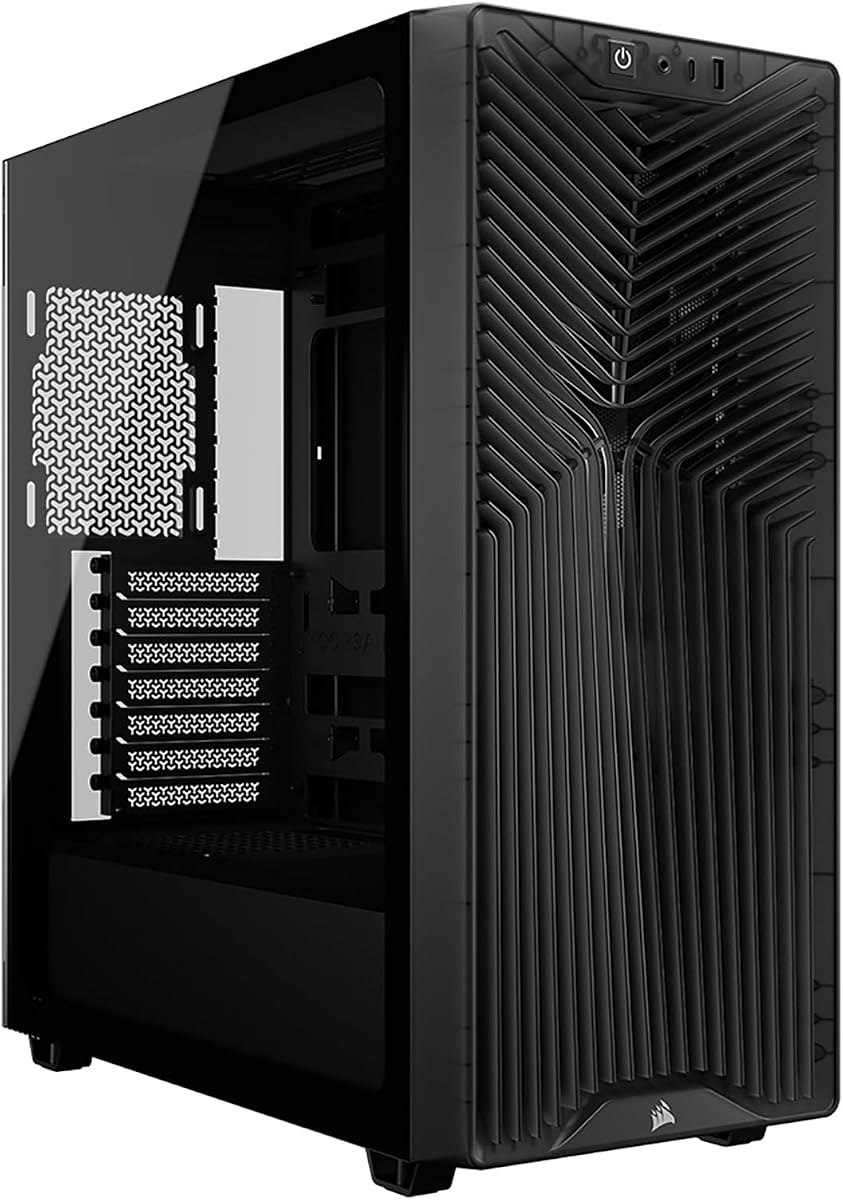


The CORSAIR 4000D RS stands out as a top choice for builders who value flexibility and airflow. With a 4.7 rating, it delivers robust cooling performance through its unique FRAME system and pre-installed high-performance fans.
We may earn a commission when you buy through this link, at no additional cost to you.
Its 3D Y-pattern airflow panel ensures minimal restriction for cool air intake. The InfiniRail mounting system allows you to position fans anywhere you need targeted cooling. The modular FRAME lets you upgrade components like the motherboard tray or I/O panel to match your evolving needs.
While the FRAME upgrades are sold separately, the base case still offers impressive stock cooling. Some users might find the steel side panel slightly resonant under high fan loads, but this is minor compared to the airflow benefits it provides.
This case is ideal for enthusiasts who want a build that grows with their hardware. Whether you are planning a simple air-cooled rig or a complex liquid setup, the 4000D RS offers the versatility to handle it all with style.
The FRAME system allows you to swap parts like the motherboard tray or I/O panel easily. This modularity means your case can adapt to new components without needing a full replacement.
The perforated front panel uses a Y-pattern to reduce air resistance. This design ensures cool air reaches your components efficiently, maintaining lower temperatures during intense gaming or workloads.
We may earn a commission when you buy through this link, at no additional cost to you.
The Lian Li V100 RX offers incredible value for budget-conscious builders who refuse to compromise on cooling. Rated 4.8 stars, it comes with four ARGB fans and robust airflow capabilities that rival much more expensive chassis options.
We may earn a commission when you buy through this link, at no additional cost to you.
Its four pre-installed PWM fans ensure excellent air circulation immediately. The tool-less mounting mechanism makes assembly and maintenance fast and easy. Support for back-connect motherboards reduces cable clutter significantly for a cleaner look.
Some users note that the glass panels attract fingerprints easily. The cable routing channels are adequate but not the widest available. However, these are minor trade-offs for such a feature-rich case at this price point.
This case is perfect for gamers needing affordable yet powerful airflow. If you want a build that looks great and runs cool without breaking the bank, the V100 RX delivers exceptional performance and aesthetics for most standard setups.
Lian Li is known for exceptional build quality and attention to detail. The V100 RX carries this legacy forward with sturdy materials and precise fitment for all internal components.
Tool-less side panels mean you can remove them without screws. This feature speeds up your building process and makes regular cleaning or upgrades much simpler than traditional cases.
We may earn a commission when you buy through this link, at no additional cost to you.
The CORSAIR AIR 5400 RS redefines premium cooling with its unique triple-chamber design. Rated 4.6 stars, it isolates heat sources effectively to ensure every component stays cool even under extreme loads.
We may earn a commission when you buy through this link, at no additional cost to you.
The isolated CPU cooling chamber prevents heat transfer to other parts. Airflow ducts accelerate air velocity without increasing fan noise. The panoramic view lets you showcase your expensive build clearly and beautifully.
This case is significantly more expensive than standard models. Planning the build requires more attention to the separate chambers. However, for those who demand top-tier cooling and aesthetics, the investment pays off.
Choose this case if you are building a high-end workstation or gaming rig. Its ability to keep powerful CPUs and GPUs cool while looking stunning makes it the ultimate choice for premium system builds.
The separate chambers for CPU, GPU, and PSU prevent heat recirculation. This isolation ensures that heat generated by one component does not negatively impact the others.
Innovative ducts force air through narrow channels to increase velocity. This allows for better cooling without needing fans to spin faster, maintaining lower noise levels.
We may earn a commission when you buy through this link, at no additional cost to you.
The NZXT H5 Flow proves that compact cases can still offer powerful cooling. With a 4.6 rating, it delivers efficient airflow through its mesh panels and perforated PSU shroud design.
We may earn a commission when you buy through this link, at no additional cost to you.
The PSU shroud allows air to be drawn directly from the bottom. Ultra-fine mesh on panels ensures maximum intake while keeping dust out. It supports large radiators despite its smaller size.
Large graphics cards might be limited by the compact dimensions. There are fewer hooks for managing excess cable lengths. These limits are acceptable given its small form factor and cooling capabilities.
Ideal for users wanting a small but efficient build, this case balances size and performance perfectly. It is a great pick for mid-range systems needing reliable cooling without a large footprint.
Despite its smaller size, the H5 Flow supports up to 360mm radiators. This means you can run high-end liquid cooling in a chassis that does not dominate your desk.
The ultra-fine mesh panels act as effective filters against dust. This helps maintain internal cleanliness and reduces maintenance frequency for your system components.
We may earn a commission when you buy through this link, at no additional cost to you.
The Antec Flux Pro offers massive cooling potential for high-end workstation builds. Rated 4.7 stars, it comes with six PWM fans and supports the largest motherboards and cooling setups available.
We may earn a commission when you buy through this link, at no additional cost to you.
Its multi-directional vent design allows for flexible fan placement. The combination of wood and glass creates a unique premium aesthetic. It supports simultaneous installation of two large radiators.
The full-tower size demands a significant desk or floor space. The weight is substantial due to the build materials. These factors are worth considering if space is limited.
Perfect for professionals needing extreme cooling, this case handles E-ATX boards and triple GPU setups easily. If you want room to expand and silence under load, the Flux Pro is a strong contender.
With support for E-ATX boards and multiple large radiators, this case handles upgrades. You never need to worry about space constraints as you upgrade your hardware.
The mix of metal, glass, and wood offers a distinct look. It elevates the visual appeal of your setup beyond standard metal chassis designs.
We may earn a commission when you buy through this link, at no additional cost to you.
The Cooler Master HAF II 500 focuses purely on massive airflow. Rated 4.8 stars, its 220mm and 180mm fans move huge volumes of air to keep components cool.
We may earn a commission when you buy through this link, at no additional cost to you.
The low resistance design lets air flow through freely. MasterRail allows you to mount different radiator sizes. The split-level cable management opens up space for the large rear exhaust.
The large fans are heavy and might need support. Some rear clearance is reduced to accommodate the exhaust fan. These trade-offs are acceptable for the cooling power gained.
This case is best for users prioritizing raw cooling performance. If your system runs hot and needs maximum air movement, the HAF II 500 provides an unbeatable airflow solution.
The oversized fans move significantly more air than standard 120mm models. This ensures heat is quickly removed from the case to lower component temperatures.
Split-level channels separate cables from airflow paths. This design optimizes airflow while giving you enough space to organize long cables neatly.
We may earn a commission when you buy through this link, at no additional cost to you.
The MSI MAG Forge 321R is a solid choice for gamers who love customizable lighting. With a 4.6 rating, it combines airflow features with an easy-to-use RGB control board.
We may earn a commission when you buy through this link, at no additional cost to you.
It supports up to 11 fans for extensive cooling options. The included ARGB control board simplifies wiring. Magnetic dust filters make maintenance quick and easy.
Glass panels collect dust visibly over time. Using Mystic Light requires additional software setup. These are minor issues for a case with such strong features.
Best for gamers wanting a flashy and functional build, this case offers plenty of options. If you prioritize lighting control and decent airflow at a great price, it is a strong choice.
The included control board lets you adjust lighting without complex wiring. This makes setting up your aesthetic easy even for novice builders.
Support for up to 11 fans means you can customize airflow paths. Add more fans if you need extra cooling for specific components.
We may earn a commission when you buy through this link, at no additional cost to you.
The CORSAIR 3200D RS is forward-ready for the latest motherboard designs. Rated 4.6 stars, it supports reverse-connector boards to reduce cable clutter effectively.
We may earn a commission when you buy through this link, at no additional cost to you.
Its anti-sag stabilization arm supports heavy GPUs securely. The front USB-C port ensures easy connection. Cable management tools are designed for clean builds.
The smoke tint obscures internal components slightly. Lighting is basic compared to ARGB models. These limits are acceptable for those prioritizing function over flash.
This case is perfect for those building with new hardware standards. If you want a clean look and solid support for heavy components, the 3200D RS is a reliable option.
Support for reverse-connector motherboards means your case stays relevant. This helps keep cables out of sight for a cleaner aesthetic over time.
The included arm prevents GPU sag with heavy cards. This protects your motherboard and ensures consistent performance under load.
We may earn a commission when you buy through this link, at no additional cost to you.
The CORSAIR AIR 5400 LX shares the same layout as the RS variant. With a 4.7 rating, it offers superior cooling through its isolated chambers and airflow ducts.
We may earn a commission when you buy through this link, at no additional cost to you.
The isolated CPU chamber prevents heat transfer to other components. Airflow ducts accelerate cooling silently. The panoramic view gives a stunning display of your hardware.
This model is quite expensive compared to standard cases. Planning your build around the chambers takes more effort. These factors are minor given the performance benefits.
Choose this case for a high-end build that looks amazing. If you want premium cooling and aesthetics, the AIR 5400 LX delivers top-tier results for serious enthusiasts.
Three separate chambers ensure heat stays isolated where it should. This design helps maintain lower temperatures for critical components like the CPU.
Panoramic glass panels offer an unobstructed view of your build. This creates a premium look that enhances the overall appeal of your setup.
We may earn a commission when you buy through this link, at no additional cost to you.
The MONTECH XR brings panoramic views at a budget-friendly price. Rated 4.7 stars, it includes three reverse blade fans and ample room for large GPUs.
We may earn a commission when you buy through this link, at no additional cost to you.
The reverse blade fans display their faces to the inside for a clean look. Wood-grain I/O adds a unique touch. Magnetic filters make cleaning easy.
Glass panels can show dust easily. RGB customization is less flexible than top brands. These are acceptable trade-offs for the price and design.
This case is best for budget builds that still want great visuals. If you need a case that looks amazing and keeps things cool, the XR is a fantastic choice.
Fans mounted on the side use reverse blades. This hides the motor hub for a cleaner view inside your PC.
Panoramic glass is rare at this price point. This model allows more people to enjoy a showpiece chassis without a high cost.
We may earn a commission when you buy through this link, at no additional cost to you.
Selecting the right case requires balancing airflow, size, and features to meet your cooling needs.
Look for mesh panels instead of solid plastic to allow air to pass through freely. Perforated designs on the front and top significantly improve intake and exhaust capabilities.
Prioritize cases with large mesh areas for optimal cooling efficiency.
Check how many fans the case can hold and if they are included. More fan mounting points give you flexibility to create positive or negative pressure.
A case with included fans offers immediate savings and setup ease.
If you plan to use liquid cooling, ensure the case supports the radiator size you need. Larger radiators like 360mm require dedicated space usually at the front or top.
Verify dimensions to avoid fit issues with your chosen liquid cooler.
Good cases have channels, hooks, and space behind the motherboard tray. Clean cable routing improves airflow and keeps the interior tidy.
Choose cases with tie-down points for a cleaner and functional build.
Ensure your GPU and CPU cooler will fit. Check maximum lengths for graphics cards and height for air coolers to avoid incompatibility.
Review specs carefully to guarantee your hardware fits inside the chassis.
Steel is durable but may be heavier. Aluminum is lighter but more expensive. Glass adds aesthetics but can attract dust easily.
Select materials that match your priorities for weight and durability.
Fan quality matters for noise control. Look for cases with sound dampening or high quality bearings for quieter operation.
Silent builds need cases designed to reduce vibration and noise.
Consider future upgrades when picking a case. Modular or spacious chassis allow for easier hardware swaps without replacing the whole case.
Opt for cases with room to grow for better long term value.
Install fans correctly with intake and exhaust directions aligned for smooth airflow. Ensure all panels are securely closed to prevent dust entry.
Clean dust filters regularly to maintain airflow efficiency. Use compressed air to remove debris from fans and heatsinks.
Periodically check fan speeds and replace if they become noisy. Proper maintenance ensures your cooling system works effectively over time.
A good cooling computer case features mesh panels for maximum airflow and includes high quality fans. It should support multiple radiators and offer enough space for components. Proper airflow paths prevent heat buildup and keep temperatures low.
Many modern cases include fans pre-installed to save you money. However, check the package details to confirm. Buying additional fans may be necessary for complex liquid cooling setups.
Large GPUs require clearance up to 420mm or more. Check the case specifications for GPU length limits. Ensure the case supports your graphics card model to avoid fit issues.
Mesh panels allow more air to pass through for better cooling. Solid panels restrict airflow which can raise temperatures. Choose mesh for performance builds unless sound dampening is a priority.
Clean filters every few weeks if you have pets or dust. Frequent cleaning ensures airflow stays unobstructed. Use a vacuum or compressed air to remove dust effectively.
Yes, tower types like full tower offer more airflow options. Mid-towers balance size and cooling. Select a size that matches your cooling needs.
Steel provides durability while aluminum is lighter. Glass adds aesthetics but is fragile. Choose based on whether you value weight or looks more.
No, cases must support specific radiator sizes. Check dimensions for front and top mounts before buying. Ensure clearance for tubes and fans.
Our top picks include the CORSAIR 4000D RS for modularity and the Lian Li V100 RX for budget value. The CORSAIR AIR 5400 RS stands out for premium cooling performance.
Prioritize airflow features and fan support when choosing a case to ensure your hardware runs efficiently. Match the size to your components to avoid compatibility issues.
Always check current prices before purchasing since deals change frequently. Verify compatibility with your specific hardware for the best results.