
Zobirez 10-Port Fast USB Charging Station
4.5Editor score
420W Total Output
GaN Fast Charging Technology
10 Short Cables Included
Discover the top charging stations for Chromebooks ranked by capacity and safety. This guide compares models for classrooms offices and home device management.
Finding the right charging solution for Chromebooks requires careful consideration of space and safety. Schools and offices need reliable stations that protect devices while keeping cables organized efficiently.
We compared ten highly rated models based on capacity, build quality, and safety features. Each product offers unique benefits for managing multiple devices in shared environments like classrooms or workspaces.
Our picks highlight diverse options from portable carts to desktop racks. Prices vary by feature set so verify current listings before purchasing to ensure you get the best value today.
4.5Editor score

4.7Editor score
4.7Editor score
This side-by-side comparison highlights key differences between the top ten models. We evaluate slot capacity, power specifications, and structural design to help you choose the most suitable station for your needs.


This charging station delivers reliable performance for classrooms and offices needing organized storage for up to eight devices. With a strong rating it balances capacity and safety effectively for daily professional use.
We may earn a commission when you buy through this link, at no additional cost to you.
Its wide-angle slots accommodate Chromebooks up to fourteen inches and one point four inches thick ensuring diverse devices fit securely. The included power strip features surge protection to guard electronics against voltage spikes effectively.
While the design is compact and requires no assembly, the fixed slot width means you cannot customize spacing for larger tablets. This trade-off is acceptable for users prioritizing immediate use over flexible layouts.
Ideal for teachers or office managers seeking a plug-and-play solution this station provides immediate organization without tools. It stands out as a top choice for reliable shared device management.
The slots are engineered to fit laptops and tablets with cases ensuring you do not need to remove protective covers before charging.
Since no assembly is required you can unbox the unit and start organizing devices instantly which saves valuable time during setup.
We may earn a commission when you buy through this link, at no additional cost to you.
This station offers versatile connectivity with six AC outlets and four USB ports making it suitable for mixed device fleets. It is designed to handle ten devices simultaneously while keeping cords organized.
We may earn a commission when you buy through this link, at no additional cost to you.
The integrated cable management system routes cords through the structure reducing clutter on desks and counters. This feature ensures a cleaner workspace which is essential for high-traffic office environments.
Users should note that while the vertical layout allows easy access it may not accommodate very large laptops without prior verification. The fixed cable paths also mean you must plan adapter placement carefully.
Best for libraries or reception areas this station provides a balanced mix of storage and charging flexibility. It is a strong contender for environments needing both traditional and USB power sources.
The combination of AC and USB ports allows you to charge laptops with brick adapters and smaller devices via direct USB connections easily.
By utilizing vertical slots the unit minimizes countertop usage leaving more room for other essential office equipment or work surfaces.
We may earn a commission when you buy through this link, at no additional cost to you.
This rack supports high-density storage with fourteen independent slots ideal for classrooms with large device fleets. Its perfect rating reflects strong user satisfaction with its durable steel construction and airflow design.
We may earn a commission when you buy through this link, at no additional cost to you.
The open-frame design promotes natural ventilation which prevents overheating during extended charging sessions. This feature is critical for maintaining device health when many units charge simultaneously without external fans.
Buyers must remember that a power strip is not included so you will need to source separate adapters for charging. Additionally the unit requires some assembly which may take extra time initially.
For labs or libraries needing maximum desktop capacity this rack is an outstanding choice. It offers a cost-effective way to store many devices securely while keeping them cool.
The open slots allow air to circulate freely around devices reducing heat build-up that could otherwise shorten battery life over time.
Adjustable leveling feet ensure the rack remains balanced even on uneven floors preventing wobbling that could lead to device falls.
We may earn a commission when you buy through this link, at no additional cost to you.
This cart provides safe charging with UL certified power strips ensuring electrical safety in educational environments. The padded shelves protect devices from scratches making it ideal for shared use where handling is frequent.
We may earn a commission when you buy through this link, at no additional cost to you.
Removable plastic dividers allow you to customize slot widths for different device sizes. The lower back tray holds adapters and cables keeping the main charging area tidy and accessible.
Assembly is required which can be a minor hurdle for those needing immediate setup. The plastic dividers may show wear over time but can be adjusted or removed as needed.
For schools on a budget this cart balances safety features with practical storage. It is a solid option for managing a small fleet of laptops and tablets securely.
Soft pads on the shelves prevent scratches and impact damage ensuring devices remain in good condition despite frequent daily handling by students.
The power strip is UL approved providing assurance of quality manufacturing and electrical safety which is vital for institutional use.
We may earn a commission when you buy through this link, at no additional cost to you.
This station is packed with twenty ports allowing simultaneous charging for phones tablets and laptops. With a high rating it uses GaN technology to manage heat efficiently ensuring safety during overnight charging cycles.
We may earn a commission when you buy through this link, at no additional cost to you.
The inclusion of ten short cables reduces cord clutter significantly. This feature is rare in high-capacity stations and makes setup much faster for users without pre-owned cables.
The slots are fixed one-piece structures which offer durability but limit flexibility for oddly shaped devices. Short cables also mean adapters should be placed close to the charging spots.
Best for offices or families managing many mobile gadgets this station is an exceptional value. Its safety features and included accessories make it a standout choice for USB charging needs.
GaN technology provides efficient power conversion and active temperature monitoring protecting devices from overheating and electrical surges automatically.
By including matching cables for different devices the unit eliminates the need for separate long cables that often tangle under desks.
We may earn a commission when you buy through this link, at no additional cost to you.
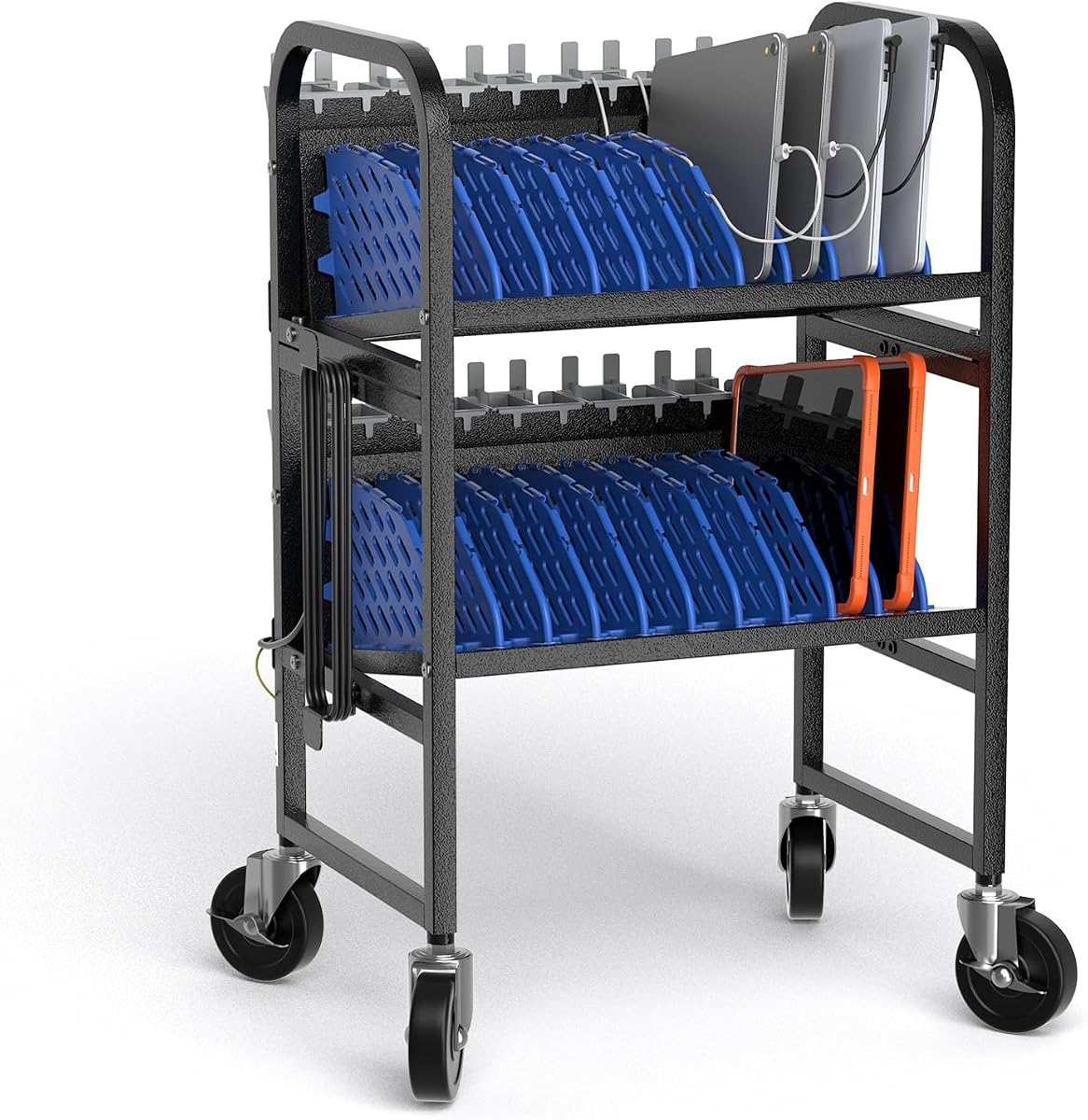
This mobile cart stores twenty devices and includes locking casters for easy transport between classrooms or conference rooms. Its industrial-grade materials ensure it withstands daily commercial use without bending or breaking.
We may earn a commission when you buy through this link, at no additional cost to you.
The open ventilated design keeps devices cool during charging and the cable management system keeps cords organized. This makes it ideal for large schools needing to move devices between labs frequently.
The size is substantial so ensure you have enough space for the cart when parked. The price reflects its premium build quality and high capacity but may exceed budgets for smaller offices.
For universities or large schools this cart is a premium solution for flexible device management. Its durability and mobility make it a worthy investment for heavy traffic areas.
Four swivel casters with locking brakes allow easy movement and secure parking ensuring devices stay put when not in transit.
Twenty slots accommodate a large fleet of Chromebooks or laptops allowing one cart to serve an entire class or department efficiently.
We may earn a commission when you buy through this link, at no additional cost to you.
Built with heavy-duty steel this station withstands the demands of hospitals and classrooms. It includes a ten-outlet power strip and slots that support devices up to fourteen inches wide.
We may earn a commission when you buy through this link, at no additional cost to you.
The design promotes airflow to reduce overheating and includes a lower tray for accessories. This ensures devices stay cool and organizers can store cables neatly out of sight.
The unit is sturdy and safe but may be heavy to move once placed. The integrated cable clips help maintain tidiness but require careful routing during initial setup.
Ideal for high-traffic public spaces this station offers security and organization. It is a great choice for environments where devices are accessed frequently by many people.
Open frame construction ensures devices do not overheat during long charging periods maintaining battery health and preventing potential safety hazards.
The lower tray provides hidden storage for chargers and school supplies keeping the workspace clutter-free and organized for daily use.
We may earn a commission when you buy through this link, at no additional cost to you.
This station is designed to fit standard AV carts making it portable for schools. It holds ten devices securely with wide-angle slots that accommodate tablets and laptops up to thirteen inches.
We may earn a commission when you buy through this link, at no additional cost to you.
Surge protection protects connected devices from electrical spikes ensuring safety. The unit includes space for personalization labels helping teachers track devices effectively in shared environments.
Since it does not include cables you must provide your own adapters which may add to initial costs. The design is versatile but the fixed slot angles may not suit all devices.
Best for classrooms using AV carts this station provides a seamless integration. It is a solid choice for educators needing a branded and reliable device storage solution.
The unit is designed to mount on standard AV carts allowing easy transport between classrooms without losing stability during movement.
Personalization space lets you mark devices or slots with names reducing confusion and ensuring the right student gets the right device.
We may earn a commission when you buy through this link, at no additional cost to you.
This compact station offers forty-two ports and includes ten cables for immediate use. It features two high-speed USB-C ports for laptops and ten other ports for phones and tablets.
We may earn a commission when you buy through this link, at no additional cost to you.
The one-piece slots are durable and flame retardant ensuring safety over time. Rubber pads on the bottom prevent scratching your desk and keep the unit stable during heavy use.
The main trade-off is the lack of AC outlets so laptops must charge via USB. However the six-five watt ports provide enough power for most modern notebooks.
Perfect for home offices or small workspaces this station is an efficient organizer. It is a great pick for users who need fast charging in a limited footprint.
The two top ports deliver up to sixty-five watts allowing you to charge laptops quickly without needing bulky external wall adapters.
Four non-slip rubber pads on the bottom prevent the unit from sliding and protect your desktop surface from scratches during use.
We may earn a commission when you buy through this link, at no additional cost to you.
This mobile station is designed for quick setup and transport. It holds ten devices and features smooth casters that allow easy movement across classrooms or office floors.
We may earn a commission when you buy through this link, at no additional cost to you.
The baked-on paint finish resists rust and wear ensuring the unit looks professional over time. Open design promotes airflow preventing overheating during long charging sessions.
Since power strips are not included you must provide separate outlets for charging. This adds a slight complexity but keeps the base cost lower than fully powered carts.
Best for small classes needing a portable storage unit this cart is ideal. It provides a clean and efficient way to store and move devices without hassle.
Tool-free setup means you can unpack and assemble the unit in minutes getting your devices organized quickly.
The baked-on paint resists rust and wear ensuring the cart stays looking good even in busy school environments with frequent use.
We may earn a commission when you buy through this link, at no additional cost to you.
Choosing the right charging station involves balancing capacity and safety to ensure reliability for your specific environment.
Evaluate how many Chromebooks or tablets you need to charge at once. A station with higher capacity reduces clutter but may require more physical space on your desk or floor.
Select a model that meets your peak demand to avoid overcrowding and ensure each device has a dedicated secure slot.
Check whether the station includes a power strip or requires separate AC adapters. Integrated power strips simplify setup and often include surge protection essential for protecting electronics.
Ensure the total wattage output matches your devices needs to prevent slow charging or potential electrical issues.
Look for sturdy materials like steel or flame-retardant ABS plastic which resist damage from daily handling. A durable build extends the lifespan of the station in high-traffic areas.
Solid construction ensures stability so devices do not tip over during charging or movement.
If you need to move devices between rooms consider models with casters or wheels. Locking mechanisms are vital to keep the cart stable when stationary.
Handles and smooth wheels make transportation easier and reduce strain on staff moving heavy equipment.
Open-frame designs allow air to circulate around devices preventing overheating during long charging sessions. Heat management is critical for maintaining battery health and device longevity.
Avoid fully enclosed cabinets unless they have dedicated cooling fans to manage temperature effectively.
Prioritize stations with UL approval or similar certifications to ensure electrical safety and compliance. Surge protection features guard against voltage spikes that could damage devices.
Certifications provide peace of mind in public settings like schools where safety is paramount.
Effective cable management reduces tangles and keeps workspaces tidy. Look for integrated clips or routing channels to organize cords neatly.
Good organization prevents accidental disconnections and makes it easier to identify which cable belongs to which device.
Start by placing the station on a stable flat surface away from water sources. Ensure the area has access to a power outlet and space for cables to route without obstruction.
Connect the device to the appropriate port or outlet and secure cables using any provided clips. Avoid overloading the unit by checking the maximum capacity before adding more devices.
Regularly clean the exterior with a damp cloth and check for signs of wear or loose parts. Keep the ventilation slots clear of dust to maintain proper airflow and cooling.
Many models come with integrated power strips to simplify setup and provide surge protection. However some compact or open racks require you to supply your own power source so check product specs carefully.
Capacities range from eight to twenty devices depending on the design. Desktop stations usually hold fewer units while mobile carts can accommodate larger fleets for classrooms or offices.
Most models feature wide-angle slots designed to fit devices even with protective cases. Always verify the maximum thickness rating in the product description to ensure a secure fit.
Safety features like surge protection and auto-shutoff make many units safe for overnight charging. However it is always best to follow manufacturer guidelines and use certified models for extended sessions.
Use a damp cloth to wipe down the surfaces and vacuum the slots to remove dust. Avoid harsh chemicals or submerging the unit in water to prevent electrical damage.
Yes most stations are designed to hold various tablets and laptops within specified size limits. Check the maximum width and thickness to ensure your specific device fits properly.
We reviewed ten top-rated stations offering diverse options for classrooms offices and home use. The POCHAR 8-Device and Zobirez 10-Port stand out as excellent choices for different budgets.
Prioritize safety features and build quality to ensure your investment lasts. Choose a capacity that meets your current needs while considering future expansion possibilities.
Remember that prices and availability fluctuate so check current listings before buying. This guide helps you find the best balance of performance and cost for your device management needs.