
msi Gaming GeForce GT 1030 4GB
4.5Editor score
4GB DDR4 Memory
Low Profile Bracket
Single Fan Cooling
This guide compares the best GPU for Optiplex systems, evaluating performance, size, and compatibility to help you choose the ideal graphics card.
Finding the right GPU for Optiplex systems requires careful consideration of size, power, and performance. Small form factor cases demand low-profile cards that fit without sacrificing capability. This guide explores top options tailored for Dell Optiplex workstations and gaming rigs.
We compared ten leading graphics cards based on architecture, memory, and physical dimensions. Our analysis focuses on compatibility with common Optiplex chassis constraints. Each product was selected for its ability to upgrade standard systems without requiring major modifications or power supply changes.
Each pick highlights specific strengths like professional rendering, gaming efficiency, or budget value. Prices change frequently so always verify current listings before purchasing. We aim to provide clear, detailed insights to help you make an informed upgrade decision for your desktop setup.
4.5Editor score

4.3Editor score

4.7Editor score
This side-by-side comparison evaluates ten compatible graphics cards for Dell Optiplex systems. We assess key specifications like memory, architecture, and physical size to highlight differences.
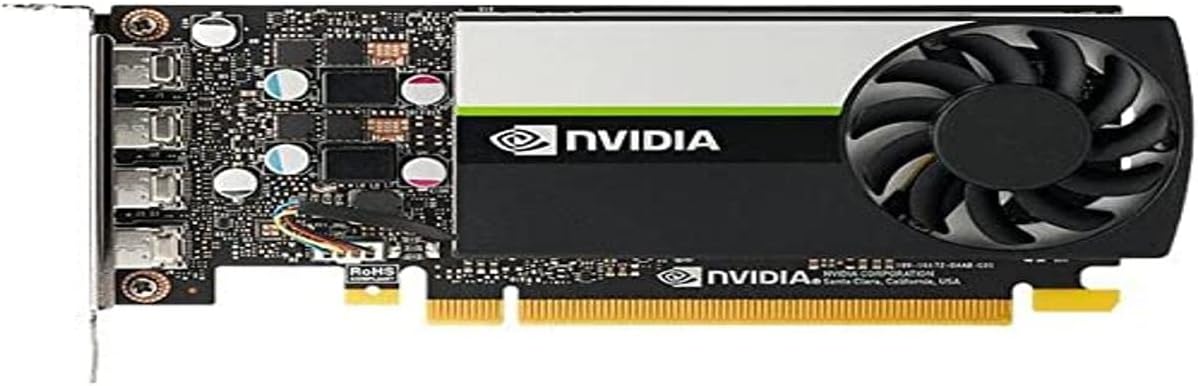


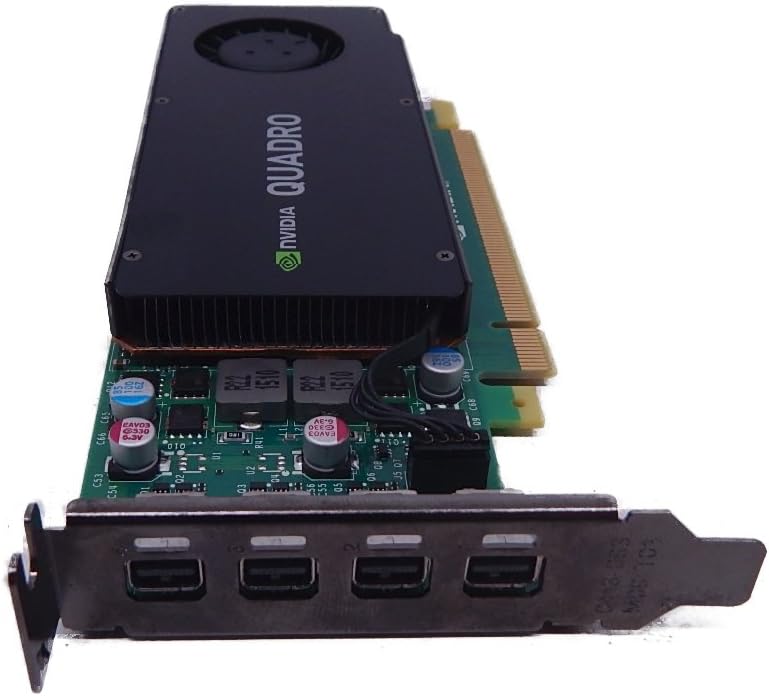
The maxsun RTX 3050 6GB is a compact card built for small Optiplex cases. It scores 4.3 stars from users who value its slim design and reliable build. This model brings modern Ampere features to tiny workstations without requiring bulky coolers.
We may earn a commission when you buy through this link, at no additional cost to you.
It features 6GB of GDDR6 memory and PCI Express 4.0 support for future proofing. HDMI 2.1 and DisplayPort 1.4a outputs allow connection to multiple displays. The low profile design measures just 6.65 inches, perfect for fitting into SFF chassis. DLSS support boosts gaming performance significantly without demanding extra power.
While not a powerhouse for heavy gaming, it handles casual titles and professional apps well. Cooling is passive but sufficient for low load scenarios. Some users note it lacks external power connectors which simplifies installation. Overall it is a strong choice for compact upgrades needing modern connectivity.
Buy this if you need a slim card for Optiplex with modern ports. It balances size and capability better than many rivals in this class. Check current listings before purchasing to confirm stock and shipping.
Its slim 6.65 inch length fits nearly any Optiplex case without blocking ports or requiring case changes.
HDMI 2.1 and DisplayPort 1.4a enable high resolution displays and multi-monitor setups for work.
We may earn a commission when you buy through this link, at no additional cost to you.
The PNY T600 delivers solid performance for 3D design and visualization tasks. With a 4.6 rating it appeals to users needing reliable graphics in small towers. Its Turing architecture offers efficiency and strong OpenGL support for professional software.
We may earn a commission when you buy through this link, at no additional cost to you.
It supports up to four 5K displays or two 8K displays making it ideal for multi-monitor setups. Dedicated H.264 and HEVC encode decode engines improve video workflow speed. The card is certified for over 100 professional apps ensuring stability. Hardware compatibility via NVIDIA support simplifies deployment in business environments.
Gaming performance is limited as this card targets professional use. Some users may find extra power unnecessary if only basic display output is needed. However for CAD or video work it excels with stable drivers. Its compact design fits many Optiplex models with low power draw.
Choose this if you run certified apps or need high resolution multi-display output. It is a stable pick for business desktops needing reliable graphics. Always verify case size before ordering to ensure physical fit.
Up to four 5K displays can be driven simultaneously for expansive workspace setups.
Dedicated media engines decode and encode HEVC and H.264 independently for faster editing.
We may earn a commission when you buy through this link, at no additional cost to you.
The PNY RTX A400 is a single slot low profile card built for compact professional systems. Rated 4.7 it stands out for efficiency and reliability in business workflows. Ampere architecture brings ray tracing and AI features to small form factor PCs.
We may earn a commission when you buy through this link, at no additional cost to you.
It includes 4GB GDDR6 memory and PCI Express 4.0 for fast data transfer. Four Mini DisplayPort 1.4a outputs allow multi-monitor setups for visualization. With 768 CUDA cores it handles modeling and AI tasks well. The low 50W power ensures it fits systems with small power supplies.
Memory size may limit large model handling but suits most general professional needs. Some users prefer more VRAM for heavy rendering. It lacks external power connectors simplifying install. This card is a great choice for small workstations needing modern compute power.
Buy this if you need a small professional card for Optiplex. It delivers strong compute in a compact design without needing extra power. Confirm port types match your displays before purchase.
Single slot design frees up space for better airflow or additional expansion in small cases.
Ampere architecture supports AI and ray tracing for advanced professional visualization and modeling.
We may earn a commission when you buy through this link, at no additional cost to you.
The ASUS Dual RTX 3050 offers solid gaming performance in a compact 2-slot design. With a 4.7 rating it is popular for small Optiplex gaming builds. Ampere SM and RT Cores provide high efficiency and good ray tracing capabilities.
We may earn a commission when you buy through this link, at no additional cost to you.
Its Axial-tech fan design improves airflow and reduces noise compared to typical coolers. IP5X dust resistance helps maintain longevity in less controlled environments. OC mode boosts clocks for extra performance. The stainless steel bracket adds durability and corrosion resistance.
While more robust than others this card still fits many Optiplex cases with room. Larger cases are needed for 2-slot models. Power use is higher than single slot cards so check PSU specs. This card is a great pick for gamers wanting performance in small systems.
Choose this if you prioritize gaming in your Optiplex. It balances size and power well with reliable cooling. Ensure your case supports 2-slot GPUs before buying.
Axial-tech fan with barrier ring increases air pressure and improves cooling in tight spaces.
DLSS and RT Cores enable smoother gaming with ray tracing on modest hardware.
We may earn a commission when you buy through this link, at no additional cost to you.
The msi GT 1030 is a budget friendly option for basic display and light gaming. Rated 4.5 it suits users needing a simple GPU upgrade without extra power. Its single fan and low profile design fit small Optiplex cases easily.
We may earn a commission when you buy through this link, at no additional cost to you.
Equipped with 4GB DDR4 memory and 64-bit interface it provides adequate performance for casual games. Boost clock of 1430 MHz ensures smooth playback. DisplayPort 1.4a and HDMI 2.0b outputs support modern displays. HDCP support enables protected content streaming.
Memory type limits raw speed but is acceptable for office or media tasks. Some users note limited performance in modern titles. Its simplicity and low power make it a safe upgrade for older systems. This card is ideal for users on a tight budget.
Buy this if you need a cheap simple GPU for Optiplex. It delivers basic capability without complex power needs. Check current prices before ordering.
Low cost makes this card accessible for basic display or light gaming needs.
Low profile and no external power required simplify install in small PCs.
We may earn a commission when you buy through this link, at no additional cost to you.
The GIGABYTE RTX 3050 WINDFORCE brings balanced gaming power to small cases. Rated 4.6 it uses dual fans to cool the RTX 3050 efficiently. Ampere SM and RT Cores support modern titles without excessive power.
We may earn a commission when you buy through this link, at no additional cost to you.
It includes 6GB GDDR6 memory and 96-bit interface for smooth rendering. Dual fans improve airflow and keep temps low during play. The compact design fits many Optiplex models but check case height. Boost clocks deliver extra performance out of the box.
Fan noise may be noticeable under load but cooling is effective. Some users find size constraints in very tiny towers. It offers good value for those wanting RTX features in a small card. This model is a smart pick for balanced gaming upgrades.
Choose this if you want solid gaming in a small form factor. It combines cooling and performance well for the price. Verify case dimensions before buying.
Dual WINDFORCE fans improve heat dissipation and stability during gaming sessions.
RTX 3050 cores enable ray tracing and DLSS for modern gaming experiences.
We may earn a commission when you buy through this link, at no additional cost to you.
The msi RTX 3050 LP 6G OC delivers compact performance for small Optiplex systems. Rated 4.5 it uses a low profile form factor with strong boost clocks. Ampere architecture supports modern features without demanding extra power from the system.
We may earn a commission when you buy through this link, at no additional cost to you.
It features 6GB GDDR6 and 96-bit memory interface. Boost clock of 1492 MHz improves gaming and rendering. Dual HDMI 2.1a ports support high resolution displays. Single fan cooling keeps temps low in small cases. This card fits many mini PCs without needing case changes.
Lack of external power simplifies install but limits peak performance. Some users may need more display options than HDMI only. It is a reliable choice for compact gaming or media. This model balances size and performance effectively.
Buy this if you need a slim RTX card for small PCs. It offers strong clocks in a small footprint. Check display ports match your setup before purchasing.
Slim design fits into tiny Optiplex cases without blocking other ports or space.
1492 MHz boost clock ensures responsive gaming and rendering on modest hardware.
We may earn a commission when you buy through this link, at no additional cost to you.
The PNY Quadro K1200 is a low profile professional card for legacy Optiplex systems. Rated 4.4 it offers stable drivers and strong multi-monitor support. Its compact footprint suits smaller workstations needing reliable graphics output.
We may earn a commission when you buy through this link, at no additional cost to you.
It includes four Mini DisplayPort 1.2 connectors for multiple displays. Powered by Quadro architecture it supports professional apps with certification. The low power draw fits systems without extra power connectors. A 3-year warranty adds peace of mind for business use.
PCI Express 2.0 may limit bandwidth compared to newer cards. Some users note lack of modern features like ray tracing. It remains a solid choice for basic CAD and display needs. This card is ideal for legacy system upgrades.
Choose this if you need professional support in older Optiplex. It delivers reliable multi-display performance in a small package. Verify PCIe slot availability before ordering.
Four Mini DisplayPort connectors enable multi-display setups for enhanced productivity.
Quadro drivers ensure stable performance for certified business applications.
We may earn a commission when you buy through this link, at no additional cost to you.
The NVIDIA Quadro P1000 delivers professional performance in a low profile design. Rated 4.5 it supports up to four 4K displays with reliable drivers. Pascal architecture offers efficient power use and stable operation for business apps.
We may earn a commission when you buy through this link, at no additional cost to you.
With 4GB GDDR5 it handles moderate workloads well. ISV certification ensures compatibility with professional software. Low profile fits small Optiplex models without case mods. The 4K support enhances visual workspace. This card is a trusted choice for legacy professional builds.
Memory and architecture are older so newer apps may need more. Some users may want newer tech for heavy tasks. It remains a solid upgrade for stable display needs. This card suits users prioritizing reliability over raw power.
Buy this if you need ISV certified graphics in small PCs. It delivers stable multi-monitor support for business. Confirm slot type before ordering.
ISV certification guarantees stability and support for professional applications.
Supports up to four 4K displays for expansive workspace setups.
We may earn a commission when you buy through this link, at no additional cost to you.
The NVIDIA VCQK1200DVI is a legacy professional card for small Optiplex systems. Rated 4.2 it provides stable drivers and display support. Its low profile form fits compact cases while delivering reliable performance for business tasks.
We may earn a commission when you buy through this link, at no additional cost to you.
Equipped with 4GB GDDR5 it handles standard professional apps. PCIe 2.0 ensures compatibility with older slots. The DVI connector suits older monitors. Low power draw simplifies install. This card is a good choice for upgrading older systems needing professional support.
Modern apps may outpace its performance but it remains stable for basic use. Some users find port options limited. It balances cost and reliability for legacy upgrades. This model suits users needing a simple professional GPU.
Choose this if you need professional support in older Optiplex. It delivers stable basic capability with minimal power needs. Confirm port types match your monitor.
DVI connector ensures compatibility with older professional displays.
Quadro drivers offer reliable performance for basic business workloads.
We may earn a commission when you buy through this link, at no additional cost to you.
Selecting the best GPU for Optiplex requires balancing physical size, power, and performance needs. This section outlines key factors to ensure compatibility.
Measure your case's height and length limits before buying a card. Low profile cards fit most Optiplex models while dual slot cards may require larger towers. Always check manufacturer specs for maximum GPU size.
Prioritize low profile cards for SFF cases to avoid fit issues.
Optiplex systems often have limited PSU capacity so choose cards under 75W if possible. Cards without external power connectors simplify installation. Verify your PSU wattage matches the GPU demands.
Select cards needing no external power for simplest upgrades.
Match GPU performance to your workload. Light gaming or professional apps benefit from RTX models. Basic display needs may be served by budget cards.
Assess apps to choose the right performance tier.
GDDR6 memory provides faster speeds than DDR4. Look for 4GB or 6GB depending on app needs. More memory helps with rendering or high resolution displays.
Choose GDDR6 models for better performance.
Check display ports match your monitors. HDMI and DisplayPort support vary by card. Ensure enough outputs for your multi-monitor setup.
Match card outputs to monitor connectors.
Quadro or RTX A-series cards offer ISV certification for business apps. This ensures stability and support for professional workflows.
Select certified cards for professional apps.
Fan designs impact noise and cooling. Look for axial tech fans in small cases. Passive cards may be silent but run hotter.
Check cooling specs for noise and heat.
PCIe 4.0 cards support newer technologies and higher bandwidth. This extends system life for years. Balance current needs with future features.
Prioritize PCIe 4.0 for long term use.
Install the card in the PCIe slot and connect power if needed. Ensure it is seated firmly before closing the case. Use the provided drivers from the manufacturer website.
Keep vents clear of dust for proper airflow. Clean fans and heatsinks every few months to maintain performance.
Update drivers regularly to ensure stability and security. Use tools to monitor temperatures during use.
Not all GPUs fit every Optiplex case. Low profile cards are designed for small form factors. Always check case dimensions and power supply limits before buying to ensure compatibility.
Many low power GPUs work with stock Optiplex PSUs. Cards under 75W often require no external power. Check your PSU wattage and connectors to avoid issues.
RTX 3050 models offer strong gaming performance in compact sizes. Look for low profile versions with good cooling. Balance case space with power draw.
Quadro cards offer ISV certification for professional software stability. They are optimized for CAD and rendering tasks. They suit business workloads better than gaming cards.
Improperly installed or underpowered GPUs can cause crashes. Ensure proper seating and power. Use reliable drivers and keep firmware updated.
Yes many cards support 2 to 4 monitors via HDMI or DisplayPort. Check output counts before buying. Some cards need adapters for different connectors.
Visit the manufacturer website to download latest drivers. Use Windows Device Manager or tools to install. Regular updates improve performance and fix bugs.
Low profile active cards with fans are best for small cases. Ensure fans have dust filters. Passive cards may overheat in tight spaces.
The maxsun RTX 3050 and PNY T600 top our picks for balance of size and capability. Each card fits specific needs from gaming to professional work. Consider your exact requirements when choosing.
Prioritize physical size and power limits to ensure a smooth upgrade. Verify case specs before ordering. Look for cards matching your display and app needs.
Always check current prices and stock before purchasing. Prices change frequently so verify listings. This guide aims to simplify your selection process.