
NetumScan USB 1D Barcode Scanner
4.4Editor score
Simple plug and play USB
Reads damaged 1D codes well
Affordable price for small libraries
This guide compares the top barcode scanner for library systems including wireless handheld wired 1D and 2D models for checkout inventory tracking and
Libraries require reliable tools to manage their collections efficiently. A good barcode scanner for library operations must read ISBN codes accurately even when they are worn or damaged on book spines.
We evaluated ten top-rated scanners based on connectivity options battery life decoding ability and ease of use. Our list covers wireless and wired models suitable for desktop checkout desks or mobile patrols.
Each pick highlights key features and real-world performance notes to help you choose the right device for your space. Please note that prices and availability change frequently on Amazon.
4.4Editor score

4.4Editor score

4.3Editor score
Below you will find a side-by-side comparison of all ten scanners evaluated in this guide. Each entry shows core specifications to help you quickly identify the model that fits your workflow needs.




The NETUM Bluetooth Barcode Scanner earns our top spot for library work due to its strong recognition ability and flexible connectivity. It rates well for handling worn or damaged ISBN codes on book spines.
We may earn a commission when you buy through this link, at no additional cost to you.
This model features a high-resolution CCD sensor that decodes 1D and stacked barcodes quickly. It supports manual continuous and auto-sensing scanning modes to speed up checkout and inventory tasks.
While powerful, you must scan a setting barcode from the manual before use. Also note that it does not work with Square POS systems which may limit some retail library settings.
Librarians who need a reliable wireless or wired scanner for book tracking will find this device excellent. Its storage mode is useful when scanning beyond wireless range.
The CCD sensor decodes damaged codes quickly which is essential for library books with worn spines.
The 2600mAh battery supports long shifts and the storage mode works when out of range.
We may earn a commission when you buy through this link, at no additional cost to you.
This NetumScan USB reader offers excellent value for small libraries on a tight budget. It uses CCD technology to read 1D barcodes accurately from paper and screens.
We may earn a commission when you buy through this link, at no additional cost to you.
The device is built to withstand drops from up to two meters which is helpful in busy circulation desks. It connects via USB without needing extra software setup.
Keep in mind this model only supports 1D codes and requires a USB cable. If you need 2D scanning or wireless freedom consider a more advanced option.
Budget-conscious libraries will appreciate the low cost and durability. It handles standard ISBN and UPC codes effectively for basic tracking.
Priced lower than most rivals it delivers reliable performance for basic library circulation.
High quality ABS plastic and shock resistance make it suitable for daily heavy use.
We may earn a commission when you buy through this link, at no additional cost to you.
The Tera HW0009 stands out as a premium choice thanks to its screen and broad scanning capabilities. Libraries needing 2D scanning for unique items will find it useful.
We may earn a commission when you buy through this link, at no additional cost to you.
Its CMOS imaging handles high-density and reflective barcodes well. The built-in cradle houses the wireless receiver to keep your desk tidy and setup simple.
The price is higher than basic 1D readers. Also the device is heavier which could be tiring during extended handheld use.
This scanner is ideal for modern libraries requiring versatile code reading. Its convenience features justify the cost for demanding workflows.
Adjust settings like volume and language directly on the scanner screen without menus.
Reads challenging formats like PDF417 and works on reflective or underwater materials.
We may earn a commission when you buy through this link, at no additional cost to you.
This Eyoyo mini scanner is perfect for patrolling shelves with minimal wrist strain. Weighing only 35 grams it is one of the lightest options available.
We may earn a commission when you buy through this link, at no additional cost to you.
The vibration mode allows quiet scanning without beeping which is ideal for study areas. It also offers 2.4G Bluetooth and USB connections.
It does not read codes from screens which limits some use cases. The small size may feel too light for some users.
Librarians needing a discreet mobile scanner will love this model. Its battery life ensures it lasts through long shifts.
Switch to vibration mode to avoid noise during late hours or quiet zones.
At just 35 grams it fits easily in a pocket for mobile inventory tasks.
We may earn a commission when you buy through this link, at no additional cost to you.
This Tera scanner excels in rugged environments with its protective features. The battery indicator light helps avoid unexpected power loss during critical tasks.
We may earn a commission when you buy through this link, at no additional cost to you.
It is rated to survive drops from over six feet and resists dust thanks to IP54 tech. The ergonomic handle provides a comfortable grip.
Like many models it only reads 1D codes. You need the USB receiver for wireless which is not built-in.
For libraries with high traffic or less careful handling this durability is valuable. It keeps working when others might fail.
See the remaining power level on the device without guessing or testing.
Silicone cover and design handle accidental drops well in busy spaces.
We may earn a commission when you buy through this link, at no additional cost to you.
This model offers advanced features that streamline complex tasks. The screen simplifies changes to settings without manual scans.
We may earn a commission when you buy through this link, at no additional cost to you.
It supports both 1D and 2D codes which is useful for modern items with QR labels. The cradle integrates the receiver for a clean desk.
The device is pricier and heavier than basic readers. Libraries without QR needs might not need these extra features.
Choose this if you need flexibility and convenience. It reduces setup time and keeps your workspace organized.
Use the built-in screen to adjust language and sound easily.
The cradle holds the wireless receiver inside so no loose USB stick sits on your desk.
We may earn a commission when you buy through this link, at no additional cost to you.
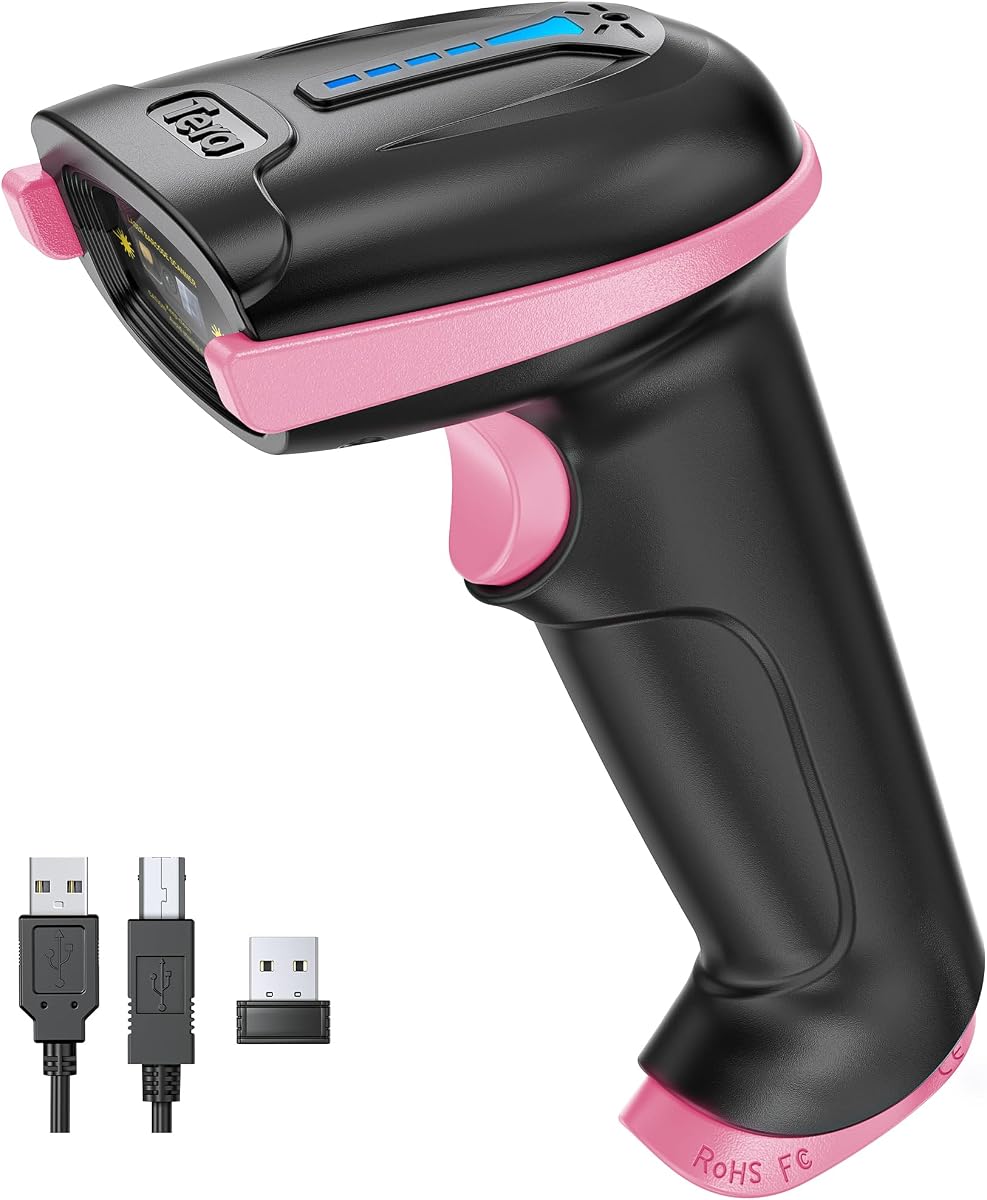
This pink version brings a touch of style to library gear without sacrificing performance. It shares the rugged traits of the standard model.
We may earn a commission when you buy through this link, at no additional cost to you.
The battery indicator helps manage shifts efficiently. Its drop rating and dust resistance make it reliable for daily use.
The pink hue might not suit all professional settings. The indicator light is small and could be hard to see from a distance.
Libraries wanting a unique look can choose this option. It offers the same reliability as other Tera models.
Stand out with a color that reflects your brand or personal preference.
Same durable build as other versions ensures it lasts through daily wear.
We may earn a commission when you buy through this link, at no additional cost to you.
This laser scanner provides quick and reliable reading for standard barcodes. It is suited for fixed checkout stations where wireless is not needed.
We may earn a commission when you buy through this link, at no additional cost to you.
It scans at two hundred scans per second which helps during busy periods. The plug and play USB connection requires no extra software.
It cannot read codes from screens or damaged prints as well as CCD models. Also it is tied to a cable.
Libraries with dedicated checkout counters will find this efficient. It offers consistent performance at a low cost.
High scan speed reduces wait times during peak library hours.
Just plug into USB and start scanning with no drivers required.
We may earn a commission when you buy through this link, at no additional cost to you.
This scanner delivers strong wireless performance for large buildings. It allows staff to scan far from the computer without signal loss.
We may earn a commission when you buy through this link, at no additional cost to you.
Offline storage keeps codes safe if you go out of range. The network mode enables multiple users to send data to one receiver.
It uses laser technology which does not read 2D codes. The battery life is good but not the longest.
Large libraries or warehouses will appreciate the range and storage features. It supports flexible mobile workflows.
Scan from far away thanks to the extended wireless transmission distance.
Multiple scanners can connect to one receiver for team scanning tasks.
We may earn a commission when you buy through this link, at no additional cost to you.
This pink mini scanner combines utility with style. It is well suited for personal use or as a gift for library staff.
We may earn a commission when you buy through this link, at no additional cost to you.
The compact size makes it easy to carry around. It offers Bluetooth wireless and wired options for flexibility.
The battery is smaller than other models so it needs more frequent charging. It only reads 1D codes.
Libraries looking for a fun and functional device can consider this. It performs well for routine scans.
The pink finish adds color to the work space and makes it distinct.
Carry it easily for quick checks without needing a desk setup.
We may earn a commission when you buy through this link, at no additional cost to you.
This model is unique for including a stand that enables hands-free scanning. It is helpful for busy desks where staff need both hands.
We may earn a commission when you buy through this link, at no additional cost to you.
The CMOS sensor reads both 1D and 2D codes accurately. The adjustable stand lets you find the best angle.
It lacks wireless connectivity so it stays tied to one spot. The stand may take up space on a small counter.
For high-volume circulation desks this hands-free feature is valuable. It improves workflow efficiency.
The stand lets you scan books without holding the scanner.
Reads both traditional barcodes and modern QR codes.
We may earn a commission when you buy through this link, at no additional cost to you.
Selecting the right barcode scanner depends on your specific workflow and facility size. Consider these factors before making a purchase.
Choose between wired USB wireless Bluetooth or 2.4G. Wired units offer stable connections but limit movement. Wireless scanners provide mobility for inventory checks.
Wireless is ideal for mobile staff while wired suits fixed checkouts.
Ensure the scanner reads ISBN and other 1D codes used on books. If you scan QR or 2D codes look for CMOS or imager technology.
Standard 1D scanners are cheaper but limit future options.
For wireless models check battery capacity. Large batteries reduce charging frequency which supports longer shifts.
Rechargeable batteries are more cost effective than disposable ones.
Library scanners often face drops and heavy use. Look for shock resistance and protective covers to extend device life.
Rugged designs prevent costly replacements over time.
Verify support for your library system OS. Most work with Windows Mac and Linux but some may have restrictions.
Check compatibility with your circulation software before buying.
Auto-sensing modes reduce physical effort during bulk scans. High scan speed helps during busy hours.
Manual trigger is sufficient for low volume but auto-mode saves time.
Some scanners allow prefixes or suffixes for data formatting. This helps match database requirements.
Programmable units adapt to specific library needs better.
A loud beep can disturb quiet study areas. Look for models with mute or vibration modes.
Silent scanning preserves the library environment.
To use most scanners connect them to your computer via USB or pair via Bluetooth. Follow the manual to scan any setup barcodes needed for configuration.
Clean the scan window gently with a soft cloth to remove dust. Avoid harsh chemicals that could scratch the sensor.
Store wireless models in a cool dry place. Charge them fully before long periods of inactivity to protect the battery.
Yes most 1D barcode scanners can read ISBN codes on books. CCD sensors are better for worn or damaged codes than laser scanners.
Most plug and play scanners do not need extra software. They appear as keyboard devices to your computer.
1D scanners read linear barcodes like ISBNs. 2D scanners read QR codes and stacked codes which hold more data.
Wireless batteries typically last several hours to days depending on usage. Larger mAh ratings offer longer runtime.
Many models support macOS and Linux but always check compatibility lists. Some features may work differently.
Check the barcode for damage and ensure correct mode settings. You can adjust prefix suffix options to fix data.
The NETUM Bluetooth model stands out as our top pick due to its balance of performance and versatility. Budget users may prefer the NetumScan USB for its low cost and durability.
Prioritize battery life and scanning mode based on whether your staff work at a desk or patrol shelves. Quiet operation is key for library environments.
Always verify current prices and availability on Amazon before buying. These models offer proven features for modern library operations.