
SteelSeries Apex 3
4.6Editor score
IP32 water resistant
Whisper quiet gaming switches
10-zone RGB illumination
Discover the best Mac gaming keyboard options for 2026. This guide compares top mechanical and wireless keyboards optimized for macOS compatibility and
Finding the right Mac gaming keyboard requires balancing seamless macOS integration with responsive mechanical switches. Gamers need layouts that respect system shortcuts while delivering precise tactile feedback for competitive play. This guide explores models designed specifically for Apple ecosystems.
We evaluated ten leading keyboards based on connectivity, switch quality, and software compatibility. Each product was assessed for its ability to handle long gaming sessions without lag or driver conflicts. Our analysis focuses on reliability and user experience across various price points.
Every selection highlights unique strengths like wireless versatility or premium build quality. Note that prices fluctuate based on availability and seasonal sales. Check current listings to ensure you get the best deal for your specific setup needs today.
4.6Editor score
4.3Editor score

4.7Editor score
This table provides a side-by-side comparison of all ten selected keyboards. It highlights key specifications to help you quickly identify the model that fits your gaming style and desk space requirements best.




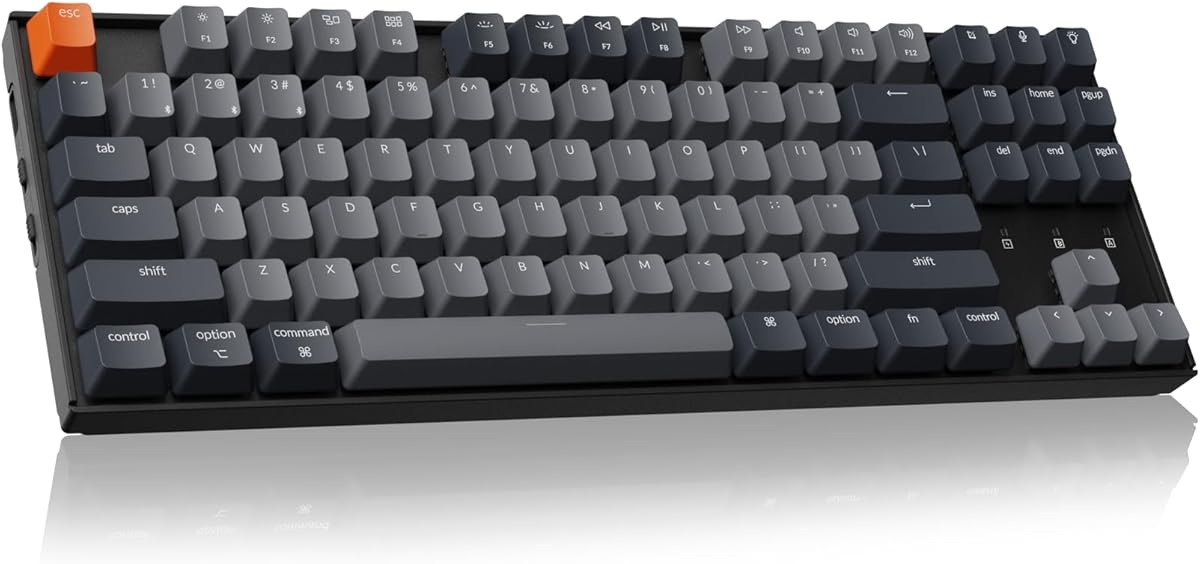
The Keychron K8 stands out as a top contender for Mac gaming keyboard setups. With a rating of 4.3 stars, it offers a perfect blend of wireless convenience and mechanical precision. Its design caters specifically to Mac users without sacrificing gaming performance.
We may earn a commission when you buy through this link, at no additional cost to you.
This keyboard features a Tenkeyless layout that saves desk space while keeping essential navigation keys accessible. The dual connection modes allow seamless switching between devices via Bluetooth or USB Type-C. The tactile brown switches provide a satisfying click without being too loud for shared environments.
While the price is higher than budget options, the build quality justifies the cost. The 4000 mAh battery ensures weeks of use on a single charge. However, the lack of RGB lighting may disappoint users who prefer colorful setups.
Gamers and professionals alike will appreciate the versatility of this model. It is ideal for those who value productivity and gaming in equal measure. If you seek a reliable wireless mechanical keyboard for your Mac, this is a strong recommendation.
The K8 includes dedicated Mac function keys and extra keycaps to ensure native support. This avoids common compatibility issues found with generic PC keyboards.
Users can connect up to three devices via Bluetooth 5.1. Switching is instantaneous, making it easy to manage work and play across multiple screens.
We may earn a commission when you buy through this link, at no additional cost to you.
The SteelSeries Apex 3 delivers exceptional value for budget-conscious gamers. With a rating of 4.6 stars, it proves that affordability does not mean compromising on features. It is a solid entry point for those new to gaming peripherals.
We may earn a commission when you buy through this link, at no additional cost to you.
Its IP32 water resistance protects against accidental spills, a common risk during intense gaming sessions. The whisper-quiet switches make it suitable for shared spaces where noise might be an issue. Dedicated multimedia controls allow easy adjustment of volume and settings.
While it lacks mechanical switches, the membrane keys still offer responsive feedback for gaming. The 10-zone RGB illumination adds a touch of style without breaking the bank. Users might need to install software to fully customize the lighting effects.
This model is perfect for casual gamers or students needing a reliable device. It balances durability, aesthetics, and cost effectively. If you prioritize a quiet and spill-resistant keyboard, the Apex 3 is an excellent choice.
The water-resistant coating adds significant longevity to the device. It ensures that minor accidents do not result in permanent damage to your setup.
Users can create unique color schemes to match their desktop themes. The lighting zones cover key areas, enhancing visibility in low-light conditions.
We may earn a commission when you buy through this link, at no additional cost to you.
The GravaStar Mercury K1 brings futuristic design to your Mac gaming setup. Rated at 4.7 stars, it combines luxury aesthetics with high-end mechanical performance. The unique aluminum alloy exoskeleton offers both strength and style.
We may earn a commission when you buy through this link, at no additional cost to you.
Its gasket-mounted structure absorbs vibrations, resulting in a softer and quieter typing experience. Tri-Mode connectivity supports USB-C, Bluetooth, and 2.4GHz wireless, providing maximum flexibility. The custom RGB lighting features 16.8 million colors for deep personalization.
While the premium price is a barrier, the build quality justifies the investment. The keyboard feels substantial on the desk, which may not suit portable setups. However, for a stationary workstation, it is a standout piece.
Gamers seeking a statement piece will love this model. It is ideal for those who value design as much as performance. If you want a unique, high-performance keyboard, the Mercury K1 is the top pick.
The gradient black finish and flowing curves make this a visual standout. It elevates the look of any desk setup significantly.
Supporting three distinct connection types ensures you are never limited by cables or interference. It adapts well to various gaming scenarios.
We may earn a commission when you buy through this link, at no additional cost to you.
The EPOMAKER X Aula F75 MAX offers advanced customization for tech-savvy gamers. With a rating of 4.6 stars, it introduces a TFT screen that allows real-time adjustments. This feature adds a unique layer of personalization to your Mac keyboard.
We may earn a commission when you buy through this link, at no additional cost to you.
Hot-swappable switches let you change the typing feel without soldering, which is great for experimentation. The gasket-mounted design ensures a premium typing experience with minimal bottom-out noise. The volume knob offers convenient control without leaving the game.
However, the extensive features might overwhelm new users. Setting up the software requires time to fully utilize the customization options. The limited brand history means support may not be as robust as established names.
This keyboard is perfect for enthusiasts who love to tinker. It suits those who want a distinct and highly functional device. If you value novelty and flexibility, the F75 MAX is a compelling option to consider.
The TFT screen can show battery status and even GIFs. It serves as a visual hub for your keyboard's status.
Users can swap out switches to tailor the tactile feel. This extends the keyboard's life and allows future upgrades easily.
We may earn a commission when you buy through this link, at no additional cost to you.
The Logitech G915 X redefines gaming keyboards with its sleek, low-profile design. Although it is wired, it delivers the speed and precision needed for competitive play. The sand-blasted aluminum top plate adds a premium feel to the desk.
We may earn a commission when you buy through this link, at no additional cost to you.
Low-profile GL mechanical switches provide a fast actuation point, which is critical for rapid inputs. The LIGHTSYNC RGB technology allows for complex lighting effects that sync with in-game events. Its slim aesthetic fits well with modern setups.
Despite its high performance, the price is significantly higher than standard options. Users may find the lack of wireless functionality limiting if they prefer cable-free setups. However, wired stability is a major plus for competitive gamers.
This keyboard is ideal for gamers who prioritize speed and style. It works exceptionally well with Mac systems via G HUB. If you want a premium aesthetic with fast response times, the G915 X is worth the investment.
Measuring only 23 mm high, it offers increased control without bulk. The slim design improves comfort during long sessions.
The 1.3 mm actuation point ensures quicker reactions. This engineering innovation reduces the delay between press and action.
We may earn a commission when you buy through this link, at no additional cost to you.
The Logitech G413 TKL SE focuses on durability and performance. Rated at 4.6 stars, it is built to withstand intense gaming sessions. The PBT keycaps resist wear and shine, ensuring the keyboard looks new for years.
We may earn a commission when you buy through this link, at no additional cost to you.
Its Tenkeyless layout saves space while maintaining essential keys for navigation. The 6-Key rollover anti-ghosting ensures that every command is registered accurately during intense gameplay. The brushed aluminum top case provides structural rigidity.
The only downside is the lack of dedicated media keys; users must use the function layer. It is also a wired-only device, which might not suit portable needs. However, the reliability is a major benefit.
This is a solid choice for gamers who want a sturdy, no-nonsense keyboard. It pairs well with Mac systems for reliable operation. If you need a long-lasting device with strong performance, this is a top contender.
PBT material is heat and wear resistant, superior to ABS. It keeps key legends clear and the surface textured.
The TKL design reduces desk footprint. It leaves more room for mouse movement during gameplay.
We may earn a commission when you buy through this link, at no additional cost to you.
The Redragon K742 brings high-end features to an affordable wireless package. With a 4.6-star rating, it offers a gasket structure for a satisfying sound. The volume knob adds convenience for quick adjustments.
We may earn a commission when you buy through this link, at no additional cost to you.
Tri-mode connectivity allows you to switch between Bluetooth, 2.4GHz, and wired USB-C easily. QMK/VIA support enables advanced key remapping and layer editing, which is rare at this price point. The hot-swappable PCB allows for easy switch changes.
While Redragon is a smaller brand, the build quality holds up well. The software for custom layers can be complex for beginners. However, for enthusiasts, it offers unmatched value.
This keyboard is ideal for those seeking a versatile compact solution. It suits users who want to customize their layout without spending a fortune. If you need a budget-friendly wireless mechanical keyboard, the K742 is a strong choice.
The gasket structure provides a bouncy typing feel. It isolates the PCB to reduce harsh bottom-out sounds.
VIA software allows deep customization without coding. It empowers users to create complex macros and layouts.
We may earn a commission when you buy through this link, at no additional cost to you.
The Keychron K4 is a unique blend of compact design and full functionality. With a 4.4-star rating, it fits a number pad into a smaller footprint. This makes it ideal for those who need a numpad without a full-size board.
We may earn a commission when you buy through this link, at no additional cost to you.
It includes specific Mac function keys, making it a native partner for Apple users. The white LED backlight offers clear visibility in dim environments. With up to 240 hours of battery life, it is perfect for heavy users.
The weight might be a consideration if you move your setup frequently. However, the stability it provides is beneficial for desktop gaming. The switch options provide a satisfying tactile experience.
This model is perfect for productivity-heavy gamers. It suits users who need both a numpad and a wireless layout. If you value efficiency and Mac compatibility, the K4 is an excellent choice.
The 96% layout keeps all essential keys. It reduces desk space while maintaining full functionality.
Mac function keys are built-in for convenience. This removes the need for manual mapping of system shortcuts.
We may earn a commission when you buy through this link, at no additional cost to you.
The Logitech MX Mechanical brings productivity features to gaming setups. With a 4.2-star rating, it focuses on quiet and comfortable typing. The tactile switches are designed to be less noisy than standard gaming keyboards.
We may earn a commission when you buy through this link, at no additional cost to you.
Smart illumination detects when your hands approach to light up, saving battery. Multi-device control allows switching between a Mac and a PC effortlessly. It is well built with durable materials and recycled plastic components.
While excellent for typing, it may not offer the speed needed for competitive gaming. The price is also higher than many dedicated gaming models. However, for hybrid users, it bridges the gap well.
This keyboard suits those who work and play on the same device. It is ideal for offices or quiet gaming environments. If you value comfort and multi-device utility, the MX Mechanical is a great option.
The low-profile keys reduce finger travel distance. This improves comfort during long typing sessions.
The keyboard lights up only when you need it. This saves power and extends battery life significantly.
We may earn a commission when you buy through this link, at no additional cost to you.
The Logitech G213 Prodigy offers a full-size gaming solution at an accessible price. With a 4.2-star rating, it provides dedicated media controls and lighting customization. Its spill-resistant design adds reliability for daily use.
We may earn a commission when you buy through this link, at no additional cost to you.
The anti-ghosting matrix ensures accurate key registration during complex game inputs. Integrated palm rest helps maintain comfort during long sessions. The five lighting zones can be synced with other Logitech devices for a cohesive look.
It lacks mechanical switches, which might not appeal to enthusiasts. However, for casual users, the tactile feedback is sufficient. The build quality is robust enough for daily use without excessive wear.
This keyboard is perfect for gamers on a tight budget. It is ideal for those who need a full layout and palm rest. If you want a reliable entry-level gaming keyboard, the G213 Prodigy is a great pick.
The design repels liquids and debris effectively. It makes cleanup easy after spills or crumbs.
You can adjust colors to match your game or theme. Syncing with other G devices creates an immersive setup.
We may earn a commission when you buy through this link, at no additional cost to you.
Selecting the right keyboard involves understanding layout types, switch mechanics, and connectivity needs. These factors define how well a device suits your gaming style and desktop.
Full-size keyboards offer a numpad but take up space. Tenkeyless models save room while keeping navigation keys for gaming. Compact layouts like 60% or 75% are for those with limited desk space.
Choose a layout that balances functionality and space. Gamers usually prefer TKL for mouse movement.
Mechanical switches provide distinct tactile feedback and longevity. Tactile switches have a bump, linear are smooth, and clicky are audible. Membrane switches are quieter but lack precision.
Pick switches based on noise tolerance. Linear switches suit competitive gaming; tactile ones suit typing.
Wireless keyboards offer clutter-free setups via Bluetooth or dongles. Wired connections ensure zero latency for competitive play. Some models offer both wired and wireless modes.
Prioritize wired if latency is critical. Choose wireless for convenience and a clean desk.
Aluminum or steel frames provide durability. Plastic models may feel lighter but less stable. Look for water resistance to protect against spills.
Invest in a sturdy frame for longevity. It ensures the keyboard lasts through intense usage.
Mac users need keyboards with macOS drivers and keycaps. Software like G HUB or VIA allows customization. Ensure compatibility to avoid driver conflicts.
Check for Mac support before buying. It ensures all function keys work correctly.
RGB customization adds personalization to your setup. Some models offer sync with other peripherals. Brightness and color range vary by model.
Consider RGB if you value aesthetics. Some users prefer clean designs without lights.
Keyboards range from budget to premium prices. Higher costs usually mean better materials and features. Find a balance between cost and desired specs.
Set a budget to narrow options. High-end features cost more but pay off in quality.
Wireless keyboards depend on battery capacity. Look for models with long runtimes between charges. Some offer quick charging features.
Check battery specs for daily use. Long battery life reduces charging interruptions.
Ensure proper Bluetooth pairing or wired connection to your Mac. Install necessary drivers like G HUB for customization. Adjust key remapping settings to match macOS shortcuts for seamless integration.
Clean keys regularly with compressed air to remove dust. Wipe surfaces with a microfiber cloth to maintain appearance. For spill-resistant models, avoid liquid contact to protect internal components.
Manage battery life by dimming lighting when not in use. Store wireless models in a safe place to avoid drops. Check for firmware updates to maintain compatibility and performance.
Yes, mechanical keyboards offer faster response and durability compared to membrane types. They provide tactile feedback that helps in competitive gaming. Ensure you choose a model with macOS support for full functionality.
Most models work as plug-and-play devices. However, advanced RGB or macro features often need software like G HUB. Always check system compatibility before purchasing.
Tenkeyless is generally preferred for the extra mouse space. Full-size layouts work if you need a numpad. Compact options save space but may lack navigation keys.
Yes, but some keys might not align with macOS functions. Look for keyboards that include Mac keycaps. This avoids frustration with function key usage.
Mechanical keyboards can last up to 50 million keystrokes. High build quality models endure years of use. Proper care extends lifespan significantly.
Modern wireless tech has minimal latency. Models with dedicated 2.4GHz dongles perform well. Wired is still preferred for zero lag scenarios.
The Keychron K8, SteelSeries Apex 3, and GravaStar Mercury K1 lead this list for different reasons. They represent the best options for performance, value, and premium features respectively.
Prioritize connectivity and layout based on your gaming habits. A model with the right switches will improve your performance significantly over time.
Prices and stock change frequently, so check the links for the latest deals. Ensure the keyboard you choose fits your desk and system requirements.