
TP-Link ER605
4.4Editor score
Up to three WAN ports for load balancing
Supports multiple VPN protocols like IPsec and OpenVPN
Advanced firewall and DoS defense protection
This guide compares the top load balancing routers for businesses and homes, evaluating WAN ports, security features, and performance to help you choose the
Finding the right load balancing router ensures your network stays online even if one internet connection fails. These devices manage multiple WAN links to optimize bandwidth and improve reliability for businesses and power users.
We evaluated ten top models based on port flexibility, security protocols, and ease of management. Our analysis covers enterprise-grade features and budget-friendly options to help you find the best fit for your specific needs.
Each product entry highlights key specifications and real-world performance traits. Please note that prices and availability change frequently, so check current listings before making your final purchase decision.
4.4Editor score

4.5Editor score

4.0Editor score
The following table provides a side-by-side comparison of all ten selected load balancing routers. It highlights key specifications including port types, VPN capabilities, and security features to help you quickly identify the model that best matches your networking requirements.




The TP-Link ER7206 is a professional wired gigabit VPN router designed for robust network performance. It holds a rating of 4.5 stars based on user feedback. Its standout qualities include flexible port configuration and integration with the Omada SDN platform.
We may earn a commission when you buy through this link, at no additional cost to you.
This router supports up to four WAN ports which optimizes bandwidth usage significantly. It can handle up to 700 clients and 150000 associated devices. The integrated SDN allows for centralized cloud management across different sites via a single interface.
While powerful, it requires compatible SDN controllers for advanced software-defined networking features. Non-SDN controllers only work with non-SDN devices. This limitation is acceptable for users invested in the Omada ecosystem who need scalable management.
Network administrators seeking professional-grade connectivity should buy this device. It offers extensive security features and secure VPN options. The combination of capacity and management tools makes it a top recommendation for growing businesses.
The router offers a mix of SFP WAN and standard Gigabit WAN ports to suit diverse connection needs.
Remote access via the Omada app allows administrators to control the network from anywhere at any time.
We may earn a commission when you buy through this link, at no additional cost to you.
The Alta Labs Route10 is a high-performance 10 Gigabit wired router designed for advanced home and enterprise networks. It has a user rating of 4.0 stars. It stands out with its Qualcomm Quad-Core processor and support for SFP+ ports.
We may earn a commission when you buy through this link, at no additional cost to you.
Powered by hardware-accelerated networking it delivers fast packet processing and low latency. It supports VLAN tagging QoS traffic prioritization and NAT port forwarding. Integrated PoE+ output allows it to power compatible access points directly through Ethernet cables.
Users must pair it with separate Wi-Fi access points since it does not broadcast wireless signals. The higher price reflects its enterprise-grade routing and firewall capabilities. This trade-off is acceptable for those needing dedicated wired performance.
Advanced users requiring high throughput should consider this router. It works natively with Alta Labs switches and controllers. The real-time stats help administrators identify issues quickly to maintain stable high-performance wired networks.
The Quad-Core Qualcomm processor ensures consistent multi-gigabit performance without bottlenecks for routing and firewall rules.
Select Ethernet ports provide Power over Ethernet Plus support reducing the need for additional power adapters.
We may earn a commission when you buy through this link, at no additional cost to you.
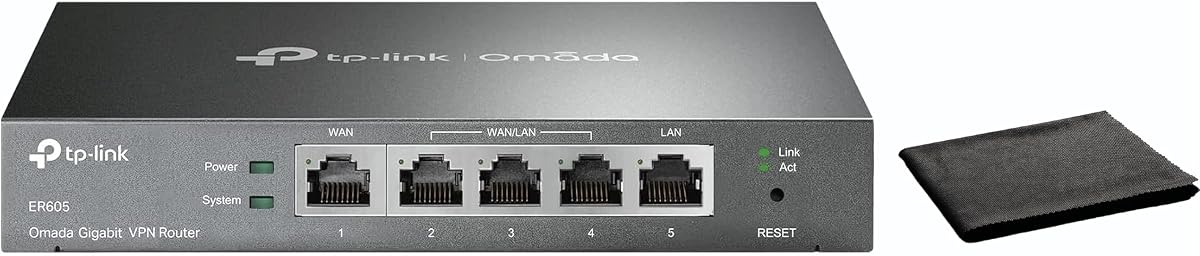
The TP-Link ER605 is a wired gigabit VPN router offering reliable load balancing at a budget-friendly price. It holds a 4.4 rating from users. Key features include five Gigabit ports and support for up to three WAN connections.
We may earn a commission when you buy through this link, at no additional cost to you.
It optimizes bandwidth usage through one device and supports mobile broadband via a USB WAN port for backup. Advanced firewall policies and DoS defense protect your network and data. It supports various VPN connections including IPsec and OpenVPN.
While it lacks SFP support found in higher-end models it covers most small office needs effectively. The USB WAN port is a unique addition for mobile failover. This makes it a flexible choice for cost-conscious buyers.
Small businesses seeking affordable security and load balancing should choose this router. It ensures reliable connectivity and secure remote access. The combination of ports and security features makes it a solid entry-level option.
The router includes a mix of WAN and LAN ports to handle multiple connections efficiently.
Multiple VPN protocols ensure secure remote access and site-to-site connectivity for businesses.
We may earn a commission when you buy through this link, at no additional cost to you.
The Cudy R700 is a gigabit multi-WAN router with full OpenWRT support for enterprise control. It has a rating of 4.4 stars. It connects up to five ISPs with automatic failover and load balancing to keep networks online.
We may earn a commission when you buy through this link, at no additional cost to you.
Full OpenWRT support unlocks VLAN segmentation and advanced firewall rules. It includes WireGuard OpenVPN and IPsec protocols for secure connections. The device allows for custom QoS policies and community-developed packages for management.
While powerful, the OpenWRT environment may require more technical knowledge to configure fully. The device offers a professional security stack and flexible deployment options. This trade-off is acceptable for users seeking deep customization.
Tech-savvy users wanting custom control should consider this router. It supports both web GUI and app management. The comprehensive security and VLAN capabilities make it ideal for home labs and remote offices.
Full support unlocks advanced features like VLAN segmentation and custom QoS policies for enterprise-grade management.
Built-in protocols allow for site-to-site tunnels and remote access without additional software.
We may earn a commission when you buy through this link, at no additional cost to you.
The Omada ER7412-M2 is a multi-gigabit VPN router designed for high-speed network needs. It holds a 4.5 rating. It offers load balancing on up to eleven WAN ports to increase bandwidth utilization rates.
We may earn a commission when you buy through this link, at no additional cost to you.
It includes two 2.5G RJ45 ports and ten Gigabit WAN/LAN ports. High-security VPN protocols like SSL IPsec and WireGuard are supported. The device features Deep Packet Inspection and IPS/IDS for enhanced security protection.
Managing eleven WAN ports can be complex for average home users but suits advanced setups. The high port count provides redundancy that is valuable for large offices. This is a viable trade-off for businesses needing maximum flexibility.
Network professionals needing high capacity and security should select this router. It supports diverse VPN protocols and advanced protection. The combination of speed and security makes it a robust choice for demanding environments.
Load balancing on up to 11 WAN ports increases the utilization rate of multi-line broadband significantly.
DPI and IPS/IDS features protect against intrusions and ensure network integrity against threats.
We may earn a commission when you buy through this link, at no additional cost to you.
The TP-Link TL-R470T+ is a Safestream Multi WAN router equipped with four WAN ports. It has a rating of 4.2 stars. It uses advanced load balance to guarantee maximum bandwidth and backup capabilities for small networks.
We may earn a commission when you buy through this link, at no additional cost to you.
It provides extensive client account and network management for administrators. Bandwidth resources are marshaled to specific clients based on their unique application environments. Powerful DoS attack protection safeguards the network from external threats.
The ports are 10/100M rather than Gigabit which limits throughput for high-speed plans. This is a cost-effective solution for smaller offices or internet cafes where speed is less critical. The protection features remain robust despite the speed limit.
Small offices needing simple load balancing and security should consider this device. It supports PPPoE server and DDNS for remote management. The compact design and protection features make it ideal for budget-conscious setups.
Extensive client account management helps administrators control access and resources effectively.
Bandwidth resources are marshaled to specific clients based on their unique application environments.
We may earn a commission when you buy through this link, at no additional cost to you.
The TP-Link TL-R480T+ is a load balance broadband router with five ports. It holds a 4.2 rating. It features three configurable WAN/LAN ports and one dedicated WAN port to manage connections.
We may earn a commission when you buy through this link, at no additional cost to you.
This device allows for flexible WAN configurations to balance traffic across links. It is simple to set up and use for basic needs. The five port total provides enough connectivity for small home or office networks.
While it lacks advanced features found in newer models it performs its core task well. The limited configuration options make it easy to manage but less flexible for complex needs. This is acceptable for straightforward requirements.
Users needing a simple balance solution should look at this router. It offers affordability and ease of use. The basic port setup ensures connectivity without unnecessary complexity or steep learning curves.
Three configurable WAN/LAN ports provide flexibility in connecting multiple internet sources.
The user-friendly design allows for quick configuration without deep technical knowledge.
We may earn a commission when you buy through this link, at no additional cost to you.
The TP-Link ER-605 is a gigabit VPN router featuring dual WAN ports. It has a rating of 4.3 stars. It offers load balancing and enhanced network performance for small and medium businesses.
We may earn a commission when you buy through this link, at no additional cost to you.
Management is simplified with an intuitive web interface and Omada app compatibility. Centralized cloud monitoring provides real-time network status and configuration without needing on-site visits. Intelligent bandwidth management ensures optimal performance for critical applications.
It has only two WAN ports which limits redundancy compared to higher models. The compact design makes it versatile for various installation environments. This trade-off is acceptable for smaller setups needing cost-effective security.
Small businesses prioritizing easy management should choose this router. It ensures reliable wired connections and secure remote access. The combination of cloud monitoring and security features makes it a practical choice.
Simplify your network management with intuitive web interface and centralized cloud monitoring for real-time status.
Ensure optimal performance for critical applications with intelligent bandwidth management and QoS settings.
We may earn a commission when you buy through this link, at no additional cost to you.
The Ubiquiti EdgeRouter 4 is a fanless router with three Gigabit Ethernet ports. It has a rating of 4.6 stars. It is designed for reliable networking with low power consumption at 13 Watts.
We may earn a commission when you buy through this link, at no additional cost to you.
It includes a serial port and an SFP port for flexible connectivity options. The fanless design ensures silent operation and longer hardware life. It supports desk wall and rack mounting options for versatile installation.
It lacks built-in WAN load balancing features unless configured via software tools. The need for a separate controller may increase total cost. This is acceptable for those already in the Ubiquiti ecosystem.
Advanced users needing a silent powerful device should consider this router. It offers solid hardware and low power needs. The mounting flexibility and ports make it ideal for quiet office environments.
Internal PSU fanless design ensures silent operation and reduces dust accumulation for longer life.
Desk wall and rack mount options allow for versatile installation in different environments.
We may earn a commission when you buy through this link, at no additional cost to you.
The Omada Fusion is a 2.5G Multi-WAN wired VPN router with a touchscreen interface. It has a rating of 4.7 stars. It allows for up to four-WAN load balancing and auto multi-WAN failover.
We may earn a commission when you buy through this link, at no additional cost to you.
Simplified setup via Bluetooth with the Omada App speeds up deployment. High-performance Quad-Core CPU ensures lightning-fast processing to overpower lag. A 2.51-inch touchscreen provides instant on-site insights including health scores and alerts.
The need for Bluetooth pairing during initial setup may be a hurdle for some users. It is strictly a wired device with no wireless features built in. This trade-off is acceptable for wired performance and local monitoring.
Users prioritizing speed and on-site management should choose this router. It delivers outstanding speed with 2.5G ports. The touchscreen interface makes monitoring and troubleshooting intuitive without external tools.
High-Performance Quad-Core CPU ensures lightning-fast processing to overpower lag and handle data traffic efficiently.
The 2.51-inch touchscreen provides instant on-site insights including health scores speed tests and real-time traffic.
We may earn a commission when you buy through this link, at no additional cost to you.
Selecting the right load balancing router requires understanding your network needs and technical capabilities. This guide outlines key factors to consider for a reliable network solution.
The number of WAN ports determines how many internet connections you can link. Look for routers with at least three WAN ports for better redundancy and load distribution. More ports allow you to balance traffic across multiple ISPs for reliability.
Choose a router that offers enough ports for your current connections plus future expansion.
Routers use different modes such as round robin or weighted balance. Weighted balance assigns traffic based on connection speed while round robin sends equal requests. Select a mode that matches your bandwidth requirements.
Ensure the device supports the specific balancing strategy you need for your business.
Security is critical to protect data and network access. Look for SPI firewall DoS defense and IP/MAC filtering. Advanced models may offer IPS/IDS and VLAN segmentation for deeper protection against threats.
Prioritize routers with robust security suites to guard against attacks and unauthorized access.
Secure remote access often requires VPN capabilities. Check for support of protocols like IPsec OpenVPN and WireGuard. Business routers should allow multiple concurrent VPN connections for distributed teams.
Verify the router supports the specific VPN protocols your organization requires for remote work.
Ease of management impacts setup and troubleshooting time. Web interfaces should be intuitive and offer cloud monitoring options. Devices with mobile apps allow for remote status checks without physical access.
Select a management system that fits your technical comfort level and workflow preferences.
Port speed affects internal network performance and throughput. Gigabit ports are standard but 2.5G ports offer higher bandwidth. Ensure LAN ports match your local network speed needs.
Choose routers with port speeds that support your local devices and total traffic volume.
Scalability allows your network to grow over time. Look for SFP ports for fiber connections or USB ports for backup modems. SDN compatibility enables integration with switches and access points for a unified setup.
Select a model that allows hardware upgrades or software-defined expansions as your needs evolve.
Begin by connecting your internet cables to the WAN ports on the router. Access the web interface using the default IP address and login credentials. Follow the setup wizard to configure your ISP details and load balancing rules.
Update the firmware regularly to ensure security and performance improvements. Monitor bandwidth usage through the dashboard to identify bottlenecks or issues. Reboot the device occasionally to clear temporary caches and maintain stability.
Protect the device from dust and direct sunlight to extend its lifespan. Use a surge protector to shield it from power spikes. Ensure proper ventilation to prevent overheating during heavy usage periods.
A load balancing router manages traffic across multiple internet connections to optimize speed and reliability. It distributes requests to prevent any single line from being overloaded. This ensures continuous operation even if one connection fails.
You need one if you rely on multiple ISPs for redundancy or speed. It is ideal for businesses that cannot afford downtime. Home users with high bandwidth demands may also benefit from improved performance.
Most routers require a modem or gateway to connect to the ISP. However some models support direct fiber or USB modem connections. Check the specific WAN compatibility before connecting your service.
VPN traffic is encrypted and routed through the network securely. A good router supports multiple VPN tunnels without slowing down bandwidth. Ensure the device has sufficient processing power for encrypted data.
Cloud management allows you to monitor and control your network remotely. It is beneficial if you manage multiple sites or lack on-site staff. Local web access remains available if cloud services are unreachable.
Load balancing routers detect failures and reroute traffic to active links automatically. This failover process minimizes downtime and maintains connectivity. Regular testing ensures that the backup connections are ready.
We reviewed ten top load balancing routers ranging from budget models to enterprise solutions. The TP-Link ER7206 stands out for its Omada integration while the Alta Labs Route10 offers unmatched speed. The Cudy R700 is great for users wanting OpenWRT flexibility.
Prioritize security and port capacity when making your decision. Ensure the device supports the specific protocols like IPsec or WireGuard you require. A well-chosen router provides long-term reliability and ease of management.
Prices and specifications change frequently so verify current listings before buying. Check compatibility with your existing switches and access points. The right investment ensures your network remains fast secure and resilient.