
Redragon K512 RGB Membrane Gaming Keyboard, 6 Macro Keys & Easy Media Wheel
4.5Editor score
Six onboard macro keys
No software required for macros
Dedicated media controls
This guide compares the top keyboards with macro keys for gaming and productivity, evaluating features, build quality, and customization options to help you
Choosing the right keyboard with macro keys can transform your workflow and gaming performance significantly. These devices allow you to execute complex commands with a single press, saving time and reducing strain during intense sessions. Whether you are a competitive gamer or a power user, having dedicated macro functionality is essential for efficiency.
We have carefully evaluated ten standout models based on their macro capabilities, build quality, and overall value. Each product offers unique features ranging from onboard memory to advanced software suites. Our analysis focuses on how well these keyboards handle custom bindings and their ease of use for everyday tasks.
Each pick in this list highlights specific strengths to help you find the perfect match for your needs. We detail the key features, pros, and cons to ensure you make an informed decision. Please note that prices and availability may change, so check current listings before purchasing your new device.
4.5Editor score

4.1Editor score
4.3Editor score
This side-by-side comparison highlights the core specifications and features of all ten selected keyboards. It allows you to quickly assess differences in switch types, macro availability, and connectivity options to find the best fit for your setup.


The VSD K1 Pro stands out as a versatile choice for users seeking deep customization. It features a full-key programmable layout that supports complex macro recording and multi-step operation flows. Its rating reflects strong performance in both gaming and productivity scenarios.
We may earn a commission when you buy through this link, at no additional cost to you.
A key strength is the integrated streaming deck function, allowing you to create switchable pages with LCD keys and knobs. This flexibility lets you assign actions for game combos or app launches directly from the keyboard. The smart display screen provides real-time updates for volume and connection modes.
While the screen requires software installation and a wired connection, the value it adds is immense for streamers and power users. The hot-swappable design ensures you can personalize the typing feel without soldering. The gasket mount offers a softer, more elastic feel compared to standard boards.
This keyboard is ideal for those who want an all-in-one solution for gaming and content creation. It balances performance with aesthetic customization through RGB lighting and LCD animations. If you prioritize functionality and flexibility, the VSD K1 Pro is a top recommendation.
You can create unlimited pages with LCD keys to control apps and media without leaving your game.
The gasket mount and dampening layers reduce noise while providing a satisfying tactile experience.
We may earn a commission when you buy through this link, at no additional cost to you.
The Redragon K512 offers exceptional value for budget-conscious gamers who need reliable macro functionality. It includes six onboard macro keys that can be recorded and reassigned on the fly. This eliminates the need for driver installation for basic macro tasks.
We may earn a commission when you buy through this link, at no additional cost to you.
Its 26 anti-ghosting keys ensure that simultaneous inputs are registered accurately during intense gaming sessions. The true RGB lighting provides 13 modes to match your setup aesthetics. The detachable wrist rest adds comfort for long sessions without taking up much desk space.
While it lacks advanced software features out of the box, the onboard memory is sufficient for most casual users. The double-shot injection molded keycaps resist fading over time, ensuring longevity. Optional software exists for those who want deeper customization later.
This keyboard is perfect for beginners or those who want a simple plug-and-play experience. It delivers solid performance and essential features without breaking the bank. If you need a cost-effective macro keyboard, the K512 is a strong contender.
You can record combos directly on the keyboard without installing any software first.
The magnetic wrist rest ensures your hands stay supported during extended gaming sessions.
We may earn a commission when you buy through this link, at no additional cost to you.
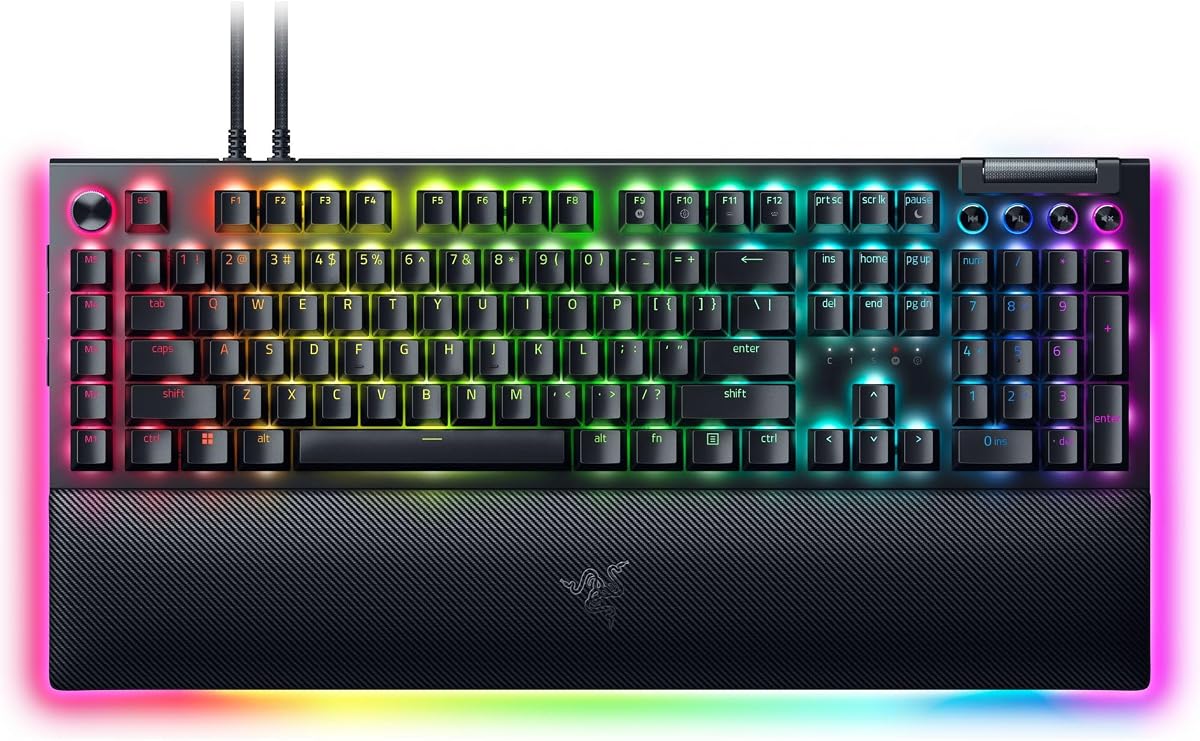
The Razer BlackWidow V4 Pro is a flagship option for those seeking top-tier performance and style. It features eight dedicated macro keys for complex commands and a command dial for custom functions. The green tactile switches provide precise execution with satisfying feedback.
We may earn a commission when you buy through this link, at no additional cost to you.
Its immersive underglow and per-key lighting sync with your battlestation for a cohesive look. The magnetic plush leatherette wrist rest offers secure support during long hours of play. Doubleshot ABS keycaps ensure the labeling never wears off even after intense use.
While the price is higher than budget options, the build quality and feature set justify the investment. The command dial adds a layer of control not found on standard keyboards. You get a complete package that enhances both gaming and productivity experiences.
This keyboard is recommended for enthusiasts who want the best features available. It combines durability with advanced customization capabilities. If you are looking for a premium upgrade, the V4 Pro delivers excellence in every aspect.
Assign custom functions to the programmable dial to manage apps and settings quickly.
The plush wrist rest features RGB lighting that integrates seamlessly with the keyboard.
We may earn a commission when you buy through this link, at no additional cost to you.
The Redragon K580 delivers a balanced mechanical experience with essential macro capabilities. It offers five dedicated macro keys to save complex combos directly on the keyboard. The hot-swappable sockets allow you to swap switches without soldering for a personalized feel.
We may earn a commission when you buy through this link, at no additional cost to you.
Its stock brown switches provide a gentle bump with less noise than clicky switches, making it quiet for office or home use. The full anti-ghosting ensures every keypress registers accurately during rapid combos. It is built to outlast daily gaming with double-shot keycaps.
While everyday use needs zero software, you can access advanced RGB effects if desired. The design focuses on durability and usability, ensuring your board holds up to years of heavy use. This makes it a reliable choice for consistent performance.
This keyboard is ideal for gamers who want a silent mechanical option with macros. It bridges the gap between affordability and quality mechanical features. If you value quiet operation and longevity, the K580 is an excellent pick.
The upgraded socket accepts almost any switch, allowing easy customization without tools.
Rated for 50 million keystrokes, this keyboard ensures long-term reliability for daily use.
We may earn a commission when you buy through this link, at no additional cost to you.
The Redragon K550 is designed for users needing extensive macro customization and robust build quality. With 12 onboard macro keys, you can program a wide variety of commands without software. The custom purple switches offer a clear tactile feel with a strong THOCK sound.
We may earn a commission when you buy through this link, at no additional cost to you.
Its solid aluminum top plate keeps the keyboard steady on your desk, ensuring an elegant and stable typing experience. The built-in USB pass-through port allows you to connect mice or wireless receivers easily. Dedicated media controls let you adjust volume without interrupting your game.
While the clicky switches might be loud for shared spaces, they provide satisfying feedback. The pro software supports expanding options with new modes and effects. This flexibility makes it suitable for both gaming and work environments.
This keyboard is a strong option for those who prioritize macro density. It offers a lot of functionality for a competitive price. If you need many macro keys and a durable frame, the K550 is worth considering.
Twelve G keys allow you to edit and perform a variety of macros without extra software.
The brushed aluminum top plate ensures the keyboard remains sturdy and premium on your desk.
We may earn a commission when you buy through this link, at no additional cost to you.
The Razer BlackWidow V4 X features yellow linear switches that offer instant rapid-fire inputs. With zero distance between actuation and reset points, it provides a quiet mechanical experience. Six dedicated macro keys expand your arsenal of commands for preferred playstyles.
We may earn a commission when you buy through this link, at no additional cost to you.
Its Chroma RGB per-key lighting allows customization from over 16.8 million colors. The doubleshot ABS keycaps ensure labeling never wears off during intense gaming. The special foam and lubricated stabilizers minimize noise, creating a satisfying typing experience.
While it has fewer macro keys than the Pro model, it remains highly capable. The linear switches are great for fast-paced gaming where speed is essential. It balances performance with quality without the high price of the full Pro line.
This keyboard is ideal for gamers who prefer linear and quiet switches. It delivers premium features at a mid-range price. If you want Razer quality with a focus on speed, the V4 X is a great choice.
The zero distance actuation point enables rapid-fire inputs without noise.
Per-key RGB lighting syncs with integrated games for an immersive environment.
We may earn a commission when you buy through this link, at no additional cost to you.
The Corsair K55 RGB PRO combines durability with essential macro features for everyday use. Six dedicated macro keys allow you to activate functions in a single stroke via software. The IP42-rated protection guards against dust and spills to keep your gameplay uninterrupted.
We may earn a commission when you buy through this link, at no additional cost to you.
Its dynamic RGB backlighting can be customized across five zones using iCUE software. The detachable soft rubber palm rest reduces stress on your hands during long sessions. Dedicated media keys provide convenient control for playback and volume tuning.
While it uses membrane technology, the design ensures a comfortable and responsive experience. The spill resistance is a critical feature for messy environments or accidental drink spills. It offers solid performance and reliability without the bulk of mechanical boards.
This keyboard is perfect for users concerned about durability and liquid damage. It balances comfort with functional macro capabilities. If you need a rugged and easy-to-use keyboard, the K55 RGB PRO fits the bill.
IP42-rated protection ensures your keyboard remains operational even after minor spills.
Assign colors to zones or program vibrant effects with iCUE software.
We may earn a commission when you buy through this link, at no additional cost to you.
The Redragon K618 PRO offers wireless freedom with powerful macro features for flexible setups. It features 20 on-the-fly macro keys and media controls that work without software. Tri-mode connectivity lets you jump between USB-C, Bluetooth, and 2.4GHz wireless instantly.
We may earn a commission when you buy through this link, at no additional cost to you.
Its low-profile design shortens travel distance so keystrokes register quickly. This helps reduce strain on your wrists during long typing sessions. You can toggle between operating systems with a one-touch switch for easy multi-device use.
While wireless can introduce complexity, this model ensures zero lag for gaming. The slim design is both stylish and functional. You get extensive customization options with pro software for deeper lighting and keybinding control.
This keyboard is ideal for users who value portability and a clean desk. It brings macro efficiency to a wireless context. If you want the freedom of wireless with solid performance, the K618 PRO is a great option.
Tri-mode connectivity allows you to move between PC, laptop, and tablet easily.
Low-profile keys shorten travel distance for lighter typing and faster response.
We may earn a commission when you buy through this link, at no additional cost to you.
The Logitech G213 Prodigy focuses on comfort and durability for gamers of all levels. It features five customizable lighting zones that can sync with other G devices. The anti-ghosting matrix ensures optimal performance even during complex inputs.
We may earn a commission when you buy through this link, at no additional cost to you.
Its dedicated media controls allow you to play or skip music instantly. The integrated palm rest provides comfort during long gaming sessions without needing extra accessories. The slim body is designed to repel liquids and dirt for easy cleanup.
While macros rely on G HUB software, the setup is straightforward for most users. The keyboard balances a sleek look with functional features. It is reliable and consistent, making it a strong candidate for daily use.
This keyboard is recommended for those who prioritize comfort and design. It offers a balanced mix of gaming and productivity features. If you want a comfortable and clean setup, the G213 Prodigy is a solid choice.
An integrated palm rest keeps you comfortable during extended gameplay hours.
Spill-resistant design ensures easy cleanup after accidental liquid splashes.
We may earn a commission when you buy through this link, at no additional cost to you.
The Razer BlackWidow V4 brings premium features to a mid-range price point. It features yellow linear switches that offer instant rapid-fire inputs with built-in sound dampeners. Six dedicated macro keys expand your command arsenal for your preferred playstyle.
We may earn a commission when you buy through this link, at no additional cost to you.
Its two-side underglow and per-key lighting highlight the keyboard from multiple angles. The magnetic plush wrist rest ensures long-lasting comfort for intense marathons. The multi-function roller and media keys allow quick adjustments to brightness and volume.
While it shares many features with the Pro model, it remains more accessible. The linear switches are optimized for quiet and fast performance. It provides a complete package with high build quality and strong customization options.
This keyboard is ideal for gamers seeking a balance of price and performance. It delivers a premium experience without the top-tier cost. If you want Razer's quality with a focus on linear speed, the V4 is recommended.
Two-side underglow syncs with integrated games for a striking visual effect.
Use the roller to tweak settings quickly without interrupting your game flow.
We may earn a commission when you buy through this link, at no additional cost to you.
Selecting the best keyboard with macro keys involves evaluating switch types, macro count, and software support.
Switch type dictates the feel and noise level. Mechanical switches offer tactile feedback and durability while membrane ones are quieter and more affordable.
Choose mechanical for gaming and membrane for quiet work environments.
Different keyboards offer varying numbers of macro keys from six to twenty or more. More keys allow for complex multi-step commands in games or productivity workflows.
Pick a model with enough keys for your specific needs without cluttering the board.
Some keyboards use onboard memory while others require full software suites for programming. Onboard options are simpler but software allows deeper customization and profile switching.
Decide if you want ease of use or advanced control features.
Look for durable materials like aluminum plates and high-quality keycaps that resist wear. Spill-resistant designs also add value for long-term reliability.
Higher build quality ensures the keyboard withstands intense daily use.
Wired models offer stable connections while wireless ones provide desk flexibility. Consider latency requirements especially for fast-paced competitive gaming.
Choose wireless if you value a clean setup and acceptable latency.
Comfort features like wrist rests and adjustable feet reduce fatigue over time. A good ergonomic design helps maintain posture during long sessions.
Prioritize models with comfortable rests for extended use.
Prices vary widely from budget membrane to premium mechanical models. Determine your price limit while ensuring you still get essential macro features.
Set a budget that aligns with your desired features and quality.
RGB lighting and keycap options allow personalization of your setup. Look for models with adjustable lighting zones if aesthetics matter.
Choose a keyboard that matches your visual preferences and setup style.
Start by reviewing the manual to understand the macro recording process. Many keyboards allow you to record sequences using specific key combinations.
Clean the keyboard regularly with a soft brush to remove dust and debris. Avoid using harsh chemicals that might damage the keycaps or switches.
Update the firmware and software to ensure macro performance remains smooth. Check for compatibility with your operating system before installing drivers.
Macro keys are programmable buttons that let you execute complex commands with a single press. They are useful for gaming combos or productivity shortcuts. You can record sequences and assign them to specific keys for quick access.
Not always. Many keyboards allow onboard recording without drivers for basic tasks. However, advanced customization like multiple profiles often requires companion software.
Mechanical keyboards generally offer better durability and tactile feedback for macros. They ensure accurate registration of key presses which is vital for complex sequences.
Many keyboards support both Windows and macOS but features may differ. Check the product specifications to ensure compatibility with your operating system before buying.
Most keyboards allow you to press a record key and then perform the sequence of actions. After finishing you save the macro to a specific key for later use.
Absolutely. Macros can automate repetitive tasks like formatting text or launching applications. This saves time and reduces strain on your hands during work.
We highlighted top picks like the VSD K1 Pro for advanced features and the Redragon K512 for budget value. Each option offers unique strengths depending on your priorities.
Consider switch type and macro count when prioritizing your needs. Comfort and connectivity should also influence your decision for long-term satisfaction.
Prices and availability can change so please check current listings before purchasing. This guide aims to help you find the right keyboard efficiently.