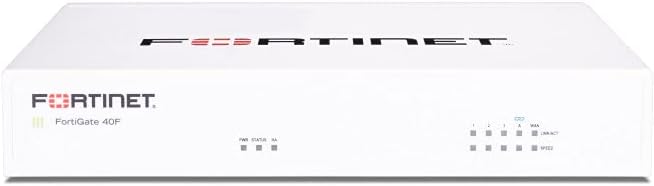
FortiGate-40F Firewall Appliance
4.2Editor score
Compact fanless design
Five Gigabit ports
AI threat protection
Compare the top 10 hardware firewalls for businesses and homes. This guide reviews performance, security features, and ease of use for every network need.
Hardware firewalls provide a critical layer of security for networks by filtering traffic before it reaches internal devices. Choosing the right appliance ensures robust protection against modern cyber threats.
We compared leading models based on throughput, security features, management tools, and overall value. Each product was selected for its reliability and ability to meet diverse networking demands.
Each pick highlights key strengths and ideal use cases to help you decide. Note that prices and availability change frequently, so verify current details before purchasing your device.
4.2Editor score

4.1Editor score

This side-by-side comparison highlights key specifications for all ten reviewed models. Use this table to quickly assess throughput, port options, and target environments for each appliance.


The FortiGate-40F Firewall Appliance is a top-rated choice for small businesses needing robust security. With a 4.2 star rating, it delivers reliable performance in a compact desktop form.
We may earn a commission when you buy through this link, at no additional cost to you.
Its standout quality is the high-performance security engine offering up to 1 Gbps IPS throughput. The integrated FortiGuard Labs ensures advanced threat protection against both known and unknown risks.
A trade-off is that the appliance alone does not include security services, requiring a separate subscription for full protection. However, this allows flexibility for businesses to choose their coverage.
Buyers needing quiet operation and efficient space usage should consider this device. It is ideal for branch offices and small enterprises prioritizing powerful protection without bulky hardware.
The fanless desktop form factor ensures quiet operation, making it perfect for office environments where noise is a concern.
Fortinet’s AI-powered FortiGuard Labs identifies and mitigates threats automatically, maintaining robust security across your network.
We may earn a commission when you buy through this link, at no additional cost to you.
The Netgate 1100 pfSense+ Security Gateway is rated 4.1 stars and stands out for its pre-loaded software. It serves as a firewall, router, and VPN gateway for diverse needs.
We may earn a commission when you buy through this link, at no additional cost to you.
Its key strength is the powerful dual core ARM Cortex-A53 processor delivering near gigabit routing. This ensures smooth traffic management even with demanding workloads like file transfers.
A minor downside is the adult signature required for delivery, which may delay access. Still, the included support and warranty make it a secure choice for networking.
Users seeking an all-in-one gateway with expert support will find this appliance valuable. It suits businesses needing a reliable edge without complex initial configuration.
Pre-loaded with pfSense+ software, this device gets you running fast without needing to install additional systems manually.
Free help with setup from our expert Technical Assistance Center is available around the clock for immediate troubleshooting help.
We may earn a commission when you buy through this link, at no additional cost to you.
The Zyxel USGFLEX100H Firewall comes with an Entry Defense Pack and has a 4.0 star rating. It supports up to 50 users and offers robust offline capabilities.
We may earn a commission when you buy through this link, at no additional cost to you.
Its standout quality is the offline-capable setup allowing updates without internet access. This feature ensures continuity for secure networks with restricted external connectivity.
A trade-off is that advanced features like sandboxing require the optional Gold Security Pack. However, the included reputation filtering offers strong baseline protection.
Businesses needing resilient connectivity and flexible VLAN options should consider this firewall. It is perfect for users managing up to 50 devices efficiently.
Update firmware offline via FTP on the local network, keeping the web interface fully accessible without internet after each update.
Eight 1G RJ-45 ports are assignable as WAN or LAN, enabling WAN load balancing and active-backup failover for reliability.
We may earn a commission when you buy through this link, at no additional cost to you.
The SonicWall TZ280 Next-Gen Firewall Appliance boasts a 4.7 star rating and delivers up to 2.5 Gbps firewall inspection. It is a powerful choice for branch offices.
We may earn a commission when you buy through this link, at no additional cost to you.
Its key strength lies in the patented Reassembly-Free Deep Packet Inspection engine driving high performance. This allows fast threat prevention without slowing network speeds significantly.
A downside is that security services must be purchased separately to activate protection. Users need to budget for the subscription to get full threat prevention.
Distributed sites needing high-speed inspection and remote worker protection should choose this device. It balances performance and connectivity for modern business needs.
Zero-touch deploy and manage on-box or via cloud Network Security Manager for streamlined setup across remote branches.
Capture ATP multi-engine sandboxing detects unknown threats, ensuring robust defense against sophisticated attacks.
We may earn a commission when you buy through this link, at no additional cost to you.
The Fortinet FortiGate-70G Firewall is highly rated with a perfect 5.0 star score. It features ten Gigabit Ethernet ports and is designed for branch and small offices.
We may earn a commission when you buy through this link, at no additional cost to you.
Its standout quality is Secure SD-WAN improving cloud performance while maintaining security. Deep visibility with SSL inspection helps govern encrypted traffic effectively.
A trade-off is the higher price compared to entry-level models. However, the performance and management tools justify the investment for growing businesses.
Offices needing seamless integration with FortiSwitch and FortiAP should choose this device. It provides a unified secure wired and wireless network experience.
Secure SD-WAN improves cloud and SaaS performance while maintaining consistent security policy across your network.
Simple deployment and centralized management via FortiGate Cloud or FortiManager simplifies network administration.
We may earn a commission when you buy through this link, at no additional cost to you.
The Sophos XGS 128 Network Security Appliance is built for enterprise environments and offers up to 19.1 Gbps firewall throughput. It is a hardware-only unit requiring a subscription.
We may earn a commission when you buy through this link, at no additional cost to you.
Its key strength is the purpose-built hardware engineered for high performance and visibility. This ensures reliable operation in complex business networks with high traffic.
A trade-off is that adding the Sophos subscription is necessary to enable advanced threat defense. Users must plan for ongoing costs to maximize hardware capabilities.
Larger offices needing resilient connectivity and intelligent traffic routing should choose this device. It supports secure site-to-site networking effectively.
Providing up to 19.1 Gbps firewall throughput, this appliance handles large traffic volumes without bottlenecks.
VPN ready architecture supports secure site to site networking and encrypted remote employee access securely.
We may earn a commission when you buy through this link, at no additional cost to you.
The Zyxel USGFLEX700 ZyWALL Cyber Security Firewall is rated 5.0 stars and includes a 1-Year UTM security pack. It serves mid-size to large offices effectively.
We may earn a commission when you buy through this link, at no additional cost to you.
Its standout quality is the complete security bundle offering anti-malware and application control. This ensures robust protection against sophisticated cyber threats.
A trade-off is the renewal of the subscription after one year to maintain protection. However, the included services provide excellent value initially.
Businesses needing award-winning management and high throughput should choose this firewall. It is perfect for users managing up to 500 devices.
Includes 1 year anti-malware, ransomware blocking, web filtering, application control and IDP security services.
Use Zyxel's award winning Nebula Cloud Management solution to easily manage, monitor and configure network security.
We may earn a commission when you buy through this link, at no additional cost to you.
The SonicWall TZ680 Next-Gen Firewall Appliance delivers up to 5 Gbps firewall inspection. It is designed for high-end SMBs needing superior performance and security.
We may earn a commission when you buy through this link, at no additional cost to you.
Its key strength is the Reassembly-Free Deep Packet Inspection engine driving fast threat prevention. This ensures security does not compromise network speed.
A trade-off is that firmware updates and support require a separate service subscription. Users must purchase this to activate full protection.
Distributed sites needing advanced protection should choose this appliance. It keeps remote workers protected with Zero-Trust Network Access.
Zero-touch deploy and manage on-box or via cloud Network Security Manager for easy setup.
Zero-Trust Network Access through Cloud Secure Edge keeps distributed sites and remote workers protected.
We may earn a commission when you buy through this link, at no additional cost to you.
The Fortinet FortiGate 60F Hardware is rated 4.4 stars and comes bundled with 36 Month Unified Threat Protection. It is tailored for medium-sized businesses.
We may earn a commission when you buy through this link, at no additional cost to you.
Its standout quality is the reliable customer support via FortiCare Premium. This ensures high-quality support and service continuity for your network.
A trade-off is the higher upfront cost compared to hardware-only units. However, the included services provide long-term value.
Businesses needing robust security without enterprise infrastructure should choose this device. It is effective against sophisticated threats.
Secures against advanced online threats with comprehensive web filtering and anti-botnet technologies.
FortiCare Premium ensures high-quality support and service continuity for your security needs.
We may earn a commission when you buy through this link, at no additional cost to you.
The Cisco ASA5525-X ASA5525-K9 Security Appliance Firewall is rated 4.3 stars and is a renewed unit. It provides basic firewall capabilities for budget-conscious buyers.
We may earn a commission when you buy through this link, at no additional cost to you.
Its key strength is affordability with eight Gigabit Ethernet ports for connectivity. This allows standard network integration without high costs.
A trade-off is the renewed condition which may carry minor wear. Users should test the device thoroughly upon arrival.
Those needing an affordable firewall for basic needs should choose this device. It is suitable for small setups or testing.
This renewed appliance offers a cost-effective solution for basic firewall needs without high initial investment.
Provides standard Cisco ASA firewall capabilities with basic setup for general network security needs.
We may earn a commission when you buy through this link, at no additional cost to you.
Selecting the best hardware firewall requires evaluating performance, features, and cost. This guide outlines key factors to consider.
Throughput indicates how much data the firewall can process without slowing down your network. Look for models that match your internet speed and internal traffic needs.
Ensure the firewall supports your required speeds to avoid bottlenecks.
Check the number and type of ports available on the device. This includes Ethernet, SFP, and Gigabit options for connecting various network devices.
Choose a model with enough ports to connect all necessary systems directly.
Modern firewalls offer Intrusion Prevention Systems, antivirus, and content filtering. Determine which threat protection features align with your security requirements.
Prioritize appliances with robust and integrated security tools.
Consider how easy the device is to configure and manage. User-friendly interfaces and centralized cloud management simplify daily operations.
Select firewalls with intuitive management consoles for easier maintenance.
Many hardware units require a subscription for threat updates and support. Factor in the ongoing costs when budgeting for the total solution.
Verify the subscription terms and support levels before purchasing.
Choose a firewall that can grow with your business. Look for models supporting additional users, sessions, or future upgrades.
Ensure the appliance can handle increasing network demands.
If remote access is essential, check the VPN features and limits. SSL VPN and IPSec tunnels are key for secure connections.
Select a device supporting secure remote access methods.
Physical design matters for placement in offices or server rooms. Fanless designs reduce noise, while rack mount options save space.
Pick a form factor suitable for your installation environment.
Begin by connecting your WAN and LAN cables to the designated ports on the appliance. Ensure all links are stable before powering on the device.
Access the device interface via its default IP address using a web browser. Change default credentials immediately to secure administrative access.
Regularly update the firmware to patch vulnerabilities and improve performance. Use the manufacturer's portal to check for new security updates.
Most hardware firewalls require a subscription to activate advanced security services. This ensures your device receives the latest threat signatures and software updates regularly.
Yes, you can use a hardware firewall alongside your router. Connect the firewall between your modem and router to filter traffic before it reaches local devices.
Unified Threat Management offers comprehensive security in one package while Next-Gen Firewall focuses on application-level inspection. Both protect networks but NGFW provides deeper visibility.
Immediately change default administrator passwords and disable unused services. Regularly review logs to detect suspicious activity on your network connections.
Hardware firewalls protect the entire network before traffic enters individual devices. Software solutions protect single endpoints, so hardware offers broader network-level security.
When a subscription expires, threat updates stop and security services may deactivate. Your network becomes vulnerable to new threats without these critical protections.
The top picks offer reliable performance for various network sizes and budgets. Each model delivers robust protection tailored to different security and throughput needs.
Prioritize throughput and management features that match your specific business requirements. Consider future scalability to ensure long-term value.
Always verify current pricing and stock before making a purchase decision to avoid surprises.