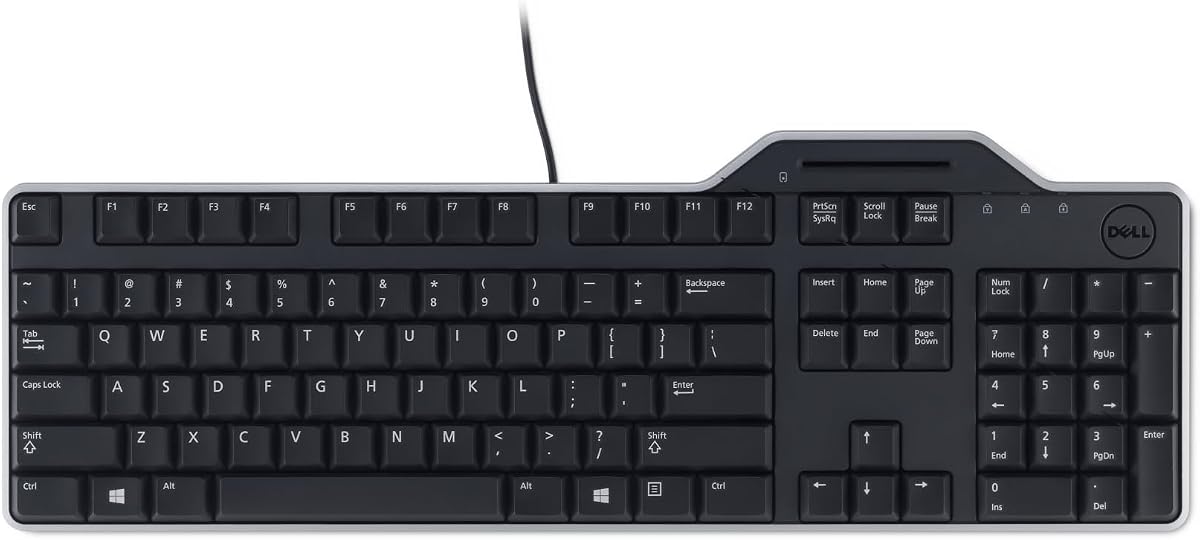
Dell KB813 Black USB English Keyboard with Smart Card Reader-3WPNC
4.6Editor score
Spill-resistant design
Integrated smartcard reader
Ergonomic comfortable keys
This guide compares the top 10 keyboards with smart card readers for secure authentication, featuring models from Dell, Adesso, Cherry, and more to help you
In today's digital landscape, security is paramount for businesses and individuals alike. A keyboard with a smart card reader combines typing functionality with secure authentication, making it an essential tool for accessing sensitive data and protected systems without relying on traditional passwords that can be compromised easily.
We have carefully evaluated ten leading models available on the market to determine which ones offer the best balance of security, comfort, and reliability. Our analysis focuses on critical features like card reader compatibility, build quality, ergonomics, and overall user experience to ensure you find a device that meets your specific professional needs.
Each selection in this roundup highlights unique strengths, whether you prioritize budget-friendly options or advanced security protocols. While the ratings and features listed here are based on current data, prices and availability can change frequently, so please check the latest listings before making your final purchase decision.
4.6Editor score

4.1Editor score

4.6Editor score
The following table provides a side-by-side comparison of all ten featured keyboards to help you quickly identify the right model based on key specifications and compatibility standards.


The Dell KB813 stands out as a top contender for those seeking a keyboard with smart card reader capabilities without breaking the bank. With a high user rating, this model offers a reliable blend of security and comfort designed for everyday office tasks. Its integrated smartcard reader allows for seamless authentication while maintaining a clean desk setup.
We may earn a commission when you buy through this link, at no additional cost to you.
This keyboard features a spill-resistant design that protects against accidental liquid spills, ensuring longevity in busy environments. The low-profile keys provide a quiet and comfortable typing experience, while the detachable palm rest supports ergonomic comfort during extended work sessions. Wired USB connectivity ensures fast and secure data transfers directly to your Dell system.
While it lacks some advanced features found in higher-end models, the trade-off is a significantly lower price point that makes it accessible for budget-conscious buyers. The modern black design adds elegance to any workspace without being overly flashy. It remains a solid choice for standard office use where security and durability are priorities.
Buyers looking for an efficient solution for secure logins and secure applications will find this keyboard meets their needs effectively. It is particularly well-suited for Dell system users who want seamless integration. We recommend checking current availability to ensure you get the best deal on this reliable device.
The integrated smartcard reader enhances security by allowing users to authenticate quickly without needing external hardware.
Spill-resistant construction protects internal components from common office accidents, extending the device lifespan.
We may earn a commission when you buy through this link, at no additional cost to you.
The Adesso TruForm AKB-150SB-TAA is designed for organizations requiring strict adherence to U.S. Trade Agreement Act specifications. It features a built-in smart card reader that supports multiple international standards, making it ideal for banking, healthcare, and government agencies. Its ergonomic split design promotes natural hand positioning to reduce strain during long typing sessions.
We may earn a commission when you buy through this link, at no additional cost to you.
This model includes an integrated palm rest that helps relieve joint pain and improve posture. The quiet membrane keys offer a comfortable typing experience with a lifecycle of over five million keystrokes. Internet and multimedia hotkeys provide instant access to common tools, boosting productivity without cluttering your screen with extra software windows.
While it comes at a higher price point compared to basic models, the compliance and ergonomic features justify the investment for professional environments. The split design may require an adjustment period for some users accustomed to traditional layouts. However, the long-term health benefits make it a compelling choice for daily intensive use.
We recommend this keyboard for users working in regulated industries or those prioritizing ergonomics alongside security. Its robust construction and certified standards ensure reliability in demanding settings. Always verify current stock and pricing to secure the best value for your specific organizational requirements.
TAA compliance ensures this device meets strict government sourcing standards for federal and military contracts.
The split design and sloped shape encourage natural wrist alignment to prevent repetitive strain injuries.
We may earn a commission when you buy through this link, at no additional cost to you.
The Cherry KC 1000 represents a premium option for security-focused environments requiring robust authentication protocols. It is FIPS 201 approved and EMV 2000 Level 1 certified, ensuring high standards for secure PIN entry and smart card interactions. The thin design with a low smart card contacting unit makes it easy to integrate into existing workstation setups.
We may earn a commission when you buy through this link, at no additional cost to you.
This keyboard supports one-handed operation of the smart card module for convenience during complex authentication processes. Compatible with Windows, MacOS, and Linux, it offers versatile driver support across multiple platforms. The reading and writing capabilities for ISO 7816 compliant smartcards enhance its utility for various secure applications.
Although it commands a higher price, the advanced security certifications and cross-platform compatibility make it invaluable for IT professionals and secure workstations. The thin profile might appeal less to those preferring full-sized keyboards with extra bulk. However, for security-first users, the functionality provided outweighs the design preferences.
We suggest this keyboard for organizations handling sensitive data that require verified security hardware. Ensure your system requirements align with the supported protocols before purchase. Checking current pricing and availability will help you secure this high-performance device for your critical security needs.
Supports T=0, T=1, and other protocols ensuring versatile smart card compatibility globally.
Driver support for Windows, MacOS, and Linux allows broad deployment across diverse IT environments.
We may earn a commission when you buy through this link, at no additional cost to you.
The Adesso EasyTouch 130SB combines mechanical keyboard performance with integrated security features for modern work environments. Its built-in smart card reader supports multiple standards including EMV and FIPS, enabling secure authentication for banking and secure web apps. The red mechanical switches offer tactile feedback with a 50 million keystroke lifecycle for exceptional durability.
We may earn a commission when you buy through this link, at no additional cost to you.
A dedicated Copilot AI hotkey allows instant access to Microsoft Copilot for code generation or language tasks. The 2X large print size keycaps improve readability in low-light conditions, benefiting users with vision challenges. Full 104-key layout includes internet and multimedia hotkeys for streamlined workflow efficiency without software navigation.
While mechanical switches can be louder than membrane keys, the feedback ensures precise typing and high user satisfaction. The Copilot feature adds modern AI utility that appeals to developers and power users. However, it might not suit environments requiring absolute silence due to switch actuation sounds.
We recommend this keyboard for users who value durability and AI tools alongside security. Its large keycaps make it inclusive for diverse users. Verify current pricing to ensure you get the best value for this feature-rich mechanical and secure typing solution.
The Copilot AI hotkey provides instant access to AI assistance directly from your keyboard.
Large print keycaps improve legibility and reduce eye strain during extended typing sessions.
We may earn a commission when you buy through this link, at no additional cost to you.
The Dell Keyboard Smartcard USB offers reliable connectivity and robust security features for standard office environments. With a high user rating, it delivers secure and fast data transfers while eliminating battery dependency. Its spill-resistant design safeguards against beverage mishaps, ensuring consistent performance in busy workspaces.
We may earn a commission when you buy through this link, at no additional cost to you.
Comfort is prioritized with low-profile keys designed for smooth, quiet typing experiences. The full-size keyboard includes a detachable palm rest to support comfortable wrist positions during extended use. These features make it ideal for daily office work where productivity and reliability are essential for team workflows.
This model focuses on core functionality without extra advanced features like multimedia keys or ergonomic splits. While simple, this design reduces potential points of failure and keeps maintenance straightforward. It is particularly effective for environments requiring consistent performance over novel features.
We suggest this keyboard for teams seeking a dependable, secure input device. Always verify current stock levels to ensure timely delivery for your project. Checking prices will help you secure this reliable keyboard at the best possible value.
Wired USB connectivity ensures stable and fast data transfers without wireless interference.
Detachable palm rest and low-profile keys support comfortable and quiet typing sessions.
We may earn a commission when you buy through this link, at no additional cost to you.
The Kensington KB201C is designed for organizations requiring strict regulatory compliance like TAA and CAC certification. It features a certified smart card reader ensuring secure and efficient access aligned with FIPS standards. The quiet-click keyboard enhances workspace focus by providing a peaceful typing experience without disturbing colleagues.
We may earn a commission when you buy through this link, at no additional cost to you.
This full-size keyboard includes a numeric keypad for enhanced productivity in data entry tasks. Compatibility with Windows, macOS, and ChromeOS allows broad deployment across diverse system environments. The reliable USB-A connection eliminates the need for batteries or software installation simplifying IT management.
While user ratings are slightly lower than competitors, the compliance features make it essential for federal and regulated sectors. The three-year limited warranty adds peace of mind for organizational buyers. However, some users may find it heavier or less ergonomic than alternatives tailored for long comfort.
We recommend this keyboard for government institutions and compliance-focused organizations. Ensure your system matches the required security protocols before purchase. Checking current prices will help you secure this compliant device at the best possible value.
CAC and TAA compliance ensures this device meets strict federal government security standards.
Quiet-click keys reduce noise pollution promoting focus and productivity in shared offices.
We may earn a commission when you buy through this link, at no additional cost to you.
The Lenovo Smartcard Wired Keyboard II provides a straightforward solution for basic smart card authentication. Designed with a US English layout, it fits standard office workflows requiring secure access. Its lightweight package and simple setup make it easy to deploy across multiple workstations quickly.
We may earn a commission when you buy through this link, at no additional cost to you.
This keyboard focuses on delivering essential wired connectivity without unnecessary complications. The standard design ensures compatibility with most Lenovo desktop systems. While it lacks advanced ergonomic features, it offers reliable functionality for daily administrative tasks efficiently.
Buyers seeking a no-frills keyboard for secure logins will find this model adequate. However, it may not suit users requiring ergonomic splits or extra multimedia controls. Always verify package contents to ensure all necessary components are included.
We suggest this keyboard for budget-conscious buyers needing secure wired connectivity. Check current availability to ensure you get the best deal on this standard device.
Lightweight and standard design allows quick deployment across multiple office workstations.
We may earn a commission when you buy through this link, at no additional cost to you.
The HP USB Business Slim Smartcard Keyboard offers a sleek profile suitable for modern desks. It features a built-in spill drain and membrane keyswitch technology ensuring reliability against accidental spills. Key light indicators provide immediate visual feedback for status changes like Caps Lock.
We may earn a commission when you buy through this link, at no additional cost to you.
With USB interface cable connectivity, this keyboard ensures fast and secure data transfers. Its slim design saves desk space while maintaining a full key layout for standard tasks. The build quality supports daily business use without compromising on essential security integration.
Users preferring traditional tactile feedback might find membrane switches less responsive than mechanical ones. However, the quiet operation and spill protection make it ideal for shared workspaces. Always verify cable length and port availability before purchase.
We recommend this keyboard for offices prioritizing space efficiency and durability. Check current pricing to ensure you get the best value.
Slim profile saves desk space while maintaining full keyboard functionality.
We may earn a commission when you buy through this link, at no additional cost to you.
The Cherry Secure Board 1.0 is an intelligent keyboard featuring an integrated reader for smart cards and RF/NFC tags. It supports secure mode authentication and encryption particularly useful for thin client environments. GS approval and ISO standards ensure compliance for regulated industries requiring robust protection.
We may earn a commission when you buy through this link, at no additional cost to you.
Protocols like T=0, T=1, and T=CL provide flexible smart card reading options across various systems. The QWERTY security layout meets standard business needs while enhancing data protection. This model is ideal for organizations managing high-security workflows with diverse card types.
While powerful, it may be overkill for standard office setups needing only basic authentication. Verify your system requirements for RF/NFC compatibility before purchasing. Always check current pricing to secure the best value for this advanced security solution.
Supports ISO 14443 compliant cards for advanced secure access options.
We may earn a commission when you buy through this link, at no additional cost to you.
The NEW OEM Dell KB813t offers an unopened keyboard with integrated smart card reading for secure environments. It follows standard Dell design ensuring compatibility with existing systems. The English layout supports common business typing tasks efficiently.
We may earn a commission when you buy through this link, at no additional cost to you.
While specific features may vary from newer models, the OEM quality ensures reliable performance for daily operations. Its secure reader capability meets basic authentication requirements without extra complexity. Always verify condition and packaging before acceptance.
Buyers needing replacement units for secure workstations will find this model cost-effective. Check current availability and pricing to secure the best deal.
OEM designation ensures consistent build quality aligned with Dell standards.
We may earn a commission when you buy through this link, at no additional cost to you.
Selecting the right keyboard with smart card reader involves balancing security compliance, ergonomic design, and budget constraints to match your specific workflow needs.
Ensure the keyboard supports necessary standards like FIPS 201 or PC/SC to meet organizational security requirements. This compatibility ensures secure authentication across various protected systems without additional hardware.
Always verify protocol support against your IT policies to prevent compatibility issues during deployment.
Look for split designs or palm rests that promote natural hand positioning to reduce strain during long sessions. Ergonomic features improve productivity by minimizing physical discomfort over time.
Consider models with adjustable height or soft-touch surfaces if you type frequently for extended periods.
Choose keyboards with spill-resistant coatings or internal drainage to protect against liquid accidents. Robust construction ensures longevity in busy environments where spills are common risks.
Invest in models rated for millions of keystrokes to handle daily office usage effectively.
Wired USB connectivity offers reliable data transfers without battery dependency making it ideal for secure environments. Wireless options may provide flexibility but could introduce latency or security concerns.
Ensure the connector type matches available ports on your system for seamless integration.
Balance advanced features against total cost of ownership to find a model that fits financial constraints. Higher-priced models may offer certifications that reduce long-term compliance expenses.
Focus on essential features first to avoid paying for capabilities you will never use regularly.
Integrated hotkeys for internet and multimedia tools streamline workflows by reducing reliance on mouse navigation. This efficiency is valuable for users managing multiple applications simultaneously.
Prioritize models with customizable hotkeys if your workflow requires frequent access to specific programs.
Check driver support for Windows, macOS, or Linux to ensure the keyboard functions correctly across your systems. Cross-platform compatibility simplifies IT management in mixed environments.
Verify if additional software is required for smart card functions before purchasing to avoid compatibility headaches.
Look for manufacturers offering extended warranties and responsive customer support to protect your investment. Strong after-sales service ensures quick resolution of any hardware issues that may arise.
Always review warranty terms to understand coverage for accidental damage or component failures.
Plug the keyboard into a USB port and install any necessary drivers provided by the manufacturer before inserting a smart card. This ensures all security functions and hotkeys are recognized by the operating system immediately.
Insert the smart card into the integrated reader slot ensuring the chip faces the correct direction for successful authentication. Most models will light up to indicate the card is being read properly by the secure module.
Clean the keyboard regularly using compressed air to remove dust and wipe keys with a slightly damp cloth to prevent debris buildup. Avoid using harsh chemicals that could damage the smart card reader components or keycaps.
Many models like the Cherry KC 1000 and Kensington KB201C offer cross-platform driver support for Windows, macOS, and Linux. Always verify specific compatibility with the vendor before purchasing to ensure seamless operation with your Mac.
Basic keyboard functions work instantly via USB but smart card authentication may require specific driver installation or middleware. Consult the product documentation to confirm necessary software dependencies for your operating system.
Select models like the Cherry KC 1000 and Kensington KB201C are FIPS 201 approved for government and high-security environments. Verify the exact certification level with the manufacturer to ensure it meets your specific compliance needs.
Most keyboards have integrated modules that cannot be easily replaced separately. If the reader fails, you may need to replace the entire keyboard unit under warranty or purchase a new device for continued use.
Wireless options are rare due to security concerns regarding data transmission. Most recommended models use wired USB connectivity to ensure secure and reliable authentication without wireless interference risks.
High-quality models often have a lifecycle of over five million keystrokes and durable construction for years of daily use. Proper care and avoidance of liquid spills can extend the device lifespan significantly beyond average estimates.
We have explored ten top keyboards with smart card readers ranging from budget-friendly Dell models to compliant Adesso and Cherry options for government needs. Each model offers unique strengths in security, ergonomics, and reliability to suit various professional environments.
Prioritize security protocol compliance and ergonomic comfort based on your organization requirements and typing habits to ensure long-term satisfaction. Always match the smart card standards with your existing IT systems to prevent deployment issues.
Remember that prices and availability can change frequently so check the current listings before making your final purchase decision. Verify warranty terms and support options to protect your investment in these essential security devices.