
M-AUDIO Keystation 49 MK3 USB MIDI Controller
4.5Editor score
Plug-and-play USB connection
Velocity-sensitive full-size keys
Includes premium software suite
This guide compares the top 49 Key MIDI Keyboards for producers and musicians, evaluating features, integration, and value to help you choose the right
Choosing the right keyboard can transform your music production workflow significantly. A good 49 key MIDI keyboard offers the perfect balance between portability and playability for most home studios.
We compared ten leading models based on key feel, software integration, control surface features, and overall build quality. Our analysis focuses on real-world usability for producers and performers.
Each pick highlights specific strengths and ideal use cases for different workflows. Please note that prices change frequently, so verify current deals before making your final purchase decision.
4.5Editor score

4.7Editor score

4.4Editor score
This side-by-side comparison evaluates all ten models across critical dimensions including keybed quality, DAW integration, control surface layout, and included software value.




The Novation Launchkey 49 MK4 stands out as the top choice for producers needing deep DAW integration. It scores 4.7 stars for its intuitive mapping and responsive keybed. This controller bridges the gap between hardware and software effortlessly.
We may earn a commission when you buy through this link, at no additional cost to you.
Its 16 FSR pads support polyphonic aftertouch for advanced drumming and clip launching. The Scale Mode ensures you always hit the right notes while composing melodies. Native Kontrol Standard compatibility allows instant preset browsing without menu diving.
While the price is higher than budget options the included software value offsets this cost. The learning curve for full feature utilization is manageable but requires some time to master all the creative tools available.
Producers working in Ableton Live or Logic Pro will find this controller indispensable for speeding up workflows. If you prioritize hands-on control over cost this model offers the best balance of features and quality.
The FSR pads support step sequencing and chord triggering beyond basic drumming.
Scale Mode maps keys to musical scales preventing wrong notes during live performance.
We may earn a commission when you buy through this link, at no additional cost to you.
The M-AUDIO Keystation 49 MK3 delivers essential MIDI control without unnecessary complexity. It holds a 4.5 star rating for its reliable performance and simplicity. This keyboard is ideal for beginners needing straightforward connectivity.
We may earn a commission when you buy through this link, at no additional cost to you.
Its velocity-sensitive keys provide expressive control while the ergonomic wheels handle pitch and modulation tasks. The plug-and-play connection works immediately with Mac or PC without driver installation. This removes setup friction for immediate creative flow.
Lacking faders and knobs limits tactile control over software parameters but simplifies operation. The included software offers great entry points though advanced producers might need additional tools eventually to unlock full potential.
Beginners and students will appreciate the low barrier to entry and included online lessons. If you need a simple reliable keyboard for composing melodies this model provides the best value for money available.
Includes free online lessons from Skoove and Melodics to accelerate learning progress.
USB connection requires no external power or drivers on macOS and Windows systems.
We may earn a commission when you buy through this link, at no additional cost to you.
The Arturia KeyLab mk3 represents premium construction with durable materials and responsive controls. It achieves a 4.4 star rating for its robust design and tactile feedback. This model is built for serious studio environments.
We may earn a commission when you buy through this link, at no additional cost to you.
Its keys support aftertouch allowing for expressive modulation after initial key press. The 12 performance pads offer precise velocity and pressure sensitivity for dynamic drum programming. USB-C power support modernizes connectivity for portable setups.
The higher price reflects the superior build quality and advanced control surface features. Initial software setup is needed to unlock full integration but this process ensures deep customization for individual workflow preferences.
Professional producers valuing tactile feedback and durability will find this controller worthwhile. If you want a long-lasting interface that enhances performance expression this model offers the highest quality available.
Aftertouch allows dynamic parameter changes like vibrato or filter sweep after pressing a key.
USB-C power reduces cable clutter and supports modern laptop ports effectively.
We may earn a commission when you buy through this link, at no additional cost to you.
The Nektar SE49 offers straightforward DAW integration without complex setup requirements. It holds a 4.5 star rating for its ease of use and value. This controller provides essential mapping features for home producers.
We may earn a commission when you buy through this link, at no additional cost to you.
Its scripts automatically configure transport and navigation controls for most popular DAWs. iOS compatibility expands usage scenarios beyond traditional desktop setups. The included Bigwig Studio provides an immediate production environment.
While the control surface lacks faders and knobs the price reflects this simplified design. This trade-off is acceptable for users who primarily need key input and basic transport functions during composing.
Casual producers or those with limited budgets will appreciate this accessible option. If you need a reliable keyboard that works out of the box with your DAW this model is a strong contender.
Compatible with iOS devices for mobile music creation using appropriate adapters.
Custom scripts map transport and volume controls automatically to your DAW.
We may earn a commission when you buy through this link, at no additional cost to you.
The M-AUDIO Oxygen 49 MKV focuses on intelligent features that assist composition. It earns a 4.6 star rating for its Smart Chord and Scale modes. This keyboard helps unlock creativity for users with limited theory knowledge.
We may earn a commission when you buy through this link, at no additional cost to you.
Its Smart Chord System generates complex chords from single key presses. The arpeggiator and auto-mapping features streamline workflow for plugin control. Native Kontrol Standard integration simplifies preset browsing within NI software.
The faders feel light which some users may find less durable than heavy-duty alternatives. However the software features compensate significantly for this hardware choice by accelerating the creative process.
Composers needing chord assistance or arpeggiated melodies will benefit most from this model. If you want a keyboard that aids composition logic this model provides the best smart features available.
Smart Chord modes map scale notes to chords for instant harmonic complexity.
NKS integration provides instant preset browsing and control for Native Instruments software.
We may earn a commission when you buy through this link, at no additional cost to you.
The Arturia KeyLab Essential mk3 integrates tightly with Analog Lab V for instant sound selection. It holds a 4.5 star rating for its rich software bundle and feedback screen. This controller excels in sound exploration.
We may earn a commission when you buy through this link, at no additional cost to you.
Its LCD screen provides real-time feedback on parameter changes without needing the screen. The RGB-backlit pads offer visual cues for clip launching and track selection. Custom scripts enable deeper control over modern DAW functions.
The semi-weighted keys feel lighter than premium models which may affect expression for pianists. However the included Analog Lab V offers thousands of presets that justify the purchase for many producers.
Sound designers and producers seeking rapid access to diverse presets will appreciate this model. If you want a controller that doubles as a comprehensive sound engine this option offers strong value.
The 2.5 inch LCD provides real-time parameter adjustments without software screen reliance.
Includes Analog Lab V offering thousands of synth and instrument presets immediately.
We may earn a commission when you buy through this link, at no additional cost to you.
This 49-Key ABS Keyboard prioritizes compact design for tight workspaces. It is a budget-friendly option designed for basic MIDI input tasks. The simple design focuses on portability over advanced features.
We may earn a commission when you buy through this link, at no additional cost to you.
Its ABS construction keeps the unit lightweight for easy storage and transport. The black finish blends naturally into home studios without distracting from other gear. It works for simple melodic input and practice.
Lacking advanced controls like pads or faders limits its utility for modern production. It is best suited for beginners or secondary setups where space is at a premium.
Users with limited desk space or tight budgets will find this controller practical. If you need a simple keyboard for sketching ideas this model offers the best portability.
Measures approximately 66 by 11.4 centimeters for easy desktop integration.
Simple USB connection allows immediate use without complex configuration.
We may earn a commission when you buy through this link, at no additional cost to you.
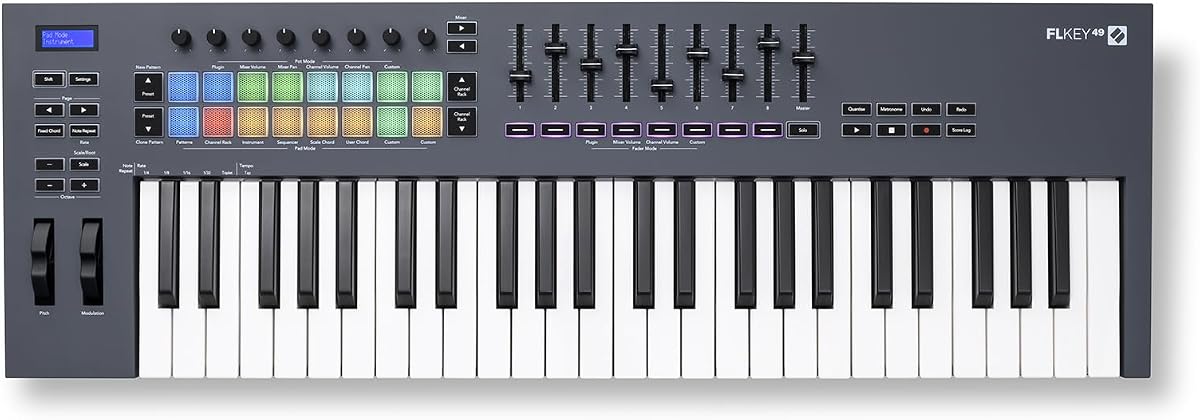
The Novation FLkey 49 is optimized specifically for FL Studio workflows. It achieves a 4.6 star rating for its seamless integration and hardware mapping. This controller brings screen controls into your physical space.
We may earn a commission when you buy through this link, at no additional cost to you.
Its Sequencer Mode pads map directly to FL Studio step sequencers for rapid beat creation. The eight pots and nine faders control mixer channels without mouse usage. Scale Mode ensures harmonically accurate performance in any project.
Because of specific mapping it offers less versatility for other DAWs compared to generic controllers. This specialization is acceptable if FL Studio is your primary production environment for consistency.
FL Studio users seeking to streamline their mixing and beat creation will find this indispensable. If you prioritize workflow speed in FL Studio this model offers the best hardware integration.
Pads map to step sequencers for quick pattern creation without mouse input.
Eight pots and nine faders control volume and pan for tracks instantly.
We may earn a commission when you buy through this link, at no additional cost to you.
The M-AUDIO Oxygen Pro 49 provides advanced control for serious production needs. It holds a 4.5 star rating for its full feature set and aftertouch support. This model is built for performance and flexibility.
We may earn a commission when you buy through this link, at no additional cost to you.
Its semi-weighted keys with aftertouch allow for expressive modulation during performance. The 16 RGB backlit pads offer clip launching and drum programming. A 5-pin MIDI output enables connection to hardware synthesizers.
The full feature set adds complexity and cost compared to simpler models. This trade-off is worth it for producers needing extensive control over software and hardware simultaneously.
Advanced producers needing comprehensive control surface features will find this controller essential. If you require aftertouch and external MIDI connectivity this model offers the best overall performance.
Aftertouch allows dynamic modulation of parameters by pressing keys harder.
Traditional 5-pin MIDI output connects to external hardware synths reliably.
We may earn a commission when you buy through this link, at no additional cost to you.
The midiplus AK490 offers essential MIDI input capabilities at a low cost. It receives a 4.3 star rating for its basic functionality. This controller is designed for straightforward note entry.
We may earn a commission when you buy through this link, at no additional cost to you.
Its velocity-sensitive keys provide essential dynamic control. Standard pitch and modulation wheels handle expression needs. A MIDI out Din jack supports legacy hardware connections without extra adapters.
Lacking a software bundle and advanced controls limits its utility for modern production workflows. This trade-off is acceptable for users needing a secondary controller or entry point.
Users prioritizing price and basic functionality will find this controller sufficient. If you need a simple secondary MIDI input device this model is the best entry level choice.
MIDI out Din jack allows connection to older hardware synthesizers.
Focuses on essential input controls without extra features.
We may earn a commission when you buy through this link, at no additional cost to you.
Selecting the right MIDI keyboard requires evaluating several factors beyond just key count. This section outlines the most important considerations for your workflow.
The keybed determines how expressive your performance can be. Look for velocity sensitivity to capture dynamics and consider semi-weighted keys for a more realistic piano feel. Aftertouch adds another layer of expression allowing control over parameters after pressing a key.
Prioritize a keybed that matches your playing style whether you focus on piano melodies or electronic beats.
Seamless integration with your Digital Audio Workstation saves time during mixing and arrangement. Check if the controller offers built-in scripts for your DAW so transport and mixer controls map automatically without manual configuration.
Strong DAW integration ensures the controller enhances your workflow rather than becoming another tool to manage.
Additional controls like faders knobs and pads provide tactile access to parameters beyond the keyboard. Consider if you need drum pads for beat making or faders for volume automation while mixing tracks.
More controls give you direct access to your music software without relying on mouse clicks.
Many controllers include virtual instruments and DAWs that add value to your purchase. Evaluate if the included software meets your needs or if you would buy it separately.
A comprehensive software bundle can offset the cost of the hardware for beginners.
A 49 key keyboard balances range and desk space better than larger 88 key models. Consider the physical dimensions and weight if you plan to transport the unit frequently for live performances.
Ensure the unit fits comfortably on your desk while leaving room for your monitor and audio gear.
Check whether the controller supports USB only or includes traditional MIDI DIN jacks for hardware integration. USB-C connectivity is becoming standard for modern setups offering stable and reliable power.
USB-C reduces cable clutter and future proofs your setup for modern laptops and interfaces.
Materials matter for long term durability especially for pads and sliders used frequently. ABS plastic is lighter and cheaper while metal parts improve longevity during daily use.
Invest in build quality that matches your usage intensity to avoid maintenance costs later.
Prices vary significantly based on included features and brand reputation. Determine your priority whether it is keybed feel software or advanced control surface features before comparing.
Set a realistic budget to ensure you pay for the features you actually use regularly.
Connect your keyboard to your computer via USB to power and transmit MIDI data. Ensure your DAW recognizes the device by selecting it as the MIDI input in preferences.
Install any required drivers or software mapping scripts included with your controller. This ensures all buttons and knobs communicate correctly with your chosen music software.
Clean the keys with a dry soft cloth to remove dust and oils. Avoid liquid cleaners that may seep into the keybed and damage internal electronics.
Most modern 49 key MIDI keyboards receive power directly through USB so no external adapter is needed. Always check the product specifications as some higher-end models may recommend additional power for full feature usage.
Yes all products in this guide support both macOS and Windows systems. Some models also offer iOS compatibility using appropriate adapters for mobile music production needs.
Velocity sensitivity detects how hard you press a key and adjusts the volume accordingly. This feature allows for dynamic expression similar to an acoustic instrument rather than static sounds.
Many models are designed for stage use with robust builds and direct DAW integration. Always verify battery requirements if you plan to use wireless connections during live shows.
Most keyboards include a sustain pedal input but do not include the pedal itself in the box. You will need to purchase a compatible sustain pedal separately for expressive performances.
Yes most DAWs allow custom MIDI mapping for all controller inputs. If built-in scripts are unavailable you can manually assign knobs and faders to parameters within your software.
The Novation Launchkey 49 MK4 leads our list with superior DAW integration and responsive controls ideal for modern producers. The M-AUDIO Keystation 49 MK3 remains the top budget choice for simplicity and ease of use.
Prioritize your specific needs whether that is advanced control surface features or simple plug-and-play connectivity. Your choice should align with your primary workflow to maximize creative efficiency daily.
Please remember that prices change frequently so verify current deals before making your purchase decision. Check availability and warranty details directly from the retailer for peace of mind.