
ASRock DeskMini X300 2.5G Series
4.2Editor score
1.92L Compact Design
AMD AM4 Socket
Triple Display Support
This guide compares the top barebone PCs with AMD processors for performance, connectivity, and upgradeability to help you choose the right mini PC.
Barebone PCs with AMD processors offer a unique blend of power and flexibility for modern computing needs. These compact systems allow users to customize memory and storage while leveraging efficient AMD architecture for demanding tasks.
We evaluated ten top models based on performance, connectivity options, thermal management, and expandability. Each unit was analyzed for its suitability across gaming, office work, and home server applications.
Every pick highlights key strengths and potential trade-offs to guide your decision. Note that availability and pricing can change quickly so verify details before purchasing your ideal system today.
4.2Editor score

4.0Editor score

3.1Editor score
This side-by-side comparison outlines the core specifications and capabilities of each model to help you identify the best fit for your specific computing requirements.





This barebone mini PC delivers top-tier performance thanks to the AMD Ryzen 7 PRO 8845HS processor paired with Radeon 780M graphics. It stands out for its robust connectivity suite and advanced cooling design.
We may earn a commission when you buy through this link, at no additional cost to you.
Key strengths include OCuLink support for external GPUs and dual USB4 ports enabling triple 4K displays. The vapor chamber cooling keeps temperatures stable under load while fingerprint unlock adds security.
Trade-offs involve the absence of RAM or SSD in the box requiring separate purchases. Some users may find the higher price point a barrier but the feature set justifies the investment.
Ideal for power users needing compact high-performance machines. If you want a versatile barebone PC for gaming or workstation tasks this model is highly recommended.
The vapor chamber heat spreader dissipates heat efficiently ensuring stable speeds during intensive workloads without thermal throttling.
With OCuLink and dual USB4 ports this unit supports external GPUs and multiple high resolution displays for professional workflows.
We may earn a commission when you buy through this link, at no additional cost to you.
This model excels with its powerful AMD Ryzen 7 PRO 8845HS CPU and Radeon 780M graphics. Its rating reflects strong user satisfaction and reliable performance across various tasks.
We may earn a commission when you buy through this link, at no additional cost to you.
Key strengths include support for four 4K displays and OCuLink port for external GPU connectivity. The vapor chamber cooling ensures quiet operation even during heavy workloads.
Trade-offs include no RAM or SSD included which means additional purchases. The OCuLink port does not support hot swapping so plan connections carefully before use.
Perfect for users needing multi-screen setups or high-performance computing in small footprint. If premium features matter this unit is a solid choice.
Support for four 4K displays via HDMI and DP plus USB4 enables versatile multi monitor workflows for creative professionals.
The VAT architecture reduces energy use by five to twenty percent improving efficiency without sacrificing performance.
We may earn a commission when you buy through this link, at no additional cost to you.
This PRO variant builds on the GEM12 with added fingerprint security and a customizable built-in display panel. It shares the same powerful CPU and GPU for balanced performance.
We may earn a commission when you buy through this link, at no additional cost to you.
Strengths include fingerprint login and flexible display settings. OCuLink and USB4 ports offer expanded connectivity. vapor chamber cooling maintains stable thermal performance under load.
Trade-offs are similar with no RAM or SSD included. The OCuLink port cannot be hot swapped so power down before connecting external GPUs for safety.
Ideal for office or gaming setups prioritizing security and display flexibility. If you value quick login and customizable interfaces this model fits well.
Built-in fingerprint recognition simplifies system access eliminating complex passwords for faster and safer logins.
A dedicated software controlled display allows real-time monitoring and personalized backgrounds for a unique device experience.
We may earn a commission when you buy through this link, at no additional cost to you.
This ASRock kit offers an excellent budget entry into barebone PCs with full PCIe x16 support and a strong AM4 CPU range. Users appreciate its expansion flexibility and included power supply.
We may earn a commission when you buy through this link, at no additional cost to you.
Key strengths include the PCIe slot for dedicated GPUs and DDR4 slots supporting up to 128GB memory. The compact 8L chassis fits well in tight spaces.
Trade-offs are limited to DDR4 memory and no built-in Wi-Fi. Still the cost efficiency and expandability make it a favorite for DIY builders.
Best for budget-focused builders wanting full desktop features. If you need a small but expandable system this kit delivers great value.
A dedicated PCIe 3.0 x16 slot allows installation of full-size graphics cards for enhanced performance in games or apps.
Support for Ryzen 5000 down to 2000 series processors lets you choose performance levels matching your budget needs.
We may earn a commission when you buy through this link, at no additional cost to you.
This X1 Lite model balances performance and portability with Zen 4 architecture and strong connectivity options. It supports multiple displays and external GPUs via OCulink for flexible setups.
We may earn a commission when you buy through this link, at no additional cost to you.
Strengths include triple 4K outputs and full-blood USB4 for 40Gbps transfer speeds. The OCulink port enables external GPU use for enhanced graphics performance.
Trade-offs include average user ratings and the need for an adapter plate to use OCulink. Still the feature set is compelling for compact computing needs.
Ideal for mobile professionals or home offices needing flexible displays. If you want modern features in small chassis this unit works well.
HDMI and USB4 plus DP enable three independent displays for immersive workflows and efficient multitasking environments.
Full-blood USB4 provides 40Gbps bandwidth ensuring rapid file transfers and seamless connection to external devices.
We may earn a commission when you buy through this link, at no additional cost to you.
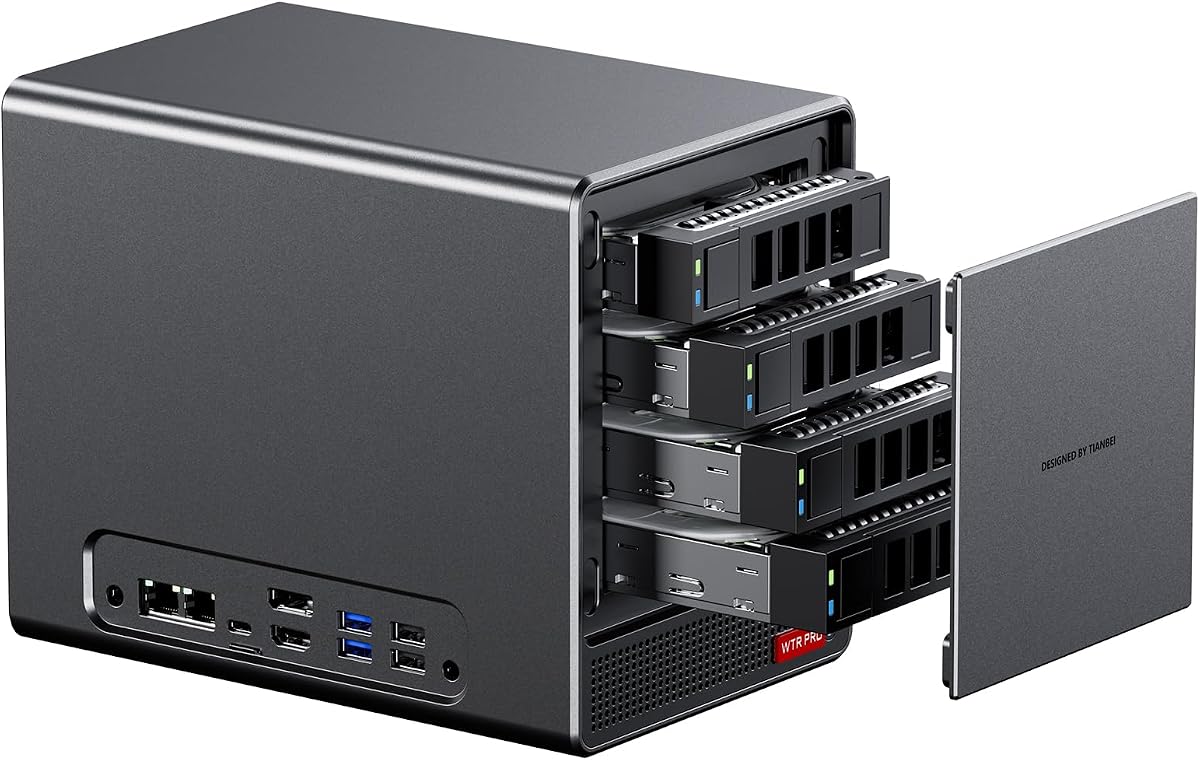
This WTR PRO variant targets storage and home server use with four SATA bays and efficient Ryzen 7 5825U processor. Its design supports continuous 24/7 operation with low power consumption.
We may earn a commission when you buy through this link, at no additional cost to you.
Strengths include expandable storage up to 88TB and silent cooling through advanced fan control. Triple 4K output allows use as media centers too.
Trade-offs involve modest CPU performance and no included RAM or drives. The focus remains on storage flexibility and energy efficiency.
Perfect for home labs or NAS builds needing reliable storage. If your priority is file storage and silent operation this unit is ideal.
Four SATA bays and two M.2 slots enable up to 88TB total storage for large media libraries or backups.
Consumes only fifteen to twenty five watts enabling 24/7 uptime with minimal electricity cost for home servers.
We may earn a commission when you buy through this link, at no additional cost to you.
This DeskMini X300 offers a tiny 1.92L footprint while retaining full AM4 CPU support and triple display outputs. It stands out for space saving without sacrificing connectivity.
We may earn a commission when you buy through this link, at no additional cost to you.
Strengths include triple display via HDMI DP and VGA plus 2.5G LAN for fast networking. Dual M.2 slots plus SATA bays offer flexible storage expansion.
Trade-offs include DDR4 only memory and lack of built-in Wi-Fi. Still for tight spaces and cost efficiency it excels.
Best for small offices or HTPC builds needing minimal space. If compact size and flexibility matter this unit is highly suitable.
At just 1.92 liters this unit fits easily behind monitors or in shelves for clean minimal desktop setups.
Dual M.2 slots and two 2.5 inch bays let you mix NVMe SSDs with HDDs for balanced capacity and speed.
We may earn a commission when you buy through this link, at no additional cost to you.
This ExpertCenter PN54 stands out with the latest Ryzen AI 300 Series processors and Wi-Fi 7 readiness. Its ultra-thin profile and toolless design appeal to professionals seeking next-gen features.
We may earn a commission when you buy through this link, at no additional cost to you.
Strengths include advanced XDNA2 NPU for AI tasks and support for four 4K displays. Toolless access simplifies upgrades making maintenance easy.
Trade-offs involve higher cost and limited reviews so far. Still the hardware innovation positions it as a future-proof choice.
Ideal for enterprise or creative users needing top connectivity. If you want latest Wi-Fi and AI features this unit is forward looking.
The XDNA2 NPU delivers five times faster AI performance enabling responsive computing for modern workflows.
Wi-Fi 7 support ensures ultrafast wireless speeds and stable connections for next-gen networking environments.
We may earn a commission when you buy through this link, at no additional cost to you.
This variant expands storage capacity with four SATA and two M.2 bays plus dual LAN ports making it excellent for server roles. It supports many Linux distributions and virtualization technologies.
We may earn a commission when you buy through this link, at no additional cost to you.
Strengths include massive expandability up to 96TB and flexible network connectivity. Quiet cooling supports 24/7 operation reliably.
Trade-offs include need for custom Linux rules for SATA power management. Still its features fit home labs well.
Perfect for home servers or soft routing. If storage capacity and networking flexibility matter this unit delivers.
Up to 96TB via four SATA and two M.2 drives enables massive file storage for media centers or backups.
Dual 2.5G LAN ports support link aggregation and robust network setups for high speed data transfers.
We may earn a commission when you buy through this link, at no additional cost to you.
This PN54-S1 offers Wi-Fi 7 and a thin profile with tool-free upgrades. While CPU is modest it remains capable for light productivity and media tasks.
We may earn a commission when you buy through this link, at no additional cost to you.
Strengths include Wi-Fi 7 support and thin design for modern offices. Tool-free access simplifies maintenance and upgrades.
Trade-offs include modest CPU performance and limited feedback. Still its design features stand out for compact use.
Ideal for users needing thin design and connectivity. If space and modern Wi-Fi matter this unit fits well.
The ultra-thin chassis at 34mm saves desk space while maintaining durable eco-conscious build quality.
Wi-Fi 7 support ensures fastest wireless speeds for seamless network performance and streaming.
We may earn a commission when you buy through this link, at no additional cost to you.
Selecting the ideal AMD barebone PC involves understanding processor generations connectivity needs storage options and cooling performance. This guide outlines key factors.
AMD Ryzen 7 PRO 8845HS offers eight cores and sixteen threads for high performance. Older Zen 3 CPUs like 5825U provide solid efficiency for lighter tasks. Match cores to your multitasking needs.
For demanding workloads choose newer Zen 4 CPUs. Lighter use cases can rely on older chips to save budget.
Radeon 780M iGPU handles modern gaming and video editing well. Older Vega graphics suit casual tasks and media playback. Consider your graphical workload carefully.
High-performance graphics need strong iGPUs. Lighter needs save money on hardware and power.
Most units feature DDR5 or DDR4 slots supporting up to 128GB. Dual M.2 slots provide fast NVMe storage options. Check expansion limits before purchase.
Choose systems with ample slots for growth. This prevents future bottlenecks and extends device lifespan.
Look for USB4 Thunderbolt or OCuLink for external GPUs. Multiple HDMI and DP outputs enable multi-monitor setups. Ethernet speed like 2.5G improves network performance.
Prioritize ports matching your peripherals. High bandwidth options future-proof your connection needs.
Vapor chambers and through wall cooling reduce thermal throttling. Quiet fans matter for office or home use. Efficient cooling sustains performance over time.
Advanced cooling improves reliability and noise. This is vital for continuous operation.
Included PSUs simplify setup for some kits. Energy efficient CPUs lower electricity costs and heat output. Check wattage ratings for stability.
Efficient systems save money over time. Verify power needs match your usage.
Many barebone units exclude OS to lower costs. Windows licensing may be provided separately or require purchase. Linux support varies by model.
Plan OS costs in advance. Compatibility with preferred OS ensures smooth setup.
Recycled aluminum or metal shells improve durability and cooling. Toolless designs ease upgrades. Size constraints fit various mounting options.
Quality materials enhance longevity. Choose designs matching your workspace needs.
Install compatible RAM and storage following manufacturer guidelines. Use quality modules for stability and performance. Verify compatibility before purchasing to avoid errors.
Connect displays and peripherals using available ports. Secure cables to prevent wear. Use cooling surfaces to maintain airflow around the chassis.
Update BIOS and drivers regularly to ensure security. Monitor temperatures using software tools. Dust cleaning with compressed air maintains cooling efficiency.
A barebone PC includes the motherboard chassis power supply and basic ports but excludes RAM storage and operating system. This allows full customization to suit needs.
Many models offer OCuLink or USB4 ports enabling external GPU connectivity for enhanced graphics. Verify specific port support before purchase to ensure compatibility.
Most units support up to 128GB using dual DDR5 or DDR4 slots. Check memory compatibility and maximum speeds listed in product specifications before upgrade.
Yes but licenses are often sold separately unless included. Some kits offer complimentary keys contacting customer support. Linux installations are common alternatives.
Advanced models use vapor chambers and smart fan control to maintain low temperatures. Ensure airflow is unobstructed for best thermal performance and longevity.
Many include dual 2.5G Ethernet ports for faster file transfers. Wi-Fi 6E or Wi-Fi 7 support provides modern wireless speeds for seamless connectivity.
Zen 4 offers higher clocks and better integrated graphics. Zen 3 is cost-effective for lighter tasks. Pick based on performance needs and budget constraints.
Warranty terms vary by manufacturer from one to three years. Check vendor support policies and return windows before purchasing to ensure peace of mind.
The reviewed models span diverse use cases from high-performance gaming to home servers. Top picks balance power connectivity and upgrade flexibility to suit various users.
Prioritize CPU generation and port types based on workload needs. Strong cooling and expandability ensure your system remains relevant over years.
Verify current availability and pricing before purchase since specs may change. These barebone PCs provide powerful flexible computing for modern demands.