
Clarity AltoPlus Amplified Phone
4.0Editor score
53dB amplification boost
Talking caller ID feature
TIA certified hearing loss
Discover the top captioned telephones for hearing impaired users compared by features, clarity, and ease of use to find the best device for your needs.
Finding the right communication device is essential for maintaining independence and staying connected with loved ones. Captioned telephones provide a unique solution by displaying real-time text alongside audio calls.
We evaluated ten leading models based on clarity, amplification, ease of use, and specific accessibility features. Our comparison focuses on how well each device supports daily communication needs.
Each product entry details specific capabilities, pros, cons, and ideal use cases. Please note that availability and specific configurations may change over time.
4.0Editor score

4.3Editor score
4.3Editor score
The following table provides a side-by-side comparison of all ten reviewed models. It highlights key specifications and unique features to help you differentiate between similar options quickly.


This device stands out for its large touchscreen and real-time captioning capabilities. With a strong rating of 4.3 stars, users appreciate the confidence it brings to phone conversations.
We may earn a commission when you buy through this link, at no additional cost to you.
The captions appear instantly on the screen, ensuring no words are missed during calls. You can choose between auto or assisted captions depending on your preference and call context.
While it requires high-speed internet and registration, the convenience of voicemail captions makes up for the setup. The amplified sound works well with hearing aids.
If you want the most comprehensive captioned experience, this model is highly recommended. It turns everyday calls into clear interactions for seniors and the hearing impaired.
The large touch screen ensures text is legible even for those with vision challenges.
Voicemails are captioned directly on the screen for easy review and response.
We may earn a commission when you buy through this link, at no additional cost to you.
The Ampli550 is designed specifically to prevent missed calls at home. Its loud ringer and bright strobe ensure alerts are never missed even in noisy environments.
We may earn a commission when you buy through this link, at no additional cost to you.
Features like talking keys and a backlit LCD make dialing straightforward. It is compatible with various audio jacks for headsets and neck loops.
The extra-large keypad and emergency keys provide peace of mind for users. However, the setup can be slightly complex for less tech-savvy individuals.
If you need reliable alerts and high volume, this phone delivers. It is a solid choice for hard-of-hearing users who prioritize loudness and visibility.
The flashing strobe provides a visual cue for incoming calls.
Talking keys announce numbers as you press them for ease of use.
We may earn a commission when you buy through this link, at no additional cost to you.
This model offers a no-frills approach to captioning. It focuses on providing essential functionality without overwhelming users with complex menus or settings.
We may earn a commission when you buy through this link, at no additional cost to you.
The corded design ensures a stable connection and eliminates battery concerns. Users appreciate the simplicity and reliability during daily use.
While it lacks some advanced features of other models, it does the job well. It is suitable for those who need basic captioning without extras.
If you want a straightforward phone that works well out of the box, this is a good option. It balances simplicity with essential captioning support.
A standard corded setup ensures consistent performance without power loss.
Minimal buttons and clear labeling make it user-friendly for seniors.
We may earn a commission when you buy through this link, at no additional cost to you.
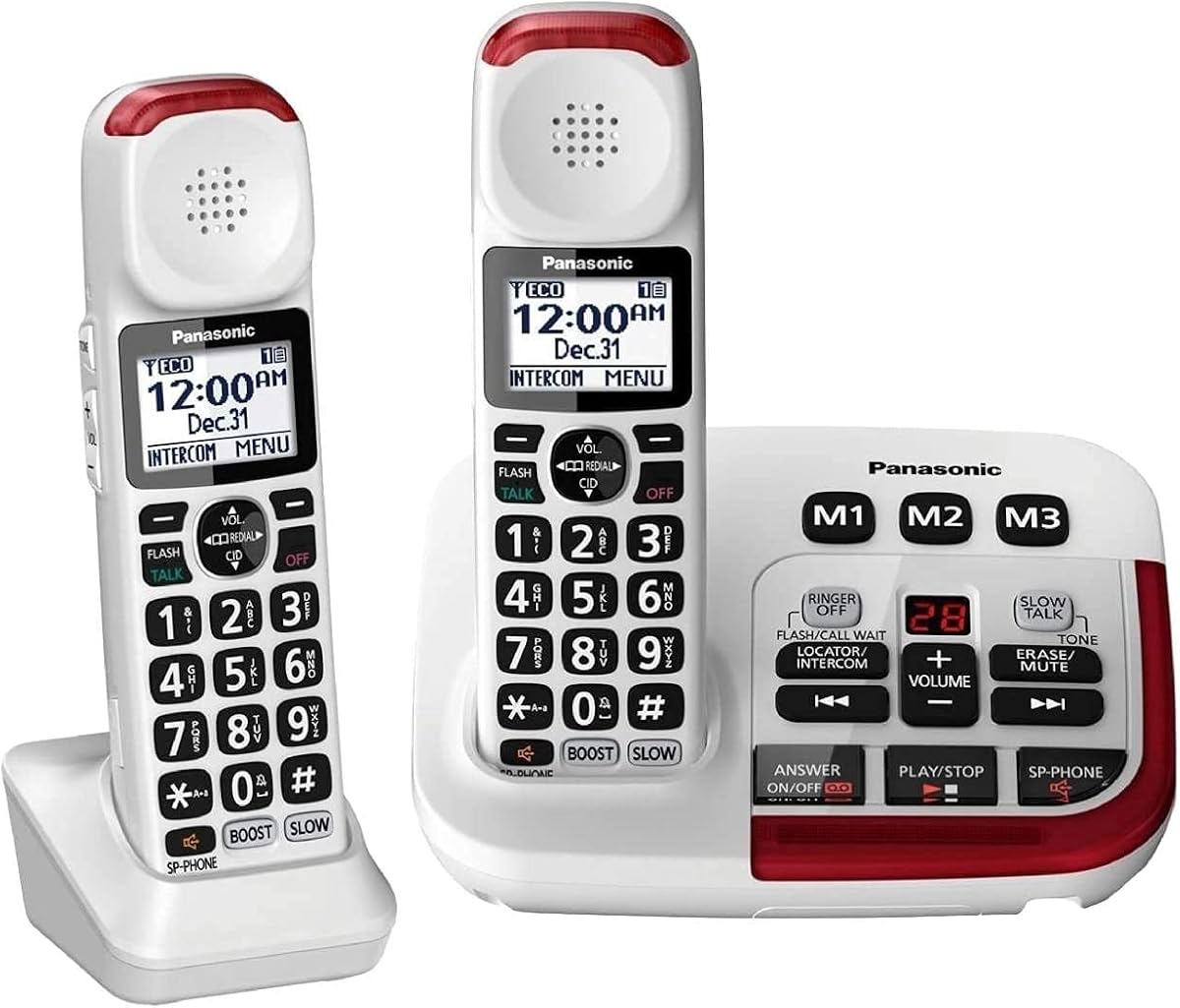
The AltoPlus is certified for mild to severe hearing loss, offering up to 53dB of amplification. This makes it suitable for users with significant volume needs.
We may earn a commission when you buy through this link, at no additional cost to you.
It also boosts outgoing speech so you can be heard clearly by others. The visual ringer and large font screen ensure important alerts are not missed.
While it comes with a higher price tag, the performance justifies the cost. The ergonomic design is comfortable for those with arthritis.
If you need maximum amplification and certification, this phone is a top choice. It provides a robust solution for severe hearing challenges.
TIA certification ensures the device meets industry standards for severe hearing loss.
Boosting outgoing speech ensures you can hear yourself clearly during calls.
We may earn a commission when you buy through this link, at no additional cost to you.
This model offers the freedom of a cordless handset with HD audio quality. It is ideal for users who move around the house while talking.
We may earn a commission when you buy through this link, at no additional cost to you.
The talking caller ID feature helps identify callers before answering. Setup is straightforward, making it accessible for seniors.
However, reliance on battery power means you must remember to charge the handset. This adds a slight maintenance step compared to corded options.
If mobility is your priority, this phone is an excellent choice. It combines the convenience of cordless calling with clear audio quality.
Move freely around your home without being tethered to a base unit.
HD quality ensures voices are clear and natural during conversations.
We may earn a commission when you buy through this link, at no additional cost to you.
The VTech SN5147 combines a reliable corded base with a cordless handset. This hybrid design ensures functionality even during power outages.
We may earn a commission when you buy through this link, at no additional cost to you.
Features like photo dial and a 90dB ringer make it highly accessible for seniors. The visual indicators prevent missed calls effectively.
It can be expanded with more handsets if needed. However, initial setup can be slightly complex for those new to hybrid systems.
If you want flexibility and a backup system, this is a strong pick. It supports seniors with both mobility and accessibility needs.
A corded base ensures service continues even when electricity is interrupted.
Flashing lights alert you to incoming calls in loud environments.
We may earn a commission when you buy through this link, at no additional cost to you.
This kit offers noise reduction to suppress background interference. The slow talk function slows down speech for better comprehension in real time.
We may earn a commission when you buy through this link, at no additional cost to you.
It includes multiple handsets and is expandable to six units. This makes it great for larger homes or multi-generational households.
The visual ringers on both base and handset help users spot calls easily. It is a comprehensive package for those needing advanced features.
If noise is a major issue, this phone is ideal. It provides clear conversations even in busy home environments.
Noise reduction technology filters out ambient sound for clearer calls.
Slow talk helps understand rapid speakers by slowing speech down.
We may earn a commission when you buy through this link, at no additional cost to you.
This phone features extra large photo memory buttons for easy contact selection. It is designed specifically for those with visual impairments or unsteady hands.
We may earn a commission when you buy through this link, at no additional cost to you.
The 90dB ringer ensures alerts are audible and includes an SOS button for emergencies. A cordless handset is included for added convenience.
While the features are basic compared to others, the design focus is unique. It simplifies dialing significantly for users with vision challenges.
If visibility is your main concern, this phone offers a practical solution. It simplifies the calling process through visual memory aids.
Photos on buttons let you recognize contacts instantly without reading names.
An SOS button provides a quick way to reach help when needed.
We may earn a commission when you buy through this link, at no additional cost to you.
This version of the Panasonic kit includes two additional handsets for broader coverage. It is perfect for larger homes where multiple users need access.
We may earn a commission when you buy through this link, at no additional cost to you.
The answering machine and intercom feature support internal communication between family members. Visual ringers ensure calls are not missed in any room.
Setup can be complex due to multiple handsets. However, the convenience of having phones everywhere outweighs the initial effort.
If you have a large household, this kit is a smart investment. It ensures seamless communication across multiple rooms.
Handsets in every room ensure you never miss a call.
Intercom allows quick calls between handsets inside the house.
We may earn a commission when you buy through this link, at no additional cost to you.
This landline phone offers extreme loudness with a 100dB ringer. It is an affordable option for those needing loud alerts and simple functionality.
We may earn a commission when you buy through this link, at no additional cost to you.
Photo speed dial buttons help contact family easily. The LED flash alert ensures visibility even in bright environments.
It lacks advanced features like slow speech or large screens. However, it performs well for basic communication needs.
If you need a simple and loud phone, this is a solid choice. It provides essential features at an accessible price point.
A 100dB ringer guarantees alerts are heard even in noisy rooms.
Flashing LEDs provide a visual cue when audio is missed.
We may earn a commission when you buy through this link, at no additional cost to you.
Choosing the right captioned telephone requires evaluating several accessibility features and technical requirements to match your lifestyle.
Captioned phones use different methods to display text. Some rely on high-speed internet while others use dedicated services. Ensure you have compatible internet access before buying.
Always verify the service requirements to avoid disruptions in your communication setup.
Amplification levels vary by model. Look for gain settings that match your hearing loss severity. Some models boost outgoing speech so others can hear you clearly.
Select a phone with adjustable volume controls for personalized comfort during calls.
Screen size and font matter for readability. Large touchscreens offer more control but may require more setup. Physical buttons can be easier for those with low vision.
Choose a display that is easy to read in your home's lighting conditions.
Consider whether you need corded or cordless options. Corded bases offer stability while cordless handsets provide mobility. Some models offer both hybrid systems.
Decide if mobility is more important than a stable connection for your needs.
Visual alerts like strobe lights or LED flashers are vital for loud ringer environments. Ensure the phone has visual indicators if you have trouble hearing audio cues.
Visual alerts ensure you never miss a call even when the ringer is too loud or quiet.
If you wear hearing aids, the phone must be compatible. Look for TIA certification or specific compatibility notes in the product specs to avoid interference.
Compatibility ensures your hearing aids work smoothly with the telephone system.
Complex menus can be frustrating. Look for phones with one-touch dialing and simple navigation. Speed dial features help you contact family members quickly.
Simpler interfaces reduce the time spent on the phone.
Some models offer answering machines, photo dialing, or noise reduction. Evaluate which extras provide real value versus clutter. Extra features can help with daily organization.
Select features that support your specific communication habits.
Start by setting up your internet connection if required. Most captioned phones need high-speed internet for real-time text. Follow the manual to register your phone with the service provider.
Adjust the volume and font size settings to suit your comfort. Test the phone with a few calls to ensure the text appears correctly. This calibration step is vital for clear communication.
Keep the phone clean and free from dust. Regularly check the battery or power cable for wear. Maintaining the device ensures long-term reliability and better sound quality.
Most modern captioned phones require high-speed internet to function properly. The text captions are generated through internet-based services. Without internet access, the captioning feature will not work.
Many models are designed to be compatible with hearing aids. Look for specific compatibility notes or TIA certification in the product details. This ensures no interference occurs during calls.
Corded phones connect directly to a wall jack for stability. Cordless phones use a wireless handset for mobility around the house. Hybrid models offer both options depending on your preference.
Some providers offer the service for free but require registration. Others may have subscription fees or service charges. Always check the provider's policy before purchasing to understand any fees.
Most models offer significant volume boosting often reaching 50dB to 100dB. This makes them suitable for those with moderate to severe hearing loss. Check the specs to match your hearing needs.
Many units include visual alert systems like strobe lights or LED flashes. These indicators ensure you know a call is coming in even if you cannot hear the ringer. They are vital for accessibility.
The top picks offer a range of solutions from basic corded units to advanced hybrid systems. The Hamilton CapTel 2400iSPNBT remains the best overall due to its comprehensive features.
Prioritize features that match your specific needs such as amplification, display type, or mobility. Ensure the device works with your current phone service and environment.
Always check current availability and settings before purchasing. These devices can significantly improve communication and help you stay connected with your loved ones.