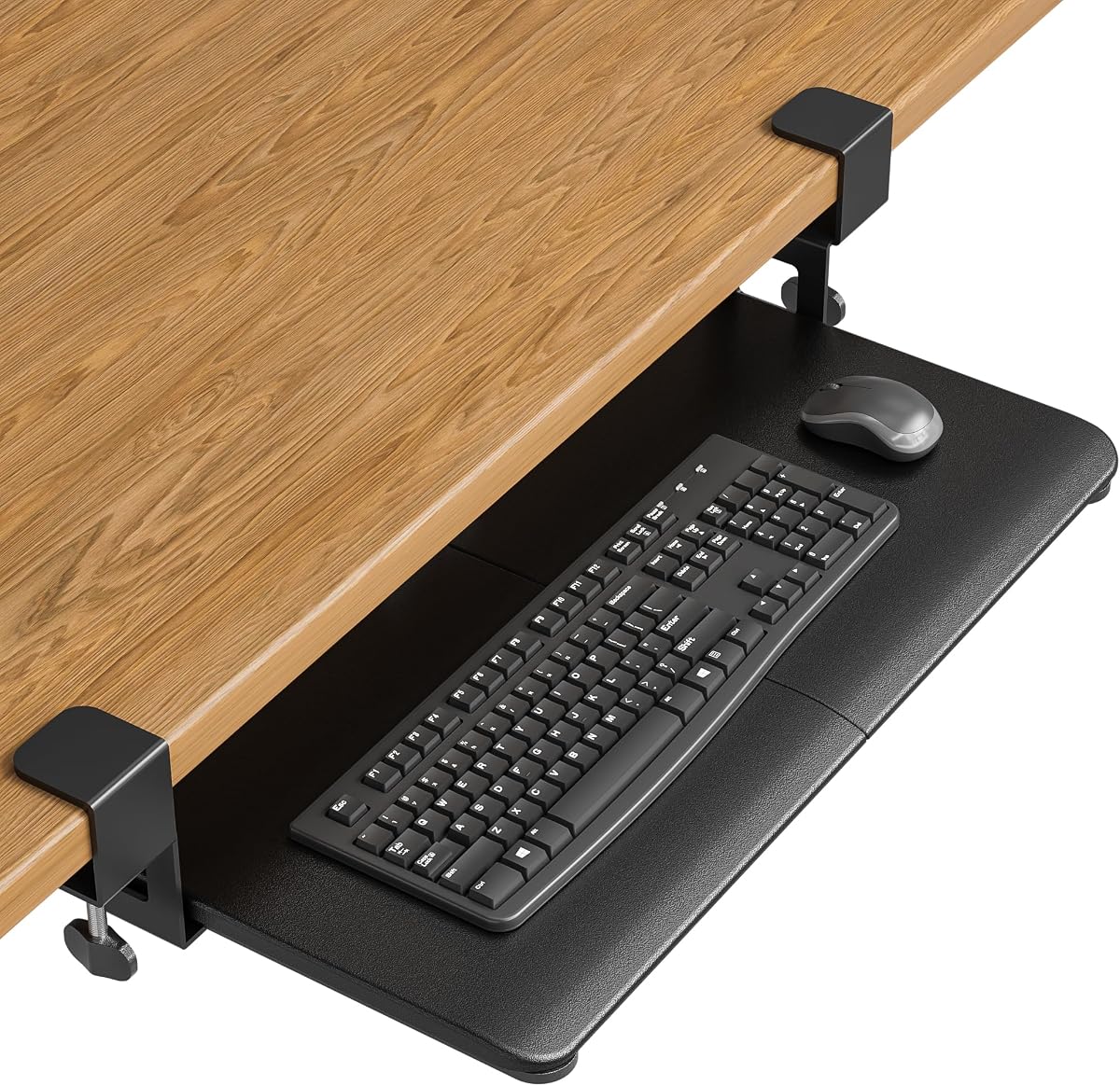
BONTEC Under Desk Keyboard Tray, Pull-Out Keyboard & Mouse Platform
4.4Editor score
No-drill installation process
Maximizes desk space use
Spacious strong platform design
This guide compares the top ten clamp on keyboard tray models for ergonomic efficiency and desk optimization to help you choose the right fit.
Creating a comfortable workstation is essential for productivity and health. A clamp on keyboard tray helps optimize your desk space and promotes better posture during long hours of typing and computing tasks.
We have evaluated ten leading models based on build quality, adjustability, and ease of installation. Each product offers unique features to suit different desk setups and user preferences for ergonomic support.
Each pick highlights key strengths and potential limitations to guide your decision. Remember that availability and offers may change over time so check current details before finalizing your purchase for your setup.
4.4Editor score

4.4Editor score

4.3Editor score
Here is a side-by-side comparison of all ten models to help you quickly identify the right features for your workspace needs and desk dimensions.


This VIVO model stands out as a top choice for users seeking reliable ergonomic support without complex installation. With a solid 4.4 rating it offers a practical solution for organizing keyboards and mice under your desktop to free up valuable workspace.
We may earn a commission when you buy through this link, at no additional cost to you.
The tray measures 26.8 by 11 inches providing ample room for standard setups. Its C-clamps attach securely to desks up to 1.25 inches thick ensuring stability during use. The sliding mechanism allows you to extend the tray 8.5 inches for comfortable typing or tuck it away when not in use.
While the design is robust it is important to note compatibility limits. Desks with beveled edges may not work with this model. Additionally ensuring your desk has enough surface area for the clamps is crucial before purchase to avoid fit issues.
Ideal for home office users or gamers looking to streamline their setup this tray delivers consistent performance. It balances price and functionality well making it a smart investment for anyone aiming to improve posture and desk organization.
Placing your keyboard below the desktop instantly clears surface area for documents or other tools enhancing overall productivity and comfort.
Adjustable angles help reduce wrist strain promoting healthier typing habits during long work sessions.
We may earn a commission when you buy through this link, at no additional cost to you.
The BONTEC tray offers an excellent entry point for those wanting to upgrade their workstation ergonomically. Rated highly by users it provides a straightforward way to move input devices off the main desktop surface.
We may earn a commission when you buy through this link, at no additional cost to you.
Its dimensions of 25.6 by 11.8 inches accommodate most standard keyboards and mice. The no-drill clamps secure it to desks up to 1.97 inches thick which accommodates a wide range of furniture styles. Protective pads prevent scratches ensuring your desk remains in pristine condition.
However compatibility is key as curved or beveled edges will not work with this unit. You must measure your desk width to ensure there is enough room for smooth sliding. This attention to detail ensures a snug fit without wobbling.
If you are on a budget but need reliable organization this tray is a strong contender. It delivers essential features without unnecessary complexity making it suitable for small offices or shared workspaces where flexibility is valued.
Setup is quick and damage-free allowing you to install or remove the tray whenever needed without tools.
Lowering your keyboard aligns arms and wrists reducing fatigue during extended computer use.
We may earn a commission when you buy through this link, at no additional cost to you.
This premium VIVO model takes ergonomic customization to the next level with its tilt adjustment feature. Users praise its versatility and sturdy construction making it a favorite for those who spend hours typing daily.
We may earn a commission when you buy through this link, at no additional cost to you.
The tray supports desks up to 3.4 inches thick which is broader than many competitors. Nine tilt settings allow you to find the perfect angle for neutral wrist positioning. Swivel clamps rotate ninety degrees making it ideal for corner desks or unique workstation layouts.
While the functionality is superior the price reflects the added features. It is also important to verify your desk dimensions since the clamp span requires significant space. Ensuring you have the clearance avoids installation challenges.
For professionals seeking the best ergonomic support this tray justifies the investment. The ability to fine tune your typing position can significantly reduce strain making it a top choice for serious users wanting long term comfort.
Nine tilt options let you customize your angle for optimal wrist health and typing comfort.
Swiveling clamps ensure a secure hold on L-shaped setups expanding your workspace options.
We may earn a commission when you buy through this link, at no additional cost to you.
This model offers unique flexibility with height and width adjustments allowing a tailored fit for diverse setups. Its sturdy build and extra accessories make it a versatile choice for offices with varying desk dimensions.
We may earn a commission when you buy through this link, at no additional cost to you.
With a width range from 23 to 30 inches it adapts to different space requirements. The height adjustment provides 2.4 inches of movement across five set points ensuring you can align it perfectly with your chair. It also includes a wrist pad for added comfort.
However the depth requirement might be challenging for smaller desks. You need clearance for the clamps and the extended tray which could limit placement options. Checking your measurements carefully will prevent fit issues.
Ideal for users needing customization this tray balances adjustability with stability. It works well in environments where desk height varies or where extra space is needed for additional peripherals alongside the keyboard and mouse.
Customize the depth to fit your desk perfectly ensuring smooth operation without obstruction.
Multiple height settings help achieve ideal ergonomic positioning for your specific chair and desk setup.
We may earn a commission when you buy through this link, at no additional cost to you.
This unique tray features a rotating clamp allowing full circular movement for ultimate placement flexibility. It is designed to tuck away under the desk when not in use saving valuable workspace in tight environments.
We may earn a commission when you buy through this link, at no additional cost to you.
The rotating mechanism offers 360 degrees of motion providing you can position the tray at any angle needed. It attaches securely with a single clamp and fits desks up to 2 inches thick. The compact size suits smaller keyboards efficiently.
However the need for clearance might be a constraint. Rotating fully requires enough space around the clamp point which could interfere with nearby furniture. Ensuring room for the arc is essential before purchase.
Best for users who need to reposition frequently this tray offers innovative utility. It suits collaborative workspaces or shared desks where the keyboard needs to be stored quickly between different users or tasks.
Full rotation allows the tray to be moved out of the way easily keeping your desk clear.
When not in use the tray folds under the desk freeing up surface space for other tasks.
We may earn a commission when you buy through this link, at no additional cost to you.
Designed specifically for corner desks this tray features swiveling clamps that adapt to L-shaped workstations seamlessly. It provides an ergonomic solution for users with multi-sided desks where standard trays might not fit well.
We may earn a commission when you buy through this link, at no additional cost to you.
The clamps rotate ninety degrees allowing independent placement for a secure hold on angled edges. The tray measures 26.8 by 11 inches providing ample room for input devices. Installation is straightforward with provided hardware for quick setup.
Compatibility remains key as desks with beveled edges are not supported. Additionally ensure your desk thickness does not exceed 1.25 inches to maintain stability. Proper measurement ensures the clamps grip firmly without slipping.
If you have a corner desk this model is a tailored choice. It maximizes the unique geometry of your workspace turning a potential challenge into an efficient ergonomic setup with minimal effort required.
Swiveling clamps allow secure attachment to angled surfaces ensuring stability on L-shaped desks.
Moving the keyboard under the desk frees up the main surface for monitors and documents.
We may earn a commission when you buy through this link, at no additional cost to you.
This tray adds a pencil drawer to the standard keyboard platform offering combined storage and ergonomics. It is perfect for users wanting to keep supplies organized while maintaining a clean desktop area.
We may earn a commission when you buy through this link, at no additional cost to you.
The tray holds keyboards and mice effectively while the drawer stores pens and small accessories. The clamps fit desks up to 1.25 inches thick ensuring a solid attachment. Sliding the tray out gives you easy access to tools when needed.
However the combined extension may be less than a standalone tray. You might need to pull further to get the drawer out fully. Checking your desk depth will help avoid collisions with the cabinet or wall.
For those valuing organization this tray is a great addition. It combines typing comfort with storage utility making it ideal for offices where keeping essentials close at hand improves workflow efficiency.
A dedicated drawer for small items helps keep your desk clutter-free and organized.
The sliding mechanism provides a natural typing position reducing strain on wrists and arms.
We may earn a commission when you buy through this link, at no additional cost to you.
This tray focuses on smooth operation with an upgraded slide mechanism ensuring easy extension and retraction. It offers a spacious surface and robust clamps for reliable daily use.
We may earn a commission when you buy through this link, at no additional cost to you.
Measuring 20 by 11.8 inches it accommodates standard setups well. The back baffle keeps the keyboard from sliding during use providing a stable typing experience. Dual C-clamps allow it to fit desks up to 2.76 inches thick which suits most furniture.
It is important to measure your desk width to ensure enough room for installation. The clamp span is specific so checking dimensions beforehand avoids fit issues. This attention ensures the tray stays secure during heavy typing.
Ideal for users wanting dependable daily performance this tray balances stability with ease of use. It fits well in home offices where smooth operation and durability are key requirements for long term satisfaction.
Upgraded slide mechanism ensures effortless movement for accessing your keyboard quickly.
A built-in baffle keeps devices secure during typing preventing unwanted movement.
We may earn a commission when you buy through this link, at no additional cost to you.
This desk extender offers dual functionality as a keyboard tray or a platform for monitors and speakers. Its foldable design provides flexibility for workspaces needing variable surface area.
We may earn a commission when you buy through this link, at no additional cost to you.
With a large surface area it supports heavy items up to 44 lbs. The K-shaped brackets ensure rigid support while the clamps fit desks up to 3.5 inches thick. You can fold it away when not needed to save space.
Though versatile it may lack dedicated ergonomic tilt settings. It works best when used as a multi-purpose platform rather than a specialized typing surface. Ensuring your desk has a flat edge is key for proper installation.
Best for users wanting adaptability this extender expands your workspace effectively. It is a practical tool for offices where the need for extra surface area varies throughout the day.
Fold it away when not in use to maximize available desk space efficiently.
Supports up to 44 lbs allowing for heavier monitors or accessories alongside the keyboard.
We may earn a commission when you buy through this link, at no additional cost to you.
This tray stands out with a lifetime warranty and robust support from the manufacturer. It offers a large platform and smooth sliding mechanics ensuring reliable ergonomic improvement for any home office setup.
We may earn a commission when you buy through this link, at no additional cost to you.
The 27 by 11 inch platform provides ample room for full-size keyboards. The clamp attaches without drilling and fits desks up to 2.2 inches thick. Sliding is smooth and stable supporting daily use without wobble or noise.
It is not suitable for glass desks so check material compatibility before purchase. The higher price reflects the warranty and build quality. However for long term durability this investment offers peace of mind.
Ideal for users seeking reliability and support this tray is a top choice. The comprehensive warranty ensures you are protected long after purchase making it a wise investment for serious computer users.
Includes a lifetime warranty covering parts ensuring long term value and customer satisfaction.
The extra wide surface accommodates full-size keyboards and ample mouse movement easily.
We may earn a commission when you buy through this link, at no additional cost to you.
Choosing the right tray requires careful evaluation of dimensions adjustability and build quality to ensure it fits your specific workspace needs.
Before purchasing measure your desk thickness and edge type. Most trays fit standard flat desks up to two inches thick but some support thicker surfaces. Beveled or rounded edges may require a different mounting mechanism to ensure stability.
Always check the product specifications for thickness limits and edge requirements to avoid fit issues upon delivery.
Consider the surface area needed for your keyboard and mouse. Larger trays offer more space for movement but require wider desk surfaces. Ensure there is enough clearance for the clamp system without obstructing your workspace.
Select a size that balances comfort with available space to maintain a tidy and functional desk environment.
Adjustable height and tilt settings allow you to customize the position for neutral wrist alignment. Look for trays with multiple settings to find the most comfortable angle for typing and gaming sessions.
Prioritize models with robust adjustment mechanisms that lock securely to maintain your chosen position during use.
Ensure the tray can support the weight of your keyboard mouse and any additional accessories. Most models hold up to 11 pounds which is sufficient for standard setups but heavier equipment may require stronger options.
Check the rated weight limit to guarantee stability and prevent sagging during prolonged daily use.
Most options use no-drill clamps making them ideal for renters or shared spaces. Verify that your desk surface can support the clamps without damage and that assembly is straightforward.
Review installation instructions to ensure you have the necessary tools and workspace to complete setup efficiently.
High-quality materials ensure durability and resistance to wear over time. Look for sturdy construction and reliable sliding mechanisms that operate smoothly without noise or friction.
Investing in a well-built tray pays off in long-term comfort and reliability for your workstation.
A solid warranty reflects the manufacturer confidence in the product. Look for options offering at least one year of coverage to protect against defects.
Choose brands with responsive customer support to assist with any questions or issues after purchase.
Some trays include drawers or wrist pads for added convenience and comfort. Consider these extras based on your workflow needs to enhance organization and posture.
Evaluate whether these features justify any price difference compared to basic models.
Install the tray by aligning the clamps with the edge of your desk and tightening them securely. Ensure the surface is flat and stable to prevent any wobbling during use.
Adjust the height and tilt settings to achieve a neutral wrist position while typing. Regularly check the clamps to ensure they remain tight and stable over time.
Clean the tray regularly with a damp cloth to remove dust and maintain smooth operation. Avoid harsh chemicals that could damage the surface or the clamping mechanism.
Most clamp-on trays are not compatible with glass desks due to safety concerns. The clamps may slip or crack the surface. Look for models specifically designed for glass if needed but always consult the manufacturer guidelines.
Measure the edge of your desk with a ruler or tape measure. Compare this measurement to the maximum thickness listed in the product specifications. If your desk exceeds this limit the clamps may not secure properly.
Most trays support standard and compact ergonomic keyboards. However larger split keyboards may require wider space. Check the tray dimensions against your keyboard size to ensure sufficient room for movement.
Some models feature swiveling clamps designed specifically for corner desks. Look for trays labeled as corner compatible or with rotating clamps to ensure a secure fit on angled edges.
Most models use no-drill clamp installations for easy setup. This preserves your desk surface and allows for flexible placement. Always verify the installation method before purchasing to match your needs.
You need enough clearance for the tray to slide in and out smoothly. Measure the depth from the desk edge to any cabinets or obstacles. Ensure the tray height fits within your legroom area.
Most trays are not compatible with beveled edges as the clamps need a flat surface to grip securely. You may need to select a model designed for such edges or consider a different mounting option.
We have reviewed ten top models that balance ergonomic support with practical functionality. From budget-friendly options to premium adjustable trays there is a solution for every workspace type and budget.
Prioritize compatibility with your desk thickness and dimensions to ensure a seamless installation. Consider additional features like tilt adjustment or storage if they align with your daily workflow needs.
Prices and availability change frequently so check current listings before finalizing your decision. Investing in the right tray will improve posture and organization for a more efficient workday.