
Zalman CUBIX M-ATX
4.5Editor score
Compact 17L volume
Supports standard ATX PSU
Includes 80mm pre-installed fan
Discover the top Compact E ATX Case options for powerful builds in small spaces. This guide compares design, cooling, and compatibility for every budget.
Finding the right Compact E ATX Case can transform your workspace by combining high performance with minimal footprint. Whether you need portability or style, these cases support powerful hardware without taking up excessive room.
We analyzed ten top-rated models based on airflow, compatibility, build quality, and user feedback. Our comparison highlights cases that balance size constraints with the ability to handle modern GPUs and motherboards effectively.
Each pick below showcases unique features like modular layouts, tool-free access, or enhanced cooling. Remember that availability and pricing fluctuate, so check current listings before finalizing your purchase decision.
4.5Editor score

4.4Editor score

3.9Editor score
This side-by-side comparison evaluates all ten cases on key metrics like motherboard support, cooling potential, and physical dimensions to help you find the perfect fit for your build.



The Cooler Master QUBE 540 stands out as a versatile solution for builders seeking a Compact E ATX Case that does not compromise on hardware support. With a solid rating and innovative design, it allows you to position your PC horizontally or vertically to fit unique desk setups.
We may earn a commission when you buy through this link, at no additional cost to you.
Its standout quality lies in the flexible orientation design and large internal dimensions. You can fit motherboards up to 11 inches wide and graphics cards up to 415 millimeters without removing the front fan, ensuring you have room for flagship hardware while maintaining a compact footprint.
While the case offers great airflow and modern connectivity including USB Type-C, it does require some attention to cable management due to its spacious interior. However, the reversible I/O panel helps customize the look to match your preference, making these minor adjustments worth the effort.
If you value adaptability and performance in a single chassis, this case is an excellent choice. It balances style, cooling, and compatibility perfectly, making it a top recommendation for those building a powerful system that needs to fit into smaller spaces.
You can rotate the case to sit vertically or horizontally thanks to the movable handles and reversible I/O panel.
The full front mesh panel maximizes ventilation, ensuring your components stay cool even under heavy gaming loads.
We may earn a commission when you buy through this link, at no additional cost to you.
The Lian Li O11D Mini V2 is a premium option designed for builders who want a compact chassis without sacrificing visual appeal. With a high user rating and refined engineering, it offers a pillar-less glass design that makes every component visible.
We may earn a commission when you buy through this link, at no additional cost to you.
This case excels in cooling and aesthetics by featuring a 10-degree slanted bottom for better air intake and full glass panels that remove obstructions. It also supports modern back-connect motherboards, which helps maintain a clean look by hiding cables behind the board.
One consideration is that it ships without fans, so you will need to purchase them separately to ensure proper airflow. Despite this, the included brackets for GPU support and cable organization add significant value, making assembly easier and more secure.
If you prioritize style and are willing to add fans yourself, this case delivers an impressive result. It combines high-end materials with smart design features, making it ideal for showcasing a custom build in a compact form factor.
The pillar-less tempered glass allows you to see your entire build from every angle without frame interference.
Special brackets help manage the 24-pin cable and prevent GPU sag for a tidy internal layout.
We may earn a commission when you buy through this link, at no additional cost to you.
The Mechanic Master C34Pro targets enthusiasts who need a portable yet powerful Compact E ATX Case. While it carries a slightly lower rating due to its niche design, it stands out for its modular flexibility and robust construction.
We may earn a commission when you buy through this link, at no additional cost to you.
It supports ATX and E-ATX motherboards and allows for extensive customization including 360mm radiators and 420mm GPUs. The 2mm aluminum shell and steel frame provide durability, while the integrated handle makes it easy to transport for LAN parties or reconfiguration.
The learning curve for assembly and the premium pricing are trade-offs, but they ensure a build that can handle top-tier components with stability. The flexible PSU mounting options further add to the versatility, allowing you to adapt the interior to your specific needs.
For users who value mobility and maximum hardware compatibility, this case offers a unique solution. It balances portability with high performance, making it a strong choice for those who need to move their PC without compromising on specs.
You can adjust PCIe slots and PSU mounting positions to fit your exact hardware preferences.
The 2mm aluminum exterior ensures the case remains sturdy even during transport.
We may earn a commission when you buy through this link, at no additional cost to you.
The Cooler Master Q300L V1 offers a budget-friendly entry into compact cases, though it focuses on Micro-ATX rather than E-ATX. Its design emphasizes flexibility and airflow, making it a great choice for small builds that still want performance.
We may earn a commission when you buy through this link, at no additional cost to you.
You can move the I/O panel to different locations and enjoy an edge-to-edge transparent side panel to showcase your build. The perforated design on all sides ensures excellent heat dissipation, and you can fit up to five fans for aggressive cooling.
While it does not support larger E-ATX boards, it accommodates GPUs up to 360mm and standard ATX power supplies. This makes it a versatile option for users who do not need the largest motherboard support but want a clean, airflow-focused design.
If you are building a smaller PC and want value, this case delivers on style and cooling. It proves that a compact chassis can still offer high airflow and modern aesthetics without a high price tag.
Adjust the I/O panel position to fit your desk setup and cable routing needs perfectly.
Perforations on all sides promote natural convection and prevent heat buildup inside the case.
We may earn a commission when you buy through this link, at no additional cost to you.
The Mechanic Master C34 Ultra is designed for users who need a compact ATX case that can be moved easily. With a strong rating, it balances size and compatibility, making it suitable for LAN events or limited desk space.
We may earn a commission when you buy through this link, at no additional cost to you.
The built-in handle simplifies transport, while the internal layout supports standard ATX components. You can fit a 240mm liquid cooler or large air coolers, and the front panel includes a USB Type-C port for modern connectivity.
While it suggests using an SFX power supply for the cleanest build, it still supports ATX units. This slight limitation ensures better airflow and cable management in such a small space. The metal I/O panel adds a premium touch.
If you need mobility without sacrificing ATX compatibility, this case is a solid option. It combines practical features like the handle with a compact design that fits well in any modern setup.
The integrated handle allows you to move your PC without needing a separate carrying case.
Internal spacing is designed to simplify installation even with larger components.
We may earn a commission when you buy through this link, at no additional cost to you.
The ASUS Prime AP201 is a micro-ATX case that punches above its weight with its mesh design. It earns a top spot for budget builders who want maximum airflow and compatibility with large radiators in a small footprint.
We may earn a commission when you buy through this link, at no additional cost to you.
Its quasi-filter mesh panels include over 57,000 holes, ensuring your PC breathes easily. The tool-free side panels make maintenance simple, and the extended motherboard tray gives you plenty of room to route cables neatly.
Even though it is limited to Micro-ATX boards, it supports GPUs up to 338mm and ATX power supplies up to 180mm. This means you can still install high-end hardware despite the small size, making it versatile for gaming.
If you want an affordable case that prioritizes cooling and ease of use, this is an excellent choice. It balances price, performance, and design, offering features usually found in more expensive chassis.
Precision machined holes provide a balance between dust protection and maximum airflow.
Despite the small size, it supports large radiators and PSUs for a full build experience.
We may earn a commission when you buy through this link, at no additional cost to you.
The Cooler Master Q300L V3 builds on the success of its predecessor with a refined design and enhanced cooling. It is a great choice for those seeking a compact Micro-ATX case that supports modern graphics cards and features.
We may earn a commission when you buy through this link, at no additional cost to you.
Its builder-friendly design allows for up to six fans and an AIO radiator, ensuring your system stays cool. The movable I/O panel and magnetic dust filters add convenience, making it easy to maintain your setup over time.
While it is limited to Micro-ATX boards, the 366mm GPU support accommodates most high-end graphics cards today. This balance of size and capability makes it a strong contender for gamers who want style and performance.
If you value modern aesthetics and airflow in a small package, this case is a top pick. It offers a hassle-free build experience with thoughtful details that improve daily use.
With room for up to six fans, you can customize your cooling strategy for any build.
The tempered glass and movable I/O panel give your PC a sleek, contemporary look.
We may earn a commission when you buy through this link, at no additional cost to you.
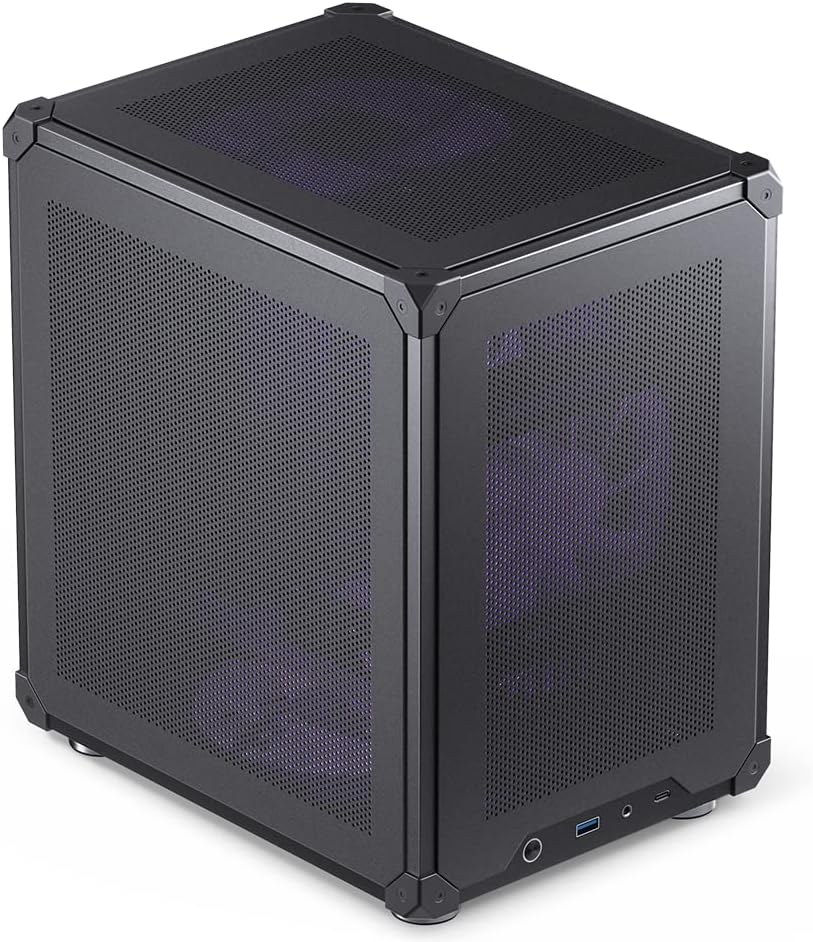
The Zalman CUBIX M-ATX offers one of the smallest footprints available while still supporting essential hardware. For budget builders needing a tiny case, it provides a reliable option with a decent rating.
We may earn a commission when you buy through this link, at no additional cost to you.
It supports standard ATX power supplies and graphics cards up to 260mm, which works well for mid-range builds. The perforated front panel and pre-installed fan ensure basic airflow, and the steel construction adds durability.
While it lacks advanced features like glass panels or extensive fan support, it gets the job done for small desks. The 3.5mm audio and USB 3.0 ports add functionality without cluttering the design.
If you need a basic, affordable case for a simple setup, this is a solid choice. It is ideal for office PCs or budget gaming rigs where space is at a premium.
Sturdy steel construction ensures the case holds up well despite its small size.
Front panel ports allow for easy device connection without reaching around the case.
We may earn a commission when you buy through this link, at no additional cost to you.
The JONSBO C6 is a small mesh case that prioritizes airflow and simplicity. With a strong rating, it offers a unique tool-free design that makes building and maintenance much easier for hobbyists.
We may earn a commission when you buy through this link, at no additional cost to you.
All sides feature mesh, ensuring heat escapes quickly. The tool-free panels let you access internals without a screwdriver, and the support for USB Type-C adds modern connectivity to a tiny chassis.
It accommodates ITX and M-ATX boards with a small CPU cooler and GPU limit. This means you need to select components carefully, but for those who do, the compact size is a major benefit.
If you want a quick-to-build, highly portable case for a mini setup, this is ideal. It proves that small cases can still offer good airflow and modern features without complexity.
No tools are needed to open the panels, making component swaps fast and simple.
The mesh design on all sides promotes natural heat dissipation and keeps temps low.
We may earn a commission when you buy through this link, at no additional cost to you.
The NZXT H5 Flow is a compact mid-tower that focuses on efficient airflow and ease of use. With a strong rating, it delivers out-of-the-box performance with fans included and a design that encourages cooling.
We may earn a commission when you buy through this link, at no additional cost to you.
Its perforated PSU shroud draws air from two intake fans, ensuring your power supply stays cool. The wide cable channels and hooks simplify routing, making the build process smooth and organized.
It supports large radiators like 360mm in the front, offering flexibility for liquid cooling. While it is slightly larger than a true mini case, it balances space and performance well for most desktop users.
If you want a hassle-free build with excellent cooling capabilities, this is a great option. It combines modern aesthetics with practical features that make building and using your PC easy.
Air flows directly to the GPU via the perforated shroud, improving performance under load.
Wide channels and hooks help you route cables neatly for a cleaner look.
We may earn a commission when you buy through this link, at no additional cost to you.
Selecting the right Compact E ATX Case involves evaluating several key factors to ensure your build fits and performs well in a small space.
Ensure the case supports the motherboard size you plan to use. While many compact cases accept ATX, some only support Micro-ATX or Mini-ITX. Check specific width and height limits carefully.
Look for cases that list explicit support for E-ATX up to specific dimensions to avoid fitting issues.
High-end graphics cards are often long, so verify the maximum GPU length the case can handle. This includes checking if you need to remove the front fan to fit longer cards.
Choose a case with at least 350mm clearance to accommodate most modern gaming GPUs.
Airflow is critical in compact spaces. Check the number of fan mounts and radiators supported to ensure your components stay cool.
Prioritize mesh panels and multiple fan options to prevent overheating during intensive tasks.
Standard ATX power supplies vary in length. Confirm that the case can hold your PSU without blocking airflow or other components.
Some compact cases support SFX PSUs which are smaller but require compatible cables.
Steel and aluminum offer different balances of weight and durability. A sturdy build ensures the case protects your hardware during transport.
Look for reinforced frames to prevent bending or flexing over time.
Cable space is limited in compact cases. Check for cutouts and grommets that help route cables cleanly.
Adequate clearance behind the motherboard tray is essential for a tidy look.
Tool-free panels simplify building and maintenance. Look for snap-on designs that let you remove sides easily.
Consider cases with removable components for easier access to difficult areas.
Modern ports like USB Type-C provide fast connectivity for peripherals. Ensure the front panel has the connections you need.
Check for audio jacks and additional USB 3.0 ports for daily use.
When installing components, plan your layout before securing parts to maximize space efficiency. Use cable ties to bundle wires and route them behind the tray to avoid clutter.
Regular cleaning is essential to prevent dust buildup. Use compressed air to blow out the mesh panels and fans every few months to maintain optimal airflow.
If you move your PC frequently, secure internal components properly to prevent movement. Use anti-sag brackets for heavy graphics cards to avoid damage to the motherboard.
A Compact E ATX Case is a chassis designed to house E-ATX motherboards while maintaining a small footprint. It allows for powerful hardware without requiring a large desk space. This makes it ideal for home offices or limited areas where performance is needed.
Many compact cases support standard ATX power supplies, but you must check length limits. Some models may require SFX power supplies to fit properly. Always verify the PSU dimensions before purchasing a case to avoid compatibility issues.
Yes, they can handle gaming GPUs if clearance is sufficient. Look for models that support long graphics cards and have good airflow. Proper cooling ensures your system runs well during intensive gaming sessions.
Check if the case supports 360mm radiators in the front or top. Some cases have specific mounting spots designed for liquid cooling. Ensure the case thickness supports the radiator and pump combo.
Yes, as long as the new parts fit within the physical limits. Consider GPU length and CPU cooler height before upgrading. Modular cases offer more flexibility for future hardware changes and expansions.
Compact cases have less internal space for air to circulate. Good airflow prevents overheating and protects your components. Mesh panels and extra fan mounts help move air efficiently through the chassis.
A carry handle is useful if you transport your PC to events. It provides a secure grip for moving the case safely. This feature is especially helpful for LAN parties or moving between rooms.
Choosing the right Compact E ATX Case depends on your specific needs for space and performance. The top picks offer a range of options from budget-friendly to premium designs that balance size and compatibility.
Prioritize features like airflow, motherboard support, and GPU clearance when making your decision. These factors ensure your system stays cool and your hardware fits without issues.
Always check current availability and specifications before buying to ensure you get the best fit for your build. With the right case, you can enjoy high performance without sacrificing your workspace.