
CENMATE 4 Bay
4.3Editor score
Aluminum alloy cooling body
USB 3.0 up to 5Gbps
Supports 2.5 and 3.5 inch
Direct Attached Storage provides a fast reliable way to expand your digital footprint without network complexity. These enclosures connect directly via USB offering plug-and-play simplicity for professionals and enthusiasts alike.
We evaluated ten leading DAS units based on transfer speeds drive capacity support build quality and cooling efficiency. Each model was analyzed for compatibility across major operating systems and real-world performance metrics.
Our picks highlight the best value top performance and specialized features for different workflows. Note that availability and pricing vary by retailer so always verify current stock before purchasing your storage solution.
4.3Editor score

4.2Editor score

4.1Editor score
As an Amazon Associate we earn from qualifying purchases.
This side-by-side comparison highlights the key specifications and unique strengths of every top-rated Direct Attached Storage enclosure available this month.


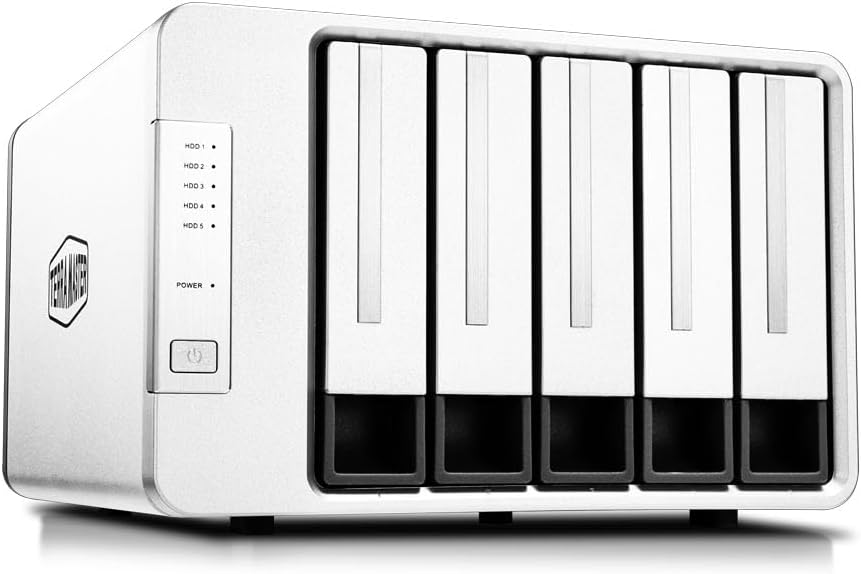


The TERRAMASTER D4-320 leads our list with its robust four-bay design and fast USB 3.2 Gen2 connectivity. It offers a reliable way to aggregate up to 120TB of storage without complex network setup.
We may earn a commission when you buy through this link, at no additional cost to you.
Its standout feature is the intelligent temperature-controlled fan that ensures drives stay cool even during heavy workloads. The Push-lock tray design prevents accidental disconnection and simplifies maintenance for users who swap drives frequently.
While it lacks hardware RAID which limits redundancy options the tool-free installation and broad OS compatibility make it ideal for creative professionals needing fast sequential access to large media files.
We recommend this DAS for editors and photographers who prioritize speed and capacity over redundancy. Ensure your computer supports USB-C to fully benefit from the 10Gbps transfer potential.
With USB 3.2 Gen2 speeds up to 10Gbps this enclosure can transfer massive 4K video files quickly without bottlenecks.
Sound-absorbing panels and a controlled fan keep noise levels low during standby and active transfers for quiet offices.
We may earn a commission when you buy through this link, at no additional cost to you.
The QNAP TR-004 distinguishes itself with integrated hardware RAID which provides essential data protection for critical files. It is an excellent choice for those who need redundancy without running a full NAS server.
We may earn a commission when you buy through this link, at no additional cost to you.
Its ability to act as an external expansion for QNAP NAS systems adds significant value for existing QNAP users. The hardware RAID modes allow you to balance speed and safety based on your specific workload requirements.
However users must ensure their NAS model supports this specific TR unit since compatibility can vary. For standalone users the USB Type-C connection and lockable drive bays offer great security and convenience.
Choose this unit if you need robust data protection and plan to integrate with a QNAP ecosystem later. It bridges the gap between simple DAS and full network storage effectively.
Hardware RAID support allows you to mirror or stripe data for better performance or safety without software overhead.
Lockable drive bays prevent unauthorized access and accidental removal of drives in shared or office environments.
We may earn a commission when you buy through this link, at no additional cost to you.
The TERRAMASTER D8 Hybrid offers a unique hybrid approach supporting both traditional SATA drives and high-speed NVMe SSDs. This allows users to optimize storage costs by using SSDs for active projects and HDDs for archives.
We may earn a commission when you buy through this link, at no additional cost to you.
Its transfer speeds are impressive especially with NVMe drives reaching up to 980MB/s under USB 3.2 Gen2. This makes it a strong candidate for video editors who need fast scratch disks alongside bulk storage.
The intelligent fan system helps manage heat which is crucial when mixing different drive technologies in one enclosure. However users should be aware of the higher price point compared to standard four-bay units.
Pick this model if you need maximum flexibility in drive types without buying separate enclosures. It is perfect for hybrid workflows where speed and capacity are both critical factors.
This enclosure supports both mechanical HDDs for bulk storage and NVMe SSDs for high-speed temporary data access.
An intelligent temperature-controlled fan adjusts speed dynamically to keep drives cool during intensive mixed workloads.
We may earn a commission when you buy through this link, at no additional cost to you.
The CENMATE 4 Bay provides exceptional value for those needing four drive bays without breaking the bank. It offers a solid aluminum build and includes cables for both USB A and C connections for broad compatibility.
We may earn a commission when you buy through this link, at no additional cost to you.
Its cooling system uses two fans that keep the drives safe even during continuous transfers. While the fan noise is noticeable it ensures data safety which is a fair trade-off for the price.
This unit is perfect for home users who need affordable expansion for backups and media libraries. It supports plug and play operation making it easy to set up instantly.
If you prioritize cost over cutting-edge speeds this is the best entry-level choice on our list. It reliably supports up to 80TB total capacity for extensive storage needs.
Built-in fans help maintain safe temperatures for multiple drives which is vital for long-term reliability and data safety.
Comes with both USB A and C cables ensuring it works with older laptops and modern Thunderbolt machines equally well.
We may earn a commission when you buy through this link, at no additional cost to you.
The SABRENT DS-SC5B is designed for power users who need maximum capacity and reliability. It features five drive bays and dedicated controllers for each which reduces the risk of total system failure.
We may earn a commission when you buy through this link, at no additional cost to you.
Its internal auto-switching power supply eliminates the need for a bulky external brick keeping your desk tidy. The PWM fan ramps up only when necessary ensuring quiet operation during light tasks.
This unit supports daisy-chaining allowing you to add a second dock if your port allows. It is robust and reliable for professional environments where uptime is critical.
Choose this premium unit if you need five drives and want a clean setup without extra power adapters. It represents the high-end reliability of direct attached storage solutions.
Each bay has a dedicated ASMedia controller ensuring stable connections independent of other drives for maximum reliability.
Internal power supply design removes external bricks reducing desk clutter and cable management issues significantly.
We may earn a commission when you buy through this link, at no additional cost to you.
The TERRAMASTER D8 Hybrid 2 builds on the hybrid concept with better power management features. Its TPM technology allows you to switch between power saving and active modes depending on your needs.
We may earn a commission when you buy through this link, at no additional cost to you.
Users will appreciate the fast read speeds which improve workflow when editing large files directly from the drive. The free backup software adds extra value by simplifying data protection routines.
This unit supports both modern and older Thunderbolt standards ensuring broad compatibility. It is an excellent choice for creative professionals who need both speed and flexible power usage.
Select this model if you want to balance energy efficiency with high performance. It offers a smart approach to managing resources without sacrificing data access speeds.
TerraMaster Power Management lets you toggle between power saving and active modes for energy efficiency and faster response.
TPC Backupper software is included to help schedule backups easily without needing third-party subscription services.
We may earn a commission when you buy through this link, at no additional cost to you.
The TERRAMASTER D5-310 simplifies RAID configuration with a dedicated knob on the back of the enclosure. This physical control makes changing redundancy levels much easier than navigating software menus.
We may earn a commission when you buy through this link, at no additional cost to you.
It supports hot spare disk features which enhance data security by automatically replacing failed drives in supported RAID modes. This feature is invaluable for users needing high availability without downtime.
While transfer speeds are capped at 5Gbps the reliability and ease of use make it a strong contender for backup and archival tasks. It supports all major OS platforms effortlessly.
Choose this model if you need hardware RAID reliability without complex network setup. The physical knob and spare drive support offer unique practical benefits for data safety.
A dedicated RAID knob on the back allows users to switch modes physically without software or driver intervention.
Supports hot spare disks that automatically replace failed drives in RAID 1 5 or 10 configurations to minimize data loss risk.
We may earn a commission when you buy through this link, at no additional cost to you.
The WAVLINK 4-Bay offers a unique dual utility by supporting direct video playback via HDMI. This makes it a great choice for users who want to play media directly without connecting to a PC.
We may earn a commission when you buy through this link, at no additional cost to you.
Its USB-C port provides fast 10Gbps transfers while the aluminum build ensures efficient cooling for multiple drives. Independent power switches make it easy to manage specific drives without shutting down the unit.
Users should ensure their host supports video over USB-C to utilize the HDMI feature fully. Despite this requirement it remains a versatile unit for media playback and data storage.
Select this if you need a docking station that can drive a display or TV directly. It combines storage with multimedia capabilities in one compact enclosure.
The HDMI interface supports 4K resolution allowing users to play media files directly from the drives to a TV.
Built-in fans activate automatically at high temperatures to protect data during intense storage workloads.
We may earn a commission when you buy through this link, at no additional cost to you.
The ORICO 5 Bay is designed for quick access with its magnetic chip cover. This innovative feature allows you to open the enclosure without tools saving time during maintenance or drive swaps.
We may earn a commission when you buy through this link, at no additional cost to you.
It supports five drives with a high total capacity of 110TB making it suitable for extensive media archives. The double-bearing fan is durable and helps maintain safe operating temperatures.
Note that Linux systems may read only one drive at a time which can be a limitation for advanced users. Otherwise it offers a smooth plug and play experience for most users.
Choose this model if you need rapid access to drives and high capacity. Its magnetic design and protection features make it a user-friendly option for home storage.
Magnetic chips on the cover enable tool-free access for faster installation and removal of drives when needed.
Includes anti-overvoltage overcurrent and overheating protection to ensure data safety during operation.
We may earn a commission when you buy through this link, at no additional cost to you.
The QNAP TR-002 is a compact dual-bay solution perfect for those who do not need massive capacity. It offers essential RAID support and USB-C connectivity in a smaller footprint.
We may earn a commission when you buy through this link, at no additional cost to you.
Its hardware RAID capabilities allow for basic redundancy making it suitable for critical data backups. For QNAP users it serves as an easy external expansion option without complex configuration.
The lockable drive bays provide an extra layer of security for sensitive environments. While limited to two bays it is efficient for simple and focused storage needs.
Select this model if you have limited desk space and only need two drives. It balances portability with essential RAID features for reliable direct attached storage.
Smaller footprint ideal for spaces where four or five bays are unnecessary saving desktop space effectively.
Designed to work with QNAP NAS systems for expansion allowing users to utilize existing network infrastructure.
We may earn a commission when you buy through this link, at no additional cost to you.
Selecting the right DAS involves evaluating interface speed capacity drive type and cooling to match your workflow.
Modern DAS units use USB 3.2 Gen2 or USB-C to achieve speeds up to 10Gbps. Ensure your computer has the matching ports to avoid throttling performance during large transfers.
Always verify the host device supports the required bandwidth for the fastest possible data movement.
Decide how many drives you need for your total storage goals. A five-bay unit offers more capacity than a two-bay model which is essential for large media libraries.
Check that each bay supports the drive capacity you plan to use such as 20TB or 30TB disks.
Some enclosures only take 3.5 inch drives while others accept both 2.5 and 3.5 inch drives. Hybrid models support NVMe SSDs alongside SATA HDDs for mixed performance needs.
Choose a unit that accepts your existing drives or the type you plan to purchase.
RAID options add redundancy and performance but require hardware support which increases cost. Individual drive support is simpler and cheaper but lacks automatic data protection.
Select RAID if you cannot afford to lose data without backups.
Multiple drives generate heat so efficient cooling fans are essential for longevity. Some models have silent fans while others may be louder during heavy operation.
Check noise ratings if the unit will be in a quiet office or home studio.
Most multi-bay DAS units need an external power brick. Internal power designs are cleaner but may be more expensive or less common.
Consider if you need to move the unit frequently for portability and setup ease.
Verify that the enclosure works with your specific OS such as Windows macOS or Linux. Some units may have driver requirements or limited Linux drive recognition.
Plug-and-play support saves time and avoids driver headaches.
Aluminum housings dissipate heat better than plastic and are generally more durable. A one to two-year warranty protects your investment against early failures.
Check for lockable drive bays for added physical security in shared environments.
Connect the DAS to your computer via the provided USB-C or USB-A cable and ensure it is powered properly. Wait for the operating system to recognize the drives before accessing files.
Format the drives to a file system compatible with your OS such as APFS for Mac or NTFS for Windows. Use the enclosure software to organize backups if included.
Regularly check fan performance and keep vents clear of dust to prevent overheating. Avoid moving the enclosure while drives are spinning to reduce risk of physical damage.
No DAS connects directly to a single computer via USB while NAS connects to a network. DAS is simpler and cheaper but lacks remote access features. Choose DAS for fast local access only.
Yes you can repurpose 2.5 or 3.5 inch SATA drives by placing them in a DAS enclosure. Ensure the drives are compatible with the bay size and SATA version for best results.
Most modern DAS units are plug-and-play on Windows Mac and Linux. Drivers are rarely required unless using specific RAID features or specialized hybrid configurations.
Hot-swappable enclosures allow drive replacement without powering down safely. Ensure you use tools provided to eject drives properly to prevent data corruption.
RAID 0 is fastest but risks all data loss if a drive fails. RAID 1 offers safety with half capacity. RAID 5 balances speed and protection if hardware supports it.
Some DAS enclosures expose drives individually in Linux requiring manual mounting for each. Check your OS documentation for multiple drive configuration steps if needed.
Our top three picks include the TERRAMASTER D4-320 for best overall performance and the CENMATE 4 Bay for budget buyers along with the SABRENT DS-SC5B for premium users.
Prioritize connection speed and cooling efficiency to ensure long-term reliability for your critical data and large media files.
Prices and availability change frequently so confirm current stock before purchasing to secure the best value for your setup.