
RREAKA TV Dock
4.4Editor score
4K660Hz HDMI Output
100W PD Charging Port
Ultra Lightweight Alloy Build
This guide compares ten top portable docks for Nintendo Switch play, evaluating video output, charging speed, build quality, and travel compatibility for
Finding the right dock for Nintendo Switch portable play can transform your gaming experience significantly. A good portable dock offers seamless connectivity to larger screens while maintaining fast charging speeds and reliable performance during travel sessions.
We evaluated ten real products based on their video output capabilities, charging port specifications, and overall build quality. Our comparison focuses on compatibility with various models including Switch OLED and Switch 2 to ensure broad utility for all users.
Each pick highlights specific strengths like HDMI 2.0 support or ultra lightweight designs for backpacking. Please note that product availability and pricing can change frequently so verify current details before making your final purchase decision online today.
4.4Editor score

4.2Editor score

4.4Editor score
The following table provides a side by side comparison of all ten selected products highlighting their key specifications and compatibility features to help you make an informed choice.


The pdobq Switch Dock stands out as a reliable choice for gamers needing a portable solution. It holds a solid 4.2 rating from users who value its compatibility with Switch 2 and OLED models. This adapter ensures you can enjoy games on larger screens without sacrificing performance.
We may earn a commission when you buy through this link, at no additional cost to you.
Its HDMI 2.0 output supports crisp visuals up to 4K at 60Hz when connected to a compatible display. The included USB 3.0 port allows for peripheral connectivity like controllers or flash drives. This makes it versatile for both gaming and file transfers on the go.
One trade-off is that it does not work with the Switch Lite model limiting its use to dockable units. Additionally you must provide your own official charger to activate TV mode properly. Despite this the convenience and performance balance remains strong for most travelers.
If you own a Switch 1 2 or OLED and need a compact dock this option is highly recommended. It replaces the bulky original dock effectively while fitting easily into travel bags. The combination of speed and compatibility makes it a top pick for portable play.
Enjoy stunning 4K support60Hz video output that brings your games to life on any modern TV or monitor.
Designed to work with Switch 2 OLED and Steam Deck ensuring broad utility across different gaming devices.
We may earn a commission when you buy through this link, at no additional cost to you.
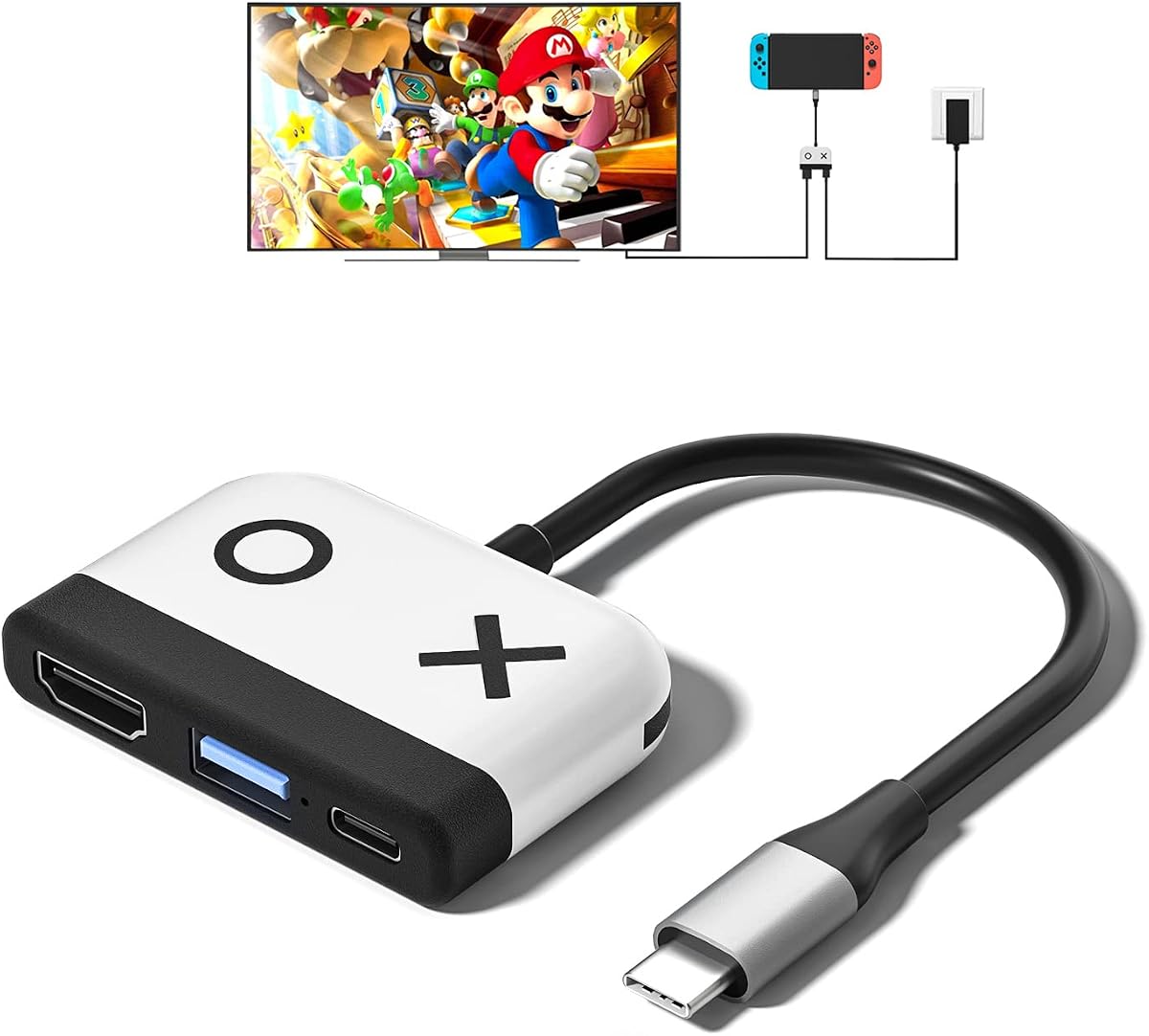
The RREAKA TV Dock offers exceptional value for budget conscious gamers seeking portable dock capabilities. With a 4.4 rating it is praised for its lightweight aluminum alloy construction that weighs only 1.5 ounces. This makes it ideal for long trips where every gram counts.
We may earn a commission when you buy through this link, at no additional cost to you.
Its HDMI output supports 4K at 60Hz delivering smooth visuals for supported content. The USB-C port supports up to 100W power delivery allowing you to charge your device while playing. This high wattage ensures stable performance during intensive gaming sessions on the road.
While the dock itself is inexpensive you will need to purchase HDMI and power cables separately which adds to the total cost. Also it requires a specific charger voltage to activate TV mode reliably. These minor issues do not overshadow its impressive portability and performance.
For travelers needing a slim and efficient dock this is an excellent choice. It works not only with Switch models but also with MacBooks and iPads for broader utility. The balance of price features and weight makes it a standout budget option.
Constructed from durable aluminum alloy to ensure longevity while maintaining an incredibly light weight profile.
Supports up to 100W PD charging so your device stays powered up even during extended play sessions.
We may earn a commission when you buy through this link, at no additional cost to you.
The Travel Portable Switch 2 Dock is a premium option tailored for the latest Switch 2 hardware. It boasts a 4.4 rating from users who appreciate its optimized connectivity and support for high resolution outputs. This dock ensures your next gen console performs at its peak.
We may earn a commission when you buy through this link, at no additional cost to you.
It supports 4K at 60Hz which is essential for future proofing your gaming setup. The included HDMI cable makes setup straightforward without needing extra accessories. Power delivery via PD up to 100W ensures your system runs efficiently even under heavy loads.
The main drawback is that the power adapter is not included so you must use your own official Switch 2 charger. While the price is higher than some alternatives the specific optimization for Switch 2 adds significant value. This justifies the cost for early adopters.
If you own a Switch 2 and want a reliable portable dock this is the top choice. It handles the unique power requirements of the new console better than generic adapters. The included cable and strong build quality make it worth the investment.
Specifically engineered to support the Switch 2 power and video requirements for optimal performance.
Comes with an HDMI cable included reducing the need for extra purchases upon arrival.
We may earn a commission when you buy through this link, at no additional cost to you.
The Kstkry Switch Dock features a unique silicone exterior that protects your gear from scratches and bumps. With a 4.4 rating it is favored by users who prioritize durability in their travel accessories. This material choice adds a layer of safety for your console.
We may earn a commission when you buy through this link, at no additional cost to you.
It supports 4K video output and USB 3.0 speed for fast data transfer. This makes it versatile for connecting external storage or high performance peripherals. The compact size allows it to slip into even the smallest pockets or sleeves.
The silicone body though durable can collect dust over time if not stored properly. Also like many docks it requires the original charger to function correctly in TV mode. These are minor inconveniences compared to the robust physical protection it offers.
For users who often toss their gear into bags this silicone dock is a smart choice. It reduces the risk of accidental damage during transit significantly. The performance is on par with harder docks while offering extra physical protection.
High quality silicone material protects both the dock and your console from scratches and impacts.
USB 3.0 port supports super high speed transmission for quick file access on external drives.
We may earn a commission when you buy through this link, at no additional cost to you.
The iPLYGAM Switch Dock distinguishes itself with a 6-in-1 multi port design. With a 4.0 rating it is appreciated for its comprehensive connectivity options. This includes HDMI USB 2.0 ports and a dedicated charging port for diverse setups.
We may earn a commission when you buy through this link, at no additional cost to you.
It features a built-in safety chip that protects against overheat and short circuits. A physical switch button allows you to toggle between tabletop and TV modes easily. Anti-skid pads keep the unit stable on surfaces during intense gaming sessions.
The device is slightly heavier than ultra compact options which might be a concern for some travelers. Also you must source HDMI and power cables separately. However the added functionality and safety features often outweigh these drawbacks for home use.
If you need a dock that can handle multiple connections and offers physical controls this is a strong candidate. It is reliable for stationary setups where weight is less of a concern. The safety chip adds peace of mind during extended play.
Built-in smart chip prevents overheating and short circuits to protect your console from damage.
Dedicated switch button lets you choose between tabletop and TV modes without touching the console.
We may earn a commission when you buy through this link, at no additional cost to you.
The Kstkry Switch Dock Gen2 is designed as a universal adapter for various USB-C devices. With a 4.2 rating it is praised for its 100W PD input support which ensures fast charging for powerful devices. This makes it suitable beyond just gaming consoles.
We may earn a commission when you buy through this link, at no additional cost to you.
It supports 4K at 60Hz via HDMI delivering crisp visuals for any compatible screen. The plug and play nature means no drivers are required for setup. This simplicity is a major plus for users who want quick connectivity.
It offers fewer USB ports compared to multi port hubs which might limit peripheral expansion. The standard size is portable but not as compact as ultra slim travel docks. These factors should be considered based on your specific port needs.
For a general purpose hub that handles power delivery and video this is a solid option. It works well with laptops and tablets as well as consoles. The balance of power and simplicity makes it a versatile tool for many.
100W PD input keeps high power devices fully charged during extended gaming or work sessions.
Plug and play functionality requires no additional drivers for immediate connectivity to your TV.
We may earn a commission when you buy through this link, at no additional cost to you.
The BIYTC Switch Dock is a lightweight alternative for those prioritizing portability above all else. With a 4.2 rating it is appreciated for its pocket size design that fits easily into any bag. This makes it ideal for impromptu gaming sessions.
We may earn a commission when you buy through this link, at no additional cost to you.
It supports both Switch 1 and 2 models ensuring broad compatibility across generations. The 3 port design keeps things simple without unnecessary clutter. This simplicity often translates to higher reliability and fewer points of failure during travel.
One limitation is that it outputs 1080P rather than 4K which may be a drawback for newer TVs. It focuses on utility rather than high resolution performance. However for many users the 1080P quality is more than sufficient.
If you need a simple portable dock that takes up minimal space this is a great choice. It covers the essentials well without unnecessary weight or bulk. The low price point adds to its value for casual travelers.
Pocket sized design makes it easy to slip into any bag for travel on the go.
Works with both Switch 1 and 2 models ensuring utility across different console generations.
We may earn a commission when you buy through this link, at no additional cost to you.
The AHGEIIY Switch 2 Dock is a compact hub that delivers high performance in a small package. With a 4.2 rating it is praised for its size and ability to support 4K at 60Hz. This makes it a powerful tool for portable setups.
We may earn a commission when you buy through this link, at no additional cost to you.
It features a 100W PD port that can charge power hungry devices like laptops and consoles. The USB 3.0 port supports fast data transfers. This combination of power and data makes it a true travel hub for tech enthusiasts.
Like most portable docks it requires external power to function which means carrying an extra brick. Also it lacks USB 2.0 ports which might limit specific legacy peripheral connections. These trade-offs are common for compact designs.
For users needing a hub that fits in a pocket but supports high power and video this is excellent. It works with MacBooks and Steam Deck too making it versatile. The small size does not sacrifice capability significantly.
100W PD port ensures powerful devices stay charged even during intensive use sessions.
USB 3.0 port supports fast file transfers allowing efficient data access on the road.
We may earn a commission when you buy through this link, at no additional cost to you.
The Switch 2 Dock Pro features a stylish black and white design that stands out visually. With a 4.3 rating it is appreciated for its aluminum alloy build which offers durability and a premium look. This design choice adds to the aesthetic appeal.
We may earn a commission when you buy through this link, at no additional cost to you.
It supports 4K at 60Hz ensuring high quality visuals for games and media. The USB 3.0 port supports fast data transfer. The 100W PD charging allows you to keep your console powered during long sessions without worry.
It is slightly heavier than the lightest models which might be a consideration for some users. Cables are not included so you must purchase them separately. However the build quality and performance justify the price point for many.
If you value design and build quality this dock is a strong contender. It performs well and looks good while doing it. The combination of style and function makes it a favorite for those who want a premium feel.
Aluminum alloy body ensures durability and a sleek look that matches modern gaming setups.
100W PD support keeps your console fully powered even during long intensive gaming sessions.
We may earn a commission when you buy through this link, at no additional cost to you.
The Portable Dock Station features a unique top loading design and built-in cooling system. With a 3.6 rating it is noted for its ventilation that helps dissipate heat during long sessions. This physical design makes it easy to place and remove the console quickly.
We may earn a commission when you buy through this link, at no additional cost to you.
It supports 4K HDMI output and multiple USB ports for versatile connectivity. The top loading mechanism is convenient for quick swaps between handheld and docked modes. This ergonomic approach saves time during gameplay transitions.
The ventilation system though helpful can allow dust to enter over time if not stored carefully. Some users report connection issues requiring multiple attempts which affects the overall rating. These inconsistencies are a concern for reliability.
If you prioritize airflow and ease of access this dock offers unique benefits. It handles heat well and offers multiple ports. However you should be aware of the potential connection reliability issues before purchasing.
Built-in ventilation design helps prevent overheating during extended gaming sessions effectively.
Top loading design allows for quick insertion and removal of the console without friction.
We may earn a commission when you buy through this link, at no additional cost to you.
Selecting the right portable dock involves considering several key factors that impact performance and convenience during travel.
Most portable docks claim support for 4K outputs though your console hardware dictates the actual limit. Check if the dock supports HDMI 2.0 which allows for 60Hz refresh rates at 1080P or 4K. This ensures smoother visuals when playing on large screens.
Always verify the dock explicitly supports your console model such as Switch 1 2 or OLED to avoid compatibility issues.
A portable dock must deliver sufficient wattage to charge your device while playing. Look for PD ports supporting at least 60W for standard models or 100W for newer devices. Insufficient power may prevent TV mode from activating correctly.
Ensure you have a compatible wall charger since many docks do not include power adapters in the box.
Materials like aluminum alloy offer durability and heat dissipation which is vital for travel. Silicone options provide scratch resistance and shock protection which is useful for packed bags. Consider where you will store the dock most often when choosing materials.
A sturdy build prevents damage during transit which keeps your console safe during long trips.
Ports allow you to connect peripherals like controllers or flash drives while docked. A USB 3.0 port supports faster data transfer which is useful for file management. Some docks include HDMI USB and PD ports which cover most basic needs effectively.
Prioritize docks with the specific ports you need to avoid carrying extra hubs.
Since this is a portable dock weight should be a priority for travel. Docks under two ounces are easier to carry in pockets or small bags. Compact designs reduce the space required in your luggage which helps keep your setup minimal.
Choose a size that fits comfortably in your intended travel gear without adding bulk.
Portable docks vary in price but budget options can sometimes offer similar core features to premium ones. Check if the product includes warranty protection which adds value against defects. A longer warranty period suggests the manufacturer stands behind the product reliability.
Compare total costs including any needed cables to ensure the best value for your budget.
Many docks support broader USB-C devices like tablets and laptops adding versatility to your gear. If you use multiple devices for work or play a universal dock saves space in your bag. This future proofs your investment beyond just the gaming console.
Check the product details to confirm it supports your other USB-C devices.
A stable connection is vital to avoid signal drops during gameplay. Docks with reinforced connectors often last longer and maintain better signal integrity. Reading user reviews can give insight into real world reliability regarding connection drops.
Prioritize products with positive feedback on consistent performance over time.
To use your portable dock connect the HDMI cable to your TV and the dock first. Then plug the official power adapter into the dock to ensure enough wattage for TV mode. Finally connect your console to the USB-C output port and wait for the display to activate automatically.
Avoid exposing the dock to extreme temperatures or humidity when traveling. Store it in a protective sleeve to prevent scratches and dust accumulation especially for silicone or metal bodies. Regularly check ports for debris to ensure clean connections.
If you notice connection issues try cleaning the USB-C port gently with a soft brush. Ensure your wall charger provides the recommended wattage because insufficient power causes TV mode to fail. Following these steps will help maintain your dock's performance and lifespan over time.
Most portable docks support the original Switch and Switch OLED models. However some may not support Switch Lite which lacks TV output capabilities. Always check the product description for compatibility with your specific console model before purchasing.
TV mode activation often fails due to insufficient power from the wall charger. Ensure your adapter outputs at least 60W or the specified wattage for your model. Also verify that your HDMI cable is properly connected to both the dock and the TV.
Yes most portable docks feature a PD charging port that allows simultaneous charging and gaming. This feature ensures your battery stays full during long play sessions. Just make sure the dock supports enough wattage for your console's needs.
No portable docks are typically plug and play devices that require no drivers. They connect directly via HDMI and USB-C so they work immediately. This simplicity makes them easy to use across different devices and operating systems.
Many portable docks are designed specifically for travel with robust materials like aluminum alloy. These materials protect against drops and scratches while keeping weight low. Proper storage in a case will further extend their lifespan during daily commuting.
Some docks support 4K output but your console's hardware ultimately determines the resolution. The original Switch caps at 1080P regardless of dock capabilities. Newer models may support higher resolutions so check both dock and console specs.
Portable docks usually do not include HDMI cables or power adapters. You will need to provide your own official charger and an HDMI cable. Verify exactly what is included in the box before purchasing to avoid missing essentials.
Use a soft dry brush or compressed air to remove dust from USB and HDMI ports. Avoid using liquids or metal tools that could damage the internal pins. Cleaning regularly helps maintain good electrical connections and prevents signal issues.
The ten portable docks reviewed here offer a range of features to suit different gaming and travel needs. Whether you prioritize speed or build quality there is a reliable option among our top picks.
Consider your specific console model and power requirements before making a final decision. Matching the dock capabilities with your system ensures smooth performance during portable play sessions.
Remember to check current availability and pricing as product details may change over time. Investing in a high quality dock can significantly enhance your gaming experience away from home.