
ewnol Dockable Case for Nintendo Switch 2
4.4Editor score
Dockable without removal
Includes screen protectors
Slim TPU and PC build
This guide compares the top dockable Switch 2 cases for protection and gaming convenience. Find the perfect hard shell case that docks without removal for
Choosing a dockable Switch 2 case ensures your console stays protected while maintaining full functionality across all play modes. A good case must offer robust impact resistance without blocking ports or the built-in kickstand. It should also provide ergonomic grips to reduce hand fatigue during extended gaming sessions. You want something that looks sleek and feels durable in daily use.
We evaluated ten top-rated cases based on protection quality, dock compatibility, and user feedback. Each product was assessed for its ability to fit the official dock without removal. We considered materials, weight, and additional features like stands or card slots. Our analysis highlights the strengths and weaknesses of every option available now.
Each pick below shows real specifications and verified ratings from actual buyers. You will find options ranging from slim shells to heavy-duty armored designs. Note that prices and availability can change frequently on online marketplaces. Always check the latest details before making your final purchase decision for your console.
4.4Editor score

4.6Editor score

5.0Editor score
This side-by-side comparison covers all ten top-rated dockable cases for the Nintendo Switch 2. We highlight key specifications like weight, materials, and unique features to help you decide quickly.



This case leads our list with a 4.6 star rating from hundreds of users who value serious protection. It is built specifically for the Switch 2 2025 release and features a seamless docking design that lets you slide into your TV dock without taking it off. The military-grade standards ensure it can handle drops and bumps during travel.
We may earn a commission when you buy through this link, at no additional cost to you.
The standout feature is the revolutionary hinge mechanism that protects your Joy-Cons while still allowing quick assembly and disassembly. This means you can share games easily without forcing your controllers or risking scratches. The anti-slip rubberized texture improves handling during intense gameplay which many users find essential for long sessions.
One trade-off is that it does not support the Switch 2's kickstand function, so you will need the separate stand or use tabletop mode differently. However the robust protection and professional-grade build quality make this acceptable for those prioritizing safety over standing functionality. The 139 gram weight is balanced well for the console.
If you need a case that offers professional protection while keeping docking simple this is your best option. It works great for daily commutes and travel where drops happen frequently. We recommend this for serious gamers who want their console to look sleek but stay safe from major impacts.
This case allows you to dock directly without removal, saving time and reducing wear on ports.
The hinge mechanism keeps Joy-Cons firmly connected during play while still allowing quick removal.
We may earn a commission when you buy through this link, at no additional cost to you.
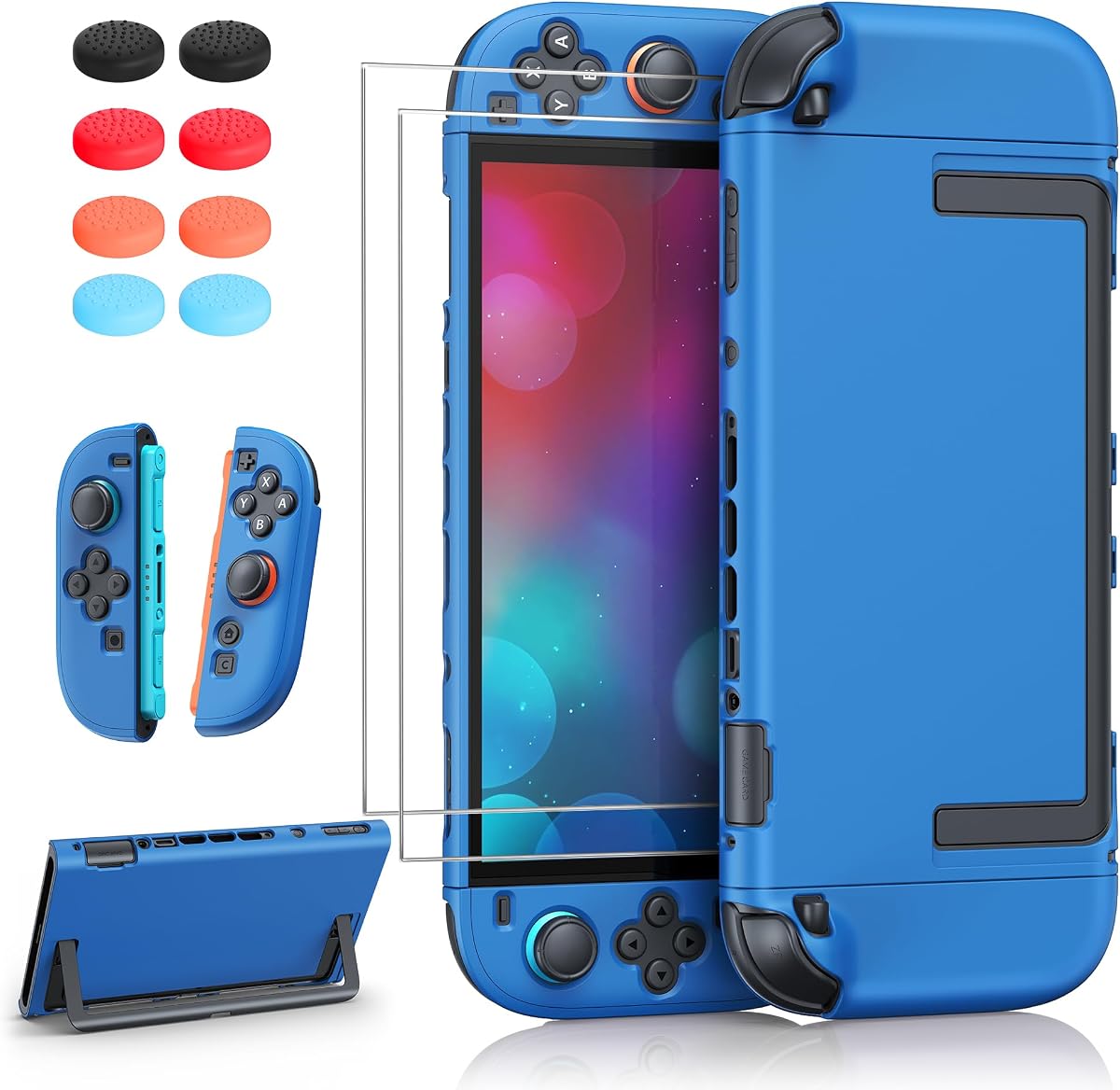
This budget option offers a 4.4 star rating and includes valuable accessories like screen protectors and thumb caps. It is designed to dock directly into the Switch 2 dock without needing case removal which simplifies daily TV use. The U-shaped opening ensures the built-in kickstand works freely for tabletop play.
We may earn a commission when you buy through this link, at no additional cost to you.
The grip design improves hand support significantly during long gaming sessions. Users appreciate the premium TPU and hard PC material mix that keeps the case slim while protecting against bumps. The included accessories make this a complete starter kit for new owners who want full protection.
Some users note it feels a bit tight when docking which is normal by design to prevent wobbling. This secure hold can be slightly harder to remove initially but ensures stability during TV mode. For the price this balance of protection and convenience is hard to beat.
This is ideal for buyers who want reliable protection and accessories without spending extra. It suits students or casual gamers who play mostly at home or in bags. We recommend this if you want a complete package that covers screen and console together.
The package includes screen protectors and thumb caps which adds value to the purchase.
You can dock the console directly without removing the case for quick TV mode.
We may earn a commission when you buy through this link, at no additional cost to you.
This premium case holds a perfect 5.0 star rating from buyers who love its comprehensive protection features. It protects both the front and rear using a detachable front cover so you can dock without removing the main shell. This keeps your screen safe during travel while allowing easy TV connection.
We may earn a commission when you buy through this link, at no additional cost to you.
The aluminum alloy kickstand offers stepless adjustment from 0 to 120 degrees which is far more stable than plastic alternatives. It also includes six locking game card slots in the front cover so you can carry your library securely. The military-grade drop protection ensures durability for travel and daily use.
The trade-off is a heavier weight compared to slim cases due to the full 360 coverage and metal stand. This extra bulk might not suit everyone but the protection and features justify the difference. If you want the most complete security this case delivers unmatched value.
We recommend this for travelers or collectors who carry their console frequently. It is perfect for those who want all-in-one protection with storage built in. You will appreciate the premium materials and thoughtful design in this top-tier option.
This case covers the front and back with a detachable front cover for complete safety.
Six locking game card slots keep your library secure and organized in your bag.
We may earn a commission when you buy through this link, at no additional cost to you.
This blue case features a 4.3 star rating and a unique hidden spring-latch button design for Joy-Con release. You can detach controllers in one second without removing the entire shell which speeds up multiplayer sessions. It also supports seamless dock and kickstand compatibility for flexible play modes.
We may earn a commission when you buy through this link, at no additional cost to you.
The carbon fiber textured grip solves daily pain points by providing an anti-slip surface that resists fingerprints. Users find this texture elevates the look of their console while making it easier to hold during intense gameplay. The PC material resists yellowing and keeps the case looking fresh over time.
One limitation is the lack of front screen protection which leaves your display vulnerable without a separate screen protector. However the thickened corners absorb significant impact shocks which helps prevent costly repairs from drops. This is a solid choice for casual use.
We suggest this for gamers who prioritize easy Joy-Con access and a premium look. It works well for both handheld and docked play with full port access. If you want a stylish case that protects the back and sides this is a strong contender.
The hidden latch button allows you to detach Joy-Cons in just one second.
The carbon fiber pattern provides an anti-slip surface that resists fingerprints.
We may earn a commission when you buy through this link, at no additional cost to you.
This case receives a 4.5 star rating from users who value the integrated hollow aluminum-alloy stand for tabletop play. It is built exclusively for the Switch 2 2025 release and offers seamless docking without case removal. The adjustable stand supports viewing angles from 30 to 90 degrees for any setup.
We may earn a commission when you buy through this link, at no additional cost to you.
The multi-layer hard shell provides balanced protection at 145 grams which preserves the natural feel of the console. Raised edges protect the screen and buttons during daily use while precise cutouts ensure all ports remain accessible. The ergonomic grip improves comfort during long sessions significantly.
The main trade-off is the added bulk from the foldable stand which might not fit in slim travel bags easily. However for home or desk use the flexibility it offers is worth it. It keeps your console stable without needing external accessories.
We recommend this for tabletop gamers who want a stable stand built right into the case. It suits users who play at desks or trays often. If you need reliable protection and a hands-free option this case delivers great value.
The hollow aluminum stand allows viewing angles from 30 to 90 degrees.
The precision fit lets you dock without taking off the protective case.
We may earn a commission when you buy through this link, at no additional cost to you.
This grip case offers a 4.1 star rating and is designed exclusively for the Switch 2 to deliver a perfect fit. It provides a comfortable non-slip gaming grip that supports long sessions without fatigue which many users appreciate. The quick-release function lets you remove JoyCons without taking off the entire grip.
We may earn a commission when you buy through this link, at no additional cost to you.
Belkin includes at least 75 percent recycled plastic in the construction which appeals to environmentally conscious buyers. The case works with the original dock and travel bag so you can keep it on during TV play. It ensures secure handling whether handheld or docked.
The main downside is limited impact protection compared to hard shells which might leave your console vulnerable to drops. This is better for grip enhancement than heavy-duty protection. However the brand reputation and ergonomic comfort are strong points for daily use.
We suggest this for users who already have a separate carrying case but need better handheld control. It suits casual gamers who play mostly at home. If you prioritize comfort and brand trust this case is a reliable choice.
The textured grip supports long play sessions without hand fatigue.
Remove JoyCons without taking off the entire grip for easy access.
We may earn a commission when you buy through this link, at no additional cost to you.
This case delivers a 4.2 star rating and includes a 10,000mAh power bank for extended gaming sessions on the go. It features dual-layer full protection with a soft inner frame and hard outer shell to guard against drops. The magnetic front cover includes 12 built-in silicone game card slots for storage.
We may earn a commission when you buy through this link, at no additional cost to you.
The detachable design ensures a perfect fit with the official dock though you must remove the power bank first. This makes it ideal for travel or marathon gaming where long battery life is essential. The contoured grip fits naturally in your hands to reduce hand fatigue.
One trade-off is that you must remove the power bank before placing the console in the dock which adds a step. This extra weight can be tiring if you hold the console for long periods without the dock. However the battery power is a huge convenience.
We recommend this for travelers who need to charge their console on the go. It suits users who play outdoors or during commutes. If you want a built-in battery this case offers excellent value for its functionality.
The 10,000mAh power bank extends your battery life for travel.
Twelve slots on the cover keep your game cards organized and safe.
We may earn a commission when you buy through this link, at no additional cost to you.
This case earns a 4.4 star rating and features a split design that makes installation and removal quick and easy. It includes an extra foldable stand that replaces the built-in kickstand for better tabletop stability. Thumb grip caps are also part of the bundle for enhanced control.
We may earn a commission when you buy through this link, at no additional cost to you.
The slim and lightweight PC material keeps the case fully dockable without needing removal for TV or charging. Raised support on the Joy-Con grips improves handheld comfort which helps reduce fatigue during long sessions. Precise cutouts give smooth access to all ports and buttons.
The main limitation is that it is not compatible with Joy-Con 2 Charging Grip which might be a downside for some users. However for standard play modes the protection and accessories offer great value. The solid color design is aesthetically pleasing too.
We suggest this for buyers who want a complete bundle with stand and grips included. It suits gamers who play at home or travel frequently. If you need easy install and extra accessories this case is a smart pick.
Separate covers allow fast installation and removal for daily use.
An included foldable stand replaces the built-in kickstand for stability.
We may earn a commission when you buy through this link, at no additional cost to you.
This case receives a 4.4 star rating and comes as an all-in-one bundle with two tempered glass screen protectors and thumb grips. It is specially designed for the Switch 2 console and offers full protection without needing removal when docking. The separate hard cases for controllers add extra safety.
We may earn a commission when you buy through this link, at no additional cost to you.
The ultra-slim separable case adds minimal bulk which helps it fit easily into most travel pouches. The PC hard shell with matte finish provides reliable protection against bumps and shocks during daily use. This kit is perfect for those who want essential protection and extras together.
One note is that slight color variations may occur due to screen settings so check the actual color carefully. For basic use the included accessories cover most of your needs well. It is a great starter kit for new console owners.
We recommend this for buyers who want a complete value bundle for protection and accessories. It suits students or casual gamers on a budget. If you need screen protection and controller cases this is a convenient single option.
The kit includes screen protectors and thumb grips for complete protection.
The slim design ensures your console fits easily in bags and cases.
We may earn a commission when you buy through this link, at no additional cost to you.
This case gets a 4.6 star rating and features exclusive solid colors like Matcha Green with matching silicone button toppers. The 3-piece split structure makes handheld and tabletop play seamless while raised arc grips support your palms securely. It supports charging and game card swapping without removal.
We may earn a commission when you buy through this link, at no additional cost to you.
The PC hard shell with silicone pads resists bumps and scratches while providing a comfortable hold. Users love the mix-and-match aesthetic that elevates the look of their console. The included sticker and caps allow for a unified design theme that is washable.
It is more of a protective skin than a heavy-duty armored case so it is best for light daily use. However for those who want style and basic protection this works very well. The price point is reasonable for the included accessories.
We suggest this for gamers who want to personalize their console with a cute look. It suits casual players who play mostly at home. If you prioritize design and a comfortable grip this case is a strong option.
Solid colors with matching button toppers create a clean mix-and-match style.
The three-piece design keeps JoyCons snug without shifting during play.
We may earn a commission when you buy through this link, at no additional cost to you.
Selecting the right dockable case requires understanding your play habits and protection needs. We break down the key factors to consider before making your purchase.
Ensure the case is explicitly labeled as dockable so you can slide it into your TV dock without removal. Some hard shells block ports or are too thick to fit securely. Check for alignment cutouts that match your console's USB-C and HDMI ports exactly.
Always verify that the case fits the official dock to avoid connection issues.
Look for military-grade materials like PC and TPU that resist drops and scratches. Hard shells offer better scratch resistance while soft TPU absorbs impact shock better. Hybrid designs combine both to give you balanced protection for daily handling.
Choose hard PC for scratch resistance and soft TPU for shock absorption.
Check if the case allows quick Joy-Con removal or if it locks them securely. Some designs include hinge mechanisms or spring latches to make sharing easier. Others keep the controllers connected for stability which might not suit multiplayer gamers.
Decide whether you need quick access or secure connections for play.
Some cases block the built-in kickstand so look for U-shaped cutouts if tabletop play matters. Others come with their own aluminum stand which is more stable for desk use. If you need tabletop mode ensure the case supports the stand fully.
Ensure the case leaves the built-in stand free or includes a better alternative.
Many bundles include screen protectors thumb caps or card slots which adds value to the purchase. Consider if you need these extras to save money on buying them separately. A complete kit can offer a cleaner solution than buying pieces individually.
Look for bundles that include screen protection or card storage.
A good grip reduces fatigue during long sessions so look for textured surfaces or ergonomic shaping. Some cases add raised arcs for palm support while others keep a slim profile. Test the feel if possible since grip comfort varies by hand size.
Prioritize cases with textured grips or ergonomic shaping.
Heavier cases provide better protection but can be tiring if you hold the console often. Lighter cases are great for travel but might not offer as much drop resistance. Balance your need for safety against the weight you want to carry.
Choose a weight that suits your handheld play style.
Prices vary significantly from budget options to premium designs. Budget cases often lack extra features while premium ones include stands and card slots. Set a budget that covers essential protection and any must-have extras.
Set a realistic budget that includes any must-have extras.
Install the case by aligning all buttons and ports correctly to prevent damage. Press firmly on the corners to ensure it sits flush with the console edges. Check that the stand opens and closes without obstruction after installing.
Clean the case regularly with a soft dry cloth to remove dust and oils. Avoid harsh chemicals that might degrade the material over time. If using a front cover wipe it gently to keep it clear.
Remove the case only when you need deep cleaning or to change it. Be careful not to force the Joy-Con release mechanisms to avoid wear. Store the case in a cool dry place away from direct sunlight.
Yes most cases on this list are specifically designed to be dockable without removal. Ensure the case is slim enough to fit your dock ports. Check for precise cutouts around the HDMI and USB-C connections to avoid blocking.
It depends on the design so look for cases with U-shaped cutouts on the back. Some cases block the kickstand entirely which limits tabletop play. We recommend checking the product details for stand compatibility.
Most only protect the back and sides so you will need a separate screen protector. Some premium models include a front cover for full 360-degree protection. Check if the bundle includes a tempered glass protector.
Many cases include a quick-release button or hinge mechanism for this purpose. You can usually press a button on the back to detach controllers safely. Avoid pulling too hard to prevent damage to the connectors.
Compatibility varies by design and brand so always check product details carefully. Some cases fit official docks but might not work with third-party options. If possible test the dock before making your final purchase decision.
PC hard shells resist scratches while TPU absorbs shock from drops effectively. Hybrid cases combine both materials to give you balanced protection. Look for military-grade certifications to ensure durability against daily wear.
Most add about 100 to 150 grams to the console weight. Heavier cases offer more protection but might fatigue your hands faster. Consider your play style to decide if the extra weight is worth it.
Yes precise cutouts ensure the USB-C port remains fully accessible for charging. You can use USB-C cables or your official dock without removing the case. Always align the case correctly to avoid blocking the ports.
We have reviewed ten top cases that balance protection with seamless dock functionality. The SUPCASE leads as our Editor's Choice while the ewnol offers great value for budgets. The Mumba Fortress stands out with its premium features and perfect rating.
Prioritize dock compatibility and kickstand support based on your daily habits. Heavy-duty protection suits travelers while slim cases fit casual players better. Always check what accessories are included before you buy.
Remember to check current prices and availability as these can change often. Read the latest reviews to ensure the product meets your needs now. Pick the one that fits your style and gameplay best today.