
USB C Docking Station Dual Monitor for HP,Laptop Docking Station 3 Monitors
4.3Editor score
Affordable Multiport Solution
4K Dual Triple Display Output
100W USB C PD Charging
Compare the top 10 docking station for 3 monitors options for 2026. We review features, compatibility, and performance to help you choose the perfect multi-moni
Finding the right docking station for 3 monitors can transform your workspace into a powerhouse of productivity. Whether you are a professional trader, a creative designer, or a developer, having three screens allows you to multitask efficiently without constant window switching.
We have carefully evaluated ten top-rated models available in October 2026. Our analysis covers connection types, power delivery capabilities, display support including macOS limitations, and overall build quality to ensure you get a reliable solution for your specific laptop.
Each pick in this guide highlights unique strengths like smart displays, high-speed data transfer, or included power adapters. Please note that product availability and prices may change over time, so verify current details before making your final purchase decision.
4.3Editor score

4.3Editor score

4.4Editor score
This side-by-side comparison highlights key specifications for all ten selected docking stations. Review the ports, power delivery, and display capabilities to find the model that best fits your workflow requirements and budget constraints.


The Selore Laptop Docking Station stands out as a top contender for those needing three monitors with unique smart features. It earns a high rating thanks to its versatile connectivity options and an innovative LCD screen that displays real-time weather and system status.
We may earn a commission when you buy through this link, at no additional cost to you.
This unit consolidates your workstation by connecting three monitors via MST on Windows, offering combinations like HDMI plus DisplayPort for optimal resolution distribution. The built-in WiFi syncs weather data directly to the LCD, providing quick access to essential information without touching your phone.
While excellent for Windows users, Mac owners should note that extended displays are not supported due to chip limitations, limiting this device to mirror mode on Apple systems. Additionally, you must supply your own 87W or higher power adapter to ensure all functions work properly.
If you want a dock that combines productivity with convenience, this model is highly recommended for Windows-based creative and data tasks. Its privacy button and sturdy suction base make it a reliable choice for professionals who value efficiency and desk stability.
The integrated screen shows time, weather, and charging status, reducing desk clutter by removing the need for separate widgets or apps.
With USB 3.1 ports offering 10Gbps speeds, large files transfer quickly, making it ideal for photographers and video editors handling heavy media.
We may earn a commission when you buy through this link, at no additional cost to you.
The TobenONE 18-in-1 model offers exceptional connectivity with nine USB ports alone, making it perfect for users with many peripherals. It supports triple 4K displays at 60Hz, ensuring smooth visuals for editing and multitasking without lag.
We may earn a commission when you buy through this link, at no additional cost to you.
By eliminating cable clutter through its extensive port layout, this docking station keeps your workspace neat and orderly. It transforms your laptop into a powerhouse capable of handling video editing and conferencing simultaneously while maintaining reliable high-speed data connections.
However, this device is specifically optimized for Windows and Chrome OS systems and is not recommended for Mac users seeking extended displays. You will also need to purchase a separate power supply to achieve the advertised 100W fast charging performance.
For those who need every possible connection in one place, this model delivers a comprehensive all-in-one solution. Its design prioritizes efficiency and productivity, making it a strong choice for busy home workspaces or offices with numerous devices.
Nine USB ports allow you to connect keyboards, mice, and drives simultaneously without needing additional hubs.
Supporting 60Hz on triple 4K displays ensures smooth motion and crisp detail for professional creative work.
We may earn a commission when you buy through this link, at no additional cost to you.
Plugable delivers a fleet-ready solution designed for enterprise deployment with standardized ports and robust support. Its DisplayLink technology allows three extended monitors on Macs that normally limit external displays, making it versatile for mixed device environments.
We may earn a commission when you buy through this link, at no additional cost to you.
This dock includes a power adapter and supports 100W laptop charging plus 20W for mobile devices. It meets compliance standards like TAA and NDAA, making it ideal for government or business IT departments seeking a unified and reliable desktop solution.
Users should be aware that protected content like Netflix is not supported due to HDCP limitations. Additionally, Mac users must install DisplayLink Manager drivers to enable multi-monitor functionality, which may add a setup step for casual users.
If you need a dependable dock for office work or education, this Plugable model offers exceptional longevity and service. Its comprehensive connectivity and official support make it a secure investment for professional workstations that must run without interruption.
Meets TAA and NDAA requirements ensuring it is suitable for government and secure enterprise procurement.
DisplayLink technology bypasses Apple hardware limits to allow three monitors on M1 and later Macs.
We may earn a commission when you buy through this link, at no additional cost to you.
Designed for hybrid teams, this Plugable dock supports up to three HDMI monitors using DisplayLink and Alt Mode technologies. It transforms notebooks into multi-monitor workstations, streamlining IT deployments in hot-desking environments or managed offices.
We may earn a commission when you buy through this link, at no additional cost to you.
The unit ensures continuous host system charging with 100W Power Delivery and provides stable network access via Gigabit Ethernet. Its compatibility spans macOS, Windows, and ChromeOS, making it a versatile choice for diverse device fleets in modern organizations.
However, it does not support Linux systems and blocks protected content playback like streaming services. Users might need to install drivers for full functionality on some macOS versions which can be a hurdle for non-technical staff.
For organizations prioritizing reliable networking and easy device connectivity, this is a strong enterprise-grade option. Its expert support and compatibility guarantee ensure that any issues are resolved quickly to minimize downtime and maintain productivity at scale.
Gigabit Ethernet ensures stable low-latency internet which is vital for cloud work and video conferencing.
Works across Windows macOS and ChromeOS environments providing flexibility for heterogeneous IT setups.
We may earn a commission when you buy through this link, at no additional cost to you.
The HoDo docking station offers a cost-effective entry point for those needing multiple displays without breaking the bank. It supports dual or triple 4K video output through HDMI, DisplayPort, and VGA, providing flexibility for various monitor types.
We may earn a commission when you buy through this link, at no additional cost to you.
This hub delivers up to 100W PD charging and includes USB 2.0 ports for basic peripherals like keyboards and mice. While simple, it effectively turns a laptop into a multi-screen setup for data analysis or standard office work efficiently.
Be aware that using the VGA port can limit resolution to 1080P across displays and Mac systems only support mirror mode. Ensure your laptop supports DisplayPort Alternate Mode since data-only ports will not work with this adapter.
If you are looking for a functional and budget-friendly solution, this HoDo model meets essential needs well. Its combination of video options and high-power charging makes it a practical choice for home offices seeking value.
This provides an economical way to add a third screen without expensive specialized hardware or adapters.
Supports up to 100W input keeping your laptop charged even while driving multiple external displays.
We may earn a commission when you buy through this link, at no additional cost to you.
Acer delivers a premium aluminum hub that combines style with functionality including a generous 110W power adapter. It supports three independent screens on Windows via MST and offers high-speed data transfer with dual USB-C and USB-A ports.
We may earn a commission when you buy through this link, at no additional cost to you.
The included power adapter ensures your laptop stays charged under heavy workloads without needing separate bricks. A security slot allows for physical theft deterrence adding peace of mind in shared workspaces or dorm environments.
While it performs well on Windows note that Mac extended displays are not supported. Triple 4K output also requires your laptop GPU to support Display Stream Compression which may not be available on all devices.
This unit is perfect for professionals wanting a complete and neat workstation solution with minimal additional purchases. Its stable performance and included accessories make it an excellent value for those seeking reliability and build quality.
The bundled 110W adapter provides robust power so you do not need to buy extra charging supplies separately.
A security slot enables you to lock the dock to your desk protecting hardware from theft in public spaces.
We may earn a commission when you buy through this link, at no additional cost to you.
This Selore hub combines speed with simplicity offering triple HDMI outputs and USB 3.1 ports for ultra-fast transfers. It supports 4K at 60Hz on Windows enabling crisp visuals for graphics work while requiring no driver installation for use.
We may earn a commission when you buy through this link, at no additional cost to you.
The device includes a dedicated screen control button allowing easy switching between mirror and extend modes on Windows. Its Gigabit Ethernet port ensures stable wired internet essential for video calls and cloud gaming sessions.
Mac users will find that extended displays are not supported due to OS limits but the hub remains functional for mirrors. You must confirm your laptop supports DisplayPort Alt Mode or Thunderbolt before purchasing to ensure video output works.
For Windows professionals needing fast data and high-resolution displays this hub is a robust and reliable pick. Its plug and play design and privacy features make it a convenient choice for productivity and security.
With 10Gbps transfers photographers and editors can offload large media files quickly without waiting around.
A one-touch button lets you instantly switch screens to protect sensitive information in open work areas.
We may earn a commission when you buy through this link, at no additional cost to you.
TobenONE provides a professional grade solution with DisplayLink allowing up to four monitors on supported systems. It includes a powerful 120W power adapter ensuring your laptop stays powered even during heavy use without separate charging units.
We may earn a commission when you buy through this link, at no additional cost to you.
With eighteen ports total this station handles massive multitasking including video production and financial analysis. It supports wide OS compatibility including Windows macOS and Ubuntu allowing flexibility across different work environments.
Note that protected content like Netflix cannot be watched due to screen recording restrictions. Drivers must be downloaded before use and Linux support is limited which might affect some technical users.
If you need maximum screen real estate and powerful charging this is an ideal choice for professionals. Its expert support and high capacity make it a strong investment for those running complex workflows on a single connection.
Supports up to four monitors providing exceptional workspace for traders and developers needing multiple charts.
The bundled 120W adapter removes the need for a laptop brick simplifying desk setup significantly.
We may earn a commission when you buy through this link, at no additional cost to you.
This Plugable dock simplifies setup by working driverless on modern Windows and ChromeOS laptops using MST technology. It supports flexible displays from dual 4K to triple 1080p making it adaptable to various monitor budgets and sizes.
We may earn a commission when you buy through this link, at no additional cost to you.
Beyond video it offers 2.5Gbps Ethernet for faster internet and a dedicated 30W USB-C port for charging phones. The 15-port design ensures you have enough connections for storage audio and accessories without needing extra hubs.
Mac users should avoid this model as it is designed specifically for Windows and ChromeOS systems. Also be aware that video output requires your laptop to support USB-C Alt Mode which older devices may not have.
If you want a plug and play experience without extra software this is a top choice for productivity. Its network speed and dedicated charging make it a practical and efficient solution for modern workstations.
Plug and play setup means you do not need to install drivers saving time on system configuration.
2.5Gbps Ethernet offers better speed than standard Gigabit ideal for large file transfers and streaming.
We may earn a commission when you buy through this link, at no additional cost to you.
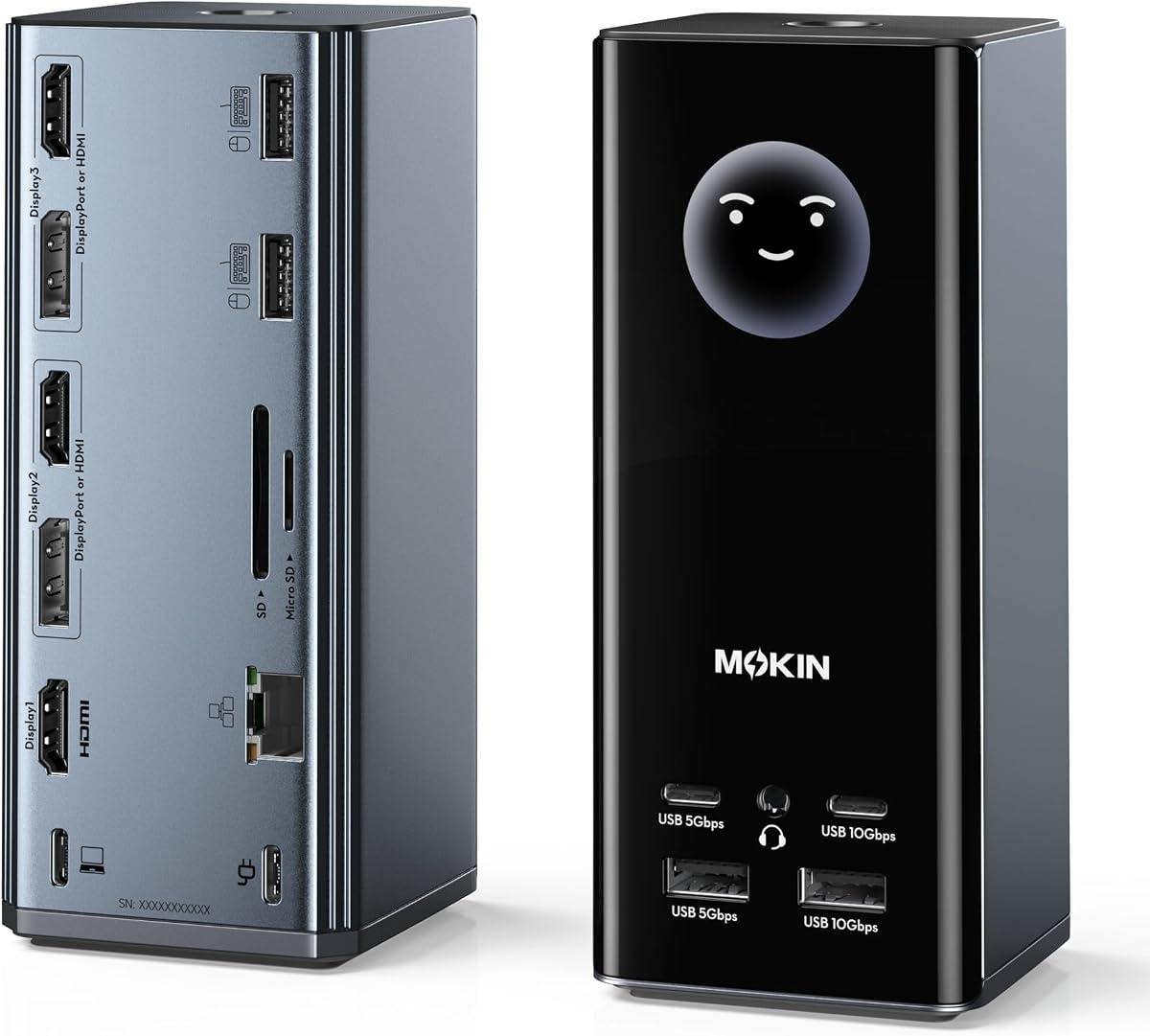
MOKiN enhances your desk with smart features including a WiFi synced LCD that shows real-time weather and charging status. It supports flexible combinations of HDMI and DP ports allowing three screens for Windows users with high-resolution capabilities.
We may earn a commission when you buy through this link, at no additional cost to you.
The visual intelligence screen helps you monitor workstation health like port connections and resolutions at a glance. A privacy lock button quickly turns off screens protecting data while silicone suction cups keep the dock stable on any surface.
To fully utilize the display you might need to contact support for firmware updates. Mac users should note that extended displays are not supported and the weather feature needs network connectivity to function.
This dock is perfect for tech enthusiasts who appreciate smart functionality combined with powerful connectivity. Its blend of utility and style offers a modern approach to organizing a multi-monitor workstation efficiently.
The LCD shows charging wattage and port status helping you diagnose connection issues quickly.
A lock button and suction cups ensure security and physical safety during daily use.
We may earn a commission when you buy through this link, at no additional cost to you.
Selecting the right docking station depends on your specific laptop and monitor needs. Understanding key factors ensures you avoid compatibility issues and get the performance required for your workflow.
Check if your laptop has a USB-C port that supports DisplayPort Alternate Mode or Thunderbolt. Without this video output will not work. Older ports might only handle data and charging.
Decide if you need 4K at 60Hz or lower resolutions. Some docks split bandwidth so one screen might run at 30Hz. Ensure the dock supports the refresh rate your monitors require.
MacBooks often limit external displays to one or two depending on the chip. DisplayLink docks can bypass this but may require drivers. Windows typically supports more monitors via MST.
Look for a dock that supplies enough watts to charge your laptop while running three screens. Most need around 100W input. Verify if the power adapter is included in the box.
Assess how many peripherals you connect like drives or mice. More USB ports reduce the need for extra hubs. Ethernet and SD card slots add convenience for network and media tasks.
Aluminum bodies dissipate heat better during long sessions. Non-slip bases prevent the dock from sliding when plugging cables in. Durability matters for daily heavy use.
Keep the dock in a well-ventilated area to prevent overheating. Avoid bending cables sharply during storage and regularly dust the ports to maintain reliable connections over time.
Yes but it depends on your Mac model. Intel Macs support multiple displays via MST while Apple Silicon chips often limit to one external display unless you use DisplayLink docks with drivers.
Many docks require an external power supply to deliver enough energy for three screens and laptop charging. Always check if an adapter is included before purchasing to avoid extra costs.
It allows USB-C ports to send video signals. Without this feature your laptop cannot output to external monitors via USB-C so verify your device supports it before buying a dock.
MacOS restricts extended displays on many modern chips. Unless the dock uses DisplayLink technology to create virtual graphics cards you will likely only see mirrored outputs on external screens.
Yes most docks allow combining HDMI and DisplayPort inputs for a three-screen setup. Just ensure the total bandwidth matches your resolution needs to avoid dropping refresh rates.
Some docks are designed primarily for Windows and macOS. While basic ports might work video output often requires specific drivers that may not be available for Linux distributions.
Prices and availability change often so verify details on retailer sites before buying. Finding the right dock will transform your laptop into a powerful and efficient multi-monitor workstation.