
THUSTAR 8MP Document Camera & Webcam 4K
4.4Editor score
Foldable compact design
Dual microphones included
Adjustable LED lighting
Finding the right document projector for classroom instruction is essential for modern educators who need to display physical materials clearly to every student in the room.
We have evaluated ten leading models based on resolution, connectivity options, ease of setup, and overall performance to help you choose the best tool for your teaching needs.
Each product overview highlights key specifications and real-world usability, though please note that pricing and availability can change frequently on retailer sites.
4.4Editor score

4.5Editor score

4.6Editor score
As an Amazon Associate we earn from qualifying purchases.
The following table provides a side-by-side comparison of all ten document projectors, highlighting their key specifications to help you make an informed decision quickly.





The IPEVO V4K stands out as a top choice for educators needing high-definition visuals in the classroom with its 8MP camera capturing ultra-sharp images up to 3264 by 2448 pixels.
We may earn a commission when you buy through this link, at no additional cost to you.
Its high frame rate ensures lag-free streaming during live demos while the Sony CMOS sensor delivers exceptional noise reduction making it effective even in dimly lit environments.
While the USB-only connection limits wireless flexibility the fast focusing speed and multi-jointed stand make switching between materials seamless and intuitive for daily use.
For teachers prioritizing image clarity and reliability the V4K is a strong recommendation that integrates smoothly with Mac Windows and Chromebook systems.
The 8 Megapixel sensor ensures fine details in documents or artwork are visible to students at the back of the room.
The multi-jointed stand allows for easy adjustment to capture various object heights and angles without destabilizing the camera.
We may earn a commission when you buy through this link, at no additional cost to you.
The Apollo Overhead Projector offers a traditional but effective solution for classrooms that rely on overhead transparencies and physical documents for instruction.
We may earn a commission when you buy through this link, at no additional cost to you.
With a 2000 Lumen output it ensures visibility even in rooms with moderate ambient light while the open head design allows for quick changes of materials.
However its larger size and conventional design may not suit modern digital setups but it remains a solid option for budget-conscious schools needing brightness.
This projector is ideal for educators who prefer a simple plug-and-play experience without the complexity of digital cameras or software integration.
The 2000 Lumen output ensures that projected images remain visible and clear even when classroom lights are not fully dimmed.
The open head design allows teachers to easily place and remove transparencies or documents during a presentation without moving the unit.
We may earn a commission when you buy through this link, at no additional cost to you.
The IPEVO VZ-X delivers premium performance with its versatile connectivity including Wi-Fi HDMI and USB which allows seamless integration into modern classroom technology setups.
We may earn a commission when you buy through this link, at no additional cost to you.
Its near 4K quality in USB mode and robust battery life of up to 12 hours ensure uninterrupted presentations across multiple classes without needing a power outlet.
While the cost is higher than standard models the freedom to move around the room and connect wirelessly makes it a valuable investment for dynamic teaching environments.
Educators seeking maximum flexibility and high-quality video should consider the VZ-X as a top-tier document projector solution for interactive lessons.
With up to 33 feet of wireless range teachers can demonstrate materials from anywhere in the classroom without being tethered to a computer.
The built-in battery supports a full school day of use allowing for presentations in any room without finding a power source.
We may earn a commission when you buy through this link, at no additional cost to you.
The THUSTAR 8MP document camera offers an excellent balance of features and affordability making it a top choice for schools looking for cost-effective visual tools.
We may earn a commission when you buy through this link, at no additional cost to you.
It supports 4K video transmission and includes dual microphones to enhance audio quality during online sessions or live demonstrations in the classroom.
The foldable design saves space on desks while the adjustable LED lights ensure clear visibility of objects in various lighting conditions throughout the day.
For educators needing a reliable and budget-friendly option the THUSTAR provides solid performance and easy compatibility with Windows Mac and Chrome OS systems.
With a competitive price point this camera allows schools to equip multiple classrooms without stretching the budget for technology.
Built-in dual microphones reduce the need for additional hardware ensuring clear sound during video calls and presentations.
We may earn a commission when you buy through this link, at no additional cost to you.
The INSWAN INS-2 is designed for professional educators who need to display large documents or artwork with exceptional clarity using its 13MP SONY sensor.
We may earn a commission when you buy through this link, at no additional cost to you.
Its ability to capture up to A3 size documents ensures that spreadsheets and diagrams are fully visible without cropping during presentations.
The included all-in-one software suite adds value with tools like OCR and annotation making it easy to interact with the projected content live.
Ideal for art instructors or science teachers this camera combines high resolution with practical features to enhance detailed visual learning.
The A3 capture capability allows for entire pages of text or diagrams to be shown without needing to stitch images together.
Download the Documate software to access additional tools like video recording and whiteboard annotations for enhanced teaching.
We may earn a commission when you buy through this link, at no additional cost to you.
The Lumens DC166 features a robust 6x optical zoom allowing for detailed close-ups of small objects which is essential for science or math demonstrations.
We may earn a commission when you buy through this link, at no additional cost to you.
It offers flexibility with internal memory for JPEG images and an SD card slot meaning you can save and share content without connecting to a computer.
While it is priced higher than many competitors its optical zoom quality and compatibility with interactive whiteboards make it a solid investment for advanced classrooms.
Educators needing detailed magnification capabilities will appreciate the precision this unit offers compared to digital zoom alternatives.
The 6x optical zoom provides true detail magnification without pixelation allowing students to see fine textures and text clearly.
Internal memory allows for quick image capture and playback without needing to rely on a constant internet or computer connection.
We may earn a commission when you buy through this link, at no additional cost to you.
The Epson PowerLite 118 is a robust LCD projector that excels in brightness and color accuracy making it ideal for large classrooms needing a reliable display solution.
We may earn a commission when you buy through this link, at no additional cost to you.
Its 3LCD technology ensures vibrant images while the long lamp life of 17000 hours reduces the need for frequent replacements lowering long-term maintenance costs.
While it does not function as a standalone document camera it pairs well with external cameras to create a complete projection setup for teaching.
Educators looking for a durable projector with excellent image quality and a built-in speaker will find this model highly effective.
With up to 17000 hours of lamp life this projector can last through multiple school years with minimal interruption or maintenance.
Ceiling mount options allow for installation that saves desk space and provides a clear view for all students in the room.
We may earn a commission when you buy through this link, at no additional cost to you.
The DLP Business Projector delivers exceptional brightness with 3300 Lumens ensuring that presentations remain visible even in classrooms with windows and natural light.
We may earn a commission when you buy through this link, at no additional cost to you.
Its quick start design reduces wait times before lessons begin making it perfect for back-to-back classes where every minute counts.
While it requires a separate document camera for physical materials its ease of connection and high performance make it a strong candidate for professional learning environments.
For institutions prioritizing visibility in well-lit rooms this projector offers a straightforward and effective solution for daily use.
The 3300 Lumens output ensures text and images stand out clearly against ambient light so students do not miss details.
Quick start functionality means the projector is ready to display content almost immediately after powering on.
We may earn a commission when you buy through this link, at no additional cost to you.
The Epson PowerLite E20 offers vibrant true-to-life images through its 3LCD technology making it suitable for educational presentations requiring accurate color representation.
We may earn a commission when you buy through this link, at no additional cost to you.
With a durable design and flexible construction it can be easily positioned anywhere in the classroom whether on a desk or mounted to the ceiling.
Although it has a slightly shorter lamp life than other Epson models it remains a cost-effective option for schools needing reliable projection technology.
Educators seeking a balance between price and performance will find the E20 a reliable choice for standard teaching needs.
The 3LCD technology ensures colors remain vivid and true to the source material which is important for visual arts and science.
Flexible construction allows for easy mounting or placement ensuring the projector can be adapted to various classroom layouts.
We may earn a commission when you buy through this link, at no additional cost to you.
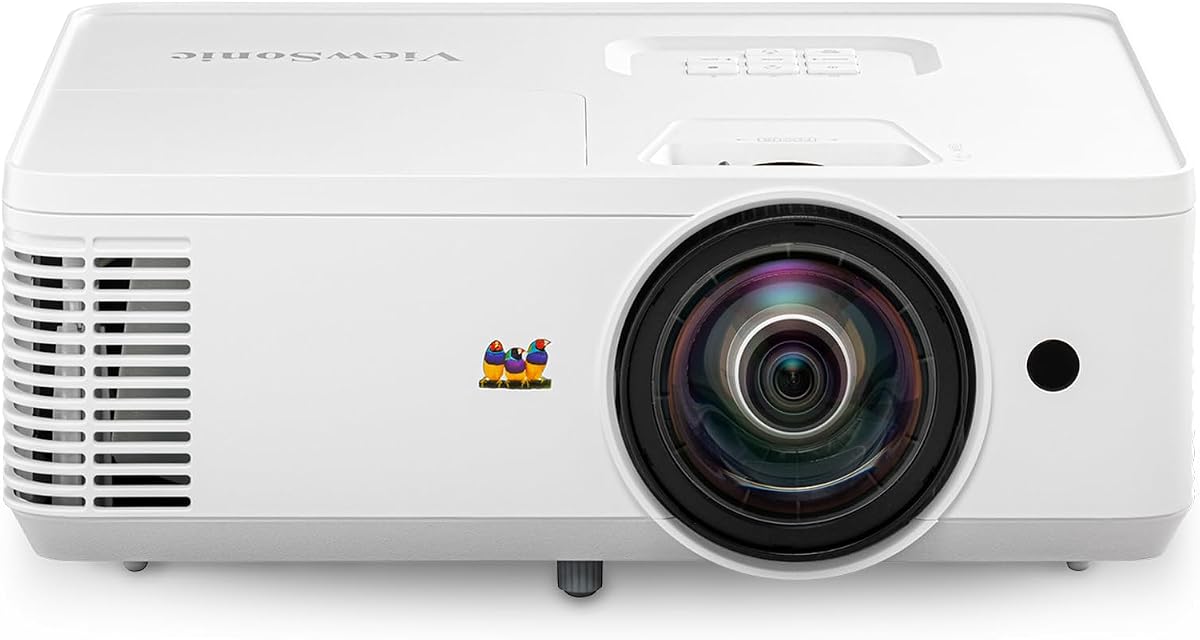
The ViewSonic PS502W Short Throw Projector is ideal for smaller classrooms as it can project large images from a very close distance without casting shadows.
We may earn a commission when you buy through this link, at no additional cost to you.
With 4000 ANSI lumens it maintains clarity even in moderate ambient light ensuring detailed visuals are visible during daytime lessons.
Instant power on and off capabilities eliminate warm-up times allowing for a smooth start to classes which enhances daily productivity.
Schools with limited space will appreciate the ability to create a large screen experience without requiring significant distance between the projector and the wall.
The 0.5 throw ratio allows for large projection sizes from just a few feet away making it perfect for compact classrooms.
Because it sits closer to the screen shadows from the presenter are minimized ensuring students always have a clear view.
We may earn a commission when you buy through this link, at no additional cost to you.
Selecting the right document projector involves considering various technical factors to ensure it meets the specific needs of your educational environment.
Resolution determines how clear and detailed your projected images will be so look for devices with at least 8MP or high-definition capabilities for crisp text and graphics.
Higher resolution ensures that students at the back of the room can see details clearly which is essential for reading documents or examining small objects.
Decide whether you need wired USB connections or wireless Wi-Fi and HDMI options to integrate seamlessly with your existing classroom computers and smartboards.
Wireless connectivity offers flexibility but may introduce latency while wired connections often provide faster and more stable data transfer.
If your classroom has windows or bright lights choose a projector with higher lumens to ensure visibility without needing to dim the room completely.
Brighter projectors allow for effective use during the day which maintains energy levels and classroom engagement.
A good document camera should have a multi-jointed stand that allows you to adjust the angle easily for capturing 3D objects or flat documents.
Flexible stands prevent interruptions during lessons and allow for quick adjustments when switching between different types of materials.
Ensure the device supports your operating system such as Windows Mac or Chrome OS to avoid installation issues or driver conflicts.
Compatible software often includes useful features like annotation and recording which can enhance your teaching experience significantly.
Determine your budget early on as prices vary widely from affordable USB cameras to premium wireless solutions with advanced features.
Balancing cost with necessary features ensures you get a product that offers long-term value without overspending on unnecessary extras.
Look for plug-and-play models that require minimal setup so you can start teaching immediately without troubleshooting technical issues.
User-friendly controls and intuitive interfaces save time and reduce frustration during busy school days.
Daily use in a classroom environment requires a durable build to withstand handling and potential accidents so check for robust construction quality.
A solid warranty provides peace of mind and ensures you are protected against defects or failures in the early years of ownership.
To get started connect your document projector to a computer or display using the appropriate USB or HDMI cable ensuring all devices are powered on.
Adjust the stand to the desired height and angle then focus the lens on your materials for a sharp and clear image on the screen.
Keep the lens clean with a microfiber cloth and avoid touching the camera sensor directly to maintain optimal image quality over time.
A document projector is a device that captures images of physical documents objects or materials and displays them on a large screen for the class to see. It acts as a bridge between physical materials and digital displays.
Most modern document projectors connect to a computer via USB or HDMI but some wireless models can connect directly to projectors or TVs without one. Check the specific requirements for your chosen model.
Yes but models with high brightness and lumens perform better in daylight. Using blinds or curtains can also help improve visibility in well-lit rooms.
Most cameras have an automatic focus feature but you can usually adjust focus manually using buttons on the camera or software on your computer for sharper details.
Wireless cameras offer more flexibility and mobility but wired connections often provide more stable performance and higher frame rates without latency issues.
Most work with standard video software like Zoom and Teams but many also come with specialized teaching software for annotation and recording.
We reviewed ten top document projectors ranging from budget-friendly cameras to high-end wireless solutions that meet diverse classroom needs.
When selecting a model prioritize resolution and connectivity to ensure smooth lessons that engage students effectively.
Always check current pricing and availability on retailer sites as these factors can change frequently for educational technology.