
Upgraded Watt Power Meter Plug
4.6Editor score
Monitors power and cost
Clear backlight display
Overload protection included
This guide compares the top energy consumption monitors for PC to help you track power usage, reduce electricity bills, and optimize your system efficiency
Monitoring your computer and PC power consumption is essential for managing electricity bills and ensuring system stability. High performance systems can draw significant power, making accurate tracking vital for homeowners and businesses alike.
We evaluated ten top-rated energy monitors based on accuracy, features, ease of use, and value. Our analysis includes plug-in meters and whole-home systems to cover various monitoring needs for PC users.
Each pick highlights key strengths and ideal use cases to help you choose the right device. Note that product availability and pricing may vary over time, so check current listings before purchasing.
4.6Editor score

4.6Editor score

4.3Editor score
This side-by-side comparison highlights key specifications and capabilities across all ten selected energy monitors to help you quickly identify the best fit for your PC and home energy tracking needs.


The Emporia Vue 3 stands out as a top choice for comprehensive energy monitoring. It offers real-time data access through a mobile app with UL certification ensuring safety for home use.
We may earn a commission when you buy through this link, at no additional cost to you.
Its 16 branch sensors allow precise tracking of individual circuits like PCs and gaming rigs. Users can configure settings to automate energy management and reduce peak demand costs effectively.
While installation requires access to your circuit panel, the detailed insights justify the effort. The system retains historical data in the cloud for long-term analysis and budgeting.
Ideal for homeowners seeking full visibility into energy usage. This monitor helps optimize consumption patterns and identify high-draw appliances for better efficiency management.
Monitor your PC and home power usage instantly through the intuitive mobile app available on iPhone and Android devices.
Track solar production and net metering performance to maximize savings and ensure your energy system operates efficiently.
We may earn a commission when you buy through this link, at no additional cost to you.
This plug-in meter offers an affordable entry into energy monitoring. It tracks power, voltage, and cost with a clear backlight for reading data day or night.
We may earn a commission when you buy through this link, at no additional cost to you.
Seven display modes provide flexibility to view specific metrics like power factor or cumulative energy. The backlight adjusts to save energy while keeping information visible.
Overload protection adds safety by warning users when power exceeds safe limits. Data memory ensures you don't lose readings even after unplugging the device.
Perfect for monitoring individual PCs or gaming stations. Its simplicity and low cost make it a practical choice for quick energy assessments.
The upgraded LCD display with backlight ensures you can read all energy parameters clearly in any lighting condition.
Built-in overload protection warns you if your appliance exceeds safe power levels to prevent electrical hazards.
We may earn a commission when you buy through this link, at no additional cost to you.
The Meross monitor prioritizes privacy with local data storage and Home Assistant support. It delivers precise power tracking with customizable alerts and no hidden subscription fees.
We may earn a commission when you buy through this link, at no additional cost to you.
Its ability to detect solar surplus allows automation to run high-draw tasks like charging when excess power is available. This maximizes solar savings and reduces grid reliance.
Installation involves connecting to your panel and configuring the app. While slightly technical, the level of control and integration justifies the effort for tech-savvy users.
Best for smart home enthusiasts seeking detailed control. It balances advanced features with privacy, making it a premium choice for comprehensive energy management.
All energy data stays local on your network ensuring complete privacy without cloud storage or third-party access.
Automatically powers high-use appliances when solar surplus is detected to reduce electricity bills and waste.
We may earn a commission when you buy through this link, at no additional cost to you.
This meter handles a wide voltage range from 90 to 250 volts with precise accuracy. Its compact design fits neatly into wall outlets without blocking the lower socket.
We may earn a commission when you buy through this link, at no additional cost to you.
Data memory retains readings for up to 90 days even during power outages. This ensures you never lose cumulative energy usage data when unplugging the device.
The cost calculator helps estimate electricity bills based on your set rates. It simplifies tracking energy costs without needing complex setups or subscriptions.
Suitable for households needing basic monitoring. Its reliability and accuracy make it a solid choice for tracking individual PC or appliance power usage.
Accurately measures power from 90 to 250 volts ensuring reliable performance across different electrical environments.
Its compact size leaves the lower outlet accessible so you can use both sockets when plugged in.
We may earn a commission when you buy through this link, at no additional cost to you.
This monitor supports 16 circuit sensors for detailed tracking across rooms or shared spaces. It includes billing templates for rental properties to allocate costs fairly.
We may earn a commission when you buy through this link, at no additional cost to you.
You can run the system without cloud access using your own MQTT server. This provides flexibility and privacy for users comfortable with advanced networking.
Installation involves connecting sensors to the circuit panel. The branch lines automatically match phases which simplifies setup compared to manual configuration.
Ideal for landlords or shared living situations. The ability to track specific circuits helps manage energy usage transparently and reduce disputes.
Track power usage by circuit to assign costs accurately in shared apartments or multi-unit properties without extra meters.
Run the system without internet access using your own server to ensure full control over your data.
We may earn a commission when you buy through this link, at no additional cost to you.
This plug-in meter offers nine display modes to view various electrical parameters. The backlit LCD ensures clear readings day or night with a wide viewing angle.
We may earn a commission when you buy through this link, at no additional cost to you.
You can toggle through data like power factor, voltage, and energy cost easily. The interface is simple and requires no complex setup to start monitoring.
Data storage retains cumulative readings even if power is cut. This prevents loss of long-term usage history and keeps your tracking consistent.
Great for monitoring PCs or home appliances. Its variety of metrics and ease of use make it a versatile tool for energy awareness.
Switch through nine different data views including power, energy, voltage, and cost to analyze usage deeply.
The backlight LCD screen allows reading data from any angle without needing to stand directly in front.
We may earn a commission when you buy through this link, at no additional cost to you.
This meter offers one-click switching to view key parameters quickly. It tracks power, voltage, and cost with clear LCD visibility from any angle.
We may earn a commission when you buy through this link, at no additional cost to you.
Multiple protection features alert you to overloads or cost thresholds. The default overload protection can be adjusted to suit different appliance needs.
Data storage ensures readings are saved even during power failures. A reset function clears data without losing settings for convenient switching between appliances.
Ideal for users seeking simple monitoring. The high rating and reliable features make it a strong choice for basic energy tracking tasks.
Use dedicated buttons to instantly switch between kWh, power, voltage, and cost views without navigating menus.
Overload and cost alarms warn you when limits are exceeded to prevent safety hazards and budget overruns.
We may earn a commission when you buy through this link, at no additional cost to you.
This two-pack offers excellent value for monitoring multiple devices simultaneously. Each unit tracks power, voltage, and energy with clear backlight visibility.
We may earn a commission when you buy through this link, at no additional cost to you.
Eight display modes allow you to view cumulative cost, power, and other metrics easily. The body is made from durable ABS material for long-lasting use.
Data memory retains cumulative settings even when unplugged. This ensures you can track usage over time without losing progress or needing to reset.
Perfect for homes needing multiple monitors. The two-pack ensures you can track both PC and other appliances without buying separate units.
Get two monitors in one package to track multiple devices like PC and console without buying extra units.
High-quality ABS material ensures the meters withstand daily use and offer fireproof and anti-drop safety.
We may earn a commission when you buy through this link, at no additional cost to you.
This classic monitor has long been a standard for tracking appliance usage. It connects directly to outlets and counts kilowatt-hours with a large clear display.
We may earn a commission when you buy through this link, at no additional cost to you.
You can calculate expenses by day, week, or year based on usage data. It supports inverters making it versatile for different power setups.
While it lacks modern smart features, its simplicity ensures reliability. It is ideal for users who prefer straightforward tracking without apps or networks.
Recommended for basic household monitoring. Its durability and proven accuracy make it a trusted option for tracking PC and other energy usage.
Plug into the wall and read usage directly without configuring apps or accounts for immediate tracking.
Estimate costs based on usage by day, week, month, or year to plan your energy budget accurately.
We may earn a commission when you buy through this link, at no additional cost to you.
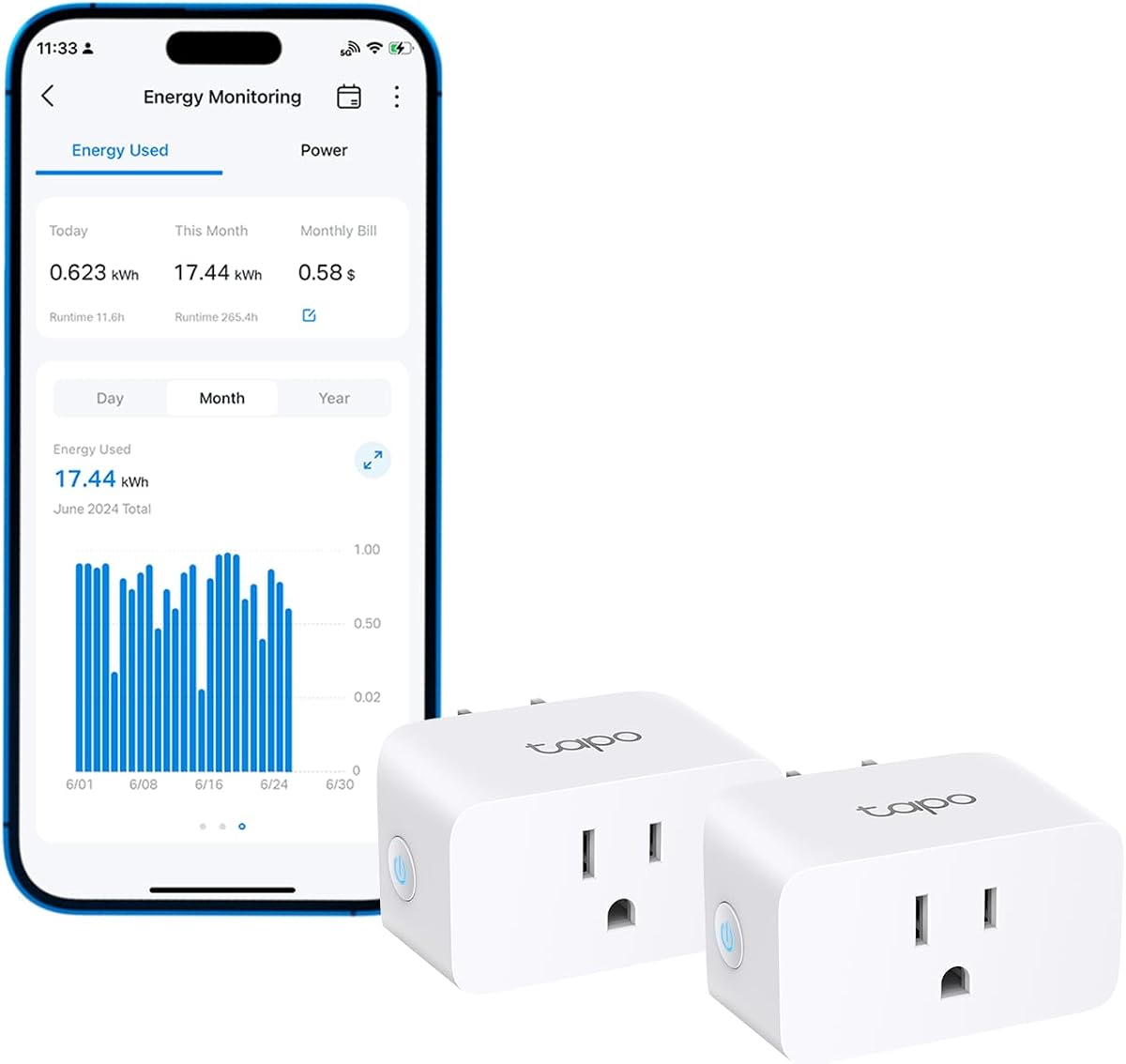
This smart plug adds energy tracking with app visualization. It supports voice assistants for remote control and scheduling high-consumption devices efficiently.
We may earn a commission when you buy through this link, at no additional cost to you.
Auto-shutoff prevents overload by cutting power when limits are exceeded. The energy charts help you optimize usage patterns to reduce waste and bills.
Setup requires Wi-Fi connection but offers modern convenience. The two-pack allows monitoring multiple outlets while gaining smart home capabilities.
Best for tech-savvy users wanting remote control. It combines energy tracking with smart home features for modern and efficient power management.
View clear and easy-to-understand statistics in the app to analyze your device power usage over time.
The plug automatically shuts off devices using too much power to prevent electrical overload hazards.
We may earn a commission when you buy through this link, at no additional cost to you.
Choosing the right energy monitor involves evaluating features like connectivity, accuracy, and ease of use to meet your specific tracking needs.
Decide between plug-in meters for single devices or whole-home systems for broader tracking. Plug-in models are simpler and cheaper while whole-home systems offer deeper insights.
Choose a plug-in meter for PCs and appliances. Select whole-home monitoring if you need to track total consumption or solar usage.
Look for monitors with high accuracy ratings like Class 1.0 or better. Precise readings ensure reliable data for budgeting and efficiency improvements.
Prioritize accuracy to trust your energy data. Inaccurate monitors can lead to poor decisions and missed savings opportunities.
Consider if you need Wi-Fi or app access. Smart monitors allow remote tracking and automation while basic ones display data locally on the device.
Use smart monitors if remote access matters. Basic models work well for quick checks without network setup.
Ensure the device is UL or ETL certified to prevent fire or electrical hazards. Safety ratings confirm rigorous testing standards have been met.
Always choose certified monitors for safe operation. This protects your PC and home from electrical risks.
Check if the monitor retains data during power outages. Built-in memory ensures cumulative readings are not lost when the device is unplugged.
Look for memory features to maintain history. This allows continuous tracking even if power is disrupted.
Plug-in monitors are easiest to install requiring no tools. Whole-home systems need circuit panel access and may require professional help.
Choose plug-in for simplicity. Whole-home suits those comfortable with electrical panels or hiring help.
Compare prices against features offered. Budget models cover basic needs while premium options include smart home integration and advanced automation.
Find a monitor that fits your budget. Higher cost may be worth it for automation and privacy features.
If you use Home Assistant or Alexa check for compatibility. Smart integration allows automating devices based on real-time energy data.
Select compatible monitors for better control. Integration enhances automation and saves energy effortlessly.
Start by plugging the monitor into a wall outlet and connecting your PC or appliance. Ensure the device is properly seated to avoid loose connections.
Calibrate the monitor by setting your local electricity rate in the app or display settings. This ensures cost calculations match your actual bills.
Keep the device clean and free of dust to maintain performance. Avoid exposing it to moisture or extreme temperatures during use.
No energy monitors do not affect PC performance. They measure power consumption externally and do not interact with the computer's internal components or software.
Most plug-in monitors are accurate within one to two percent. This level of precision is sufficient for tracking usage and identifying high-consumption devices.
Some monitors like the P4400 are designed to work with inverters. Always check the product specifications to confirm compatibility with your power setup.
Whole-home monitors often require panel access which may need professional installation. However some models come with guides for DIY users comfortable with electrical work.
Smart monitors store data locally or in the cloud depending on the model. Most allow exporting reports and keep historical data for months or years.
Yes certified energy monitors are designed to remain plugged in safely. They include features like overload protection to prevent hazards during continuous use.
The Emporia Vue 3 leads for whole-home coverage while the Upgraded Watt Power Meter offers best value. Select based on your need for app access or simplicity.
Prioritize accuracy and safety certifications when making your choice. These factors ensure reliable data and protection for your home and equipment.
Prices and availability change so check current listings before buying. Investing in monitoring helps reduce bills and manage energy consumption efficiently.