
Logitech G F310 Wired Gamepad Controller Console
4.4Editor score
Floating D-Pad design
Broad game support
Six-foot cord included
10 programmable buttons
Discover the top fightpads for PC in October 2026. We compare wired and wireless controllers optimized for fighting games to help you choose the right gear.
Finding the right fightpad for PC can transform your gaming experience significantly. A quality controller offers precision, durability, and comfort during intense matches. Whether you are a casual player or a tournament competitor, the right inputs matter.
We evaluated ten top-rated controllers based on build quality, button layout, and platform compatibility. Our analysis focuses on features that enhance execution speed and accuracy. This guide helps you navigate the options available for your setup.
Each pick highlights unique strengths tailored to different player needs and budgets. Prices and availability may change frequently so check current listings before buying. Use this guide to find the perfect controller for your next competitive session.
4.4Editor score

4.1Editor score

4.2Editor score
This comparison table breaks down the key specifications of each controller to help you decide quickly. Look at layout types, connection methods, and special features to find your match.
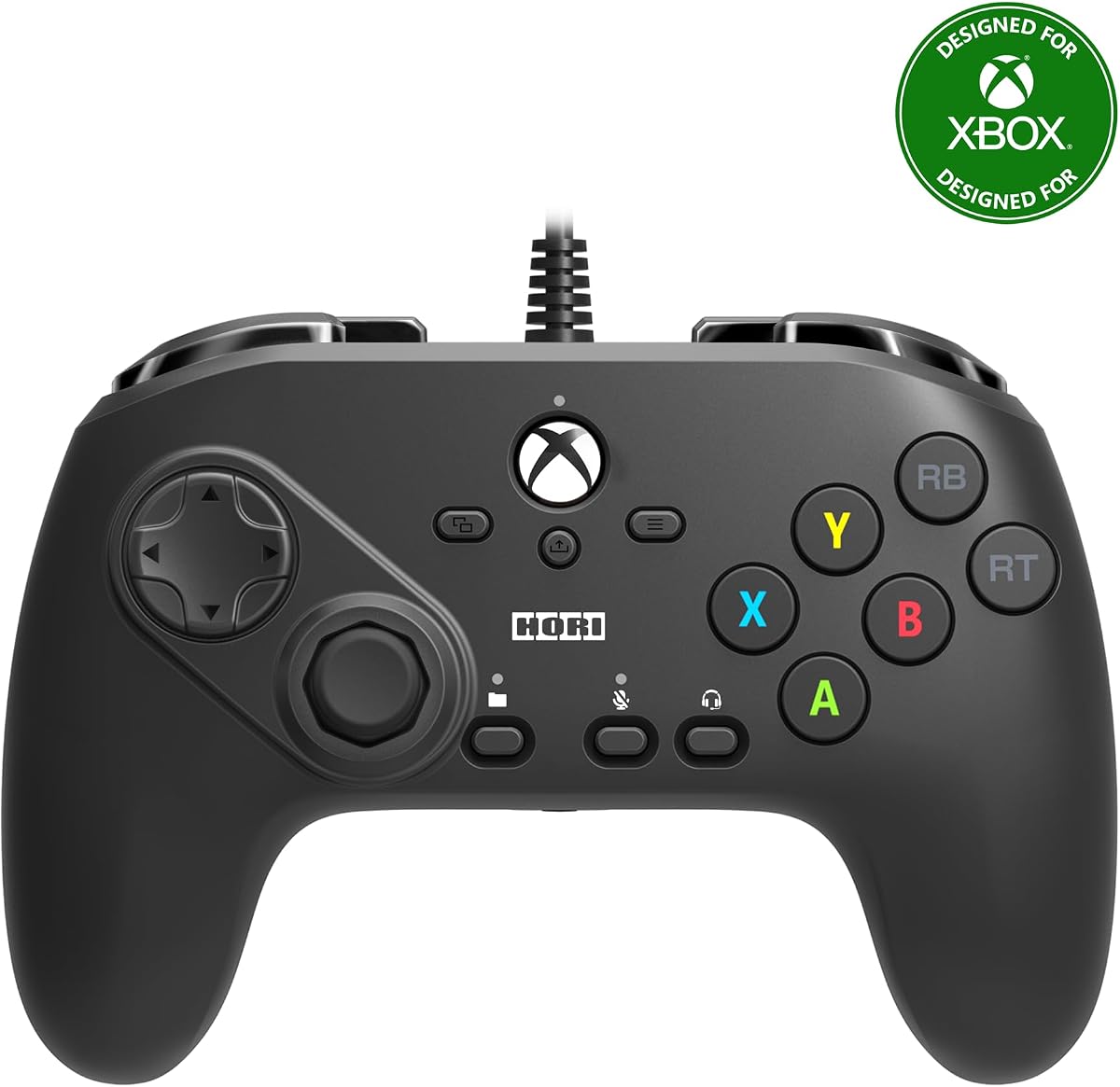


The HORI Fighting Commander OCTA stands out as a top choice for serious PC fighters. It offers a tournament grade design with a rating that reflects solid performance. The layout is optimized for quick inputs and precise movements.
We may earn a commission when you buy through this link, at no additional cost to you.
Key strengths include the use of Micro Switch buttons which provide clear tactile feedback. The short throw analog stick with an 8-way gate enhances accuracy during complex combos. You can adjust D-Pad sensitivity to match your personal preference easily.
While it is a wired device, this ensures zero latency for competitive play. The companion app allows you to save and switch between custom profiles. This level of customization makes it versatile for different game genres.
This fightpad is ideal for players who value reliability and official licensing. It bridges the gap between console and PC experiences effectively. If you need a controller built for longevity, this is a strong pick.
Top quality components ensure the controller withstands intense training sessions without degradation.
Use the companion app to tweak settings and save profiles for different fighting games.
We may earn a commission when you buy through this link, at no additional cost to you.
This controller brings the fighting experience to Xbox on PC seamlessly. It features a wired design optimized for accuracy and speed. The build quality aligns with Microsoft official licensing standards for consistency.
We may earn a commission when you buy through this link, at no additional cost to you.
You can customize settings using the companion app and save multiple profiles. Switching between them is quick thanks to the dedicated profile button. The short throw analog stick helps with fast directional inputs.
Although the rating is moderate, it remains a solid choice for Xbox fans. The six-button layout simplifies inputs for those who prefer classic arcade styles. It handles Windows 10 without driver issues usually.
Buy this if you need a reliable Xbox specific fightpad for PC. It offers the essential tools for competitive play without unnecessary complexity. The license ensures compatibility with modern Xbox titles on PC.
Save up to four profiles to switch between different game setups instantly.
The 8-way gate on the analog stick improves execution speed and precision.
We may earn a commission when you buy through this link, at no additional cost to you.
The 8Bitdo M30 is an excellent budget option for PC fighting games. It comes officially licensed by Xbox ensuring broad compatibility. The USB-C wired connection minimizes latency for responsive gameplay.
We may earn a commission when you buy through this link, at no additional cost to you.
Support for 8BitDo Ultimate Software adds value by allowing deep customization. You can switch between three profiles easily using a custom button. The six-button layout is designed for classic fighting mechanics.
Despite the lower price point, it maintains a reliable build for daily use. The audio jack provides convenience for headset users without extra adapters. It supports Windows well for a streamlined setup.
This controller is perfect for those starting out or on a budget. It delivers the core features needed for competitive play affordably. If you need a simple yet effective fightpad, this is a great choice.
Official Xbox license guarantees seamless integration with PC gaming environments.
Switch between three saved profiles on the fly for different games.
We may earn a commission when you buy through this link, at no additional cost to you.
This leverless controller offers a unique hitbox-style layout for PC users. The OLED display shows settings clearly without needing extra software. It supports multiple platforms making it versatile for different devices.
We may earn a commission when you buy through this link, at no additional cost to you.
Hot-swappable switches allow you to change the feel without soldering. The web-based customization lets you tweak buttons and macros directly in a browser. The reinforced USB-C port ensures the connection stays secure during play.
It is ideal for players who want advanced control over inputs. The SOCD settings help maintain tournament compliance easily. The non-slip rubber feet keep the base stable on your desk.
Choose this if you need a portable yet powerful fightpad. It balances flexibility with ease of use effectively. For those interested in leverless layouts, this is a top contender.
Web-based customization allows you to configure settings without installing drivers.
Swap mechanical switches in seconds to change the tactile feel.
We may earn a commission when you buy through this link, at no additional cost to you.
The Akko FUNBOX is a premium choice designed for competitive PC players. It features next-generation Hall Effect switches that never wear out. The rapid trigger technology offers an edge in fast-paced games.
We may earn a commission when you buy through this link, at no additional cost to you.
A full-color LCD acts as a control hub for settings and animations. You can upload your own standby animations via the browser driver. The aluminum dial makes navigating menus intuitive and satisfying.
It supports multiple platforms and includes tournament lock mode for compliance. The 8000Hz polling rate ensures inputs are registered instantly. This level of tech is rare in fightpads at any price.
Buy this if you want top-tier performance and customization. It caters to pros who need every millisecond advantage. The build quality and features justify the investment for serious fighters.
Hall Effect magnetic switches eliminate physical friction and debris buildup.
Adjustable trigger points let you tailor responsiveness to your playstyle.
We may earn a commission when you buy through this link, at no additional cost to you.
This special edition controller is tailored for Windows PC and TEKKEN 8. It keeps the core features of the standard OCTA but with licensed branding. The components ensure high accuracy and durability for matches.
We may earn a commission when you buy through this link, at no additional cost to you.
The short throw analog stick is great for execution speed. Microswitch buttons provide clear feedback for every press. You also get an analog slide pad for navigating game lobbies effectively.
While themed, it works well for other fighting games too. The build quality remains consistent with other HORI products. It is a solid pick for fans of the TEKKEN series.
Choose this if you want official support for TEKKEN 8. It delivers performance without sacrificing comfort. The license ensures compatibility with the latest updates and titles.
Designed for competitive use with top-quality components for accuracy.
Microswitch buttons and accurate D-Pad help with clean execution.
We may earn a commission when you buy through this link, at no additional cost to you.
If you prefer wireless, this pro edition delivers tournament quality. It works on PS5 and Windows 11 or 10 PCs seamlessly. The inclusion of programmable rear buttons adds versatility for inputs.
We may earn a commission when you buy through this link, at no additional cost to you.
A swappable D-pad lets you choose your preferred shape. The USB-C cable features a lock to prevent disconnects while charging. Firmware updates keep it compatible with new systems and games.
Wireless tech has improved to offer low latency for most users. It is a convenience boost for those who want cable-free play. The tactile switches provide a satisfying feel during sessions.
Buy this if wireless is a priority for your setup. It balances mobility with performance well. Just ensure you update the firmware before first use for best results.
Add extra inputs without moving your hands off the D-Pad.
The cable lock prevents disconnects so you stay powered up.
We may earn a commission when you buy through this link, at no additional cost to you.
This renewed version brings the OCTA experience at a lower price. It keeps the eight-button layout and programmable macros for utility. It is officially licensed ensuring it works with Sony systems.
We may earn a commission when you buy through this link, at no additional cost to you.
The build quality is inspected to meet standards before sale. You get the same core performance as a new unit. It is a practical choice for those watching their budget.
While renewed, the core components remain the same. Macros help automate actions for easier setup in games. The license guarantees compatibility with PC and console titles.
Choose this if you want a proven design without the cost. Just check the listing details for condition specifics. It offers great value for entry-level fighters on PC.
Programmable macros make setup easier for complex combos.
The tournament grade design holds up to frequent practice.
We may earn a commission when you buy through this link, at no additional cost to you.
The Logitech G F310 is a versatile controller for many PC games. It features a floating D-Pad for quick direction changes. The layout mimics a standard Xbox pad so learning is easy.
We may earn a commission when you buy through this link, at no additional cost to you.
With Profiler software you can map keys for games without native support. The six-foot cord gives plenty of room to sit back. It works with a wide range of titles and Windows versions.
It may lack specific fightpad tweaks but it covers the basics well. The 10 programmable buttons allow for some customization. It is reliable and fits most desks without clutter.
Buy this if you need a general purpose controller that works. It is a staple for casual play and older titles. For fighting, it is a budget friendly starting point.
Rests on four switches for responsive changes in direction.
Works with both old favorites and new PC game titles.
We may earn a commission when you buy through this link, at no additional cost to you.
This mini stick offers a compact option for those who prefer sticks. It fits on your desk or lap easily due to its small factor. The classic eight-button layout supports arcade style inputs well.
We may earn a commission when you buy through this link, at no additional cost to you.
A long eight-foot cable keeps your setup flexible without clutter. The V-cut housing is designed for smooth movement. It is officially licensed by Sony for guaranteed compatibility.
Though small it feels solid for daily training sessions. The lightweight design makes it portable for events. It is a great entry to stick gaming without taking up space.
Choose this if you want a portable stick for PC. It delivers a traditional feel in a modern size. For fans of stick inputs, this is a reliable portable pick.
Great for both arcade games and tight desk spaces.
The small form factor makes it easy to bring to events.
We may earn a commission when you buy through this link, at no additional cost to you.
Choosing the right fightpad requires considering several factors to match your setup and style.
Wired controllers ensure zero latency which is critical for competitive fighting. Wireless options offer freedom but may require charging and can introduce slight lag. Most competitive players still prefer wired for consistency.
Prioritize wired if you compete seriously; choose wireless for casual comfort.
Six-button layouts are standard for fighting games and mimic arcade sticks. Some players prefer eight-button or hitbox styles for different inputs. The choice depends on your hand size and game familiarity.
Pick a layout that matches what you have used before to reduce learning time.
Micro switches provide tactile feedback that helps confirm inputs. Hall Effect switches are newer and resist wear over time. The feel impacts your comfort during long practice sessions significantly.
Consider switch types for longevity and the tactile response you prefer.
Ensure the fightpad supports your PC operating system and any consoles you use. Some controllers need adapters to work across different systems. Compatibility issues can lead to unresponsive controls and frustration.
Check the system requirements to confirm it works with your specific setup.
Fighting games put stress on buttons and sticks so build quality matters. Look for reinforced ports and durable materials that withstand heavy use. A sturdy controller saves money over time by lasting longer.
Invest in robust construction to avoid frequent replacements or repairs.
Software or onboard tools let you change inputs or save profiles easily. This flexibility helps adapt the controller to different games quickly. Some models offer web-based config which avoids installing extra drivers.
Look for customization tools to optimize inputs for your specific games.
If you travel to events, a compact and lightweight controller is essential. Some pads come with cases or small frames that fit in bags. Consider weight and size when planning to take it to tournaments.
Choose a portable design if you plan to move your gear often.
Fightpads range from budget friendly to high-end professional models. Higher price often brings better materials and features like customization. However good performance is possible at mid-range price points too.
Balance your budget with the features you actually need to save money.
Connect the controller to your PC via USB before launching your game. Most modern systems recognize the device automatically and assign it as a controller. Check your game settings to ensure all buttons map correctly.
Clean the surface with a dry cloth regularly to remove dust. Avoid using liquids directly on buttons or switches as this can cause damage. Store the cable neatly to prevent tangling or fraying at the ends.
Firmware updates can fix issues and improve performance over time. Visit the manufacturer website to download the latest versions for your model. Keep your controller away from extreme heat or direct sunlight.
Most modern fighting games support gamepad inputs natively. Older titles might need mapping software like Xpadder to work correctly. Check game descriptions for controller support before buying a fightpad.
Yes many fightpads are compatible with Steam Deck via USB. Some models list this support directly in their specs. Use the wired option for the most reliable connection on Deck.
A hitbox layout uses buttons instead of a joystick for directional inputs. It offers precision but has a learning curve compared to traditional sticks. Many competitive players prefer it for speed and accuracy.
Wireless pads can work but wired ones are still preferred for latency. If you choose wireless, ensure it has a low latency mode. Keep the battery charged to avoid disconnections mid-game.
Visit the manufacturer's website and download their software tool. Connect the controller via USB and follow the on-screen instructions. Regular updates fix bugs and add new features.
Some models come with hot-swappable switches to change the feel. Others need soldering which requires tools and skills. Check the product specs to see if swaps are supported.
We explored ten fightpads that cater to different preferences and budgets. The HORI Fighting Commander OCTA stands out as a reliable option for most players. Meanwhile the Akko FUNBOX leads for advanced features and customization.
Prioritize build quality and input accuracy when making your decision. Your choice should match your playstyle and the games you play most. A good fightpad can help you execute combos with more confidence.
Always check current prices and availability before purchasing online. Deals change often so comparing offers can help you save money. With the right gear you are ready to take your fighting game skills further.