
DUMOS 52 Reversible Gaming Desk
4.6Editor score
Built-in fabric storage drawers
Ergonomic monitor shelf included
Reinforced metal frame support
Choosing the right gaming desk for console setup transforms your living space into a dedicated command center for entertainment and productivity. A well-designed workstation supports your console, accessories, and peripherals while keeping cables organized and your posture healthy during long sessions.
We evaluated ten top-rated desks based on storage capacity, build quality, lighting features, and ergonomic design. Each product offers unique benefits tailored to different room sizes and gaming preferences. Our analysis highlights models that maximize space efficiency without compromising stability or style.
Every pick below showcases specific strengths like built-in power hubs, RGB lighting, or expandable shelving. While prices may fluctuate over time, the value and performance metrics remain consistent across these selections. Consider your room layout and essential gear before making your final decision.
4.6Editor score

4.7Editor score

4.6Editor score
As an Amazon Associate we earn from qualifying purchases.
The following table provides a side-by-side comparison of all ten selected desks highlighting key specifications and unique features to help you identify the perfect match for your console setup requirements.


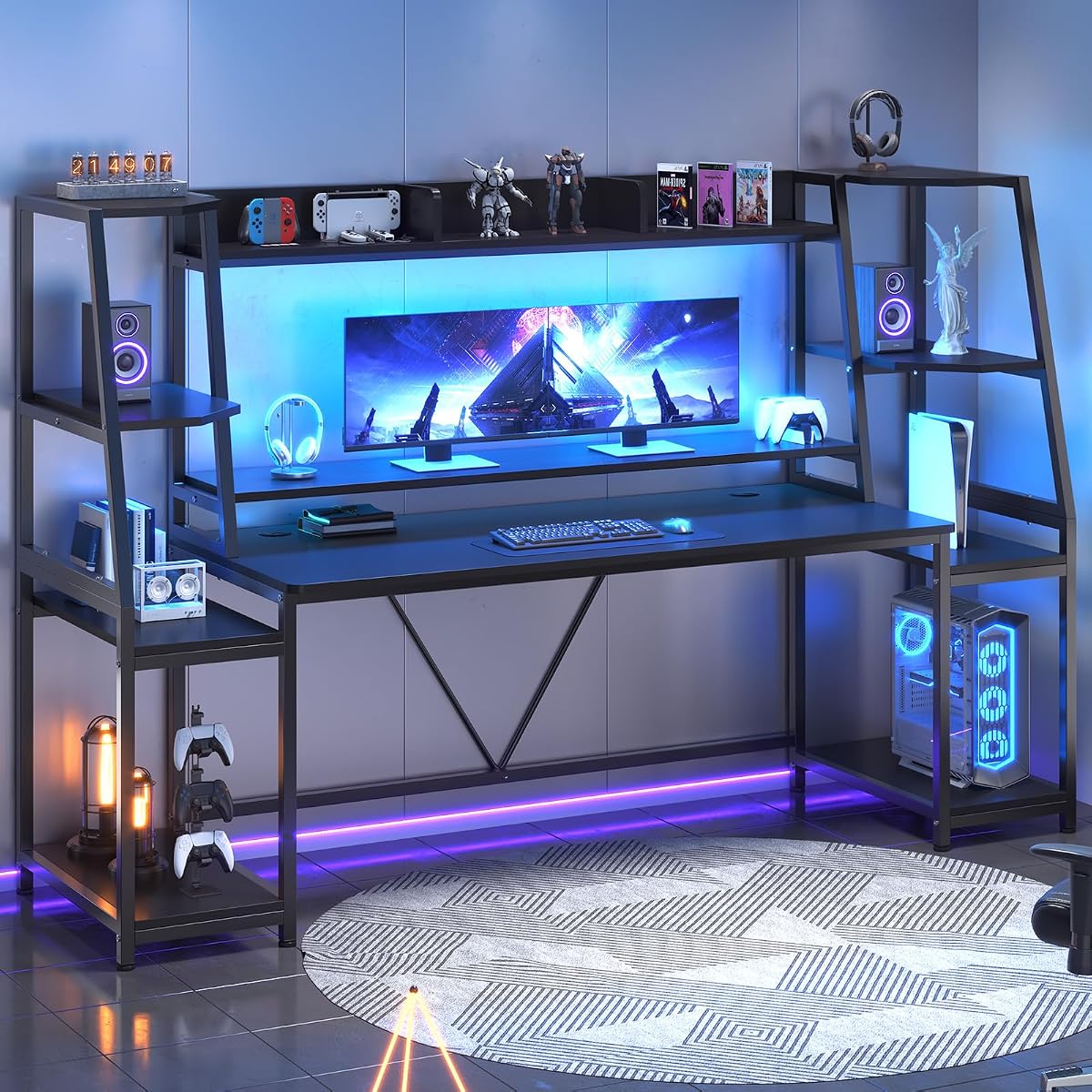
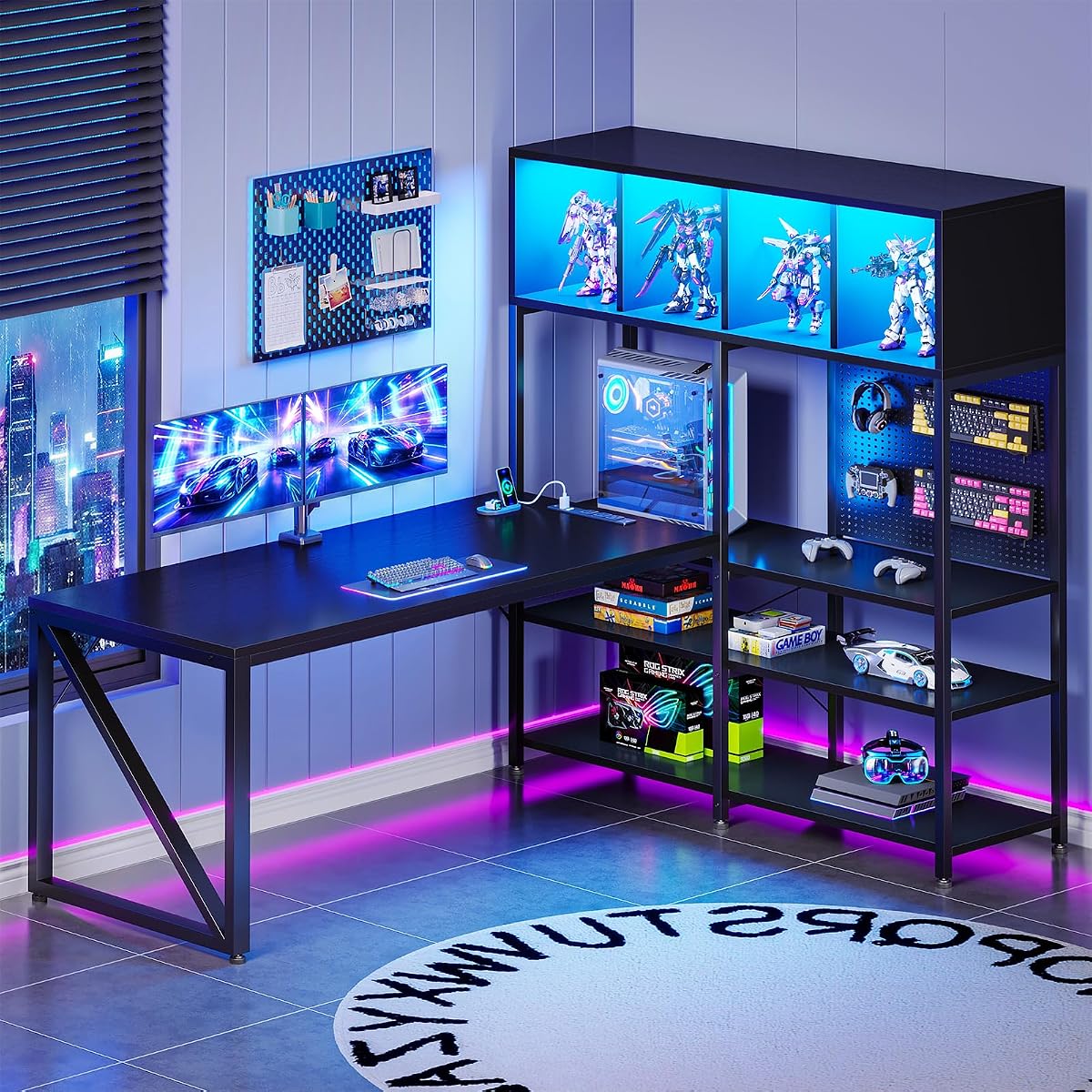


The ODK 53 L Shaped Gaming Desk stands out as a versatile solution for console enthusiasts needing organized workspace and integrated power. With a strong 4.7 star rating users praise its ability to hold multiple devices while maintaining a clean aesthetic in compact rooms.
We may earn a commission when you buy through this link, at no additional cost to you.
Its standout quality lies in the centralized power hub featuring three AC outlets and two USB ports directly on the desk surface. This eliminates the need for extra power strips and keeps controllers charging within easy reach during intense gaming sessions.
While the LED lighting adds visual appeal the remote control range can sometimes be inconsistent depending on room lighting. However this minor inconvenience is outweighed by the desk solid stability and adjustable foot pads that ensure wobble-free performance on uneven floors.
This desk is ideal for gamers who value storage and power access without sacrificing desk space. The reversible layout allows flexible installation making it a top recommendation for home offices and dedicated gaming corners alike.
Built-in outlets reduce cable clutter by keeping all essential devices connected at one central location for easier access.
The reversible side modules let you customize the L-shape to fit your specific room corner or existing furniture arrangement.
We may earn a commission when you buy through this link, at no additional cost to you.
The DUMOS 52 Reversible Gaming Desk offers exceptional value for budget-conscious gamers seeking a feature-rich console setup. Its 4.6 star rating reflects high satisfaction with its smart lighting and practical storage options that keep the workspace tidy.
We may earn a commission when you buy through this link, at no additional cost to you.
Key strengths include three fabric drawers that provide discreet storage for controllers and accessories while the monitor shelf elevates screens to eye level. The RGB lighting syncs with music creating an immersive atmosphere that transforms ordinary gaming sessions into vibrant experiences.
While the fabric drawers are lightweight they may not support heavy items as securely as solid wood. Additionally some users find the assembly process slightly challenging but the included tools and labeled parts make it manageable with patience.
This desk is perfect for those entering the gaming scene or upgrading a dorm room. It balances cost and functionality effectively making it a standout choice for affordable ergonomic comfort and style.
Music synchronization allows the LED strip to pulse with game audio enhancing the sensory experience during gameplay.
The elevated monitor stand reduces neck strain by aligning the screen with natural eye level for extended use.
We may earn a commission when you buy through this link, at no additional cost to you.
This Gaming Desk with PC Display Stand redefines console setups by elevating your hardware into a visual centerpiece. With a 4.6 star rating users appreciate its ability to showcase premium PC builds while maintaining ample surface area for gaming gear.
We may earn a commission when you buy through this link, at no additional cost to you.
The standout feature is the elevated desktop stand designed specifically for panoramic PC cases like Lian Li O11. This lifts your rig to eye level maximizing visibility of internal components and RGB lighting while protecting the chassis from floor dust.
Trade-offs include a higher price point and a footprint that might not suit smaller rooms. However the tri-drawer system and side shelf compensate by offering organized storage that keeps the desk surface clear for monitors and peripherals.
Gamers with high-end hardware or collectibles will find this desk unmatched in style and utility. It transforms a functional workstation into a curated display area perfect for streaming or showcasing a passion for tech.
The elevated stand turns your PC into a visual focal point allowing internal lighting and components to shine.
Three spacious drawers provide dedicated space for cables and accessories keeping the desk surface clean and minimalist.
We may earn a commission when you buy through this link, at no additional cost to you.
The 51 Inch Gaming Desk with Drawers provides a compact yet highly functional solution for smaller gaming rooms. Its 4.5 star rating indicates solid performance with storage solutions that keep essentials organized and within arm's reach.
We may earn a commission when you buy through this link, at no additional cost to you.
Key strengths include four roomy fabric drawers and an open rack designed to hold a full-size PC tower. The carbon-fiber textured surface adds a modern touch while the RGB LED strips create a customizable lighting environment for streaming or gaming.
While the fabric drawers lack the durability of wood they offer lightweight convenience for storing cables and controllers. The narrower width may limit dual monitor setups but it works well for single-screen console configurations.
This desk is best for users needing maximum storage in a minimal footprint. It combines style and practicality making it an excellent choice for bedrooms or dorm rooms where space is at a premium.
Four fabric drawers and a side hook utilize vertical space efficiently to keep the desktop clutter-free.
The carbon-fiber texture gives the desk a sleek contemporary look that complements modern gaming setups.
We may earn a commission when you buy through this link, at no additional cost to you.
The AODK L Shaped Desk Gaming Desk is designed to optimize corner spaces with its reversible configuration and integrated storage. A 4.6 star rating highlights its reliability for both gaming and office work in home environments.
We may earn a commission when you buy through this link, at no additional cost to you.
Its primary advantage is the reversible L-shape that allows flexible placement of the top hutch to suit your room layout. Built-in power outlets and USB ports ensure all devices stay charged without cluttering the desk surface with extra cords.
While the LED strip adds visual appeal the remote controls can sometimes be finicky during adjustment. The assembly process also requires patience but the labeled parts simplify the task for most users.
This desk is ideal for those needing a versatile workstation that transitions between gaming and productivity. Its smart storage solutions make it a great choice for shared rooms or home offices.
The reversible design lets you place the hutch on the left or right to fit specific corner spaces.
Power outlets and USB ports are built into the desk allowing seamless charging of all your devices.
We may earn a commission when you buy through this link, at no additional cost to you.
The SEDETA 79 Gaming Desk offers an expansive workspace ideal for multi-monitor setups and large gaming rigs. A 4.7 star rating reflects user satisfaction with its capacity to host multiple consoles and accessories without crowding.
We may earn a commission when you buy through this link, at no additional cost to you.
Key strengths include a 79-inch desktop that fits two computers simultaneously and large shelves designed for PCs or Xbox units. The RGB lighting with music sync adds an immersive layer that enhances both gaming and working sessions.
While the size is a major advantage it requires a generous room footprint. The weight of the frame also makes it challenging to move once assembled so placement planning is essential.
This desk is best for dedicated gaming rooms where space is not a constraint. It provides unparalleled surface area for serious gamers who need room for all their equipment.
The 79-inch surface provides ample room for multiple monitors keyboards and accessories all at once.
Music-sync LEDs create a dynamic atmosphere that responds to audio for a more engaging experience.
We may earn a commission when you buy through this link, at no additional cost to you.
The AODK 63 L Shaped Gaming Desk combines storage and display features to create a highly organized gaming environment. A 4.6 star rating points to its effectiveness in keeping collectibles visible while maintaining a clean workspace.
We may earn a commission when you buy through this link, at no additional cost to you.
Its standout features include a display cabinet for figures and a pegboard for hanging headphones and controllers. The extra-deep 21-inch desktop allows for full mouse movement which is crucial for precise gaming control.
While the pegboard adds customization it may require additional tools for optimal setup. The weight of the unit also means it should be assembled in place to avoid moving challenges.
This desk is perfect for gamers who collect figures or need quick access to peripherals. Its design balances utility and style making it a strong contender for dedicated setups.
The pegboard and cabinet let you store and display items within easy reach without cluttering the desk.
An extra-deep desktop provides space for large mouse pads and comfortable viewing distances.
We may earn a commission when you buy through this link, at no additional cost to you.
The Korfile 66 L Shaped Gaming Desk offers a reliable mix of storage and power options for varied room setups. A 4.3 star rating shows consistent performance though it trails slightly behind top competitors in user feedback.
We may earn a commission when you buy through this link, at no additional cost to you.
Key strengths include an integrated power station that keeps cords managed and fabric drawers for storing accessories. The extended monitor riser helps improve posture and creates extra space under the screen for keyboard storage.
While it offers solid features some users note that the fabric drawers may not be as durable as hard cases. The assembly process is straightforward but instructions could be clearer for some parts.
This desk is ideal for those seeking a balance of storage and power without breaking the budget. It suits home offices and gaming rooms where organization is a priority.
Integrated outlets and USB ports provide convenient charging options for all your essential devices.
The monitor riser elevates screens to eye level reducing strain during long use.
We may earn a commission when you buy through this link, at no additional cost to you.
The Korfile 47 Gaming Computer Desk is tailored for small spaces needing maximum storage in a compact format. A 4.4 star rating reflects its success in organizing essentials while fitting into tight corners or dorm rooms.
We may earn a commission when you buy through this link, at no additional cost to you.
Its main feature is five non-woven fabric drawers that offer flexible mounting options to suit your layout. The high-rise monitor mount elevates screens for better ergonomics and the LED strip adds a vibrant touch to the workspace.
While the desk is narrow it works well for single monitor setups. The fabric drawers are lightweight but may not hold heavier items securely over time.
This desk is perfect for students or gamers with limited floor space. It delivers essential functionality and style in a package that fits smaller living environments.
Five drawers with multiple mounting options allow you to customize storage based on your needs.
A compact 47-inch width makes this desk ideal for smaller rooms or dorm setups.
We may earn a commission when you buy through this link, at no additional cost to you.
The Veken 55 Inch Large Electric Standing Desk offers unique ergonomic benefits for health-conscious gamers. A 4.5 star rating highlights its ability to support sitting and standing positions without sacrificing desk space.
We may earn a commission when you buy through this link, at no additional cost to you.
Its standout feature is the quiet electric motor that adjusts height from 28 to 46 inches. This flexibility helps reduce sedentary time and allows quick changes between sitting and standing during long sessions.
While the motor adds cost it operates quietly under 52 decibels to avoid distraction. The desk surface is spacious enough for dual monitors but the height adjustment mechanism requires power access.
This desk is ideal for users prioritizing health and ergonomics. Its electric functionality makes it a premium choice for those wanting to avoid back strain during extended play.
Adjustable height reduces sedentary time promoting better posture and circulation during long sessions.
Memory presets allow you to save and recall preferred heights with a simple button press.
We may earn a commission when you buy through this link, at no additional cost to you.
Selecting the right gaming desk requires understanding your room constraints and essential needs. This guide outlines key factors to consider for a setup that balances function and comfort.
Measure your available space carefully to determine the width and depth needed. L-shaped desks work well in corners while rectangular units fit against walls. Ensure the length accommodates your console monitors and peripherals with extra room for movement.
Prioritize desks with widths above 50 inches for multi-device setups. Depth should allow at least 20 inches for comfortable viewing distance.
Evaluate whether you need open shelves drawers or both for your accessories. Drawers hide cables and controllers while shelves keep frequently used gear accessible. Some desks include specific racks for PC towers that save floor space.
Look for integrated storage solutions that reduce clutter. A mix of drawers and open shelving often provides the most versatile organization.
Desks with built-in outlets and USB ports streamline power access for your console and devices. Built-in cable management channels keep wires off the floor and prevent tangling during sessions.
Check the number and type of outlets provided. Models with both AC sockets and USB ports offer greater flexibility for charging multiple devices.
Monitor shelves or risers elevate screens to eye level reducing neck strain during extended play. Adjustable height desks are beneficial for users who prefer standing options for health reasons.
Ensure the desk surface is sturdy enough to support your monitor weight. A stable frame prevents shaking during intense gaming moments.
Steel frames provide better stability than wood alone especially for heavy loads. Look for thick desktop boards that resist scratches and heat from consoles.
Prioritize models with adjustable foot pads to compensate for uneven floors. This ensures the desk remains level and wobble-free.
RGB LED strips can enhance the visual appeal of your setup. Check for options with music sync or app control for a customizable experience.
Consider the brightness levels and color options available. Some users prefer static colors while others enjoy dynamic lighting effects.
Review assembly instructions and tools included before purchase. Clear labeling of parts simplifies the process and reduces time spent setting up.
Some desks require two people for safe assembly. Factor in the time and effort needed when choosing between complex and simple models.
Balance the features offered with your budget constraints. Higher-priced desks often provide better build quality and more storage options.
Prioritize needs over wants like storage and power over lighting if funds are limited. A functional base desk is better than a flashy one that lacks stability.
Begin by placing your console and monitors on the desk surface ensuring cables run through any built-in management channels. Secure power strips or hubs on shelves to keep outlets accessible but out of sight. Adjust the monitor height so the top of the screen aligns with your eye level for comfort.
Organize controllers accessories and chargers in the designated drawers or shelves to maintain a cluttered workspace. Use headphone hooks if available to prevent cables from tangling. Regularly clean the desktop surface with a soft cloth to remove dust and fingerprints that accumulate over time.
Inspect the desk frame and joints periodically for loose screws or bolts. Tighten any connections that have shifted to ensure ongoing stability. If you notice wobbling adjust the foot pads until the desk sits level on the floor to maintain a solid gaming experience.
For small rooms look for desks under 55 inches in width with compact storage options. L-shaped designs fit efficiently into corners and free up floor space. Ensure the desk depth accommodates your console and monitors without overcrowding the area.
Most desks with built-in outlets require a nearby wall socket to function properly. These built-in hubs distribute power to your devices but do not generate electricity themselves. Always check the cable length to ensure it reaches your power source easily.
Yes most of these desks work well for PC setups due to their sturdy surfaces and storage options. Models with CPU shelves or tower racks are specifically designed to hold PC hardware securely. Check the weight capacity to ensure it supports your specific hardware.
RGB lights are safe for extended use but may cause eye strain if too bright in a dark room. Adjust brightness settings or use ambient modes to reduce glare during nighttime play. Many desks allow you to turn off the lights completely for focused gaming.
Use a dry or slightly damp microfiber cloth to wipe the surface and remove dust. Avoid harsh chemicals that could damage the texture or finish. Regular dusting prevents buildup and keeps the surface looking clean and professional.
Assembly typically takes between one to three hours depending on the model and tools available. Most desks come with all necessary hardware and instructions. Having a second person help can reduce time and ensure proper alignment of parts.
Some desks allow for modifications but adding shelves may require drilling and additional hardware. Check if the frame supports attachments before purchasing accessories. Reversible designs offer flexibility without permanent changes.
Yes these desks are ideal for teens with gaming setups due to their durable build and storage features. Ensure the height is comfortable for the user and use child-friendly features like rounded edges. Adjust the desk height to match growing users for long-term comfort.
These ten desks offer a wide range of features from budget-friendly storage solutions to premium electric height options. Whether you need a compact unit for a dorm or a spacious hub for a dedicated room there is a model that fits your needs.
Prioritize factors like storage capacity power access and ergonomics over aesthetics when making your decision. A stable and functional desk will enhance your gaming experience more than flashy features alone.
Always verify the current price and availability as these can change quickly. Compare the specs that matter most to your setup before finalizing your purchase to ensure you get the best value.