
HDMI Tester Portable High Definition Network Cable Tester Checker
4.4Editor score
Tests HDMI and RJ45 cables
Main and remote unit design
Powered by AAA battery or USB
This comprehensive guide compares the top HDMI Signal Tester models available today to help you choose the right tool for testing video, audio, and cable
Finding the right HDMI Signal Tester is essential for technicians and enthusiasts who need to verify cable integrity and signal quality. A good tester ensures your displays receive the correct resolution and audio formats without costly troubleshooting delays.
We analyzed ten highly rated products based on their features, compatibility, and user feedback. This list covers portable handheld units, advanced generators, and simple continuity checkers to suit every budget and technical requirement.
Each pick highlights key capabilities like resolution support and HDCP handling. Please note that availability and pricing change frequently, so check current details before purchasing to ensure you get the best value.
4.4Editor score

4.8Editor score

4.5Editor score
This side-by-side comparison helps you evaluate the core specifications and capabilities of each HDMI Signal Tester to find the model that best fits your specific installation needs.


The Monoprice HDMI Signal Generator serves as a versatile tool for verifying both source and display functionality. It receives a solid rating for its ability to emulate signals or generate them for testing cable runs effectively.
We may earn a commission when you buy through this link, at no additional cost to you.
Its standout quality is the DIP switch interface that allows precise control over resolution and HDCP versions. This level of granularity is crucial when diagnosing compatibility issues between modern TVs and older receivers or switches.
While it offers robust features, the physical interface relies on manual switches rather than a digital screen which may slow down quick checks. However, the reliability of its signal generation makes up for the lack of a visual display.
Technicians who need to validate high bandwidth 4K setups will find this unit indispensable. It ensures your signal chain meets the required standards before connecting expensive end user displays.
The DIP switches allow you to set specific output formats like 4K at 60Hz with exact color subsampling options.
You can toggle HDCP off or set it to 1.4 and 2.2 to test how devices handle protected content encryption.
We may earn a commission when you buy through this link, at no additional cost to you.
The Parts Express HDMI Cable Signal Tester is an ideal entry-level device for identifying common connectivity problems. Users appreciate its straightforward design that lets you plug in a cable and immediately see if the signal path is intact.
We may earn a commission when you buy through this link, at no additional cost to you.
Its key strength lies in its ability to diagnose specific issues like color shift or sparkle without needing a full TV. The tester indicates the status of each signal component which helps isolate whether the fault is in the cable or the equipment.
A trade-off is that it does not provide a visual video output so you cannot see the actual image quality. For simple continuity and signal path verification this limitation is acceptable given the low cost and ease of use.
This unit is perfect for home users or contractors who frequently need to check cable integrity during installations. It saves time by confirming cable health before you attempt to troubleshoot complex display settings.
By displaying the status of individual signal components this tester helps you pinpoint the exact cause of a display issue quickly.
The device can be placed at either the source or the display end giving you flexibility in how you test the system.
We may earn a commission when you buy through this link, at no additional cost to you.
This portable tester stands out because it handles both HDMI and Network cables making it a versatile addition to any toolkit. It provides a reliable way to check physical connectivity without needing expensive dedicated equipment for each cable type.
We may earn a commission when you buy through this link, at no additional cost to you.
The main and remote unit design allows you to test cables that are installed in walls or long runs by plugging the remote end into the cable at a distance. It scans up to nineteen wires to detect shorts or open circuits effectively.
While it is great for physical layer testing it does not analyze high frequency signal quality or resolution compatibility. The LED lights show connection status which is sufficient for ensuring a cable is wired correctly.
Installers who work with structured cabling and home theater setups will benefit from this dual functionality. It reduces the need to carry multiple testers for different connection standards in the field.
The remote unit stores on the side of the main unit and allows testing long cables where access to both ends is difficult.
You can power the main unit with an AAA battery or use a phone USB charger ensuring it stays ready when you need it.
We may earn a commission when you buy through this link, at no additional cost to you.
The STEREN Handheld HDMI Tester is a premium device that brings visual verification to portable testing. It features an HD LCD screen that displays both audio and video so you can confirm signal integrity without an external TV.
We may earn a commission when you buy through this link, at no additional cost to you.
Its rugged design makes it suitable for demanding field environments where dust or water might be present. The tempered glass display resists scratches and shattering while the silicone rubber housing protects against drops and impact.
The inclusion of three HDMI ports allows you to pass through signals which is useful for testing setups with switches or splitters. Battery life supports three to four hours of continuous use which covers most work shifts comfortably.
Technicians who need to verify channel lineups or signal quality on site will find this unit invaluable. It bridges the gap between simple continuity checkers and expensive desktop analyzers.
The HD LCD screen allows you to see the video and hear the audio directly on the device to confirm full signal delivery.
With its hybrid dual layer housing and tempered glass this tester is built to withstand the rigors of professional installation work.
We may earn a commission when you buy through this link, at no additional cost to you.
This advanced generator supports the latest HDMI 2.1 standards making it ideal for professional high end system integrators. It can output signals up to 8K at 60Hz which covers the full bandwidth capabilities of modern displays and switches.
We may earn a commission when you buy through this link, at no additional cost to you.
It includes a wide variety of resolutions and patterns that help verify timing and color formats accurately. The device also checks HDCP 2.3 encryption and includes CEC control features to ensure all handshake protocols function correctly.
While powerful this tool is not necessary for simple home setups and may be overkill for basic continuity checks. The learning curve for utilizing all features is steep but the precision it offers is unmatched for professional validation.
If you are testing premium home theater systems or commercial installations this generator ensures your components are ready for future proof bandwidth requirements. It is a comprehensive solution for those who need exact signal control.
With 8K@60Hz support and 40Gbps bandwidth this generator prepares your system for the highest current video standards available.
Timing and InfoFrame analysis plus EDID read and write capabilities allow for deep dives into how your device handles signals.
We may earn a commission when you buy through this link, at no additional cost to you.
This unit combines signal generation with analysis capabilities to provide a robust solution for 4K system verification. It supports up to 18Gbps bandwidth ensuring your cables and devices can handle the latest UHD resolutions without dropouts.
We may earn a commission when you buy through this link, at no additional cost to you.
The device allows for 4K to 1080p scaling which helps test compatibility with older displays or receivers that might not support full UHD. It also manages EDID to ensure your source device outputs the correct resolution for the connected screen.
While it lacks the 8K capabilities of higher end models it covers the most common high bandwidth use cases effectively. The integration of cable testing adds value by letting you verify physical layers alongside signal integrity.
Installers looking for a reliable middle ground between basic checkers and enterprise gear will appreciate this unit. It delivers the necessary features for professional 4K installation work.
By testing up to 18Gbps this analyzer confirms your cabling meets the strict requirements for 4K content delivery.
The ability to manage EDID ensures your source and display negotiate the right resolution and refresh rate automatically.
We may earn a commission when you buy through this link, at no additional cost to you.
This tester offers a practical mix of features at a competitive price point making it accessible for homeowners and small contractors. It supports both HDMI and network cables which simplifies the tool bag for general connectivity checks.
We may earn a commission when you buy through this link, at no additional cost to you.
It provides two test modes allowing you to choose between a fast scan for quick checks or a full display for a detailed view of all wires. The auto shut-down feature helps preserve battery life during long days on the job.
While it is an effective tool for identifying open or short circuits it does not offer advanced signal analysis. Users looking for a simple way to verify physical connections will find it performs well for its intended purpose.
For those who need a versatile tester that covers multiple cable standards without a high investment this unit is a solid choice. It saves time by quickly ruling out cable faults during installation.
You can switch between fast scan and full display modes to get either a quick result or a detailed wire status.
The automatic shut-down after ten minutes of inactivity ensures your battery lasts longer when you are working on multiple runs.
We may earn a commission when you buy through this link, at no additional cost to you.
Jonard Tools is known for quality hand tools and this HDMI tester reflects that reliability. It is designed to handle long cable runs by using a detachable remote unit which makes testing installed cables much easier.
We may earn a commission when you buy through this link, at no additional cost to you.
The device evaluates cables for shorts and incorrect pairings with precision. It offers two modes to show either individual pins as they are tested or a full display of all connections at once for comprehensive verification.
One consideration is that it relies on a standard 9V battery which needs to be replaced periodically. Despite this the robust construction and ability to test up to five hundred meters of cable make it a strong professional option.
Contractors who often deal with cabling hidden in walls or long distances will find the remote feature particularly useful. It ensures you can verify continuity even when you cannot access both ends simultaneously.
The detachable remote lets you test cables that are installed in walls or long runs by placing the unit at either end.
You can choose to see one connection at a time or all connections together to match your preferred workflow speed.
We may earn a commission when you buy through this link, at no additional cost to you.
The UT681 tester excels in supporting a wide range of HDMI connector types including Micro and Mini versions. This makes it a versatile choice for modern devices that often use smaller form factors for high definition video.
We may earn a commission when you buy through this link, at no additional cost to you.
It rapidly scans the nineteen wires in an HDMI cable to identify shorts or open circuits. The LED indicator zones highlight exactly which pins are faulty simplifying the troubleshooting process significantly for the user.
Its lightweight and portable design allows you to carry it easily in a pocket or tool bag. The automatic power-off after ten minutes ensures you do not drain the battery if you forget to turn it off manually.
For those working with compact devices like cameras or portable consoles this adapter support is a major advantage. It provides a quick and reliable way to ensure physical connectivity on these smaller interfaces.
Supporting Type A standard and Type C mini interfaces ensures you can test a wide variety of modern cables.
A blue light flashes to warn you when the battery is low so you are never caught off guard during a test.
We may earn a commission when you buy through this link, at no additional cost to you.
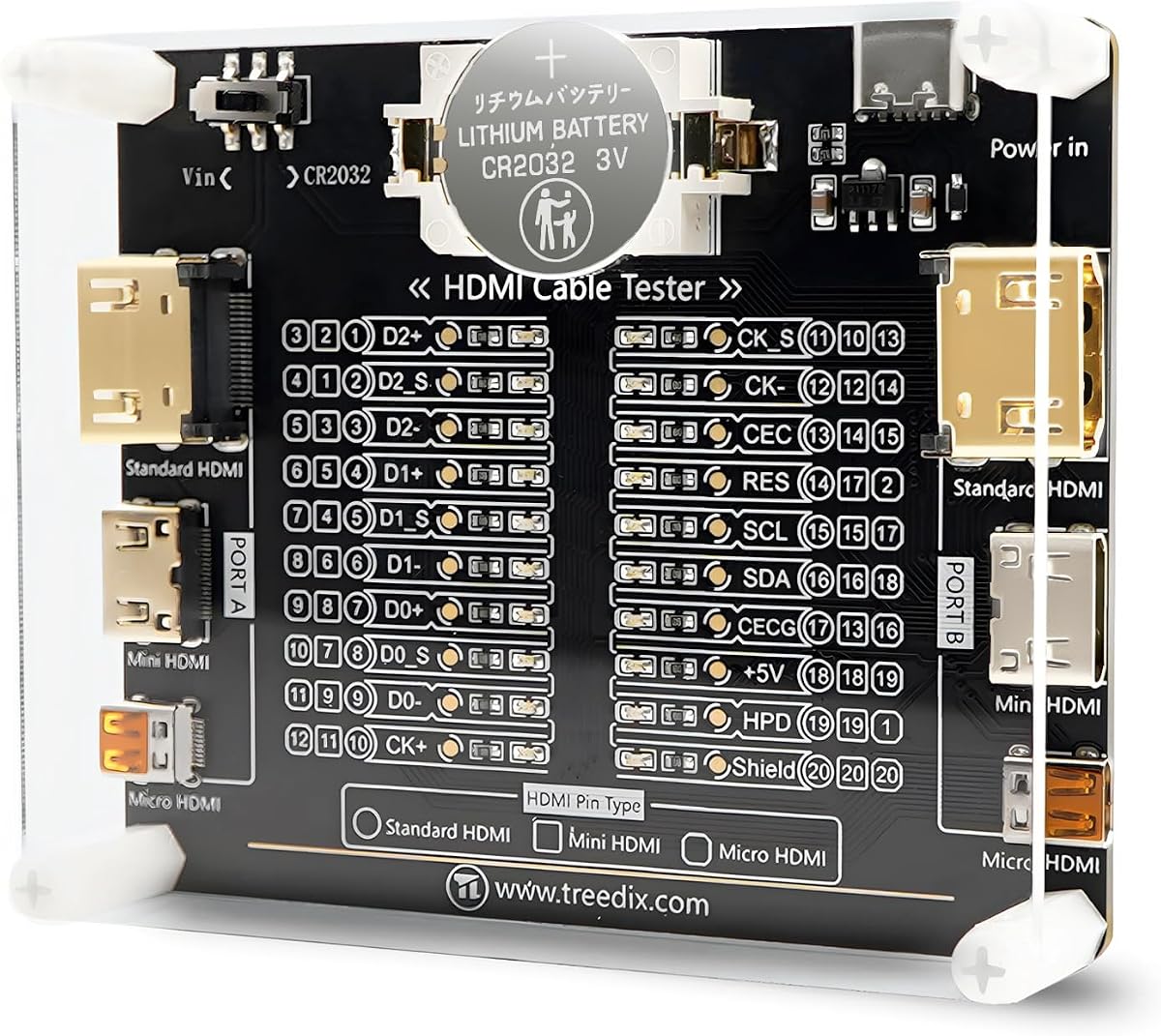
This board style tester offers a simple and effective way to check HDMI cable continuity with clear visual feedback. It uses twenty LED lights to indicate the status of each pin making it easy to see wiring faults at a glance.
We may earn a commission when you buy through this link, at no additional cost to you.
It supports a wide range of HDMI versions from 1.0 to 2.1 and various interfaces including Standard Mini and Micro. The ability to run on battery or external power gives you flexibility depending on your work environment.
While it is not as handheld as some other units its compact size and acrylic case make it easy to store and protect. The clear pin mapping helps users understand the function of each connection line as they test.
Those who prefer a straightforward visual tool for checking cable wiring will appreciate this board design. It is a cost effective solution for ensuring your cables are wired correctly before connecting them to sensitive equipment.
Each pin corresponds to one LED light so you can instantly see if a specific connection is open or shorted.
You can power the board with batteries or connect an external power supply to suit different testing scenarios.
We may earn a commission when you buy through this link, at no additional cost to you.
Selecting the right HDMI Signal Tester depends on your specific technical needs and the types of installations you perform.
Decide whether you need a simple continuity checker or a full signal analyzer. Continuity testers verify physical connections while analyzers confirm signal quality and resolution support.
For basic cable checks a continuity tester is sufficient. For troubleshooting display issues choose an analyzer with video output.
Ensure the tester supports the resolutions you work with. Many devices now require 4K at 60Hz or even 8K to function correctly.
Look for testers that explicitly mention support for 4K or higher to ensure they can validate your current and future hardware.
HDCP content protection can cause signal issues if not handled correctly. Some testers allow you to toggle HDCP on or off to isolate handshake problems.
Choose a model that offers HDCP controls if you frequently deal with streaming devices or protected content systems.
Consider where you will use the tester. Handheld units with built-in screens are great for field work while board style testers might stay in a workshop.
Portable units with durable casings are better for jobsite use to prevent damage from drops or dust.
Battery life and power source affect how long you can work. Some units use standard batteries while others have rechargeable packs or external power inputs.
Rechargeable models reduce waste but standard batteries are easier to replace quickly if you run out during a job.
Check which HDMI connector types the device supports. Many modern gadgets use Mini or Micro HDMI rather than the standard Type A.
Select a tester that includes adapters or support for Mini and Micro HDMI to ensure it works with all your equipment.
Some testers offer extra capabilities like LAN cable testing or EDID management. These features can save time by combining multiple tools into one.
Evaluate whether features like dual cable testing justify the added cost based on your typical workflow.
Look at user reviews to gauge real-world performance. A tester might have good specs but poor build quality or confusing instructions.
Reliable brands often provide better support and durability which reduces the risk of equipment failure in the field.
Connect the tester to the HDMI cable or device you want to evaluate. Ensure the ports are clean and fully inserted to avoid false connection errors.
Observe the indicators or screen on the device to check for signal quality. If you see error lights or no signal verify the cable connections and try a different cable.
Store the tester in a dry safe place to protect it from dust and impact. If it uses batteries remove them if not used for long periods to prevent corrosion.
An HDMI Signal Tester checks physical connectivity and signal integrity. It verifies that all pins are connected properly and that the video and audio signals are transmitting correctly to the display.
Many modern HDMI testers support 4K verification but you should check the specs for your specific model. High-end analyzers will confirm 4K at 60Hz bandwidth while basic ones only check continuity.
No not all testers require a screen. Simple LED testers show connection status without displaying video which is enough for continuity checks. Screens help if you need to verify image quality.
Use a tester with a detachable remote unit. This allows you to plug one end at the source and the other end at the destination to test the full length effectively.
An HDMI tester identifies faults but does not repair them. If the tester shows a break you will need to replace the cable or splice it if you have soldering skills.
Some testers are specifically designed for Mini and Micro HDMI. Always check the product description to ensure it supports the smaller connectors used on cameras and portable devices.
If HDCP fails the signal may be blocked or show a black screen. A good tester allows you to toggle HDCP settings to confirm if encryption is the cause of the issue.
Most HDMI testers do not require regular calibration as they check physical connections rather than complex analog signals. Simply keep them clean and store them properly to maintain accuracy.
This guide highlighted ten top HDMI Signal Testers ranging from basic checkers to advanced generators. Whether you need a budget-friendly dual tester or a premium 8K analyzer there is a suitable model for your needs.
Prioritize resolution support and HDMI compatibility to ensure your tool meets current industry standards. A well-chosen tester will save you time and prevent costly installation errors.
Keep in mind that availability and details can change so review the latest product pages before purchasing. Investing in the right testing tool ensures your HDMI systems perform reliably.