
KPXOS OSU3X Custom Gaming Keyboard
3.4Editor score
Affordable Magnetic Switch Design
Visual Feedback Display Included
Flexible Calibration Setup
Discover the top keyboards for Geometry Dash players. This guide compares magnetic switches, rapid trigger tech, and compact layouts to help you pick the
Finding the right keyboard for Geometry Dash can transform your gameplay experience. Precision timing and rapid inputs are crucial for success in this challenging rhythm game. Players need devices that offer fast response times and reliable actuation to hit every note accurately.
We have carefully evaluated ten top-rated keyboards specifically suited for rhythm gaming and competitive play. Our analysis focuses on magnetic switch technology, polling rates, and customizable features that enhance performance. Each product offers unique benefits tailored to different player preferences and budgets.
Each pick in this guide highlights key specifications and user feedback to help you make an informed decision. You will see detailed breakdowns of features, pros, and cons for every option. Please note that availability and specific details may change over time as manufacturers update their lines.
3.4Editor score
4.7Editor score

4.5Editor score
This comparison table provides a side-by-side overview of all ten keyboards featured in this guide. It highlights key specifications and unique features to help you quickly identify which model aligns best with your specific gaming needs and preferences.





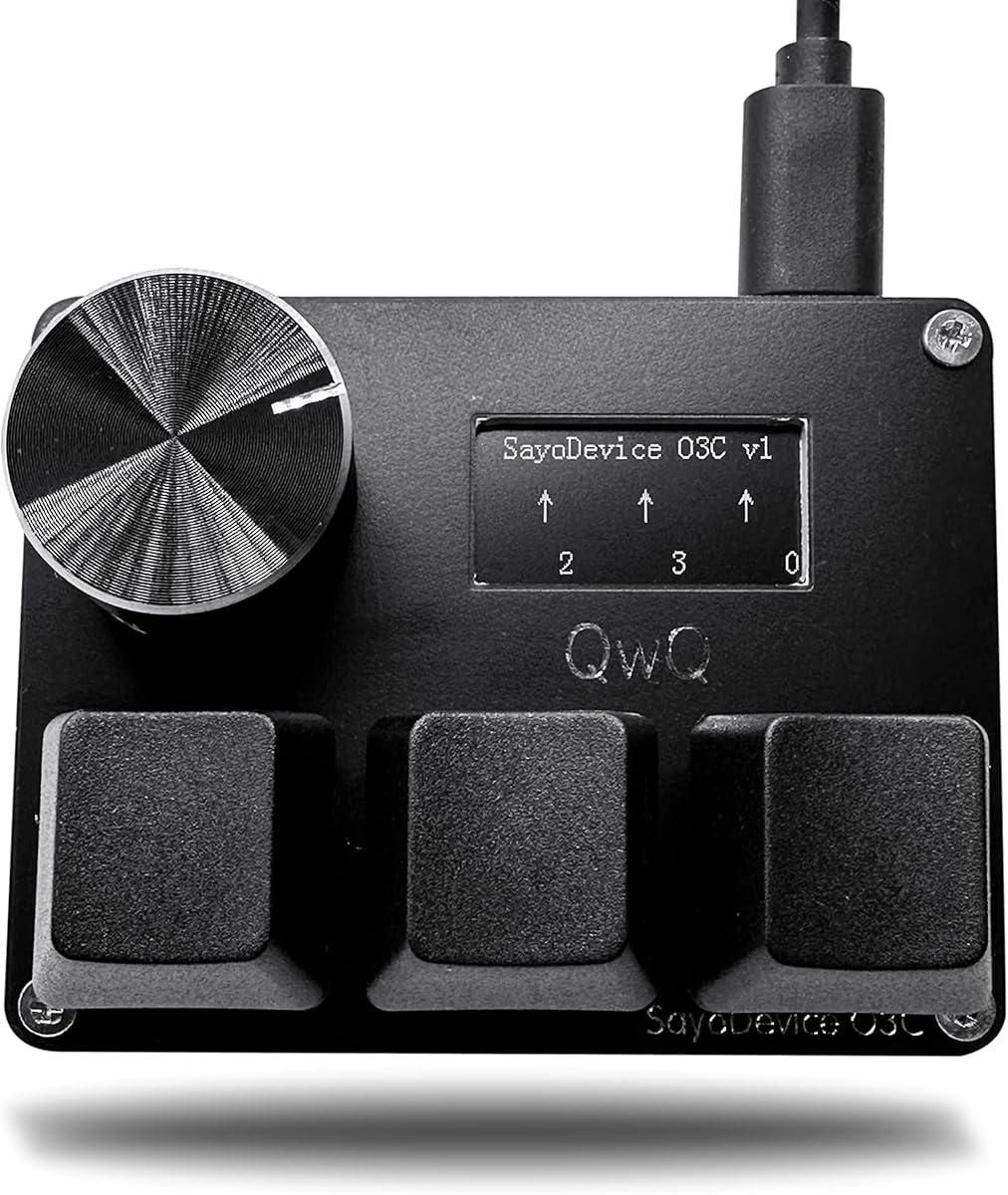
The BTXETUEL SayoDevice O3C OSU Keyboard stands out as a top choice for Geometry Dash players seeking precision and speed. With a high rating of 4.7 stars, this device combines rapid trigger technology with magnetic linear switches to deliver exceptional performance. Its unique features like an IPS color screen and customizable knobs make it a versatile tool for any gamer.
We may earn a commission when you buy through this link, at no additional cost to you.
Key strengths include its ability to handle rapid inputs with minimal delay. The 8000HZ polling rate ensures that every keystroke is registered instantly, which is crucial for hitting notes accurately in fast-paced games. The replaceable switches allow users to customize the feel of their keyboard without needing advanced tools or soldering skills.
While the keyboard offers impressive features, it does require an initial calibration step before first use or after firmware upgrades. This might be a minor inconvenience for some users, but it ensures optimal performance over time. The limited key count is also a trade-off, but it keeps the device compact and focused on essential functions.
This keyboard is ideal for players who prioritize speed and customization in their setup. Whether you are a competitive gamer or a casual enthusiast, the BTXETUEL SayoDevice O3C OSU Keyboard provides the reliability and features needed to excel. Its high rating and positive user feedback make it a strong recommendation for anyone looking to upgrade their gaming experience.
The rapid trigger feature allows keys to reset immediately upon release, enabling faster repeated inputs without waiting for a fixed reset point.
With a customizable screen and knob, you can personalize your interface to display useful information like song lists or key counts.
We may earn a commission when you buy through this link, at no additional cost to you.
The KPXOS OSU3X Custom Gaming Keyboard offers an affordable entry point into the world of magnetic switch keyboards. While it has a lower rating of 3.4 stars, it still provides essential features like rapid trigger functionality and a visual feedback display. This makes it a viable option for players on a budget who want improved performance over standard keyboards.
We may earn a commission when you buy through this link, at no additional cost to you.
Its standout features include a flexible calibration setup that allows users to adjust trigger distances to their preference. The visual feedback display helps users see key travel and status in real time, enhancing the overall interaction. The minimalist design with function keys ensures that the device remains compact and easy to use during intense gaming sessions.
However, the lower rating suggests there may be some inconsistencies or limitations in build quality or software support. Users might find that the customization options are not as extensive as higher-priced models. Despite this, the plug-and-play setup ensures that beginners can start using the keyboard without complex configurations.
For gamers looking for a cost-effective solution, this keyboard provides the basics needed for improved gameplay. It is suitable for those who want to try magnetic switch technology without a significant financial commitment. While it may not be the top choice for competitive players, it offers good value for casual users seeking better performance.
The display shows key travel and counts, helping you understand how your inputs are being registered during gameplay.
This keyboard brings magnetic switch benefits like rapid trigger to a lower price point, making advanced tech more accessible.
We may earn a commission when you buy through this link, at no additional cost to you.
This variant of the BTXETUEL SayoDevice keyboard shares many features with the O3C model, offering a high rating of 4.7 stars. It includes rapid trigger hall switches and an IPS color screen that can display custom text like your ID. This model is designed for users who value both performance and personalization in their gaming setup.
We may earn a commission when you buy through this link, at no additional cost to you.
The key strengths lie in its ability to provide fast and accurate inputs. With an 8000HZ polling rate, the keyboard ensures that commands are sent quickly to your computer. The hotswap capability allows you to experiment with different magnetic switches, giving you flexibility to tailor the keyboard to your exact preferences.
Some users might find the need for calibration a minor hassle, especially if they upgrade firmware frequently. Additionally, the compact design means it lacks the full layout of traditional keyboards, which could be a drawback for tasks outside of gaming. However, for rhythm games, this compactness is often a benefit.
This keyboard is a great choice for players who want a reliable and customizable device. Its high rating indicates satisfaction among users who have tested its features. If you are looking for a compact keyboard that delivers on speed and customization, this model is worth considering for your Geometry Dash setup.
The first line of text on the screen can be customized, allowing you to display your player ID or other meaningful text.
Support for hot-swappable switches means you can change the feel of your keyboard without soldering or specialized tools.
We may earn a commission when you buy through this link, at no additional cost to you.
The O3C Rapid Trigger Keyboard is specifically marketed for OSU and Geometry Dash players, making it a targeted solution for rhythm game enthusiasts. With a rating of 4.6 stars, it delivers on its promise of performance through professional-grade magnetic switches and rapid trigger technology. The inclusion of custom screen animations adds a unique touch to the user experience.
We may earn a commission when you buy through this link, at no additional cost to you.
Its features are designed to maximize efficiency and responsiveness. The 3 hall magnetic linear switches ensure that inputs are consistent and fast. The ability to customize the screen with animations allows users to add a visual flair to their setup, making it more engaging during gameplay sessions. The hot-swappable design means you can maintain or upgrade the keyboard easily.
One consideration is that this keyboard is not ideal for general typing tasks due to its limited layout. Additionally, like many rapid trigger devices, it requires calibration before first use to ensure optimal performance. This step is necessary to calibrate the magnetic switches properly, but it adds a small setup time.
For those focused on rhythm games, this keyboard offers a specialized tool that can significantly improve performance. The high rating suggests that users appreciate its focus on speed and customization. If you are serious about improving your gameplay and want a device tailored to your needs, this keyboard is a strong candidate.
The screen supports custom animations, allowing you to display dynamic visuals that match your personal style or game status.
The magnetic switches are built for gaming, ensuring they withstand the rapid inputs and heavy usage typical in rhythm games.
We may earn a commission when you buy through this link, at no additional cost to you.
The Aula WIN60 HE Mechanical Gaming Keyboard is a compact 60% design that delivers full-size performance in a smaller package. With a rating of 4.5 stars, it is praised for its high-speed polling rate and rapid trigger capabilities. This keyboard is suitable for gamers who need speed and customization without the bulk of a traditional full-size board.
We may earn a commission when you buy through this link, at no additional cost to you.
Its features include an 8000Hz polling rate that ensures minimal latency during gameplay. The magnetic switches are adjustable, allowing users to set the actuation point to their preference. The web-based driver makes customization accessible from any device with an internet connection, simplifying the setup process for most users.
One trade-off is the 60% layout, which does not include dedicated arrow keys. This might be a drawback for players who rely on arrow keys for certain functions. Additionally, the web-based driver requires a stable internet connection to access, which could be inconvenient if you are offline or on a restricted network.
This keyboard is an excellent choice for gamers who value compactness and high performance. Its rating reflects satisfaction with its build quality and features. If you are looking for a keyboard that offers advanced magnetic switch technology in a small form factor, the WIN60 HE is a compelling option for your setup.
The web-based driver allows you to customize settings from any device with a browser, removing the need for software downloads.
The RGB lighting can be customized to match your setup, adding a visual element to your gaming environment.
We may earn a commission when you buy through this link, at no additional cost to you.
The RedThunder K95 Wireless Mechanical Keyboard offers a unique blend of features with a large TFT screen and wireless connectivity. With a rating of 4.2 stars, it is appreciated for its stylish design and versatile connection options. This keyboard is ideal for users who want a premium experience with the freedom to move away from their desk.
We may earn a commission when you buy through this link, at no additional cost to you.
Its standout feature is the 1.14-inch TFT screen, which can display various information like time and volume. The gasket design and hot-swap switches provide a comfortable typing feel and the ability to customize the keyboard easily. The triple mode connection allows you to switch between wired and wireless modes seamlessly for different needs.
However, wireless keyboards can sometimes have higher latency compared to wired options, which may affect performance in competitive scenarios. Additionally, the higher price point may not fit all budgets. Despite this, the build quality and features like side printed PBT keycaps ensure durability and long-term use.
For those who value aesthetics and versatility, this keyboard is a strong choice. It balances functionality with style, making it suitable for both gaming and work. If you want a keyboard that stands out and offers wireless convenience without sacrificing too much performance, the RedThunder K95 is worth considering.
The 1.14-inch TFT screen provides more space for displaying information, making it a functional addition to your setup.
The ability to switch between wired and wireless modes gives you flexibility depending on your current gaming or work needs.
We may earn a commission when you buy through this link, at no additional cost to you.
The WIN68 HE Hall Effect Keyboard offers exceptional performance with its 0.01mm adjustable actuation and 8000Hz polling rate. With a rating of 4.7 stars, it is highly regarded for its precision and build quality. This keyboard is designed for gamers who need rapid response times and customizable features to enhance their gameplay experience.
We may earn a commission when you buy through this link, at no additional cost to you.
Its features include a shock-absorbing gasket structure that reduces vibrations and improves the typing feel. The RGB PBT keycaps ensure durability and vibrant lighting effects. The web-based driver allows for easy customization of key mappings and RGB settings, making it accessible to users who prefer a streamlined setup.
One consideration is the 60% layout, which may not include dedicated arrow keys for all users. Additionally, the web driver support is limited to Windows, which might be a drawback for Mac users. Despite these limitations, the keyboard provides high performance and reliability for competitive gaming.
For players seeking a high-quality magnetic keyboard, this model offers a strong combination of features. The high rating reflects user satisfaction with its precision and build. If you need a reliable keyboard with advanced features for rhythm gaming, the WIN68 HE is a great option to consider for your setup.
The 0.01mm adjustable actuation allows you to fine-tune each key for the exact pressure point you prefer.
The gasket design cushions keystrokes, reducing harsh vibrations and providing a more comfortable experience over long sessions.
We may earn a commission when you buy through this link, at no additional cost to you.
The AULA WIN68 HE Mechanical Gaming Keyboard is a compact 60% device designed for fast and efficient gameplay. With a rating of 4.5 stars, it offers advanced features like adjustable actuation and a high polling rate. This keyboard is suitable for gamers who need speed and portability without compromising on performance.
We may earn a commission when you buy through this link, at no additional cost to you.
Its features include a hall effect magnetic switch that allows for precise actuation points. The customizable web driver simplifies the process of setting up key mappings and RGB effects. The compact design saves desktop space, making it easier to move around your workspace or take with you when traveling.
However, the keyboard is limited to a wired connection, which may reduce flexibility compared to wireless options. Additionally, the web driver requires Windows compatibility, so Mac users might find it less convenient. Despite this, the high polling rate ensures low latency during gameplay.
For those seeking a portable yet powerful keyboard, this model is a strong choice. Its features are tailored for gaming efficiency and ease of use. If you want a keyboard that combines compactness with advanced magnetic switch technology, the AULA WIN68 HE is worth exploring for your gaming setup.
Adjustable actuation points let you set each key to trigger at the exact moment you need, enhancing precision.
The 60% design saves desktop space, providing more room for mouse movement and improving overall ergonomics.
We may earn a commission when you buy through this link, at no additional cost to you.
The KPXOS OSU3X Custom Gaming Keyboard in white offers a sleek aesthetic for those who prefer a clean setup. With a rating of 3.0 stars, it provides basic magnetic switch features but may not compete with higher-rated models. This keyboard is suitable for users who value appearance and basic functionality over advanced features.
We may earn a commission when you buy through this link, at no additional cost to you.
Its features include a visual feedback display and a customizable interface, which enhance user interaction. The precise magnetic calibration allows for adjustable trigger distances, though the range may be limited compared to premium models. The minimalist design ensures that the keyboard remains compact and easy to integrate into various setups.
However, the lower rating suggests that there may be issues with build quality or performance consistency. Users might find that the customization options are not as extensive as other keyboards. Despite this, the white design provides a unique visual appeal that can complement specific room decors.
For those prioritizing style over high-end performance, this keyboard is an option to consider. It offers a budget-friendly entry into magnetic keyboards with some customization features. If you want a keyboard that looks great and provides basic rapid trigger functionality, this model might fit your needs.
The white color provides a clean look that can complement a minimalist or bright gaming setup effectively.
While not as advanced as premium models, it offers some calibration options to adjust trigger sensitivity.
We may earn a commission when you buy through this link, at no additional cost to you.
The KPXOS OSU4X Gaming Keyoard is designed as a simple plug-and-play solution for rhythm game enthusiasts. With a rating of 3.1 stars, it offers basic features that cater to casual users who want quick setup without complex configuration. This keyboard is suitable for those who prioritize ease of use over advanced customization.
We may earn a commission when you buy through this link, at no additional cost to you.
Its features include a customizable boot interface that can display device information and key counts. The high-efficiency USB connection ensures reliable performance during gameplay. The compact keypad design saves space and focuses on essential keys needed for games like Geometry Dash and Friday Night Funkin.
However, the lower rating indicates that there may be limitations in build quality or feature depth. Users might find that the customization options are not as extensive as higher-rated models. Additionally, the mechanical keyboard design may not offer the same speed as magnetic rapid trigger options.
For casual players looking for a straightforward device, this keyboard provides a simple solution. It is easy to set up and use, making it accessible for beginners. If you want a keyboard that works right out of the box with basic features, this model is an option to consider.
The boot interface allows you to customize the first line of text, adding a personal touch to your device.
Designed for ease of use, this keyboard requires minimal setup, allowing you to start playing immediately.
We may earn a commission when you buy through this link, at no additional cost to you.
Selecting the right keyboard requires understanding the features that enhance gameplay performance. This guide breaks down the key factors to consider when choosing a device for rhythm games.
Magnetic switches are preferred for rhythm games because they use magnetic fields to detect key presses. This allows for rapid trigger technology which resets keys instantly without needing a fixed actuation point. Traditional mechanical switches may have slower reset times, which can limit your speed in fast-paced games.
Look for keyboards with adjustable actuation points to fine-tune the sensitivity of each key to your preference.
A high polling rate ensures that your computer receives input signals quickly. Keyboards with 8000Hz polling rates reduce input lag and improve responsiveness. This is crucial for games like Geometry Dash where timing is everything and even milliseconds matter.
Higher polling rates generally result in smoother gameplay and more accurate command execution.
Compact layouts like 60% designs save desk space and allow for better mouse movement. However, ensure the keyboard includes essential keys or programmable options for navigation. Some users might prefer full-sized boards for versatility but these are less common for competitive gaming.
Choose a form factor that balances space efficiency with the need for specific function keys.
Keyboards with customizable software or hardware features allow you to remap keys and adjust settings. Look for devices with web drivers or onboard memory to save your configurations. This flexibility helps you optimize the keyboard for your specific playstyle and game requirements.
Customization options can transform a basic keyboard into a specialized tool tailored to your needs.
Durability is important since gaming keyboards often endure intense use. Materials like PBT keycaps and sturdy frames ensure longevity. A keyboard with a solid build will maintain performance over time without key degradation or hardware failures.
Prioritize keyboards with proven durability to avoid frequent replacements or repairs.
Visual feedback displays provide real-time information on key presses and status. This helps you understand how your inputs are being registered and can improve your technique. Some keyboards include screens that display animations or custom text for a more engaging experience.
Feedback mechanisms enhance the connection between you and your device during gameplay.
Wired connections generally offer lower latency than wireless ones. If you prioritize speed, a USB-C wired keyboard is ideal. However, wireless keyboards can provide freedom of movement and are suitable for casual play or setups where cable clutter is an issue.
Select connectivity based on whether you prioritize speed or convenience for your specific setup.
Price points vary widely among keyboards, but higher cost does not always mean better performance. Identify your core needs and find a device that meets them without unnecessary features. Some budget models offer excellent performance for specific tasks like rhythm gaming.
Set a budget that aligns with your needs to find the best value for your investment.
To begin using your new keyboard, ensure you have installed the necessary drivers or software for customization. For magnetic keyboards, perform an initial calibration to set the trigger points according to your preference. This step is essential for the keyboard to function correctly and deliver optimal performance.
Regular maintenance includes keeping the keyboard clean from dust and debris. Use compressed air to remove particles from between keys and gently wipe the surface with a soft cloth. Avoid using harsh chemicals that could damage the keycaps or the screen on your device.
Periodically check for firmware updates provided by the manufacturer to improve performance and fix bugs. This ensures your keyboard stays compatible with the latest software and maintains high reliability. Proper care will extend the lifespan of your keyboard and ensure consistent performance.
A suitable keyboard for Geometry Dash features rapid trigger technology and magnetic switches that allow for fast input resets. High polling rates reduce latency, ensuring precise timing for hits. Compact designs also help optimize mouse space for better gameplay ergonomics.
Magnetic switches are often better for gaming because they offer adjustable actuation and rapid trigger capabilities. They allow for faster reset times compared to traditional mechanical switches. This makes them ideal for games requiring high precision and speed like Geometry Dash.
No, not all keyboards include a display screen. Some specialized models come with small screens for feedback or customization options. These screens can show key counts or custom animations but are not required for basic gaming performance.
A high polling rate is beneficial for rhythm games as it reduces input lag and improves responsiveness. It ensures your commands are registered quickly by the computer. While not strictly necessary, it provides a competitive edge during intense gameplay.
Calibration involves following the manufacturer's instructions to adjust the trigger points. Typically, you press a button or use software to set the actuation distance. This process ensures the keyboard responds accurately to your inputs and maintains optimal performance.
Yes, a 60 percent keyboard is suitable for Geometry Dash as it includes essential keys for gameplay. The compact layout saves space for mouse movement which is crucial for many rhythm games. Programmed combinations can compensate for the lack of dedicated arrow keys.
Web-based drivers allow customization without installing additional software. They can be accessed from any device with a browser, offering convenience and simplicity. This means you can customize settings easily without worrying about system compatibility issues.
No, a wired keyboard is generally recommended for Geometry Dash due to lower latency. Wireless options are available but may introduce slight delays which can affect performance. For competitive play, wired connections provide the most reliable and responsive experience.
Choosing the right keyboard can significantly impact your performance and enjoyment of Geometry Dash. This guide highlighted ten top options ranging from budget-friendly choices to premium models with advanced features. Each keyboard offers unique benefits tailored to different player preferences and needs.
When selecting a device, prioritize factors like magnetic switches, polling rates, and form factor. These elements determine how well the keyboard will support your gameplay style. Consider your budget and desired customization options to find a model that fits your setup.
Remember that the best keyboard is one that aligns with your personal goals and comfort. Take time to evaluate the pros and cons of each option to make an informed decision. Always check the latest product details to ensure you are getting the best value for your investment.