
AULA WIN68 HE Mechanical Gaming Keyboard 60%
4.5Editor score
8000Hz Polling Rate
Adjustable Actuation Point
Web-Based Customization Driver
Compact 60% Layout
Discover the top keyboards for Valorant ranked by speed and precision. We compare Hall Effect, magnetic, and optical switches to help you choose the best
Finding the right keyboard for Valorant is crucial for competitive success. Players need fast actuation, reliable inputs, and minimal latency to execute precise movements during intense matches.
We evaluated ten top keyboards based on switch technology, polling rates, build quality, and user feedback. Our analysis focuses on features that directly impact gameplay performance and comfort.
Each pick highlights specific strengths for Valorant players. Prices and availability change frequently, so verify details before purchasing to ensure you get the best value for your setup.
4.5Editor score

4.1Editor score

4.6Editor score
This side-by-side comparison highlights key differences across all ten models. We focus on switch types, polling rates, layouts, and unique features to help you find the perfect match for your play style.

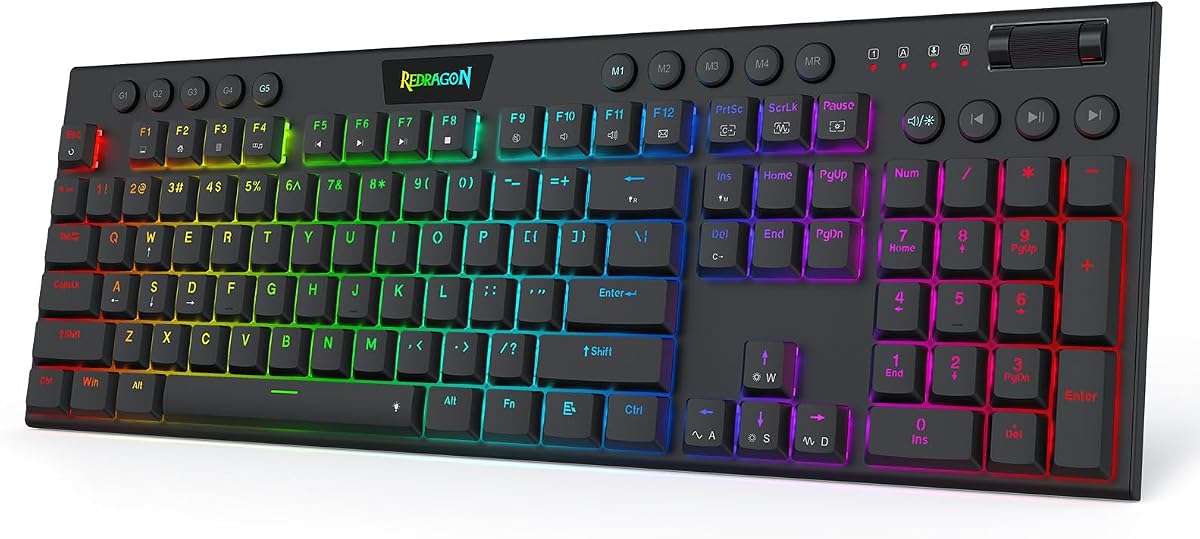





The Redragon K673 HE stands out as an exceptional choice for Valorant players seeking speed and precision. With an impressive 8,000Hz polling rate and rapid trigger technology, this keyboard ensures your inputs are registered instantly. The magnetic switches eliminate physical contact, reducing wear and enhancing consistency during intense gameplay sessions.
We may earn a commission when you buy through this link, at no additional cost to you.
Its standout feature is the ability to save multiple actuation profiles between 0.1mm and 3.4mm. This allows you to tailor the keyboard to your specific play style, whether you prefer light taps for quick movements or deeper presses for deliberate actions. The one-knob control simplifies adjusting brightness and volume, keeping your focus on the game.
While the keyboard excels in performance, it requires a wired connection, which might not suit wireless enthusiasts. Additionally, the software-powered precision tuning means you need to install a driver for full customization. These are minor trade-offs considering the competitive edge this keyboard provides in fast-paced tactical shooters.
If you prioritize reaction time and precise control, the Redragon K673 HE is a top recommendation. It delivers reliable performance and customization options that cater to serious gamers. This keyboard balances cutting-edge technology with user-friendly design, making it a strong contender for your Valorant setup.
Rapid trigger technology cuts redundant keystrokes during quick direction changes, essential for counter-strafing in Valorant.
Adjusting actuation points lets you optimize key sensitivity for different keys, enhancing overall gameplay efficiency.
We may earn a commission when you buy through this link, at no additional cost to you.
The Redragon K686 HE offers similar advanced features to its sibling model at a competitive price point. It features next-gen UltraMag POM magnetic switches that sense keypresses without physical contact, ensuring precise timing for peek-and-fire moments in Valorant. The 8,000Hz hyper-polling rate guarantees inputs are transmitted up to eight times faster than standard keyboards.
We may earn a commission when you buy through this link, at no additional cost to you.
One of its key strengths is the software-powered precision tuning, allowing you to calibrate switches through a desktop or web-based driver. You can save multiple actuation profiles to maintain consistency across games. The dual-module floating structure provides noise dampening, resulting in a soft, Hi-Fi bounce instead of a harsh clack.
However, like many performance-focused keyboards, it relies on a wired connection. This might be a drawback if you prefer wireless setups. Also, the requirement for software tuning could be a barrier for users who want immediate plug-and-play functionality without extra steps.
Overall, the K686 HE is an excellent choice for budget-conscious gamers who don't want to compromise on features. Its magnetic switches and rapid trigger capabilities make it well-suited for competitive play. If you value speed and customization, this keyboard delivers outstanding performance for its price.
These switches eliminate physical contact, reducing friction and wear for longer durability and consistent actuation.
Independent switch-plate design paired with dampening layers ensures quieter keystrokes, reducing distractions during matches.
We may earn a commission when you buy through this link, at no additional cost to you.
The Redragon K618 HE is built specifically for counter-strafing with its low-profile magnetic switches. These switches sense keypresses without physical contact and register inputs faster than standard switches. The design shortens travel distance by 30%, making keystrokes register quicker and typing feel lighter on your wrists during long sessions.
We may earn a commission when you buy through this link, at no additional cost to you.
A standout feature is the dedicated 4×5 macro zone plus media controls, allowing you to record combos or adjust volume instantly without installing software. The one-knob simplicity lets you manage lighting and volume via a single control scroll wheel. Software tuning is available for calibration between 0.1mm and 2.8mm actuation.
While the low-profile design enhances speed, the actuation range is slightly narrower than other models. Also, it is wired only, which may limit flexibility. However, the ease of macro programming without software is a significant advantage for players who prefer quick setup and immediate use.
This keyboard is ideal for players who prefer a sleeker, more responsive typing experience. Its focus on speed and simplicity makes it a strong contender for Valorant. If you value a lightweight feel and fast actuation without complex software, the K618 HE delivers exceptional results.
The 30% slimmer design shortens travel distance, enabling faster key registration for rapid in-game actions.
Dedicated macro zone lets you execute complex commands instantly without needing to install additional drivers.
We may earn a commission when you buy through this link, at no additional cost to you.
The Corsair Clipper PRO MINI is designed for competitive FPS players needing precise control. It features advanced Hall Effect control with Rapid Trigger enabling instant 0.1mm reset for rapid taps. The FlashTap SOCD ensures cleaner directional inputs and sharper counter-strafing, crucial for maintaining accurate positioning in Valorant.
We may earn a commission when you buy through this link, at no additional cost to you.
Its MGX Hyperdrive core switches offer adjustable actuation between 0.2mm and 3.8mm, providing zero drift and 100M keystroke durability. The IP57-rated durability protects against water and dust, making it suitable for long sessions. The dual-layer sound dampening keeps keystrokes quieter and distraction-free.
While the keyboard offers premium features, the 60% layout might be too compact for players who rely on arrow keys frequently. Additionally, white keycaps may show dirt more easily over time. These are manageable considerations given the high performance and durability it offers.
If you need a compact keyboard with industry-leading durability and speed, this is an excellent choice. The combination of Hall Effect technology and IP57 rating sets it apart for demanding environments. For players prioritizing performance and resilience, the Clipper PRO MINI is a reliable investment.
SOCD logic ensures consistent directional inputs, helping prevent movement errors during quick direction changes.
Built to handle intense gameplay with water and dust resistance, ensuring longevity in high-use scenarios.
We may earn a commission when you buy through this link, at no additional cost to you.
The Razer Huntsman Mini uses Linear Optical switch technology that registers key presses at the speed of light. With 1.0mm actuation distance, it is faster than traditional mechanical switches. The Snap Tap feature lets you toggle responsiveness between assigned keys via Razer Synapse 4, enhancing in-game movement control.
We may earn a commission when you buy through this link, at no additional cost to you.
Its construction includes a matte aluminum top frame for structural integrity and oil-resistant double-shot PBT keycaps. Full programmable macros via Razer Hypershift allow complex commands. The Chroma RGB lighting supports 16.8 million colors, syncing with popular games and hardware.
While the optical switches are fast, they lack the actuation adjustment of Hall Effect models. The 60% layout also means missing arrow keys. However, the build quality and RGB ecosystem are unmatched. These trade-offs are acceptable for users focused on speed and customization.
This keyboard is perfect for players who want a proven optical switch with solid build quality. Its speed and integration with Razer's ecosystem make it a favorite. If you value durability and vibrant lighting, the Huntsman Mini is a top-tier choice for competitive gaming.
Optical beams register key presses instantly, reducing latency compared to physical contact mechanical switches.
Syncs with games and 30+ partners for immersive lighting effects that enhance gaming atmosphere.
We may earn a commission when you buy through this link, at no additional cost to you.
The Aula WIN60 HE features self-developed magnetic switches that deliver 8,000Hz polling rates for ultra-fast response times. It eliminates physical contact to ensure precise actuation. Optimized for FPS games like Valorant, it enables faster peeking and quick-stop shooting, giving you a clear advantage in high-stakes moments.
We may earn a commission when you buy through this link, at no additional cost to you.
It includes an ultra-low Rapid Trigger step distance of 0.02mm, perfect for rapid shooting and complex combos. The 60% design saves space without sacrificing functionality. A web-based driver lets you remap keys and customize RGB without bulky software downloads. Dynamic RGB lighting offers 16.8 million colors.
Some users may find the 60% layout too restrictive. Also, the web driver requires internet access. Despite this, the customization and speed are notable. These trade-offs are minimal given the high performance and ease of use offered by this keyboard.
If you want high-end features at a budget price, the WIN60 HE is a great option. It balances speed, compact design, and customization effectively. For competitive gamers on a budget, this keyboard delivers exceptional value and reliable performance.
An ultra-low RT of 0.02mm ensures lightning-fast response times for complex key combinations.
Customization is accessible from any device with internet, avoiding system compatibility issues.
We may earn a commission when you buy through this link, at no additional cost to you.
The AULA WIN68 HE offers magnetic gaming with an industry-leading 8,000Hz polling rate. It ensures ultra-low latency of 0.3ms so commands take effect instantly. Hall Effect magnetic switches provide adjustable actuation points from 0.02mm to 3.44mm, allowing precise keying experiences tailored to your habits.
We may earn a commission when you buy through this link, at no additional cost to you.
A web driver allows customization of RT/SOCD/DKS/MT/TGL functions, key mapping, macro editing, and RGB lighting without downloading. The 60% compact wired keyboard saves up to 40% desktop space while retaining arrow keys. Detachable USB cable ensures a stable connection.
The driver only supports Windows, which is a limitation for Mac users. The 68-key layout is a compromise between compact and functional. Despite this, the speed and customization are strong. These minor issues do not detract from its gaming prowess.
Ideal for gamers wanting a compact layout with full function access. The magnetic switches and high polling rate deliver competitive performance. If you need a balance of size and functionality, the WIN68 HE is a strong choice for your setup.
Individual key sensitivity settings let you match keystroke habits for different games and preferences.
Retaining arrow keys in a small design ensures essential controls are available without extra rows.
We may earn a commission when you buy through this link, at no additional cost to you.
The AULA F75 Pro supports Bluetooth 5.0, 2.4GHz wireless, and USB-C wired connection. It connects to up to five devices. The hot-swappable base supports 3-pin or 5-pin switches. It includes pre-lubricated stabilizers and LEOBOG reaper switches for smooth typing and fast response.
We may earn a commission when you buy through this link, at no additional cost to you.
The PCB single key slotting optimizes resilience. Five layers of filling silencer counteract cavity noise. It offers 16.8 million RGB colors with music rhythm effects. A multi-function knob switches gaming or office mode. Side-prined PBT keycaps are durable and sweat-proof.
Wireless options may introduce slight latency compared to wired. The 75% size might not fit minimal setups. However, the versatility and customization are excellent. These trade-offs are acceptable given the features and battery life provided.
Perfect for users needing wireless flexibility with mechanical feel. Its robust build and hot-swap support make it versatile. If you prioritize connectivity options and customization, the F75 Pro is a solid choice for a modern setup.
Connect via Bluetooth, 2.4GHz, or USB-C to suit different devices and usage scenarios.
Rotate to adjust brightness or volume and click to switch modes or play/pause media.
We may earn a commission when you buy through this link, at no additional cost to you.
The ATTACK SHARK X68 HE offers adjustable hall effect magnetic switches with rapid trigger. You can bind four functions to one key based on pressing degrees. It achieves true 8000Hz polling rates and 0.01mm RT accuracy, reducing latency to 0.125ms for ultra-response.
We may earn a commission when you buy through this link, at no additional cost to you.
The programmable NKRO uses web driver for remapping without installation. It adopts top-mount structure with aluminum alloy positioning plate for smooth operation. South-facing LEDs ensure superior shine-through. PBT keycaps offer durability with clear lettering.
The web driver may need setup initially. The TKL label might conflict with 60% layout naming. Still, the speed and customization are top-notch. These minor inconsistencies do not affect its excellent performance capabilities.
Ideal for users seeking speed and detailed control. Its magnetic switches and polling rate provide a competitive edge. If you want rapid trigger functionality without breaking the bank, the X68 HE delivers outstanding value.
Adjustable actuation points from 0.1mm to 3.4mm tailor key response to specific game requirements.
No need to install software; configure settings directly through a web interface for convenience.
We may earn a commission when you buy through this link, at no additional cost to you.
The ASUS ROG Strix Scope II 96 combines full-size functionality with a compact layout only 1 cm wider than standard keyboards. It offers tri-mode connectivity including Bluetooth, 2.4GHz wireless, and USB-C wired. Integrated sound-dampening foam improves keystroke acoustics for a clean sound.
We may earn a commission when you buy through this link, at no additional cost to you.
Its hot-swappable mechanical switches include factory-lubricated ROG NX Snow linear options. Multi-function wheel allows intuitive media adjustments. Keys are macro-programmable. It comes with a detachable wrist rest and accessories like a keycap puller. Battery life is up to 1,500 hours in 2.4GHz mode.
The higher price reflects premium features. The larger footprint may not suit small desks. Despite this, the versatility and build quality are exceptional. These are reasonable trade-offs for users wanting a complete gaming solution.
Perfect for players needing full-size keys with wireless freedom. The hot-swappable switches and sound dampening enhance usability. If you seek a premium keyboard with comprehensive features, the ROG Strix Scope II 96 is the ultimate choice.
Retains arrow keys and number pad while saving space compared to traditional full-size keyboards.
Up to 1,500 hours in 2.4GHz wireless mode ensures extended use without frequent charging.
We may earn a commission when you buy through this link, at no additional cost to you.
Selecting the right keyboard for Valorant involves considering factors like switch type, polling rate, layout, and durability. This guide breaks down what matters most for competitive play.
Hall Effect and magnetic switches are top-tier for Valorant due to rapid trigger and adjustable actuation. Optical switches also offer speed, while mechanical switches require careful selection for low latency. Choose based on how quickly you need keys to register.
Prioritize switches that reduce input lag and allow customization to match your finger pressure and movement speed.
Higher polling rates like 8,000Hz mean inputs are sent more frequently, reducing perceived latency. Standard keyboards offer 1,000Hz. In fast-paced games, even small delays can impact performance. Look for models specifying hyper-polling capabilities.
Aim for keyboards with at least 8,000Hz polling rates for the smoothest and most responsive gameplay experience.
Layouts range from full-size to 60%. Compact layouts free up mouse space, essential for low-sensitivity aiming. However, missing keys like arrows or function keys can hinder gameplay. Decide based on your desk space and reliance on specific keys.
Choose a layout that balances desk space savings with access to keys you use frequently in game menus and movement.
Adjustable actuation points let you fine-tune key sensitivity. Software or web drivers enable macros and RGB changes. Some players prefer plug-and-play without software. Others value deep customization for specific moves. Check if customization requires extra installation.
Look for models offering intuitive software or web drivers that allow easy profile changes and macro setups.
Materials like PBT keycaps resist wear and oil buildup. Metal frames add stability. IP57 ratings indicate water and dust resistance. Durability ensures consistent performance over time. Consider your typing habits and environment when choosing materials.
Select keyboards with durable keycaps and sturdy construction to ensure longevity under intense gaming conditions.
Wired keyboards guarantee lowest latency, ideal for competitive play. Wireless offers convenience but may introduce slight delays. Modern 2.4GHz wireless has narrowed this gap. If latency is critical, wired remains the safe choice for tournaments.
For most competitive Valorant players, wired connections ensure the fastest and most consistent input registration.
Prices vary significantly from budget-friendly magnetic keyboards to premium wireless models. High-performance features don't always mean high cost. Evaluate what features matter most and compare across price points. Value is found where performance meets affordability.
Focus on finding models that offer essential competitive features within your budget range for the best return.
Features like noise dampening, wrist rests, and RGB enhance comfort and atmosphere. Multi-function knobs simplify controls. Consider how these extras impact your daily use. Sometimes small features add significant long-term satisfaction.
Choose keyboards with comfort-enhancing extras that suit your workspace and ergonomic preferences.
Install any required drivers or web-based software to unlock advanced features like actuation tuning and macros. Familiarize yourself with the key bindings and software interface before gameplay sessions.
Regularly clean your keyboard to remove dust and debris. Use compressed air and a soft cloth. For spill-resistant models, follow drying guidelines. Keep liquids away to prevent damage to switches.
Adjust actuation profiles to match your play style over time. Monitor battery levels for wireless keyboards. Store in a cool, dry place when not in use to maintain longevity and consistent performance.
Valorant requires precise movement and rapid reaction times. A good keyboard features rapid trigger technology, adjustable actuation points, and high polling rates to minimize input lag. Compact layouts can also improve mouse space for aiming.
Hall Effect switches often outperform mechanical ones in speed and consistency because they eliminate physical contact. This allows for features like rapid trigger and adjustable actuation that enhance competitive gaming experiences significantly.
Some features like actuation tuning and macros require software or web-based drivers. Basic functions work without installation, but full customization needs setup. Check product details to understand if software is mandatory for your desired features.
Higher polling rates mean the keyboard sends input signals more frequently, reducing latency. In fast games like Valorant, this leads to more immediate responsiveness. 8,000Hz keyboards provide the fastest registration compared to standard 1,000Hz models.
Most keyboards work with Mac and PC, but driver software may be Windows-only. Verify compatibility in the product specs. Wired connection works universally; wireless may vary by device support. Always confirm before purchasing.
Rapid Trigger mode allows keys to reset as soon as they are released, enabling faster repeated inputs. It is ideal for quick direction changes in FPS games. This feature helps players maintain precise movement and timing during matches.
Layout size affects desk space and mouse movement. Compact layouts like 60% or TKL free up space for low-sensitivity aiming. However, missing arrow keys may hinder menu navigation. Choose based on your desk and usage habits.
Wired keyboards remain the gold standard for lowest latency. While modern wireless models are fast, wired ensures consistency. For professional or tournament play, wired is still recommended to avoid any potential latency or connection issues.
The Redragon K673 HE leads our list for its rapid trigger and high polling rates, while the Aula WIN68 HE offers top value and the ASUS ROG Strix Scope II 96 provides premium features for comprehensive needs.
Prioritize switch technology and polling rate over extra features for competitive play. Ensure your choice supports your preferred layout and connectivity to avoid workflow interruptions during matches.
Prices and availability may vary. Check current offers before buying to secure the best deal for your setup.