
Caydo T3 Joy AI Drawing Projector
4.8Editor score
120 built-in patterns
SGS certified eye protection
Adjustable timer settings
This guide compares the top ten kids drawing projector options to help parents choose the best device for fostering creativity and artistic skills in children.
Finding the right tool to spark creativity in young children can be a challenge for parents. A kids drawing projector offers a unique solution by projecting images onto paper for easy tracing and learning. These devices transform screen time into hands-on artistic play while developing motor skills.
We have evaluated the leading models on the market based on image clarity, ease of use, and educational value. Our comparison covers a wide range of options from budget-friendly tracers to advanced AI-powered projectors. Each product was selected for its ability to engage children effectively.
Every pick in this list highlights specific strengths that cater to different age groups and artistic interests. You will find detailed breakdowns of features, included accessories, and safety certifications. Please note that prices and availability are subject to change over time.
4.8Editor score

4.5Editor score

4.6Editor score
This side-by-side comparison reviews the technical specifications and unique selling points of all ten selected devices. We look at connectivity options, image sources, and included art supplies to help you make an informed decision for your child's needs.



The Flycatcher smART Sketcher 2.0 stands out as a comprehensive tool for budding young artists aged five and up. With a strong rating of 4.5 stars, it is designed to provide a structured learn to draw experience that balances fun with education. This device is not just a toy but a versatile platform for cognitive development.
We may earn a commission when you buy through this link, at no additional cost to you.
Its standout feature is the app-enabled connectivity which allows children to access endless content and interactive tutorials via Bluetooth. The expanded content library includes over 60 pre-loaded images ranging from animals to landmarks. Users can also snap a picture of real objects and project them for tracing making it highly interactive.
While the price is higher than basic tracers the educational value justifies the investment. The step-by-step tutorials help kids build confidence without feeling overwhelmed by complex drawings. Some users note that initial setup requires a stable Bluetooth connection which might be a minor hurdle for less tech-savvy parents.
This projector is ideal for parents seeking a tool that grows with their child. It promotes fine motor skills and hand-eye coordination effectively. For a child interested in art and technology this is a top recommendation that offers long-term engagement and creative growth.
The companion app adds layers of engagement by allowing personalization and real-world object projection.
Focuses on skill building rather than passive entertainment to foster genuine artistic development.
We may earn a commission when you buy through this link, at no additional cost to you.
The Caydo T3 Joy AI Drawing Projector is a fantastic entry-level option for children as young as four years old. With an impressive rating of 4.8 stars it offers a high level of user satisfaction at a budget-friendly price point. Its cute sloth design makes it approachable for younger kids.
We may earn a commission when you buy through this link, at no additional cost to you.
It comes ready to create in minutes with 120 built-in patterns across four fun themes like animals and space. The SGS certified eye protection ensures that the light is safe for children by shining downward onto the paper. This reduces eye strain and makes it safe for longer creative sessions.
One minor trade-off is that advanced features like photo conversion require using the Caydo App. However the built-in patterns are sufficient for regular use. The adjustable timer settings help parents encourage healthy breaks which adds value beyond just the drawing capabilities.
This projector is the best budget choice for parents wanting a safe and fun art tool. It balances affordability with essential safety features and content variety. For a first drawing projector this is highly recommended for its reliability and ease of use.
RG0 blue light safety certification ensures the device is safe for children's eyes during use.
Pre-loaded content means kids can start drawing immediately without needing external devices.
We may earn a commission when you buy through this link, at no additional cost to you.
The Caydo T3 AI Drawing Projector is the premium choice for families wanting more than just a tracing tool. Rated 4.6 stars it functions as a native 720P projector allowing users to stream cartoons or music after drawing. This versatility makes it a great long-term investment.
We may earn a commission when you buy through this link, at no additional cost to you.
It excels at turning photos into perfect drawings using its powerful AI integration. Children can upload a picture of a pet or friend and trace it instantly. The auto-brightness feature ensures clear images in any room lighting without manual adjustment.
The main trade-off is the higher price and complexity compared to basic models. It requires WiFi or Bluetooth to access the full range of features which might be too much for very young users. However older kids will appreciate the ability to create custom content.
This device is perfect for tech-savvy families who want a multifunctional entertainment system. It grows with the child from a drawing tool to a media player. For those seeking the ultimate creative experience this is the top premium recommendation.
Built-in streaming transforms the device into a movie and music player after creative play.
AI tools allow kids to bring their own ideas and photos to life as traceable outlines.
We may earn a commission when you buy through this link, at no additional cost to you.
This AI Drawing Projector allows kids to type an idea like a dancing dragon and turn it into a custom image to trace. It has a solid rating of 4.4 stars and is targeted at children between five and twelve years old. It focuses heavily on imagination and personalization.
We may earn a commission when you buy through this link, at no additional cost to you.
The device includes a feature to turn favorite photos of family or pets into art which is heartwarming for kids. Learning packs include audio that speaks words and numbers helping with education. It comes ready to draw with 50 built-in pictures.
It requires a corded power connection which limits portability during travel. However this ensures it remains ready to use without battery anxiety. The premium gift box packaging makes it a thoughtful present for birthdays or holidays.
This projector is ideal for children who want to draw specific ideas that are not in standard books. The AI capability makes it unique in the market. For personalized creative play this is a strong contender.
AI generation allows kids to trace exact ideas they describe using text input.
Photo transformation lets children draw loved ones and keepsakes they treasure.
We may earn a commission when you buy through this link, at no additional cost to you.
Blue Marble offers a trusted name in educational toys with this Learn to Draw projector. Rated 4.4 stars it features a patent-pending design that allows tracing without blocking light. The kit includes everything needed including markers and discs.
We may earn a commission when you buy through this link, at no additional cost to you.
Setup is simple so kids can get started right away. The instructions are illustrated to teach drawing fundamentals effectively. The projector is adjustable and collapsible for easy storage with built-in compartments for accessories.
The disc system is a bit old school compared to digital apps but it is reliable. Some kids may prefer digital content over physical discs. However the included markers and paper make it a complete ready-to-go kit.
This is the best value for parents who want a complete kit without digital dependency. It fosters creativity with physical tools and clear instructions. For a classic drawing experience this is a great option.
Includes markers and discs so no extra supplies are needed to start drawing.
Recognized for quality and educational value by the Toy Association.
We may earn a commission when you buy through this link, at no additional cost to you.
Designed for children 3 and up this Thin Air Brands projector is built to be tough and kid-proof. It holds a high rating of 4.6 stars. It is made of rugged ABS plastic that resists impact and shock from active kids.
We may earn a commission when you buy through this link, at no additional cost to you.
The kit is complete with 32 animal drawings on four sturdy discs and crayons. It is simple to use with battery power and a disc slot. The gift box is colorful and kid-pleasing which adds to the appeal.
The focus on durability makes it ideal for younger children who might handle toys roughly. However the image variety is mostly animals which limits creativity for older kids. It is a straightforward tool without complex settings.
This projector is perfect for preschoolers learning basic tracing skills. It is robust and easy to handle. For toddlers needing a durable art toy this is an excellent choice.
Constructed with rugged materials to survive the demands of preschool play.
Supplies like crayons and paper are included so kids can start immediately.
We may earn a commission when you buy through this link, at no additional cost to you.
The Gohero Drawing Projector comes with 64 images and is designed to be a great starter toy. It has a rating of 4.3 stars and is suitable for ages 3 to 6. The projector can be rotated 360 degrees for flexible positioning.
We may earn a commission when you buy through this link, at no additional cost to you.
Its storage box design is a major plus for travel and cleanup. Everything fits inside the sturdy case which is helpful for keeping supplies organized. It includes pens and stencils to support creativity.
The large number of images is good for long play sessions. However the setup might be slightly more involved than simpler models. The lower rating suggests some users find it tricky to use initially.
This is a great option for keeping kids entertained on trips. The portability makes it stand out. For travel and quick storage this is a strong pick.
All components fit into a single box making it easy to carry and store.
64 images provide plenty of options without needing to buy extra packs.
We may earn a commission when you buy through this link, at no additional cost to you.
This KETIEE projector offers a complete set with an erasable board and multiple discs. It is priced affordably which makes it a great choice for budget-conscious buyers. The device supports music playback which adds a fun element to art time.
We may earn a commission when you buy through this link, at no additional cost to you.
It uses high-quality ABS material with smooth edges for safety. The rotation feature helps adjust the image clearly for the child. It is a simple tool that encourages shape and color recognition.
The music feature is basic and not as advanced as modern speakers. However for the price it offers significant value. The erasable board allows for reuse which saves on paper.
This is an excellent entry-level option for introducing kids to drawing. It is safe and simple to use. For a low cost introduction this is a good choice.
The erasable board allows kids to trace repeatedly without wasting paper.
Kids can listen to music while they draw to make the experience more fun.
We may earn a commission when you buy through this link, at no additional cost to you.
The Crayola Light Up Tracing Pad is a light box that works well for tracing images from books or sheets. It has a strong rating of 4.6 stars and is a classic choice for older kids. It includes pencils and sheets to start right away.
We may earn a commission when you buy through this link, at no additional cost to you.
It makes tracing simple with an even LED surface. The lightweight and portable design makes it easy to move around. It is great for animation basics and sketching practice.
Unlike a projector it relies on physical sheets placed on the light box. This limits the image choices unless the user creates them manually. However the reliability of the LED light is high.
This is a great traditional tool for kids who prefer sketching over projectors. It is sturdy and easy to use. For a reliable light box this is the top pick.
The light surface helps kids understand animation basics and layering.
Crayola is a well-known name for quality art supplies and toys.
We may earn a commission when you buy through this link, at no additional cost to you.
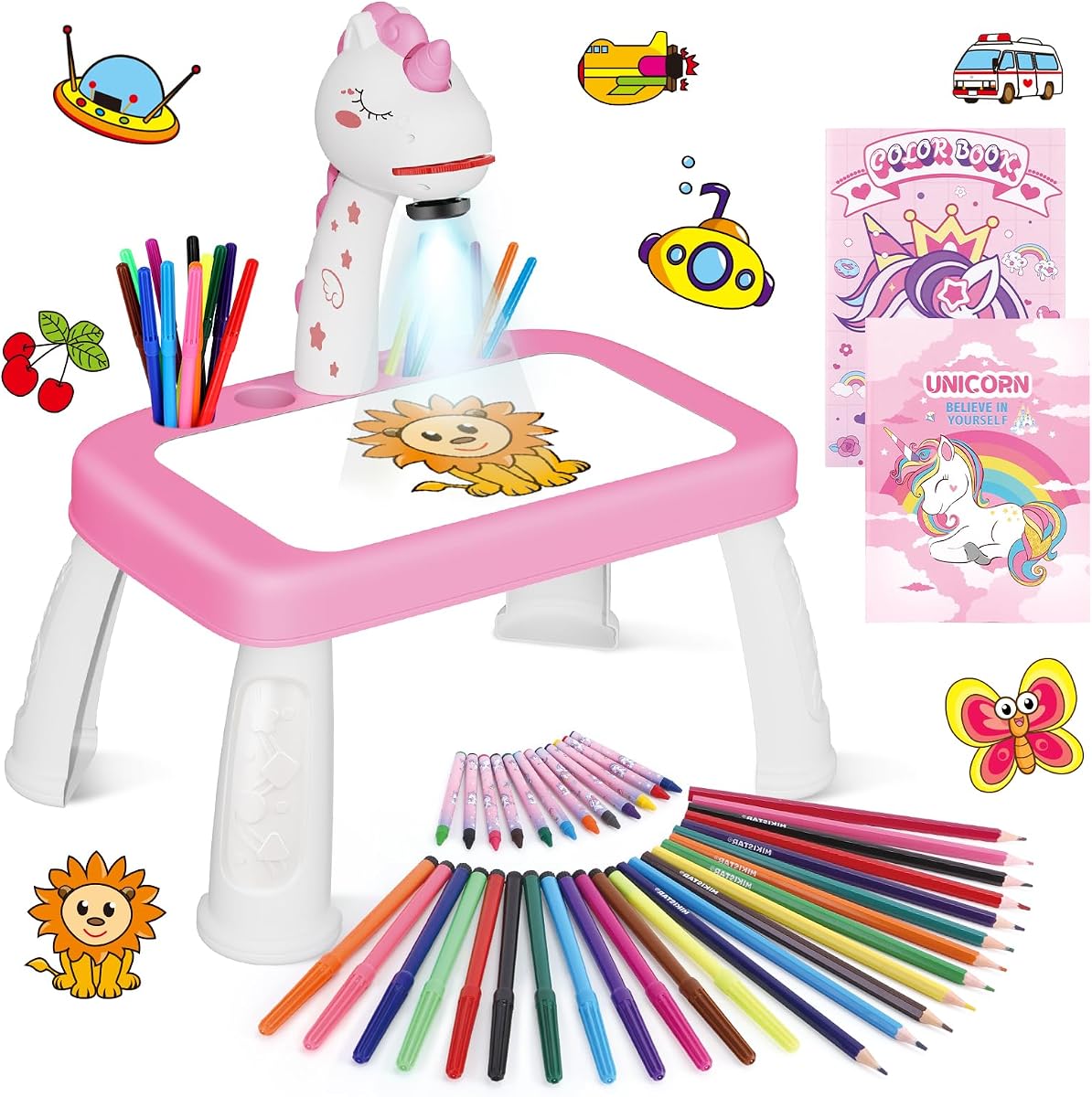
This Unicorn themed kit is a great gift for kids who love unicorns and animals. It is rated 4.4 stars and includes a wide range of supplies like pens pencils and crayons. The projector itself is designed with a cute unicorn shape.
We may earn a commission when you buy through this link, at no additional cost to you.
The set includes a sticker book and scrapbook to expand creative options. It is made with high-quality ABS material that is drop-resistant and safe. The simple assembly makes it easy for parents to set up quickly.
The theme might limit appeal for kids who do not love unicorns. However the variety of supplies makes it a great value. Customer support is committed to resolving issues within 24 hours.
This is the best choice for a themed gift set that includes more than just the projector. It encourages comprehensive arts and crafts play. For themed fun this is a top pick.
The unicorn design and stickers add a magical element to drawing time.
Includes diverse tools so kids can experiment with different styles.
We may earn a commission when you buy through this link, at no additional cost to you.
Selecting the right drawing projector requires considering age appropriateness, safety features, and content variety to ensure your child enjoys the experience.
Different models are designed for specific age ranges. Some simple tracers are suitable for toddlers as young as three while advanced AI models are better for kids five and older. Check the recommended age to ensure the device matches your child's skill level.
Choose a model that aligns with your child's developmental stage to avoid frustration or boredom.
Since these devices use light it is crucial to choose one that protects your child's eyes. Look for features like downward projection or certified blue light safety such as SGS RG0 ratings. This ensures the light does not shine directly into their eyes during extended use.
Prioritize eye protection certifications to ensure safe creative play sessions.
Consider the range of images available. Some projectors come with physical discs while others use digital apps with thousands of images. Decide whether your child prefers physical media or digital interaction. A wider variety keeps them engaged for longer periods.
Ensure the device has enough content to keep your child interested over time.
Devices may run on batteries or require a corded power connection. Battery-powered units are more portable but need replacements. Corded units ensure constant power but limit where they can be used. Choose based on your portability needs.
Select a power source that fits your typical play environment and convenience preferences.
Many projectors include tutorials or learning packs that teach drawing fundamentals. Some offer audio features to teach numbers and words alongside drawing. Look for educational benefits that go beyond simple tracing to help your child grow.
Look for models that offer structured learning to support artistic development.
Kids can be rough with toys so choose a model made from rugged materials like ABS plastic. Check if the projector is collapsible or comes with a storage case to prevent damage when not in use. A durable build ensures longevity.
Invest in a sturdy build to withstand daily play and extend the product life.
A good projector should be easy for both parents and children to set up. Look for simple mechanisms like slide-in discs or clear instructions. Complex setups can lead to frustration before the fun even begins.
Choose a device with straightforward setup to start creating quickly.
Prices vary widely from basic kits to advanced AI models. Determine your budget and ensure you get good value for the money. Higher prices often justify better features and content but simple tools can be just as fun for young children.
Balance your budget with the features you need to find the best value.
To begin use ensure the projector is placed on a stable flat surface with adequate space around it. Adjust the height and angle so the image aligns properly with the paper. Turn on the lights in the room if using a bright projector or dim them for a clearer image depending on the model.
Insert the chosen image disc or select the desired pattern via the app interface. Use the focus knob or buttons to sharpen the image lines so they are easy for your child to trace. Ensure the paper is secured under the arms of the projector to prevent slipping during use.
After use clean the projector with a dry soft cloth to remove dust. Store the discs or accessories in their designated compartments to avoid losing them. If using batteries check the compartment regularly to ensure they are inserted correctly and not leaking.
Yes most modern projectors are designed with safety in mind. Look for models that project downward onto the paper so the light does not shine directly into the eyes. Certifications like SGS RG0 indicate low blue light hazards making them safe for regular use.
Not usually. Standard printer or drawing paper works fine for most models. Some kits come with their own paper pads but you can use any smooth paper that fits under the projector arms. Thicker paper may prevent ink bleed if using markers.
Many basic models work perfectly fine without an app using physical discs or pre-loaded images. However advanced AI models often require an app for the full range of features like photo conversion. Check the specific requirements before buying if app usage is a concern.
Children as young as three can use simple tracers with guidance. More advanced models with AI features are best for children aged five and older who can follow instructions independently. Check the age rating on the product packaging for the best fit.
Yes many brands offer additional discs or digital content packs. For app-based models you can often download new images for free. Always check if the brand sells extra content to keep the experience fresh as your child grows.
It is recommended to limit screen-based or light-focused play to avoid fatigue. Use the built-in timer settings if available to encourage breaks every 30 to 60 minutes. Regular breaks help maintain focus and protect eye health during creative sessions.
We have reviewed ten top options ranging from simple tracers to advanced AI projectors. The Flycatcher smART Sketcher 2.0 leads as the best educational experience while the Caydo T3 Joy offers the best budget value. Each model brings unique strengths to help your child develop artistic skills.
When choosing prioritize safety features and ease of use to ensure a positive experience. Consider your child's age and interests to select a model that will keep them engaged long-term. A device that grows with them provides better value than a one-time toy.
Please remember that prices and availability can change frequently. Check current listings before making a purchase to ensure you get the best deal. We hope this guide helps you find the perfect tool to spark your child's creativity.