
Anti Slip Laptop Rubber Feet Pad Replacement for MacBook Pro 15PCS
4.4Editor score
Strong self-adhesive backing
Anti-slip rubber feet design
Works on any flat surface
Laptops often lose their grip over time as the original rubber feet wear out or detach. Replacing them restores stability and prevents sliding on smooth surfaces during use. Quality replacement strips offer durability, strong adhesion, and proper sizing for a secure fit.
We compared ten highly rated replacement options based on compatibility, material quality, and user feedback. Each product was evaluated for ease of installation, adhesive strength, and overall design. This list covers models for HP, Microsoft Surface, and universal options for various devices.
Each pick highlights key features, pros, cons, and ideal use cases to help you choose the right fit. Note that product availability and pricing may change frequently on retailer sites. Always verify your laptop model and dimensions before ordering to ensure compatibility.
4.4Editor score

4.5Editor score

4.5Editor score
As an Amazon Associate we earn from qualifying purchases.
The following table provides a side-by-side comparison of all ten products to help you quickly identify the best match for your device and needs.


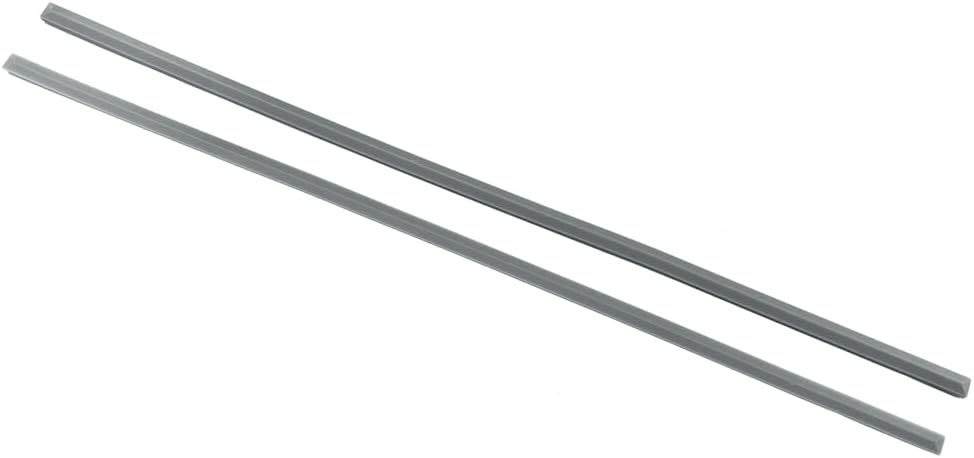


This product stands out as a top choice for HP Envy users needing reliable rubber feet replacement. With a 4.5 star rating, it offers high quality materials designed to restore stability and prevent sliding during daily use.
We may earn a commission when you buy through this link, at no additional cost to you.
The strips measure 31.5 cm in length and are tailored for specific HP Envy X360 models. Users report that the adhesive is strong and the rubber is durable, ensuring long-term performance without peeling or fading.
While the grey color is standard, some may notice slight variations. Additionally, thorough cleaning of the surface before application is recommended for the best bond, which is a minor trade-off for the quality provided.
If you own an HP Envy X360 or similar model, these strips are an excellent investment. They effectively replace worn-out feet, protect your surface, and keep your laptop secure on desks or laps.
The rubber material provides a non-slip surface that prevents your laptop from moving during typing or use.
Made from premium rubber, these strips resist wear and tear, ensuring they last longer than cheaper alternatives.
We may earn a commission when you buy through this link, at no additional cost to you.
This set offers two thickness types for flexible fitting, making it a versatile choice for HP 15-DY series owners. The premium rubber ensures durability and high-temperature resistance for long-term use.
We may earn a commission when you buy through this link, at no additional cost to you.
The elevated design enhances airflow and cooling, which is a significant benefit for performance. The strips absorb shocks and prevent scratches on surfaces, adding protection for your device and desk.
Compatibility is specific to HP models, so checking your laptop cover is essential. The two thickness options are useful but require careful selection to match your original feet dimensions.
For HP 15-DY users, these strips are a practical solution to restore stability. They combine functionality with protection, ensuring your laptop stays secure while improving thermal performance.
Having two thickness types allows you to choose the one that best matches your laptop's original foot height.
The slightly elevated design lifts the laptop slightly, promoting better air circulation underneath to reduce heat buildup.
We may earn a commission when you buy through this link, at no additional cost to you.
This product is tailored for Microsoft Surface Book 1, 2, or 3 models with a 13.5 inch size. The silicone bumper material offers excellent non-slip performance and protection for the bottom case.
We may earn a commission when you buy through this link, at no additional cost to you.
Each pack includes 2 non-slip strips designed to replace worn-out feet. The adhesive backing ensures a firm bond, keeping the laptop stable during use on various surfaces like glass or wood.
It is important to verify your exact model before purchasing to ensure a perfect fit. The grey color is standard but may have slight variations depending on lighting conditions.
Surface Book owners will find these strips reliable and effective. They restore the original stability of the device and add a layer of protection against scratches and wear.
The dimensions and design are specific to Surface Book models, ensuring a precise and secure fit on the bottom case.
Silicone material resists wear and provides a soft yet firm grip that protects both the laptop and your surfaces.
We may earn a commission when you buy through this link, at no additional cost to you.
These strips are designed for HP Envy x360 and related models, offering a precise fit. The black color matches the original design, maintaining the aesthetic of your device.
We may earn a commission when you buy through this link, at no additional cost to you.
The adhesive is pre-applied, making installation straightforward. Users report that the strips stay firm and prevent sliding, which is essential for productivity during work or travel.
It is crucial to clean the bottom case thoroughly before application for the best results. Confirming your model ensures compatibility and avoids issues with sizing.
For HP Envy x360 users, this is a reliable way to replace lost or worn feet. They are simple to install and effectively restore the laptop's stability and appearance.
The black finish ensures the replacement strips blend seamlessly with your laptop's original design for a clean look.
The adhesive backing is designed to hold securely, preventing the strips from peeling off during daily use.
We may earn a commission when you buy through this link, at no additional cost to you.
This option includes one thick and one thin pad for versatility. It is compatible with HP 15-EF and 15-DY series, ensuring a precise fit for these models.
We may earn a commission when you buy through this link, at no additional cost to you.
The strips come with pre-applied adhesive, saving you the hassle of buying separate glue. They are 100% brand new and tested for quality before shipping.
Checking your laptop's specific model is key since these are designed for HP series. The two thickness options are helpful but require you to choose the correct one.
HP 15-EF owners will appreciate the convenience and reliability. The strips restore grip and protect your surface while being easy to install without extra tools.
The adhesive is already applied to the strips, making the installation process quick and straightforward without extra supplies.
Having both thick and thin pads gives you flexibility to match the original height of your worn-out feet.
We may earn a commission when you buy through this link, at no additional cost to you.
X-Protector offers premium rubber foam strips suitable for laptops and more. The 8 pack provides flexibility, and the adhesive is strong enough to keep items in place on glass or wood.
We may earn a commission when you buy through this link, at no additional cost to you.
The strips are versatile and can be used for speakers or keyboards too. The material resists wear and maintains grip even with frequent use, ensuring lasting performance.
Some may find the universal design less specific than model-specific strips. Measuring your laptop's needs ensures the strips fit the intended area properly.
If you want a premium multi-purpose solution, these are an excellent choice. They deliver durability and stability for laptops and other devices needing non-slip protection.
The foam rubber is durable and soft, providing a comfortable yet secure grip that protects both the device and surface.
Beyond laptops, these strips work well for various household items like keyboards, speakers, or cutting boards needing stability.
We may earn a commission when you buy through this link, at no additional cost to you.
These pads are ideal for MacBook Pro and Air users needing reliable replacements. With 15 pieces, you have plenty for current needs and future replacements if needed.
We may earn a commission when you buy through this link, at no additional cost to you.
The self-adhesive backing is strong, ensuring the pads stay in place. They are slightly taller than original feet, which lifts the laptop for better airflow and cooling.
The height difference may be noticeable but benefits thermal performance. Measuring your laptop is recommended to ensure the height is acceptable for your setup.
MacBook owners will find these pads effective and economical. They provide strong grip, prevent slipping, and help keep the device cooler during extended use.
The pads are slightly taller than original feet, lifting the laptop to allow air to circulate underneath and reduce heat buildup.
With 15 pads included, you have enough for immediate use and extras to keep on hand for future needs.
We may earn a commission when you buy through this link, at no additional cost to you.
These strips are specifically made for Surface Laptop Studio 14.4 inch models. The nonskid bumper design ensures your device stays secure during use on smooth surfaces.
We may earn a commission when you buy through this link, at no additional cost to you.
The grey color matches the laptop's aesthetic, maintaining a sleek look. The adhesive backing is straightforward to apply, requiring minimal effort for installation.
The rating is slightly lower, so checking user feedback is wise before buying. Measuring your model ensures these strips fit properly without issues.
For Surface Laptop Studio owners, these are a convenient option. They restore stability and protect the bottom case while keeping the laptop looking original.
The dimensions are tailored for the 14.4 inch Surface Laptop Studio, ensuring a precise fit on the bottom case.
The bumper design not only prevents slipping but also cushions the laptop to reduce wear on the bottom case and your surfaces.
We may earn a commission when you buy through this link, at no additional cost to you.
These parts are designed for HP Elitebook X360 1030 G3 series. The 260MM length fits the bottom case, and the double-sided adhesive ensures a strong bond.
We may earn a commission when you buy through this link, at no additional cost to you.
Installation is simple with the included adhesive. The strips are new replacements for lost or worn feet, helping maintain the laptop's stability during use.
The lower rating suggests checking compatibility carefully. Ensure the surface is clean before applying for the best adhesion and longevity.
Elitebook X360 users can rely on these parts to restore functionality. They are a practical solution to keep your laptop secure and protected.
The 260MM length is calculated to match the HP Elitebook X360 1030 G3 series bottom case for a seamless fit.
The double-sided adhesive ensures the strips stick firmly to the case, preventing peeling or movement during use.
We may earn a commission when you buy through this link, at no additional cost to you.
This kit includes 2 sets of rubber feet and adhesive strips, ideal for multiple laptops. The adhesive is included, making reattachment to notebooks simple and efficient.
We may earn a commission when you buy through this link, at no additional cost to you.
The rubber feet are durable and designed to last. This option is flexible for various notebook models, but checking compatibility is recommended.
Specific to Majextand parts, so ensure your needs align. The included adhesive saves time and ensures a strong bond for the rubber feet.
For those needing extra sets or reattachment help, this is a solid choice. It provides convenience and reliability for maintaining laptop stability.
The adhesive strips are included in the pack, saving you the need to purchase extra supplies for reattachment.
With two sets included, you can fix multiple devices or keep extra sets ready for future replacements as needed.
We may earn a commission when you buy through this link, at no additional cost to you.
Choosing the right replacement requires careful consideration of compatibility, material, and design. This guide outlines key factors to ensure a perfect fit and long-lasting performance.
Always verify your laptop model and dimensions before purchasing. Replacement strips are designed for specific series, and mismatched sizes can lead to poor adhesion or misalignment.
Check the product description for listed models and measure your original feet if needed to ensure a precise fit.
Premium rubber or silicone ensures durability and effective non-slip performance. High-quality materials resist wear, maintain grip, and protect your surfaces from scratches.
Look for products labeled with durability or high-temperature resistance to ensure they last longer under daily use.
Strong adhesive is crucial for the strips to stay in place. Pre-applied adhesive strips are convenient, but ensure they are designed for strong bonding on smooth surfaces.
Cleaning the laptop bottom before application improves adhesive performance and prevents premature peeling.
The thickness of the strips affects stability and airflow. Some products offer multiple thickness options to match your original feet's height for a seamless look.
Consider if the strip raises the laptop slightly for better cooling, which can be beneficial for high-performance devices.
Matching the color of your laptop's base ensures a clean appearance. Black and grey are common choices that blend well with most devices.
Aesthetic consistency matters for users who want replacements to look like original parts.
Simple installation saves time and effort. Look for strips with peel-off liners and clear instructions to avoid mistakes during application.
Tools are usually not required, but a clean, dry surface is essential for best results.
Some packs include multiple strips, which is helpful for replacements or multiple devices. Ensure the number meets your needs to avoid frequent reordering.
Extra strips can serve as backups in case of future wear or accidental loss.
Check if the product offers a money-back guarantee or warranty. This protects your purchase if the strips do not meet expectations.
A flexible return policy is especially important when dealing with compatibility uncertainties.
Clean the bottom surface of your laptop thoroughly before applying the new strips. Remove all old adhesive residue, dust, and oils to ensure the strongest possible bond for the replacement feet.
Peel off the release liner from the adhesive side and carefully align the strip with the original placement on your laptop's bottom cover. Press firmly for 30 seconds to activate the adhesive and ensure a secure fit.
Allow the adhesive to cure for 24 hours before heavy use. Avoid exposing the strips to excessive heat or moisture, and periodically check for signs of wear to maintain optimal stability.
Check the product's compatibility list for your exact model. If not listed, measure your original rubber feet's length, width, and thickness to match them with the replacement options.
Universal strips work if they match your laptop's dimensions. However, model-specific strips ensure a perfect fit and better adhesion for long-lasting stability on your device.
Most replacement strips come with pre-applied adhesive, so no extra glue is needed. Ensure the surface is clean for the adhesive to bond effectively.
With quality materials like rubber or silicone, strips can last several years. Avoidance and cleaning the laptop surface extend their lifespan significantly.
Yes, many strips are universal and work on speakers, keyboards, or other items. Verify dimensions to ensure they fit your specific device properly.
This may be due to poor surface cleaning or weak adhesive. Always clean and dry the bottom of your laptop thoroughly before applying for the best bond.
The top three picks offer reliable solutions for HP Envy, Surface Book, and MacBook users seeking stability. Each provides quality materials, strong adhesive, and precise compatibility for a secure fit.
Prioritize your laptop model and adhesive strength to ensure lasting results. Investing in high-quality strips protects your device and improves comfort during extended use.
Prices and availability change frequently. Always verify the current product details and reviews before ordering to make the best choice for your specific needs.