
HP 17 Laptop
5.0Editor score
AMD Ryzen 5 7520U Processor
17.3-inch FHD Display
Windows 11 Pro Included
Selecting the right laptop for Adobe Premiere Pro requires balancing processing power, memory, and display quality to ensure smooth video editing workflows.
We compared ten high-performance machines focusing on CPU speed, RAM capacity, and graphics capabilities to help you find the ideal tool for your needs.
Each pick highlights specific strengths for creative work, though availability and pricing may shift, so always check current listings before making your final decision.
5.0Editor score

4.4Editor score

4.7Editor score
As an Amazon Associate we earn from qualifying purchases.
This side-by-side comparison highlights the key specifications and unique features of each laptop to help you identify the best fit for your editing workflow.




The Dell Precision 7680 stands out as a top-tier workstation designed specifically for demanding creative workflows like Adobe Premiere Pro editing. With a powerful Intel Core i9 processor and 32GB of DDR5 RAM, this laptop handles complex timelines and high-resolution footage with ease. Its ISV certifications ensure stable performance with professional software, making it a reliable choice for serious video editors who cannot afford downtime or crashes during critical projects.
We may earn a commission when you buy through this link, at no additional cost to you.
Key strengths include its scalable architecture and robust connectivity options. The system supports up to three external monitors via Thunderbolt 4 and HDMI, allowing for a multi-screen editing setup without needing a separate docking station. Additionally, the CAMM RAM design improves performance and reduces height, contributing to a sleeker profile while maintaining enterprise-grade security and manageability features essential for professional environments.
While the performance is outstanding, users should note the trade-off in portability and price. This is a robust machine built for power rather than travel, and its cost reflects the high-end components and enterprise support included. However, for editors working on complex 4K or 8K projects, the speed and stability provided by the workstation-grade hardware justify the investment and ensure smooth playback and rendering.
This laptop is ideal for professionals who need uncompromising power for video editing, 3D rendering, and content creation. If your workflow involves heavy multitasking, large file handling, and professional-grade color grading, the Precision 7680 delivers the reliability and performance required to keep your creative process efficient and productive day after day.
The Intel Core i9-13950HX processor provides the multi-core performance necessary for rendering high-resolution video and handling complex effects without lag.
Support for three external 4K monitors enables flexible workspace configurations that are crucial for detailed editing and color correction tasks.
We may earn a commission when you buy through this link, at no additional cost to you.
The Apple 2025 MacBook Pro with the M5 chip offers a unique blend of performance and portability that appeals to creative professionals working on the go. Its unified memory architecture ensures that data moves quickly between the CPU and GPU, which is particularly beneficial for video editing tasks in Adobe Premiere Pro. The Liquid Retina XDR display provides exceptional brightness and contrast, allowing editors to accurately grade colors and preview content in a high-fidelity environment.
We may earn a commission when you buy through this link, at no additional cost to you.
One of the standout features of this machine is its ability to maintain peak performance even when running on battery power. Unlike many Windows laptops that throttle performance to save energy, the MacBook Pro delivers consistent speeds throughout the day. The M5 chip also includes built-in Neural Accelerators that enhance AI-driven tasks, making it future-proof for emerging features in creative software that rely on machine learning for tasks like auto-reframing or noise reduction.
However, the premium design comes with certain constraints, such as limited internal upgrade options and a higher cost compared to similarly specced Windows machines. The 16GB unified memory is sufficient for most tasks but may feel restrictive for editors working with massive 8K projects or heavy multitasking. Despite these limitations, the overall user experience, build quality, and display accuracy make it a top choice for those invested in the Apple ecosystem.
This laptop is best suited for editors who value display quality, battery life, and a seamless workflow between devices. If you frequently work from coffee shops or client sites and need a machine that balances power with mobility, the MacBook Pro provides an excellent balance of performance and portability that supports creative workflows effectively.
The Liquid Retina XDR display delivers 1600 nits peak brightness and a million-to-one contrast ratio for precise color grading and HDR viewing.
Unified memory architecture allows the CPU and GPU to share data efficiently, speeding up rendering and playback in video editing applications.
We may earn a commission when you buy through this link, at no additional cost to you.
The HP 17 Laptop offers an accessible entry point for users looking to perform basic video editing without breaking the bank. Its 17.3-inch Full HD display provides ample screen real estate for timeline management and previewing footage, which is a significant advantage over smaller 13 or 14-inch laptops. Powered by an AMD Ryzen 5 processor and DDR5 RAM, it handles standard 1080p editing tasks smoothly and supports general productivity needs effectively.
We may earn a commission when you buy through this link, at no additional cost to you.
Despite its budget-friendly positioning, this laptop includes thoughtful features like Windows 11 Pro and physical privacy shutters for the webcam. The inclusion of accessories such as a mouse and tablet stand adds value by helping users set up a comfortable workspace immediately. The narrow bezel design enhances the viewing experience, making the screen appear larger and more immersive during editing sessions or client presentations.
Users should be aware that the 256GB SSD and 8GB of RAM may limit its longevity for heavier workloads. Large video files fill up storage quickly, and more complex projects might benefit from additional RAM. However, for students, hobbyists, or those editing short-form content, the performance is adequate and the price point makes it a compelling option for those who need a functional machine without a high investment.
This laptop is perfect for beginners or casual editors who need a reliable device for 1080p projects and general office tasks. If you are looking for a large screen and a complete package at an affordable price, the HP 17 delivers solid value and meets the basic requirements for smooth video editing workflows.
The 17.3-inch display offers plenty of space for managing multiple windows and viewing detailed video timelines without external monitors.
Included accessories like a mouse and stand help users establish a productive workflow right out of the box without extra purchases.
We may earn a commission when you buy through this link, at no additional cost to you.
The Dell Precision 7780 is designed for users who require the absolute highest level of performance for complex video editing and 3D rendering tasks. With an unprecedented 128GB of RAM and the powerful NVIDIA RTX ADA 3500 GPU, this machine can handle massive multi-camera projects and high-resolution timelines without any performance bottlenecks. It is essentially a desktop replacement that offers workstation-grade power in a mobile form factor for on-site professional use.
We may earn a commission when you buy through this link, at no additional cost to you.
The inclusion of 128GB RAM ensures that editors can keep numerous applications, browser tabs, and large Premiere Pro projects open simultaneously without slowdowns. The NVIDIA RTX ADA 3500 GPU features 12GB of VRAM, providing the necessary horsepower for real-time playback of 4K and 8K footage with effects applied. This configuration is tailored for engineers, architects, and creative professionals who rely on stability and speed for critical business applications.
The trade-offs for this level of power are significant in terms of portability and price. The system is heavy and expensive, making it less suitable for casual users or those who travel frequently. However, for enterprise environments or studios where downtime is not an option, the reliability and performance of the Precision 7780 justify the investment. It delivers a seamless editing experience even under the most demanding conditions.
This laptop is ideal for power users who need maximum memory and graphics capability for professional workflows. If your work involves heavy 3D rendering, simulation, or ultra-high-definition video editing, the Precision 7780 provides the robust infrastructure required to complete tasks efficiently and reliably.
128GB of RAM allows for seamless multitasking and handling of massive project files that would overwhelm standard consumer laptops.
The NVIDIA RTX ADA 3500 offers 12GB VRAM for high-fidelity rendering and smooth playback of complex video effects.
We may earn a commission when you buy through this link, at no additional cost to you.
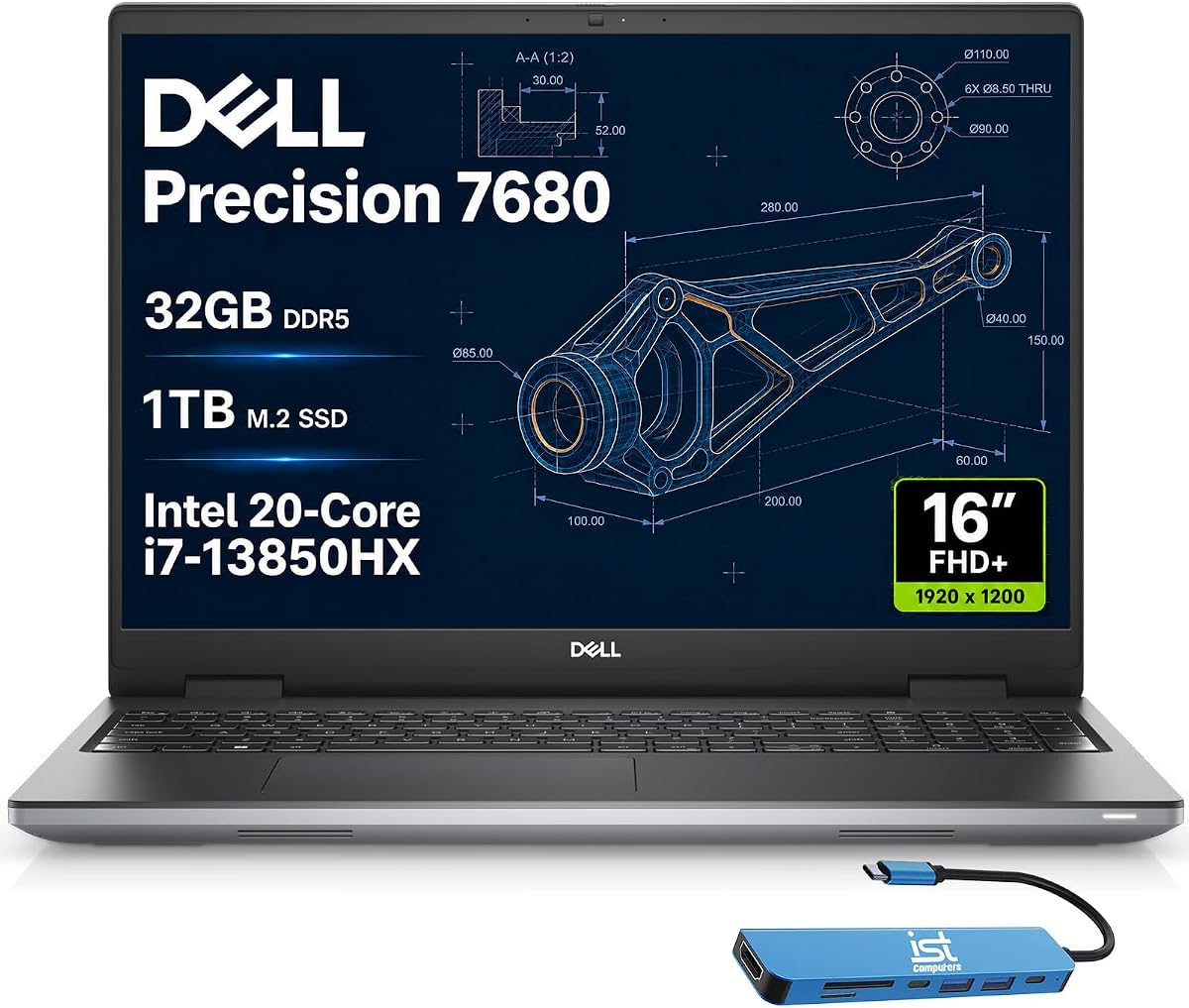
The Dell Precision 7680 with the i7 processor offers a balanced workstation solution for professionals who need reliability without the highest-end price tag. The Intel Core i7-13850HX provides strong multi-core performance suitable for most video editing tasks, while the 32GB DDR5 RAM ensures smooth operation during multitasking. It combines the durability of a workstation with a more accessible price point than the i9 variants.
We may earn a commission when you buy through this link, at no additional cost to you.
This model features ISV certifications that guarantee compatibility with professional software like Adobe Premiere Pro. The display supports up to three external monitors, enabling a productive multi-screen setup for editing. Connectivity options are robust, with Thunderbolt 4 and HDMI ports ensuring you can easily connect external drives and displays for on-site work or client meetings.
While the integrated graphics may not be sufficient for heavy GPU-accelerated effects compared to models with dedicated RTX cards, it handles standard editing workflows well. The focus here is on CPU power and system stability. Users who prioritize processing speed for rendering and encoding over real-time effects will find this configuration highly effective for their daily tasks.
This laptop is best for professionals who need a reliable, certified workstation for general creative work. If you require a balance of performance and security with a manageable price point for enterprise use, the i7 Precision 7680 offers a practical and powerful solution for video production environments.
ISV certifications ensure that the system runs professional software smoothly without unexpected crashes or compatibility issues.
Multiple Thunderbolt 4 and HDMI ports allow for versatile connections to external displays and storage devices.
We may earn a commission when you buy through this link, at no additional cost to you.
This version of the Dell Precision 7680 distinguishes itself with generous internal configurations and enterprise-level support. With 64GB of RAM and a 2TB NVMe SSD, it provides significant room for large project files and simultaneous editing applications. The inclusion of Dell ProSupport Plus adds a layer of peace of mind for businesses that cannot afford extended downtime due to hardware failures.
We may earn a commission when you buy through this link, at no additional cost to you.
The NVIDIA RTX 1000 GPU with 6GB VRAM offers dedicated graphics power that improves performance in GPU-accelerated tasks compared to integrated solutions. This makes it a strong candidate for users who need a mix of processing power and graphics capability for video rendering and effects processing. The workstation design ensures durability and reliability for daily professional use.
The cost reflects the high specifications and included warranty services, making it more of an investment for organizations or serious creatives. However, the combination of fast storage, ample memory, and professional support makes it a valuable tool for maintaining productivity. It reduces the risk of workflow interruptions and ensures that the hardware remains in optimal condition over time.
This laptop is ideal for business environments where reliability and support are critical. If you need a machine with plenty of storage and memory for large files and want premium service options, the Precision 7680 with ProSupport Plus is a dependable choice for professional video editing.
64GB RAM and 2TB SSD provide ample resources for multitasking and storing extensive video project libraries locally.
ProSupport Plus offers 24/7 access to experts and onsite service to minimize downtime and keep operations running smoothly.
We may earn a commission when you buy through this link, at no additional cost to you.
The Dell Precision 3581 offers a compelling entry point into the workstation category by delivering core professional features at a lower cost. With a 13th Gen Intel Core i7 processor and 32GB of DDR5 RAM, it handles multitasking and video editing workflows effectively. The dedicated RTX A500 GPU provides essential graphics acceleration for smoother playback and rendering in Adobe Premiere Pro.
We may earn a commission when you buy through this link, at no additional cost to you.
Its configuration includes a 1TB SSD which provides ample space for project files and quick data access. The 15.6-inch FHD display offers clear visuals suitable for general editing work. This model is ideal for users who want workstation-grade reliability and performance without the premium price tag of higher-end series. The renewed status makes it even more accessible for budget-conscious professionals.
While the RTX A500 has limited video RAM compared to higher-end cards, it is sufficient for 1080p and light 4K editing tasks. The renewed condition means it may not look brand new, but it comes with a warranty that ensures protection. This balance of performance and affordability makes it a smart choice for those stepping up from consumer laptops to professional work.
This laptop is best for small businesses or freelancers who need reliable hardware without overspending. If you want workstation-class speed and graphics capabilities at a manageable price, the Precision 3581 offers excellent value for professional video editing needs.
The 14-core processor and 32GB RAM ensure smooth operation for most standard editing timelines and multitasking.
The RTX A500 GPU enables hardware acceleration for video effects and playback at an entry-level workstation price.
We may earn a commission when you buy through this link, at no additional cost to you.
The Dell Precision 5550 is known for its sleek design and portability within the workstation category. It packs professional-grade performance into a thin chassis, making it a great option for editors who need to travel with their equipment. The 32GB of RAM ensures that editing software runs smoothly, and the ISV certification guarantees stability with Adobe applications.
We may earn a commission when you buy through this link, at no additional cost to you.
With a 15.6-inch display and a durable build, this laptop offers a practical balance between screen real estate and mobility. The renewed condition provides access to high-end specifications at a reduced cost, making it an attractive option for those on a budget. It is a reliable choice for users who prioritize a compact form factor without sacrificing essential workstation features.
While the processor is an older generation, it still provides adequate power for standard video editing tasks. The main trade-off is that it may not support the latest software optimizations as well as newer models. However, for many editing workflows, the performance remains solid and efficient enough to get the job done without issues.
This laptop is ideal for mobile professionals who need a portable workstation for editing on the go. If you require a slim, reliable machine with plenty of RAM for standard editing tasks, the Precision 5550 offers a practical and cost-effective solution.
The slim chassis allows for easy transport while maintaining the durability required for daily use in varied environments.
32GB of RAM ensures that editing software and background processes run smoothly without performance bottlenecks.
We may earn a commission when you buy through this link, at no additional cost to you.
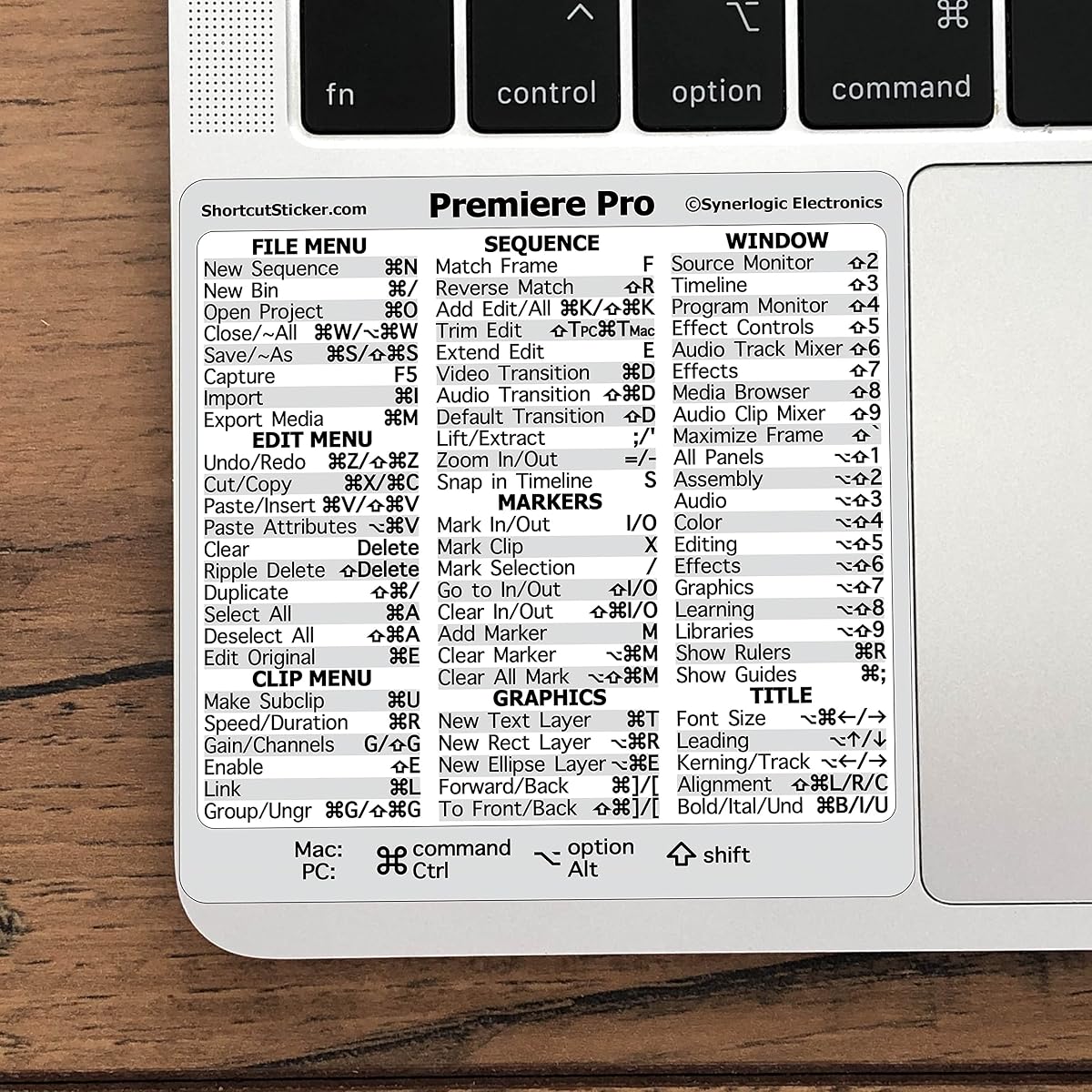
While not a laptop, this keyboard sticker is an essential accessory for editors who want to maximize their workflow efficiency. It provides quick reference to essential keyboard shortcuts directly on your keyboard, reducing the need to pause and look up commands. For anyone learning Adobe Premiere Pro or looking to speed up their editing process, this tool is a valuable addition to any workstation setup.
We may earn a commission when you buy through this link, at no additional cost to you.
The sticker is designed with a durable vinyl material that withstands frequent use and looks professional with an OEM-like appearance. It works on both Mac and Windows keyboards, making it versatile for different users. The shortcuts are organized to cover everything from basic to advanced commands, ensuring that users can improve their proficiency over time.
The value of this product lies in its ability to significantly reduce the time spent searching for shortcuts. It helps users transition from mouse-based editing to keyboard-based workflows, which is crucial for faster editing. While it does not replace hardware upgrades, it enhances the usability of the hardware you already have.
This accessory is best for editors at any skill level who want to learn shortcuts faster and work more efficiently. If you are looking for a low-cost way to improve your editing speed and reduce workflow interruptions, this sticker is a highly recommended investment.
Having shortcuts at your fingertips reduces context switching and allows for a smoother, faster editing experience.
The high-quality vinyl material ensures longevity, and the design works across both Mac and Windows keyboards.
We may earn a commission when you buy through this link, at no additional cost to you.
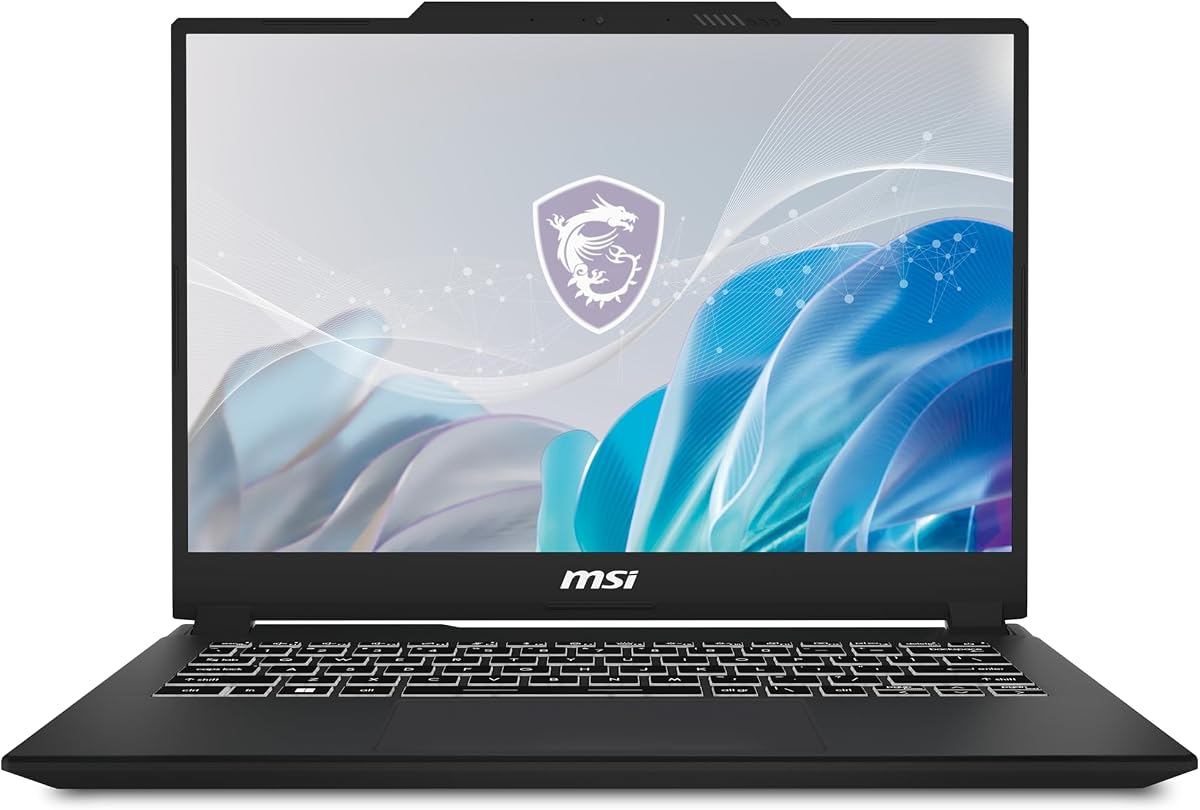
The MSI Creator M14 is designed specifically for content creators who need a portable yet powerful machine. Its 14-inch 2.8K display offers vivid colors and high resolution, making it an excellent choice for color grading and visual detail. The RTX 4050 GPU provides the necessary graphics power for smooth video editing, balancing performance with a compact form factor.
We may earn a commission when you buy through this link, at no additional cost to you.
With 16GB DDR5 RAM and a 1TB SSD, it handles standard video editing tasks efficiently. The cooling system ensures that the laptop maintains performance during longer editing sessions without throttling. This machine is ideal for creators who prioritize screen quality and portability for on-the-go work while still requiring hardware acceleration for their projects.
The main trade-off is the limited RAM and smaller screen compared to 17-inch models. However, for those who can work within these limits, the display quality and performance per pound are impressive. It supports creative workflows well and offers a premium experience in a travel-friendly package that is easy to carry to client meetings.
This laptop is best for mobile creators who value display quality and portability. If you need a reliable tool for editing and rendering that fits easily into a bag, the Creator M14 delivers a balanced mix of power and convenience.
The 2.8K screen provides precise color accuracy essential for professional video grading and visual content creation.
The Cooler Boost technology maintains performance levels during intensive tasks by managing heat effectively.
We may earn a commission when you buy through this link, at no additional cost to you.
Selecting the right laptop for video editing involves evaluating several critical components that directly impact your workflow efficiency and project quality.
The CPU is the engine of your editing workflow, responsible for decoding video and rendering final outputs. Look for multi-core processors such as Intel Core i7 or i9, or AMD Ryzen 7 or 9, which provide the necessary horsepower to handle high-resolution footage and complex effects efficiently.
Prioritize processors with higher clock speeds and core counts to ensure smooth playback and faster rendering times for your projects.
RAM plays a crucial role in multitasking and handling large timelines. Adobe Premiere Pro recommends at least 32GB of RAM for 4K editing, though 16GB may suffice for lighter 1080p projects. More memory allows you to keep multiple applications open without performance drops.
Choose laptops with 32GB or more if you plan to work with complex effects or multiple video streams simultaneously.
A dedicated GPU accelerates video processing, effects rendering, and playback. NVIDIA GeForce RTX cards or professional Quadro/RTX workstation GPUs offer significant advantages over integrated graphics. The amount of VRAM also matters, with 6GB or more recommended for high-resolution editing.
Ensure the laptop has a dedicated GPU with sufficient VRAM to support GPU-accelerated features in your software.
Fast storage is essential for loading large video files and saving projects quickly. NVMe SSDs are the standard for modern laptops and provide much faster read/write speeds than traditional hard drives. Aim for at least 1TB of storage to accommodate project files and media libraries.
Opt for NVMe SSDs to reduce loading times and improve overall system responsiveness during editing sessions.
A high-quality display is vital for color accuracy and detail. Look for Full HD or higher resolution with good color gamut coverage. A larger screen or the option to connect external monitors can significantly improve productivity by providing more workspace.
Select a display with high brightness and accurate colors to ensure your edits look correct on various devices.
Video editors often connect external drives, monitors, and peripherals. Ensure the laptop has enough USB ports, HDMI or Thunderbolt connections, and SD card slots if needed. Thunderbolt support is particularly useful for high-speed data transfer and docking stations.
Verify that the available ports meet your peripheral needs to avoid constant use of adapters.
If you edit on the go, battery life is a significant factor. While performance laptops often have shorter battery life, newer models are improving. Consider how long you need to work unplugged and whether portability outweighs the need for plugged-in performance.
Check battery life reviews to ensure the laptop supports your mobility requirements without frequent charging interruptions.
Professional workstations are often built to withstand daily use and travel. Look for models with robust construction and certifications like MIL-STD testing. A durable chassis ensures longevity and protects your investment during on-site work or client visits.
Prioritize laptops with proven durability if you plan to use them in varied environments.
To get the most out of your laptop for video editing, always plug it into a power source when rendering large projects to prevent performance throttling and ensure full utilization of hardware capabilities.
Regularly update your graphics drivers and operating system to maintain compatibility with the latest software versions and security patches. Keeping drivers current is essential for smooth playback and avoiding crashes during critical editing tasks.
Clean your laptop periodically to prevent dust buildup in vents which can lead to overheating. Use compressed air to clear the fans and ensure the cooling system operates efficiently for sustained performance.
Adobe recommends at least 16GB of RAM for basic editing, but 32GB or more is ideal for 4K footage and complex workflows. Having more RAM allows for smoother multitasking and better performance when working with multiple applications.
Yes, a dedicated GPU is essential for hardware-accelerated effects and smooth playback. Integrated graphics may work for simple 1080p projects but will struggle with higher resolutions or effects-heavy timelines.
Both macOS and Windows support Premiere Pro well. macOS offers stability and excellent displays, while Windows provides more hardware variety and often better performance per dollar for workstation configurations.
Screen color accuracy is crucial for video editing to ensure colors look correct across different devices. Look for displays with good color gamut coverage and calibration tools to achieve professional results.
Some laptops allow upgrades while others do not. Workstations typically offer more flexibility for upgrading memory and storage compared to ultrabooks, so check the specific model's expansion options before buying.
Video files are large, so a 1TB SSD is recommended as a starting point. Consider external storage or cloud solutions for archival projects if your laptop storage fills up quickly.
The Dell Precision 7680, Apple 2025 MacBook Pro, and HP 17 Laptop offer distinct advantages depending on your budget and workflow requirements. Each provides the necessary hardware to handle professional video editing tasks effectively.
Prioritize processing power, memory, and display quality when making your decision to ensure the machine supports your current and future editing needs without compromise.
Always check current prices and availability before purchasing as these can fluctuate frequently. Finding the right balance between performance and value is key to a successful investment in your editing tools.