
Light Gaming Laptop
4.6Editor score
AMD Ryzen 7 430U
16GB RAM Capacity
Lightweight Portable Design
Finding the right laptop for Enscape requires balancing processing power with portability. Architects and designers need machines that handle real-time rendering without lagging during critical presentations or detailed modeling sessions.
We evaluated ten distinct models based on their CPU efficiency, GPU capabilities, and display fidelity. Each selection offers a unique mix of performance and value tailored to varying budget constraints and workflow demands.
Each pick highlights specific strengths like battery endurance or screen accuracy. Note that availability and pricing fluctuate frequently, so verify current stock and deals before making your final purchasing decision today.
4.6Editor score

4.5Editor score

4.3Editor score
As an Amazon Associate we earn from qualifying purchases.
The following table provides a side-by-side comparison of all ten selected laptops, highlighting key specifications like processor type, memory capacity, storage size, and display resolution to assist in quick decision-making.




The HP 17 inch Business Laptop stands out as a top contender for Enscape users due to its robust balance of screen real estate and processing power. With a 4.5 rating, it consistently delivers reliability for professionals needing detailed visualization tools without constant upgrades.
We may earn a commission when you buy through this link, at no additional cost to you.
Its AMD Ryzen 5 CPU paired with 16GB of RAM ensures that multitasking between heavy rendering software and browser tabs remains smooth. The 17.3 inch FHD display provides ample space to view complex architectural plans and 3D models with clarity and precision.
While the device is bulkier than standard ultrabooks, the trade-off offers better thermal management during intensive rendering sessions. Users may find the battery life dependent on workload intensity, so keeping a charger nearby is recommended for mobile work.
This laptop is ideal for students and professionals who prioritize screen size and performance over portability. It offers a solid foundation for running Enscape efficiently while providing enough storage for large project files.
The expansive 17.3 inch screen allows for better navigation of detailed 3D models and architectural blueprints simultaneously.
With 16GB RAM, you can run Enscape alongside other productivity tools without significant performance drops or lag.
We may earn a commission when you buy through this link, at no additional cost to you.
This Light Gaming Laptop offers exceptional value for users seeking performance without breaking the bank. Rated at 4.6 stars, it features a powerful AMD Ryzen 7 processor that competes well against more expensive options in rendering tasks.
We may earn a commission when you buy through this link, at no additional cost to you.
The inclusion of 16GB RAM makes it suitable for running modern software like Enscape comfortably. Its lightweight construction ensures you can carry it to client meetings or co-working spaces without strain.
However, relying on integrated graphics may limit high-end rendering speeds compared to dedicated GPU models. The build quality is functional but may not withstand heavy physical stress over long periods of travel.
Ideal for budget-conscious students or freelancers, this machine provides a capable platform for learning and professional work. It balances cost and performance effectively for those who need reliable hardware on a tight budget.
The Ryzen 7 430U delivers strong single-core performance crucial for many design applications and real-time rendering engines.
Its compact size and low weight make it easy to transport between job sites and offices daily.
We may earn a commission when you buy through this link, at no additional cost to you.
The Lenovo V15 Gen 4 delivers premium features tailored for business professionals who need robust security and performance. With an Intel Core i5-13420H processor, it handles complex workflows and rendering tasks with consistent speed and stability.
We may earn a commission when you buy through this link, at no additional cost to you.
Running Windows 11 Pro adds enterprise-level security features that are beneficial for protecting sensitive client data. The 16GB RAM ensures smooth multitasking even when multiple heavy applications are open simultaneously.
While the price is higher than budget options, the build quality justifies the investment for daily professional use. The standard screen brightness may be a limitation for outdoor work compared to higher-end display panels.
This laptop is best suited for professionals who value system stability and security features alongside performance. It provides a reliable workhorse for running Enscape and other demanding design software efficiently.
Windows 11 Pro offers advanced encryption and management tools vital for businesses handling confidential architectural plans.
The i5-13420H processor provides ample power for rendering and modeling without requiring excessive cooling systems.
We may earn a commission when you buy through this link, at no additional cost to you.
This HP Laptop 14 Computer serves as an entry-level option for users with basic needs or very tight budgets. While it has a 4.3 rating, its specs are modest compared to higher-end models needed for heavy rendering tasks.
We may earn a commission when you buy through this link, at no additional cost to you.
It features an Intel N150 processor and 4GB RAM which might struggle with complex 3D scenes in Enscape. The 128GB storage limits how many files you can keep locally without external drives.
Despite limitations, it is a good starting point for those learning design basics or handling simple 2D drafts. Its lightweight design makes it highly portable for students on the go.
Ideal for occasional users or those who rely on cloud storage and remote rendering. It offers a low-cost entry into the ecosystem but may require upgrades for professional daily use.
Low pricing makes it accessible for students or hobbyists exploring design software without significant financial commitment.
Simplified performance ensures stable operation for word processing and basic web-based design tools efficiently.
We may earn a commission when you buy through this link, at no additional cost to you.
The HP OmniBook 3 14 inch brings next-generation AI capabilities and stunning OLED visuals to the table. With a 2K OLED display, color accuracy is exceptional for viewing high-fidelity architectural renders and textures.
We may earn a commission when you buy through this link, at no additional cost to you.
Equipped with the Snapdragon X X1-26-100 processor, it offers impressive battery life and fast performance for everyday tasks. However, users should verify software compatibility with ARM-based systems before committing.
While 16GB RAM helps multitasking, the 256GB SSD might fill up quickly with large project files. The OLED screen is vibrant but may require calibration for precise professional color work.
Best for users prioritizing display quality and portability over raw processing power. It is a compelling choice for visual presentations and mobile work where battery endurance is critical.
The OLED panel delivers deep blacks and vibrant colors essential for high-quality architectural presentations and renderings.
Built-in AI features help streamline workflows and optimize performance for demanding design applications efficiently.
We may earn a commission when you buy through this link, at no additional cost to you.
This HP 2025 New 17 inch model stands out for its massive storage and high RAM capacity suitable for large data sets. The inclusion of 32GB RAM ensures you can handle complex models without performance bottlenecks.
We may earn a commission when you buy through this link, at no additional cost to you.
With 1.5TB of total storage including an external drive, you have ample room for project archives and assets. The 17.3 inch screen provides a generous workspace for detailed architectural planning and editing.
The added weight may make it less ideal for frequent travel, but it excels as a stationary workstation. Users should ensure they utilize the external drive effectively to maximize the full storage potential.
Best for professionals who manage extensive libraries of textures and large project files regularly. It offers a robust hardware foundation for heavy-duty tasks and efficient workflow management.
32GB RAM allows simultaneous operation of rendering software and multiple browser tabs without system slowdown.
Combined internal and external storage ensures you never run out of space for critical project files.
We may earn a commission when you buy through this link, at no additional cost to you.
The HP OmniBook 3 16 inch combines a responsive touchscreen with a high-resolution display for intuitive interaction. Its 2K resolution ensures that details in your architectural plans are crisp and easy to inspect.
We may earn a commission when you buy through this link, at no additional cost to you.
While 8GB RAM is sufficient for standard tasks, heavy rendering might require closing other apps. The touchscreen adds convenience for annotating or navigating models directly on the screen.
The battery life is robust enough for full-day usage away from power outlets. This model is best for those who value display clarity and touch input over raw processing power.
Ideal for design students or professionals who present frequently and need direct screen interaction. It offers a modern interface that enhances usability for visual design workflows.
Touchscreen capabilities allow direct manipulation of designs, speeding up the editing and review process significantly.
The 2K screen provides sharp visuals essential for checking fine details in architectural drafts and textures.
We may earn a commission when you buy through this link, at no additional cost to you.
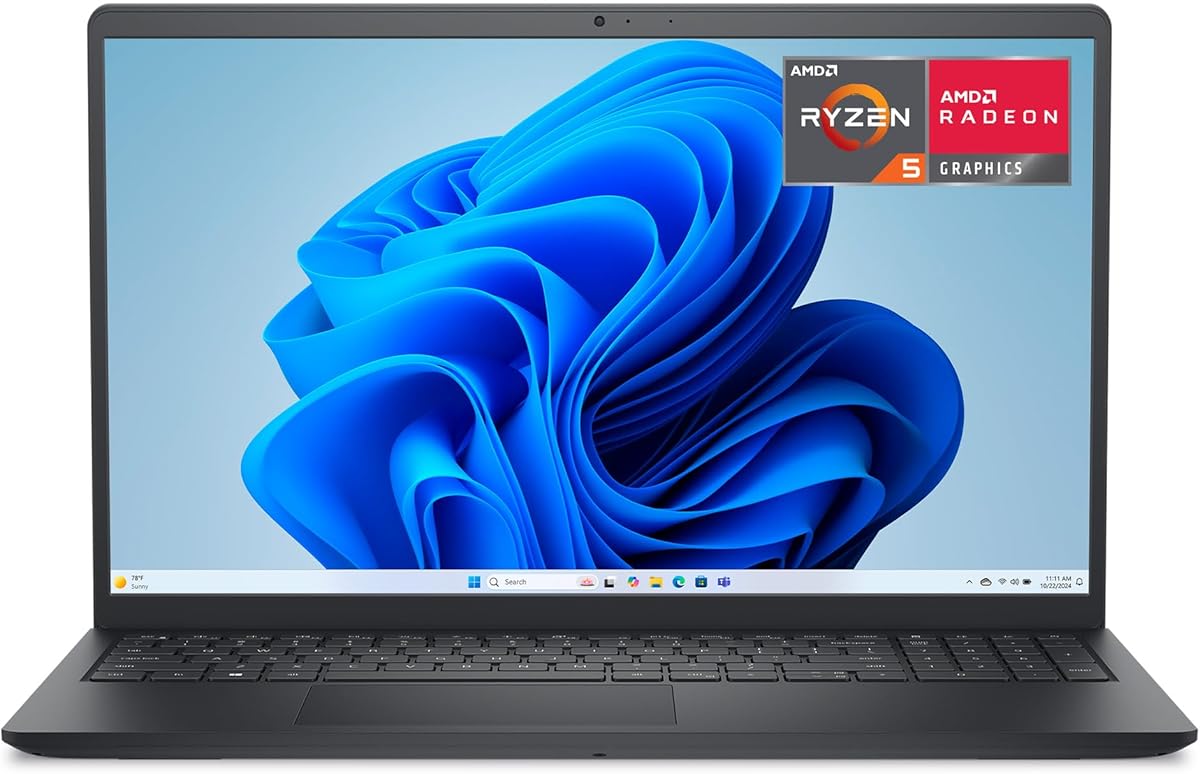
This Dell 15.6 Laptop focuses on user comfort with its ergonomic design features and adaptive thermal management. It is ideal for extended work sessions where physical comfort is a priority during rendering or modeling.
We may earn a commission when you buy through this link, at no additional cost to you.
The Ryzen 5 7520U provides decent performance for moderate workloads. Adaptive thermals ensure the system remains cool and quiet during operation.
However, the lack of advanced graphics capabilities might limit high-end rendering speeds. The lightweight chassis makes it easy to carry around various work environments effortlessly.
Best for users who prioritize comfort and portability over maximum performance. It is a reliable companion for standard design work and daily professional use.
Ergonomic hinges and keyboard layout reduce strain during long periods of drafting and data entry work.
Adaptive thermals adjust cooling based on workload to maintain efficiency and prevent overheating.
We may earn a commission when you buy through this link, at no additional cost to you.
The Dell 16 Laptop DC16251 offers an expansive 16-inch screen with a wide aspect ratio that maximizes workspace efficiency. The Intel Core 7 150U provides solid performance for multitasking and design applications.
We may earn a commission when you buy through this link, at no additional cost to you.
ComfortView Plus helps reduce blue light, making it easier on the eyes during long rendering sessions. The 16GB RAM ensures smooth operation when multiple software tools are open simultaneously.
While performance is strong, the device may lack the raw power of dedicated workstation GPUs. It remains a reliable choice for general design work and collaborative presentations.
Best for professionals needing a larger workspace and eye comfort. It balances performance and display quality effectively for daily professional tasks and creative work.
The 16:10 aspect ratio provides extra vertical space perfect for viewing long architectural documents or code.
Built-in features reduce strain during extended use ensuring you stay comfortable throughout the workday.
We may earn a commission when you buy through this link, at no additional cost to you.
This HP OmniBook 3 17.3 inch offers a large display at a competitive price point making it attractive for budget-conscious users. The 17.3 inch screen provides a generous workspace for viewing designs and blueprints.
We may earn a commission when you buy through this link, at no additional cost to you.
While the Ryzen 3 processor and 8GB RAM are sufficient for basic workloads, heavy rendering might require closing background apps. The 512GB SSD offers decent storage for software and files.
The design is sleek and modern, fitting well in professional environments. It remains a solid choice for those who need a large screen without compromising on budget constraints.
Best for students or home office users who prioritize screen size and cost. It delivers a practical solution for visual work without the premium price tag.
The large 17.3 inch display allows comfortable viewing of detailed architectural plans and software interfaces.
Balanced specs provide adequate performance for entry-level to mid-range tasks at an accessible price.
We may earn a commission when you buy through this link, at no additional cost to you.
Selecting the right laptop for Enscape involves weighing several critical factors to ensure your device meets your specific design and rendering needs effectively.
A strong CPU is essential for handling complex calculations during rendering and modeling. Look for multi-core processors like Intel Core i5/i7 or AMD Ryzen 5/7 to ensure smooth performance in demanding scenarios.
Prioritize processors with higher clock speeds to reduce wait times when generating high-quality visualizations.
RAM directly impacts how many applications you can run simultaneously without slowdowns. For Enscape, aim for at least 16GB of RAM to comfortably handle large projects and multiple browser tabs.
Ensure the laptop allows future RAM upgrades if you expect your projects to grow in complexity over time.
Fast storage speeds up boot times and loading times for large texture libraries. Solid State Drives (SSD) are highly recommended over traditional Hard Disk Drives (HDD) for reliability and speed.
Consider models with at least 512GB of storage to accommodate project files and application updates without external drives.
A high-resolution screen with accurate colors is vital for reviewing architectural details and textures. Look for IPS panels with 100% sRGB coverage to ensure your designs appear true to life.
Screen size matters too; larger displays like 17 inches offer more workspace but add weight to your setup.
Enscape relies heavily on GPU performance for real-time rendering. Integrated graphics can work for simple tasks but dedicated GPUs provide smoother frame rates and faster render times.
Check compatibility with your specific rendering tools to ensure stable performance without crashes or lag.
If you travel often for site visits or client meetings, prioritize lightweight models with long battery life. However, high-performance machines often sacrifice battery life for cooling and power.
Balance your need for mobility with the raw power required to complete your projects efficiently.
Most design software runs best on Windows, ensuring broad compatibility and driver support. macOS offers stability but requires careful checking for software compatibility with specific plugins.
Choose an OS that aligns with your team's ecosystem and the specific tools you use daily.
Adequate ports for external monitors, projectors, and storage devices are necessary for presentations and backups. USB-C and HDMI ports allow seamless connection to various peripherals.
Verify that the laptop supports modern standards like USB 3.2 or Thunderbolt for fast data transfer speeds.
To maximize performance, keep your operating system and graphics drivers updated regularly. This ensures compatibility with the latest features and security patches for your design software.
Avoid placing the laptop on soft surfaces like beds or couches which block airflow and cause overheating. Use a hard, flat surface to maintain optimal internal temperatures during long rendering sessions.
Regularly clean the keyboard and screen with appropriate microfiber cloths to maintain visibility and hygiene. Proper maintenance extends the lifespan of your device and prevents unnecessary hardware failures.
While 8GB may work for very simple projects, 16GB is the recommended minimum for smooth performance. Running Enscape alongside CAD software benefits significantly from higher memory capacity to prevent lag.
Enscape is natively optimized for Windows offering broader compatibility and performance stability. While Mac support exists, users often find Windows machines offer better driver support for high-end rendering tasks.
For professional work, a dedicated graphics card is highly recommended to handle real-time rendering. Integrated graphics can suffice for basic viewing but will struggle with complex 3D scenes.
High resolution screens like Full HD or higher allow you to see finer details in your designs. It helps in reviewing precise architectural lines and textures without zooming in constantly.
Yes many modern laptops are powerful enough for both rendering and smooth presentations. Ensure you have reliable output ports like HDMI to connect to projectors during client meetings.
Larger screens provide more workspace for viewing complex drawings and software interfaces simultaneously. However they add weight so consider portability needs if you travel frequently for work.
We have reviewed ten top options ranging from budget-friendly entry points to powerful workstations. Each model offers unique strengths tailored to different needs and financial constraints in the design industry.
Prioritize processing power and memory capacity if your projects involve complex 3D models and heavy rendering. For basic modeling, mid-range devices may offer sufficient performance without unnecessary costs.
Always check current pricing and availability before buying as deals change frequently. Ensure your final choice aligns with your daily workflow to maintain efficiency and productivity.