
Lenovo IdeaPad with Microsoft 365
4.1Editor score
Affordable Price Point
1TB Cloud Storage Included
Wi-Fi 6 Connectivity
Finding the right laptop for your daily tasks requires careful consideration of performance, portability, and included software. Many users seek devices that come ready to work right out of the box without additional subscription costs. This is where laptops with Microsoft 365 included truly shine for students and professionals alike.
We have evaluated ten distinct models based on their hardware specifications, software bundles, and overall value proposition. Each product was selected for its ability to deliver reliable performance for everyday computing tasks. Our comparison focuses on processors, memory, storage, and the specific office suite included with each device.
Each pick in this list highlights key strengths and potential trade-offs to help you make an informed decision. We detail the included software licenses, hardware capabilities, and design features for every model. Please note that prices and availability can change frequently, so verify current details before purchasing.
4.1Editor score

5.0Editor score

4.3Editor score
As an Amazon Associate we earn from qualifying purchases.
The following table provides a side-by-side comparison of all ten selected laptops. It highlights key specifications including processor type, memory, storage capacity, and the specific software included to help you quickly identify the right model for your needs.


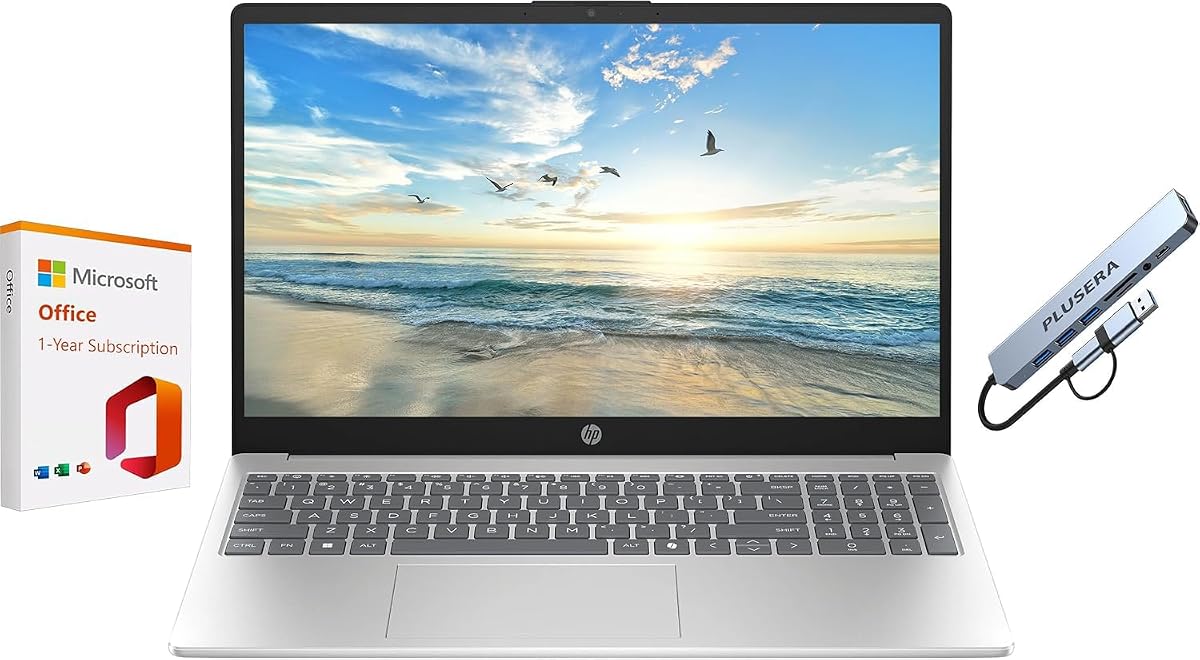




This HP model stands out as the top choice in our lineup with a perfect rating. It comes with Microsoft Office 365 included, making it ready for immediate use by students and professionals. The design is elegant with a Snowflake White finish that looks professional in any setting.
We may earn a commission when you buy through this link, at no additional cost to you.
Performance is handled by an Intel Processor paired with 8GB RAM, ensuring smooth multitasking for web browsing, streaming, and office work. The 1TB cloud storage compensates for local storage limits, keeping files safe and accessible. Fast charge technology ensures you are never left waiting for power.
The trade-off is the modest local SSD capacity, but for users who rely on cloud services, this is rarely an issue. The anti-glare display reduces eye strain during long study sessions. Overall, this laptop delivers exceptional value by bundling essential software and hardware into one package.
We recommend this laptop for anyone seeking a reliable daily driver for school or work without extra software costs. It balances portability and performance effectively. Its high user rating suggests consistent quality and satisfaction across different user bases.
The inclusion of Microsoft Office 365 means you do not need to pay for a separate subscription to access Word, Excel, and PowerPoint.
Weighing just over 3 pounds and offering up to 11 hours of playback, this laptop is designed to be taken anywhere you need to work.
We may earn a commission when you buy through this link, at no additional cost to you.
This laptop is a strong contender for users who need extra memory for demanding tasks. The 16GB RAM allows you to keep numerous browser tabs and applications open simultaneously without slowdown. It also includes a lifetime license for Microsoft Office, which is a significant long-term value.
We may earn a commission when you buy through this link, at no additional cost to you.
The Quad-Core Intel CPU provides sufficient power for video editing and photo manipulation. Windows 11 Pro adds enterprise-grade security features like encryption and hardware isolation. The bundle includes useful accessories like a docking station and external drive to expand connectivity and storage.
The storage setup uses a combination of UFS and external storage, which might be less convenient than a single internal SSD for some users. However, the speed and capacity are adequate for most business and student needs. The green finish adds a unique aesthetic touch.
Ideal for professionals or students who prioritize multitasking capability and software longevity. The lifetime office license eliminates recurring subscription fees. This model is best suited for those who need a robust workspace in a portable 14-inch form factor.
Having a lifetime license for Office 2024 means you own the software permanently without needing monthly or annual payments.
The included 6-in-1 USB-C docking station hub expands your ports for monitors, SD cards, and USB peripherals effortlessly.
We may earn a commission when you buy through this link, at no additional cost to you.
The HP Ultrabook focuses on providing a lightweight and reliable experience for students and commuters. It features an Intel Core processor that handles daily tasks efficiently. The massive storage bundle ensures you have room for schoolwork and media without needing external drives immediately.
We may earn a commission when you buy through this link, at no additional cost to you.
Built for mobility, this device weighs just over 3 pounds and fits easily into most backpacks. The quick charge feature keeps you productive during long days away from a power outlet. Wi-Fi 6 technology ensures stable connections for Zoom classes and video conferences.
The absence of a mouse in the box is a minor inconvenience, but most users prefer a trackpad or have their own peripheral. The anti-glare display reduces eye strain during extended typing sessions. The overall package offers great value for everyday computing needs.
This laptop is perfect for anyone who needs to carry their computer between classes or coffee shops frequently. The included software and hardware balance makes it a solid choice for general productivity. We recommend it for families sharing a single device for homework and bills.
The slim profile and light weight make it easy to transport without adding bulk to your bag or luggage.
Ready to use right out of the box with Windows 11 Home and Office included to start working immediately.
We may earn a commission when you buy through this link, at no additional cost to you.
The Lenovo IdeaPad offers an accessible entry point for users seeking a laptop with essential software included. The Intel High Performance CPU ensures basic tasks are handled smoothly. With Microsoft 365 included, you get full access to productivity tools without extra costs.
We may earn a commission when you buy through this link, at no additional cost to you.
Although the RAM is lower than other models, it is sufficient for web browsing and document editing. The 1TB cloud storage provides ample space for files without cluttering the local drive. The package includes a wireless keyboard and mouse, completing your setup immediately.
The main limitation is the 4GB RAM, which may struggle with heavy multitasking or multiple heavy applications. However, for basic educational or home use, this is rarely a bottleneck. The 11-hour battery life ensures you can work through the day unplugged.
We suggest this model for budget-conscious students or families needing a secondary computer. It delivers excellent value by bundling accessories and software. If you need light computing power with strong connectivity, this is a smart choice.
The bundle comes with a wireless keyboard and mouse so you have a complete desktop-like setup right away.
Heavy reliance on cloud storage keeps the local device light and your files backed up across devices.
We may earn a commission when you buy through this link, at no additional cost to you.
This business laptop provides a balanced set of features for office environments and remote work. The 16GB RAM supports efficient workflow management. Microsoft Office 365 is included for one year, giving you immediate access to collaboration tools.
We may earn a commission when you buy through this link, at no additional cost to you.
The large 15.6-inch screen provides more workspace for spreadsheets and documents. Connectivity is enhanced with an 8-in-1 hub included in the box, allowing you to connect multiple peripherals easily. Earphones are also included for private audio or calls.
Storage is the main constraint, with only 128GB available on the local SSD. Users should rely on external drives or cloud services for larger files. The natural silver finish gives it a professional look suitable for client meetings or business travel.
Recommended for small business owners or professionals who need robust RAM and connectivity options. The included hub adds significant value to the price. If you manage data via cloud storage, this model offers a premium experience.
The 8-in-1 hub expands your ports significantly, letting you connect external displays and storage without extra purchases.
A 15.6-inch display gives you more room to work with side-by-side windows or large data sheets comfortably.
We may earn a commission when you buy through this link, at no additional cost to you.
Designed specifically for students, this model prioritizes portability and battery endurance. It includes Microsoft 365 and massive cloud storage to keep all your school materials safe. The battery can last up to 12 hours, ideal for a full day of lectures.
We may earn a commission when you buy through this link, at no additional cost to you.
The Intel Processor provides smooth performance for online classes and streaming. Wi-Fi 6 ensures you stay connected in crowded campus networks. The Royal Blue chassis looks vibrant and fresh, appealing to younger users who value style alongside function.
The device runs in Windows 11 S Mode, which limits app installation to the Microsoft Store for security and performance. This might require switching out of S Mode if you need specific non-store applications. However, for standard student tasks, it is generally not an issue.
This laptop is perfect for students who need a reliable device for note-taking and research. The battery life is a standout feature for long study sessions. We recommend it for those who prefer cloud storage over local hard drives.
Up to 12 hours of battery life means you can leave your charger at home for a day at school.
The included 1TB OneDrive ensures you have plenty of space for assignments and photos in the cloud.
We may earn a commission when you buy through this link, at no additional cost to you.
This Lenovo laptop delivers a crisp visual experience with its Full HD IPS display. It includes Microsoft 365 to ensure productivity tools are available immediately. The 8GB DDR5 RAM provides faster data processing than older memory standards.
We may earn a commission when you buy through this link, at no additional cost to you.
The 15.6-inch screen offers wide viewing angles and vibrant colors for both work and streaming. Privacy features include a built-in shutter for the webcam, giving you control over your security. Rapid charge support helps get power back quickly when needed.
The local storage is limited to 128GB, so you may need to use cloud services for larger files. However, the performance and display quality make up for this trade-off. It received a perfect 5.0 rating, indicating high satisfaction.
Ideal for college students and daily users who value screen quality and security. The high rating suggests reliable build quality. We recommend it for those who watch media or edit photos alongside standard office work.
The FHD IPS display provides sharp text and vibrant colors that reduce eye strain during long viewing sessions.
A privacy shutter on the webcam allows you to physically cover the lens when not in use.
We may earn a commission when you buy through this link, at no additional cost to you.
For those needing a desktop replacement, this 17-inch laptop offers a spacious workspace. It includes a lifetime license for Microsoft Office, making it a long-term investment. The 8-core processor and 16GB RAM handle demanding applications with ease.
We may earn a commission when you buy through this link, at no additional cost to you.
The large screen allows you to view multiple windows side by side comfortably. Storage is generous with a combination of internal SSD and external drive. Wi-Fi 6 ensures stable connections for high-bandwidth tasks like video conferencing.
Due to its size and weight, this laptop is less portable than 14-inch models. It is best suited for a fixed workspace or travel where screen size is a priority. The lifetime software license adds significant value over time.
Recommended for power users or small business professionals who need screen real estate and multitasking power. It serves well as a primary workstation. The included accessories and large capacity make it a premium choice.
The 17.3-inch screen provides ample room for complex spreadsheets and coding without an external monitor.
The lifetime MS Office license means you never pay again for Word, Excel, and other core applications.
We may earn a commission when you buy through this link, at no additional cost to you.
This model stands out with a HD touchscreen display, offering interactive navigation. It includes a lifetime license for Office 2024 and a massive 1TB SSD for local file storage. The 6-core processor ensures responsive performance for daily tasks.
We may earn a commission when you buy through this link, at no additional cost to you.
Touchscreens are useful for presentations and casual browsing, providing an intuitive way to interact with content. Windows 11 Pro adds security features suitable for business environments. The device is well-equipped for modern office work without extra accessories.
Battery life is limited to around 5 hours of mixed usage, which may require carrying a charger for long days. This is a trade-off for the larger screen and powerful internals. The touch functionality adds versatility for creative tasks.
We recommend this laptop for users who prioritize storage and screen interaction over battery endurance. It is ideal for presentations and local file management. Check current battery specs before buying to ensure it meets your usage needs.
The touchscreen allows you to navigate menus and annotate documents directly with your finger.
A 1TB local SSD means you do not have to rely on the internet to access your large files.
We may earn a commission when you buy through this link, at no additional cost to you.
The HP Everyday Laptop features a stunning Rose Gold finish that adds a touch of elegance to your setup. It includes Microsoft Office 365 for immediate productivity. The Intel Processor and 8GB RAM ensure smooth performance for general use.
We may earn a commission when you buy through this link, at no additional cost to you.
Fast charge technology allows you to get back to work quickly. The design is thin and lightweight, making it easy to carry to school or meetings. Bluetooth 5.4 and Wi-Fi 6 keep you connected to the latest accessories and networks.
Storage is limited locally to 128GB, but this is offset by cloud storage capabilities. The high user rating reflects satisfaction with its style and performance. It is a great choice for those who value aesthetics alongside functionality.
Perfect for young professionals or students who want a device that looks good. The software bundle ensures you are ready to work immediately. We recommend it for users who prioritize design and ease of use.
The Rose Gold finish offers a modern look that stands out from standard black or silver laptops.
Bluetooth 5.4 ensures stable wireless connections to mice, headphones, and other accessories.
We may earn a commission when you buy through this link, at no additional cost to you.
Choosing the right laptop requires balancing hardware capabilities with the software features included in the package. This section outlines the key factors you should consider before purchasing.
The processor is the engine of your laptop, determining how fast it can handle tasks. For basic web browsing and office work, entry-level Intel processors are sufficient. If you plan to edit video or run multiple heavy applications, look for quad-core or higher options.
Prioritize modern processors that support faster speeds to ensure your laptop remains usable for several years.
RAM dictates how many programs you can run at once without slowing down. 8GB is a safe baseline for most users, while 16GB offers headroom for multitasking. Storage capacity is also vital for keeping files local without cluttering your system.
Consider models that offer a mix of local SSD speed and cloud storage space for flexibility.
Some laptops include a subscription-based Office 365, while others offer a lifetime license. Subscription services usually include cloud updates and multiple device access, whereas lifetime licenses are one-time purchases. Verify exactly which version is included before buying.
Ensure the license type matches your long-term budget and usage preferences to avoid unexpected costs.
A good display reduces eye strain during long work sessions. Look for Full HD resolution and anti-glare technology if you work in bright environments. Larger screens offer more workspace but add weight to the device.
Choose a screen size that balances visual clarity with the portability you need for travel.
If you plan to use the laptop away from a power outlet, check the battery specifications. Aim for devices that claim at least 8 to 10 hours of real-world use. Fast charge features can also reduce downtime when you need power quickly.
Battery performance often varies by usage, so consider models with a slightly higher capacity than your minimum needs.
Weight and dimensions matter if you carry your laptop daily. A 14-inch model is generally easier to transport than a 17-inch desktop replacement. Build quality also affects durability, so consider the materials used in the chassis.
Select a design that fits comfortably in your bag and matches your professional or personal style.
Check the available ports for USB, HDMI, and SD card readers. Modern laptops may require docking stations for older peripherals. Wi-Fi 6 and Bluetooth 5.4 ensure faster and more stable wireless connections.
Ensure the laptop has the necessary ports for your specific peripherals and accessories.
Business users should look for features like privacy shutters and hardware-based encryption. Windows 11 Pro adds enterprise-grade security tools compared to Home editions. These features protect your data when using public networks.
Prioritize security if you handle sensitive information or work in shared environments.
Set up your Microsoft 365 account immediately after receiving the laptop to activate your included software. Follow the on-screen prompts to sign in and install any necessary updates for security and performance. This ensures you have full access to all cloud and desktop apps.
Maintain the battery health by avoiding extreme temperatures and not leaving it plugged in constantly. Use fast charge features wisely to reduce wear on the battery over time. Regularly check for system updates to keep your device secure and efficient.
Clean the screen and keyboard with a soft, lint-free cloth to prevent scratches. Keep liquids away from the ports to avoid internal damage. Organize your files using the included cloud storage to keep your local drive clean and organized.
It depends on the specific model. Some include a lifetime license for Office 2024, while others offer a one-year subscription to Microsoft 365. Check the product details carefully to confirm the type of license included with your chosen device.
Many modern laptops have soldered RAM that cannot be upgraded later. However, some models allow upgrades. Check the manufacturer specifications before purchasing if you plan to increase memory in the future.
No, Microsoft 365 is a subscription service that includes cloud storage and updates, while Office 2024 is a one-time purchase. Both provide core apps like Word and Excel but differ in feature availability and cost.
If you have a subscription-based 365 plan, you can still view and edit documents but may lose access to new features. You will need to renew the subscription to regain full functionality and cloud storage benefits.
Yes, most models come with HDMI or USB-C ports that support external displays. You can connect to TVs or desktop monitors to expand your workspace for better productivity.
The included software license may require an internet connection for activation. Additionally, using cloud storage often has limits, and some premium cloud features might require an extra subscription. Always read the fine print before buying.
Students should look for models with long battery life and lightweight designs. The HP New Student Laptop or HP Everyday Laptop are excellent choices due to their portability and included software bundles.
Yes, provided they have sufficient RAM and a decent display. The models with 16GB RAM and larger screens are better suited for photo editing tasks than those with lower specifications.
We have reviewed ten excellent options that include Microsoft software in their packages. The HP Everyday Laptop 2026 stands out as our top pick for its perfect rating and balanced features. The Lenovo IdeaPad offers a strong budget alternative for cost-conscious buyers.
When making your decision, prioritize the specs that match your daily tasks. If you need heavy multitasking, opt for models with 16GB RAM. For students, battery life and portability are often more important than raw power.
Remember that technology prices fluctuate frequently. Please check the current listings on Amazon to ensure you get the best deal today. We hope this guide helps you find the perfect laptop to boost your productivity.