
Kids Microphone with Stand
4.6Editor score
Rotatable light ball base
Adjustable height range
Non-toxic durable material
This guide compares the top 10 Light Up LED Mic Stand options for 2026, highlighting features, durability, and value to help you choose the perfect audio setup.
Light Up LED Mic Stand models combine audio support with dynamic visual flair, making them essential for gamers, streamers, and performers who want immersive setups. These stands offer adjustable height, stability, and synchronized lighting that enhances any desk or stage environment.
We evaluated ten standout products based on build quality, lighting versatility, microphone compatibility, and ease of use. Our analysis covers floor tripods, desk boom arms, and specialized units designed to elevate your recording or streaming experience with style and function.
Each pick in this guide showcases specific strengths tailored to different needs, from budget-friendly options to premium RGB arms. Please note that product availability and pricing may change over time, so verify current details before making your final purchase decision.
4.6Editor score
4.5Editor score

4.9Editor score
Here is a side-by-side comparison of all ten Light Up LED Mic Stand products, detailing their key specifications to help you quickly identify the model that fits your specific setup requirements.


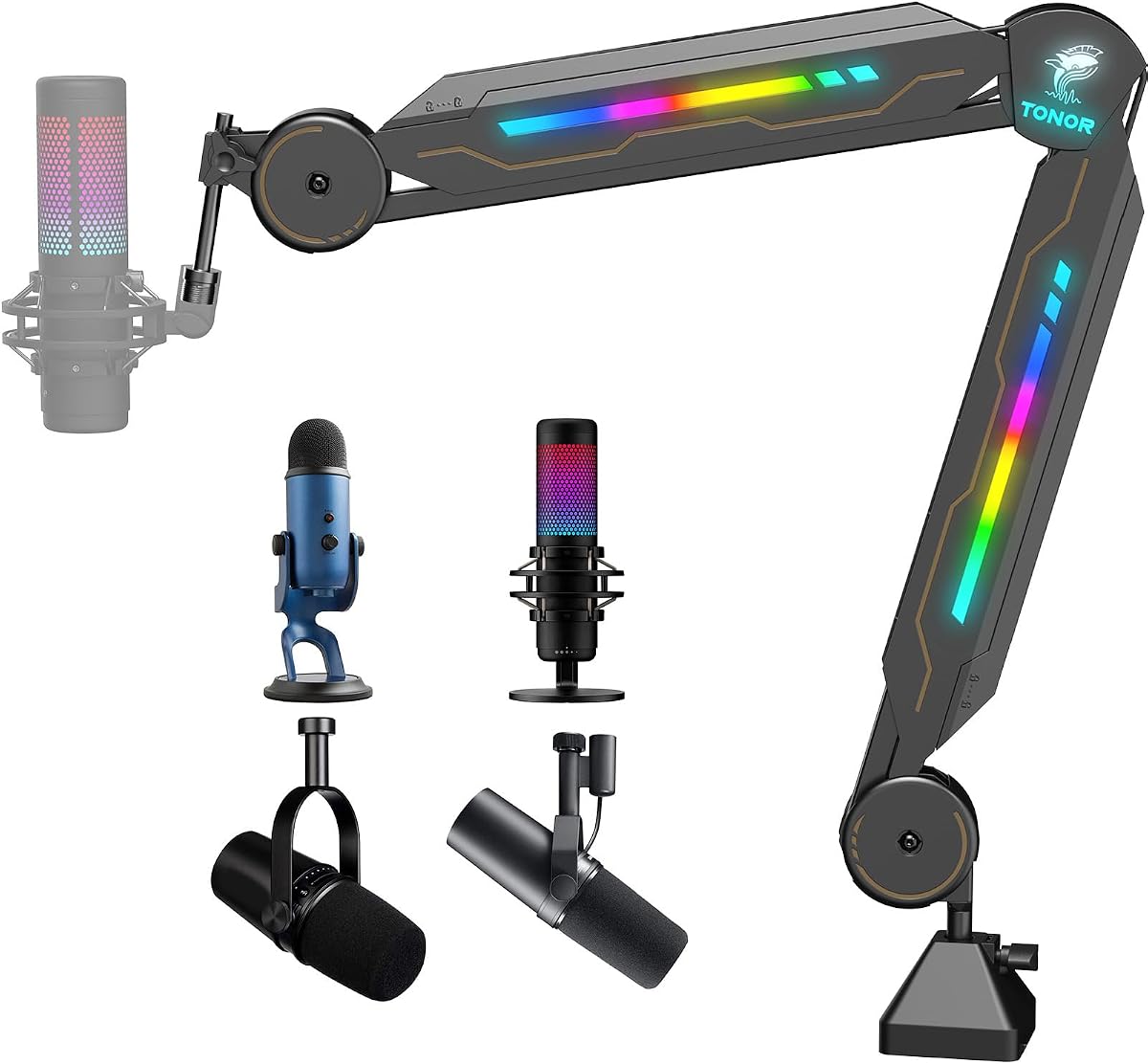
The TONOR T90 RGB scissor mic stand delivers an impressive blend of audio support and visual appeal. With a rating of 4.5 stars, it stands out for its eleven distinct light modes that let you customize your gaming environment easily.
We may earn a commission when you buy through this link, at no additional cost to you.
Its premium steel arm provides robust support for most microphones, ensuring that your setup remains steady during intense recording sessions. The hidden cable channel keeps wires organized, which is essential for maintaining a tidy workspace while streaming.
While it requires a desk clamp and has a slightly shorter reach than some floor models, these trade-offs are minor compared to the vibrant atmosphere it creates. The quick setup time means you can start using it almost immediately after unboxing.
Ideal for streamers and gamers who want to add color to their desk without spending hours on installation, this stand balances performance and style effectively for daily use.
You can switch between eleven light modes using a simple tap, creating dynamic visual effects that match your content or mood.
The integrated cable channel hides wires neatly, reducing clutter and ensuring your desk stays clean while you focus on your work.
We may earn a commission when you buy through this link, at no additional cost to you.
This Kids Microphone with Stand transforms any living room into a stage with its rotating light ball base. Rated at 4.6 stars, it is designed to boost musical enthusiasm and confidence in young performers through interactive lighting and sound.
We may earn a commission when you buy through this link, at no additional cost to you.
The stand adjusts from roughly 15 to 35 inches, making it suitable for toddlers and taller children alike. Crafted from safe, non-toxic ABS materials, it ensures durability and safety during active play sessions at home or parties.
While it is not built for professional studio microphones, its primary purpose is entertainment and early skill building. The included audio cable allows connection to music sources, keeping kids engaged without screen time distractions.
Perfect for birthdays or family gatherings, this set encourages creativity and performance. It is an affordable way to introduce children to the joy of singing and hosting their own mini-concerts safely.
The base features a rotatable light ball that simulates stage lighting, creating a vibrant and immersive atmosphere for young singers.
Smooth edges and lightweight materials protect little hands, ensuring that playtime remains safe and worry-free for all children.
We may earn a commission when you buy through this link, at no additional cost to you.
The YOUSHARES RGB Mic Arm leads the market with over 100 lighting modes and intelligent sound synchronization. It earns a high 4.9 rating for its ability to adapt lighting based on audio rhythms, creating a truly immersive visual experience.
We may earn a commission when you buy through this link, at no additional cost to you.
Constructed from high-quality steel, it supports microphones up to 4 lbs, making it suitable for heavy units like the Blue Yeti or HyperX QuadCast. The included adapters ensure compatibility with most popular microphones right out of the box.
While you need to install a mobile app for full control and the price is higher than basic models, the advanced features justify the investment. The remote option offers convenience for quick adjustments without interrupting your workflow.
For podcasters and streamers seeking top-tier customization, this arm delivers unmatched versatility. Its heavy-duty design ensures stability, while the smart lighting adds a professional touch to any broadcast setup.
Lights flicker and change in sync with your voice, enhancing audio-visual engagement for audiences during live streams or recordings.
Manage lighting via mobile app or remote control, giving you flexible options to customize your setup based on your preferences.
We may earn a commission when you buy through this link, at no additional cost to you.
The InnoGear Mic Stand Tripod offers an excellent floor solution with height adjustable up to nearly 90 inches. Its 4.4 rating reflects strong stability from thickened steel poles, which prevent tipping during performances or studio sessions.
We may earn a commission when you buy through this link, at no additional cost to you.
The boom arm rotates 360 degrees and extends to 30 inches, providing flexible positioning for various microphone types. It includes a premium carrying bag, making it easy to transport for outdoor events or gigs despite its sturdy build.
Although it requires more floor space and weighs more than desk stands, its durability and height adjustability are superior for live settings. The included adapters fit most standard mics, ensuring you can use your existing equipment.
Ideal for singers and presenters who need a robust, adjustable support, this stand balances portability with reliability. It is a solid investment for those who value consistent performance across different environments.
Adjustable from 28 to 90 inches, this stand accommodates users of all heights, ensuring optimal microphone placement for any performance.
Despite its heavy-duty build, it disassembles easily to fit into a compact carrying bag, simplifying transport and storage.
We may earn a commission when you buy through this link, at no additional cost to you.
This InnoGear Mic Stand features a heavy 4.5 lbs weighted base that ensures excellent stability on any floor surface. With a 4.3 rating, it is built to hold even heavy microphones without deformation thanks to its 1.5mm thickened steel arm.
We may earn a commission when you buy through this link, at no additional cost to you.
The height adjusts from 34 to 60 inches, which suits most singing or presentation scenarios. Non-slip pads on the base provide extra security, while the detachable design allows for convenient transport to road shows or outdoor events.
While the design is straightforward and the base may not suit all tight spaces, its focus on stability and durability makes it reliable. It offers strong value for those prioritizing a secure stand over aesthetic features.
Best for home studios or stage use, this stand delivers consistent performance. Its compatibility with a wide range of microphones ensures it integrates well into existing setups without requiring adapters.
A 4.5 lbs round base with non-slip pads keeps the stand firmly planted, reducing wobble during intense vocal performances.
The 1.5mm thickened steel arm is significantly stronger than standard models, ensuring long-term use without sagging.
We may earn a commission when you buy through this link, at no additional cost to you.
The MAONO DGM20 combines microphone and RGB lighting in one compact unit, rated at 4.6 stars for its clear voice capture. It features dynamic lighting modes and smart noise cancellation to suppress background noise effectively during gaming.
We may earn a commission when you buy through this link, at no additional cost to you.
Real-time monitoring via the headphone jack ensures zero-latency listening, which is critical for streamers. The one-click mute and gain control provide precise audio adjustments, simplifying setup for PC and console use.
Since it does not include a stand, you may need to pair it with a separate mount. However, its standalone audio quality and visual appeal make it a strong choice for gamers seeking a unified setup.
Best for PC gaming and streaming, this mic offers professional clarity and style. Its plug-and-play nature means you can start recording immediately without complex software installation or driver issues.
Dynamic multicolor and static modes enhance your desk aesthetic, creating an immersive gaming atmosphere without extra hardware.
Built-in noise cancellation and gain knobs allow real-time audio tuning, ensuring clear voice communication during intense sessions.
We may earn a commission when you buy through this link, at no additional cost to you.
This Pyle Universal Mic Stand is sold as a pair, offering great value for settings needing multiple mics. With a 4.4 rating, it provides adjustable height from 2.8 to 5 feet and features a compact metal base for stability.
We may earn a commission when you buy through this link, at no additional cost to you.
Its lightweight steel construction makes it easy to transport, perfect for touring musicians or bands. The sleek black finish fits both studio and concert environments, and the standard threading ensures broad microphone compatibility.
While it lacks RGB lights or advanced features, its reliability and affordability make it a practical choice for functional setups. The pivot angle clip allows for optimal positioning, ensuring clear sound capture during performances.
Ideal for bands needing duplicate stands, this model delivers consistent performance. Its simple design and durable materials ensure it can withstand regular use without breaking the budget.
Buying a pair saves cost and ensures you have backup stands for multi-mic setups or group performances.
The sleek black metal base and lightweight construction provide a polished look that suits both professional and casual environments.
We may earn a commission when you buy through this link, at no additional cost to you.
The ARES WING Aluminum Microphone Boom Arm integrates a volume control knob directly into the arm, rated at 4.4 stars for its ease of use. Its 26 RGB modes and infinity mirror effect create a striking visual setup for streaming.
We may earn a commission when you buy through this link, at no additional cost to you.
Built with a reinforced metal structure, it supports up to 3.3 lbs without sagging, ensuring precise positioning. The tool-free installation and universal threading mean you can set it up in minutes without extra hardware.
While the lighting modes are fewer than some competitors, the added volume control offers unique convenience during live sessions. The foldable design helps keep desks clean, and the silent movement prevents noise interference.
Best for streamers needing quick audio tweaks, this arm balances function and flair. Its robust support and simple setup make it a reliable choice for daily content creation.
Adjust mic levels with a single knob on the arm, eliminating the need to reach for software controls during recording.
Infinity mirror joints and vivid light strips enhance your visual setup, adding depth and color to your broadcast background.
We may earn a commission when you buy through this link, at no additional cost to you.
This LED Speaker Stand is designed for DJ and PA setups rather than direct mic use, featuring built-in RGB lighting on the tripod legs. It offers a robust steel frame and remote control to sync lights with music energy for events.
We may earn a commission when you buy through this link, at no additional cost to you.
Its universal 35mm mounting fits most PA speakers and lighting bars, making it versatile for stage use. The collapsible design allows quick transport, which is ideal for bands or event rentals needing fast setup.
While it is not a dedicated mic stand, its dual-purpose nature helps declutter stages. The immersive lighting effects enhance any party or karaoke performance, adding professional visuals without extra fixtures.
Best for mobile DJs and event hosts, this unit simplifies audio and lighting gear. Its durable build ensures safety for expensive equipment, delivering a polished look for any venue.
Vibrant built-in lighting syncs with your music via remote, creating a dynamic atmosphere for parties and concerts.
Functions as both a speaker mount and lighting fixture, reducing gear clutter and setup time for event professionals.
We may earn a commission when you buy through this link, at no additional cost to you.
The SUNMON Boom Arm offers Bluetooth RGB control with a unique extension tube to increase height beyond standard desk limits. Rated at 4.3 stars, it supports most gaming mics up to 3 lbs while providing flexible positioning for seated work.
We may earn a commission when you buy through this link, at no additional cost to you.
It includes adapters for 3/8 and 5/8 threads, ensuring compatibility with Blue Yeti and Shure models. The flowing light modes enhance ambiance, and the extension tube helps position the mic above monitor eye level.
While it depends on a mobile app for full control, the added height capability sets it apart for taller setups. Its sturdy construction keeps the mic in place, and the desk mount saves valuable space.
Ideal for streamers needing height versatility, this arm combines visual appeal with function. The extension feature is a standout for those who want a higher mic without a floor stand.
An extension tube adds up to 6.3 inches in height, allowing you to position the mic above monitors for better ergonomics.
Connect via Bluetooth to adjust light color and brightness, offering remote customization for your desk environment.
We may earn a commission when you buy through this link, at no additional cost to you.
Selecting the right Light Up LED Mic Stand requires evaluating several key factors to ensure it meets your specific recording or streaming needs.
Consider how many RGB options are available, from basic static colors to dynamic sound-sync patterns. A variety of modes lets you match your setup to different content styles or moods effectively.
Look for models with easy control options like remotes or apps to change lighting without interrupting your workflow.
Steel and aluminum constructions provide the best durability and stability for holding microphones. Heavier materials prevent tipping, while reinforced joints reduce sagging over time.
Prioritize stands with thickened arms and secure joints to ensure long-term reliability during daily use.
Ensure the stand offers a height range that accommodates your sitting or standing position. Adjustable arms or extension tubes are crucial for ergonomic comfort and optimal mic placement.
Check maximum height limits to guarantee the mic sits at the right level for your voice and desk setup.
Verify that the stand includes or supports adapters for your specific microphone model, typically 3/8 or 5/8 inch threads. Universal compatibility ensures you can use your existing gear without extra purchases.
Look for stands that explicitly list supported mics to avoid fitment issues upon arrival.
Hidden channels or clips for cables help keep your desk clean and reduce clutter. Good organization prevents tangled wires that can interfere with your movement or look messy on camera.
Choose models with integrated cable routing to maintain a professional appearance during broadcasts.
Decide between desk clamps, screw mounts, or floor bases based on your workspace. Desk mounts save space but require edge thickness limits, while floor stands offer more stability for larger rooms.
Ensure the mounting method is compatible with your table or stage to secure the stand properly.
Check the maximum weight the stand can hold to ensure it supports your microphone safely. Heavy mics require stronger supports to prevent sagging or instability over time.
Always choose a capacity higher than your mic's weight for added safety and durability.
Tool-free or simple step assembly saves time and frustration when setting up. Models that require fewer tools are more convenient for quick changes or travel.
Look for stands with clear instructions and minimal parts to speed up your installation process.
Start by attaching the stand securely to your desk or floor base using the provided hardware. Ensure all knobs and clamps are tightened firmly to prevent any movement during recording sessions.
Connect the USB or power cable for RGB lighting and turn it on using the remote or switch. Select your preferred lighting mode to match your content style, avoiding overly bright settings that might distract viewers.
Clean the stand regularly with a dry cloth to remove dust and protect the LED components. Avoid water or harsh chemicals near electronic parts to maintain longevity and prevent damage to the lights.
Most basic models do not require software and work with simple controls or remotes. However, advanced RGB arms may offer app-based control for syncing lights with sound, so check product details for specific needs.
Yes, most stands include adapters that fit standard 3/8 or 5/8 inch threads found on USB microphones. Always confirm the thread type of your mic to ensure a secure connection.
Use a dry, soft cloth to gently wipe away dust and debris from the LED components. Avoid using water or cleaning sprays directly on the lights to prevent electrical damage.
You can, but floor stands typically require more space and height than desk models. Consider a desk arm for compact spaces to save room and maintain better ergonomics.
Most LED lights in these stands are rated for thousands of hours of use. With proper care and avoiding physical damage, they should last throughout the life of the stand.
Some premium models feature intelligent sound sync that changes lighting based on voice or music rhythm. Basic units offer static or dynamic modes but may not respond directly to audio input.
Weight capacity varies by model, typically ranging from 2.5 to 4 pounds. Check the specific specs to ensure it can handle your microphone safely without sagging.
Many manufacturers offer limited warranties covering defects in materials or construction. Review the product listing or contact the seller for details on warranty terms and duration.
Choosing the best Light Up LED Mic Stand depends on your specific audio and visual needs. The top picks like the YOUSHARES RGB Mic Arm for premium features and the TONOR T90 for versatility offer excellent starting points for most setups.
Prioritize stability, height adjustability, and lighting options that align with your streaming or recording style. A well-matched stand enhances both audio quality and visual presentation for your audience.
Always check current pricing and availability before purchasing to ensure you get the best deal. Prices may change, so comparing options at the time of purchase helps you secure the right fit for your needs.