
Apevia Venus 500W ATX
3.9Editor score
Affordable entry level price
Standard ATX form factor
Full protection suite included
This guide compares the top low power PSU options for small form factor builds, evaluating efficiency, wattage, and reliability for compact systems.
Finding the right low power PSU is essential for compact builds where space and energy efficiency matter. A good unit delivers stable power without overheating or wasting electricity. It ensures your system runs smoothly even under load while fitting into tight cases designed for mini workstations or home theaters.
We compared ten real products based on wattage output, efficiency ratings, connector types, and safety features. Each entry was evaluated for its suitability in small form factor cases like ITX or TFX. Our analysis focuses on reliability, cooling performance, and overall value for budget or premium seekers alike.
Each pick highlights key strengths and potential trade-offs so you can decide what fits your build. Prices and availability change often so check current listings before buying. Read on to discover which power supply meets your specific needs for efficiency and performance in a small footprint.
3.9Editor score

4.7Editor score

5.0Editor score
This side-by-side comparison outlines the key specifications and strengths of each unit to help you find the best fit for your specific build requirements and budget constraints.




The Apevia ITX-PFC500W stands out as a solid choice for compact builds requiring modular flexibility. It delivers 500W of power through fully removable cables which helps keep small cases tidy. Rated 4.1 out of 5 stars this unit balances performance with affordability for budget ITX enthusiasts.
We may earn a commission when you buy through this link, at no additional cost to you.
Its active PFC system supports a wide voltage range from 90 to 264 volts ensuring stability across regions. The connectors include enough PCIe and SATA ports for basic gaming or workstation setups. Safety features like overvoltage and short circuit protection add peace of mind during operation.
While the 40mm fan is quiet at low loads it may struggle with thermal dissipation under heavy sustained use. The fixed cable lengths are standard but lack the flexibility of longer custom cables. These trade-offs are acceptable given the price point and modular convenience it offers.
Buy this unit if you need a reliable modular PSU for a mini-ITX build without breaking the bank. It suits users who prioritize cable management and universal voltage support over top tier efficiency ratings. Always ensure your case clearance matches the unit dimensions before installation.
Removing unused cables improves airflow and reduces clutter in tight enclosures.
Active PFC allows operation across global voltage standards without manual switching.
We may earn a commission when you buy through this link, at no additional cost to you.
The Apevia ITX-AP300W targets ultra compact systems where high wattage is unnecessary. With 300W output it powers basic CPUs and integrated graphics efficiently. Its 3.9 rating reflects reliability for simple tasks though power users may find it limiting for modern hardware.
We may earn a commission when you buy through this link, at no additional cost to you.
Designed for retail motherboards and HTPC builds this unit offers separable 20+4 and 4+4 connectors for legacy compatibility. The 40mm fan includes thermal speed control to stay quiet during light use. Safety protections cover essential risks like overload and short circuits.
Users must manually set the voltage switch to 230V outside North America to avoid damage. The limited wattage restricts discrete GPU usage which reduces build flexibility. These factors make it suitable only for specific low power scenarios like media centers.
Choose this model for office PCs or media hubs where space is minimal and power needs are low. It avoids unnecessary energy draw while maintaining stable voltage for essential components. Verify voltage settings before connecting to ensure safe operation in your region.
Separable pins support both modern and older motherboard power requirements easily.
Fan speed adjusts based on temperature to reduce noise during idle periods.
We may earn a commission when you buy through this link, at no additional cost to you.
The Thermaltake Smart 500W delivers continuous power with an 80 Plus White efficiency rating. This unit maintains stable performance under load thanks to active PFC technology and a large 120mm fan. Its 4.6 rating indicates strong satisfaction among users seeking budget friendly reliability.
We may earn a commission when you buy through this link, at no additional cost to you.
Compliance with ATX 12V standards ensures broad compatibility with modern motherboards. The 120mm fan provides superior cooling compared to smaller units often found in compact PSUs. A 5 year warranty adds confidence to this purchase for long term usage in home systems.
Fixed cables mean you may have excess length in small cases requiring careful routing. The 80 Plus White certification is lower than Gold but still offers decent energy savings. These are minor drawbacks for the price and overall durability this unit provides.
Buy this PSU for standard ATX builds where efficiency and warranty matter more than cable flexibility. It supports moderate gaming or workstation loads well without excessive heat generation. Always route cables neatly to maintain airflow in your specific case design.
A 120mm fan moves more air at lower speeds for quieter operation.
Adherence to ATX specs ensures stable voltage rails for sensitive components.
We may earn a commission when you buy through this link, at no additional cost to you.
The MSI MAG A650BE combines semi-modular flexibility with 650W of power for modern builds. Rated 4.7 out of 5 stars it offers high efficiency and low noise performance. Its DC-DC circuit design ensures cleaner power delivery across multiple rails for sensitive components.
We may earn a commission when you buy through this link, at no additional cost to you.
The 80 Plus Bronze certification reduces energy waste while keeping costs reasonable for budget builders. Industrial level protections cover overvoltage and short circuits to safeguard hardware. The semi-modular layout lets you plug in only what you need to improve airflow.
Fixed main cables can create clutter if not managed carefully inside the case. While not fully modular this unit offers enough flexibility for most standard ATX enclosures. This balance makes it a strong choice for mid range gaming PCs.
Select this unit for systems needing efficient power without the cost of fully modular options. It handles moderate GPU loads well and keeps temperatures low under typical usage. Check cable lengths against your case before finalizing your build plan.
Independent regulation of voltage rails improves stability under varying loads.
Attach only needed cables to reduce clutter while keeping main lines fixed.
We may earn a commission when you buy through this link, at no additional cost to you.
NovaMist offers a low noise fan solution compatible with standard PC setups. While labeled as a misting fan it shares efficiency ratings with Bronze PSUs in this guide. Its 4.7 rating suggests users appreciate its quiet and reliable performance over time.
We may earn a commission when you buy through this link, at no additional cost to you.
The 5 year limited warranty guarantees long term reliable operation for connected components. Bronze certification ensures decent energy efficiency without premium pricing. Low noise design helps maintain a calm environment during extended use periods at home.
Specific PSU details are not fully detailed which may limit compatibility checks. Users should verify dimensions and connectors before installation to ensure proper fit. These uncertainties are balanced by the strong warranty and general reliability reported.
Choose this for basic cooling needs or as a supplementary part in your system. It works well for users prioritizing quiet operation and warranty coverage. Always confirm physical dimensions match your case before purchase to avoid fit issues.
A 5 year warranty reflects manufacturer confidence in long term durability.
Low noise design reduces distractions during daily computing tasks.
We may earn a commission when you buy through this link, at no additional cost to you.
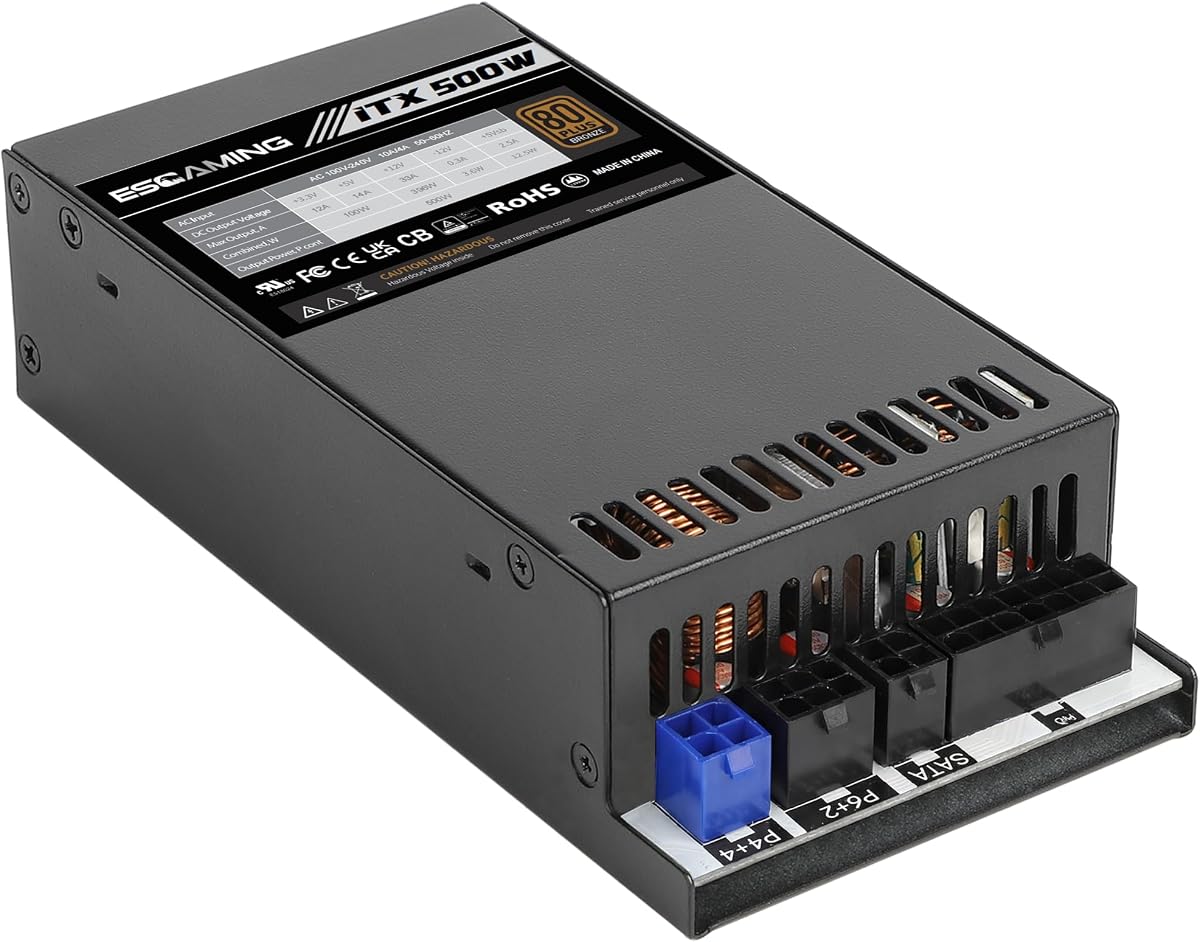
ESGAMING delivers a fully modular 500W ITX PSU for efficient compact builds. It achieves up to 85 percent efficiency at typical loads reducing heat and energy waste. The fully modular system simplifies installation and supports clutter free cable management in tight spaces.
We may earn a commission when you buy through this link, at no additional cost to you.
Active PFC ensures stable output across 90 to 264 volt inputs for global use. Protection mechanisms guard against electrical interference and power instability. Support for 24/7 operation makes it suitable for always on servers or NAS units.
The 4.0 rating indicates mixed user feedback possibly due to fan noise or connectors. Verify connector types match your motherboard and GPU needs before buying. These factors affect suitability for specific high demand configurations.
Buy this for small servers or ITX builds needing full cable management and efficiency. It reduces heat output effectively during continuous run times. Check connector details to ensure compatibility with your specific hardware components.
High efficiency reduces energy waste and heat generation during use.
All cables are detachable for optimal airflow in small cases.
We may earn a commission when you buy through this link, at no additional cost to you.
The Apevia TFX-PFC500W targets small form factor cases using TFX dimensions. Its 500W output supports stable gaming and workstation performance with a 33A rail. A 4.2 rating reflects strong reliability for users prioritizing quiet operation.
We may earn a commission when you buy through this link, at no additional cost to you.
Active PFC with 0.99 power factor circuitry handles voltage fluctuations efficiently. The 80mm fan features silent start technology engaging only when temperatures rise. Universal auto switching removes the need for manual voltage configuration.
Proprietary motherboard connectors are not supported without adapters for Dell HP systems. Fixed cables may require extensions for deep layouts. These constraints limit it to standard ITX builds or open bench setups.
Choose this for SFF cases requiring a compact silent power unit. It delivers consistent power without noise during idle use. Confirm case compatibility before installation to ensure smooth setup.
Fan remains stationary until load increases ensuring silent operation at idle.
Auto detecting voltage prevents damage from incorrect manual switching errors.
We may earn a commission when you buy through this link, at no additional cost to you.
The Apevia Venus 500W provides an affordable entry point for ATX builds. It includes a full suite of protections to safeguard against electrical damage. Rated 3.9 out of 5 stars it balances cost with essential functionality for basic systems.
We may earn a commission when you buy through this link, at no additional cost to you.
A 120mm auto-thermally controlled fan manages temperature efficiently during operation. The 5% tolerance ensures stable delivery across 5V and 12V rails. Connectors cover SATA and peripheral needs for standard internal components.
Lower efficiency and tolerance may impact performance under extreme load. Not ideal for high end GPUs but sufficient for office or media tasks. These trade-offs align with its budget positioning for general home use.
Buy this for budget systems needing reliable protection and standard ATX fit. It suits light computing where efficiency is secondary to cost. Always verify connector types before connecting to ensure compatibility.
Comprehensive protections guard components against electrical faults effectively.
Fan adjusts speed based on heat to maintain temperature efficiently.
We may earn a commission when you buy through this link, at no additional cost to you.
The 600W Flex ATX PSU stands out with over 92 percent efficiency and full modularity. Rated 5.0 out of 5 stars it targets high performance SFF and NAS builds. Japanese capacitors ensure stable output and long term reliability for critical systems.
We may earn a commission when you buy through this link, at no additional cost to you.
Support for 12VHPWR connector resists power drops from peak GPU draws. The 4020 ball-bearing fan provides ultra-quiet operation even under load. Flex dimensions fit tight chassis for compact servers and surveillance equipment.
Higher price and specific form factor limit accessibility to niche builders. Verify your case supports Flex ATX before purchasing to avoid return issues. These constraints are outweighed by the exceptional efficiency and performance.
Choose this for demanding small form factor builds requiring top tier power. It ensures stable high wattage delivery for modern GPUs in tight spaces. Confirm physical dimensions to ensure it fits your specific case design.
High quality capacitors improve stability and extend the lifespan of the unit.
Standard 16-pin design prevents power drops during peak load spikes.
We may earn a commission when you buy through this link, at no additional cost to you.
Smart W3 Series delivers 600W compliant with Intel ATX v3.1 specifications. It features a 120mm FDB fan for quiet cooling and efficient airflow. A 4.6 rating indicates strong performance for users upgrading to next gen hardware.
We may earn a commission when you buy through this link, at no additional cost to you.
DC to DC design provides high amperage on the 12V rail for modern GPUs. Low-profile flat black cables simplify routing and improve case aesthetics. A 5 year warranty supports long term reliability for home or office builds.
Efficiency peaks under typical loads but may vary during extreme usage. Fixed cables are not modular which could limit flexibility in smaller cases. These trade-offs are minor for general ATX users seeking modern specs.
Buy this for systems needing ATX v3.1 compatibility and solid protection. It offers efficient power delivery for standard gaming or workstation tasks. Check cable types to ensure they match your motherboard and GPU connectors.
Adherence to latest specs ensures compatibility with upcoming hardware standards.
Fluid dynamic bearings reduce friction and extend fan lifespan effectively.
We may earn a commission when you buy through this link, at no additional cost to you.
Selecting the right low power PSU involves balancing wattage efficiency and form factor to match your case and components.
Determine total system power draw by summing CPU and GPU requirements plus overhead. A 300W PSU suits basic office systems while 500W covers moderate gaming. Always leave headroom for future upgrades and avoid running units at full capacity.
Match wattage to your component load to prevent shutdowns and improve longevity.
Efficiency ratings like 80 Plus Bronze or Gold indicate how much power converts to work. Higher ratings waste less energy as heat and lower electricity bills over time. Choose Bronze for budget builds and Gold for systems running 24/7.
Higher efficiency reduces heat and energy waste for long term savings.
Low power PSUs come in ITX TFX or Flex ATX sizes designed for compact cases. Measure your case dimensions to confirm fit before purchasing. Standard ATX units fit most towers but fail in tiny chassis requiring specific form factors.
Confirm dimensions match your case to ensure physical fit and clearance.
Fully modular PSUs let you connect only needed cables for better airflow. Semi-modular units allow partial customization while keeping essential lines fixed. Fixed cables are cheaper but can clutter small cases and restrict ventilation.
Modular designs improve airflow in tight spaces and simplify cable management.
Universal inputs from 90 to 264 volts allow global use without manual switches. Some units need manual switching to 230V in international regions. Always verify input settings to prevent damage from incorrect voltage configuration.
Universal voltage support eliminates manual switching risks across different regions.
Modern GPUs require 8pin or 12VHPWR connectors while legacy boards use 20pin. Check that your PSU includes enough PCIe and CPU power cables. Missing adapters can limit upgrades or require additional purchases.
Ensure connector types match your motherboard and GPU requirements for safety.
Look for OVP OCP and SCP protections that guard against electrical surges. These features prevent hardware damage during power spikes. Reliable units include comprehensive safety circuits to protect your investment.
Safety features prevent hardware damage during unexpected power fluctuations.
A longer warranty like 5 years indicates manufacturer confidence in quality. Check support availability for replacements or troubleshooting. Reliable brands offer clear return policies and responsive customer service.
Strong warranty coverage protects your investment against early failures.
Always connect all necessary cables before powering on to ensure proper startup. Some units require full motherboard connection to initiate fan spin. Skipping steps may lead to no power or erratic operation during boot.
Route cables neatly to maximize airflow and prevent blockages near intake fans. Use cable ties to bundle excess length and maintain clean airflow paths. Good airflow reduces heat and extends the lifespan of internal components.
Check fan operation regularly to detect dust buildup or bearing issues. Dust can reduce cooling efficiency and cause overheating over time. Clean vents with compressed air periodically to maintain optimal performance.
For basic office or media PCs a 300W unit often suffices. Gaming or workstation builds typically need 500W to 650W to handle GPU spikes. Always calculate total system draw plus headroom to ensure stability.
80 Plus ratings indicate how efficiently the PSU converts wall power. Bronze units reach around 82 percent while Gold units hit 87 percent. Higher ratings mean less wasted energy and lower operating heat over time.
Yes modular PSUs improve airflow by removing unused cables in tight spaces. Semi-modular options offer a middle ground for essential permanent lines. This flexibility reduces clutter and allows better thermal management in compact builds.
Many support universal input from 90 to 264 volts allowing international use. Some require manual switching to 230V outside North America. Always verify input settings before connecting to avoid potential damage.
TFX and ITX describe different physical dimensions for power supply units. TFX is slightly wider and taller while ITX fits tighter Mini-ITX cases. Measure your case to confirm which specific form factor is supported.
Yes units designed for 24/7 operation like Flex ATX models suit NAS builds. Ensure adequate wattage for drive arrays and support for continuous run times. Look for reliable capacitors and low noise cooling for always on servers.
Higher wattage units like the 600W Flex support 12VHPWR connectors for modern cards. Check your specific GPU model requirements against PSU connectors. Missing adapters may limit compatibility for next gen hardware.
Yes a 5 year warranty signals reliability and protects against early failures. Reputable brands offer clear support for replacements and troubleshooting. Consider warranty terms when comparing similarly priced units for value.
This guide highlights top picks ranging from the budget Apevia Venus to the premium 600W Flex ATX. Each option balances wattage and form factor for different compact use cases from HTPCs to NAS systems.
Prioritize efficiency ratings and modular flexibility if you aim to minimize heat and maximize airflow. Match your PSU's wattage and connectors to your specific build requirements for stable performance.
Prices and availability change often so check current listings on Amazon before buying. Verify physical dimensions and voltage input settings to ensure compatibility with your case and region.